Draw a Mermaid
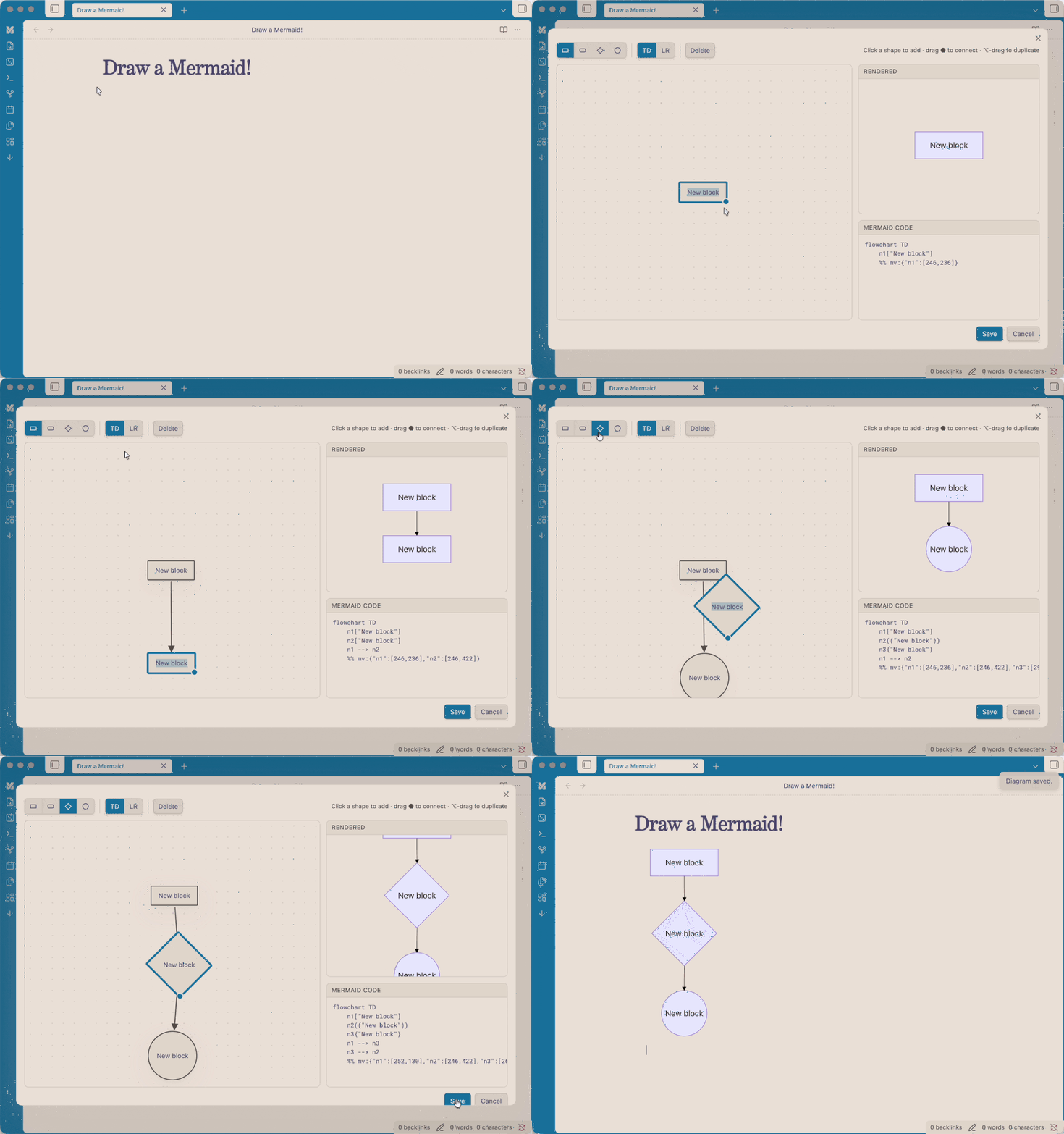
Build mermaid flowcharts visually inside Obsidian: drag blocks and connectors on a canvas, rename them inline, and let the plugin generate the mermaid code for you. A live preview renders as you build.
Features
- Visual-first canvas: the canvas is the source of truth; mermaid code is generated from it.
- Add blocks by clicking a shape (rectangle, rounded, diamond, circle).
- Connect blocks by dragging the ● handle onto another block. Drop on empty space to spawn a new connected block; drop onto an existing arrow to splice a block into that connection.
- Rename a block by double-clicking it, or a connector by double-clicking the arrow.
- Multi-select with a rubber-band marquee (or Shift-click) for bulk move, reshape, duplicate, and delete.
- ⌥/Alt-drag to duplicate a block or a whole selection.
- Live output: rendered diagram and generated mermaid code update in real time.
- Layout persistence: your block positions are stored in a
%% mv:comment in the block, so reopening restores the canvas.
Usage
- Click the ribbon icon ("Draw a Mermaid") to start a blank diagram; on save it's inserted into the active note (or a new note).
- Hover any rendered
mermaidblock in a note and click the pencil button to edit it visually. - Command palette: "Edit mermaid diagram at cursor" and "Insert mermaid diagram (visual editor)".
Direction TD = top-down, LR = left-to-right; this only affects how the rendered diagram is auto-laid-out.
Installation
From Community Plugins (once approved)
Settings → Community plugins → Browse → search "Draw a Mermaid".
Manual
Copy main.js, manifest.json, and styles.css into
<vault>/.obsidian/plugins/mermaid-visual/, then enable it in Settings → Community plugins.
Development
npm install
npm run dev    # watch build
npm run build  # production build (type-check + bundle)
About
I'm a designer main, so when I realised I have write code for a visual chart, I almost deleted Obsidian(/s). Alas, I got claude's help to build this visual mermaid tool, hope it can help people like me who are looking for a tool like this.
License
MIT © yaye.work