

Dukehoff MCP for Java
Headless Model Context Protocol server that gives coding agents
semantic access to Java code: the parser, index and refactoring engine of Apache NetBeans, which
runs headless underneath. Its technical name, used for the launcher, the artifacts and the data
directory, is dukehoff-mcp; agents see its tools under the server name java.
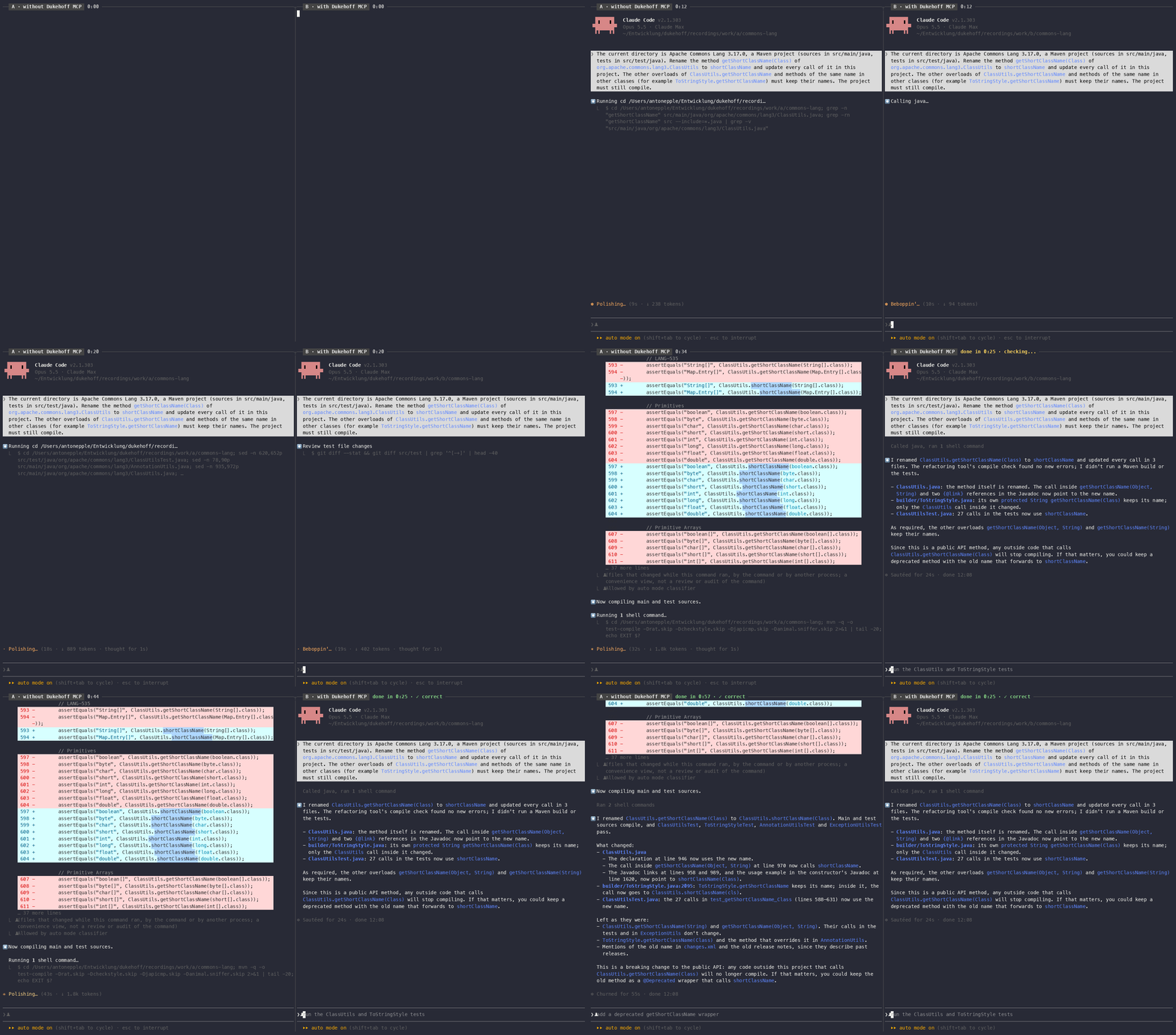
Same model, same task, at the same time: Claude Opus 5.5 renames one overload of
ClassUtils.getShortClassName in Apache Commons Lang, leaving the other overloads and a same-named
method of another class alone. Without the server (left) it searches with grep, edits with sed and
compiles with Maven; with it (right) it makes one rename call, which also checks that everything
still compiles. Both results are correct. In three runs this took 0:46–1:07 without and 0:18–0:25 with
the server; shown is the run with the middle time without it. Pauses are shortened in the video, the
times in the headers are real. Task and check,
recording script.
Tools
| Tool | What it does |
|---|---|
find_symbol |
Types declared in the workspace by prefix, glob or partially qualified name, or members of them; with include_libraries also the JDK and the dependencies |
find_usages |
Semantic references to a type, method, constructor or field (WhereUsedQuery); grouped by file, or with group_by: "caller" by the method, constructor or field that contains them, named by signature |
find_implementations |
Subtypes of a type (all or direct) or overriding methods of a method; for a method also what it overrides or implements upwards, library declarations included |
outline |
Members of a type or file: modifiers, canonical signatures, declared types, line numbers; for types of the JDK and the dependencies their public API (overloads, generics, deprecations) from the class files |
diagnostics |
Compile errors (optionally warnings) of given files or the whole workspace, without a build |
rename |
Renames a type, method or field with the refactoring engine; writes to disk, returns a unified diff and, since strings stay unchanged as in the IDE, the string literals that still contain the old name (reflection, names used as data) |
move |
Moves a top-level class to another package, updating package declaration, imports and references |
change_signature |
Adds, removes, reorders, renames or retypes parameters, or changes name, return type or visibility of a method; updates callers and overriders |
safe_delete |
Deletes a type or member only if it is unused; otherwise lists the blocking usages |
inline |
Inlines a method or constant into all usages and removes it |
apply_rule |
Structural search, or search and replace with a NetBeans declarative hint rule (Jackpot) across the workspace; dry run and path scope supported. Tested rule packs instead of a rule: junit5 (JUnit 4 to 5: assertions with the message moved last, assertThat to Hamcrest, annotations) modernize (try-with-resources, for-each, getOrDefault, isEmpty, valueOf) and jakarta (javax to jakarta for Servlet, JSP, EL, Persistence, Validation, Annotation, Inject, CDI, EJB, JAX-RS, Transaction, JAXB, Activation, Mail, JSON-P, JSON-B, JMS, Faces, WebSocket; the JDK's own javax packages and JCache stay); the result lists what is left for hand edits |
debug |
Runs a JUnit test under the debugger (Maven, Gradle, or a NetBeans module through Ant) and stops once: at a method, a line or a thrown exception, optionally only where a condition holds. Returns where it stopped, the project's stack, the local variables of the top frames and the values of given expressions; the test JVM ends afterwards |
workspace_status |
Opened projects, source roots, indexing state |
All refactoring tools write their changes to disk and return warnings plus a unified diff (git diff
format). Fatal problems stop them before anything changes. Afterwards they check for compile errors
the change introduced, also in files it did not touch, and report only those: making Apache Commons
Lang's ArrayUtils.isEmpty(Object[]) private with change_signature changes one file and reports the
14 new compile errors in callers it did not touch, such as StringUtils (47 s for the whole call).
They write only inside the workspace (in an IDE: the open projects), like an agent harness that treats
everything outside the session's folder as external. A refactoring that would also change a file
outside (a source folder of the build that lies elsewhere, for example) changes nothing and names those
files; the agent is told to ask the user and then call again with allow_outside (files or folders).
Folders that may always be changed are set per registration with --allow-writes <folder,...>
(relative to the workspace), in VS Code with the setting dukehoffMcp.allowedWritePaths.
Symbols are addressed by name, not by cursor position:
com.acme.Foo                    com.acme.Foo.Inner  /  com.acme.Foo$Inner
com.acme.Foo#count              com.acme.Foo#bar(String,int)
com.acme.Foo#<init>()           com.acme.Foo#Foo(String)
Installation
Requirements on the target machine:
- Windows, macOS or Linux. On Windows the server is started with
java -jar bin\dukehoff-mcp.jar(bin/dukehoff-mcp, a bash script, does the same on macOS and Linux). CI runs the end-to-end smoke test on all three. - A JDK 17 or newer, a full JDK with
javac(a JRE is not enough).dukehoff-mcptakes--jdk,$DUKEHOFF_MCP_JDK,$JAVA_HOME, thejavaon thePATHor (macOS)/usr/libexec/java_home, in this order. Use a JDK at least as new as the Java version of your projects: NetBeans compiles them against that JDK's class library unless a project names another platform. - For Maven and Gradle projects the usual access to their dependencies (see Troubleshooting).
Working in VS Code or NetBeans? Then you need no archive: the VS Code extension or the NetBeans plugin brings the server along.
Download the archive of the latest release from the
Releases page: dukehoff-mcp-<version>.tar.gz
for macOS and Linux, dukehoff-mcp-<version>.zip for Windows (SHA256SUMS has their checksums;
building it yourself: see Building). Unpack it anywhere, for example to /opt or C:\tools:
tar xzf dukehoff-mcp-<version>.tar.gz -C /opt      # creates /opt/dukehoffmcp, about 270 MB
/opt/dukehoffmcp/bin/dukehoff-mcp --version
/opt/dukehoffmcp/bin/dukehoff-mcp --check /path/to/project   # which JDK, data directory and workspace would be used
On Windows, unpack dukehoff-mcp-<version>.zip (Explorer, or tar -xf dukehoff-mcp-<version>.zip -C C:\tools), then:
java -jar C:\tools\dukehoffmcp\bin\dukehoff-mcp.jar --version
java -jar C:\tools\dukehoffmcp\bin\dukehoff-mcp.jar --check C:\path\to\project
The indexes are kept in %LOCALAPPDATA%\dukehoff-mcp on Windows and ~/.cache/dukehoff-mcp elsewhere.
For a team, unpack it to the same path on every machine: then a project's .mcp.json or
.vscode/mcp.json can be committed and works for everyone. To update, replace the folder; the
indexes under ~/.cache/dukehoff-mcp stay and are checked on the next start. To remove dukehoff-mcp, delete the
folder and ~/.cache/dukehoff-mcp.
Registering with your agent
The agent starts the launcher itself and talks to it over stdin/stdout; the launcher connects to the workspace's server (see What to expect). Let the launcher print the configuration with its own absolute path:
/opt/dukehoffmcp/bin/dukehoff-mcp --config claude                      # also: copilot, vscode, cursor, codex, omp, bob
java -jar C:\tools\dukehoffmcp\bin\dukehoff-mcp.jar --config vscode    # Windows: java.exe -jar dukehoff-mcp.jar
On Windows, register java.exe with -jar ...\dukehoff-mcp.jar as --config prints it, not dukehoff-mcp.cmd:
clients start .cmd files through cmd /c, which breaks paths with spaces. The JDK --config
names is the one that ran it; java -jar works with any Java 17+ on the PATH.
Claude Code
claude mcp add --scope user java -- /opt/dukehoffmcp/bin/dukehoff-mcp
or, shared with the team, .mcp.json in the project:
{ "mcpServers": { "java": { "command": "/opt/dukehoffmcp/bin/dukehoff-mcp", "args": [] } } }
The first start indexes the project, and a refactoring right after a start waits for the index
check, so allow time: MCP_TIMEOUT=120000 MCP_TOOL_TIMEOUT=600000 (shell profile, or "env" in
~/.claude/settings.json).
VS Code (GitHub Copilot agent mode)
The easiest way is the extension Dukehoff MCP for Java from the
VS Code Marketplace
(Extensions view, search "Dukehoff MCP"; or code --install-extension dukehoff.dukehoff-mcp-java).
Each release also carries it as dukehoff-mcp-java-<version>.vsix on the
Releases page ("..." menu of the Extensions
view, "Install from VSIX..."). It needs no download of the runtime above: it brings the Apache NetBeans
Language Server extension along and runs inside its NetBeans; the tools appear in Copilot's agent mode
as the server Java. It needs NetBeans' Java support enabled (netbeans.javaSupport.enabled, the
default). Claude Code's VS Code extension has its own MCP configuration and does not see that server;
the command Dukehoff MCP: Use the Java tools in Claude Code registers it there for the folder.
Refactorings write their files themselves, apart from the agent's own edits. The extension shows each
one in a notification with Review (a diff of all files it changed) and Undo; the setting
dukehoffMcp.refactoringReview chooses notify (default), openDiff (open the diff right away) or
off.
With the standalone runtime instead: .vscode/mcp.json in the project (or the user configuration,
command palette "MCP: Open User Configuration", for all projects):
{ "servers": { "java": { "type": "stdio", "command": "/opt/dukehoffmcp/bin/dukehoff-mcp", "args": ["${workspaceFolder}"] } } }
Windows:
{ "servers": { "java": { "type": "stdio",
    "command": "C:\\Program Files\\Eclipse Adoptium\\jdk-21\\bin\\java.exe",
    "args": ["-jar", "C:\\tools\\dukehoffmcp\\bin\\dukehoff-mcp.jar", "${workspaceFolder}"] } } }
Then start the server from the MCP view or mcp.json ("Start"), and use Copilot Chat in agent mode;
the tools appear under the java server.
GitHub Copilot CLI
~/.copilot/mcp-config.json (Windows: %USERPROFILE%\.copilot\mcp-config.json); merge it into the
file if it exists. "tools": ["*"] is required and enables all tools:
{ "mcpServers": { "java": { "type": "local", "command": "/opt/dukehoffmcp/bin/dukehoff-mcp", "args": [], "tools": ["*"] } } }
Windows:
{ "mcpServers": { "java": { "type": "local",
    "command": "C:\\Program Files\\Eclipse Adoptium\\jdk-21\\bin\\java.exe",
    "args": ["-jar", "C:\\tools\\dukehoffmcp\\bin\\dukehoff-mcp.jar"], "tools": ["*"] } } }
Or interactively: /mcp add in a Copilot CLI session, with the command and arguments above. Start
copilot in the project directory: the server works on the directory it is started in. /mcp show
lists the server and its tools.
Codex CLI
~/.codex/config.toml:
[mcp_servers.java]
command = "/opt/dukehoffmcp/bin/dukehoff-mcp"
args = []
startup_timeout_sec = 120
IBM Bob
bob mcp add java --scope global -- /opt/dukehoffmcp/bin/dukehoff-mcp
or, shared with the team, .bob/mcp.json in the project:
{ "mcpServers": { "java": { "command": "/opt/dukehoffmcp/bin/dukehoff-mcp", "args": [] } } }
Cursor, omp (Oh My Pi)
.cursor/mcp.json or .omp/mcp.json in the project (omp also reads .mcp.json, .cursor/ and
.vscode/ files):
{ "mcpServers": { "java": { "command": "/opt/dukehoffmcp/bin/dukehoff-mcp", "args": [] } } }
Clients start the server in the project directory, so no workspace argument is needed; give one
(dukehoff-mcp /path/to/project) if your client starts servers elsewhere. A workspace can be one project
or a folder of projects (Maven, Gradle, Ant).
With a running NetBeans IDE
If you work in NetBeans, an agent in a terminal can use the running IDE instead of a NetBeans of its own: the same index, the projects you have open, and the refactorings show in the editor at once. This needs no runtime archive:
- Install the plugin: download
dukehoff-mcp-netbeans-<version>.nbmfrom the Releases page, then in NetBeans 31 or newer Tools > Plugins > Downloaded > Add Plugins..., Install, and restart if asked. The IDE then starts the server by itself. Projects on Lombok 1.18.46 or older: NetBeans 31 parses with a newer javac than those Lombok versions support, so NetBeans (and the tools) see no generated members. Installing the plugin from Tools > Plugins brings the plugin Lombok for nb-javac along when it is offered there (a current Lombok for NetBeans' analysis; your build stays as it is); with a downloaded NBM, install that plugin too. The runtime and the VS Code extension include it. - Download
dukehoff-mcp-launcher-<version>.jarfrom the same release and let it print the registration with--ide, e.g.java -jar dukehoff-mcp-launcher-<version>.jar --config claude --ide. - Open the project in NetBeans, then start the agent in its folder.
With the runtime installed, dukehoff-mcp --config claude --ide does the same. The agent's folder (where it was started) is its workspace: the
tools see the projects open in NetBeans there, name files relative to it and write only inside it. If
no project there is open, the tools say so; open it in NetBeans. NetBeans announces the server in
~/.dukehoff-mcp/ide/; -J-Ddukehoffmcp.ide.server=false (in etc/netbeans.conf) turns it off.
An agent in a sandbox needs no network port: only Java, the launcher jar and read access to
~/.dukehoff-mcp/ide/, where the server's Unix domain socket lies next to its announcement (in a
temporary folder instead if that path is longer than about 100 bytes), and the project at the same
path as in NetBeans. A separate process namespace is fine. For lince,
for example: home_ro_dirs = [".dukehoff-mcp"] under [sandbox]. The refactorings are done by NetBeans
itself, outside the sandbox; they write only inside the agent's folder unless more is allowed (see above).
Telling the agent when to use the tools
Agents pick tools by what they read, and project instructions weigh most. A short section in the
project's CLAUDE.md (Claude Code) or AGENTS.md (Copilot, Codex, Cursor and others) makes them use
the tools where they pay. In our evaluation, with this section in CLAUDE.md, Claude Code used
apply_rule for a modernization on its own in 3 of 3 sessions (0 of 3 without), with a third fewer
turns; the VS Code extension offers to add it (command "Add Java tool hints to AGENTS.md").
## Java code

These hints apply when the Java MCP tools (server `java`) are connected; without them, ignore this section.
To rename, move or delete Java code or change a method's signature, use the Java MCP tools
(`rename`, `move`, `change_signature`, `safe_delete`) instead of editing files: one call updates
every reference, also in other modules, and checks that everything still compiles.
To find who calls or uses a method, field or class, use `find_usages` (`group_by: "caller"` names the
calling methods).
For the same kind of change at many places (migrations, modernizations, replacing an API), use
`apply_rule`: structural rewrite rules that check types and match whole statements, not text.
For JUnit 4 to 5, javax to jakarta or a Java modernization, start with `apply_rule` and
`pack: "junit5"`, `"jakarta"` or `"modernize"` (a dry run first), then finish what the result lists by hand.
Before calling a method of the JDK or a dependency whose exact signature you are unsure of, look it
up with `outline`.
Its first line makes the section safe to commit for a team: agents of colleagues without the server skip it. To keep it to yourself instead, put it where only your agent reads it; these files apply to all your projects, which the first line covers as well:
| Client | Personal instructions |
|---|---|
| Claude Code | ~/.claude/CLAUDE.md; it keeps the project's AGENTS.md loading. (A CLAUDE.local.md in the project would stop Claude Code from reading AGENTS.md unless it imports it with @AGENTS.md.) |
| Codex CLI | ~/.codex/AGENTS.md |
| GitHub Copilot CLI | ~/.copilot/copilot-instructions.md |
| VS Code with Copilot | an instructions file in your user profile (command "Chat: New Instructions File", location "User Data") |
| Cursor | User Rules in Cursor's settings |
Choosing the tools
Clients limit the number of tools, and every tool description costs context in each session. A
registration can offer a subset with --tools: tool names, groups and presets, comma separated.
--config puts the selection into the printed configuration:
dukehoff-mcp --config copilot --tools copilot          # the core group: diagnostics, find_usages, outline, rename
dukehoff-mcp --config claude --tools core,refactor     # plus change_signature, move, safe_delete, inline
| Group | Tools |
|---|---|
core |
diagnostics, find_usages, outline, rename |
refactor |
change_signature, move, safe_delete, inline, find_usages, diagnostics |
migrate |
apply_rule |
debug |
debug |
all |
every tool (the default) |
Presets: copilot (= core), claude-code (= all). Several registrations with different
selections (e.g. one per client) share the workspace's server and index. The server's instructions
and hints name only the tools a registration offers. To change the selection, edit the registration's
args and restart the session; nothing needs reinstalling.
What to expect
- First start in a workspace: NetBeans indexes the JDK and the project and resolves Maven
dependencies: about 50 s for Apache Commons Lang (500 files), minutes for large projects. A tool
call waits up to 150 s for it, then reports "not ready" and asks the agent to call again (indexing
goes on meanwhile);
workspace_statusshows the progress. The limit stays below the clients' request timeouts (Copilot CLI: 3 minutes); for a client with a shorter one, pass e.g.-- -J-Ddukehoffmcp.wait.seconds=50to the launcher. - The server keeps running between sessions: one per workspace, shared by all sessions on it
(also several at once, and when Copilot CLI switches sessions). A new session's first answer comes
from the running server: 2.4 s for a
find_usageson Commons Lang, against 10 s when NetBeans has to start and check its index. NetBeans watches the files meanwhile, so the index stays current. Refactorings of different sessions run one after the other. An idle server holds about 1.5–2