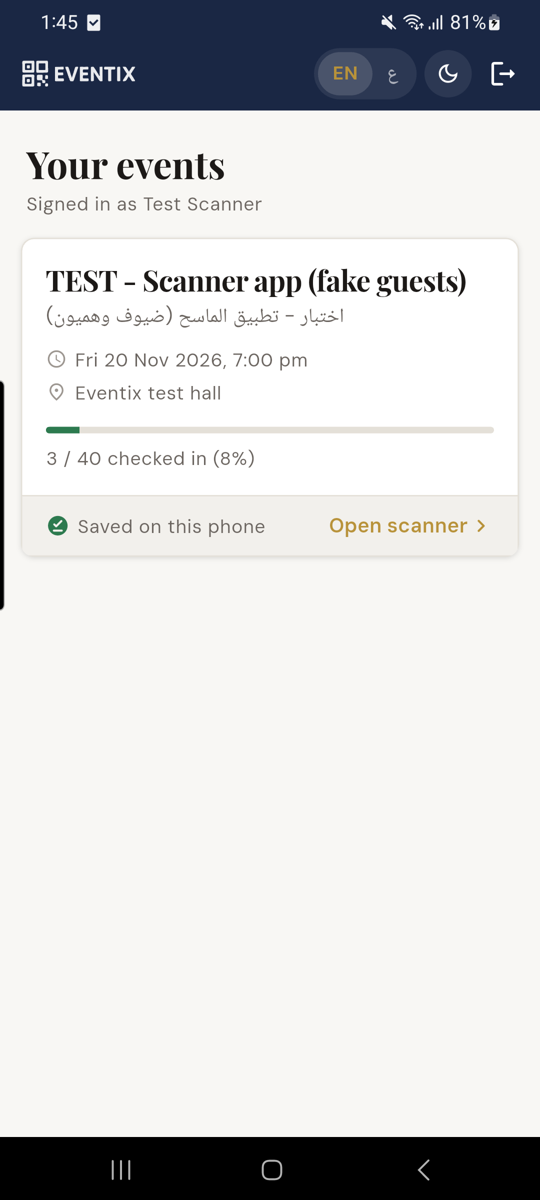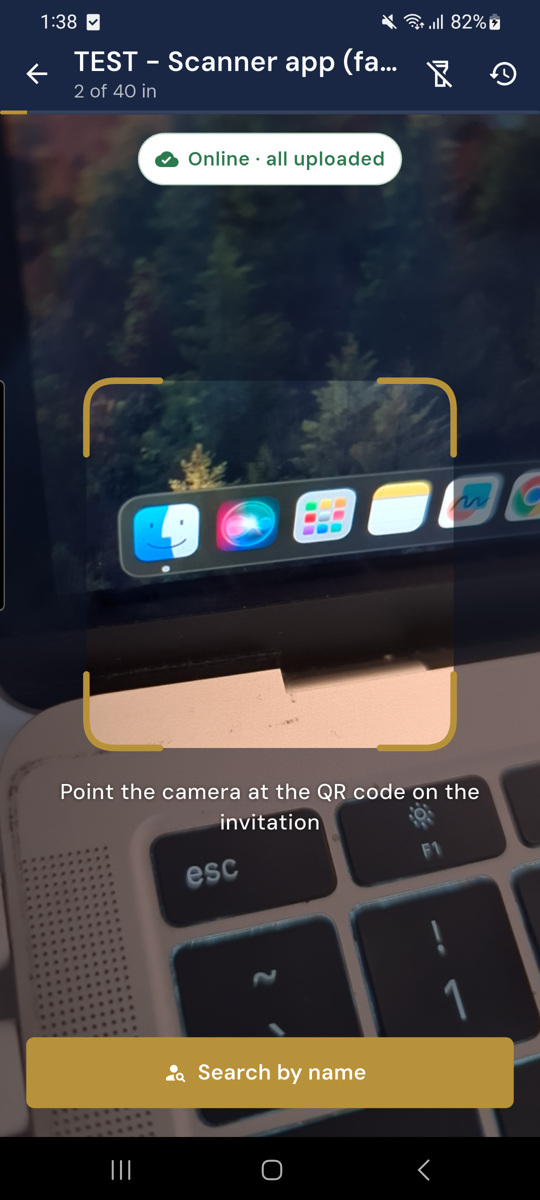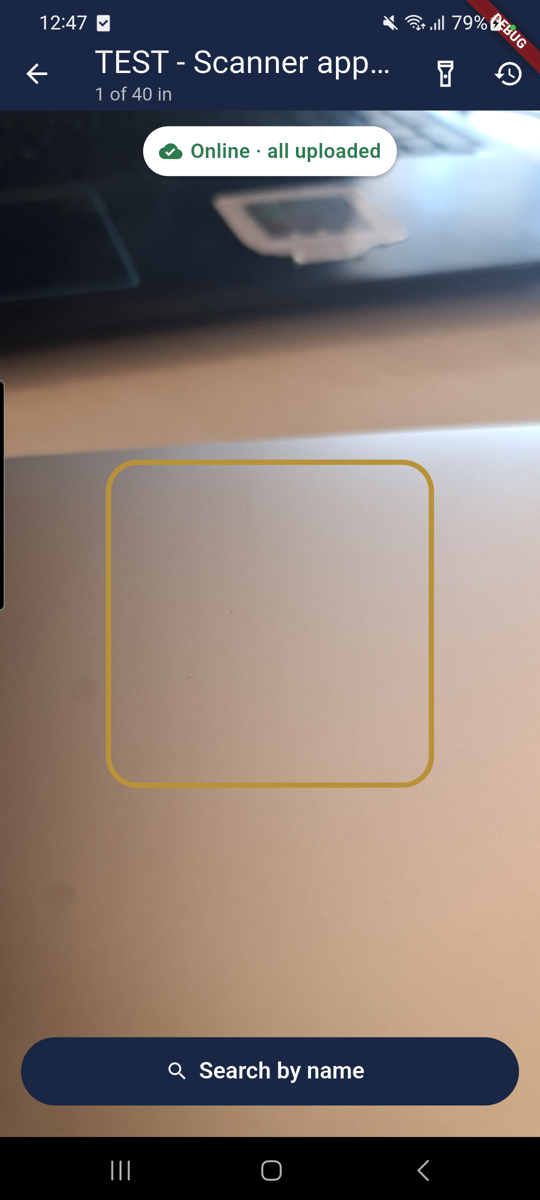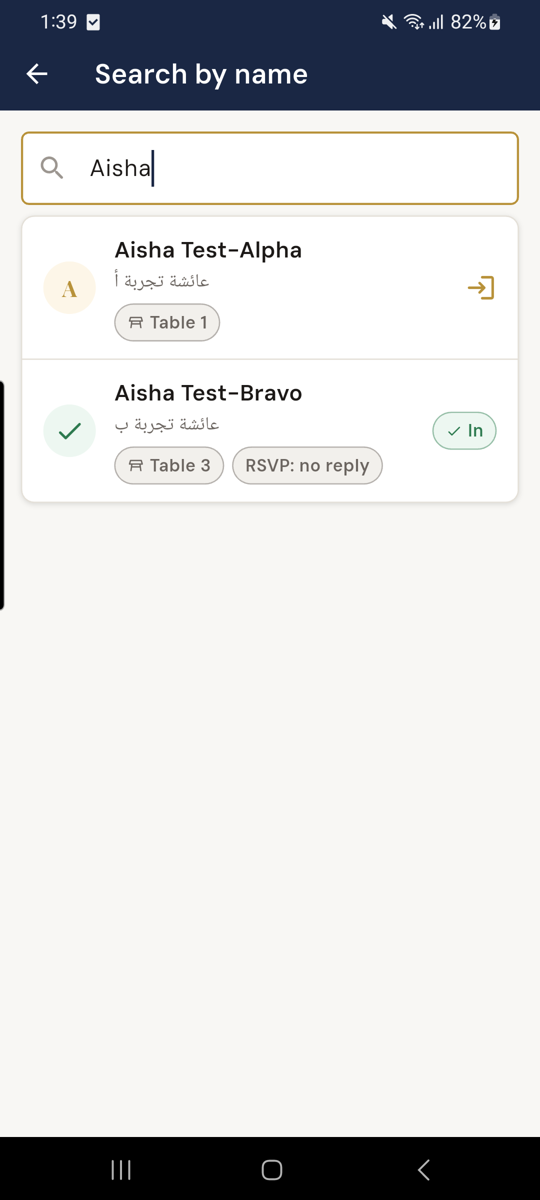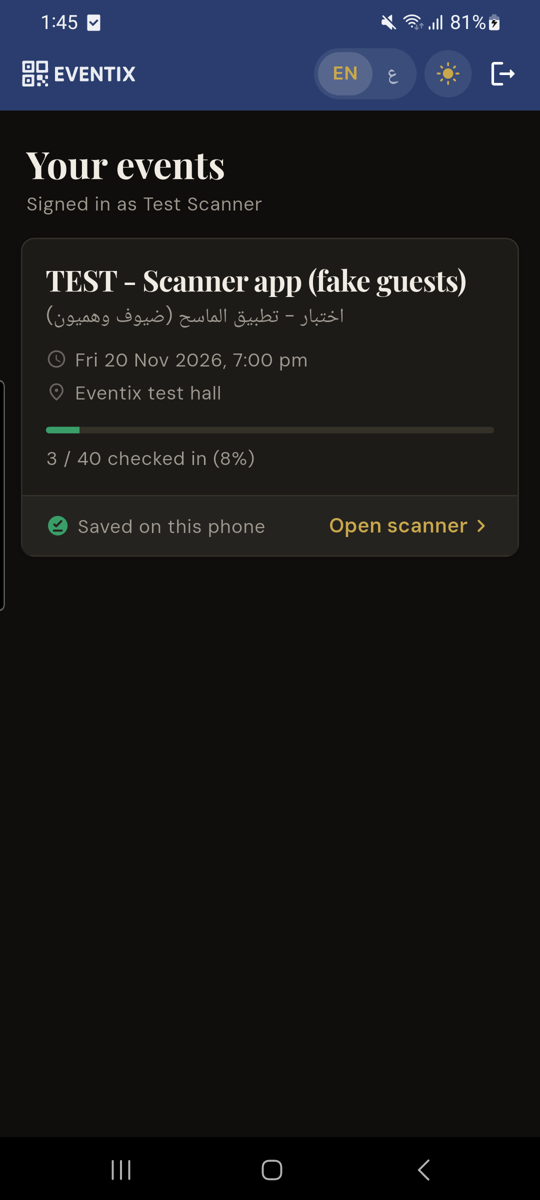

Door check-in for Eventix events: a Flutter app that event staff use to check guests in by scanning the QR code on their invitation. It works when the venue's network doesn't.
| Submission | |
|---|---|
| Candidate | Mohammed |
| Lane | Mobile (native iOS and Android apps) |
| Project | Eventix Scanner: offline-first QR check-in for event door staff |
| Outcome | Android: complete, tested on a real phone; the server API is live. iOS: configured but not built or tested. The only Mac available is too old to build for the test iPhone (see Limitations). |
| Repository | https://github.com/alraisi2581-web/eventix-scanner |
| Version to review | The latest release: its tag, commit and Android APK |
| Time spent | About 5 hours of build work, 1–2 November 2026 |
Contents
- Project and lane
- Requirements and status
- Setup and run
- Demo and access
- Architecture and decisions
- Verification and limitations
- Credits and contribution
1. Project and lane
Problem. Guests arrive at an Eventix event with a QR code on their invitation. Door staff used Eventix's web scanner, which needs the network for every scan. A slow or dropped venue connection stops the queue. Two staff can also both admit the same guest, because the web scanner reads and then writes without a lock.
Users. Event door staff using a scanner account that an Eventix admin has assigned to the event, on their own Android phone or iPhone.
Main workflow.
- Sign in with the Eventix account.
- Pick the event; its guest list downloads once.
- Scan each guest's QR, or find them by name.
- Get an instant green / amber / red answer, decided on the phone.
- Check-ins upload in the background. Offline ones wait and go up later, never lost and never counted twice.
- If two phones check in the same guest, the first to reach the server wins, and the other phone is told the guest was already checked in.
Scope.
- In: the app (Android and iOS source), the scanner API added to the existing Eventix server, English and Arabic.
- Out: guest management, invitations and undoing a check-in. These stay on the Eventix website.
Assumptions.
- One phone per staff member.
- Event sizes up to a few thousand guests: the real event this was built alongside has 969.
- Each phone downloads the guest list once while online before going offline.
- Phone clocks may be wrong, so they never decide who was first.
Lane. Mobile. Flutter compiles to native ARM code and draws with its own native engine. Platform work goes through native APIs: the camera (CameraX with ML Kit on Android, AVFoundation with Vision on iOS) and the Keychain / Keystore. There is no WebView anywhere.
2. Requirements and status
These criteria restate, in measurable form, the requirements set on 1 November 2026 before the build. They were written into this README afterwards.
Status:
- ✅ met, with evidence;
- 🔁 met in automated tests, the device recording still to come;
- ❌ not met.
| # | Acceptance criterion | Android | iOS | Evidence |
|---|---|---|---|---|
| A1 | A scanner account signs in with its Eventix username and password. A wrong password, a non-scanner account, a temporary password and too many attempts each get their own message. | ✅ | ❌ | screens_test.dart "sign-in" group; API checks "login: …" in backend/evals; device: signed in as Test Scanner |
| A2 | The account sees only its assigned events, and the guest list downloads once, without phone numbers, emails or raw QR tokens. | ✅ | ❌ | API checks "events: …", "guests: …"; screenshot |
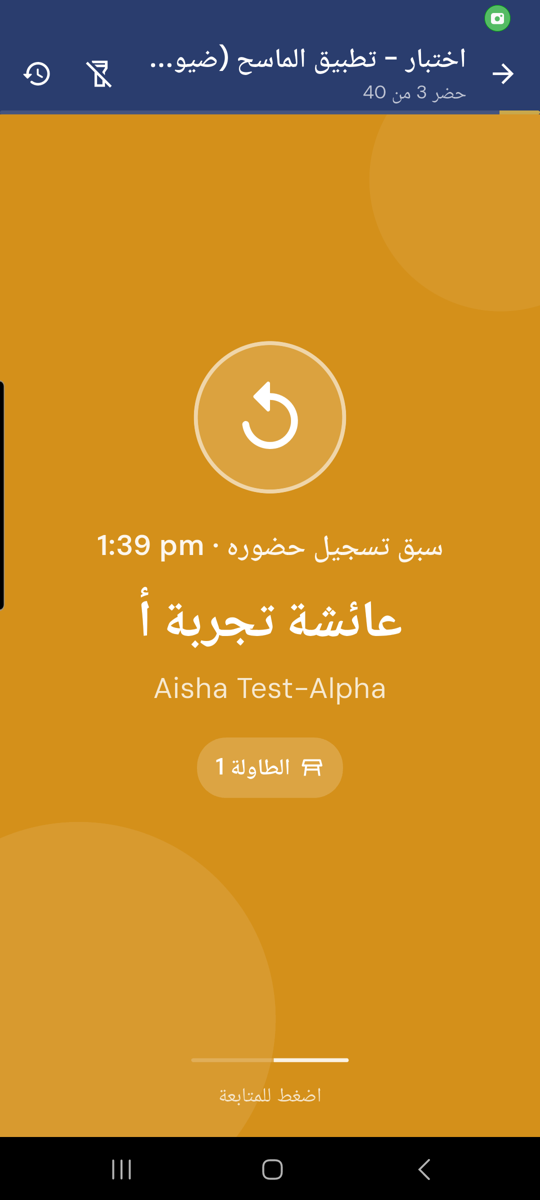
| A3 | A scan answers without any network request: green "Checked in", amber "Already checked in · time", or red with what to do. | ✅ | ❌ | checkin_flow_test.dart "scanning on the phone"; screenshots scanner, amber |
| A4 | Offline check-ins survive closing the app and relaunching, and upload by themselves when the network returns. | 🔁 | ❌ | checkin_flow_test "offline: check-ins wait, nothing is lost…"; recording #7–9 |
| A5 | No duplicates: N check-ins made offline give exactly N on the server, and resending an upload (a lost reply) changes nothing. | 🔁 | ❌ | checkin_flow_test "an answer lost on the way back…"; API checks "the whole batch resent → all replayed", "the same upload sent 12 times at once → one check-in"; recording #8 |
| A6 | Two phones, one guest: exactly one check-in counts. The other phone shows "already checked in at …" until acknowledged, and keeps its own record of the scan. | 🔁 | ❌ | API check "16 phones check in one guest at once → exactly one"; checkin_flow_test "two phones, one guest"; recording #10 |
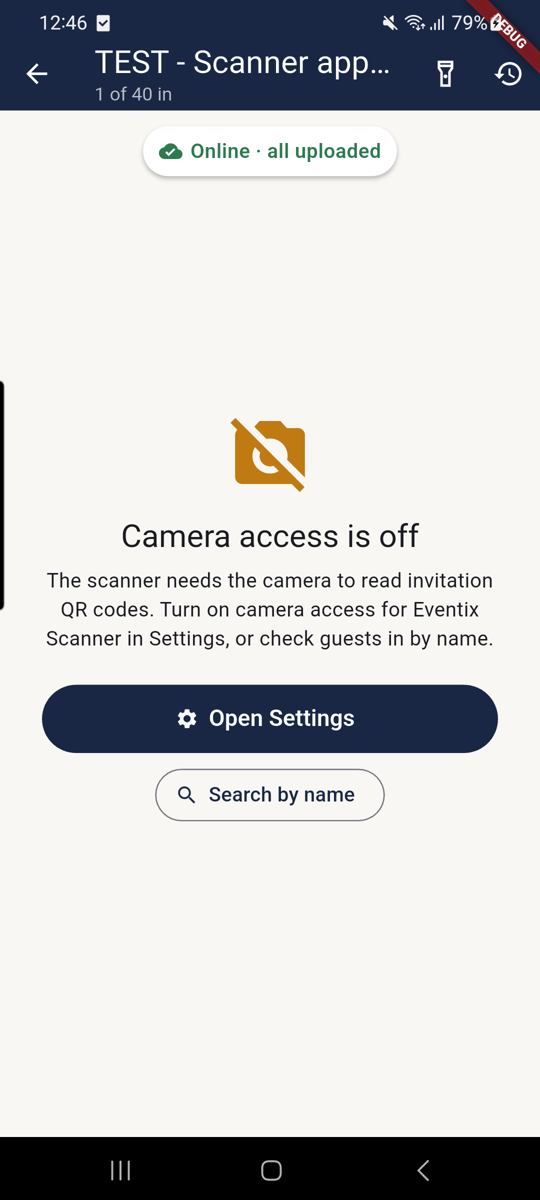
| A7 | Camera denied: an explanation, Open Settings, and check-in by name. After allowing it in Settings, the camera starts without leaving the screen. | ✅ | ❌ | screenshots denied, allowed; recording #1–2 |
| A8 | Input validation, and loading, empty and error states, on every screen. | ✅ | ❌ | screens_test "empty fields are refused…", "no events assigned…", "search by name: validation…"; screenshot |
| A9 | English and Arabic (right-to-left), light and dark. | ✅ | ❌ | screens_test "Arabic: right-to-left…"; screenshots Arabic, dark |
| A10 | No credentials or private data in Git; the token is kept in the Keychain or Keystore and stored hashed on the server. | ✅ | ✅ | Security; API check "only the SHA-256 of the token is stored" |
| A11 | Working native apps on both platforms. | ✅ | ❌ | Android: release APK, device screenshots. iOS: not built. |
3. Setup and run
Versions.
- Flutter 3.41.6 (stable), Dart 3.11.4.
- Android SDK 35, JDK 17.
- For iOS: Xcode with CocoaPods on macOS. A phone on iOS 27 needs Xcode 27.
All package versions are pinned in pubspec.lock.
Build and test:
flutter pub get
flutter test
flutter build apk --release
Expected results:
flutter testprintsAll tests passed!(31 tests).- The build writes
build/app/outputs/flutter-apk/app-release.apk.
On Windows, flutter test needs SQLITE3_DLL pointing at a sqlite3.dll;
Python ships one (details). If Gradle fails with "Unable to
establish loopback connection", set
JAVA_TOOL_OPTIONS=-Djdk.net.unixdomain.tmpdir=C:\tmp\jdk.
Run on a phone. Use flutter run --release with the phone connected, or
install the APK:
- Download it from the latest release.
- Open it on the phone, allow installing from that source, and tap Install.
The app needs Android 7.0 (API 24) or later. It is signed with a debug key, which is fine for test phones.
iOS.
- Open
ios/Runner.xcworkspacein Xcode. - Set a signing team under Runner → Signing & Capabilities.
- Run
flutter run --releaseon a connected iPhone (iOS 13 or later).
Configuration.
- The server defaults to
https://eventix.om/. Use another with--dart-define=EVENTIX_BASE_URL=https://example.test/. - No keys or secrets are needed to build.
Generated code. Generated files (*.g.dart, lib/l10n/app_localizations*.dart)
are committed. Re-run dart run build_runner build after changing tables, and
flutter gen-l10n after changing texts.
Continuous integration. .github/workflows/android.yml runs analysis and the tests and builds the APK on every push. On a version tag it publishes the APK as a release, so the downloadable build is made from the tagged source.
4. Demo and access
What reviewers need, all provided separately through the hiring channel and never in Git:
- two scanner accounts, Test Scanner and Test Scanner 2, assigned only to the test event;
- the QR sheet for that event. Even for made-up guests, each QR is a live RSVP link, so it isn't published here.
Live parts:
- The app downloads from the latest release.
- The scanner API is live on
https://eventix.om. - The test event is TEST - Scanner app (fake guests): 40 made-up guests, all marked do-not-contact. One, Saif Test-Alpha, is already checked in, for the "already in" case.
Walkthrough (about 10 minutes, one Android phone; a second phone adds step 7):
- Install the APK and sign in as Test Scanner. The test event appears.
- Tap it. The guest list downloads, then the scanner opens. Allow the camera.
- Scan a guest's QR. Expected: green "Checked in", the name in English and Arabic, and the table. The status chip shows "Online · all uploaded".
- Scan the same QR again. Expected: amber "Already checked in · time".
- Turn on airplane mode and scan two more guests. Expected: both green at once, and the chip shows "Offline · 2 waiting". Swipe the app away and reopen it; the check-ins are still listed under Activity (the clock icon).
- Turn airplane mode off. Expected: the chip returns to "all uploaded". To check the server's own count, sign in on a computer at https://eventix.om/login with the other test account and open the Scanner dashboard. The event's count rose by exactly 2: each check-in counted once, even though the phone tried to upload them while offline.
- Two phones: phone B (Test Scanner 2) scans guest X offline; phone A scans X online; then phone B goes online. Expected: phone B shows a banner saying X was already checked in, and its scan didn't count.
- Deny camera access in Android Settings and reopen the scanner. Expected: "Camera access is off", Open Settings, and Search by name, which still checks guests in.
Steps 3–8 are scenarios 3–10 of the device checklist. Recordings: docs/evidence/.
5. Architecture and decisions
flowchart LR
    Cam([Camera]) --> UI[Screens]
    UI --> CS[CheckinService<br/>decides each scan] --> DB[(SQLite<br/>guests + outbox)]
    UI --> SS[SyncService<br/>uploads, refreshes] --> DB
    SS == HTTPS + bearer token ==> API[Eventix server<br/>api/scanner/*.php] --> MySQL[(Eventix MySQL)]
| Document | Contents |
|---|---|
| docs/architecture.md | System diagram, component responsibilities, on-phone data model, scan and two-phone sequences, app lifecycle, security |
| docs/decisions.md | 17 decision records: options considered, the choice, who made it and why |
| docs/backend-api.md | The API contract, what was checked on the live server before building, deployment and rollback |
| backend/ | The API's source, migration and 71 end-to-end tests (copied from the private Eventix code base) |
| docs/operation.md | Runbook: setting up an event, running the door, network loss, conflicts, after the event, troubleshooting |
| docs/testing.md | Tests, test data, and the device evidence checklist |
Key decisions (details in decisions.md):
- Sign-in: a 14-day bearer token, checked against the existing Eventix accounts, instead of the website's session cookie, which dies after 24 idle minutes.
- Offline: every scan is decided on the phone and recorded in an outbox in the same database transaction.
- Duplicates and conflicts: each check-in carries an ID made on the phone, so uploads are safe to repeat. The server locks the guest's row, so the first to reach it wins.
- Privacy: QR tokens reach phones only as hashes, and phone numbers and emails never do.
- Design: the Eventix web app's own design system.
Supported OS versions: Android 7.0 (API 24) or later; iOS 13 or later (set
by flutter_secure_storage).
Backend dependencies: Eventix with migration 030, and the five endpoints in backend/.
Security and privacy
- Nothing private in the repository: no credentials or private data. Reviewer accounts and the QR sheet go out separately.
- The sign-in token: kept in the Keychain or Keystore; the server stores only its SHA-256. It ends on sign-out, a password change, a role change, or after 14 days.
- Data on the phone: guest lists hold only name, RSVP and table, and are deleted on sign-out. Android cloud backup is off.
6. Verification and limitations
Automated:
- 31 app tests (
flutter test). They include two simulated phones against a fake server that follows the real server's rules: offline queue, a reply lost after the server applied it, 230 check-ins in 3 batches, first-to-server wins, sign-in expiry and a web undo. - 71 API checks over real HTTP with genuinely parallel requests (backend/evals). Removing the server's row lock makes the race check fail, which shows the test catches the bug.
- The existing Eventix suite (780 checks) still passes.
- CI runs the app tests on every push.
On a real device: a Samsung Galaxy S20 Ultra (SM-G988B), Android 13, against the live server on 2 November 2026:
- sign-in, events, the camera scanner, check-in by name and the amber result;
- camera denied, then allowed in Settings;
- Arabic, dark mode and the activity list.
Screenshots: docs/evidence/screenshots. Recordings: docs/evidence.
The device check found three bugs, all fixed:
- the camera-denied screen flickered;
- the scan frame sat over the denied message;
- the result screen wasn't centred.
What happens when things fail:
| Failure | What the app does |
|---|---|
| No network | Scans continue. Uploads retry after 5 s, then longer, up to 60 s, and also when the network returns and when the app comes back to the front. |
| A reply lost after the server saved the check-in | The resend carries the same ID and is answered from the server's record. Nothing doubles. |
| Two phones, one guest | The first upload wins; the other is marked "didn't count" and shown on screen until acknowledged. |
| Sign-in ended (expired, password changed) | Back to sign-in; the queue waits and uploads once the same user signs in again. |
| App killed or phone dies | Every check-in shown on screen is already in SQLite and uploads on the next start. |
| Camera denied or broken | An explanation, Open Settings, and check-in by name. |
The full table is in docs/architecture.md.
Known limitations
- iOS was not built or tested.
- The test iPhone (iPhone 14 Pro, iOS 27.0.1) needs Xcode 27.
- Xcode 27 needs an Apple-silicon Mac on macOS Tahoe 26.6 or later. The only Mac available, a MacBook Air 2019 (Intel), stops at macOS Sonoma.
- The iOS project is configured: permissions, icons, launch screen, Podfile and minimum iOS 13.
- Next step: build on an Apple-silicon Mac, or a cloud macOS build installed through TestFlight, which needs an Apple Developer account.
- No background uploads. Check-ins upload only while the app is open, because iOS doesn't reliably allow background work. Queued check-ins wait safely.
- Full list downloads. The app re-downloads the whole guest list every 60 s while scanning, about 200 KB for 1,000 guests. This is simple and fine at this size. Next: download only changes, for very large events.
- No direct "sign out a lost phone" for admins. A token ends on a password change, a role change, or after 14 days. Next: a list of signed-in devices in Eventix's admin area.
- Undo only on the website (Scanner → Manual check-in). This is deliberate: it keeps sync one-way. The app picks up web undos on its next list refresh.
- The existing web scanner still has its race. Two web scanners can both admit the same guest. Only the new API locks the guest's row. Next: move the web scanner onto the same check-in code.
- Times from the server are labelled in the event's time zone; times from the phone use the phone's clock.
7. Credits and contribution
External code, assets and services
| Package | Use | Licence |
|---|---|---|
| Flutter | App framework | BSD-3-Clause |
| flutter_riverpod | State management | MIT |
| drift, drift_flutter, drift_dev | SQLite database and code generation | MIT |
| sqlite3, sqlite3_flutter_libs | SQLite bindings and libraries (SQLite itself is public domain) | MIT |
| mobile_scanner | Camera QR scanning: Google ML Kit on Android, Apple Vision on iOS | BSD-3-Clause |
| flutter_secure_storage | Keychain / Keystore | BSD-3-Clause |
| http, crypto, intl | HTTP, SHA-256, date formatting | BSD-3-Clause |
| connectivity_plus | Network change events | BSD-3-Clause |
| uuid | Check-in IDs | MIT |
| [app_settings](https://pub.dev/pac |