

Give your agent a browser.
A browser agent that picks from the controls a page actually has, cites the page for every claim, and keeps credentials, irreversible actions and spending under the control of code.

Why fastbrowse
- It picks, it does not invent. Each page is indexed into the controls it has, and Jev, a choice model, picks one. It cannot click something that is not on the page, and there are no selectors to maintain.
- Answers you can check. Every claim in a complete answer cites a verbatim quote from the page, with a link that scrolls to it. Pass a schema and get validated data back.
- Code holds the keys. Submit, pay, delete and send stop until you allow them. A secret is typed only on the origin it was declared for, and models only see its name. Step, time and dollar limits are enforced in code.
- Any browser. A Browser Use Cloud browser by default, local Chrome, or any Chromium browser or Electron app that is already running.
- One agent, every interface. A CLI, a Python library, a Node SDK with a native binary and no Python, an MCP server, and a skill for coding agents.
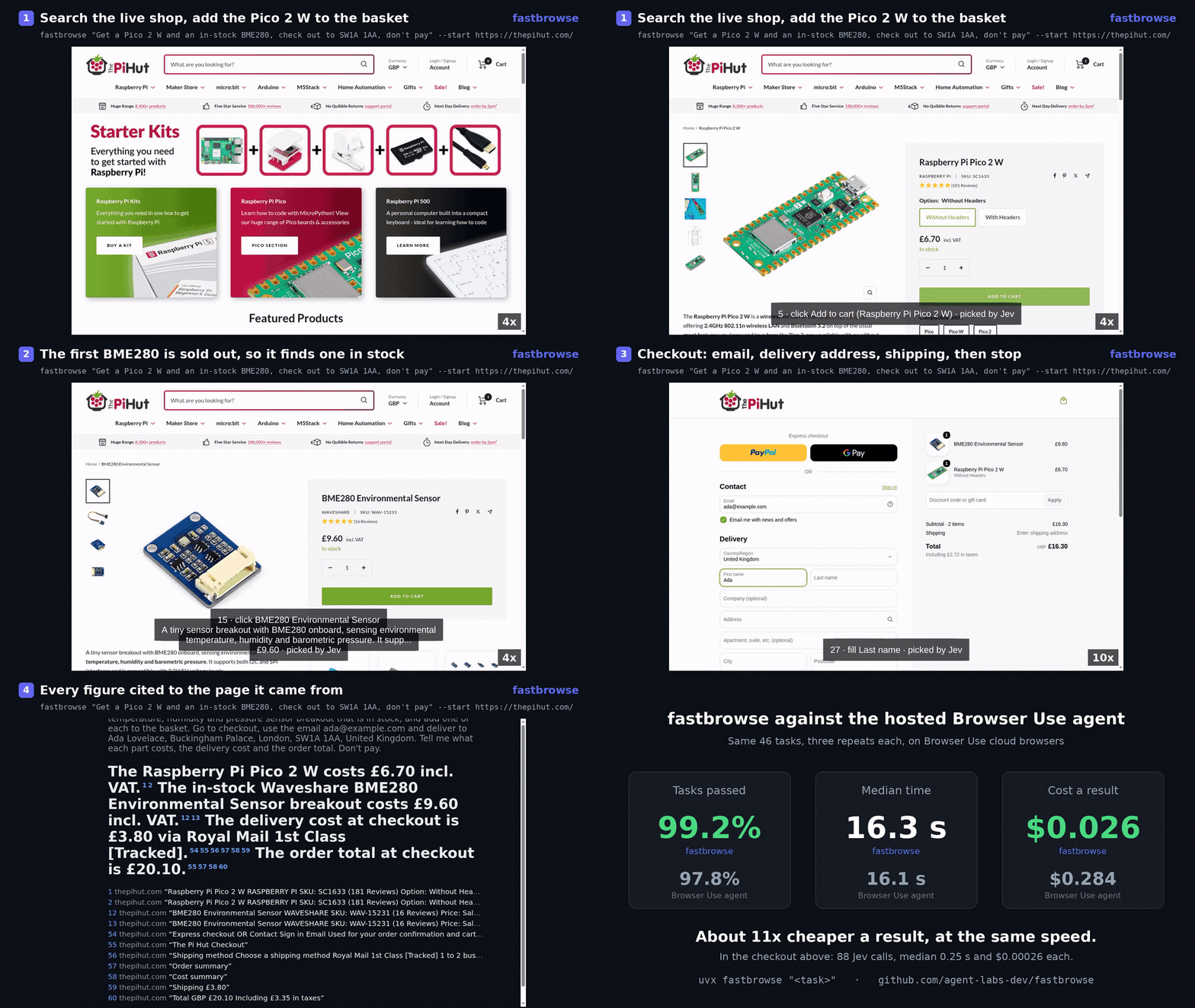
Recorded on local Chrome against thepihut.com: 37 steps, about 4 minutes and $0.29 in model calls. Playback is sped up with pauses cut. The full-resolution recording is docs/assets/demo.mp4.
Against the hosted Browser Use agent, on 46 tasks with three repeats each, fastbrowse passed 99.2% to 96.3% at $0.0296 a run to $0.3180, and took 18.9s to 15.3s. See How it compares.
Try it
You need uv, which fetches Python 3.13 or newer itself, and model keys:
export TYPESAFE_API_KEY=...     # Jev, the model that picks each action
export OPENROUTER_API_KEY=...   # the LLM that plans, reads and writes
export BROWSER_USE_API_KEY=...  # the cloud browser; or pass --local to use Chrome
uvx fastbrowse "What is the title of the top story right now?" --start https://news.ycombinator.com/
The cloud browser is the default because it passes bot checks a fresh local Chrome fails; it also prints a URL to
watch the run live. AI_GATEWAY_API_KEY (Vercel AI Gateway) serves the LLM when OPENROUTER_API_KEY is unset.
Jev can also run through OpenRouter (text only), the gateway as a last resort, or another decision host with
FASTBROWSE_DECISION_SOURCE. Jev routing covers the order and
other hosts.
Keys can live in a .env file in the working directory (.env.example lists every setting), but
values named by --secret must be in the process environment. uv tool install fastbrowse keeps the command on
your PATH and uv add fastbrowse adds it to a project. On Arch Linux, the
AUR package installs fastbrowse and fastbrowse-mcp:
paru -S fastbrowse, or makepkg -si in packaging/aur.
To work on fastbrowse itself:
git clone https://github.com/agent-labs-dev/fastbrowse.git && cd fastbrowse
uv sync --all-extras   # builds the Rust core, so it needs cargo (rustup installs the pinned toolchain)
cp .env.example .env   # then fill in the keys, or pass --local
uv run fastbrowse "What is the title of the top story right now?" --start https://news.ycombinator.com/
Steps go to stderr; the status, cost, step count, why a run stopped short, and the answer go to stdout. --json
prints the full result: every step, the quotes behind the answer, and cost by component.
| Flag | Effect |
|---|---|
--start URL |
the first page; worked out from the task when omitted |
--context TEXT |
background the run may use but never treats as the task |
--local |
local Chrome instead of a cloud browser |
--cloud |
force the cloud browser even when FASTBROWSE_PROFILE or FASTBROWSE_HEADED is set |
--headed |
show the local Chrome window (implies --local) |
--profile DIR |
keep the local Chrome profile in DIR, so sign-ins persist (implies --local) |
--cloud-profile ID |
run on a signed-in Browser Use Cloud profile |
--fetch |
read pages over HTTP with no browser, for a task that only reads |
--fetch-first |
read over HTTP, and start a browser only if the task needs one |
--cdp-url URL, --cdp-port PORT |
drive a browser already running, at a ws:// URL or on 127.0.0.1:PORT |
--attach |
with --cdp-url or --cdp-port, drive a window already open instead of opening a tab |
--target-match TEXT |
attach to the first window whose title or URL contains TEXT (implies --attach) |
--foreground |
bring the run's tab to the front instead of working behind the current one |
--proxy-country CC |
browse from that country (uk, de, ...; default us) |
--authorize |
allow submit, pay, delete and send; otherwise the run stops at needs_confirmation |
--secret NAME=ENV_VAR[@ORIGIN] |
let the agent type $ENV_VAR on ORIGIN (https://*.site.com covers its hosts), or on the --start origin; models see NAME only |
--bitwarden ITEM |
use a vault login on the origin its saved URIs match, including its one-time code |
--max-steps N, --max-dollars N |
bound steps and model spend; unlimited by default |
--downloads DIR |
keep downloaded files |
--json |
print the full result |
--trace FILE |
append each model call, read and check to FILE as JSON lines (- for stderr); FASTBROWSE_TRACE does the same for serve and MCP |
--record FILE |
save a captioned MP4 of the run (needs ffmpeg); it shows what the pages showed, so watch it before sharing |
--cursor |
draw the agent's cursor over a visible Chrome with Cua Driver (needs cua-driver, and X11 on Linux) |
export SAUCE_PASSWORD=secret_sauce
uv run fastbrowse "Log in as standard_user with the saved password and add the backpack to the cart." \
  --start https://www.saucedemo.com/ --secret password=SAUCE_PASSWORD --authorize
Signed-in sites
Sign in once by hand in a profile of its own, then point runs at it. --headed is only needed for the first run:
google-chrome --user-data-dir="$HOME/.fastbrowse/amazon" https://www.amazon.com/   # sign in, then close Chrome
uv run fastbrowse "Add a UGREEN USB-A to USB-C cable, 2m, to my cart." \
  --start https://www.amazon.com/ --profile ~/.fastbrowse/amazon --headed
On a cloud browser, --cloud-profile prof_1234 runs as a Browser Use Cloud
profile someone signed in once. The run inherits its cookies and no model sees a credential.
With the Bitwarden CLI unlocked, --bitwarden ITEM types the vault login. The
item's saved URIs must match --start. Models see only username, password and, when the item holds an
authenticator key, one_time_code, computed as it is typed:
export BW_SESSION="$(bw unlock --raw)"
uv run fastbrowse "Add a UGREEN USB-A to USB-C cable, 2m, to my cart." \
  --start https://www.amazon.com/ --bitwarden Amazon --profile ~/.fastbrowse/amazon
To change a password, add the replacement as an origin-scoped secret named new_password, refer to it in the
task, and pass --authorize. fastbrowse never generates a password or reuses the old one.
Open windows and Electron apps
Any Chromium app that exposes a DevTools port can be driven. Restart the app with --remote-debugging-port (a
running app ignores the flag), then attach to its window by title or URL:
open -a "Visual Studio Code" --args --remote-debugging-port=9222 ~/code/my-project   # elsewhere, pass the flag to the binary
uv run fastbrowse "Open the Extensions view and report how many extensions are installed." \
  --cdp-port 9222 --target-match my-project
--attach takes over the first window, skipping DevTools, and --target-match picks one by title or URL.
Without --start the run begins on whatever the window shows, and the window stays open afterwards. Popups the
window opens join the run.
For a signed-in browser that stays open, start a Chrome with a data directory of its own (Chrome ignores the port on its default one), sign in, and leave it running. Each run opens and closes a background tab in it:
google-chrome --remote-debugging-port=9222 --user-data-dir="$HOME/.fastbrowse/chrome"
uv run fastbrowse "Report my open orders." --start https://www.amazon.com/ --cdp-port 9222
A run in a visible window works in a tab behind the current one and never raises the window itself. Chrome still
brings a window forward when it starts headed, when a page opens a popup, and, with --attach, on a click in the
window's front tab.
A DevTools port gives any program on the machine full control of the app and its sessions. Close the app, or restart it without the flag, when you are done.
Models
The LLM defaults to google/gemini-3.8-flash at low reasoning effort, with google/gemini-3.5-flash-lite for
proposing a direct address and typing field text.
| Setting | Effect |
|---|---|
FASTBROWSE_LLM_MODEL |
the model for every purpose |
FASTBROWSE_LLM_MODEL_<PURPOSE> |
the model for one purpose: PLAN, READ, FIELD_TEXT, SHORTCUT, RECOVER, COMPOSE or VERIFY |
FASTBROWSE_LLM_REASONING, FASTBROWSE_LLM_REASONING_<PURPOSE> |
none, low, medium or high; none turns reasoning off for a model such as DeepSeek V4.1 Flash that otherwise reasons at every effort |
FASTBROWSE_LLM_PROVIDER |
openrouter, gateway, openai, anthropic, gemini, groq, together, mistral, deepseek, xai, fireworks, azure, ollama, lmstudio, vllm or custom; each reads its own key, such as OPENAI_API_KEY, and sends it to that provider alone |
FASTBROWSE_LLM_BASE_URL, FASTBROWSE_LLM_API_KEY |
any OpenAI-compatible endpoint, such as a local vLLM at http://127.0.0.1:8000/v1; it needs FASTBROWSE_LLM_MODEL, and never receives the OpenRouter or gateway key |
FASTBROWSE_LLM_STRICT=0, FASTBROWSE_LLM_EXTRA_BODY |
for that endpoint: send schemas in non-strict form, and add a JSON object to every request |
LLM providers lists what each preset sends and its default models. Jev still needs its
own key. An endpoint that reports no price leaves those calls' cost unknown, so --max-dollars stops the run
after the first one.
Results
The exit code is the status. Only complete exits 0; configuration refusals exit 1 and bad syntax exits 2.
| Status | Exit | Meaning |
|---|---|---|
complete |
0 | every information requirement is backed by a quote, and every action that changes the site is confirmed on the page |
unverified |
10 | it believes it finished but could not back every claim |
needs_confirmation |
3 | stopped before an irreversible action; re-run with --authorize |
needs_login |
4 | a sign-in wall that no --secret covers |
blocked |
6 | a bot check (a CAPTCHA) that did not clear; not a sign-in, so no secret passes it |
needs_input |
5 | a required value or file is missing, or an upload exceeds the configured size limit |
stuck |
9 | recovery ran out without reaching a page state the run had not seen |
budget_exceeded |
7 | a resource limit was reached, or a missing cost prevents enforcing the dollar cap |
observation_limit |
11 | the page or required evidence cannot fit the configured prompt budget |
unavailable |
8 | a model or browser provider stayed unavailable through every retry; the same run later may pass |
error |
1 | a model or browser failure |
The JSON result says why a run stopped where a caller can act on it:
budgetnames the limit abudget_exceededrun hit (steps,seconds,dollars,jev_callsorllm_calls) and its value.walldescribes aneeds_loginorblockedpage: itskind(password,one_time_code,sign_inorbot_check),origin, thefieldsit asked for andseen_at_ms. A caller that can read the user's email or texts can answer aone_time_codewall with a secret scoped to that origin and run again.- A
stuckorunverifiedrun that read evidence still returns a cited answer, startingAnswer (unverified).
A cost a provider omits is looked up from its receipt, or bounded from OpenRouter's listed prices. A cost that
cannot be bounded is unknown, and a run with a dollar cap then stops with budget_exceeded. A browser command
unanswered for 120 seconds returns unavailable. Step and dollar limits do not bound elapsed time:
Limits(max_seconds=...) does.
Troubleshooting covers each status: what it means, common causes and the next step.
How it works
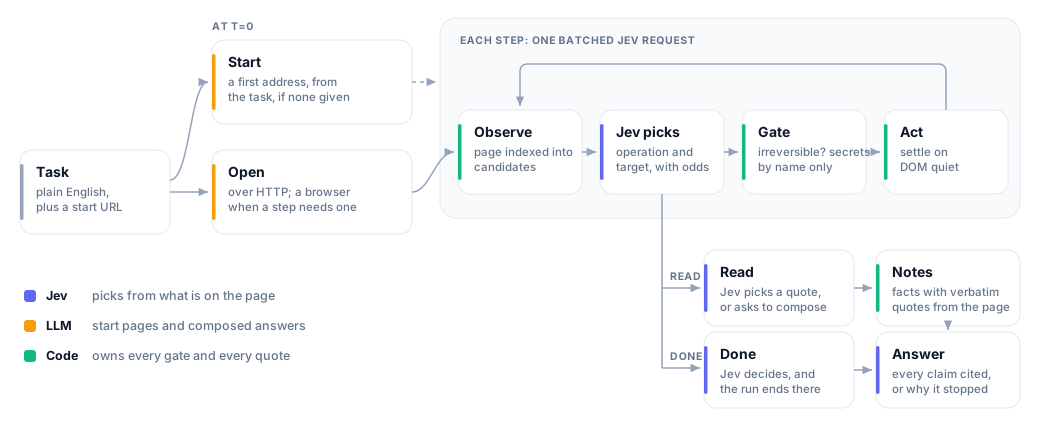
The LLM plans, reads and writes. Jev picks each action. Code owns the gates: irreversible actions stop without
--authorize, secrets reach models by name only, and supported cookie banners are refused through autoconsent.
More in docs/design.md.
The core is Rust, in crates/, and every interface hands its work to it; the wheel carries it as
fastbrowse._native (ADR 0004). Against the Python core it replaced, it
reached the same result on all 36 fixture tasks with 18x less agent CPU, 54x faster startup and 5.4x less peak
memory (measurements).
How it compares
| Browser Use agent (hosted) | Browser Use Ultrafast (jev-ultrafast) |
fastbrowse | |
|---|---|---|---|
| Choosing an action | hosted model and tools | Jev picks from indexed controls | Jev picks from indexed controls |
| Returns | an answer | DONE or BLOCKED |
an answer with quotes, or why it stopped |
| Cited answers | not graded for citations here | no cited-answer result API | answers backed by captured quotes |
| Signing in | yes | password fields excluded | --secret or a Bitwarden vault item; models see names only |
| Irreversible actions | explicit task instructions in our fixture tests | no authorization parameter in Agent | classifier plus a code-enforced authorization gate |
| Browser | cloud | Chrome through Browser Harness; cloud in these evals | cloud by default, or local Chrome with --local |
The Ultrafast column describes commit 1231850a, the version the eval runner pins.
Benchmarking makes three comparisons:
- C1, agent against agent: fastbrowse against the hosted Browser Use agent, the figures above, on Browser Use cloud browsers under identical limits with the hosted agent at its defaults. On its own 53-task catalog, fastbrowse passed 99.3% at 17.0s and $0.0268 a run.
- C2, browser against browser: the same fastbrowse build on its own browser pool and on a Browser Use Cloud browser. In an earlier record (release-0.5.25), not on the published page, the pool passed fewer tasks.
- C3, fastbrowse on its pool against
jev-ultrafast, over 6 tasks: not yet measured.
The benchmark page publishes campaign release-0.7.1 (agent commit 7b8b0e8f,
data sha256 7d6ac26f23fa6d354128fa7e4bcc8190125c441f4f136dc39d0e3c35cec5d4e2).
Benchmark results gives the sources, cost basis and limitations, and
eval results and workflow covers the diagnostic suites.
Embed it
uv add fastbrowse first, then:
import asyncio

from pydantic import BaseModel

from fastbrowse import run_task
from fastbrowse.models import Limits

class Release(BaseModel):
    package: str
    version: str

async def main() -> None:
    result = await run_task(
        "Find the httpx package and report its name and latest released version.",
        start="https://pypi.org/",
        output_schema=Release,
        limits=Limits(max_dollars=0.10),
    )
    print(result.status, result.data, f"${result.cost.known_dollars:.4f}")
    for evidence in result.evidence:
        print(f'  "{evidence.quote}" from {evidence.url}')

asyncio.run(main())
Choosing the browser. With no browser argument, run_task runs local Chrome. browser_api_key= starts a
cloud browser, and cloud_extensions=[...] loads up to three of your account's Browser Use Cloud extensions into
it. cdp_url= or cdp_port= drives a browser already running: the run opens and closes its own tab and leaves
the rest, though cookies the task sets can persist. attach=True, target_match= and foreground=True work as
the matching flags do. Passing a cloud key and a CDP address together is an error.
Your own script on the page. connect_cdp() hands you the attached page without the agent, and
resolve_cdp_port(port) returns the ws:// URL behind a DevTools port:
from fastbrowse import connect_cdp

async def main() -> None:
    async with connect_cdp(9222, target_match="my-project") as page:
        print(await page.observe())
Access controls that only the Python API offers:
allowed_origins=["https://app.example.com"]limits the documents a run may read and control to those exact origins. Navigations, redirects, frames and popups elsewhere are refused before they are sent, so a sign-in that redirects through another origin needs it listed too. It scopes documents, not the network, and a scoped run sends no live frames or screenshots and cannot record.check_access=is an async callback awaited before the browser starts and before every read, navigation and action. If it raises, the run ends with statuserror(connect_cdpraisesBrowserError), naming only the exception's type.
Citations. result.citations holds a Citation per numbered link in result.answer: id, text,
requirement_id, url, quote and deep_link. Counts, totals and superlatives cite every record they were
derived from. A deep_link is a text fragment URL that
scrolls