███████╗███████╗██████╗  ██████╗ ██╗  ██╗
██╔════╝██╔════╝██╔══██╗██╔═══██╗╚██╗██╔╝
█████╗  █████╗  ██████╔╝██║   ██║ ╚███╔╝
██╔══╝  ██╔══╝  ██╔══██╗██║   ██║ ██╔██╗
██║     ███████╗██║  ██║╚██████╔╝██╔╝ ██╗
╚═╝     ╚══════╝╚═╝  ╚═╝ ╚═════╝ ╚═╝  ╚═╝
A blazing-fast PostgreSQL client built in Rust. No Electron. No JVM. No bloat.


Ferox is a native PostgreSQL client in a ~10 MB binary, idling at ~40–55 MB of RAM and starting in under 200 ms — because your database client shouldn't be the bottleneck.
Screenshots
All screenshots use a fictional demo database — recreate it with scripts/demo_db.py.
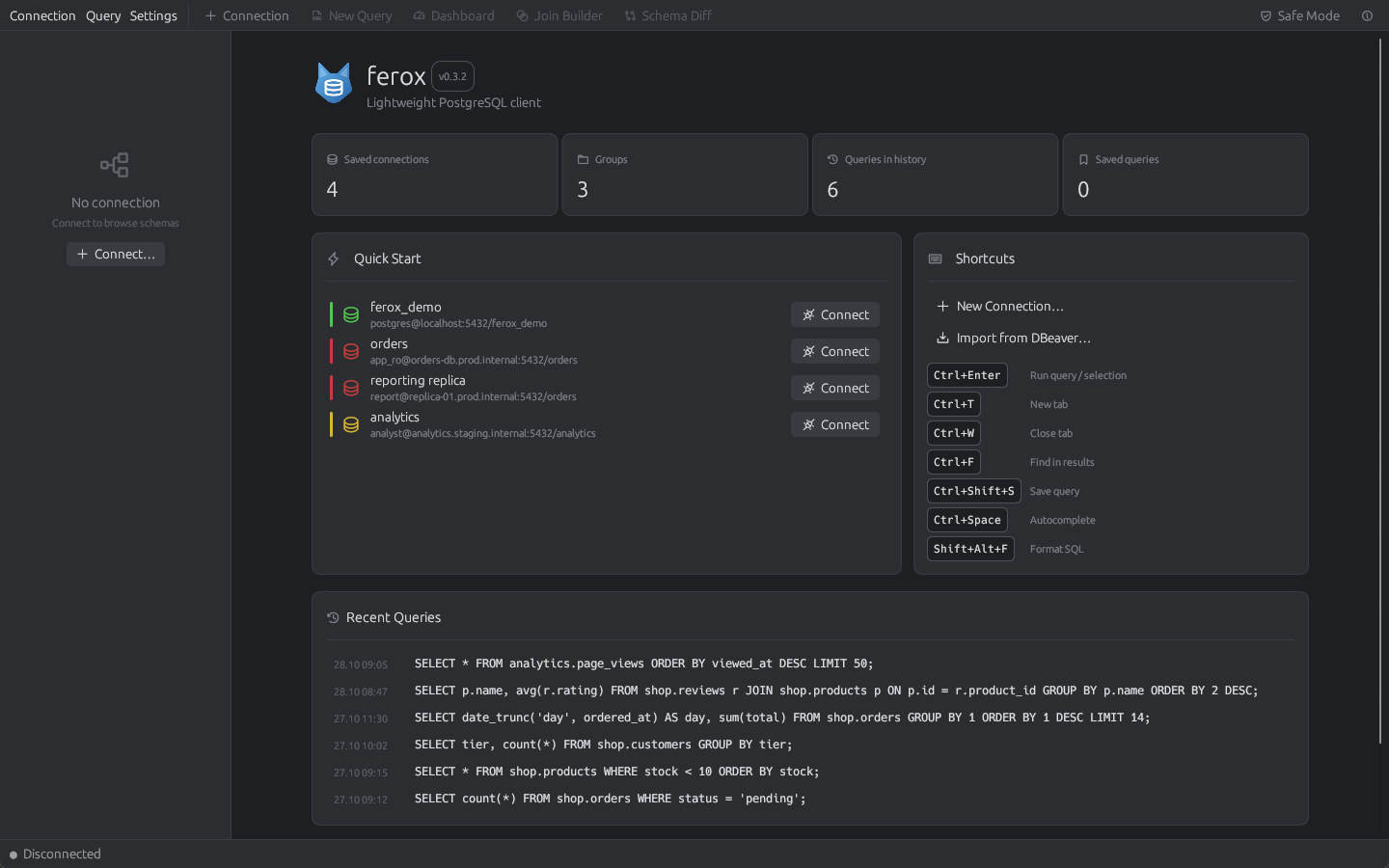
Home screen — saved connections grouped by environment, shortcuts and recent queries
| Query editor | EXPLAIN ANALYZE visualizer |
|---|---|
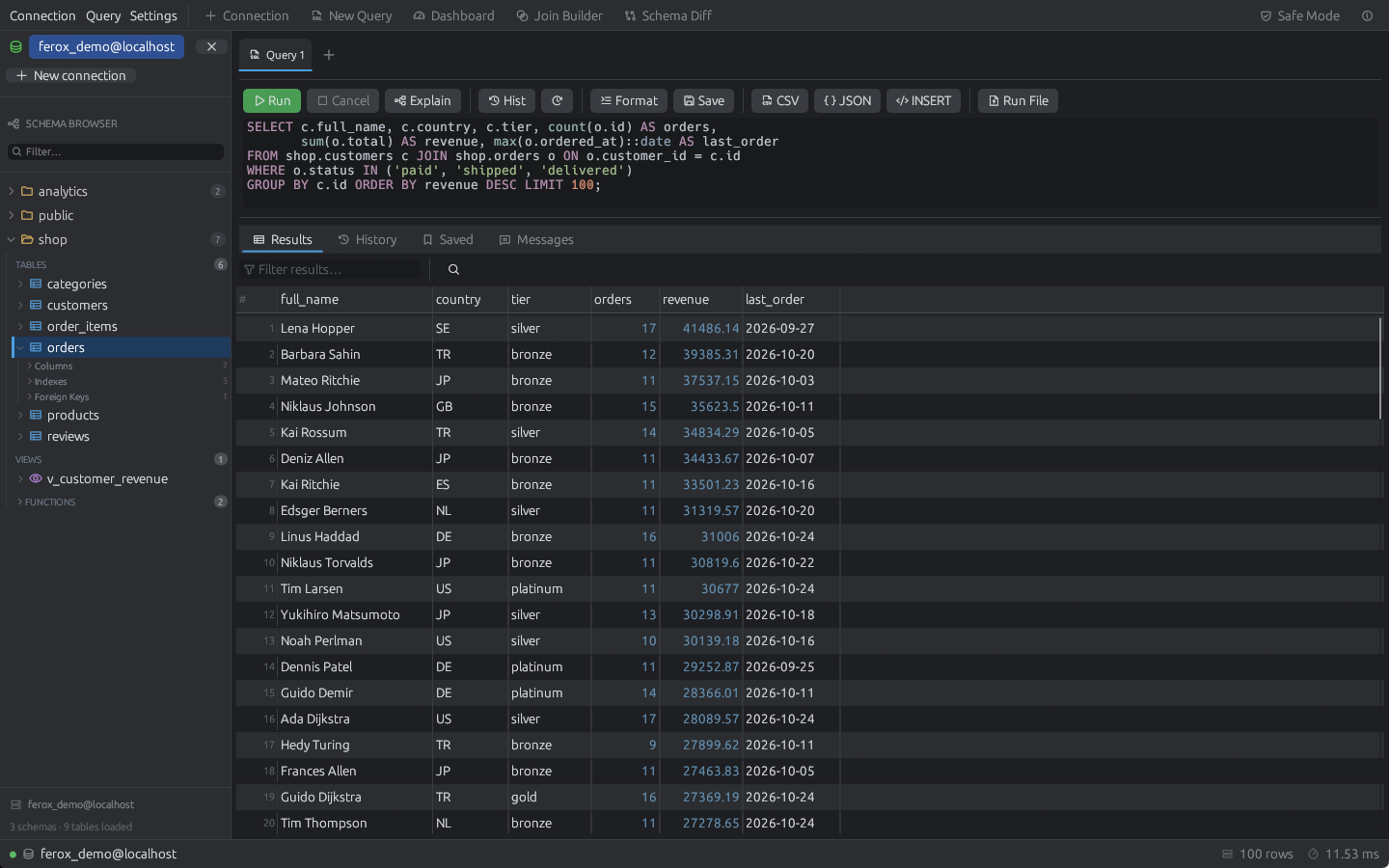 |
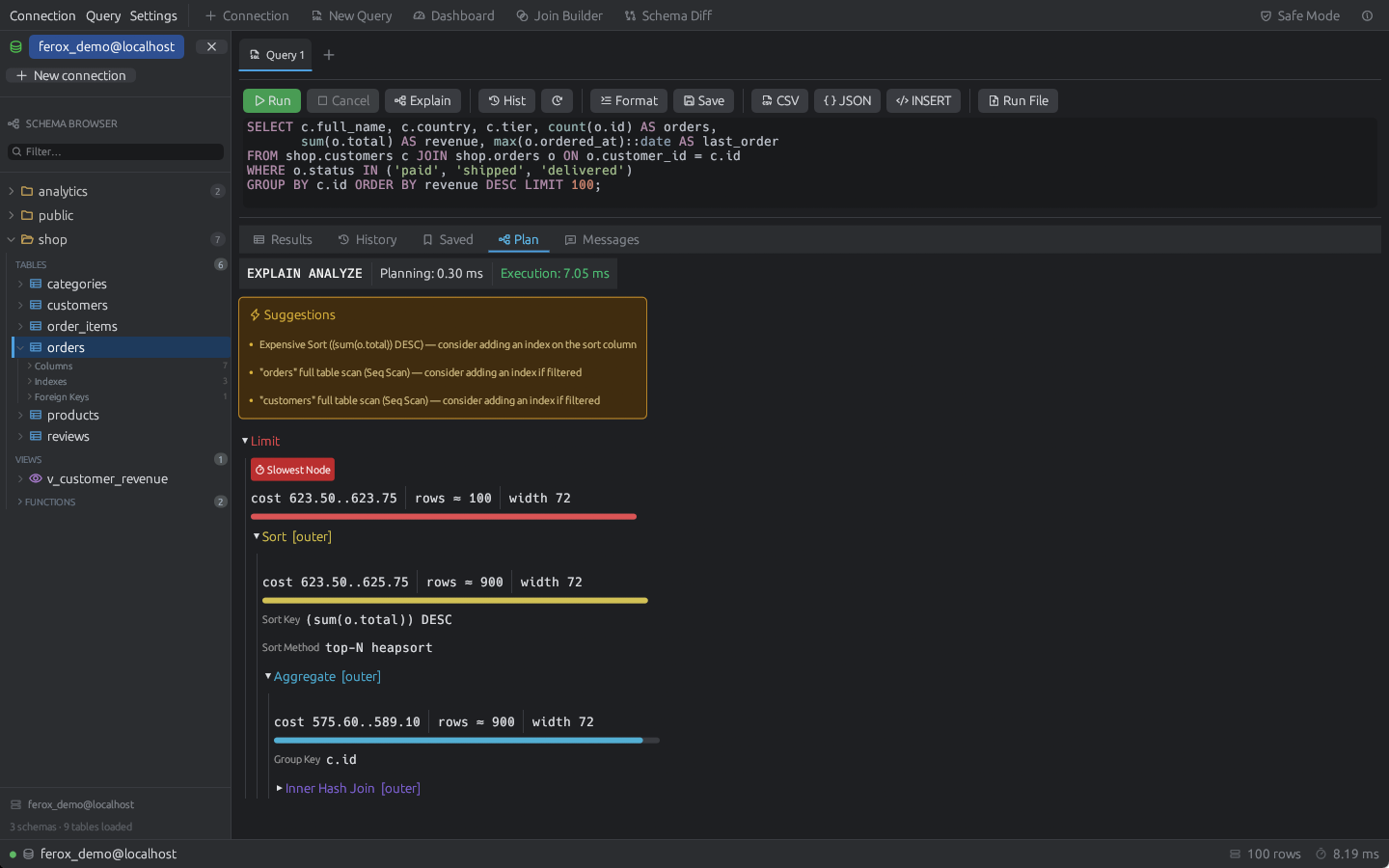 |
| Table structure editor (DDL preview) | Browse mode — filter builder & bulk actions |
|---|---|
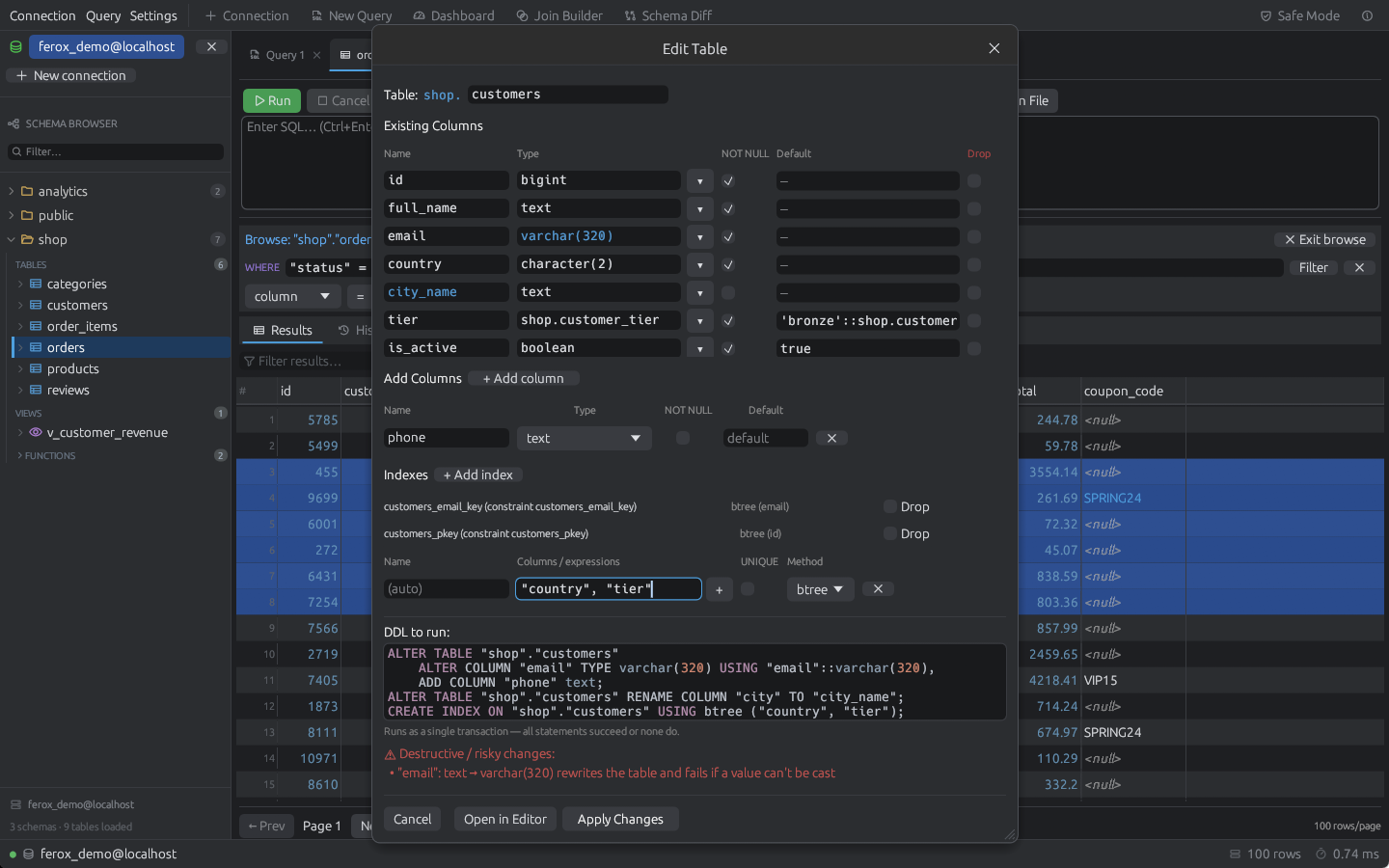 |
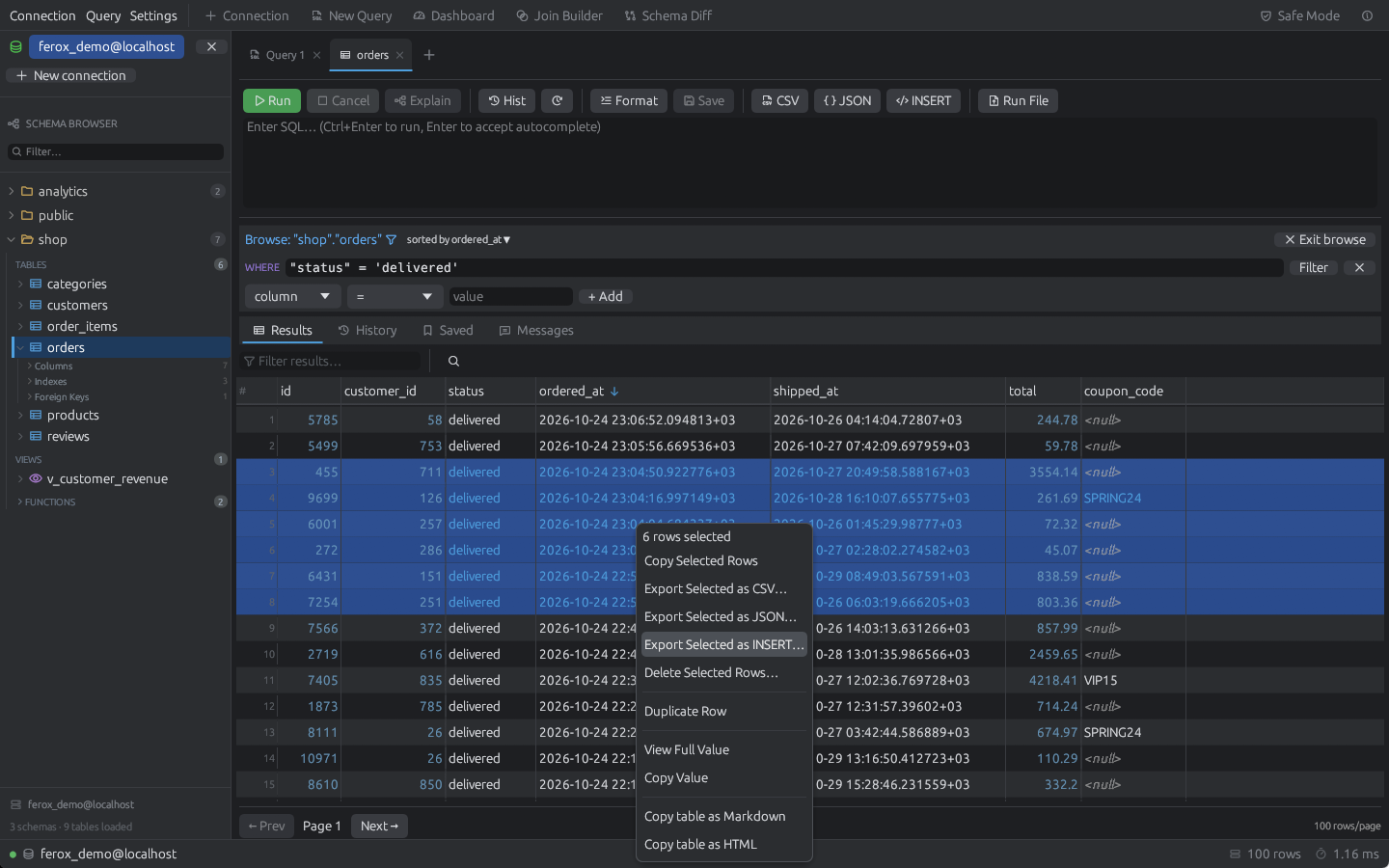 |
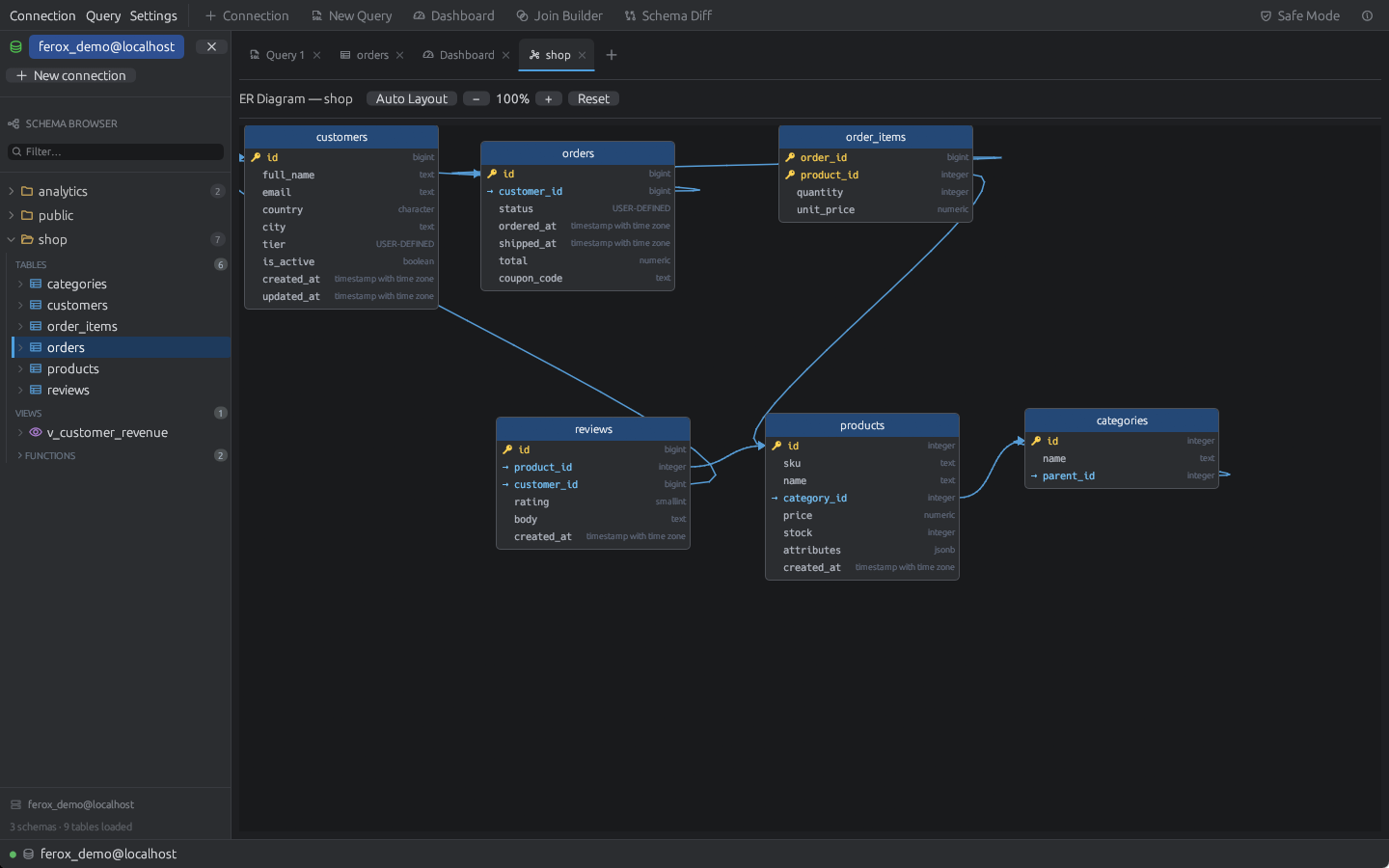
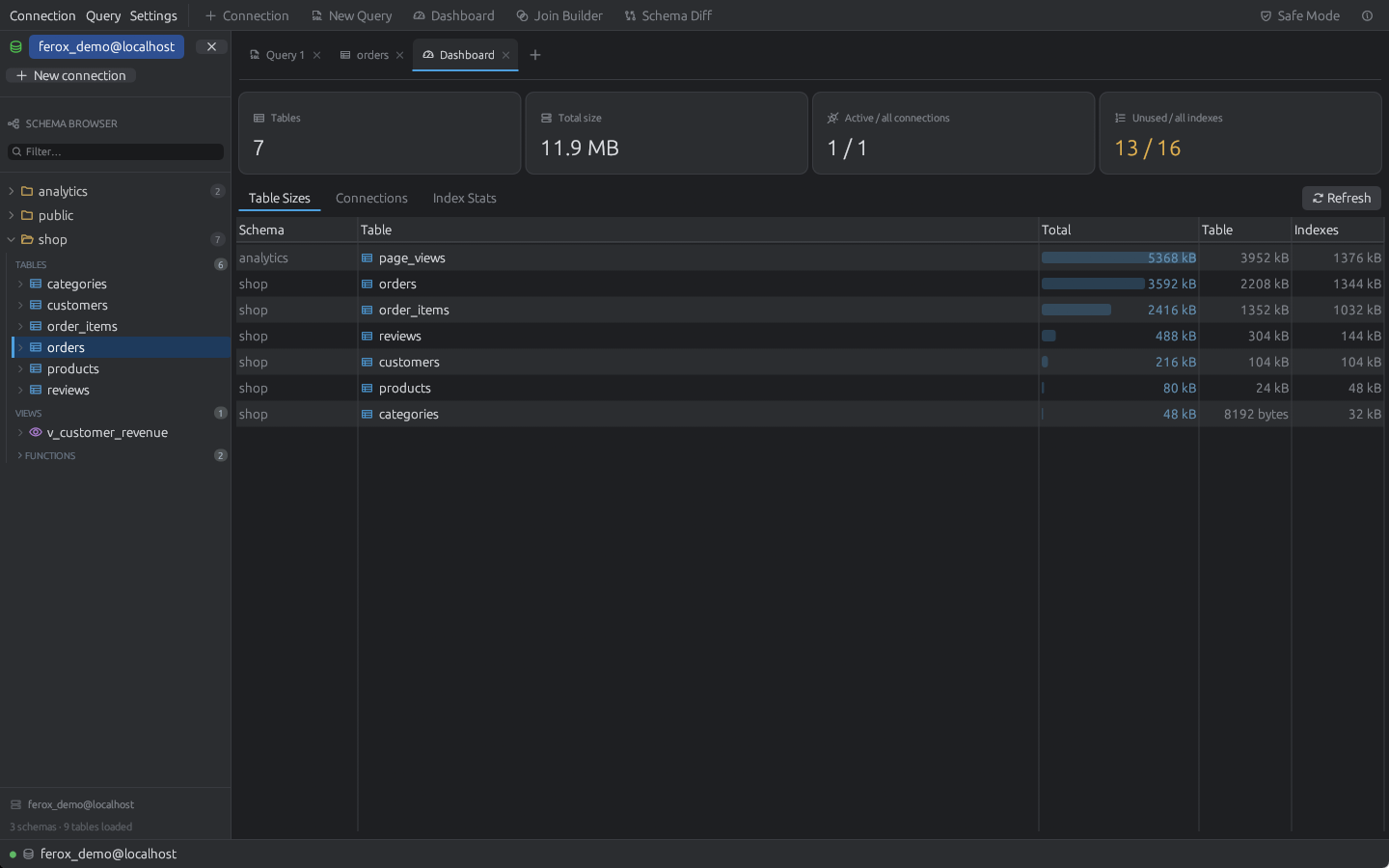
| ER diagram | Database dashboard |
|---|---|
 |
 |
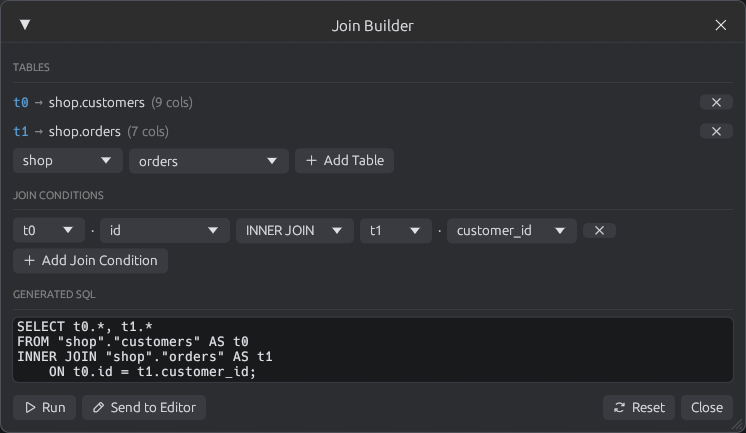
Join Builder — compose multi-table JOINs visually
Features
✨ AI — Natural Language to SQL, Explain, Optimize & Fix
Click the ✦ AI button in the toolbar to open the NL bar. Type plain English — Ferox fetches the live schema from your DB and sends it to the AI, so the generated query always uses your real tables and columns.
"show me the top 10 customers by total order value in the last 30 days"
The ✦ ▾ menu next to it works on the query in the editor (or just the selection):
- Explain query — a plain-language walkthrough: what it returns, how tables are joined, and pitfalls (NULL handling, join fan-out, missing
LIMIT) - Optimize query — a faster rewrite with the same result; the AI also sees your indexes, and suggests a
CREATE INDEXwhen that would help more - Fix error with AI — after a query fails, sends the query plus the Postgres error and returns a minimal fix with the cause explained (also offered in the Messages tab)
AI-generated SQL is never run automatically — it opens in a review window. If a suggestion adds a write operation the original didn't have (DELETE, DROP, UPDATE, …), a red warning names it. Replace in editor saves your original query to history first.
Supported providers (configure via Settings → AI):
| Provider | Notes |
|---|---|
| Anthropic Claude | claude-haiku-4-5 by default — fast and cheap |
| Groq | llama-3.3-70b-versatile — free tier available |
| Ollama | Fully local, no API key, no data leaves your machine |
| OpenAI | gpt-4o-mini by default |
| Custom / OpenRouter | Any OpenAI-compatible endpoint via base URL override |
Core
- Multi-tab query editor — Ctrl+T new tab, Ctrl+W close, right-click for Close / Close Others / Close All
- Run selection — select part of the editor and F5 / Ctrl+Enter / Run / Explain execute only that
- Per-table tabs — clicking a table opens it in its own tab; existing tabs are reused
- Schema browser — lazy-loaded tree: schemas → tables / views / mat-views / foreign tables / functions / sequences / triggers, live filter
- Data browser — double-click any table or view to browse with server-side pagination & ORDER BY
- Structured filter builder — pick a column/operator/value (
=, !=, >, <, LIKE, ILIKE, IS NULL, IN, …) in browse mode, or type a rawWHEREfragment directly - Multi-row selection & bulk actions — Shift/Ctrl+Click to select rows, then bulk copy / export as CSV, JSON or INSERT / delete (confirmation dialog, PK-based)
- Duplicate Row — right-click a row to INSERT a copy, auto-omitting primary-key columns
- Inline editing — double-click a cell to edit, Enter to commit, Escape to cancel
- JSON/JSONB pretty-print — the cell value popup detects JSON, pretty-prints and syntax-highlights it, with a Pretty/Raw toggle
- Persistent query history — last 500 queries, searchable, click to reload
- Saved queries — Ctrl+Shift+S saves the editor under a name; searchable Saved tab
Schema & Data Tools
- Table structure editor — rename columns, change types (automatic
USINGcast), set/dropNOT NULLandDEFAULT, add/drop columns, add/drop indexes (PK/UNIQUE-backed ones viaDROP CONSTRAINT), rename the table. The exact DDL is always previewed, risky changes are flagged in red, and everything applies as one transaction — or open it in the editor instead - Schema dump — right-click a schema → dump structure + data (or structure only) to a
.sqlfile. Nopg_dumpneeded, works through the SSH tunnel; consistent snapshot, rows streamed through a cursor (types, sequences, functions, partitions, constraints, indexes, views, matviews, triggers — not owners/grants/RLS/comments). PostgreSQL 12+ - CSV import — right-click a table → Import CSV…; columns are read from the file's header and streamed in via
COPY FROM STDIN - Export — CSV, JSON and INSERT statements via native OS file dialog; copy results as Markdown/HTML
- View DDL — right-click any view or materialized view → Show DDL
- Script generation — right-click table → Generate SELECT / INSERT / UPDATE / DELETE scripts
- ER diagram — visual schema relationship viewer with FK arrows, pan/zoom, draggable nodes
- Schema diff — compare the structure of two connections/schemas
- Column statistics — right-click any column header → null %, distinct count, min/max length, top values (computed on the database in browse mode)
Query Tools
- Multi-statement execution —
;-separated statements run in sequence; each SELECT result opens in its own tab - EXPLAIN visualizer — tree view of query plans with cost, rows, and timing per node; slowest-node highlight and optimization suggestions
- Safe mode transactions — DML wrapped in explicit BEGIN/COMMIT/ROLLBACK
- Join Builder — visual multi-table JOIN composer (
Query → Join Builder…) - SQL formatting — Shift+Alt+F
- Find in results — Ctrl+F highlights matching cells
Connections & Security
- Connection profiles — saved to
config.toml(see Configuration); SSL modes + SSH tunnel (password or private key) - Import from DBeaver —
Connection → Import from DBeaver…finds your DBeaver workspace and imports PostgreSQL connections with passwords, SSH, SSL mode, folders and prod/test color; duplicates are detected - Credentials in the OS keychain — connection/SSH passwords and the AI API key are stored via Windows Credential Manager / macOS Keychain / Linux Secret Service, not as plain text
- Connection color tags — flag a connection red/yellow/green/blue (e.g. "Production") so it stands out on the tab bar and connection switcher
- Multiple simultaneous connections — per-connection sidebar, tabs, and DB threads
- Auto-reconnect — a dropped connection is re-established on the next command
Developer Experience
- SQL syntax highlighting — zero-dependency tokenizer, dark (
base16-ocean.dark) and light (InspiredGitHub) themes - SQL autocomplete — table names (with alias suggestions), column names, keywords; Ctrl+Space to force
- Database dashboard — table sizes, index stats, active connections with kill support
- Update check — a banner tells you when a new release is out (one GitHub API request at startup on a background thread; nothing is downloaded automatically). Turn it off under
Settings → Check for updates on startup - EN / TR localisation — full bilingual UI; language choice persists to config
Performance
| Metric | Ferox |
|---|---|
| RAM at idle | ~40–55 MB (working set) |
| Cold startup | < 200 ms |
| Binary size | ~10.1 MB |
Measured on Windows 11, release build with LTO (v0.3.1). The binary grew from ~7 MB
after adding OS-keychain-backed credential storage (keyring crate) — its Windows backend
pulls in a full regex engine. RAM/startup are unaffected (keychain I/O only happens
on connect/save, never per-frame).
Installation
Pre-built binaries
Download the latest release for your platform from the Releases page.
| Platform | File | Format |
|---|---|---|
| Windows 10+ | ferox-windows-x64.exe |
standalone .exe |
| macOS 12+ (Intel + Apple Silicon) | ferox-macos-universal.dmg |
disk image containing Ferox.app |
| Linux x86_64 | ferox-linux-x64.tar.gz |
tarball containing the ferox binary |
macOS — first launch
Open the .dmg and drag Ferox.app to Applications (or run it straight from the mounted volume). macOS may still block it with an "unidentified developer" warning because Ferox is not notarized — if so, clear the quarantine flag:
xattr -rd com.apple.quarantine /Applications/Ferox.app
Then double-click to launch.
Linux — first launch
tar -xzf ferox-linux-x64.tar.gz
chmod +x ferox
./ferox
Build from source
# Prerequisites: Rust 1.88+ (https://rustup.rs)
git clone https://github.com/frkdrgt/ferox.git
cd ferox
cargo build --release
Binary lands at target/release/ferox (or ferox.exe on Windows).
Quick Start
- Launch Ferox
- Connection → New Connection… — enter host, port, user, password, database
- Toggle SSL if needed (
preferworks for most setups) - Hit Connect — schema tree loads on the left
Running a query
Type SQL in the editor, press F5 or Ctrl+Enter. Select part of the text first to run only that.
SELECT u.name, COUNT(o.id) AS orders
FROM users u
LEFT JOIN orders o ON u.id = o.user_id
GROUP BY u.name
ORDER BY orders DESC;
Or use the Join Builder (Query → Join Builder…) to construct joins visually.
Keyboard shortcuts
| Shortcut | Action |
|---|---|
F5 / Ctrl+Enter |
Run query (or the selection) |
Ctrl+C |
Cancel running query |
Ctrl+T |
New tab |
Ctrl+W |
Close tab |
Ctrl+Tab / Ctrl+Shift+Tab |
Next / previous tab |
Ctrl+Shift+S |
Save query |
Ctrl+Space |
Show autocomplete |
Ctrl+A |
Select all in the editor |
Shift+Alt+F |
Format SQL |
Ctrl+F |
Find in results |
F5 (sidebar focused) |
Refresh schema tree |
Configuration
Profiles are stored automatically (config file directory is still named pgclient — a holdover from before the ferox rebrand):
| Platform | Config file | Query history |
|---|---|---|
| Windows | %APPDATA%\pgclient\config.toml |
%LOCALAPPDATA%\pgclient\history.txt |
| macOS | ~/Library/Application Support/pgclient/config.toml |
~/Library/Application Support/pgclient/history.txt |
| Linux | ~/.config/pgclient/config.toml |
~/.local/share/pgclient/history.txt |
language = "en"          # "en" or "tr"
null_color = [128, 100, 100]
check_updates = true     # GitHub release check at startup
# skipped_version = "0.3.2"  # set by "Skip this version" in the update banner

[[connections]]
name     = "prod-readonly"
host     = "db.example.com"
port     = 5432
user     = "analyst"
database = "warehouse"
ssl      = "require"
color    = [200, 60, 60] # optional danger tag: red/yellow/green/blue, or omit
Passwords aren't in this file if a keychain entry exists. On first successful save, ferox moves the connection password (and SSH tunnel password, and AI API key) into Windows Credential Manager / macOS Keychain / Linux Secret Service, and clears the plain-text field here. If no keychain backend is available, the password stays in this file as a plain-text fallback — nothing breaks, you just don't get the extra protection.
History keeps the last 500 entries.
Architecture
Ferox uses three dedicated threads, zero shared mutable state between them:
┌──────────────────────────────────────────────────────────┐
│                  UI Thread (eframe)                      │
│   egui immediate-mode rendering                          │
│   sidebar · tabs · join builder · NL bar                 │
└────────┬───────────┬──────────────┬───────────┬──────────┘
         │ DbCommand │ DbEvent      │ AiCommand │ AiEvent
         ▼           ▼              ▼           ▼
┌────────────────────┐   ┌─────────────────────────────────┐
│   DB Thread        │   │        AI Thread (tokio)        │
│   (tokio)          │   │  reqwest · Anthropic / OpenAI   │
│   tokio-postgres   │   │  Groq · Ollama · custom         │
│   native-tls       │   │  Schema context fetched live    │
│   async queries    │   │  from DB before every request   │
└────────────────────┘   └─────────────────────────────────┘
All communication goes through mpsc channels — the UI thread never blocks.
The startup update check runs on a fourth, short-lived thread the same way.
Tech Stack
| Role | Crate |
|---|---|
| GUI framework | egui + eframe |
| Table widget | egui_extras |
| PostgreSQL driver | tokio-postgres |
| Async runtime | tokio (current-thread per worker thread) |
| TLS | native-tls + postgres-native-tls |
| SSH tunnel | russh |
| AI HTTP client | reqwest (native-tls, JSON) |
| SQL highlighting | custom zero-dependency tokenizer (src/ui/syntax.rs) |
| Config | serde + toml |
| File dialogs | rfd |
| OS keychain | keyring |
| DBeaver credential import | aes + cbc (already linked via russh) |
Roadmap
- Auto-complete — table names, column names, SQL keywords
- Database dashboard — table sizes, index bloat, active connections
- Multiple simultaneous connections — separate DB threads per connection
- SSH tunnel — connect through a jump host
- ER diagram — visual schema relationships
- Multi-statement queries — run multiple statements separated by
; - View DDL — right-click any view or materialized view to see its definition
- Safe mode transactions — explicit BEGIN/COMMIT/ROLLBACK for DML
- Join Builder — visual multi-table JOIN composer
- EN/TR localisation — full bilingual UI, language persists to config
- Settings & About — Settings menu with language switcher and About dialog
- Test Connection — verify credentials before connecting, from the connection dialog
- Close connection — disconnect and remove a connection from the sidebar with one click
- Connection status indicators — color-coded dots replacing broken emoji squares on Windows
- AI: Natural Language → SQL — multi-provider (Claude, Groq, Ollama, OpenAI, custom), live schema context
- Ctrl+A select-all in query editor
- Bookmarked queries — saved queries/snippets, Ctrl+Shift+S, searchable panel
- Structured filter builder — column/operator/value picker for browse-mode
WHEREfilters - Multi-row selection & bulk actions — bulk copy / export / delete, plus Duplicate Row
- CSV import — via a file picker (
Import CSV…), not drag-and-drop - Connection color tags — per-connection danger color, shown on tabs and the connection switcher
- Credentials in the OS keychain — passwords and API keys no longer stored as plain text
- Run selection — execute only the selected SQL
- AI: Explain / Optimize / Fix error — with index-aware context and a review step before anything runs
- Table structure editor — ALTER with live DDL preview, single transaction
- Schema dump —
.sqlexport of structure ± data withoutpg_dump - Export as INSERT statements
- Import connections from DBeaver
- Update check — GitHub releases banner
- XLSX export
- Restore open tabs on restart
- Data compare — diff table contents and generate sync SQL
- Proxy settings for DB and AI connections
- Dark / light theme toggle — runtime switch
- Result diff — compare two query results side-by-side
Contributing
Bug reports, feature requests, and pull requests are welcome.
# Run against a local Postgres
docker run -d -p 5432:5432 -e POSTGRES_PASSWORD=test postgres:16

# Dev build (faster compile, debug symbols)
cargo build

# Unit tests — pure logic (SQL builders, tokenizers, quoting, parsers), no DB required
cargo test

# Integration tests — not run by default. They need a reachable local Postgres
# (CSV import, schema dump/restore round-trip, structure-editor DDL), the OS
# keychain, and network access (GitHub releases API). Point them at your instance
# with FEROX_TEST_PG_HOST/PORT/USER/PASSWORD/DATABASE (default: postgres/postgres
# @localhost:5432/postgres) if it differs.
cargo test -- --ignored

# Demo database used for the screenshots
pip install psycopg2-binary
FEROX_DEMO_DSN="host=localhost user=postgres password=test" python scripts/demo_db.py
Please keep the UI thread non-blocking and all DB work behind DbCommand / DbEvent.
See CLAUDE.md for architecture notes.
How This Was Built
This project is an experiment in vibe-coding — writing software primarily through conversation with an AI, rather than typing code by hand.
Every line of Rust in this repository was generated by Claude (Anthropic) via Claude Code. Every commit was authored through an AI session. The developer's role was to define what to build, review what came out, and decide what to do next — not to write the code itself.
Why be upfront about this?
Because it matters. If you're evaluating this project — as a tool, as a reference, or as a hiring signal — you deserve to know how it was made. Passing this off as hand-crafted Rust would be dishonest.
What the human actually did
- Chose the goal: a lightweight, native PostgreSQL client as an alternative to DBeaver/DataGrip
- Picked the stack:
egui,tokio-postgres,russh— no Electron, no JVM - Defined the architecture: two-thread model,
mpscchannels, no shared mutable state between UI and DB - Wrote the
CLAUDE.mdspec that guided every session - Planned each feature phase, reviewed diffs, caught bugs