Firekeep
Your agents shouldn’t work like strangers.
Connect Claude Code, Codex, Kiro, OpenCode, and other MCP clients through one shared, self-hosted Keep.
Every solved problem should make the next one easier. Firekeep preserves the experience behind the work — durable knowledge, working state, procedures, coordination, and inspectable evidence — and puts it back to work in the next session, tool, or machine.
Use it for your own continuity on one workstation. Add teammates when you need them without starting the team’s context over.
Website · Install · Product tour · Firekeep Studio · Evidence · Privacy · Support
One Keep, across runtimes
flowchart LR
    A["Claude Code<br/>stores a proven fix"] --> K[("your self-hosted<br/>Keep")]
    K --> B["Codex<br/>recalls the fix + evidence"]
    K --> C["Kiro<br/>reuses the procedure"]
    K --> D["OpenCode / MCP client<br/>continues informed"]
Agents keep their native interfaces and provider-owned sessions. What carries forward is the Firekeep context they explicitly record and recall through the same local MCP gateway. That means one person can switch tools without losing the thread, and a team can earn context once and carry it forward.
See Claude Code and Codex share one Keep →
Install Firekeep
The installer configures Claude Code, Codex, Kiro, and OpenCode together (plus Claude Desktop when its config directory exists), then asks where your Firekeep server should live. The full setup flow is in the install guide.
curl -fsSL 'https://firekeep.ai/latest/install?src=github' | sh    # macOS / Linux
irm 'https://firekeep.ai/latest/install.ps1?src=github' | iex      # Windows PowerShell
The server runs on linux/amd64 or linux/arm64 (server releases after v1.6.2;
v1.6.2 and earlier are amd64-only) and needs Docker Compose v2, two CPU cores,
and Git; 16 GB RAM is recommended for the default stack. It binds to
127.0.0.1 by default. See the
requirements and sizing notes
before choosing a host.
Trying Firekeep for the first time? Share what worked and where you got stuck →
Runtime coverage
- Client Kit: configures Claude Code, Codex, Kiro, and OpenCode together; Claude Desktop is added when its config directory exists. Other MCP clients can use the generic path.
- Claude Code: managed MCP, instructions, and lifecycle hooks. Its supported pre-tool hook can hard-block an edit, write, or shell action.
- Codex: managed MCP plus
AGENTS.mdguidance. Codex exposes no native hooks, so lifecycle automation and pre-edit enforcement are not implied. - Kiro CLI: a named Firekeep agent with MCP, steering, and lifecycle hooks. On the validated Kiro CLI 2.12.1 surface, its pre-edit hook is advisory.
- Firekeep Studio: runs Codex, Claude Code, Kiro CLI, and Grok in one desktop workspace. The direct Grok adapter has no Keep memory, hooks, or briefing; Studio reports that boundary instead of inheriting another runtime’s status.
See the integration guide and Studio runtime matrix for the maintained details.
Measured retrieval, with the method attached
On the accepted 2026-08-28 LongMemEval-S run, Firekeep achieved 97.7% Evidence Recall@10: at least one labeled evidence session appeared in the first ten results for 459 of 470 scored questions. The measurement covers retrieval, not generated-answer accuracy; it is one corrected deterministic run rather than a multi-run confidence interval.
The problem Firekeep solves
People do not build professional judgment by rereading every email, document, ticket, or source file from the beginning. They remember what happened, why a decision worked, how a failure was diagnosed, and which procedure held up in practice. That experience changes how they approach the next problem.
Agents should improve the same way. Firekeep connects the knowledge, working state, coordination, and evidence behind the work so the next agent can begin with the experience the last one earned.
Detailed capability map
| Capability | What it means |
|---|---|
| Memory | Agents remember what worked, what failed, and what matters across sessions. Semantic + graph retrieval, confidence scoring, contradiction handling, four memory types (reference / procedural / episodic / transient) with type-aware recall decay, recoverable archive-first aging, and token-conscious recall with optional LLM synthesis. Recall is re-ranked by recorded session outcomes (outcome-weighted memory) and by agent feedback on knowledge that was actually acted on (memory_feedback). |
| Knowledge Autopilot | The knowledge base maintains itself without deciding anything on its own. When two unconfirmed memories genuinely conflict, neither is silently dropped — both stay recallable, marked contested, until a human verdict (/memory/contested/resolve). A session reaper closes out crashed/walked-away sessions so failures count in outcome scoring. Every review queue (draft skills, stale skills, procedure proposals, contested pairs, eval dead letters) lands in one inbox with a weekly digest, and /memory/{id}/evidence shows every signal behind a memory's rank in one read. |
| Fleet-as-GPU (Night Shift) | The connected agents' own machines do the knowledge base's homework overnight, against a local model, and only ever produce drafts. The session-end hook queues a distill job per session; the server's nightly passes queue one job per stale skill (re-author it) and per contested memory pair (propose a verdict); firekeep night-shift drains the queue — started for you at session start whenever LM Studio or Ollama is listening. A human still activates every draft and resolves every pair, and an approval-rate ledger per job type on the Autopilot tab says whether the fleet's work is worth keeping. |
| Team Continuity | Memories carry verified workspace/member provenance plus an untrusted runtime agent_id label and project. Per-contributor activity reports and LLM-synthesized handoff briefs let one agent pick up where another left off. |
| Session Continuity | Plans, decisions, and progress recorded through the session tools survive context compression. Crashed sessions are auto-detected on next start and offered for resumption with a periodic workspace snapshot (git branch, recent commits, diff stats) embedded in the shadow. |
| Environment Awareness | Configured Docker, git, and file collectors monitor operational state instead of relying only on prompts. Container restarts, new commits, and file changes flow into a replayable event stream. |
| Agent Coordination | Shared channels, bulletin board, structured task queue, resource leases with monotonic fencing tokens, presence registry, and direct messages. Concurrent agents can assign work, track progress, and use leases to prevent overlapping edits; hook-enabled clients block an edit when another agent already holds the file lease. |
| Predict-then-Act Gateway | Agents declare intent before consequential actions (action_before → `allow |
| Skills | Agents author reusable "what to do when X happens" playbooks via the skill_create tool (client-side, with full session context); a docs→skills pipeline drafts more from wikis/runbooks under human review. Top matches are injected into the next session's briefing. (Server-side auto-synthesis exists behind SKILL_SYNTHESIS_ENABLED but is off by default — the CPU-only deploy can't run the generation LLM in workable time.) |
| Enforced Runbooks | A skill whose steps carry command matchers is a runbook a human can arm: advise (round-1 advisories), require_ack (a matched command is challenged and proceeds only after an audited acknowledgement — one-use permit bound to workspace, member, session, command hash, step, bundle version and execution), or block (fails closed, with a server receipt the client requires before honoring an allow). Evidence is scored by success — a step counts only when its command exits 0 — and every enforcement event lands in a deviation ledger (dashboard + inbox), storing command hashes, never command text. Modes are set by a human on an admin-only route; agents can propose runbooks, never arm them. Opt-in via PROCEDURE_ENABLED, currently being dogfooded on our own deploys — see docs/guides/living-procedures.md. |
| Decision Board | When a clarification needs more than a couple of questions, the agent opens a local browser board pre-populated with evidence retrieved from team memory — better questions, informed by what the team already learned. The local gateway fronts the Decision Board process and Cortex /decision/synthesize. |
| Living Instructions | The instruction layer measures itself: a per-instruction compliance table computed deterministically from replay (did sessions recall before answering, record as they went, declare consequential actions), with trend over time, per-runtime slices, and exposure receipts — sessions carry a content hash of the instruction text that actually reached them, and anything unverifiable reports as unknown rather than counted. Honest about its limits by construction: it measures behavior, not whether the behavior helped. Fleet-drafted rewrites under human verdict and A/B validation are roadmap. |
| Trust Ledger | A per-agent employment record built from the declarations agents already make through the gateway (action_before/action_after): declared-action count, reconciliation rate, prediction-match calibration (Brier over stated confidence vs reconciled outcome), reversals, sessions, first/last seen. Visibility only — it reports, it never gates. Honest by construction: calibration is behavior not competence, only declared actions are seen, agent_id is a self-reported label so the record is per declared identity, and calibration reads not enough signal below a threshold rather than inventing a number. The enforcing half (a capability broker turning the record into earned autonomy) is roadmap. |
| Auto-Evals + Pattern Discovery | Quality metrics computed from replay traces on session completion. Pattern detection is enabled; automated promotion/validation and A/B experiment endpoints are implemented but disabled by default until a deployment has enough session volume to use them responsibly. |
| Replay & Explainability | Every memory read/write, session lifecycle event, environment change, coordination action, and gateway decision is recorded as a structured trace. Inspect, narrow, and reconstruct context at any prior event. |
| Encrypted Secrets | Fernet-backed vault for infrastructure credentials, API tokens, and connection strings. Distinct from memory — secrets never appear in recall. |
| Business Knowledge | Ingest company documents (wiki pages, tickets, API docs) — manually, or via scheduled Confluence collectors. Chunks land in the vector store and surface naturally during memory recall alongside operational memories. |
| Code Intelligence | Tree-sitter-based symbol search, caller graphs, architecture maps, and impact analysis that returns symbol slices instead of whole files — runs client-side through the local gateway (firekeep-symdex is installed with the kit). 38 MCP tools (8 analytics tools hidden by default behind SYMDEX_ANALYTICS_ENABLED). |
Why Firekeep Is Different
Firekeep is not another chatbot wrapper or prompt orchestration layer.
It is an operating layer for connected AI agents — infrastructure that sits behind your existing tools and makes them better.
- Self-hosted by default. The server, datastores, embeddings, and default generation model run on your infrastructure. Third-party egress occurs only when you opt into a connector or external Symdex AI provider.
- Deep where the work happens. Coding is the strongest shipped workflow, with Symdex for code intelligence. It is not the product boundary: Docdex brings selected document folders into the same Keep, Maildex brings a member's email (read-only IMAP, always member-private,
firekeep maildex add), and the shared continuity, coordination, governance, and evidence layers are domain-independent. - Persistence + observability. Most agent tools focus on making the agent smarter in the moment. Firekeep focuses on what happens between sessions and after things go wrong.
- MCP-native. Four remote services and two client-local backends expose Model Context Protocol tools through one local
firekeepstdio gateway. Shipped adapters configure Claude Code, Claude Desktop, Codex, Kiro, and OpenCode; other MCP clients can be configured manually. - Agent-agnostic. Swap the agent client without rebuilding the underlying memory and coordination layer. Cursor has a documented manual MCP path; Aider does not currently have a shipped adapter.
- A2A-discoverable. Relay publishes an Agent-to-Agent agent card at
/.well-known/agent.jsonfor capability discovery. This is discovery-only, not an A2A task-execution endpoint.
Installation and operations details
One command, two required questions: the agent identity every memory, session and
replay event is attributed to, and where your Firekeep server is — set one
up on this machine with Docker, redeem a join code, point at one that is
already running, or decide later (firekeep doctor then tells you how to
finish). Setting one up here runs firekeep init for you; that installer asks
nothing, and the machine enrols itself once the stack is up, so firekeep doctor is green with no dashboard, no tunnel, and no pasted key. It prints the
paste-ready command for your second machine when it finishes.
The installer then offers one skippable prompt for another MCP client's rules file; the four shipped adapters are rendered either way.
Server images after v1.6.2 are published for linux/amd64 and linux/arm64, so
an x86-64 or ARM64 Linux host (e.g. AWS Graviton, Ampere) or Docker
Desktop on an Apple-silicon Mac runs them natively; v1.6.2 and earlier are
amd64-only. The client bootstrap is exercised in CI on
Ubuntu, Debian, Alpine, Fedora, Rocky, Arch and openSUSE (x86_64 and aarch64);
macOS runs the same script but is not covered by CI.
- Requirements and sizing — firekeep.ai/docs.html#requirements
- Server install — firekeep.ai/docs.html#server
- Connecting agents and teammates — firekeep.ai/docs.html#connect
- Troubleshooting — firekeep.ai/docs.html#troubleshooting
From this checkout
bash install.sh              # build the server from source
bash install.sh --pull       # the same installer against the published images
cd client && ./install       # the kit from this checkout (.\install.ps1 on Windows)
firekeep install             # re-render the runtime adapters only
install.sh prompts for nothing: the host address is detected and the Neo4j
password generated (--ip / --neo4j-password, or FIREKEEP_VPS_IP /
FIREKEEP_NEO4J_PASSWORD, override either). It returns as soon as the stack is
up rather than blocking on the ~3.3 GB model pull — until that finishes, memory
writes return status="partial" (stored and queued for backfill, not yet
searchable) and firekeep doctor carries an embeddings WARN row saying so.
bash install.sh --wait-for-models blocks instead.
Operating the server afterwards — access and authentication, the dashboard, backups, updates, exposing ports deliberately — is docs/DEPLOYMENT.md.
Removing it
firekeep uninstall            # remove the client kit from this machine
firekeep uninstall --server   # also tear down the server + ALL its data
firekeep uninstall removes only what the kit installed — the Firekeep blocks
in each runtime's config (your own settings stay intact), the launcher and its
PATH entry, and ~/.firekeep — and asks first (--yes skips the prompt). It
never touches a server you set up. --server additionally runs docker compose down -v on the stack this machine provisioned, deleting the Neo4j/Qdrant/Redis
volumes — every memory, session and secret, permanently — behind a separate
data-loss confirmation that a plain uninstall or --yes can never trigger. Back
up first (docs/DEPLOYMENT.md) if you
might want the data back.
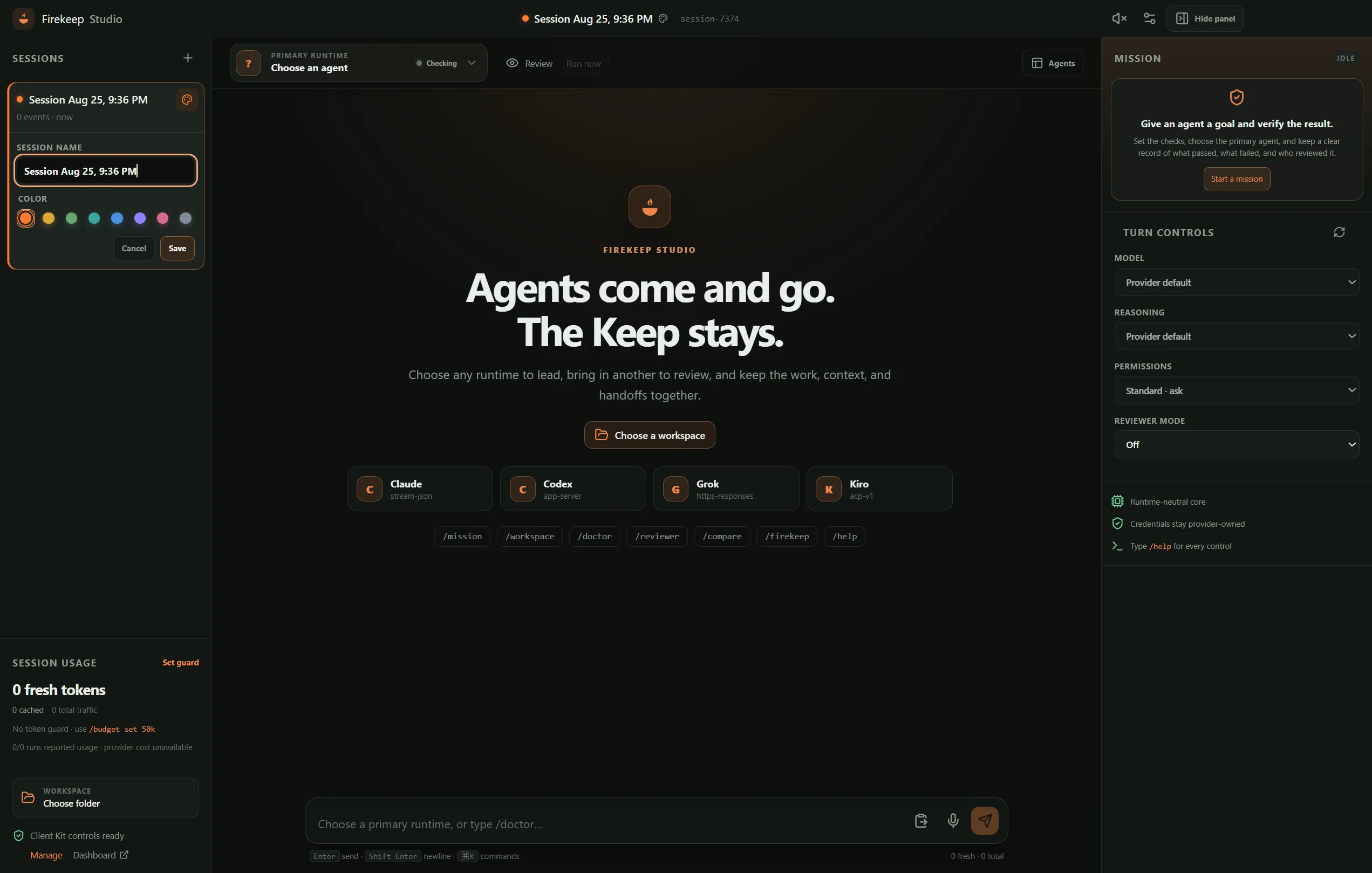
Firekeep Studio
Download for Windows · Download universal macOS · Explore Studio →
studio/ is a separate desktop client for people who want Firekeep to be the
only agent application they open. It gives Codex, Claude Code, Kiro CLI, and Grok one
runtime-neutral conversation surface: any supported runtime can be the explicit primary,
other runtimes can review it in fresh read-only contexts, and /compare, /consensus,
an explicit shared workspace, Windows voice input and system voice output, cache-aware token guards, named and color-coded local sessions,
live provider model/reasoning discovery, and typed Client Kit controls are built in. The
selected runtime is visually explicit, the full inspector can be hidden, and Studio links
to the dashboard from the existing Client Kit connection without exposing its credentials.
Fenced Mermaid responses render as native zoomable diagrams, and the existing Firekeep
Decision Board opens as a native question/evidence/action panel inside Studio. Its local
authenticated push preserves the original long poll, avoiding an extra agent turn merely to
discover that the board is ready.
The primary runtime picker shows live readiness and transport context, response scrolling
respects readers who move away from the tail, and copy/paste uses bounded text-only native
clipboard operations. Completed answers lead each run while detailed working events fold into
a Work log. A runtime-neutral Agents view tiles Codex, Claude, Kiro, Grok, or any future
chat-capable adapter into selectable panes with independent native continuations; the shared
composer targets the selected pane, and active runs remain serialized for workspace safety.
Mission Mode adds an outcome-bounded harness: one primary
writ