Fleet
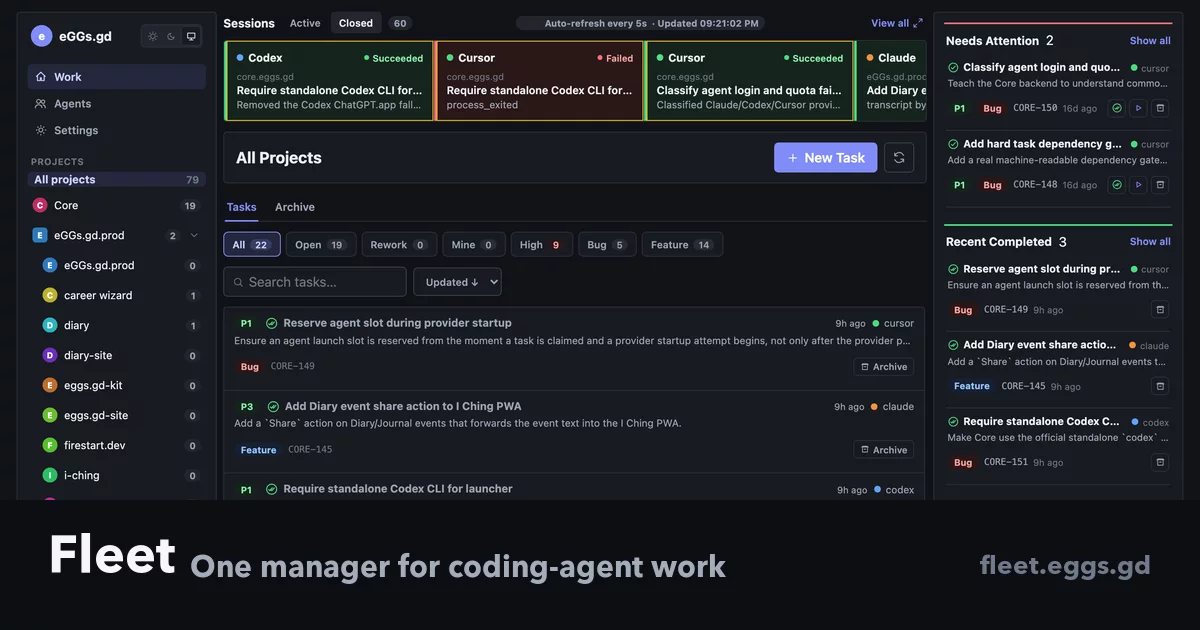
Fleet manages work, not artifacts. A task lives in Fleet, and the work happens in a workspace: a folder that can hold code, documents, research, or anything an AI agent or a person can work on. Fleet hands ready tasks to the agents you already use (Claude, Codex, Cursor, Gemini), keeps their sessions in one place, and puts the result in front of you for review. Code is the most developed kind of workspace today, not the only one.
You talk to a Manager, which is a session in one of those agents with your Fleet data folder as its working directory. It reads and changes the board through Fleet's tools. Fleet does not host a chat of its own.
Early software. Version 0.0.x. It runs on macOS on Apple Silicon. Linux has not been tried, and Windows is not supported yet. Interfaces and file formats can still change.
What you need
- macOS on Apple Silicon.
- Go 1.27.3 or newer, and Node 22.12 or newer, to build it (there is no download yet).
- At least one supported agent installed and signed in: Claude, Codex, Cursor, or Gemini. Without one Fleet still runs, but it has nobody to give work to.
Build and run
git clone https://github.com/eggs-gd/fleet.eggs.gd.git
cd fleet.eggs.gd
make setup     # installs the dashboard's dependencies once
make build     # builds bin/fleet, with the dashboard inside it
bin/fleet serve
Open http://127.0.0.1:8787/.
The first run creates ~/.fleet/. Your data lives in ~/.fleet/workspace: tasks,
projects, and worker notes as plain Markdown, copied from a template. Fleet listens
on 127.0.0.1 by default and sends nothing anywhere unless you configure an
integration (Plane, speech-to-text).
Fleet starts in dry-run mode. It shows what it would launch and starts nothing. See What Fleet does on your computer before you turn launching on.
First steps
- In Settings → General, add the folder that holds your git repositories. Fleet scans it and shows each project.
- Optionally create the Manager session when the dashboard offers it (or later in Settings → Agents). You can skip it.
- Create a task, give it a project and a worker, and move it to
todo. - When you are ready for Fleet to start agents, set Saved launch mode to
Live in Settings → General (or start with
bin/fleet serve --live).
What Fleet does on your computer
- Files. It reads and writes Markdown under your data folder, and reads the
folders you tell it to scan. It writes
~/.fleet/(a launch token, a SQLite database with session logs, and settings). That folder is private to your user. - Network. It listens on
127.0.0.1:8787unless you change--addr. Requests need a per-install token, and a wrongHostorOriginis refused. Fleet does not phone home. - Agents (live mode only). Fleet starts your agents on tasks you marked
ready, in the task's repository. The agents run with these settings: Claude with
--permission-mode acceptEdits, Cursor with--trust, Codex with approvals off and a workspace-write sandbox. They edit files without asking each time. By default Fleet never commits, pushes, or opens pull requests by itself. - The Manager. Creating a Manager session writes Fleet's MCP address, with the
token, into your data folder (
.mcp.jsonand the equivalent files for the other agents). Do not publish those files. - Untrusted text. A task's text goes to an agent. If a task comes from somewhere you do not trust (an email, a web page, another tool), treat it like a script you were about to run. See SECURITY.md.
Stop and remove
Press Ctrl-C to stop bin/fleet. Agent sessions it started keep running and are
picked up again the next time Fleet starts. To remove everything Fleet made, delete
~/.fleet/ and the repository folder.
When something does not work
- "This binary was built without the dashboard": run
make build, notgo build. - The address is in use: another Fleet or another program has port 8787. Start
with
bin/fleet serve --addr 127.0.0.1:8790. - Manager setup says the agent is not signed in: open that agent once, sign in, then try again.
- Nothing happens to a
todotask: Fleet is probably in dry-run mode. Check Settings → General.
Layout
server/   Go backend and the fleet command
view/     Svelte dashboard
site/     the public landing page
_docs/    architecture notes, specs, roadmaps
See CONTRIBUTING.md to work on Fleet itself.
Community
- Questions and ideas: Discussions. Bugs: Issues. See SUPPORT.md.
- Security problems: SECURITY.md, privately.
- Everyone taking part follows the Code of Conduct.
License
Fleet is released under the Apache License 2.0. Claude, Codex, Cursor, Gemini and other product names belong to their owners; see NOTICE.