

Fud AI
Eat Smart, Live Better
Snap, speak, or type your food — AI handles the rest.











Open-source, privacy-first calorie tracker for iOS and Android. Bring your own AI provider — 13 supported including Gemini, OpenAI, Claude, Grok, Groq, Hugging Face, Fireworks AI, DeepInfra, Mistral, and any custom OpenAI-compatible endpoint — or optionally use Plus/Pro hosted AI on iPhone and Android. Capture or import up to 10 food photos with an optional note, scan a barcode, ask your AI coach how to hit your goal, speak your lunch, or use Siri Shortcuts on iOS to log food and weight. On supported iPhones, food-description analysis for text, voice-transcribed, and Siri food logs can use Apple Intelligence on-device as the final fallback after BYOK provider/fallback attempts fail. On iOS 27, Apple Intelligence can also analyze food photos on-device when you select it. The core tracker has no required account, general cloud sync, tracking, or ads. Its sole first-party sync exception for scores and profiles is an optional 18+ Weekly Challenge that shares only a pseudonymous display profile and weekly aggregate scores with other enrolled participants — never raw logs.
Fud AI 8.0 brings Live Voice to iPhone, iPad and Android: talk to Fud AI to log meals, scan barcodes and check your progress, from the Home orb (and Siri, the Action Button or, on iOS 18, Control Center). It also adds iPad support and AR portion sizing on iOS, a workout rest timer and routines, Weekly Recap and Steps, kcal or kJ, and Short or Direct share links. Android 7.2 brought the optional Plus/Pro hosted AI to Android through Google Play (Settings → AI Access, onboarding, credit packs) and moves the Android tip jar to Google Play. iOS and Android 7.1 add Weekly Challenge places with a podium and 20 places per page, Help & Feedback on GitHub or Discord, an Android in-app language picker, and on-device food-photo analysis with Apple Intelligence on iOS 27. iOS 7.1.2 keeps that update and makes the optional Plus/Pro hosted AI easier to find, shipping alongside the first subscription submission. 7.0 remains the release that added optional Plus/Pro hosted AI on iPhone, daily steps, Walk/Run logging, custom exercises, meal date/time, the Log Food widget, pinch-zoom photos, and Czech and Ukrainian.
Normal updates preserve existing local and Health data.
App Store · Google Play · Website · Discord /ask · Report an Issue · Request a Feature
Business Registration
Fud AI is a Udyam-registered micro enterprise in India, operating as a sole proprietorship in Services. Registration number: UDYAM-DL-06-0225072, registered on 9 September 2026.
Features
Logging
- Photo & Scan menu — a focused submenu for Camera, Photos, and Barcode
- Multi-photo Camera — keep taking photos, review them horizontally, add an optional note, then analyze up to 10 separate images together
- iOS Share Extension — send a food photo from Photos or another app directly into Fud AI for review and logging
- Barcode lookup — scan packaged foods on iOS and Android and fill nutrition from Open Food Facts when product data is available
- Multi-photo library import — select up to 10 existing images, add an optional note, and analyze them together
- Text input — type food descriptions
- Voice input — speak your meals hands-free (6 STT options with per-provider language selection, see below)
- iOS Siri Shortcuts — say phrases like "Log food in Fud AI", "Calories today in Fud AI", or "Log my weight in Fud AI"; the phrase guide lives under + → Describe Meal → Siri Phrases
- Manual Entry — log known calories and macros without AI
- Smart serving units — AI can show slices, pieces, cups, ml, or other visible serving units while grams stay the source of truth
- Review nutrition unlock — correct calories, macros, and detailed nutrients before logging, then lock again so serving changes scale from your edits
- Meal What if? — preview how a reviewed meal changes today's calories and macros, then ask AI for a practical suggestion before logging
- Saved Meals — Recents, Frequent, and Favorites with safer swipe actions, search, and drag-to-reorder
- Retryable analysis — failed image analysis offers Retry and Cancel without limiting the number of retries
Intelligence
- AI Coach tab — multi-turn chat with memory. Coach can retrieve relevant profile, weight, body-fat, nutrition, workout, and explicitly logged fasting context, then answer questions like "what's my expected weight in 30 days?" or "how did my training go this week?". It never treats a missing meal log as proof that you fasted. Camera/photo attachments work on both platforms. Memory persists across launches; Reset starts a fresh conversation. Long-press any reply to copy.
- AI Access — free Bring Your Own Key: pick provider, model, fallback, custom instructions, and speech language directly on device. (The optional Fud AI Premium proxy from earlier iOS versions has been discontinued.)
- Apple Intelligence fallback — on supported iPhones, food-description analysis for text, voice-transcribed, and Siri food logs can use Apple Intelligence on-device as the final fallback after BYOK provider/fallback attempts fail.
- AI optional nutrient goals — estimate detailed nutrient goals from profile data without changing calorie/protein/carbs/fat formulas.
- Goal-aware prompt chips — suggested questions change based on whether your goal is Lose / Gain / Maintain
- Thermodynamic weight forecast — expected weight at 30/60/90 days, predicted vs observed weekly change, days-to-goal, under-logging detection. Surfaced through Coach as live context on every turn.
- Resilient requests — transient provider overloads (503 / 529 / 429) auto-retry with 1s / 2s / 4s exponential backoff across both food analysis and Coach chat, so short spikes resolve invisibly
Tracking
- Expanded nutrients per entry — macros plus sugar, fiber, fats, cholesterol, sodium, potassium, calcium, iron, magnesium, zinc, vitamins, folate, omega-3, and more when available
- Custom Home nutrient cards — swap the top cards from protein/carbs/fat to fiber, sodium, vitamin D, calcium, or other tracked nutrients
- Optional nutrient goals — set or AI-estimate goals for the non-macro nutrients; these stay separate from the calorie and macro calculator
- Scrollable week calendar — swipe to any past week, configurable start day
- Food log sorting — keep the default grouped view, or sort meal sections by latest logging order from the Home screen
- Progress charts — switch between weight, optional body fat, and calculated workout burn, alongside calorie history and macro averages (1W to All Time)
- Progress summaries — weight and body-fat ranges show average and net change for the selected week, month, or longer window
- Decimal nutrition totals — macros and detailed nutrients preserve decimal precision in logs, Home, widgets, and View More
- Weight History — tap-to-delete past entries and sync supported deletions to Apple Health / Health Connect
- Goal tracking — set target weight, BMR/TDEE auto-calculation; goal-reached alert fires from both manual logs and Apple Health reads
- Adaptive Goals — weekly calorie correction from observed weight trend; pinned macros stay pinned and unlocked macros auto-balance. On by default for new installs (stays off if you hand-edit your plan during onboarding)
- Six activity levels — Sedentary, Light, Moderate, Active, Very Active, and Extra Active use work and training descriptions instead of step-count requirements
- Custom meal times — choose when Breakfast, Lunch, Dinner, and Snack begin; the app uses those boundaries for automatic meal grouping
- Optional water tracking — off by default; set any practical daily goal, quick-log one to three glasses or a custom amount, see progress below calories, and optionally schedule a local reminder
- Optional fasting tracking — off by default; choose a 1–168 hour goal, start/end/cancel from the Home + menu, keep an active timer through app restarts, optionally receive a local goal alert, and edit or delete completed sessions without changing nutrition totals
Workouts
- Workout diary & logger — plan exercises by day, swipe between weeks, and log sets, reps, weight, and RPE without starting a timer
- Gender-aware exercise illustrations — selected exercise detail views use matched four-phase male/female v2 sequences in one consistent hand-drawn visual system, with the original exercise photos retained as the fallback for entries that do not yet have authored artwork
- Calculated workout burn — estimate a day's calorie burn from the logged work, review or delete burn history in Progress, and optionally sync those records with Apple Health / Health Connect
- Exercise library — switch in place to 877 exercises with photos, primary/secondary muscle and equipment filters, search, sort, and per-exercise detail pages; the last diary/library view persists
- Coach workout context — Coach can retrieve workout plans, preferences, completed sessions, sets, reps, RPE, and calculated burn when answering training questions
Health & platform
- Apple Health — bidirectional sync for body measurements, meal nutrition, and calculated workout calories; Siri food/weight logs use the same HealthKit paths, and Energy Burn Goals can estimate calorie targets from active/total energy while macros stay editable
- Health Connect — Android sync for nutrition, weight, body fat, and calculated workout calories, with permission reconciliation and backfill support; Energy Burn Goals can use recent energy data for calorie targets; optional read-only import of workouts other apps (Garmin Connect, Coros, Strava, Samsung Health, Fitbit, …) share with Health Connect into Workouts and Progress
- Local-only fasting records — fasting sessions are intentionally not written to Apple Health or Health Connect; eligible OS backup/device transfer may still include them according to device settings
- Restore after a reinstall — on a fresh install or new phone, food, weight, body-fat, and calculated workout-burn records previously written by Fud AI can restore from Apple Health / Health Connect; local workout plans and set details require an OS backup/device transfer
- Optional iCloud / Google Drive Backup — off until you turn it on in Settings → Data Management; iPhone uses iCloud, Android uses Google Drive after sign-in at that toggle, or when a returning user taps Restore on the Welcome back screen during setup; restore keeps original Health IDs so samples are not duplicated
- Apple Watch — watchOS app and complications show calories, macros, and compact water progress when water tracking is enabled
- Widgets — iOS offers Fud AI in Small, Medium, and Large, small Protein, and a separate small/Lock Screen Water widget; Android offers Calorie, Protein, Today, and Water Glance widgets that update from local snapshots
- Share the App — native iOS share sheet from About → forwards App Store URL plus a personalized message and
fud-ai.applink; message body localized into all 18 iOS languages - Update check — About shows the installed app version, opens the App Store / Play Store when a newer version is available, and shows a tab dot for pending updates
- Theme color — iOS and Android Settings let users change the app accent, with matching home screen / launcher icons
- Languages — iOS and Android support 19 languages: Arabic, Azerbaijani, Czech, Dutch, English, French, German, Hindi, Italian, Japanese, Korean, Polish, Portuguese (Brazil), Romanian, Russian, Simplified Chinese, Spanish, Turkish, Ukrainian. The app auto-selects by the phone's Language setting.
- Meal reminders — customizable breakfast, lunch, dinner notifications
- Dark mode — system, light, or dark
- Metric & imperial units
AI Providers
Pick any of the 16 LLM providers for food analysis, meal what-if suggestions, optional nutrient-goal estimation, and Coach chat. Free Gemini keys are available at aistudio.google.com/apikey. Requests go directly from your device to the provider you configure. For text, voice-transcribed, and Siri food descriptions on supported iPhones, Apple Intelligence can run on-device only as the last fallback after BYOK provider/fallback attempts fail.
| Provider | Format | Highlight | Needs API Key |
|---|---|---|---|
| Google Gemini | Gemini API | Gemini 3.5 Flash-Lite (default) / 3.6 Flash / 3.5 Flash | Yes |
| OpenAI | OpenAI | GPT-5.4 Mini (default) / 5.5 / 5.4 Nano | Yes |
| Anthropic Claude | Messages API | Sonnet 5 (default) / Opus 4.8 / Haiku 4.5 | Yes |
| xAI Grok | OpenAI-compatible | Grok 4.3 | Yes |
| OpenRouter | OpenAI-compatible | Any model, free-form IDs | Yes |
| Together AI | OpenAI-compatible | Qwen 3.5, Gemma 4, MiniMax M3 | Yes |
| Groq | OpenAI-compatible | Qwen 3.6, very fast | Yes |
| Hugging Face | OpenAI-compatible | Gemma 4 / 3 and Qwen 3.5 / 2.5 VL (open-weight router, free-form IDs) | Yes |
| Fireworks AI | OpenAI-compatible | Qwen 3.7 Plus, MiniMax M3, Kimi K2.6 | Yes |
| DeepInfra | OpenAI-compatible | Gemma 4 / 3 vision models | Yes |
| Mistral | OpenAI-compatible | Mistral Small / Medium, Ministral 14B | Yes |
| DeepSeek | OpenAI-compatible | DeepSeek V4 Flash / Pro (text only) | Yes |
| Alibaba Qwen | OpenAI-compatible | Qwen 3.7 Plus / 3.8 Max / 3-VL Plus; also Qwen live voice | Yes |
| Cerebras | OpenAI-compatible | gpt-oss-120b, Gemma 4 (text only) | Yes |
| Ollama | OpenAI-compatible (local) | Qwen 3 VL, Gemma 4, Llama 3.2 Vision, LLaVA, Moondream | No |
| Custom (OpenAI-compatible) | OpenAI-compatible | You set base URL + free-form model name | Optional |
Speech-to-Text Providers
Pick how voice input is transcribed. Native iOS / Android is the default — free, on-device where supported, real-time. On Android, native speech first tries the on-device language path, then falls back to Android recognition with network/provider defaults if the phone lacks offline support for that language. Each provider has its own language setting: use Provider Auto, Use Device Language, or an explicit language hint where supported.
| Provider | Notes |
|---|---|
| Native iOS / Android (On-Device) | Free, offline where the phone supports the selected language, real-time partial results |
| Gemini Audio | Batch audio transcription through Gemini for BYOK users |
| OpenAI Whisper | Whisper-1 via /v1/audio/transcriptions |
| Groq (Whisper) | Whisper-large-v3, very fast, has a free tier |
| Deepgram | Nova-3, fast and accurate |
| AssemblyAI | Universal model, strong accuracy, free tier |
For Android phones where native speech is inconsistent, Groq (Whisper) or Deepgram are recommended alternatives; the developer currently uses Groq.
API keys are stored encrypted on-device: iOS Keychain on iOS and EncryptedSharedPreferences backed by Android Keystore on Android.
Release notes and upgrade changes
How It Works
Photo(s) / Text / Voice
        │
        ▼
  BYOK provider API
        │
        ├── BYOK provider fallback if configured
        └── iOS Apple Intelligence final fallback for text / voice transcript / Siri food descriptions
        │
        ▼
  JSON nutrition response
        │
        ▼
  User reviews & edits
        │
        ▼
  FoodStore.addEntry()  ──▶  UserDefaults (local) + Apple Health (optional)
For the Coach chat, every turn builds a slim system prompt from your live profile, BMR formula in use, computed forecast, today's date/timezone, and a one-line snapshot of available data. Coach then pulls relevant ranges of weight, body fat, calorie totals, food entries, workouts, or explicitly logged fasting sessions on demand via tool calling — ask "what was my weight in March?" or "how did my completed fasts line up with training this week?" and it fetches only the slice it needs. Coach never infers fasting from gaps in the food log.
Screenshots
Nine screens from the current app, from Home and Live Voice to Coach, Workouts and your own AI keys. They are captured on a simulator with demo data by scripts/screenshots/capture-ios.sh.
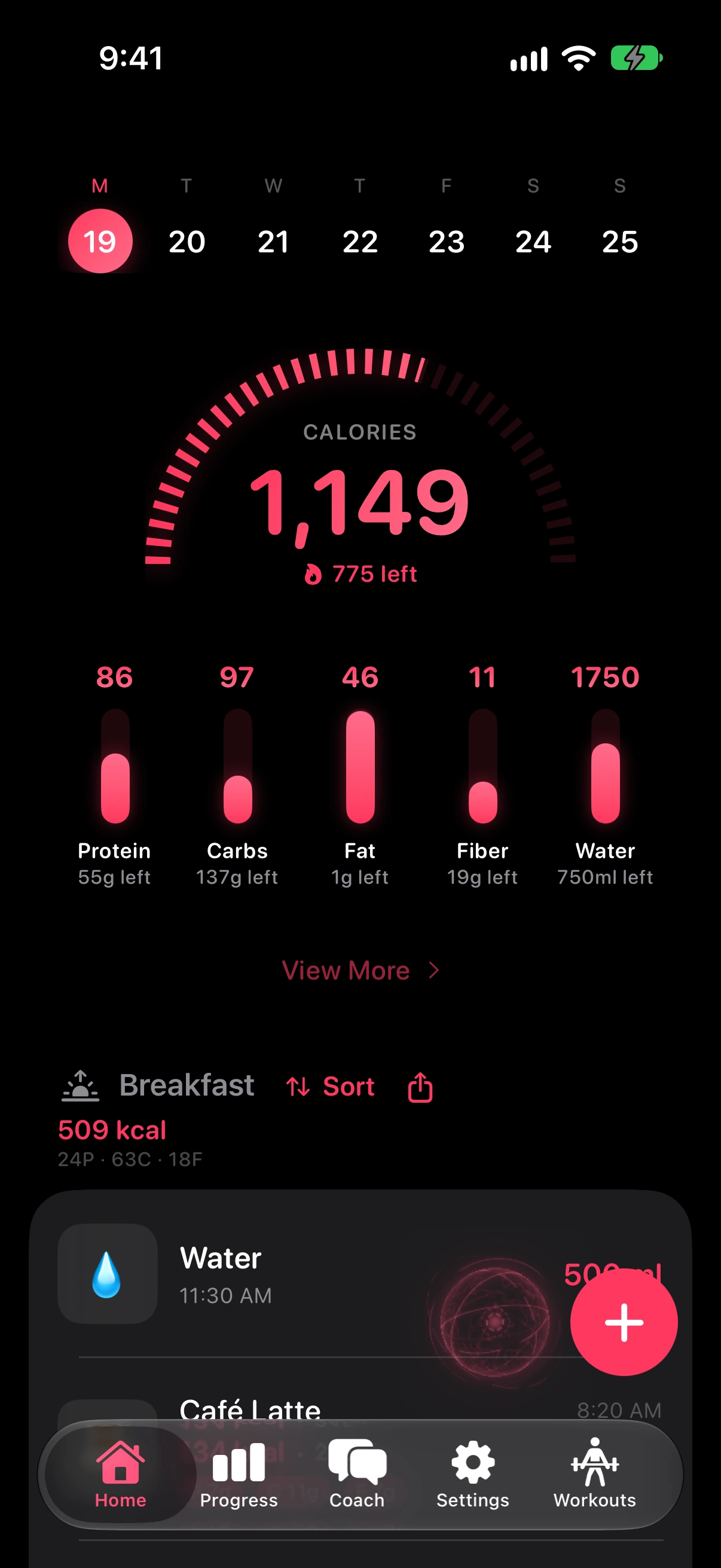
01 · Home · Dashboard Calorie ring, macro and water pillars, and one diary for meals, water and fasts. The orb next to + starts Live Voice. |
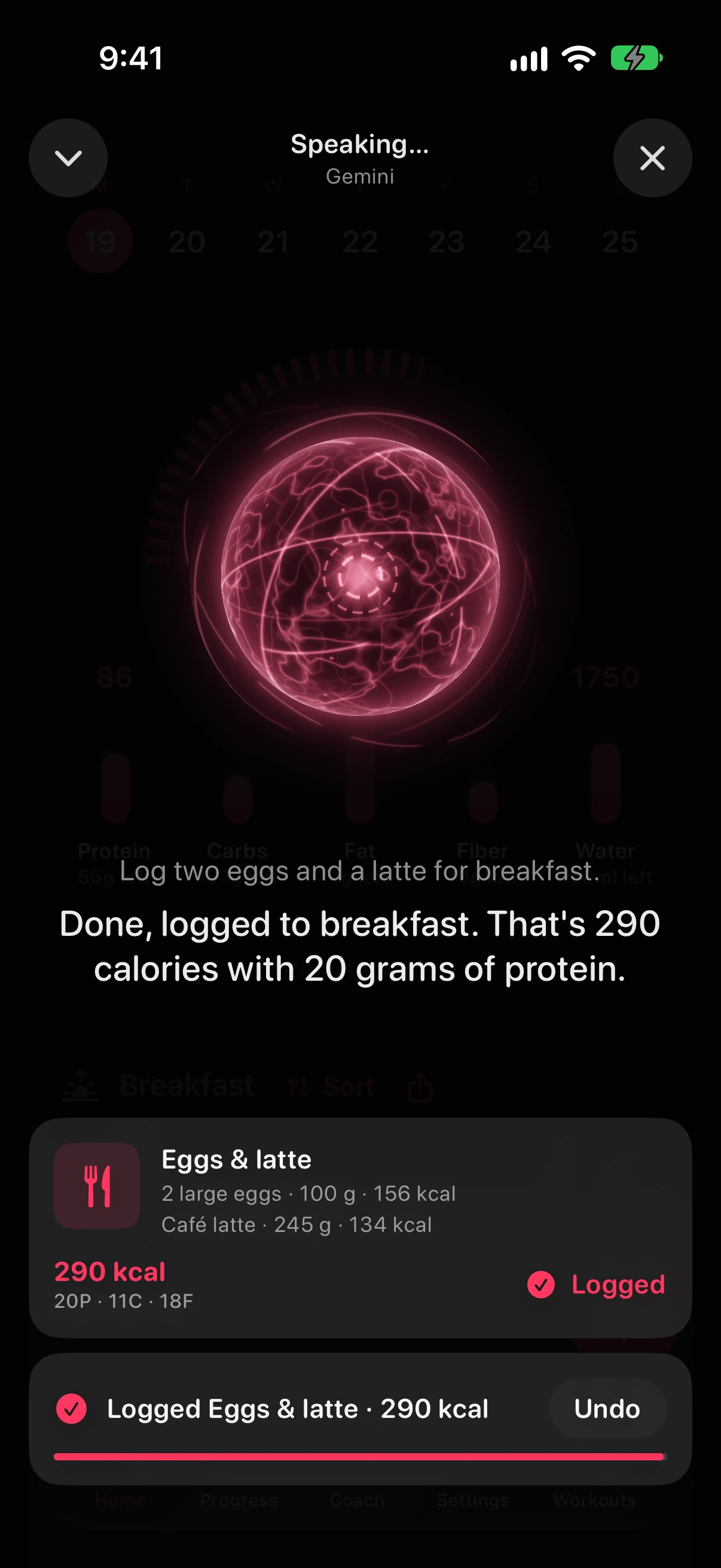
02 · Live Voice · Talk to Log Talk to log meals, scan food and barcodes, and ask about your progress, with an Undo for every change. Runs on Plus or Pro, or your own Gemini, OpenAI, xAI or Qwen key. |
 |