 Fusion
From rough idea to production code — automatically.
🏭 A software factory, run by a multi-agent orchestrator.
Describe what you want — a team of AI agents plans, builds, reviews, and ships it for you. Fusion is your software factory: an assembly line for code that runs across tasks, agents, missions, git, files, and worktrees, with any model, local or cloud.
runfusion.ai → · Docs · GitHub · npm · Discord
English · 简体中文 · 繁體中文 · Français · Español · 한국어 · Português (Brasil)





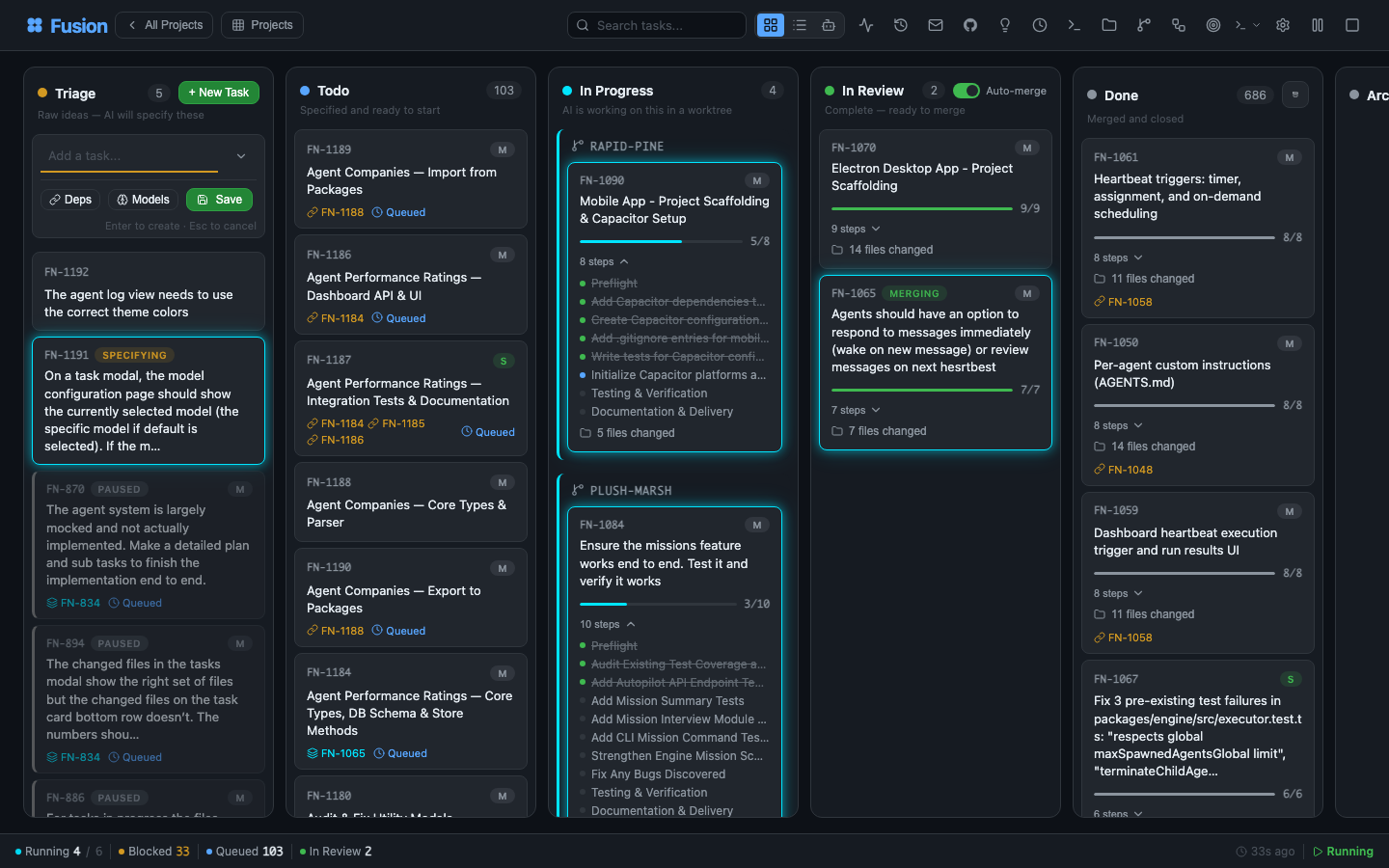
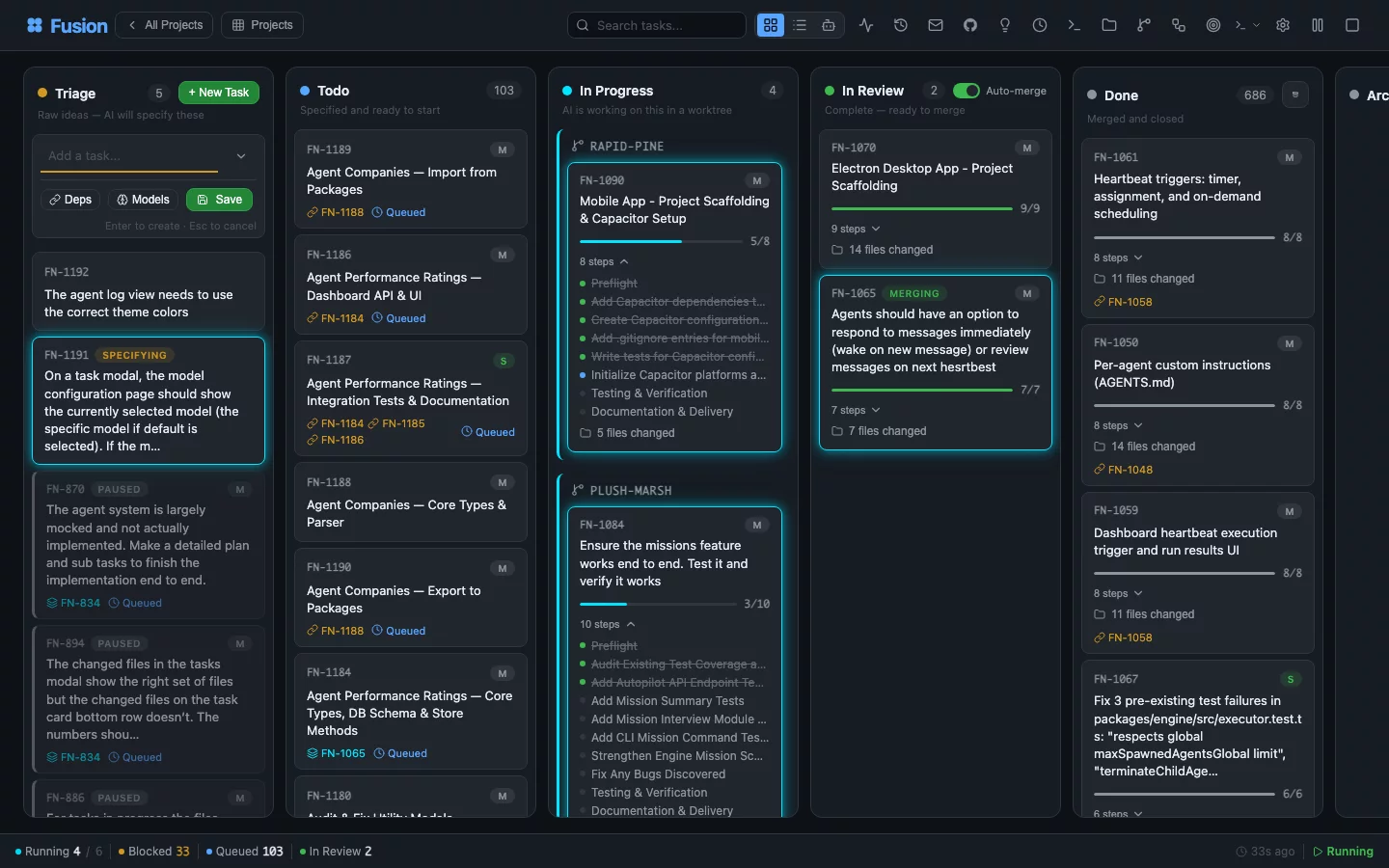
Your entire dev environment. On a single pane of glass.
Describe a task in plain language. A planning agent reads your project, understands context, and writes a full PROMPT.md plan — steps, file scope, acceptance criteria. Then Fusion plans, reviews, executes, and reviews again, in an isolated git worktree, with a human approval gate wherever you want one.
One board. Controlled from anywhere. Laptop, Mac mini, Linux server, cloud VM, phone — all connected.
Like Trello, but your tasks get specified, executed, and delivered by AI. Built on the great work of dustinbyrne/kb.
Quick start
Zero install, straight from npm:
npx runfusion.ai
That launches the dashboard. Subcommands forward through: npx runfusion.ai task create "fix X", npx runfusion.ai --help, etc. (Or verbosely: npx @runfusion/fusion dashboard.)
One-line installer (macOS & Linux — auto-picks Homebrew, falls back to npm):
curl -fsSL https://runfusion.ai/install.sh | sh
fusion dashboard
Homebrew (macOS & Linux):
brew install runfusion/fusion/fusion
fusion dashboard            # or: fn dashboard
Fully-qualified install auto-taps and, on Homebrew 6.0+, trusts only the Fusion formula. If you already ran brew tap runfusion/fusion and short-name install fails with “untrusted tap”, run brew trust --formula runfusion/fusion/fusion then brew install fusion.
npm global:
npm install -g @runfusion/fusion
fn dashboard                # or: fusion dashboard
From a clone (for development):
pnpm dev dashboard
Then click the Open: URL printed in the terminal. It embeds a bearer token
(http://localhost:4040/?token=fn_...) that the browser captures to
localStorage on first visit and reuses automatically thereafter. On the
server side, Fusion now persists the dashboard/daemon token in
~/.fusion/settings.json on first authenticated run and reuses it on later
starts unless you override it (--token, FUSION_DASHBOARD_TOKEN,
FUSION_DAEMON_TOKEN) or disable auth with --no-auth. See
CLI reference → fn dashboard → Authentication
for full precedence and reset/revocation options.
First-run setup
On first launch, Fusion opens the onboarding wizard with three guided steps:
- AI Setup — Use a simplified quick-start provider list (recommended providers plus any already-connected providers), then expand Advanced provider settings only if you need additional providers or setup details. You only need one provider to get started. Deprecated Google Gemini CLI / Antigravity provider entries are intentionally hidden; Google/Gemini API key, Google Generative AI, Vertex, and Cloud Code paths remain supported.
- GitHub (Optional) — Connect GitHub for issue import and PR management
- First Task — Create your first task or import from GitHub (if no project is active, onboarding first prompts you to register/select a project directory)
The wizard is dismissible and non-blocking — click Skip for now to use the dashboard immediately. Re-trigger it later from Settings → Authentication → Reopen onboarding guide.
Mobile
For Capacitor + PWA workflow, see MOBILE.md.
The flow
  ①  Describe          ②  Planning             ③  The board           ④  Isolated worktree
  ─────────────        ─────────────         ─────────────          ─────────────────────
  "Add dark mode   →   Agent writes    →   Plan → Review →    →   fusion/FN-123 branch
   toggle to           PROMPT.md           Execute → Review        concurrent, zero
   settings panel"     (steps, scope,      (per step, until        file conflicts
                       acceptance)         done)
See every step, before the merge
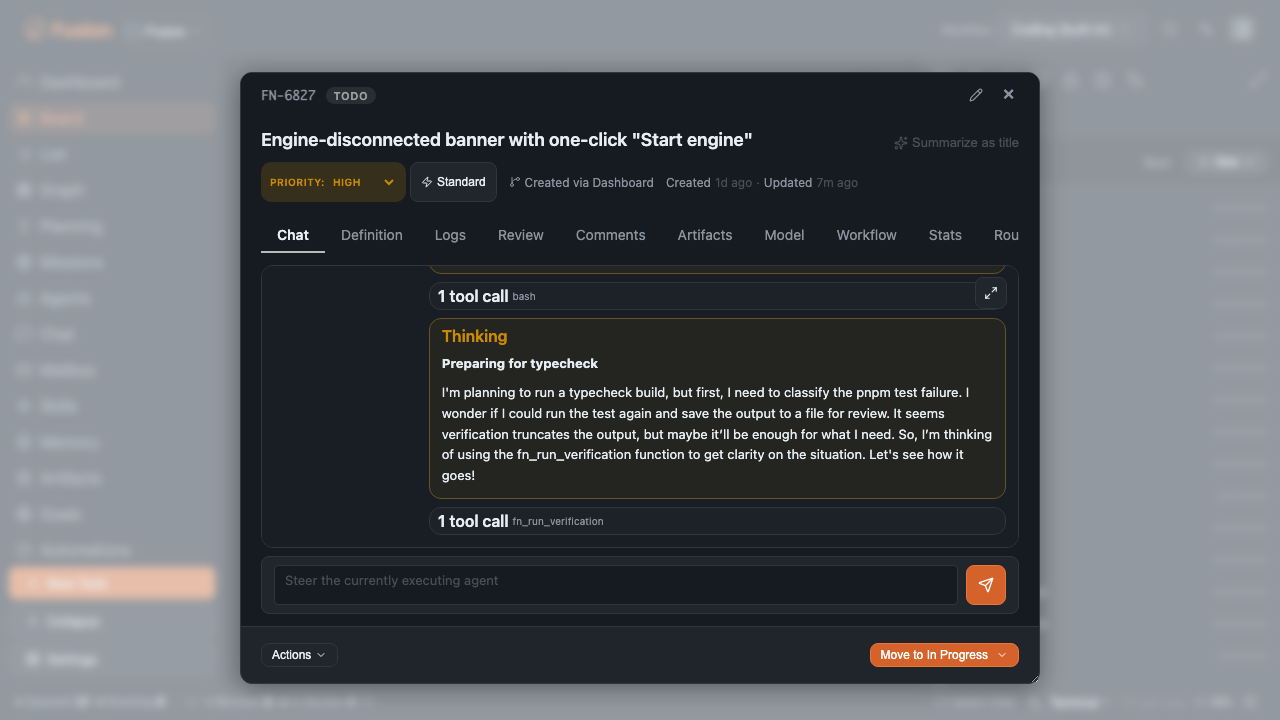
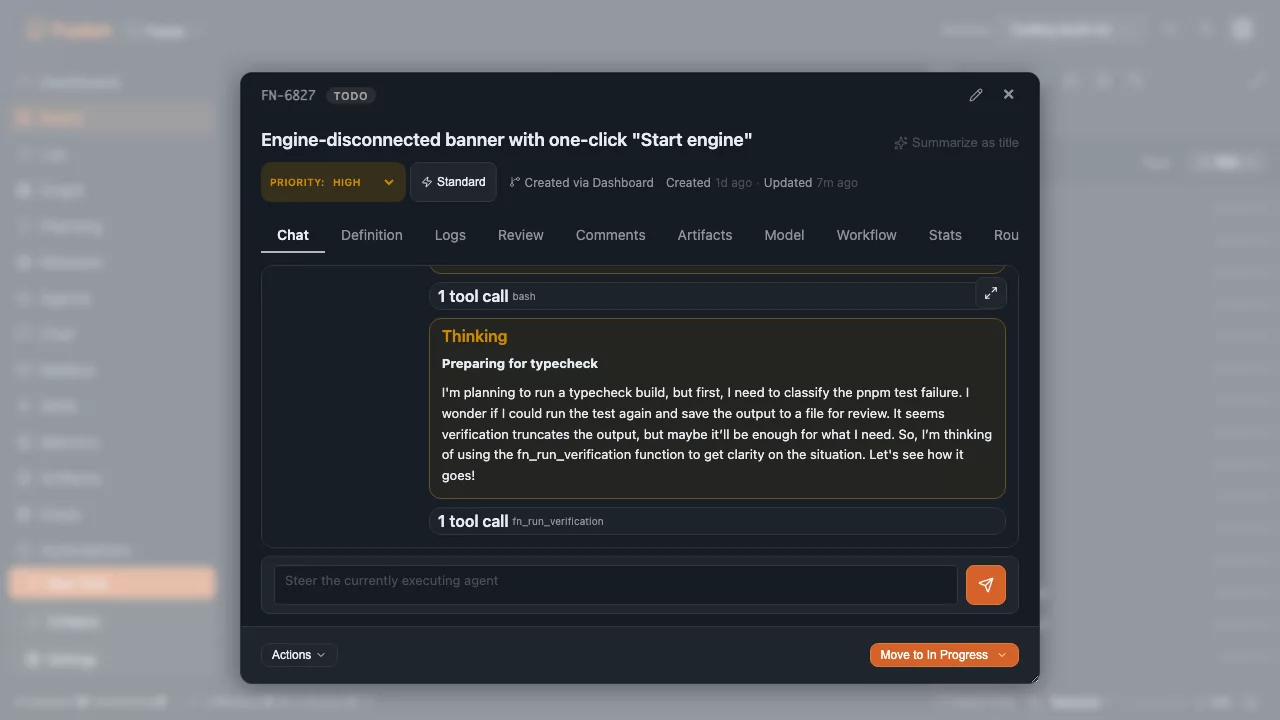
Every task shows its plan, its reviews, its diffs, and its file changes in real time. Jump into an active task and nudge direction, tighten constraints, pause, or re-prompt.
What makes it different
| 🧠 AI planning | Describe a task in plain language. Planning agents turn it into a PROMPT.md plan with steps, file scope, and acceptance criteria. |
| 🔁 Selectable workflows | Built-ins cover coding, quick fixes, review-heavy work, stepwise execution, plugin-gated Compound Engineering, and PR lifecycle fragments. Pick a workflow per task or author custom ones in the Workflow Editor. |
| 🛡️ Planner oversight | Per-task or per-workflow oversight level (off / observe / steer / autonomous) governs how closely a planner overseer watches and intervenes — merge/PR and destructive actions always require explicit human confirmation. See Settings Reference and Dashboard Guide. |
| 🌳 Worktree isolation | Each task runs in its own branch and worktree (fusion/{task-id}). Parallel tasks. Zero conflicts. Optional worktrunk delegation via worktrunk.enabled (see WorktreeBackend abstraction). |
| 🗄️ PostgreSQL by default | Fusion uses zero-config embedded PostgreSQL for local runtime metadata. Legacy SQLite files are one-time migration inputs only; use a shared external database for multi-project and multi-node setups. (Storage) |
| ⚡ Smart merge controls | Passing every gate? Fusion squash-merges and moves on. Opt into manual approval anywhere, inherit the live global auto-merge default, or set explicit per-task auto/manual overrides. |
| 🛰️ Multi-node mesh | Laptop, Mac mini, Linux server, cloud VM, phone — all synced. Desktop, mobile, web. |
| 🧩 Any model | Anthropic, OpenAI, Ollama, Google Generative AI, Z.ai, Kimi K3, local runtimes, and user-defined custom providers. Local and cloud coexist, with workflow model/fallback lanes configurable per project. |
| 🏢 Agent companies | Import pre-built teams — 440+ agents across 16 companies — and run them autonomously for weeks. |
| 📬 Inter-agent messaging | Built-in mailbox between agents. Delegate, clarify, coordinate; engineer-role agents can opt into backlog auto-claim when you want implementation help beyond executor-only pickup. |
| 🗨️ Agent chat | Direct chat, task chat that proactively narrates step progress, failures, and review outcomes, attachments, in-chat question cards, resumable streams, and experimental multi-agent Chat Rooms where mentioned members respond directly and ambient members can join up to a cap. (Chat docs) |
| 🗺️ Missions | Hierarchical planning (Mission → Milestone → Slice → Feature → Task) with autopilot and validation contracts. |
| 🔬 Research | Bounded research runs with web search, GitHub, local docs, and LLM synthesis (plus runtime builtin WebSearch/WebFetch support in planning + synthesis flows when available). Turn findings into tasks. (Docs) |
| 🧪 Self-improvement | Agents reflect on their own output and update their prompts as they learn your codebase. |
| 🔓 Open source. MIT. | No vendor lock-in. Run it on your own hardware. Shipping weekly. |
See it in action
The newest surfaces in Fusion, at a glance — the live board, your agent team, mission control, visual workflows, agent chat, multi-agent rooms, and inter-agent mail.
📋 The board & your agent team — live, from a real fleet

Every task, every column, every step — live. Cards carry GitHub links, step counts, review levels, and promote/move/archive actions. Switch to the Graph view to see task dependencies as an interactive node graph:
Board — kanban columns |
 Graph — dependency map |
Here is the same fleet re-skinned into the Ember theme (dark graphite with an orange accent), alongside the Agents roster:
 Board — Ember |
 Agents — Tokyo Night |
Import a team and every agent shows up here — role, reports-to chain, heartbeat, and token share. Each agent card's heartbeat dropdown shows Disabled when scheduling is persisted off; choose Disabled to pause heartbeats while retaining its cadence, or select an interval to re-enable them. The Agents roster in Ember:

🛰️ Command Center — mission control for your agent fleet

One screen for everything your agents are doing. Tune live scheduler capacity, watch token spend by model in real time, and prove the value with hard numbers. The Overview tab opens with live gauges and charts:

Every tab is a different lens on the same live fleet:
 Tokens — spend by model, cached vs. input vs. output, over time. |
 Productivity — outcomes, duration percentiles, language mix. |
 Team — agent org chart and token share per agent. |
 Activity — task throughput and event timelines. |
 Signals — anomaly detection and fleet health. |
More — Tools · Ecosystem · GitHub · System · Reliability. |
Tokens · Tools · Activity · Productivity · Team · Ecosystem · GitHub · Signals · System · Reliability · Mission Control — every tab is a different lens on the same live fleet.
The same fleet, your way — Command Center (and the whole dashboard) re-skins live across 70+ color themes, including Cobalt, Clay, and Moss. Here it is in Shadcn Light, Shadcn Dark Gray, and Ember:
 Shadcn Light |
 Shadcn Dark Gray |
 Ember |
A dozen light themes & a dozen dark themes (click to expand)


🔁 Selectable workflows, authored visually

A task's journey from idea to merge is a workflow — and it's yours to choose and shape. Pick a built-in (Coding, Quick fix, Review-heavy, Stepwise, PR lifecycle, Compound engineering, and more), inspect its graph, then duplicate and customize columns, gates, model lanes, and review policy in the visual Workflow Editor. No engine fork required.
Here's the Stepwise coding graph — plan, execute, and review every step before the next — explored node-by-node in Shadcn Light, Dark Gray, and Ember:
 Shadcn Light |
 Shadcn Dark Gray |
 Ember |
🗨️ Agent chat — talk to your agents, mid-flight

Direct chat and per-task chat with any agent, on any model. Ask why a task failed, steer an approach, drop attachments, answer in-chat question cards, and resume streams where you left off — full markdown and code rendering throughout.