HelioFITS Peek
Know what you're looking at before you open a thing.
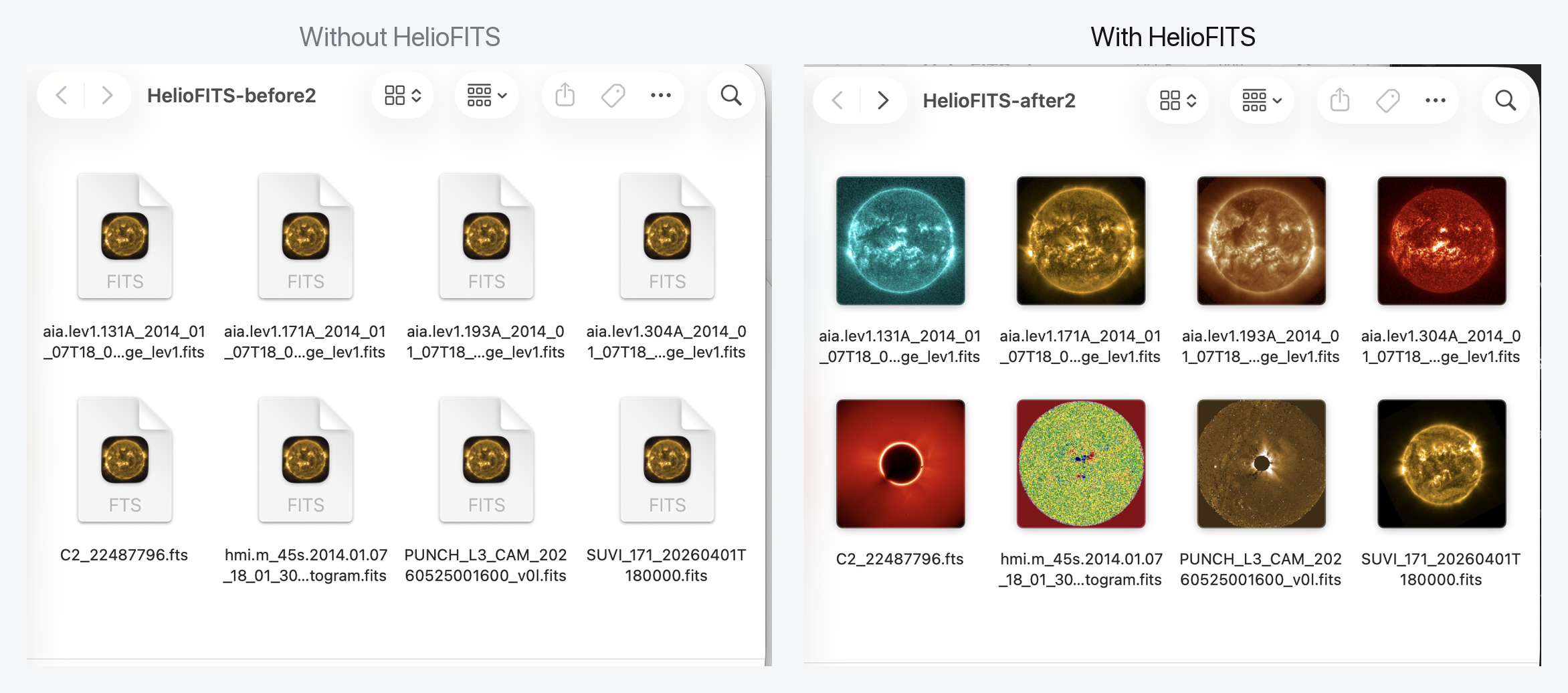
Solar FITS files, previewable in Finder: in the right colors, with real coordinates.
Get it free on the Mac App Store →
· macOS 14.5+ (universal — Apple Silicon & Intel) · Free & open source · No network access
HelioFITS previews solar FITS files in Finder and Quick Look. HelioFITS Studio is the full desktop application for working with coronagraph and wide-field solar imagery. Looking for the desktop application? See HelioFITS Studio.
Do you have a hundred directories of FITS files and no way to preview them without launching a heavy application for each one? On the left above, every file is the same grey icon — you can't tell an EUV frame from a magnetogram without opening each one. On the right is the same folder with HelioFITS installed. That's the whole idea.
HelioFITS Peek teaches Finder to read solar FITS files. Once it's installed, your
.fits files stop being rows of identical grey document icons and become what
they actually are — the Sun, rendered in the correct instrument colormap. Press
the spacebar on any of them and you get an interactive preview with pixel values,
helioprojective coordinates, region statistics, and multi-HDU blink comparison,
without opening anything.
It's built by a solar physicist, for the archive already sitting on your disk. It recognizes SDO/AIA, HMI magnetograms, LASCO, SUVI, EIT, STEREO, PUNCH, K‑Cor, TRACE, and XRT straight from the header — nothing to configure. There is no account, no telemetry, and no network access of any kind.
Three ways it makes Finder understand FITS
HelioFITS is three small system extensions plus a viewer. Each lights up a different part of macOS, and they all work together — no app window required.
1 · Thumbnails, on every icon
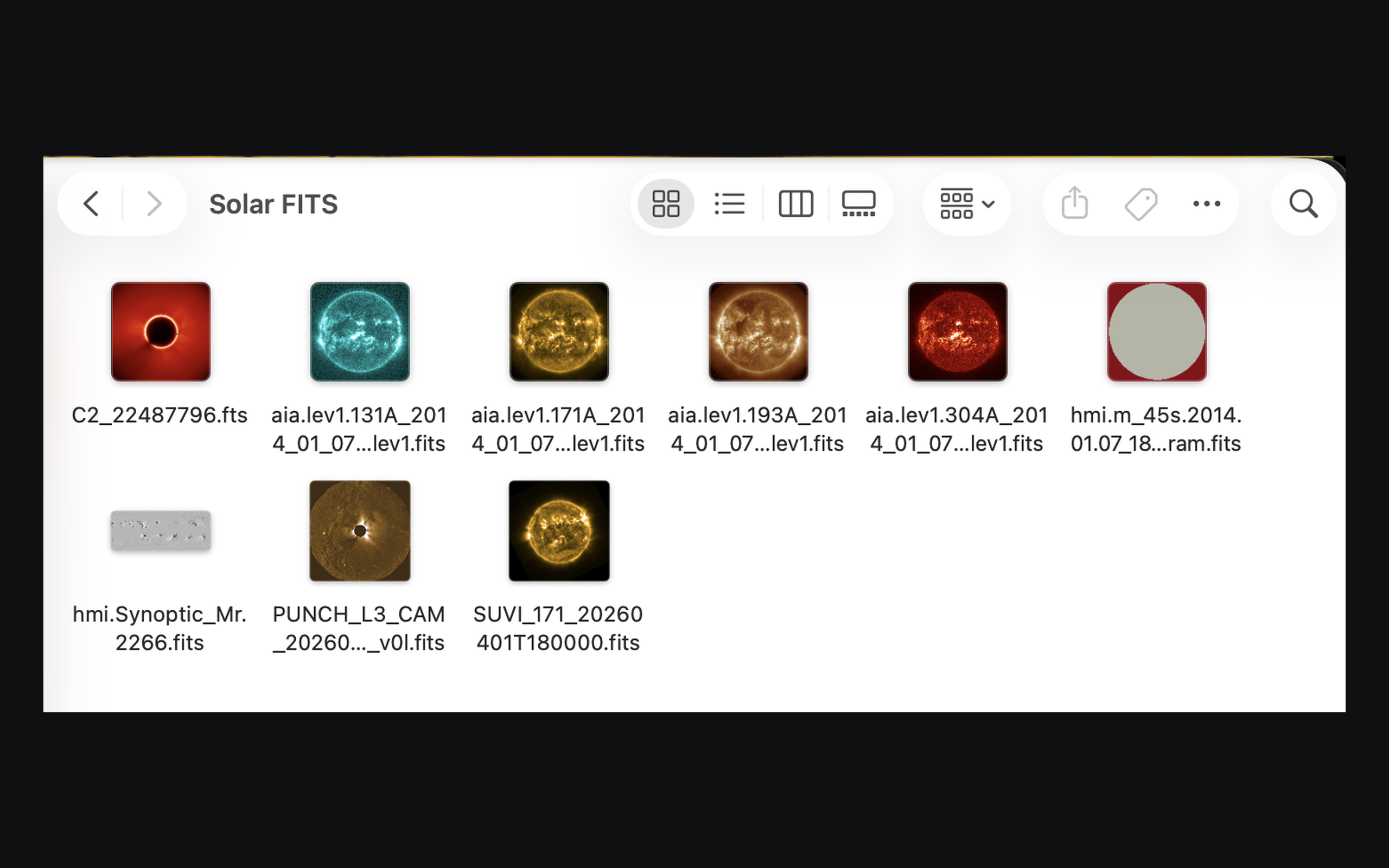
The thumbnail extension renders each FITS file's default image in the colormap its header calls for — AIA gold, a diverging red/blue magnetogram, a LASCO coronagraph, a PUNCH heliospheric mosaic. Icon view, gallery view, the icons in list and column views: all of them show the real image. A directory of solar data becomes browsable the way a folder of photos is.
2 · Interactive previews, from the spacebar
 |
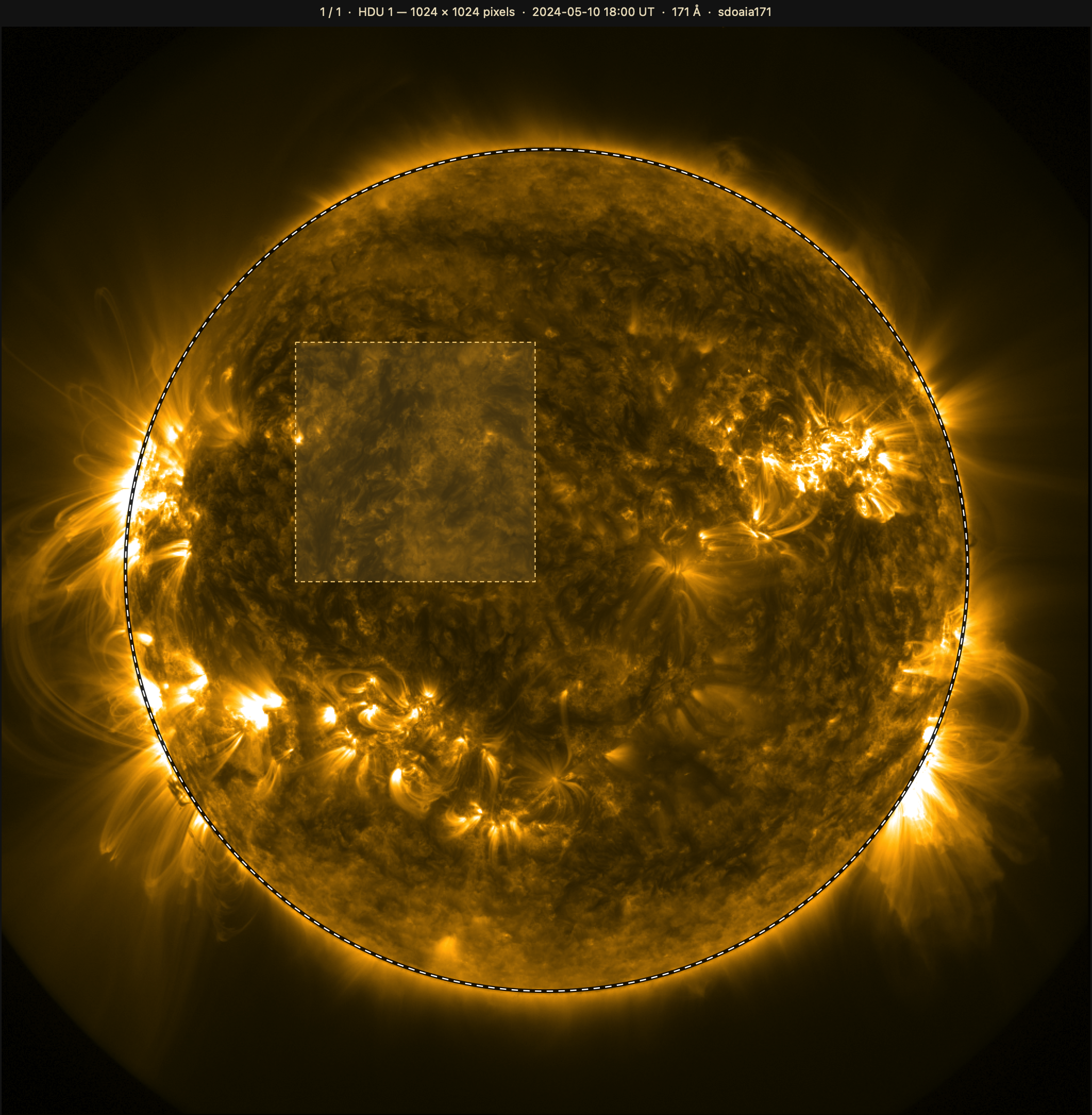 |
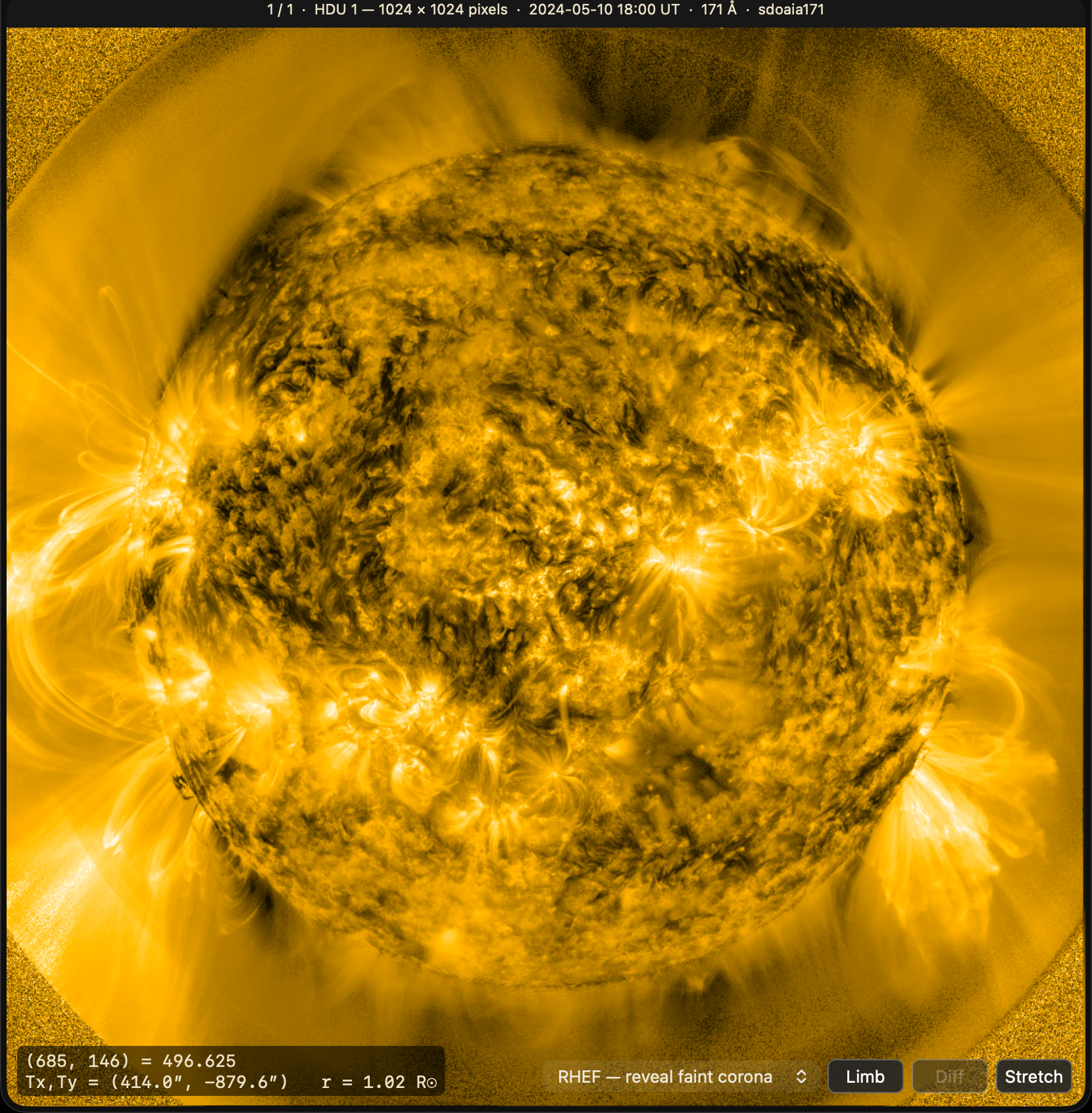
Select a .fits file and press the spacebar — the standard macOS Quick Look —
and HelioFITS draws the image live. This is not a static picture; it's fully
interactive in the spacebar panel and gallery view. (Finder's narrow column pane
gives you scroll‑to‑blink; press space there for the full controls.)
- Hover any pixel to read its value together with its helioprojective coordinate — Tx, Ty, the arcsecond offset east/west and north/south from the center of the Sun's disk — and its distance from disk center in solar radii (R☉).
- Drag a box for region statistics — mean, median, σ, sum, min, max — computed at full native resolution, with a live histogram.
- Scroll (or press ↑/↓) to blink between HDUs (a FITS file's stacked image extensions), pixel‑registered, to compare processing levels or filters.
- Toggle the solar limb, a running difference between HDUs, a live stretch (percentile clip, gamma, log), or the RHEF filter — a radial histogram equalization (Gilly & Cranmer 2025) that flattens the steep coronal falloff to reveal faint off‑limb structure at every height. None of it touches the file.
- Pick MGN (multi‑scale Gaussian normalization, Morgan & Druckmüller 2014, with
sunkit‑image's default widths) or WOW (wavelet whitening after Auchère et al.
2023, in HelioFITS's own reading; not checked against the authors'
watroopackage) to bring out structure at every scale. Swipe puts the unfiltered image left of a divider and the filter right of it; drag it, or press ⌥←/⌥→. Every filter runs on a grid of at most 1024 px a side; MGN and WOW divide their widths by that decimation, so the preview approximates the full‑resolution filter. Filter output is a visualization, not a calibrated radiance; the readout and the statistics always report the file's raw values. Copy Python reproduces each filter. - ⌥‑scroll (or ⌘ +/−/0) to zoom.
The coordinate math is computed the same way astropy and sunpy do it, and verified against astropy pixel‑for‑pixel in the test suite — so you can trust the numbers. (For the experts: real spherical deprojection for TAN/ARC/SIN/CAR, honoring CUNIT, the PC/CD matrices, and CROTA2.) When it meets a projection it can't handle, it shows no coordinate rather than a plausible wrong one.
3 · Metadata, in Get Info and Spotlight
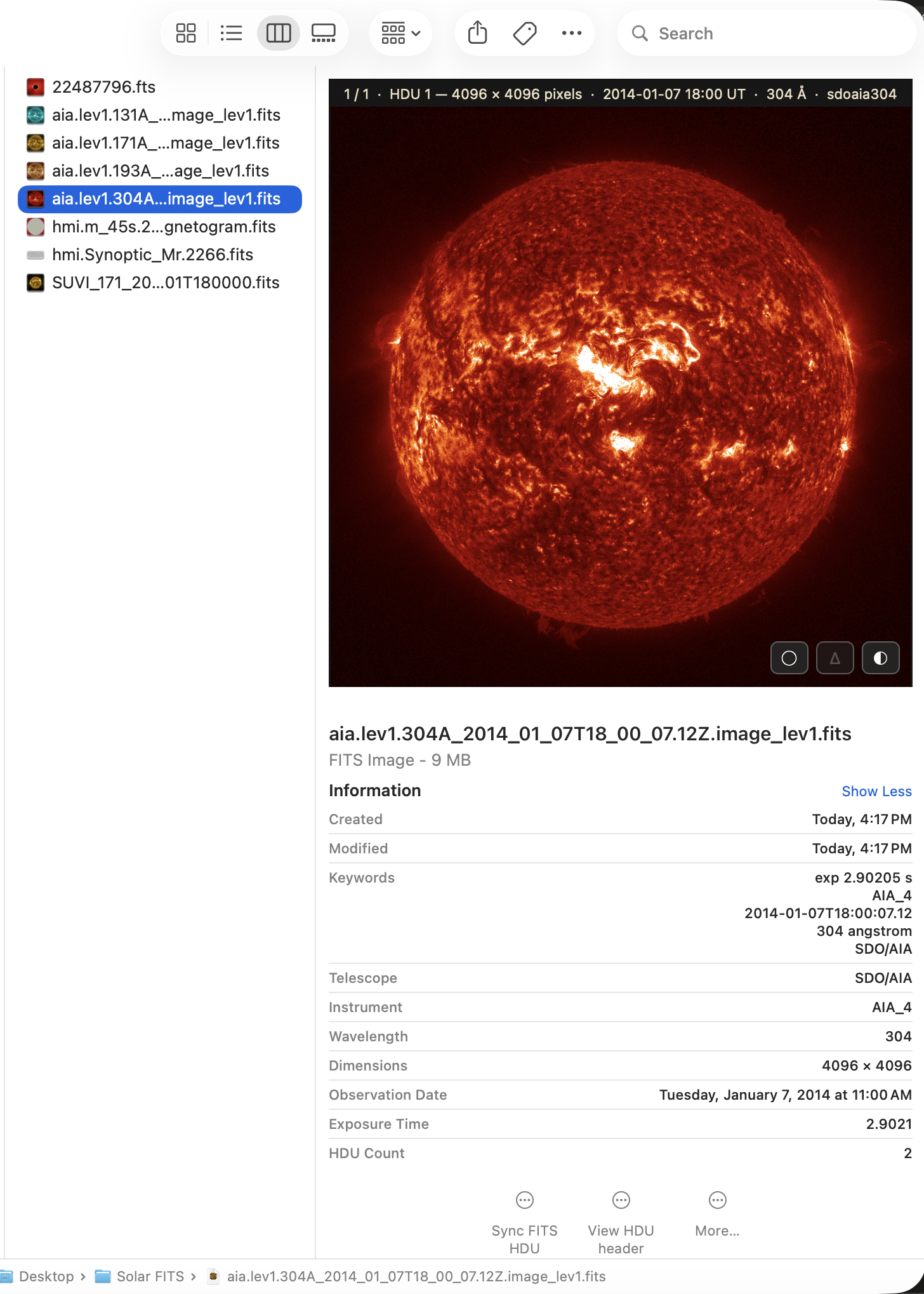
The Spotlight importer pulls the header fields you actually search on — telescope, instrument, wavelength, observation date, exposure, dimensions, HDU count — into Finder's Get Info panel and makes them Spotlight‑searchable. You can find every 171 Å frame on your disk with a query.
And a viewer, when you want more
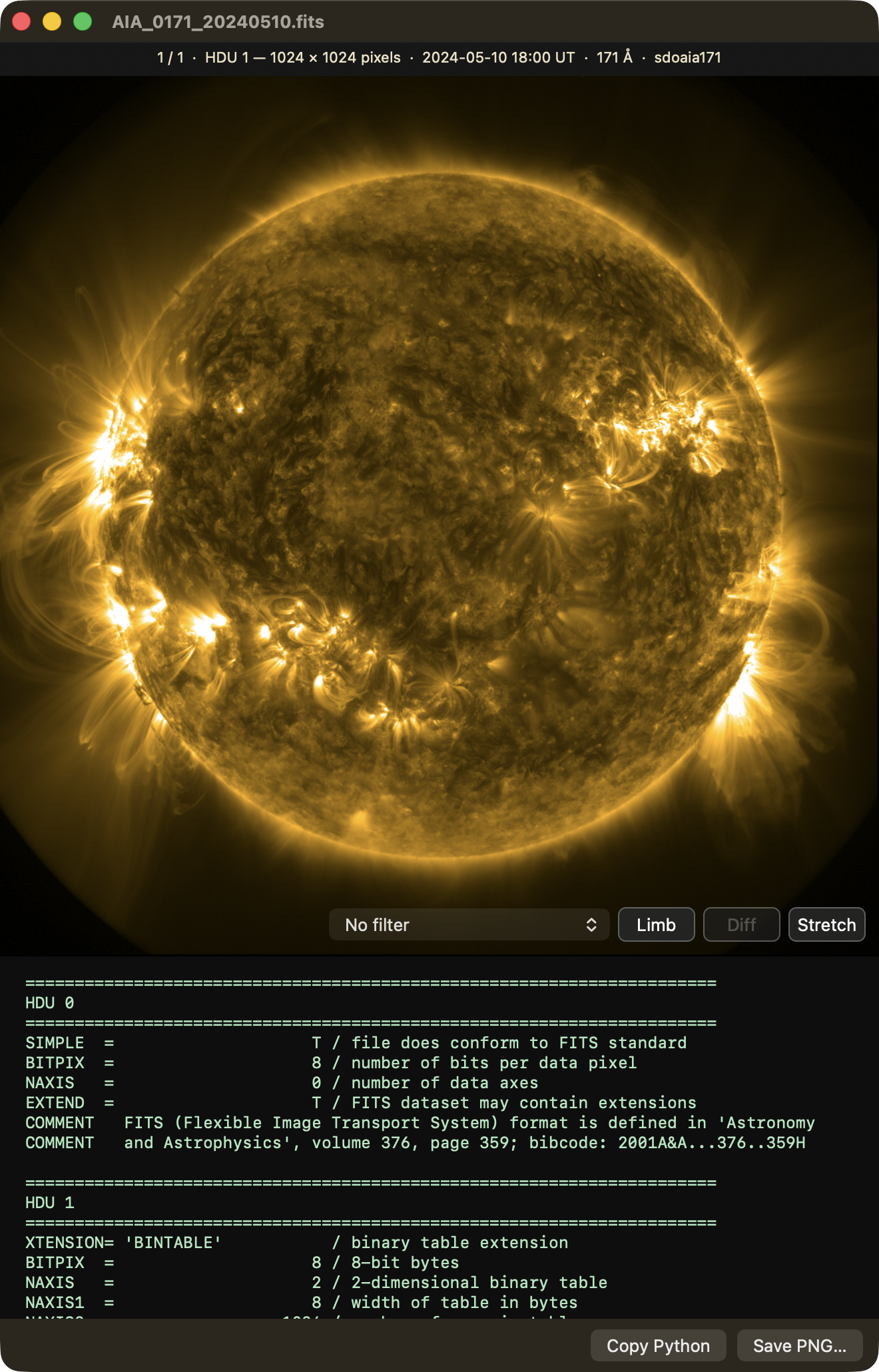
Double‑click a FITS file to open the built‑in viewer: the interactive image on top, the complete FITS header beneath. From here you can export any HDU to PNG for a slide or a paper, or copy a ready‑to‑run sunpy snippet that loads exactly the HDU you're looking at — a one‑click bridge back to Python.
Play runs a file's layers as a looping movie. Open a folder (File ▸ Open…) and its FITS files become one: frames in DATE‑OBS order, a scrubber, a frame rate, and Diff as a running difference between neighbouring files, taken at full resolution. Nothing plays until you press Play.
Install
Runs on any Mac — Apple Silicon or Intel — with macOS 14.5 or later. It's a universal binary.
Get it on the Mac App Store →
That's the whole install: it's free, it updates itself, and macOS registers the
Finder extensions for you. Then press the spacebar on any .fits file. (If a
thumbnail still looks generic at first, relaunch Finder or log out and back in —
macOS caches icons.)
If you can't use the App Store
Some managed and institutional Macs block it. The notarized build is also attached
to each GitHub release:
download the zip, unzip it, drag HelioFITS.app into /Applications, and launch it
once so the extensions register. It opens without security warnings, but it does
not self-update — watch the
releases feed for new
versions. The App Store is the supported channel; this is a fallback.
Getting FITS files to try
The repo ships no data. Any solar .fits file works — free sources include
SDO data, the
Virtual Solar Observatory,
PUNCH, and
sunpy's Fido.
.fz (fpack) and Rice‑compressed files work natively.
Settings
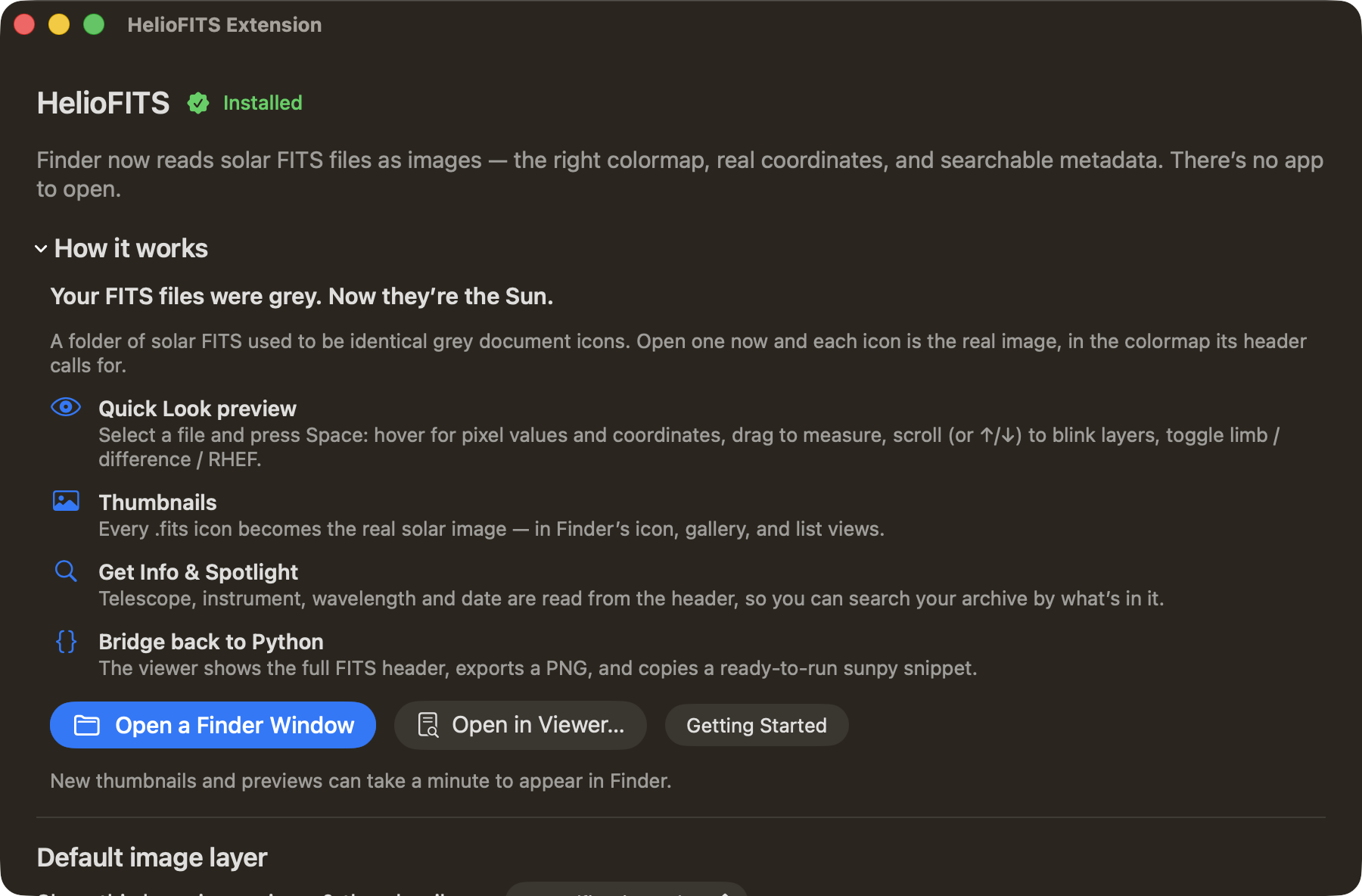
Open HelioFITS ▸ Settings… (⌘,). A FITS file can stack several images as
separate Header Data Units (HDUs) — also called extensions, each labelled by
its EXTNAME (say, a raw frame, a processed layer, and an uncertainty map).
HelioFITS shows the first image HDU by default; the settings panel lets you change
that globally, or pin a folder to a specific HDU so an entire directory previews
the same layer for apples‑to‑apples comparison.
Supported instruments
AIA · HMI (line‑of‑sight magnetograms and synoptic B_r charts) · LASCO C2/C3 ·
SUVI · EIT · STEREO/SECCHI (EUVI, COR, HI) · PUNCH (including its polarized Stokes
cubes — a stack of polarization measurements in one file) · K‑Cor · TRACE · XRT.
Instrument is recognized from TELESCOP/INSTRUME/DETECTOR; anything
unrecognized falls back to a sensible grayscale stretch. Missing one?
Open an issue — colormaps are
easy to add.
Accessibility
The viewer window is keyboard‑ and VoiceOver‑friendly: the HDU picker and Copy/Save buttons are labeled and reachable, the FITS header is a selectable, VoiceOver‑navigable, ⌘F‑searchable text pane, and in the image the ↑/↓ arrows blink between layers, ⌘ +/−/0 zoom, and ⌘C copies the pixel readout. Toolbar toggles announce their name and on/off state. Work still to do: a keyboard cursor for the hover readout and drag‑box statistics (today those are mouse‑driven), and honoring the system Larger‑Text setting. Feedback from assistive‑technology users is very welcome via the issue tracker.
Reporting bugs
Open an issue: https://github.com/GillySpace27/HelioFITS/issues. Attaching (or linking) a FITS file that reproduces the problem makes fixes much faster. If a readout ever disagrees with what sunpy tells you, I especially want to know.
Building from source
git clone https://github.com/GillySpace27/HelioFITS.git
cd HelioFITS
xcodebuild -project HelioFITS.xcodeproj -scheme HelioFITS -configuration Release \
  -destination 'platform=macOS,arch=arm64' build
The app is universal (Apple Silicon and Intel): the vendored CFITSIO library in
HelioFITSCore/CFITSIO.xcframework carries both Mac slices, and
lipo -archs HelioFITSCore/CFITSIO.xcframework/macos-arm64_x86_64/libcfitsio.a
prints x86_64 arm64. The core tests (the WCS math pinned against astropy ground
truth, colormaps, cubes, RHEF, the readout) live under
HelioFITSCore/Tests/HelioFITSCoreTests/ and run headless with
swift test --package-path HelioFITSCore, without launching the app. Tests that need
the app (canvas, toolbar, stretch panel, header reader) live under HelioFITSTests/;
run them with the scheme's Test action, then
./lsclean.sh. ship.sh documents the notarized release flow and RELEASING.md
the full two-channel process. Contributors and coding agents start at CLAUDE.md;
bash scripts/check.sh runs the fast static checks.
iPhone and iPad (in development)
HelioFITS-iOS/ holds an iPhone and iPad app that shares HelioFITSCore with the
Mac: thumbnails and Quick Look previews in the Files app, and an interactive
viewer. It is not on the App Store yet, keeps its own version number, and has
been tested in the Simulator only. Build it with:
xcodebuild -project HelioFITS-iOS/HelioFITS-iOS.xcodeproj -scheme HelioFITS \
  -destination 'generic/platform=iOS Simulator' CODE_SIGNING_ALLOWED=NO build
Command line
The renderer behind the thumbnails and previews is also a small command-line tool, for scripts and SSH sessions. It is built from source only; it is not part of the App Store app or the GitHub zip.
swift build -c release --package-path HelioFITSCore
HelioFITSCore/.build/release/heliofits --header sun.fits
HelioFITSCore/.build/release/heliofits --info sun.fits
HelioFITSCore/.build/release/heliofits --export sun.fits --hdu 1 --max-side 2048 --out sun.png
--hdu defaults to the first image HDU (-1; -2 is the last), --plane
picks a plane of a data cube, and --max-side caps the longest side of the PNG.
The tool makes no network calls. Exit status is 0 on success, 1 when the file
cannot be read or rendered, and 2 on a usage error.
Privacy
HelioFITS collects nothing and has no network entitlement — the macOS sandbox denies it all internet access, so nothing can leave your Mac. No accounts, no analytics, no telemetry. See PRIVACY.md.
Citing
If HelioFITS Peek helps your research, please cite it. Every release is archived on Zenodo. The concept DOI, https://doi.org/10.5281/zenodo.23749496, always resolves to the newest version. Version 1.5.0 is https://doi.org/10.5281/zenodo.23749497. CITATION.cff has the details, and GitHub's "Cite this repository" button turns it into APA or BibTeX.
@software{gilly_heliofits_peek,
  author    = {Gilly, Chris R.},
  title     = {{HelioFITS Peek}},
  year      = {2026},
  publisher = {Zenodo},
  doi       = {10.5281/zenodo.23749496},
  url       = {https://doi.org/10.5281/zenodo.23749496}
}
If you used the RHEF filter, please also cite Gilly & Cranmer (2025), Solar Physics 300, 174, https://doi.org/10.1007/s11207-025-02578-x.
HelioFITS Peek is part of the HelioFITS suite, which has its own DOI: https://doi.org/10.5281/zenodo.23524598.
License & credits
BSD 2‑Clause. Vendors CFITSIO by William Pence (NASA HEASARC) — see its license. Instrument colormaps are the standard sunpy color tables.
Built by Dr. Chris "Gilly" Gilbert, heliophysics research scientist at NorthWest Research Associates · gilly.space.