A free, local CRM for solopreneurs. Your pipeline, contacts and conversations live as Markdown files in git on your own Mac, with a web app for you and a CLI and MCP server for your AI agent. No account, no cloud, Apache 2.0.
Install it with your AI coding agent. Paste this into Claude Code, Codex, Cursor or any other:
Read https://raw.githubusercontent.com/Hermit-CRM/hermit-crm/main/INSTALL.md and set up Hermit CRM for me.
Prefer to type the commands yourself? See Install.
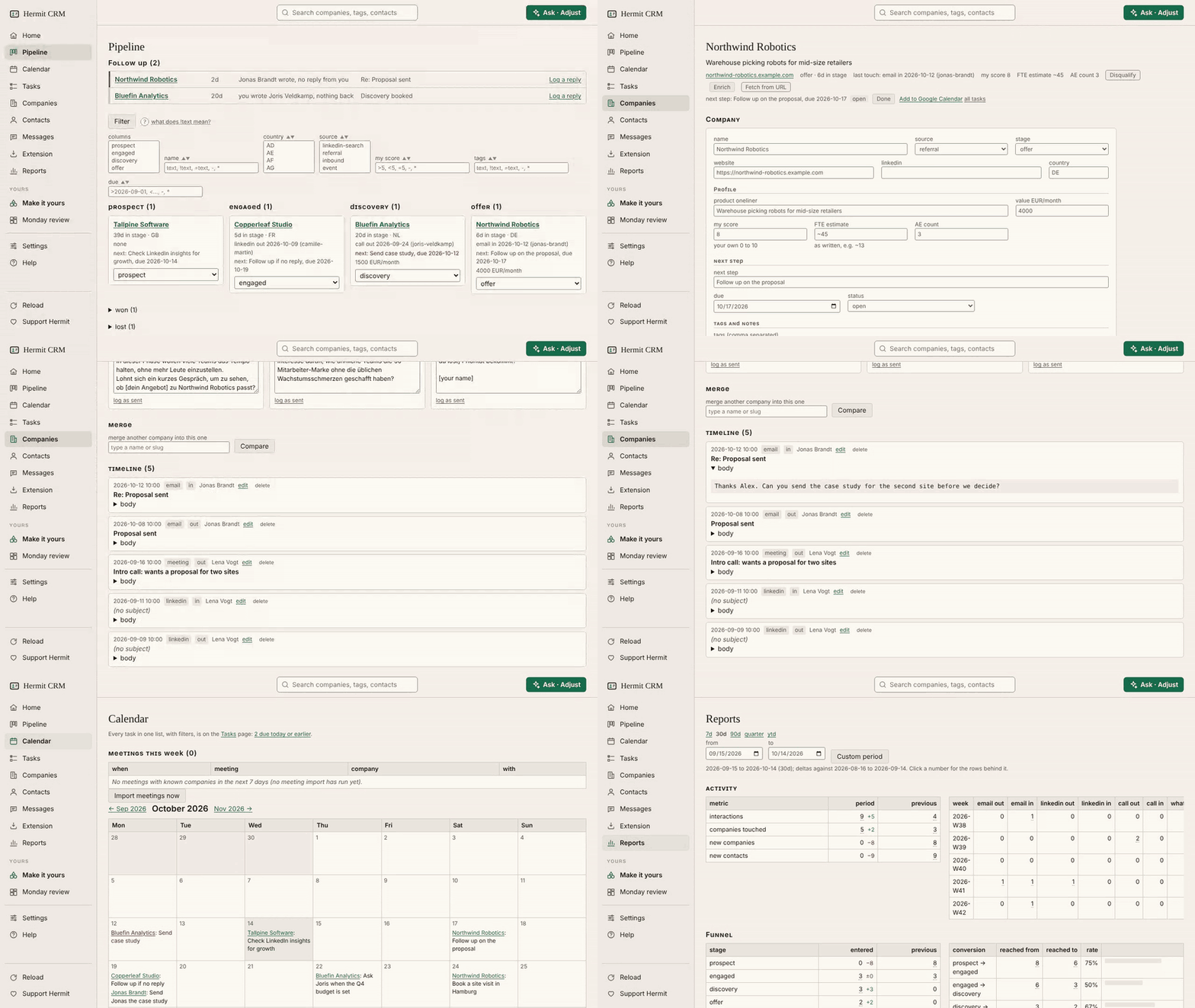
| Pipeline | A company | Calendar |
|---|---|---|
 |
 |
 |
Alpha software. Hermit CRM is incomplete, it changes without notice, and it has bugs nobody has found yet. It is free and comes with no warranty of any kind — nobody is on the hook if it loses your data. Keep your own backups, and check that they restore. Read DISCLAIMER.md before you put real work in it.
Your CRM is a folder of Markdown files in git. Every company, contact and
conversation is a small text file you can read, grep, edit and diff; every
change the app makes is a commit, so the previous version of a file stays in
git log and most mistakes are one git revert away. A local web app gives
you a pipeline board, a calendar of next steps, message drafts and reports,
and because the data is plain files with a small CLI, AI agents (Claude Code,
Codex and others) can read and update your pipeline as easily as you can.
Hermit CRM is built for one person: a founder, a freelancer, someone doing
their own sales.
How it compares
A modest, factual comparison (checked September 2026; corrections welcome):
| Hermit CRM | HubSpot Free | Twenty | Obsidian CRM plugin | |
|---|---|---|---|---|
| Data as Markdown files | Yes | No | No (Postgres) | Yes |
| Git history of every change | Yes, one commit per write | No (activity log) | No | Only with a git plugin |
| Web app | Yes, local | Yes, hosted | Yes | No (inside Obsidian) |
| Email capture | BCC/forward via Gmail IMAP | Yes (BCC, inbox sync) | Yes (Gmail/Outlook sync) | Depends on the plugin |
| AI-agent friendly | Plain files, CLI, AGENTS.md | Via API | Via API | Plain files |
| Self-hosted without Docker | Yes (git clone + pip) |
No (SaaS only) | No (Docker Compose) | n/a (desktop app) |
| Multi-user teams | No | Yes | Yes | No |
If you need a team CRM, use one of the others. If you want your pipeline in files you own, Hermit CRM is for you.
Install
With an AI assistant. Paste the line at the top of this page into Claude Code, Codex, Cursor or another AI coding tool, or unpack the download, open the folder in one and send it one message:
Read INSTALL.md and set up Hermit CRM for me.
It checks the machine, installs the command, makes your data folder, asks your name and sending addresses, and starts the app. It will not ask you for an app password or a calendar URL: those you type into the Settings page yourself, so they stay on your machine. INSTALL.md is the script it follows.
Hermit CRM runs on macOS. Linux works but is less tested.
By hand. You need Python 3.11 or newer and git:
git clone https://github.com/Hermit-CRM/hermit-crm.git && cd hermit-crm
python3 -m venv .venv && source .venv/bin/activate
pip install .
hermitcrm init ~/crm                                # a new data folder; asks 3 questions
hermitcrm --data ~/crm serve                        # http://127.0.0.1:8765
hermitcrm --data ~/crm schedule install --serve     # daily sync, web app always on
On Debian and Ubuntu, python3 -m venv needs the python3-venv package, and
Ubuntu 22.04's Python (3.10) is too old; uv
(uv tool install . from the clone) brings its own Python and avoids both.
A download is hermitcrm-<version>.tar.gz and unpacks to hermitcrm-<version>/,
with a .sha256 beside it. Check it before you unpack:
shasum -a 256 -c hermitcrm-<version>.tar.gz.sha256   # macOS
sha256sum -c hermitcrm-<version>.tar.gz.sha256       # Linux
Hermit CRM is also on PyPI: uv tool install hermitcrm (or pipx install hermitcrm) replaces the first three lines and gives you a hermitcrm command
that works without activating the virtualenv.
hermitcrm init asks three questions: you (your name and sending addresses),
BCC capture (the tracking address and its app password) and an online
copy (an optional private git remote; local backups start with
schedule install or Settings > Backup). Skip any of them; rerun with hermitcrm setup or open the
Settings page (/settings) in the web app. Add --demo for thirteen fictional companies,
--no-setup to skip the questions. Instead of --data you can set
HERMITCRM_DATA=~/crm or run commands from inside the folder.
hermitcrm doctor checks the whole installation in one go. Every page of the
web app has a Help link; hermitcrm help [topic] prints the same pages.
Your first company
Want to see a worked account first? The empty home page offers Look at a
sample account (or run hermitcrm sample add): one made-up company with its
people, messages, a deal on the pipeline and tasks, plus a pinned dashboard and a
paused routine to show what you can build. A bar on every page says it is there;
Remove it deletes it again in one commit (hermitcrm sample remove), and
never touches your own companies.
With the app running at http://127.0.0.1:8765, click New company, type a name and a country, and save. Or do the same from the terminal:
hermitcrm --data ~/crm add company "Acme BV" --country NL --website acme.example.com
# company acme created: companies/acme/company.md
Either way one file now exists, and it is the whole record:
~/crm/companies/acme/company.md
---
name: Acme BV
slug: acme
website: https://acme.example.com
country: NL
source: other
stage: prospect
stage_changed: 2026-09-17
...
and one commit records it, company: acme created. Open the company page and
add a contact, then log the first email:
hermitcrm --data ~/crm add contact acme "Jane Roe" --title CTO --email jane@example.com
hermitcrm --data ~/crm add interaction acme --channel email --direction out \
    --contact jane-roe --subject "Intro" --body "Hi Jane, ..."
The contact becomes companies/acme/contacts/jane-roe.md, the mail becomes a
file under companies/acme/interactions/, and Acme moves from prospect to
engaged because you have now spoken to them. Three files, three commits,
git log for the history. hermitcrm show acme prints the lot.
That is the entire data model: a folder per company, a file per contact and a file per conversation. Everything below is convenience on top of it.
Features
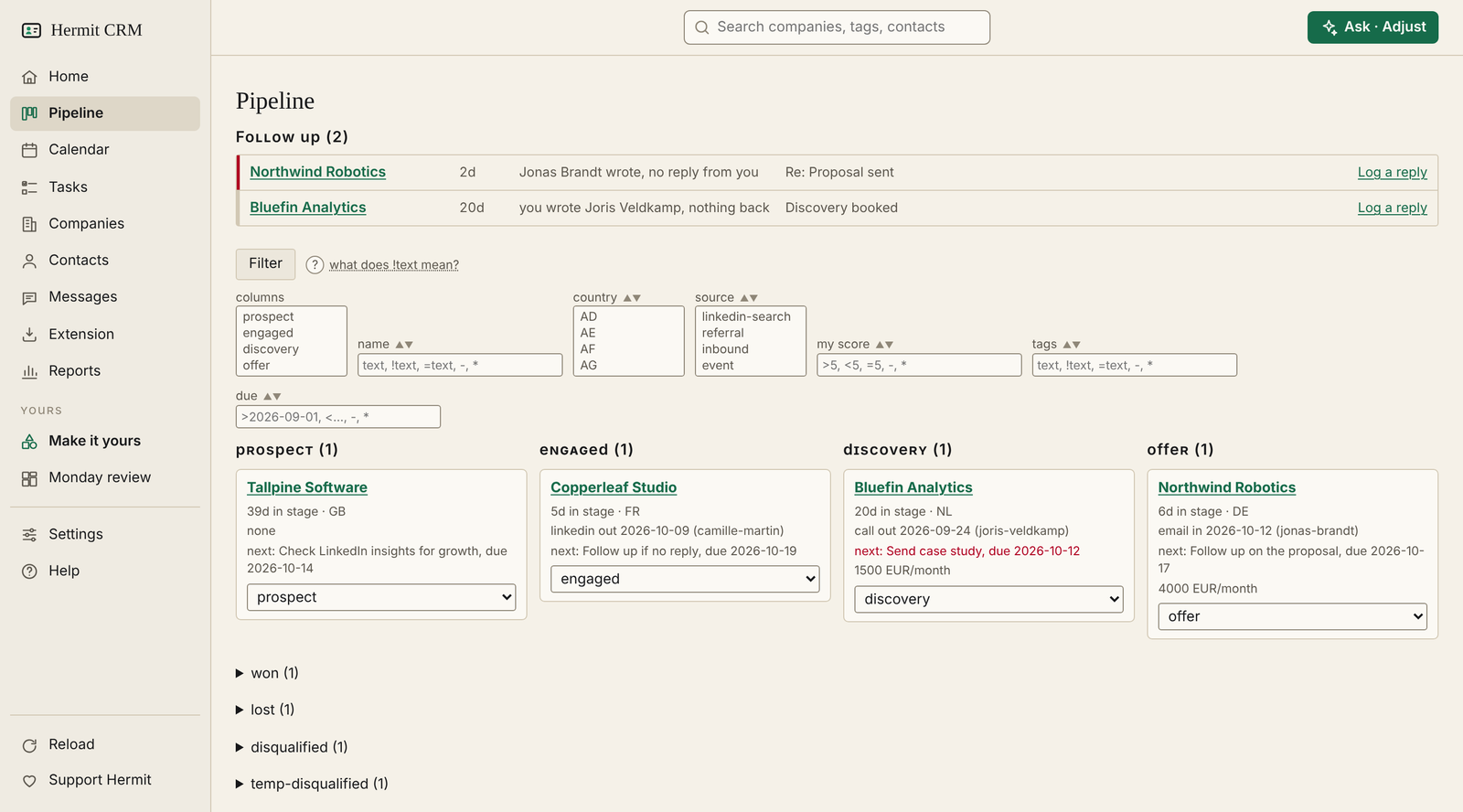
- Pipeline board with stages of your own. The defaults are prospect, engaged, discovery, offer, won, lost, disqualified and temporarily disqualified (with a requalify date); rename, add, reorder or remove them in Settings, each with a role (open, won, lost, closed or parked).
- Companies and contacts tables with column filters and sorting.
- Follow-up radar on the home page: the threads where somebody wrote to you
and you have not answered, and the ones where you wrote and nothing came back.
Also
hermitcrm followups. - Tasks: as many as you like per company or person, one table with date buttons and a filter per column, done dates kept. A company's next step is its task due first.
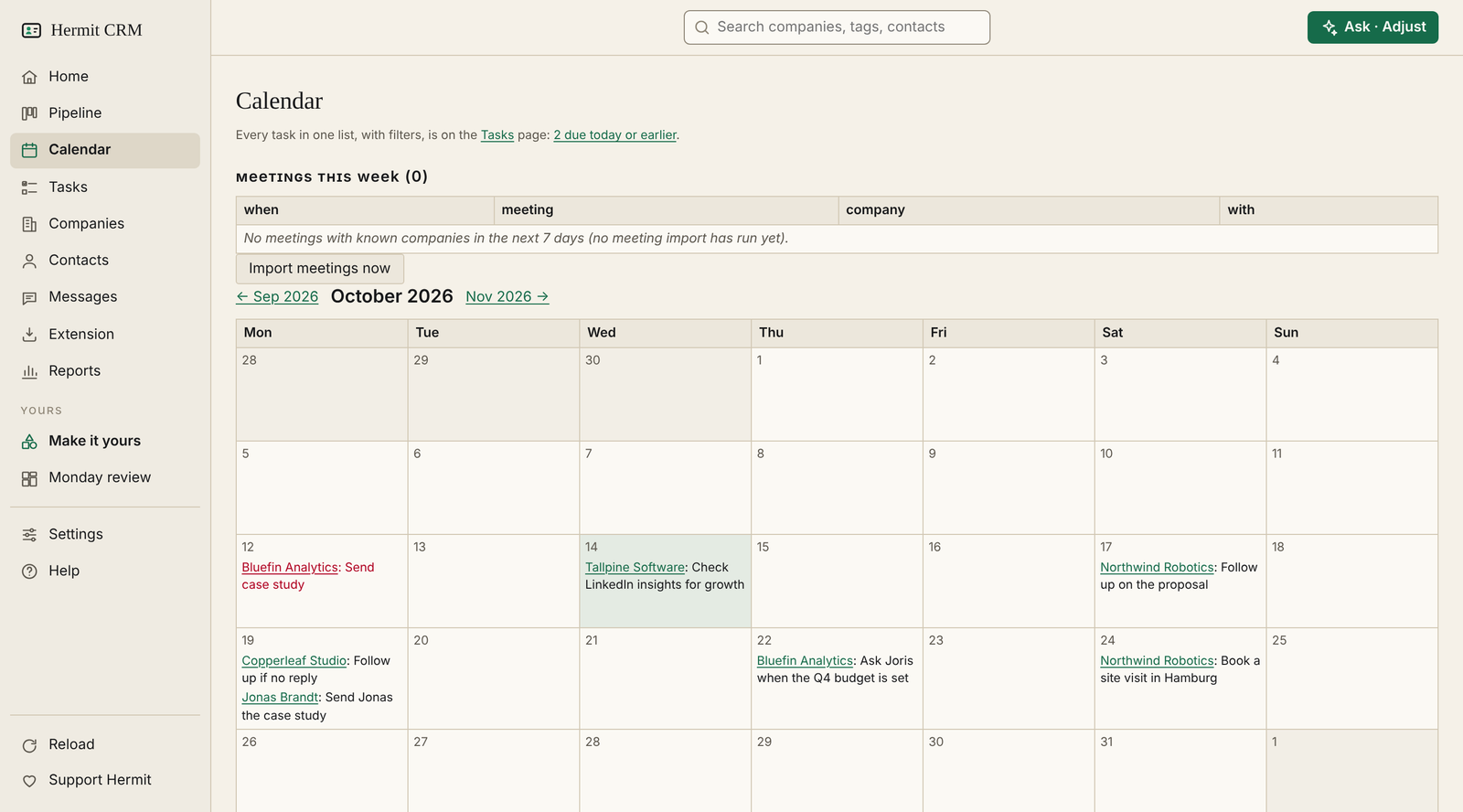
- Calendar: every task on a month grid, meetings this week and Google Calendar links.
- Pre-meeting brief under every upcoming meeting: stage, open next step,
contacts and the last three interactions. Also
hermitcrm brief. - Extension: a bookmarklet that turns the page you are looking at into a filled-in form: a company page into a new company, a LinkedIn profile you are logged in to into a new contact, read in your own tab. Nothing to install.
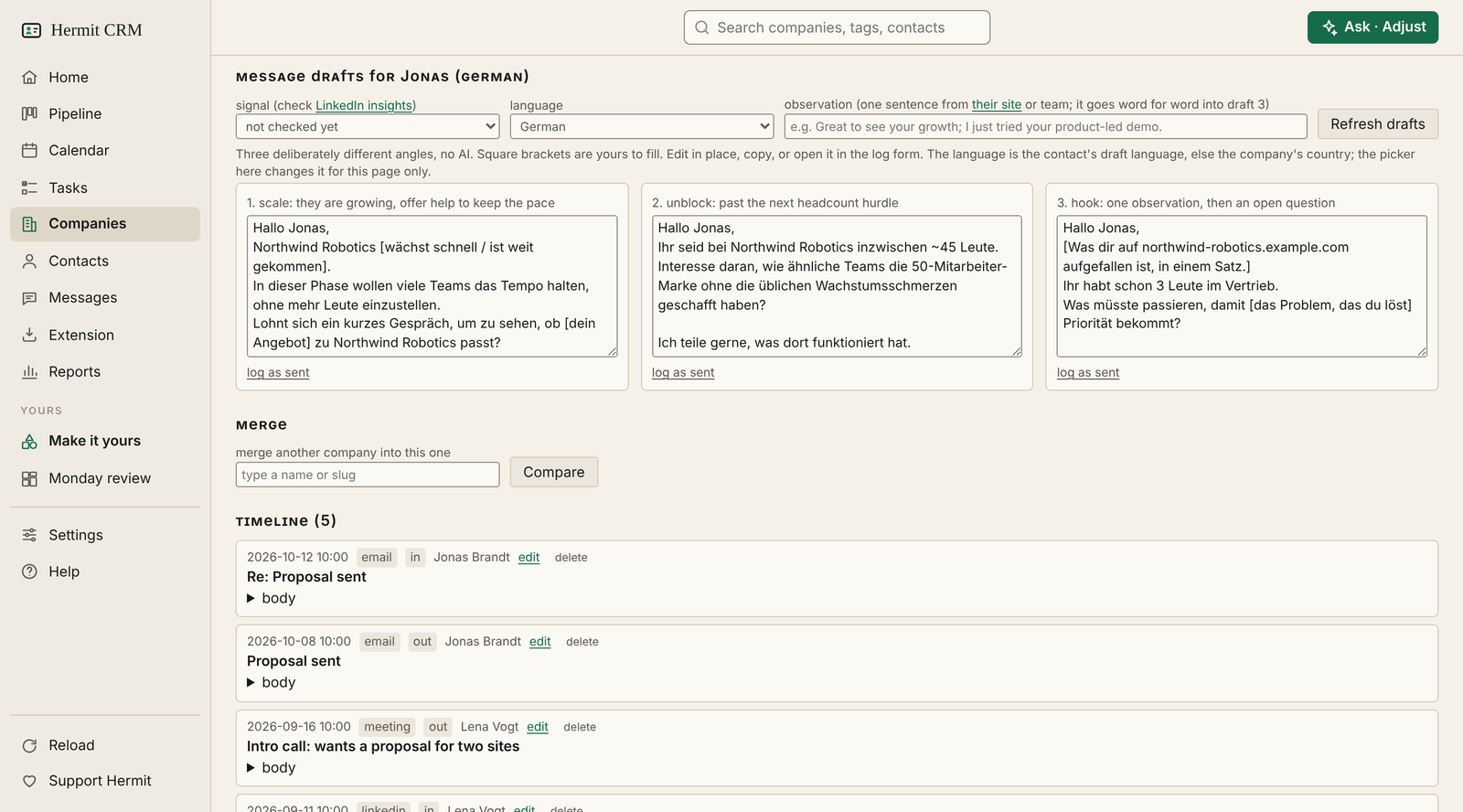
- Timeline per company: email, LinkedIn, call, WhatsApp and meeting interactions, in or out, with bodies kept byte for byte.
- Generate outreach per contact: one button opens Outreach with that person
ready, in English, German, Dutch or French (by country; for Belgium from mails,
website, postcode and titles). What you know about them is kept as notes the
draft is written from, with wording you control in
messages.toml. - Messages tab: every outbound message with its outcome (successful on a
reply, unsuccessful after a window, or set by hand; the choices are
outcomesin config.toml). - Reports: activity per week, funnel and conversion, time in stage, outcomes, message results by language and channel, data hygiene.
- BCC import: BCC or forward mail to a Gmail address and it is logged on the right contact; unmatched mail waits on Home under To file.
- Calendar import: past meetings from a secret ICS feed (no OAuth).
- Import companies or contacts from CSV, TSV or
.xlsx. - Ask Hermit: a question box on every page. The AI answers from the page you are on, or reads the whole data folder (read only) when the page is not enough; retry on the strong model with one click.
- Night mode (on, off or follow the system) and a sidebar with icons.
- On your phone:
hermitcrm serve --host 0.0.0.0puts the app on your local network. It has no password, so use a network you trust or a private one (Tailscale, WireGuard). - Enrichment: free "fetch from URL" (website or LinkedIn page), or any AI CLI you already use (claude, codex, gemini, grok or a custom command).
- Stage history per company, reconstructable from git.
- MCP server (
hermitcrm mcp): read and write the CRM from Claude Desktop, ChatGPT, Cursor or anything else that speaks MCP, with no terminal. Ten read tools and seven write tools (records, Make it yours, bulk changes, undo), over stdio, with no extra dependency. - Feedback form at
/help/feedback: writes a report into your folder with the version, counts and feature flags attached, and shows it to you to send. Nothing leaves your machine on its own, and no names or paths go in the report. - PIPELINE.md: a generated one-page summary for you and your agents.
- Unknown front-matter keys are preserved, so other tools can add fields.
Configuration
hermitcrm init writes config.toml with every key commented out at its default.
Uncomment what you want to change.
| Key | Default | What it does |
|---|---|---|
owner_name |
"" |
Your name; its first word signs outreach drafts ({owner_first_name}). |
owner_email |
"" |
Your main email address (informational). |
port |
8765 |
Port of the web app on 127.0.0.1 (hermitcrm serve --port overrides it). |
silent_days |
14 |
A company with no interaction for this many days counts as silent. |
push_enabled |
true |
Push to the git remote after each commit (when a remote exists). |
remote |
"origin" |
Name of the git remote to push to. |
enrich_provider |
"auto" |
AI CLI for Enrich: auto, claude, codex, gemini, grok or custom. |
enrich_command |
"" |
Custom enrich command; empty means the provider's own binary. |
enrich_model |
"" |
Model for the enrich CLI; empty means its default. |
enrich_timeout |
180 |
Seconds before an enrich call is abandoned. |
message_window_days |
14 |
A message without reply or outcome counts as the last outcome after this many days. |
fetch_timeout |
10 |
Seconds to wait when Fetch from URL reads a page. |
bcc_address |
"" |
Address you BCC or forward mail to, e.g. you+crm@gmail.com; empty disables BCC import. |
bcc_imap_host |
"imap.gmail.com" |
IMAP server of that mailbox. |
bcc_keychain_service |
"crm-bcc" |
Keychain (macOS) or Secret Service (Linux) service holding the app password (account = IMAP user). |
bcc_lookback_days |
30 |
How far back the BCC import searches. |
bcc_create_companies |
true |
Create the company when mail you send or forward reaches a domain no company has (named after the domain); false sends it to To file on Home instead. |
my_addresses |
[] |
Mail from these addresses is yours (outbound). |
bcc_ignore_domains |
[] |
Recipients at these domains (colleagues) are never logged. |
calendar_keychain_service |
"crm-calendar" |
Keychain (macOS) or Secret Service (Linux) service holding the secret ICS URL. |
calendar_keychain_account |
"ics" |
Keychain (macOS) or Secret Service (Linux) account for the ICS URL. |
calendar_lookback_days |
30 |
How far back the calendar import looks. |
calendar_ignore_titles |
[] |
Events whose title contains one of these are skipped. |
calendar_min_attendees |
2 |
Events with fewer participants (you included) are skipped. |
ai_tier |
"medium" |
Model tier for Enrich and Ask Hermit: medium (Claude: Opus) or strong (Claude: Fable). |
enrich_model_strong |
"" |
Strong-tier model override; empty means the provider default. |
ask_timeout |
300 |
Seconds before one Ask Hermit call is abandoned. |
theme |
"light" |
Look of the web app: light, dark or system. |
date_format |
"iso" |
How the web app shows and takes dates: iso (2026-12-31), dmy-dash (31-12-2026), dmy (31/12/2026) or mdy (12/31/2026). Files and exports stay YYYY-MM-DD. |
update_check |
true |
Check for a newer Hermit CRM at most once a day (no identifiers sent). |
update_url |
"" |
Where that check asks; empty means PyPI. Any URL answering {"version": "0.4.0"} works. |
feedback_email |
"" |
Address the Feedback form offers to mail a report to; empty means copy it yourself. |
Secrets never go in config.toml; see Secrets.
Message templates
Drafts come from the package's neutral default_messages.toml. Put a
messages.toml in your data folder to override any part of it; it is
deep-merged, so a two-line file is enough:
[languages.en]
signoff = "Best,\n{owner_first_name}"
MESSAGING.md in your data folder holds your tone, your approaches and the languages.
CLI
hermitcrm [--data DIR] <command>      --data, then $HERMITCRM_DATA, then the current directory
hermitcrm --version

hermitcrm init DIR [--demo] [--no-setup]
                                   create a data folder (git repo, config, agent rules)
hermitcrm setup                       the setup questions again (you, BCC, backup, calendar)
hermitcrm help [TOPIC]                how a feature works (the web app's /help pages)
hermitcrm doctor [--online]           check Python, git, config, secrets, schedule, backup, updates
hermitcrm schedule install [--at HH:MM] [--serve]
                                   daily sync --apply (launchd, systemd; schtasks is printed)
hermitcrm schedule remove|status
hermitcrm serve [--port N] [--host A] the web app (default 127.0.0.1; --host 0.0.0.0 reaches your phone)
hermitcrm show <slug> [--bodies N | --all]
hermitcrm digest [--days 7]           recent interactions, oldest first
hermitcrm followups [--reply-after N] [--nudge-after N]
                                   threads you owe a reply, and ones you are waiting on
hermitcrm brief [--days 7]            each upcoming meeting with the record behind it
hermitcrm mcp                         serve this folder to AI clients over MCP (stdio)
hermitcrm report [--days N | --from D --to D] [--md]
hermitcrm check                       validate every file (exit 1 on problems)
hermitcrm rebuild                     regenerate PIPELINE.md and commit
hermitcrm add company NAME [--country NL] [--website URL] [--stage S] [--next-step TEXT] [--set FIELD=VALUE ...]
hermitcrm add contact SLUG NAME [--title T] [--email E] [--phone P] [--role R]
hermitcrm add interaction SLUG --channel email|linkedin|call|whatsapp|meeting --direction in|out
                                   [--contact CSLUG] [--subject S] [--date D] [--body TEXT|-]
hermitcrm import FILE [--mode companies|contacts] [--map HEADER=FIELD] [--apply]
hermitcrm fetch <slug> [--url URL] [--apply]
hermitcrm enrich <slug> [--contact SLUG] [--apply]
hermitcrm bcc [--apply] [--eml FILE ...]
hermitcrm calendar [--apply] [--ics FILE ...]
hermitcrm sync [--apply]              bcc, then calendar
hermitcrm backfill-history [--apply]  stage_history from git
hermitcrm migrate [--dry-run]         upgrade the data format (runs automatically)
Commands that write take --apply; without it they show what they would do.
Every write is one git commit.
Secrets
Two secrets exist: bcc_password (a Gmail app password) and
calendar_ics_url. Hermit CRM looks for each in this order:
- the environment:
HERMITCRM_BCC_PASSWORD,HERMITCRM_CALENDAR_ICS_URL; .secrets.tomlin the data folder (gitignored; keep itchmod 600, Hermit CRM warns otherwise):bcc_password = "abcd efgh ijkl mnop" calendar_ics_url = "https://calendar.google.com/calendar/ical/.../basic.ics"- the system's secret store, with the service from
bcc_keychain_service/calendar_keychain_serviceinconfig.toml(the keys keep the name "keychain" on every platform):- macOS: the Keychain, through
security; - Linux: the freedesktop Secret Service (GNOME Keyring, KWallet, KeePassXC),
through
secret-toolfromlibsecret-tools. By hand:secret-tool store --label='Hermit CRM calendar' service crm-calendar account ics(then paste the URL). It is used only when a D-Bus session is running, so a headless server simply falls back to.secrets.toml;hermitcrm doctorshows akeyringline saying which case applies.
- macOS: the Keychain, through
Without a secret store a secret lives in the environment or in
.secrets.toml, in plain text, readable only by your user account and never
committed. Full-disk encryption protects it when the machine is off. A Linux
keyring is locked while you are logged out, so if the daily import runs then
(systemd lingering), keep the app password in .secrets.toml.
BCC import setup
The easy way: Settings → BCC capture in the web app (/settings#bcc) or
hermitcrm setup. It suggests you+crm@gmail.com for Gmail, picks the IMAP server
for Gmail, Outlook/Hotmail/Live and iCloud, stores the app password in
.secrets.toml or the system keyring (macOS Keychain, Linux Secret Service), tests the connection with a dry run and
shows the Gmail filter to add:
Matches: to:(you+crm@gmail.com) → Skip the Inbox, Mark as read, Apply label Hermit CRM
For Gmail, turn on 2-step verification and create an app password at https://myaccount.google.com/apppasswords; your normal password is rejected.
By hand: set bcc_address, my_addresses and optionally bcc_ignore_domains
in config.toml and store bcc_password as a secret (see Secrets).
Then BCC that address on mail you send, or forward a thread to it, and run
hermitcrm bcc (dry run) and hermitcrm bcc --apply. Mail that matches no cont