HorusEye
Find the fix that breaks the most routes to Domain Admin.
Maps Active Directory attack paths with evidence, compares remediation options side by side, and produces an offline report for red and blue teams. Complements BloodHound.
▶ Live demo · Website · Quick start · Changelog
Made with care by Omar Tamer — Egypt
What It Does
Point HorusEye at the data you already collect (a SharpHound/BloodHound export, plus optional Certipy, ldapdomaindump and NetExec output) and it answers three questions:
- How does an attacker reach Domain Admin from here? It builds a control graph and finds the shortest routes from a foothold to Tier-0, with the evidence behind every step and whether that step is observed in the data or only inferred.
- Is there one fix that breaks them all? It names the choke points: single relationships whose removal breaks every route in the imported graph.
- Which fix should we actually make? It compares remediation options
side by side (fewest changes, keep group memberships, fix nearest the
targets) and shows who loses what access with each. Mark access people need
for their job with
--keep, and it is never proposed.
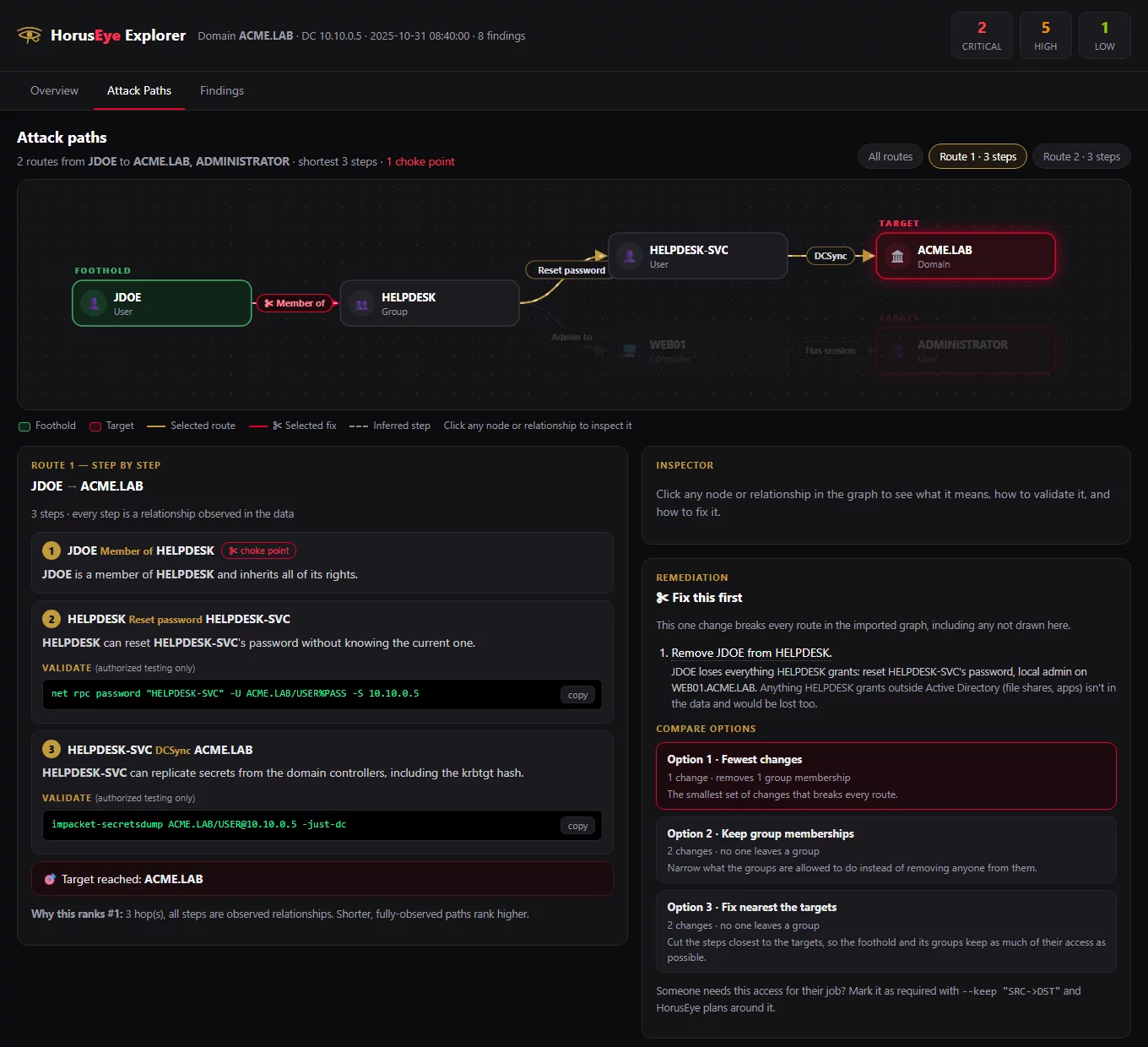
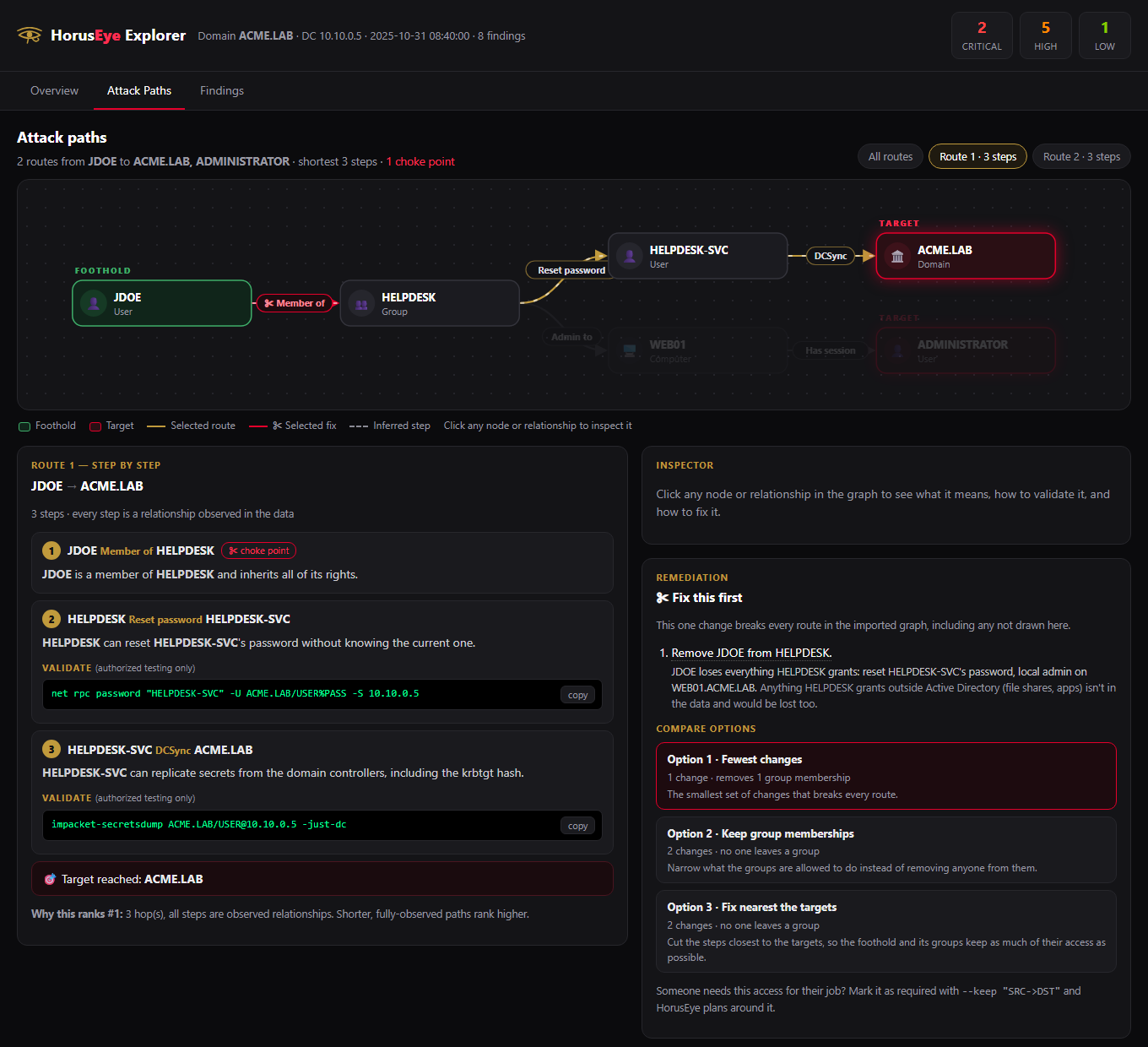
Everything lands in one offline report: the interactive explorer above, plus HTML, Markdown and JSON. Nothing leaves the machine unless you turn on the optional AI narrative layer (which can redact names first).
Alongside the paths, HorusEye flags 13 classes of AD misconfiguration (Kerberoasting, AS-REP roasting, DCSync, ACL abuse, GPO abuse, unconstrained and constrained delegation, ADCS ESC1–ESC8, trusts, privileged sessions, weak password policy and stale admins), each with evidence, a confidence level, MITRE ATT&CK mapping, remediation steps and detection guidance.
How it fits with BloodHound: BloodHound collects and explores the graph. HorusEye works on the same export and turns it into an ordered, evidence-backed fix list you can hand to the team that owns the change.
Quick Start
git clone https://github.com/Omar-tamerr/HorusEye && cd HorusEye
pip install -e .

# The bundled synthetic lab: 2 routes to Domain Admin, 1 choke point
horuseye --bloodhound examples/acme-lab --domain ACME.LAB --dc 10.10.0.5 \
    --graph --owned 'JDOE@ACME.LAB' --explorer acme.html

# JDOE needs HELPDESK for their job? Plan the fix around it
horuseye --bloodhound examples/acme-lab --domain ACME.LAB --dc 10.10.0.5 \
    --graph --owned 'JDOE@ACME.LAB' --keep 'JDOE@ACME.LAB->HELPDESK@ACME.LAB'

# Your own SharpHound export: paths from a user, reports, and a CI gate
horuseye --bloodhound ./bh/ --domain corp.local --dc 10.10.10.5 \
    --graph --owned 'bob@corp.local' \
    --explorer report.html --json report.json --fail-on high
Open acme.html in any browser, or try the
live demo without
installing anything. Full details: Installation,
Attack Paths, More Examples.
What's New in v2.3
New on main (next release): remediation options compared side by side, with who loses what access and --keep for access people need; and a redesigned attack-path view in the explorer. See Attack Paths.
- Interactive offline explorer (
--explorer). One self-contained HTML file — a dashboard, a clickable attack-path graph (nodes/edges → evidence, choke points highlighted red), and a filterable findings explorer. No server, no external requests; open it anywhere, hand it to a client. - Evidence & confidence on every finding. Each finding now carries a
rule_id, aconfidencelevel with a stated reason, and structured evidence — the actual ACEs/objects behind it — so it can be reproduced from source data. Aggregated findings keep every affected object; nothing is lost to brevity. - Provenance. Findings trace to their exact source file (e.g.
corp_domains.json), and a parse report with compatibility warnings distinguishes a clean domain from a thin import. - Graph you can trust and steer.
--targetpaths to any critical asset (not just Tier-0); edges are labelled observed vs inferred; paths rank with a stated rationale; and remediation impact names the choke points — the single fixes that break the path. - Automation-grade output. Reports are byte-deterministic (
SOURCE_DATE_EPOCH), and a documented exit-code taxonomy (0/1/2/3) lets CI tell "clean" from "findings" from "incomplete". - Privacy & AI safety.
--ai-redactmasks emails, IPs, domain and account names before any request; AI output is validated and can never overwrite a verified field. - Honest UX. The no-input help now describes the real CLI (the old phase-command help was misleading), and
SECURITY.mddocuments intended use, data egress, and reporting.
What was new in v2.2
- Attack-path graph engine (
--graph). HorusEye now builds a directed control graph from group membership, abusable ACLs, local-admin rights, sessions, DCSync and delegation, and finds the shortest path from a foothold to Domain Admin — printing the ordered steps and the command for each. BloodHound shows the graph; HorusEye tells you the order to walk it. Set the foothold with--owned USER@DOMAIN(default: any domain user). - Built for defenders too. Every finding now carries MITRE ATT&CK technique(s), remediation steps, and detection guidance (event IDs / telemetry), so one report is actionable for red and blue teams.
- Trustworthy on real exports. Noise reduction drops expected rights (Domain Admins' GenericAll, DCs replicating), collapses duplicate ACEs, and aggregates mass grants — so a real SharpHound export produces a readable finding list, not thousands of rows.
- Professional reports. Reworked dark-theme HTML (severity tiles, ATT&CK table, per-finding remediation/detection), a new Markdown export (
--markdown) with Mermaid attack-path diagrams, and a versioned JSON schema. - Repeatable workflow.
--diff OLD.jsonshows New / Fixed / Unchanged against a previous run;--fail-on LEVELexits non-zero for CI gating. - Modernized AI layer. Official Anthropic SDK, current model (
claude-opus-5-5), per-finding narratives, surfaced errors, and--ai-redactto mask client names before anything leaves the machine.
What was new in v2.1
- All 13 attack-path types implemented (v2.0 shipped only Kerberoasting and AS-REP roasting).
- Impact-aware scoring with a Tier-0 privilege model; CRITICAL made reachable.
- Fixed the Windows
UnicodeEncodeErrorcrash; UTF-8 everywhere. - Installable
horuseyecommand (pip install -e .);--check-depspreflight. - Honest
--da-checklistand--team-connect; pytest suite + CI.
See the full changelog and the Roadmap.
Contents
- What It Does · Quick Start · What's New
- Features · Installation · Input Sources
- Attack Detection · Attack Paths & Remediation Options
- Reports · AI Analysis · More Examples
- Full CLI Reference · Project Structure · Testing · Roadmap
- Offensive Helpers (Labs & CTF): hash cracking, wordlists, password spraying, lateral movement, timeline, auto-exploit, LSASS, DA checklist, team collaboration, credentials manager, CTF usage guide
Features
| Category | Feature | Description |
|---|---|---|
| Input | BloodHound | Parses SharpHound JSON — users, groups, ACLs, sessions, local admins |
| Input | Certipy / ldapdomaindump / NetExec / CME | ADCS (ESC1–ESC8), LDAP and scan output |
| Input | Manual | Interactive prompt when no files are available |
| Analysis | Attack-path graph | Shortest routes from a foothold to Tier-0 or any --target, observed vs inferred steps |
| Analysis | 13 detections | Evidence, confidence, MITRE ATT&CK, remediation and detection guidance per finding |
| Analysis | Scoring | Ranks findings by impact × ease with a Tier-0 privilege model |
| Remediation | Choke points | The single relationships whose removal breaks every route in the imported graph |
| Remediation | Fix options | Alternatives compared side by side, with who loses what access; --keep for required access |
| Reporting | Explorer | One offline HTML file: dashboard, interactive graph, fix options, findings |
| Reporting | HTML / Markdown / JSON | Dark-theme report, Mermaid diagrams, versioned JSON schema |
| Reporting | Retest & CI | --diff (new / fixed / unchanged), --fail-on, deterministic output, exit codes |
| AI | Narratives (optional) | Plain-English explanation per finding; --ai-redact masks names first |
| Labs | Offensive helpers | Hash cracking, wordlists, spraying, lateral movement — some still stubs |
Installation
Requirements: Python 3.8+ (Linux or Windows). The only Python dependency is
rich; everything else is an external
CLI tool HorusEye orchestrates rather than a library it imports.
git clone https://github.com/Omar-tamerr/HorusEye
cd HorusEye

# Option A — install as a command (recommended)
pip install -e .          # adds the `horuseye` command to your PATH

# Option B — run in place
pip install -r requirements.txt
python3 horuseye.py --help
On Kali/Debian with an externally-managed Python, add
--break-system-packagesto thepipcall, or install into a virtualenv / viapipx.
External toolchain (optional — only for the offense features). Detection and scoring work with no external tools at all. The modules that execute against a DC shell out to the standard suite:
# check what is already on your PATH, grouped by the feature that needs it
horuseye --check-deps
| Feature | Tools |
|---|---|
| Hash cracking | hashcat, john |
| Enumeration / lateral | nxc (NetExec), crackmapexec, evil-winrm |
| Impacket suite | impacket-GetUserSPNs, impacket-GetNPUsers, impacket-secretsdump |
| ADCS | certipy |
| Collection | bloodhound-python |
| Credential parsing | pypykatz |
Optional — AI narratives:
horuseye --config --claude-key YOUR_ANTHROPIC_KEY # stored in ~/.horuseye/config.json
Input Sources
HorusEye accepts output from four major AD enumeration tools, or manual input when you only have partial information.
BloodHound (recommended)
# Collect with SharpHound on Windows target
SharpHound.exe -c All --zipfilename bloodhound.zip

# Or from Linux with bloodhound-python
bloodhound-python -d corp.local -u user -p pass -ns 10.10.10.5 -c All

# Feed to HorusEye
python3 horuseye.py --bloodhound ./bloodhound_output/
Certipy (ADCS)
certipy find -u user@corp.local -p pass -dc-ip 10.10.10.5 -json
python3 horuseye.py --certipy ./certipy_output.json
ldapdomaindump
ldapdomaindump -u 'corp\user' -p pass ldap://10.10.10.5 -o ./ldap/
python3 horuseye.py --ldap ./ldap/
CrackMapExec
cme smb 10.10.10.0/24 -u user -p pass --shares > cme_output.txt
python3 horuseye.py --cme cme_output.txt
NetExec (recommended over CME)
nxc smb 10.10.10.0/24 -u user -p pass --shares 2>&1 | tee nxc.txt
python3 horuseye.py --nxc nxc.txt --domain corp.local --dc 10.10.10.5
Combined (best results)
python3 horuseye.py \
    --bloodhound ./bh/ \
    --certipy certipy.json \
    --ldap ./ldap/ \
    --cme cme.txt \
	--nxc nxc.txt \
    --domain corp.local \
    --dc 10.10.10.5
Attack Detection
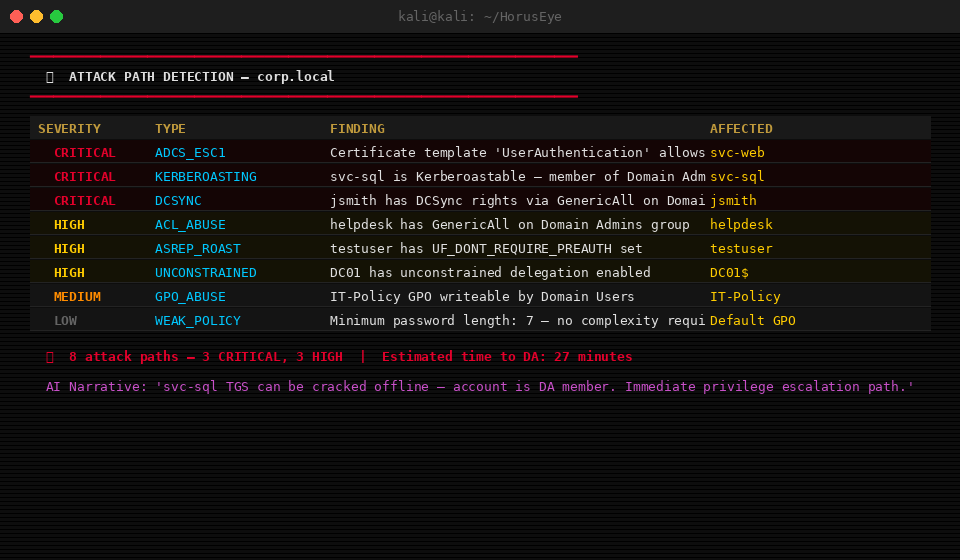
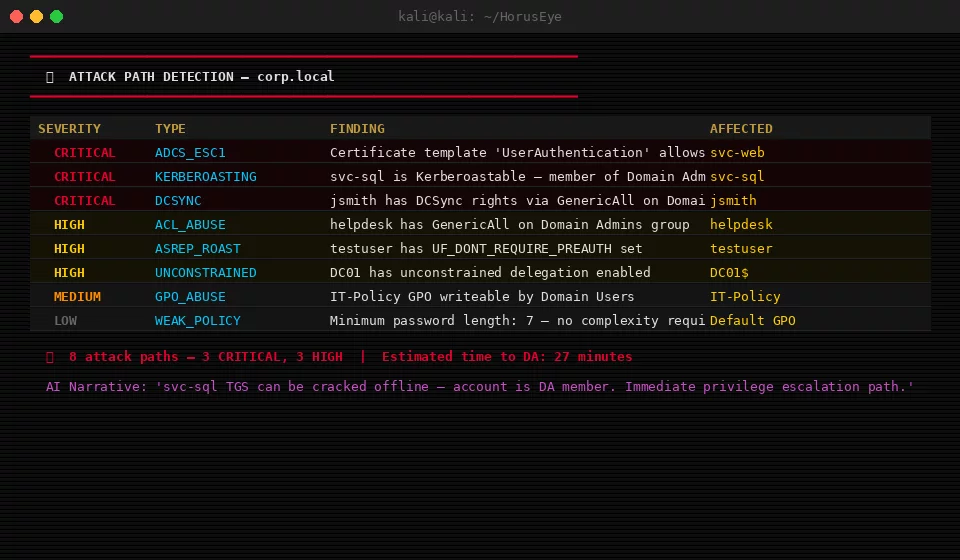
HorusEye detects all 13 attack path types below (all implemented — see the changelog). Each finding includes a severity, the affected account/object, a standard documented command to validate it, a short rationale, and — with a key configured — an AI-generated attack narrative.
| # | Attack Type | Severity | What it detects |
|---|---|---|---|
| 1 | Kerberoasting | HIGH / CRITICAL | Service accounts with SPNs; Tier-0 members promoted to CRITICAL |
| 2 | AS-REP Roasting | HIGH / CRITICAL | Accounts with DONT_REQUIRE_PREAUTH; Tier-0 promoted |
| 3 | DCSync | CRITICAL | Principals with replication rights (GetChanges / GetChangesAll) |
| 4 | ACL Abuse | HIGH / CRITICAL | GenericAll, GenericWrite, WriteDacl, WriteOwner, ForceChangePassword, AddMember, AddKeyCredentialLink, WriteSPN |
| 5 | GPO Abuse | HIGH | Write access on Group Policy Objects |
| 6 | Unconstrained Delegation | CRITICAL | Computers/users trusted for unconstrained delegation |
| 7 | Constrained Delegation | HIGH | Protocol-transition (TrustedToAuthForDelegation) misconfigurations |
| 8 | Pass-the-Hash | HIGH | Reusable admin access across multiple hosts |
| 9 | ADCS ESC1-ESC8 | CRITICAL / HIGH | All Certipy ADCS vulnerability classes |
| 10 | Domain Trusts | MEDIUM / HIGH | Cross-domain / forest trust relationships |
| 11 | Privileged Sessions | HIGH | Tier-0 sessions on reachable hosts |
| 12 | Weak Password Policy | MEDIUM | Lockout threshold, minimum length, complexity |
| 13 | Stale Admin Accounts | LOW / MEDIUM | Disabled-but-privileged and password-never-expires admins |
Findings are scored 0–100, combining severity with an exploitability-ease factor, and sorted so the shortest path to Domain Admin surfaces first (a one-command DCSync outranks a crack-then-pivot chain). The Tier-0 privilege model — built from adminCount and well-known group membership — promotes any path that lands directly on a Domain/Enterprise Admin to CRITICAL.
Scope note. Detection reports where a misconfiguration exists and the standard, publicly documented command to validate it. The offensive execution engines (
--auto-exploit,--auto-chain,--lsass-dump) are stubs — they print the method rather than executing it — and are tracked on the Roadmap. Detection itself requires none of the external tools.
Attack Paths
--graph is the difference between a list of problems and a plan. HorusEye builds a directed control graph — where an edge A → B means "control of A yields control of B" — from group membership, abusable ACLs, local-admin rights (AdminTo), sessions (HasSession), DCSync rights, and delegation, then finds the shortest route from a foothold to Domain Admin and prints the ordered steps with the command for each.
# What can a given user reach?
horuseye --bloodhound ./bh/ --domain corp.local --dc 10.10.10.5 --graph --owned 'bob@corp.local'

# What can ANY domain user reach? (default start = broad groups)
horuseye --bloodhound ./bh/ --domain corp.local --graph
Path 1  (3 hops: BOB@CORP.LOCAL → SVC-ADM@CORP.LOCAL)
  BOB@CORP.LOCAL
    │ MemberOf (member of group)
    ▼ HELPDESK@CORP.LOCAL
    │ AdminTo (local administrator)
    ▼ WS01.CORP.LOCAL     nxc smb WS01 -u USER -p PASS --sam
    │ HasSession (credentials in memory)
    ▼ SVC-ADM@CORP.LOCAL  # dump LSASS on WS01 to recover SVC-ADM
Paths are included in the HTML report and rendered as Mermaid diagrams in the Markdown export. Richer paths need local-admin and session data — collect with SharpHound.exe -c All.
Remediation options — fix it without breaking someone's job
The shortest fix is not always the right one. Removing a user from a group closes the routes, but it also takes away everything that group gives them, including access their job depends on. So after the paths, HorusEye compares remediation options. Each one is a different set of changes that breaks every route in the imported graph, including routes not shown, and is re-checked by search before it is reported. That is the scope of the check: relationships missing from the collected data can't be seen.
| Option | What it does |
|---|---|
| Fewest changes | The smallest set of changes that breaks every route |
| Keep group memberships | Nobody is removed from a group; the groups' own permissions are narrowed instead |
| Fix nearest the targets | Cuts the steps closest to the targets, so the foothold keeps as much access as possible |
Every change says who is affected and what they lose: a removed membership lists every right the user loses with it (and warns that access granted outside AD, like file shares and apps, isn't in the data); a narrowed group permission lists every member who loses that one right.
HorusEye can't know what someone needs for their job, so you tell it. Mark required access with --keep, and no option will ever remove it:
# The bundled example: JDOE needs to stay in HELPDESK
horuseye --bloodhound examples/acme-lab --domain ACME.LAB --dc 10.10.0.5 --graph \
    --owned 'JDOE@ACME.LAB' --keep 'JDOE@ACME.LAB->HELPDESK@ACME.LAB'
𓂀 Remediation options (each breaks every route in the imported graph, including routes not shown)
Option 1 · Fewest changes  2 changes · no one leaves a group
  ✂ Remove the password-reset right HELPDESK holds on HELPDESK-SVC.
    HELPDESK's 2 members (HELPDESK-SVC, JDOE) lose only this right: reset HELPDESK-SVC's password.
  ✂ Remove HELPDESK from the local Administrators group on WEB01.ACME.LAB (use Windows LAPS for local admin).
    HELPDESK's 2 members (HELPDESK-SVC, JDOE) lose only this right: local admin on WEB01.ACME.LAB.
Option 2 · Fix nearest the targets  2 changes · no one leaves a group
  ✂ Remove HELPDESK from the local Administrators group on WEB01.ACME.LAB (use Windows LAPS for local admin).
    HELPDESK's 2 members (HELPDESK-SVC, JDOE) lose only this right: local admin on WEB01.ACME.LAB.
  ✂ Remove replication rights (Get-Changes / Get-Changes-All) from HELPDESK-SVC.
    HELPDESK-SVC loses only this right: replicate domain secrets (DCSync).
Without --keep, option 1 is "Remove JDOE from HELPDESK" (one change), and the report spells out that JDOE would lose the password-reset right and local admin on WEB01 along with it.
The options are in the explorer (pick one and the ✂ marks move on the graph), the HTML and Markdown reports, and the JSON (remediation_plans).
| Flag | Purpose |
|---|---|
--graph |
Compute and print the shortest attack path(s) to Domain Admin |
--owned PRINCIPALS |
Comma-separated foothold principals (default: any domain user) |
--max-paths N |
Maximum node-diverse paths to show (default: 5) |
--keep 'SRC->DST' |
Access people need for their job; remediation options never remove it (repeatable or comma-separated) |
--webapps FILE |
Web app → AD service account claims (draft format, see below) |
Web app → AD service account (draft, milestone 1)
--webapps FILE links a web app to the AD account it runs as, using three separate,
evidence-backed claims: the app is reachable from a named assessment vantage, it
uses t