🏠 What it is
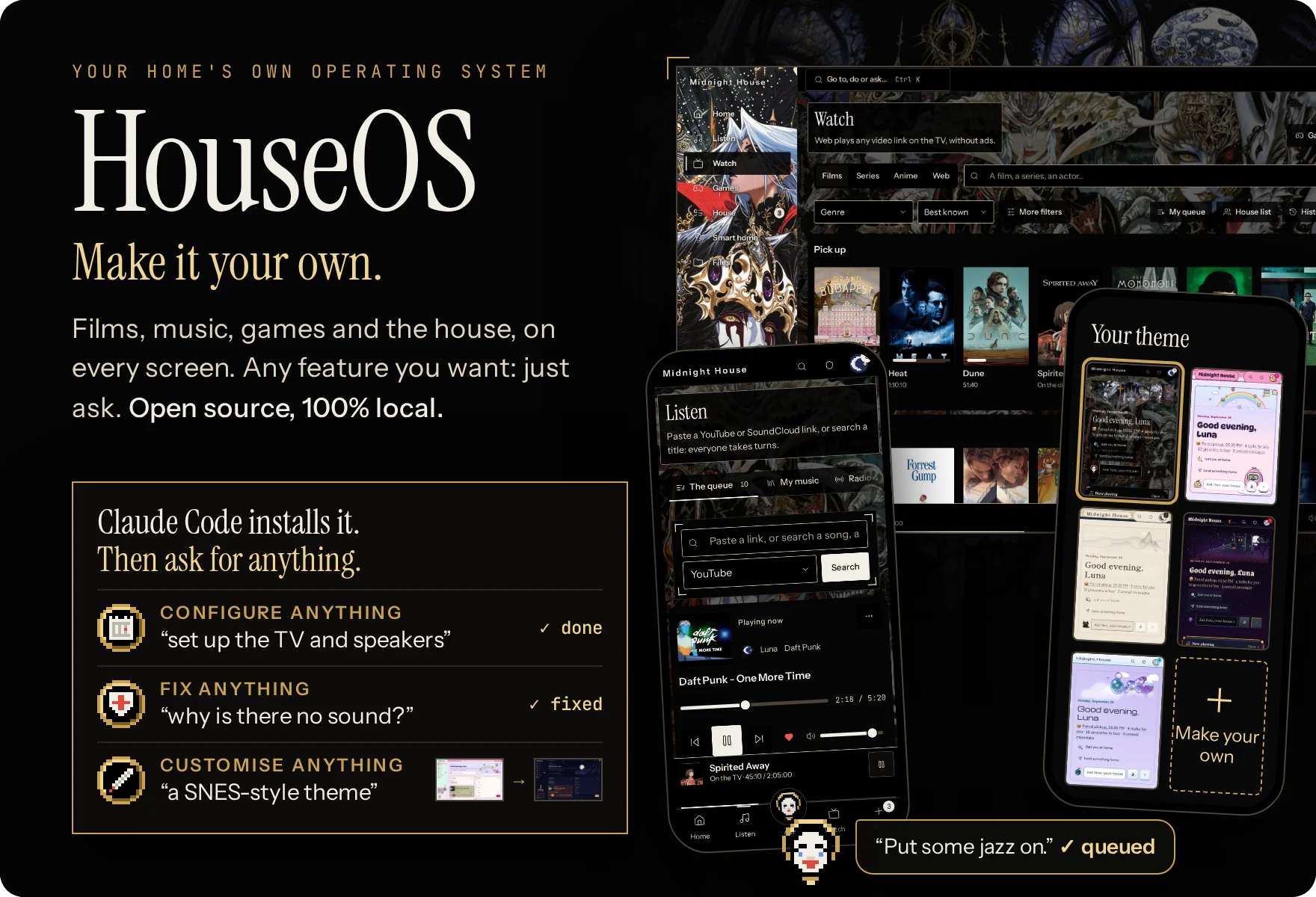
The open-source, self-hosted, fully customizable home platform. Movies and series (Stremio add-ons, debrid services, Jellyfin), music, games, your own cloud, smart home and AI agents: one free app on one computer at home, access it on any phone, laptop and TV around the world.
- 🍿 Stream anything: films, music, videos, games and your files, at home or across the globe.
- 🔒 Free and local: private, no account, no subscription, no ads. Agent features optional.
- 🎨 100% customizable: change any setting, any look, or create any feature you want.
- 🤖 Your AI housekeeper: ask Nox in plain words to set up the TV, fix what's wrong or build what's missing.
- 🧠 Human brain or AI brain: run the house yourself, or hand it to ChatGPT, Claude or a local model.
🔑 Install
Paste this into Claude Code (or any coding agent) on the computer that will run the house:
Install HouseOS here and set it up with me.
Clone https://github.com/boitech-dev/HouseOS
and follow its AGENT-INSTALL.md.
⌨️ Or install it yourself · and see requirements
-
Needs: 64-bit Linux, a Raspberry Pi 4/5, or Windows 11 with WSL 2 · Docker Engine (not Docker Desktop) · 4 GB of memory (8 on Windows) · about 30 GB free.
-
Install, on Linux:
git clone https://github.com/boitech-dev/HouseOS.git && cd HouseOS && ./houseos.sh install -
It takes 10–20 minutes the first time (20–40 on a Pi) and ends with a one-time setup code. Open
https://houseos.local:8443(or the address printed), accept the certificate once and enter the code. -
No Docker yet?
curl -fsSL https://get.docker.com | sh && sudo usermod -aG docker $USER, then log out and back in. -
Windows:
wsl --install -d Ubuntu-24.04as administrator, then docs/WINDOWS.md so phones can reach it, then the Linux line inside Ubuntu. -
Mac: can open HouseOS, can't host it.
✨ Features
🍿 Watch · Stremio add-ons and a debrid service, one tap to the TV
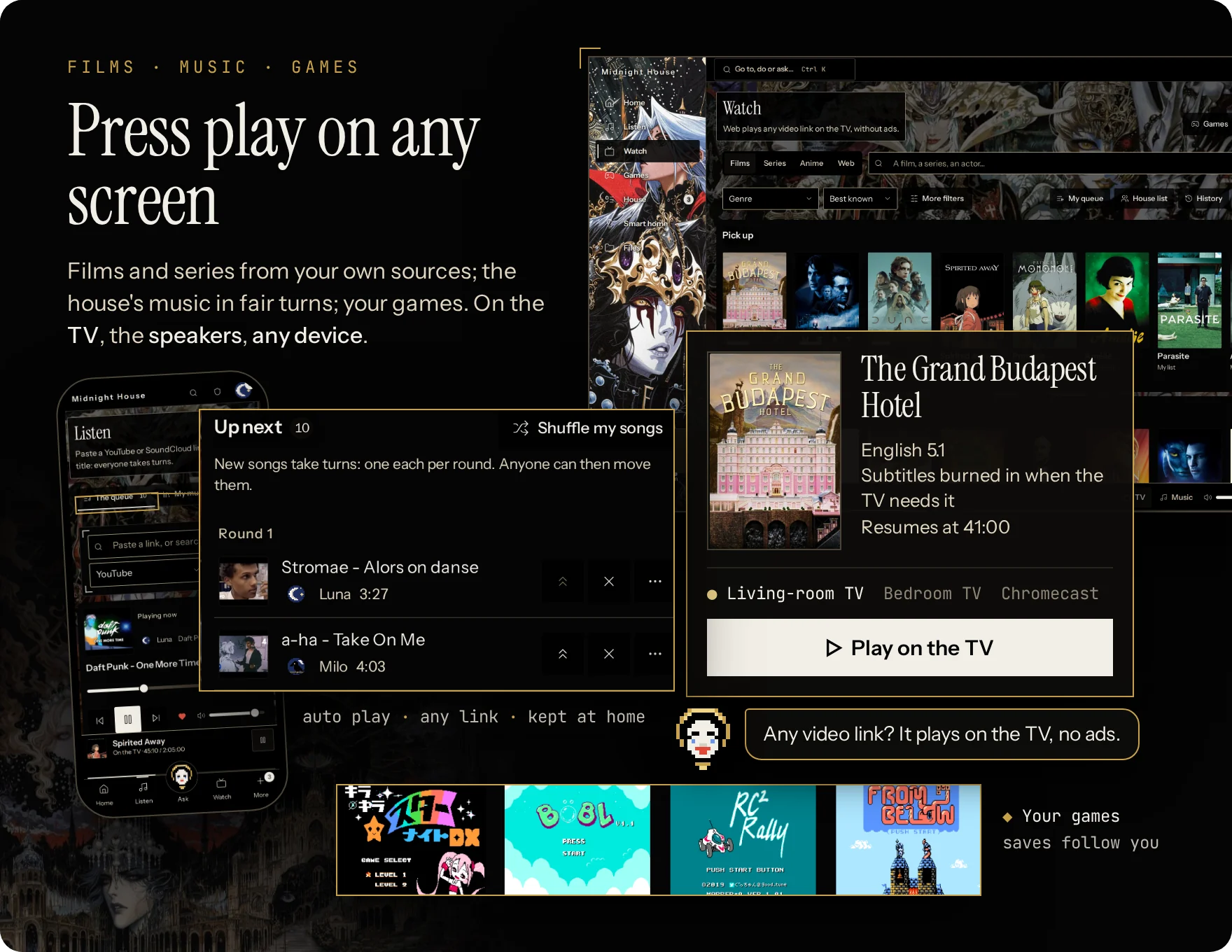
- Made for a Stremio add-on + a debrid service, both of your choice: the recommended setup, for fast and reliable streams. Also works with Jellyfin, your own files, or the optional torrent player instead of a debrid service.
- One tap to the TV from any phone: a version in your languages that the TV can play, resume, next episode. Films go to Chromecast, Google TV and Android TV (and TVs with Chromecast built in); other smart TVs through the Jellyfin app. With Home Assistant it switches the TV on too.
- Subtitles that just work: from the file, OpenSubtitles, Jellyfin or your own upload, in each person's languages; converted for the TV, burned in when it can't show them.
- Anywhere: Keep a copy at home saves a film to the house disk; then, even away from home, it plays in the browser or streams to VLC or any player on your laptop or phone: nothing to install, nothing copied.
- Films, series and anime: seasons and episodes, Continue watching, your own list and a shared house watchlist, For you picks and More like this. Browse by year, theme, person or award.
- Sleep timer: the film stops and the TV can switch off.
- Any video link: a YouTube, TikTok or Instagram link or an
.mp4plays on the TV without ads, gone 6 hours after you watch.
🎶 Listen · one song each per round
- Add anything: search, a YouTube or SoundCloud link or playlist, one of 50,000 radio stations, or ask Nox.
- Fair turns: your next song lands in the next round. Anyone can move a waiting song; everyone has one veto, back 3 hours after use.
- Kept at home: after its first play a song stays on the house disk, instant next time, offline too.
- Likes and playlists: like a song to keep it in My music, make playlists or import one from a YouTube or SoundCloud link, replay anything from the house history, keep your radio stations.
- Auto play: when the queue runs dry it keeps going with the house's songs (all, or the genres you pick) or a rotation of radio stations. Its next 50 songs are a list anyone can reorder, trim or redraw; songs heard lately stay out, and a real request always goes first.
- Sleep timer: the music stops after 15 minutes, an hour, or when you say.
- Plays on the computer's speakers, Bluetooth, Cast, DLNA, Sonos, or a phone in Speaker mode.
🎮 Games · your ROMs, every emulator ready
- Every emulator ready: about 30 consoles, NES to PlayStation in the browser, plus GameCube, Wii, PS2, PSP, Dreamcast and Saturn on the TV.
- Bring your ROMs: a folder, an upload or a link. Covers come from the open libretro database.
- Play anywhere: on your phone or laptop, at home or across the world, right in the browser: nothing to install, and no lag, the game runs on your device. With a controller or the keyboard.
- On the TV through Moonlight, on a native Linux install (docs/GAMES.md).
- Catalogue of every known game of a console, with what the house has; romhacks and translations from an
.ipsor.bpspatch. - Your save follows you from the phone to the TV and back; snapshots save anywhere, loaded from any device.
- Game night: favourites, a filter for 2, 3 or 4 players, and switch games from your phone while the TV plays.
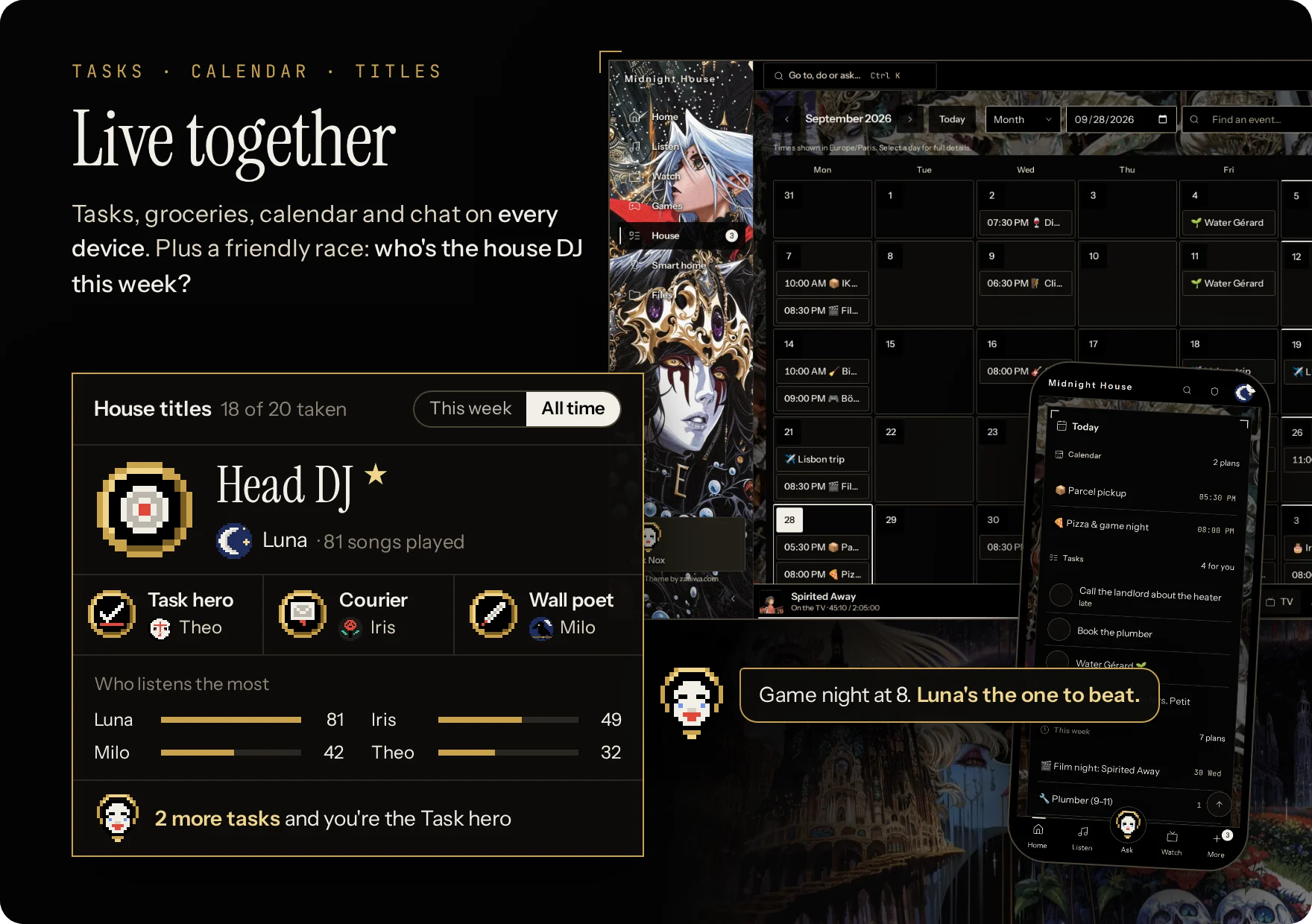
📋 House board · tasks, groceries, calendar
- Tasks in one line (what, when, who, how often): I'll do it, snooze until tomorrow, a file attached.
- Groceries ticked off in the shop, a wall for notes, a shared calendar with private events, reminders and an export to your calendar app.
- Chat between housemates, with photos and push notifications. Home shows today at a glance and who's around.
- Invite each housemate with a link (Control Room → Invites); guests get a party pass.
🏆 House titles · who's DJ this week?
- Titles (Head DJ, Night owl, Task hero, Courier…) won from what everyone plays and does. Weekly ones change hands; all-time ones earn up to three ★.
- The house in numbers: who plays the most, when the house listens, film nights, top songs and games, and how close you are to your next title.
- Invent your own: ask your agent for a new title and it tracks any metric you like: who skips the most songs, who binges series at 3 a.m., who never does the dishes.
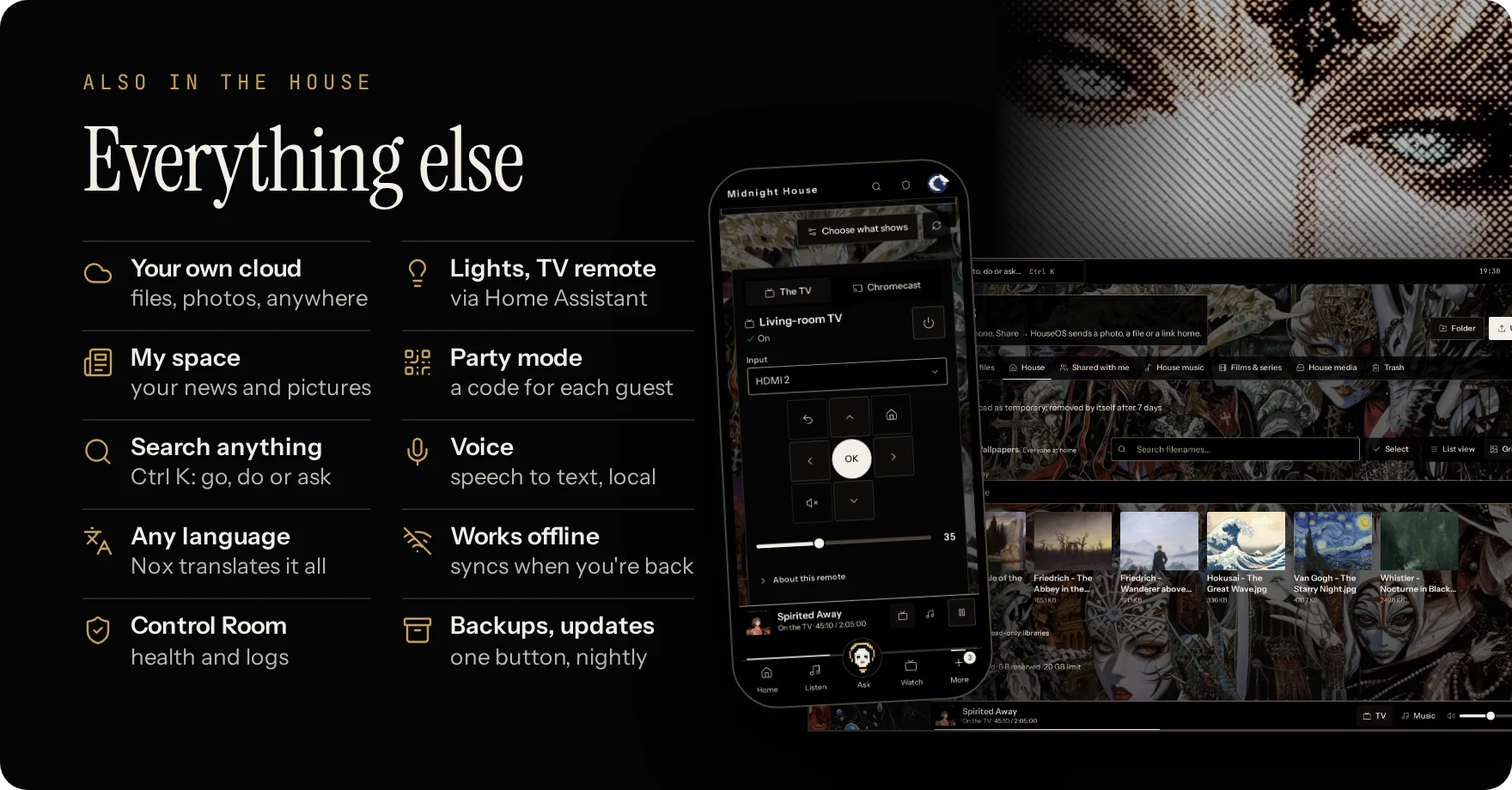
🗂️ Your own cloud · files, photos, anywhere
- Your files and photos, shared folders and Shared with me, from anywhere through Tailscale or your own proxy. On Android, Share → HouseOS saves a photo in one tap.
- The house library: every kept song and film, playable in the browser.
- Share for a while: a file for one housemate for 2 hours, a day, a week or for good; take it back any time.
- Search, grid view, PDF preview, a duplicate finder for songs, and a trash for mistakes.
💡 Smart home · lights and the TV remote
- With Home Assistant: lights (brightness, colour, warmth), plugs, blinds and heating by room, your favourites on top, scenes in one tap, or ask Nox to "dim the living room".
- A TV remote on every phone: volume and playback over Cast, arrows after a one-time pairing, power and input through Home Assistant. On a laptop, the keyboard steers the TV.
- Locks, alarms and sirens stay off unless you allow them, and always wait for a second tap.
🎉 And more · party, search, voice, offline
- Party mode: a tablet becomes the jukebox; guests scan a QR code to add songs.
- Guest code: the music and the TV for four hours, never the house's history or files.
- Search: Ctrl K goes anywhere, does things or asks Nox.
- Voice: speech becomes text on your own computer.
- Languages: English and French built in; Nox translates the app into any other.
- Offline: kept songs, your files and the house board still work.
- My space: your news, subreddits and pictures, on one page.
- Nox, day to day: puts music on, adds tasks, groceries and events, sends messages, dims the lights, reads a photo you add, and remembers what you tell it (you see and edit what it keeps).
- Your data: export your account, or delete it.
- Control Room: tests every part and says what to do; logs, one-tap backups and night updates (on Docker, with the Control Room buttons on).
🎨 Make it yours
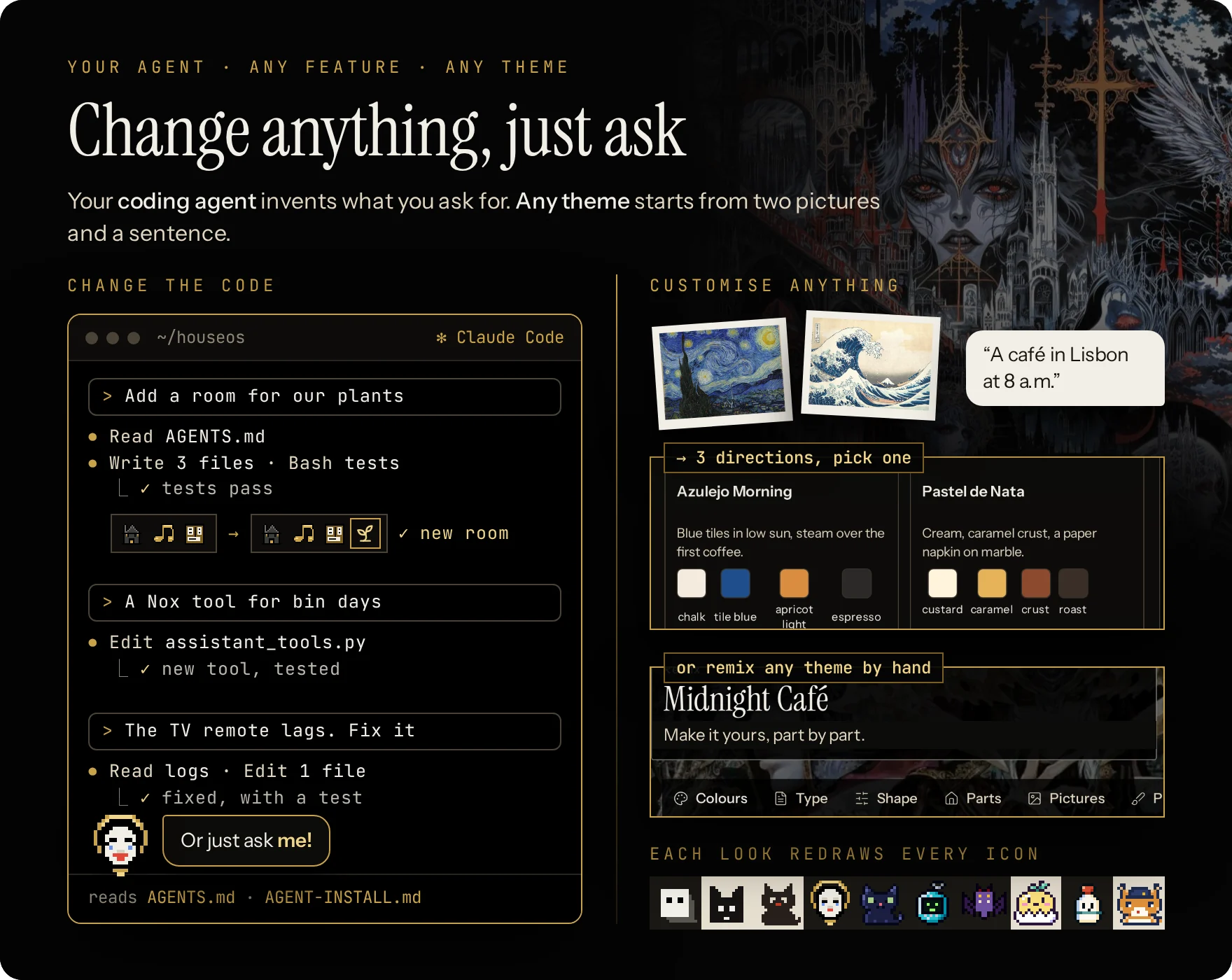
Every setting, every look, every feature: change it in plain words, or by hand. Your coding agent edits the HouseOS folder; Nox lives in the app and changes things on a tap.
💻 Coding agent · new rooms, tools, fixes
- How: open the HouseOS folder in Claude Code, Codex or any agent, let it work, and ask.
- Written for agents: AGENTS.md is the map; docs/CHANGING-HOUSEOS.md walks a feature end to end (route → Nox tool → screen → translation → test), so each one is a button and something Nox can do.
- Ask for: a room for the plants, a Nox tool for bin days, a fix for a laggy TV remote, a new language.
Read AGENTS.md. Add a room for our plants:
watering days, a photo of each, and
a reminder for whoever's turn it is.
💬 Nox sets it up · a card, then your tap
- Setup mode: an admin opens it; Nox checks what's wrong and explains errors in plain words.
- On a card: quiet hours and the volume cap, time zone, auto play, which speaker plays, which smart-home devices show up, the TV's input for films, invites, AI budgets, which AI does what, night updates, trash settings, restarting a service, trusting a new address.
- Your tap applies it: the card shows the exact change and runs only when you press Confirm, from your own browser, with your own rights.
- Never from a card: making someone admin, turning accounts off, AI provider addresses, backups, sign-in, deleting people or data. Keys are typed on their own screen.
Set quiet hours from 11 p.m.
Why was there no sound last night?
🛠️ Nox drafts code · you review, Apply or Undo
- Drafts what no setting covers, in the app's own code, never the install or check scripts. On Docker, screens and themes come prebuilt, so its drafts change server code there.
- You review the whole diff in Control Room → Changes; Apply takes only that exact diff.
- Safe to try: a backup, the checks, a restart (the music picks up where it was), and a rollback if the house doesn't come back.
- Keep or Undo: Keep deletes the backup, Undo returns to it. Both wait while a film plays. On Docker, first
./houseos.sh buttons on.
🖌️ Themes · customize every part of the look, in plain words or pictures
- Ten ship. Each changes colours, type, shapes, pictures, Nox, every icon and the titles' medals. Themes are data, not code: they can't break a screen.
- Create any theme you want: describe it in plain English, add pictures if you like, to Nox's theme studio or your agent. It offers three directions, builds the one you pick and checks every screen stays readable.
- Remix by hand in the workshop, no AI needed.
- Share it: one
.houseos-themefile, brought in from Your preferences → Appearance.
Read themes/AGENT-KIT.md. Make a theme
from these two photos: a café in Lisbon
at 8 a.m., warm and calm.
Made something good? A theme, a room, a Nox tool, a fix: open a pull request, or show it in Discussions.
🐳 Running HouseOS
One computer at home runs the house in Docker; everyone else opens a browser.
Easiest: let your agent run it. Open the HouseOS folder in Claude Code (or any coding agent) and ask: "update HouseOS", "back it up", "why is there no sound?". AGENTS.md tells it how. Or just ask Nox, right in the app: "why is there no sound?", "update HouseOS".
🛠️ Run it yourself · requirements, commands, ports, remote access, updates, backups
💻 What it runs on · Linux, Raspberry Pi, Windows
| Computer | Runs HouseOS? |
|---|---|
| 🐧 Linux, x86_64 or arm64: a mini-PC, a NAS, an old laptop | ✅ Ubuntu, Debian and most distros |
| 🍓 Raspberry Pi 4/5, 4 GB+, 64-bit OS, an SSD rather than the SD card | ✅ slower first build and voice |
| 🖥️ Windows 11 (22H2+) with WSL 2 | ✅ docs/WINDOWS.md |
| 📦 Unraid, Proxmox, Fedora, Mint, Arch | ✅ a few notes |
| 🍎 macOS | opens HouseOS, can't host it |
| ❌ Podman, rootless Docker, 32-bit | not supported. Docker Desktop starts it, but can't cast or find devices |
Needs: Docker Engine with Compose v2 (2.24+) · 4 GB of memory (8 comfortable) · about 30 GB free, plus room for songs and films · the same network as the phones (not a guest Wi-Fi). No screen or speakers needed.
⌨️ Commands · update, backup, logs and the rest
./houseos.sh                  # the menu
./houseos.sh install          # first install
./houseos.sh update           # new version, rebuilt; the music resumes at the same second
./houseos.sh backup           # database + state (keys) + files into backups/<date>
./houseos.sh status           # what runs
./houseos.sh logs [api worker…]   # what it says, live
./houseos.sh setup-code       # the one-time setup code again
./houseos.sh buttons on|off   # the Control Room buttons (update, backup… from the app)
./houseos.sh gpu on|off       # voice typing on an NVIDIA card, or the processor
./houseos.sh torrents on|off  # the torrent player: a stream add-on without a debrid service
./houseos.sh own-address      # HouseOS as its own device on the network
docker compose down stops HouseOS and keeps everything. docker compose down -v deletes it all: only for a real fresh start.
🌐 Addresses and ports · houseos.local, 8443, 8991
| Open | When |
|---|---|
https://houseos.local:8443 |
the usual way, from any device at home. The browser warns once about the certificate: it's your house's own |
https://<server-ip>:8443 |
if houseos.local doesn't open (some Android and older Windows) |
https://your.domain |
behind your own proxy, pointed at http://<server>:8990 |
- Sign up at the address the phones will use: only that one is trusted at first. Add others in Control Room → Access.
- No more certificate warning: Control Room → Access → Download the certificate on each device, or use a proxy or Tailscale (below).
- Ports, from the home network only: TCP 8443 (the app), TCP 8991 (media for TVs and speakers), UDP 5353 and 1900 (Find devices,
houseos.local). 8990 is plain HTTP for a proxy, on this computer only. - Port 8443 taken? The install picks 9443 or the next free one and says so.
🔐 From outside home · Tailscale or your own proxy
Tailscale gives a real certificate with nothing to configure:
tailscale serve --bg 8990
Then open https://<server>.<tailnet>.ts.net and add it in Control Room → Access.
Caddy (nginx, Apache, Traefik and proxies in containers: docs/DOCKER.md §3):
house.example.lan {
    reverse_proxy 127.0.0.1:8990
}
Never open HouseOS to the whole internet: use your network or a private VPN like Tailscale.
🔄 Updates · by command, a button or at night
./houseos.sh buttons on(or yes at install) adds a small helper, so Control Room → Services can update, back up and move voice to the graphics card with a button.- New versions: HouseOS then checks every 6 hours and Nox leaves admins a note. Press Update HouseOS, ask Nox "update HouseOS", or tick Update by itself at night (3–5 am, only when nothing plays).
- Know what it means: the helper holds Docker's socket, which is as strong as being this computer's admin. It has no network and runs only
houseos.sh's fixed actions, when the app asks with a note signed by the house's own key../houseos.sh buttons offremoves it.
💾 Backups · one command, and restoring
./houseos.sh backup writes backups/<date>/: the database, the state (with the keys that unlock saved passwords) and your files, plus your settings. Everything pauses for about a minute. Keep them private and copy them to another disk.
To restore on a fresh clone, before the first start:
cp backups/<date>/houseos.env .env && chmod 600 .env
docker compose create
docker compose run --rm --no-deps -u 0 -v "$PWD/backups/<date>":/b --entrypoint tar db  xzf /b/houseos-db.tgz -C /var/lib/mysql
docker compose run --rm --no-deps -u 0 -v "$PWD/backups/<date>":/b --entrypoint tar api xzf /b/houseos-files.tgz -C /
docker compose up -d
⚙️ Options · graphics card, your own folders, no Docker
- Voice on an NVIDIA card:
./houseos.sh gpu on, with the NVIDIA Container Toolkit. It falls back to the processor by itself. The microphone needs anhttps://address. - Raspberry Pi: the same install, 20–40 minutes the first time; voice uses the smaller spee