

HubDeck
The free, open-source app for the Cooler Master MasterHUB modular deck,
an alternative to the official MasterHUB software.
Windows and macOS. No account, no cloud, no telemetry.



Download for Windows · Download for macOS · Website · Docs · FAQ

HubDeck is an independent project. It is not made, endorsed or supported by Cooler Master. "Cooler Master" and "MasterHUB" are trademarks of their owner and are used here only to say which hardware this software works with.
Quick start
- Download for Windows or for macOS and install it (step by step).
- Quit the official MasterHUB app: two apps cannot drive the deck at once.
- Open HubDeck from the tray and click Show me on my deck: one question, and in about five minutes your deck is set up for your modules and apps. No account and no AI needed.
Supported modules
| Module | Windows 10/11 | macOS 12+ |
|---|---|---|
| Base with the edge light | ✓ | ✓ |
| 15 LCD keys | ✓ | ✓ |
| Dial with its round screen | ✓ | ✓ |
| 3 knobs | ✓ | ✓ |
| 5 faders | ✓ | ✓ |
| 2 rollers | ✓ | ✓ |
Checked module by module on real hardware. Attach and take off modules while HubDeck runs; it finds where each one sits and how it is turned. One base at a time for now.
Highlights
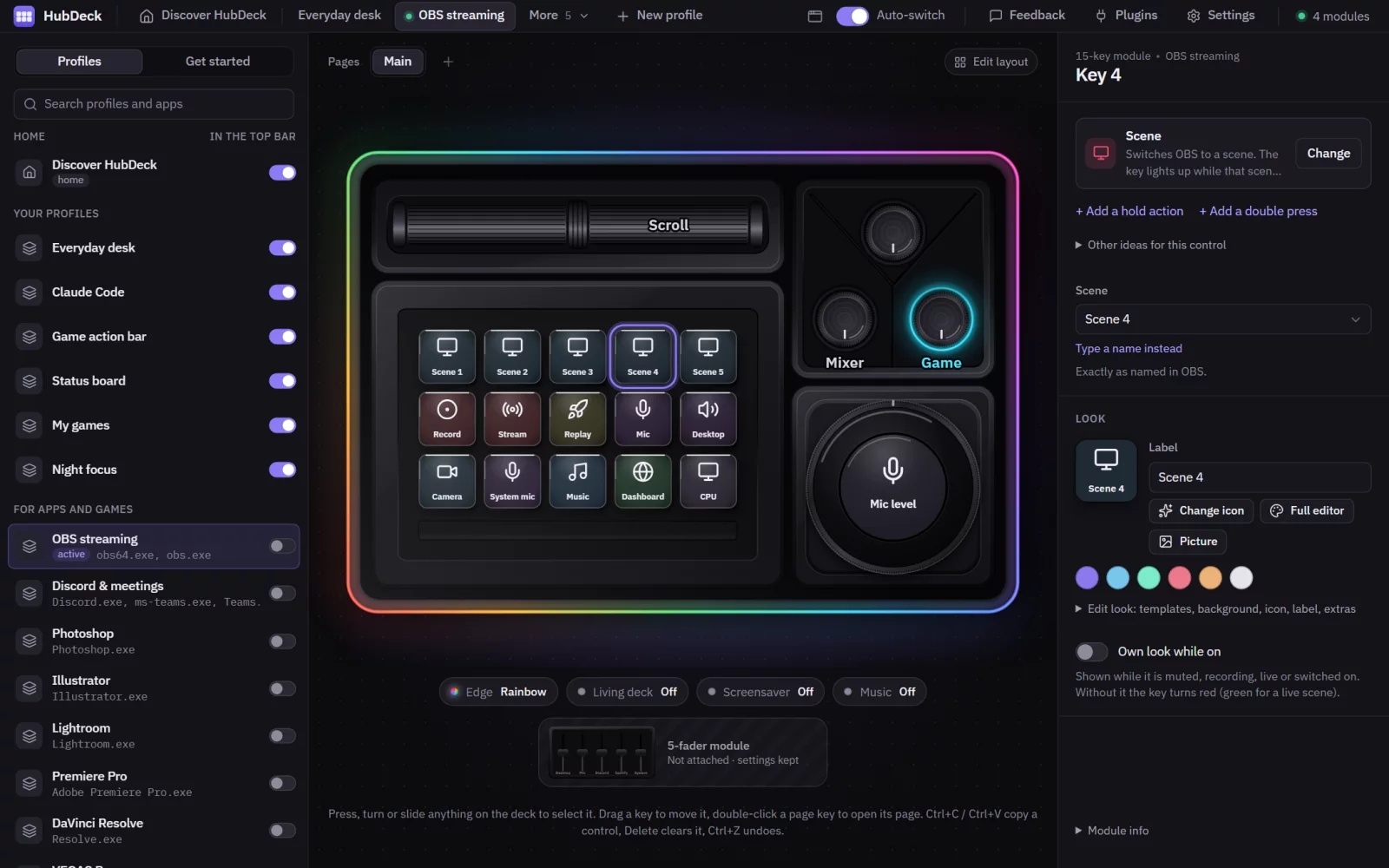
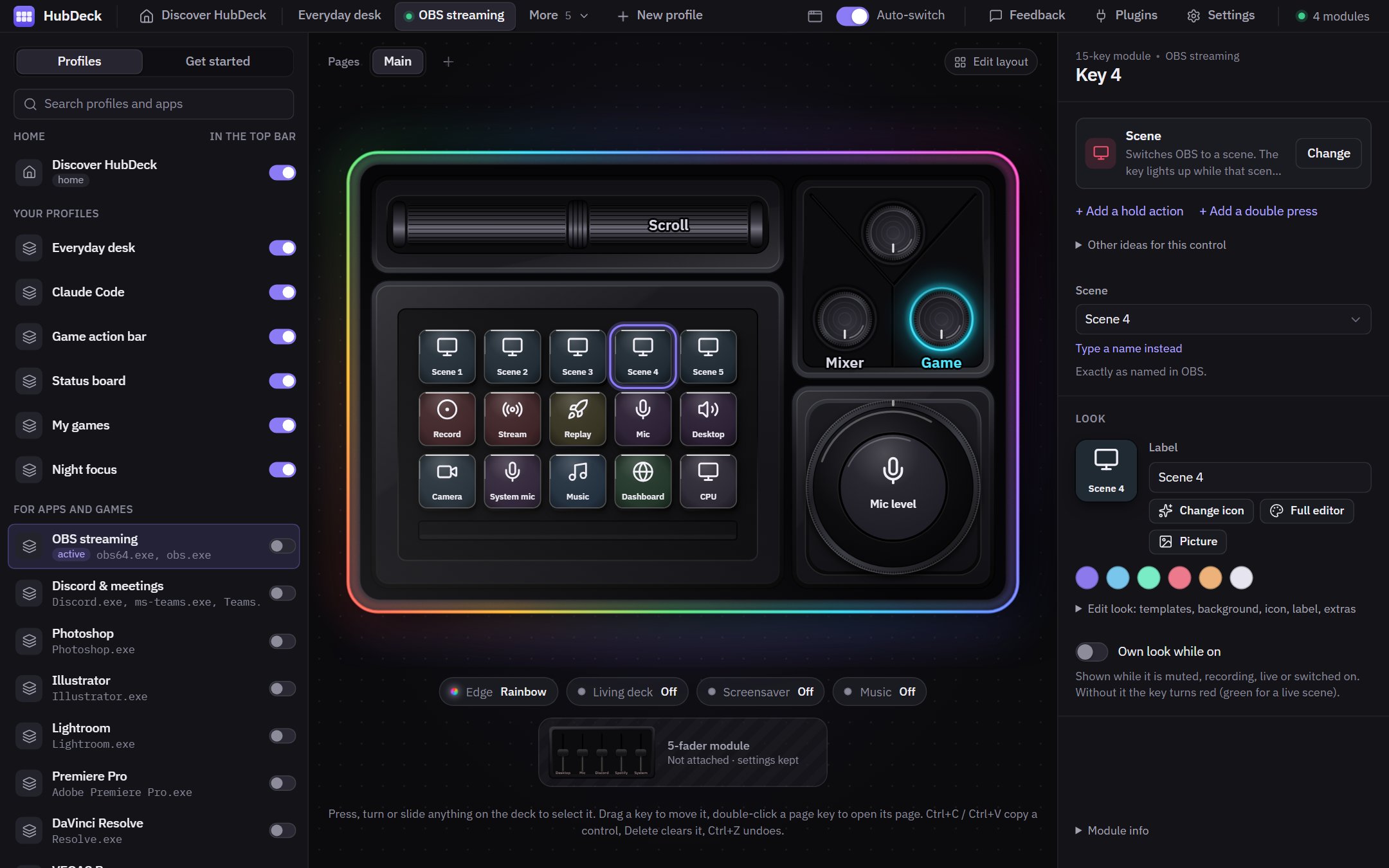
- Every module, live. 15 LCD keys, the round dial, knobs, faders, rollers and the edge light, found and drawn as they sit on your base, while it runs.
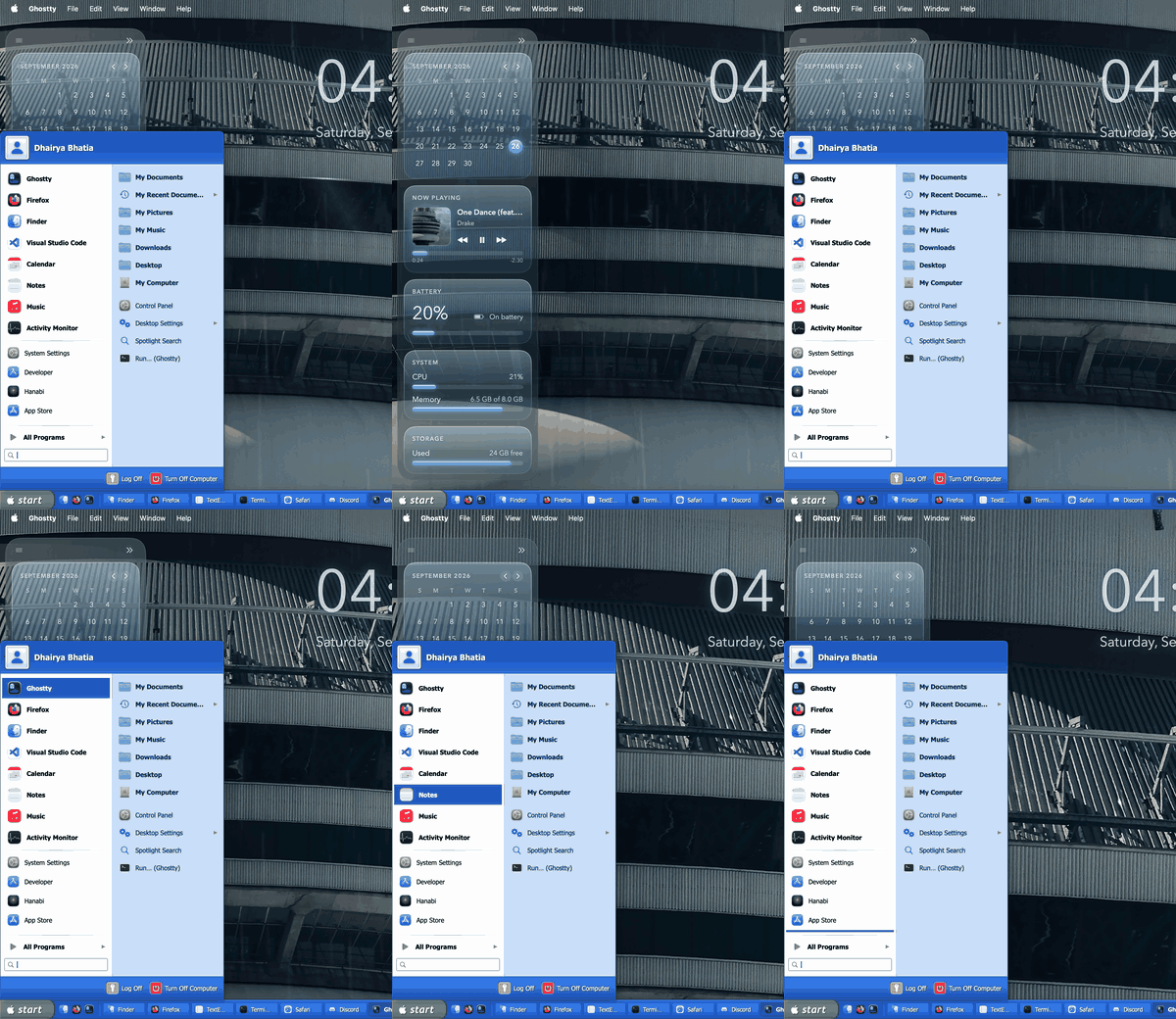
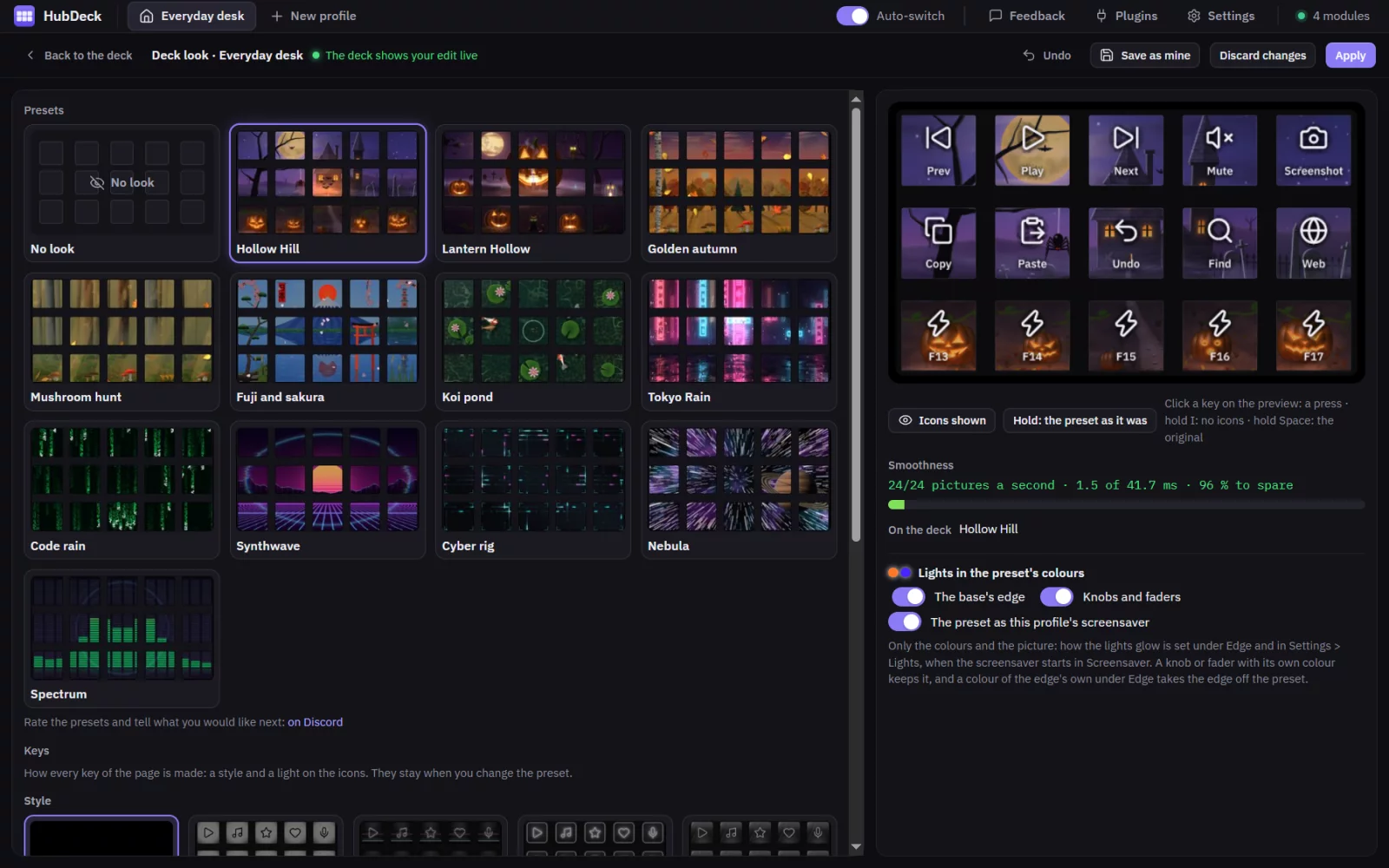
- A living deck. The 15 keys show one moving scene behind your icons, as if they were windows onto it, and it answers your presses: a forest in autumn, Fuji, a koi pond, code rain, a nebula, two for Halloween and more (below).
- A deck made for you in minutes. Say what you do most; HubDeck builds a deck for your modules and apps and walks you through it on the hardware. No AI needed.
- Profiles that follow the app in front, with per-app volume, mute, media with cover art, OBS, Home Assistant, monitor brightness and system stats.
- Stream Deck plugins run in HubDeck: the Plugins tab lists about 300 that install with one
click (the open ones on Elgato Marketplace, the OpenAction catalog and GitHub), with filters and
search; also the plugins your Stream Deck app already has, and any
.streamDeckPluginyou open with HubDeck or drop on its window. Of 53 popular ones checked, 44 start and draw on Windows (marked "tried in HubDeck"; the list); tell us when one does not work. - Your language and your fonts. English, Polish and Japanese built in, or a language file of your own; any font on your computer for the text on the deck.
- Safe by design. Firmware is never written; dangerous commands are refused in code. Nothing leaves your computer unless you turn it on (PRIVACY.md).
- Light. About 3 % of one CPU core and 40 MB of memory in the tray with a clock and meters on the keys; 9 % and 62 MB with 22 animations on the deck (Windows, measured before the release).
The living deck
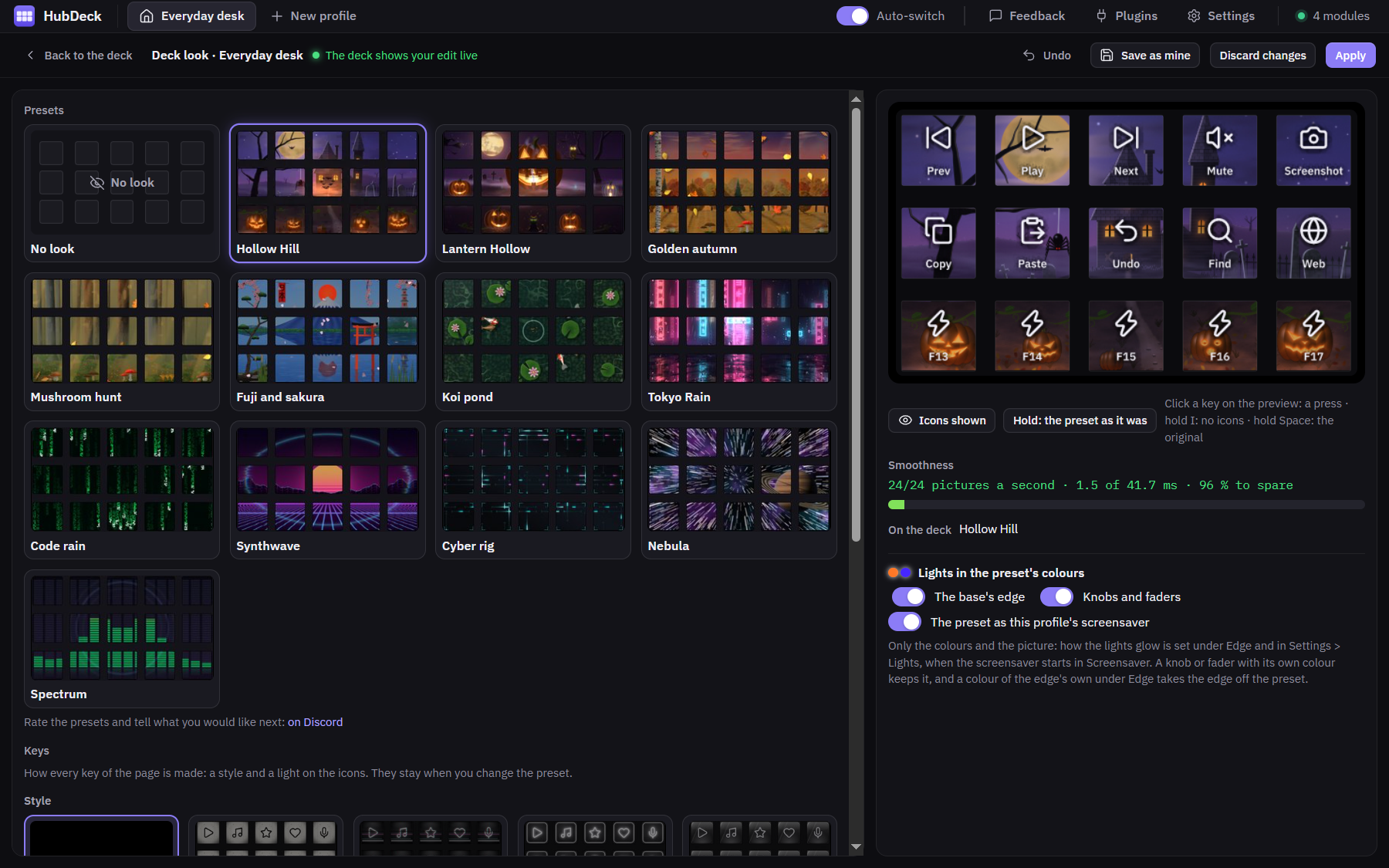

The keys module can be one picture instead of fifteen squares. A scene is drawn live behind your icons and seen through the key windows, moving all the time, and a press does something in it: leaves thrown out of the key, a gust through the cherry blossom, koi swimming to the key for food, a jump to hyperspace. Your icons and labels stay on top, with a soft dark halo behind them so they stay readable.
Click Living deck under the deck in the window. Deck look opens with the presets (each thumbnail moves when you point at it) and your deck as it really is, live: the deck shows a preset while you try it, a click on a key in the preview presses it, and nothing is kept until you click Apply (it is saved in the profile). The presets:
- Halloween: Hollow Hill (a crooked manor on a knoll, a harvest moon, a graveyard in the fog) and Lantern Hollow (jack-o'-lanterns, an owl, a black cat, now and then a witch across the moon)
- Golden autumn and Mushroom hunt: a forest against the low sun, and the inside of an old forest with ceps and fly agarics on the floor
- Fuji and sakura, Koi pond and Tokyo Rain: a bright day at Mount Fuji, a pond seen from above, a street at night through wet glass
- Code rain, Synthwave, Cyber rig, Nebula and Spectrum: the last one shows what plays on your speakers (on a Mac from macOS 14.2; HubDeck listens only while it is on and records nothing)
Mushroom hunt, Fuji and sakura and Koi pond are drawn as one picture for a deck lying flat or standing upright. Keys, in the same view, gives every key a style and a light on the icons, and they stay when you change the preset; Save as mine keeps a look of your own.
The scenes are drawn by the graphics card, up to 24 pictures a second (as many as the key screens show). On a computer without a graphics card HubDeck can use, the window says so and the deck runs without them.
Screensaver, beside Living deck under the deck: after the minutes you set without a touch, a scene across all 15 keys (aurora, aquarium, lava lamp, fireplace, summer night, neon rain or haunted night), any of the presets, or a simple one; meanwhile the dial can show a clock and the lights breathe in the scene's color. The first touch only ends it, it does not press a key. One for every profile, or a profile's own; Preview on the deck shows it for 20 seconds.
Built from what deck owners complain about
Before and while building HubDeck we read what owners of the MasterHUB and of other decks (Stream Deck, Loupedeck, Logitech MX Creative Console, Razer Stream Controller) say goes wrong: reviews, vendor forums, GitHub issues and about 1,200 Reddit posts of 2025-2026. The ones that shaped HubDeck most, with their sources:
| What owners say | What HubDeck does |
|---|---|
| "Nearly every update ... breaks almost everything"; people roll back by hand (r/elgato, r/elgato) | Nothing installs until you click Install, with the changes shown first; Go back to the version before in Settings, signed like any update, your profiles backed up first |
| A press does nothing, or arrives seconds later, and you cannot tell which (r/elgato) | Every press frames the key at once; an action that failed leaves a red corner and the window says why |
| Official integrations broken for weeks: OBS, weather, Spotify (r/elgato, r/elgato) | OBS, Streamlabs, now playing, weather and Home Assistant are built in; Stream Deck plugins run beside them, restarted when they crash, stoppable by hand |
| Forced accounts, a store, an ad in paid software (r/elgato, r/elgato) | No account, no store, no ads, no telemetry. Open source |
| The vendor walks away and the hardware becomes a brick (r/Loupedeck, the MasterHUB itself) | MIT or Apache-2.0, the protocol documented in PROTOCOL.md: anyone can keep it going |
| "What do I use it for if I don't stream?" (the most discussed non-hardware thread, r/elgato) | A tour builds a deck for your modules and apps in minutes; ideas from other deck owners, taken from that thread, are one click away |
| Companion apps that take 2-4 GB of memory (Logitech reviews) | Measured before every release: 9.4 % of one CPU core and 62 MB with 22 animations on the deck, memory flat over 5 minutes (Windows) |
| "Commands did not save properly", a setup lost (APH Networks) | Every change saved at once and written safely; daily backups with Restore |
Install
Download from Releases.
Windows 10 and 11: run HubDeck_x.y.z_x64-setup.exe. Windows SmartScreen may say it does not
know the app (it is not signed with a paid certificate): choose More info > Run anyway.
macOS 12 or later (Apple silicon and Intel): open the .dmg and drag HubDeck to Applications.
The app is not notarised by Apple yet, so the first time macOS says it "could not verify" HubDeck.
Once only:
- Click Done (not Move to Trash).
- Open System Settings > Privacy & Security, scroll to Security and click Open Anyway next to the line about HubDeck; confirm with your password or Touch ID.
- Click Open in the next message.
On macOS 14 and older, right-click HubDeck in Applications and choose Open also works. To send shortcuts and type text from the deck, allow HubDeck in Privacy & Security > Accessibility; the app asks for it with a button. Setting one app's own volume (macOS 14.2 or later) asks once for System Audio Recording: HubDeck plays that app's sound at the level you set and records nothing.
Close the official MasterHUB app first: two apps cannot drive the deck at once.
Platforms
| System | Every release | On a real deck |
|---|---|---|
| Windows 10 and 11 | built and tested by CI | checked before every release (modules, window, a soak of memory and CPU) |
| macOS 12 or later | built, signed and tested by CI | checked every few weeks; last: 2026-10-30, a build after 0.1.12 |
| Linux | not supported |
Something wrong on a Mac? Please open an issue: Mac reports are checked on a deck first.
Known issues
- The window shows the dial's animations at about 8 frames a second; the dial itself plays them at 15 or more.
- macOS: after HubDeck restarts, the keys or the dial sometimes stop taking pictures; HubDeck tries to restart that module by itself, and taking it off the base and putting it back always helps.
- macOS 12 to 14.1: one app's own volume cannot be set (the system and the player can).
- Elgato Marketplace plugins with copy protection do not run, also when the Stream Deck app has them (Elgato keeps their files encrypted on disk); the catalog says which ones come only through Elgato's app. Plugins from their authors' own pages run.
- Twitch sign-in is off until the app registration is done. Linux is not supported.
- A module that drops off USB when you press it (Windows plays its unplug sound, the keys go blank for a moment) has a loose contact with the base: take it off and put it back firmly.
What it does
Everything in detail (modules, profiles, actions, plugins, the tour and the assistant, integrations, lights, looks, ready-made profiles, safety)
Coming next: Twitch actions (built, waiting for the app's Twitch registration), a shared profiles gallery, more than one base.
Deck and modules
- Every module: 15 keys, dial with its 240x240 screen, knobs, faders, rollers and the base. Attach and remove modules while it runs; HubDeck finds where each one sits and how it is turned.
- The window draws your deck as it is on the desk, live: the very pictures the keys and the dial get (clocks, values, covers), LED colors and the edge light. Press, turn or slide anything to select it.
- Modules you own but have not attached stay on a shelf beside the deck, still editable.
Profiles that follow you
- Your home profile is the one you pick. An app with its own profile takes over while it is in
front (even one window:
chrome.exe: YouTubeon Windows,Google Chrome: YouTubeon macOS) and gives back when you leave it; the Auto-switch switch in the top bar stops switching. Switching is drawn in tens of milliseconds. - Key pages, press / hold / double press on every key, knob and the dial, multi-actions with delays and conditions, a keyboard macro recorder, toggles, several modes on one dial.
- Profiles in a OneDrive or Dropbox folder to share them between PCs; daily backups with
one-click restore; import of profiles exported by the official app (
.mhz, beta).
Actions
- Open apps, files and websites (with the app's own icon), run commands, hotkeys (F13-F24, media keys, and a mode that games can read), type text, scroll.
- System, per-app, "app in front" and microphone volume (per app on macOS 14.2 or later); microphone mute for every app; switch the speakers or microphone; play sounds (a small soundboard).
- Multimedia (play, pause, tracks), now playing with cover art, seek in 12 players; monitor brightness (DDC/CI); system monitor (CPU, memory, GPU, temperatures, on macOS too); clock and timer; deck brightness.
- On the dial for fun and focus: Mochi, a pet that gets hungry, sleepy and happy (with a picture of your own as its body if you like), Pomodoro and the weather; screensavers for the whole deck.
Plugins made for Stream Deck
- Install a
.streamDeckPlugin(open it with HubDeck, drop it on the window, or pick it), use the plugins Elgato's Stream Deck app already installed, or pick one in the Plugins tab: about 300 from Elgato Marketplace's open ones, the OpenAction catalog and GitHub (Discord, Spotify, OBS, Home Assistant, Philips Hue, VS Code and more), with filters for the source, this computer, dial and knobs and what was tried in HubDeck. Use it after Install opens the deck with the plugin's actions first, and they join "What should it do?". 44 of 53 popular ones checked run on Windows (the list). Keys are a 5x3 keypad, the dial and knobs are dials, the plugin's own settings page shows in the panel on the right. Many plugins are written in JavaScript and need Node.js 20 or later installed; HubDeck says so when one does. How it works and what to expect: docs/STREAMDECK-PLUGINS.md.
A tour, then a deck assistant
- Show me on my deck (no AI needed): one question about what you do most, then HubDeck makes a deck for your modules and your apps at once and walks you through it on the hardware, part by part; the control to try blinks on the deck. Keep the parts you like; nothing of yours changes until you keep the deck. With your OK it counts presses, and the next day names a control you never used, to swap it.
- The assistant uses your own Claude Code (it needs a Claude Pro or Max plan, or an Anthropic API key; the tour and everything else work without it): it looks at the apps you use (with your OK), asks a few questions and sketches whole decks you try on the hardware before you keep one; or go step by step, control by control, through a gallery of options. It changes only drafts; more in docs/ASSISTANT.md.
- Your own apps and scripts can show their state on the deck (an agent waiting, a build running) and offer actions: docs/APP-CONTRACT.md.
Integrations
- OBS Studio and Streamlabs Desktop: scenes, record, stream, replay, sources, mixer, with the live state on the keys.
- Spotify (like, playlists; with Spotify Premium, through a free developer app of your own), Home Assistant (devices, scenes, lights, services), MIDI to any DAW.
- Claude Code: a key per coding session that shows whether it works, needs your permission or waits for you. Only the state and the project folder name are sent; never your prompts.
- Plugins in any language over a local WebSocket, and a local API for scripts; see docs/PLUGINS.md.
Lights
- One lighting style for the whole deck, or a color and effect per knob and fader and for the edge.
- Lights that mean something: a muted microphone, being on air, a session that needs you, a timer that ran out, levels as brightness.
Key looks
- Labels, colors, styles (flat, gradient, glass, outline), your own pictures and animated GIFs, one picture, a clock or a live graph across all 15 keys.
- A look editor in the key's Look panel (templates, background, icon, label, extras such as patterns, a badge and motion), and Full editor for the key on the whole window, several keys at once; save a key as a PNG or a page as a Stream Deck icon pack. A key can change its look while something holds (CPU over 80 %, music playing, the microphone muted, an app in front, a time of day) and show a value in its label.
- The living deck: scenes behind the icons across all 15 keys, answering presses (more).
- Lucide icons and 300 game icons (game-icons.net) with search; install icon packs, including Stream Deck icon packs.
Ready-made profiles
- Everyday desk, OBS streaming, Discord and meetings, Photoshop, Illustrator, Lightroom, video editing, Claude Code, a game action bar, and games on their default keys: Diablo IV, Baldur's Gate 3, Counter-Strike 2, Valorant, Fortnite, Minecraft, League of Legends (how to set up a game). Each one adapts to the modules you have.
Sharing
- A profile and all its pictures as one
.hubdeckfile; secrets in web requests are left out.
Safe and light
- The module firmware is never updated or changed. Commands that could rewrite serial numbers, reset a module or flash firmware are not part of HubDeck's protocol code, and hand-built reports carrying them are refused.
- No account, no cloud, no telemetry. HubDeck goes online only for the update check (on by default, Settings > Updates), album covers of what plays, and what you turn on; the full list is in [PRIVACY.md](https://github.com/przemotar/hubd