
Inkling is a Chrome and Firefox extension that checks spelling and grammar in your web browser with your own LanguageTool server. Text goes only to the server you configure.
This project is not affiliated with LanguageTooler GmbH or with Automattic.
Built on Harper
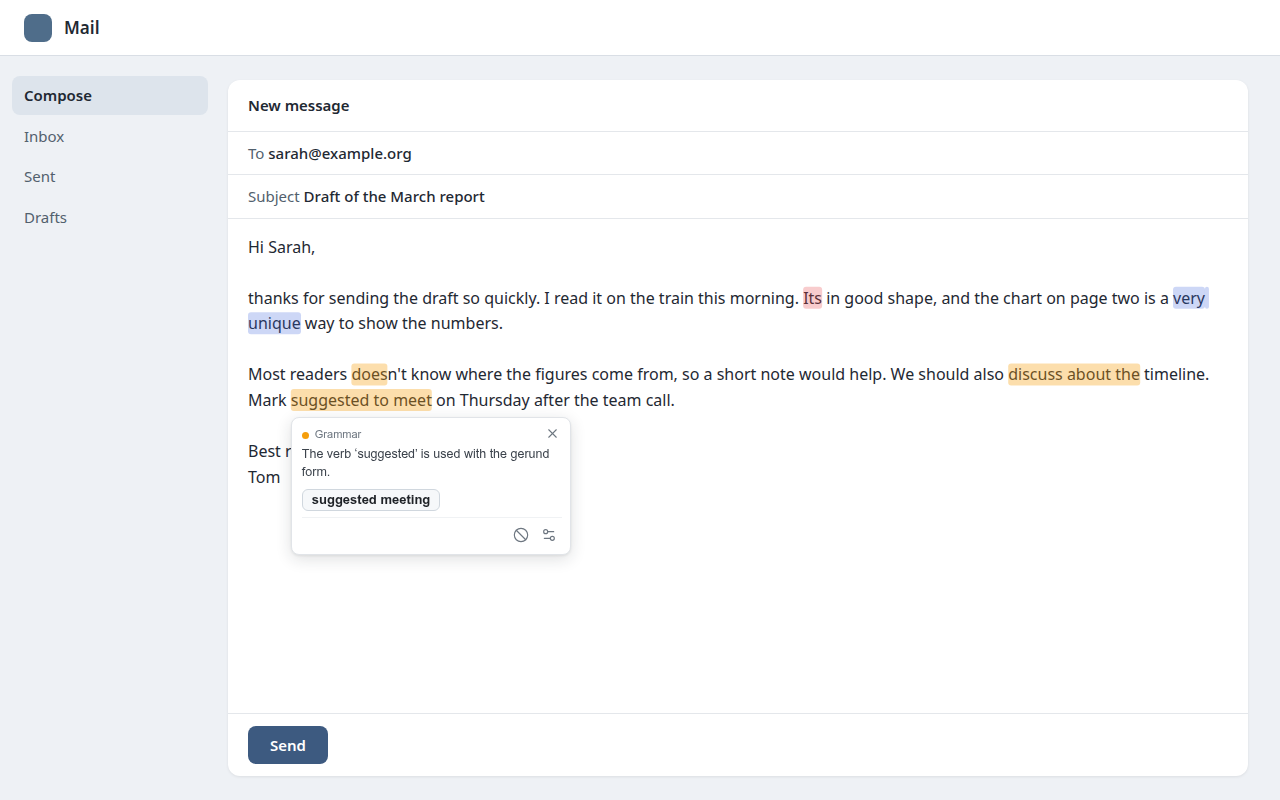
Inkling exists because of Harper, the open-source grammar checker by Elijah Potter, its contributors and Automattic. Almost everything you see on a web page is their work: the highlights, the suggestion popup, the hotkeys, the per-site switch, and the editor support for plain text fields, Lexical, ProseMirror, Slate, Quill, Draft.js, iframes and Google Docs. Each of those editors needed its own careful work, and Harper's team published all of it under Apache-2.0, so others can build on it.
Inkling is a fork of Harper's browser extension at commit 6bb9b661. It
replaces Harper's built-in checker with requests to a LanguageTool server, which
adds German and the other LanguageTool languages. Everything else from the
Harper repository was removed.
If you write in English, use Harper itself. It runs entirely in your browser, needs no server, and is fast: https://writewithharper.com.
Install
- Chrome and other Chromium browsers: Chrome Web Store
- Firefox: addons.mozilla.org
After the install, the settings page opens. Enter the address of your
LanguageTool server and click Save and Test.
Run your own server
podman run -d --name languagetool -p 8010:8010 docker.io/erikvl87/languagetool
Then enter http://localhost:8010 as the server URL. Docker takes the same
command. The image is a community build of the open-source
LanguageTool server; its
documentation covers n-gram
data and memory settings.
Build from source
make chrome    # packages/extension/package/inkling-chrome.zip
make firefox   # packages/extension/package/inkling-firefox.zip
Load the unpacked packages/extension/build directory in
chrome://extensions (developer mode), or the zip in about:debugging in
Firefox.
To ship a build with a server already set:
LT_DEFAULT_SERVER_URL=https://lt.example.com make chrome
Settings
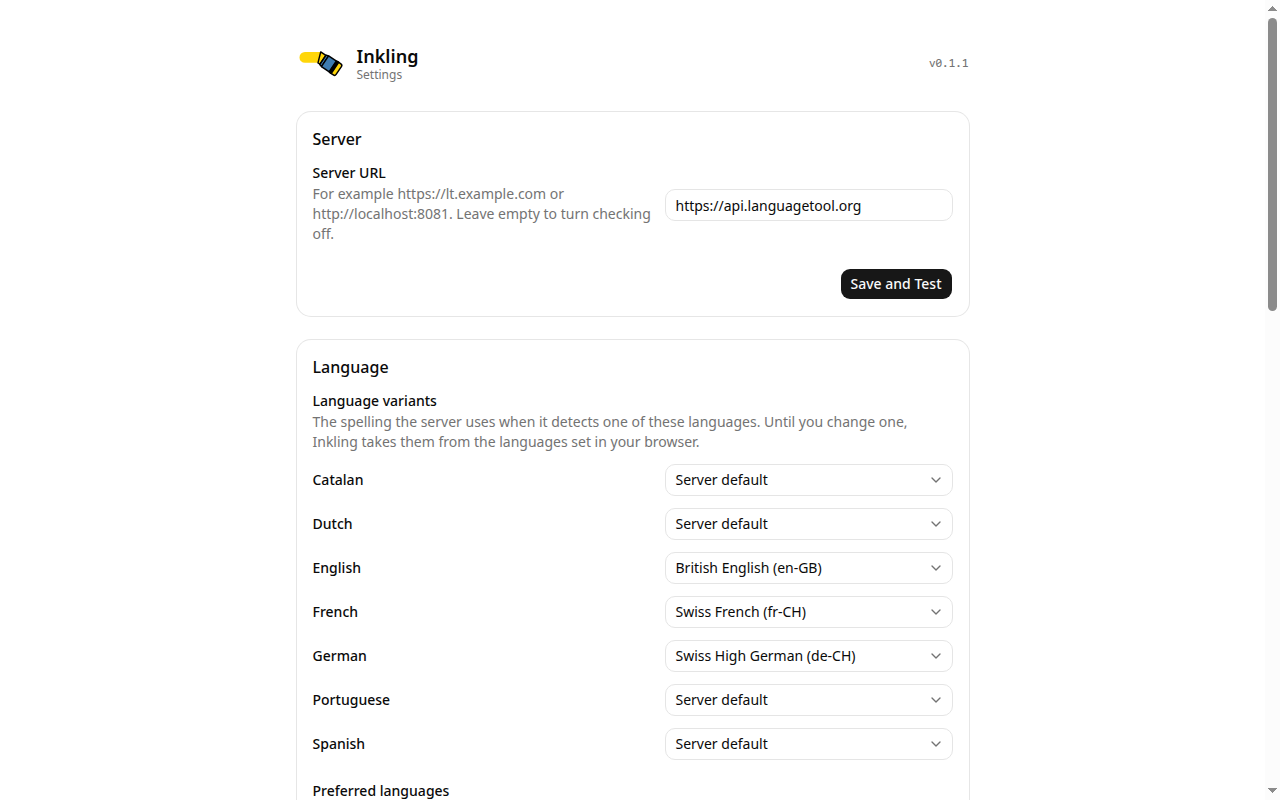
Server URL: Base URL of the LanguageTool server, for examplehttps://lt.example.comorhttp://localhost:8081. Empty turns checking off.Save and Testasks the browser for access to that server. While the field is empty,Use public serverfills inhttps://api.languagetool.org.Language variants: The variant per language, such as Swiss High German (de-CH) or British English (en-GB), that the server uses when it detects that language. Until you change one, they follow the languages set in the browser. The lists come from the server.Preferred languages: The languages you write in. They help the server detect the language of short texts.Mother tongue: Lets the server find mistakes typical for speakers of that language, such as false friends.Picky mode: Also reports style issues and less certain mistakes.Enable on new sites: Off by default. Checking then runs only on the sites in the built-in list, on WordPress and Substack sites, and on sites you switch on in the popup. When on, checking runs on every site you have not switched off in the popup.Delay: Milliseconds to wait after typing stops before the text is sent to the server, from 0 to 60000. Default 500.Activation key: WithDouble ShiftorDouble Control, pressing that key twice opens the suggestion card of the mark nearest the cursor and moves the keyboard into it. DefaultOff.Apply-suggestion hotkey: Applies the first suggestion of the mark nearest the cursor, or ignores the mark when it has no suggestion. Default Ctrl+E.User dictionary: Words that are never marked as spelling mistakes, one per line.Export enabled domains:Export JSONdownloads a list of the sites that are switched on. Sites in the built-in list are only in it when you switched them on yourself.Disabled rules: LanguageTool rule IDs, one per line. "Disable rule" in a suggestion adds its rule here.Ignored suggestions:Clearshows all suggestions you ignored again.
Development
make check       # TypeScript and Svelte checks
make lint        # Biome
make test-unit   # connector tests, no browser needed
make test        # unit tests plus Playwright tests in Chromium and Firefox
The Playwright tests run headed under xvfb-run against a stand-in server in
packages/extension/tests/mockLanguageTool.mjs. Set LT_TEST_SERVER to run
the Chromium test against a real server.
License
Apache-2.0, see LICENSE. Copyright for the original code remains with the Harper authors.