
Job-search automation for any role across Europe. Fork it, point it at your own places, languages and CV, and it crawls job boards and employer feeds every 4 hours, has Claude score each posting against your profile, drafts a cover letter and form answers for your best matches, and sends a ranked digest to Telegram. Applications are tracked in Notion. It never submits an application on your behalf — drafting and filling can be automated; clicking Submit always stays with you.
Not a developer? Use the free Mac app (Windows beta too): a guided setup in about ten minutes, no terminal, with a Chrome extension that fills the forms. Website: www.jobpilotto.top (how it works, all the AI inside, compared with Simplify, Teal, Huntr, JobCopilot and LazyApply).
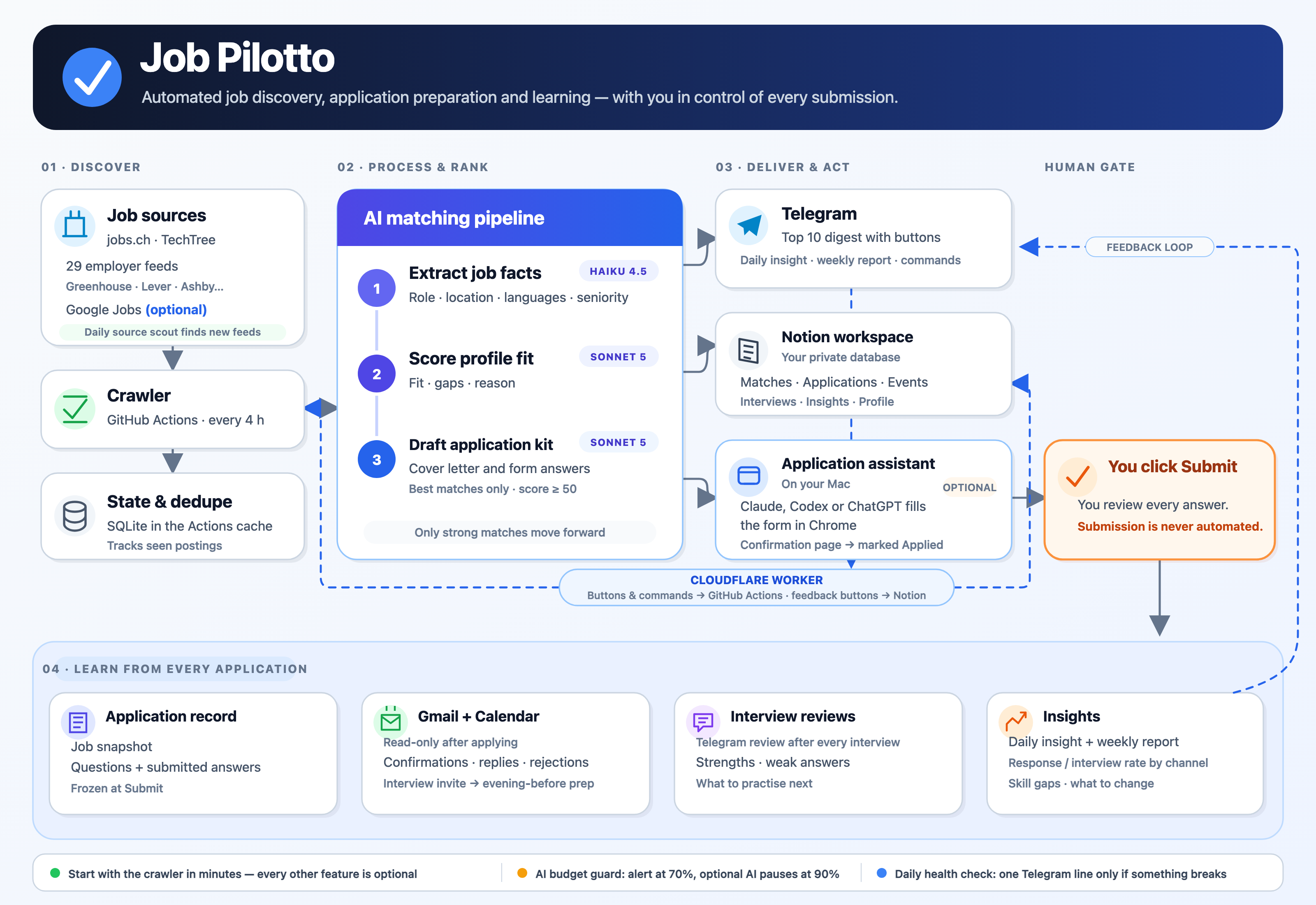
Discover → rank with Claude → deliver to Telegram and Notion → you submit → learn from every reply.
Diagram source: docs/images/architecture.svg.
Everything in that diagram except the crawl is optional. You can run the core in two minutes with no accounts and no keys, then turn on the rest one piece at a time, only if you want it.
Quick start (no accounts, no keys)
Needs Python 3.10+ and nothing else: the core uses only the standard library.
git clone https://github.com/<you>/job-pilotto && cd job-pilotto
python3 -m src discover     # job boards (jobs.ch, TechTree): their jobs, and new employers to watch
                            # (SwissDevJobs is tried too, but it blocks automated access)
python3 -m src daily        # crawl every employer feed, add the board jobs, rank, print the digest
python3 -m src feeds        # the employer-feed crawl as a filterable page: reports/latest.html
python3 -m src doctor       # what's on, what's optional, and the one next step
Without Notion, daily crawls the employer feeds in config/sources.json: a shared starter list
of 29 verified public feeds (Anthropic, OpenAI, Stripe, Datadog, Grafana Labs, Cloudflare, GitLab,
Databricks and more, about 9,000 open jobs), so the first run already has plenty to rank. Your
config/search.json then keeps only the titles and places you want. With Notion, daily also
crawls every Active row of your Employers & Sources database (your own list, kept growing by your
own optional scout). On top of both, every run downloads the shared employer index: feeds found and verified
daily by one central scout, worldwide, each with the places it hires in; only feeds with roles in your places
are crawled (JOB_PILOTTO_INDEX_ALL=1 for all, JOB_PILOTTO_DISABLE=index for none). Nothing about you is sent to
get it. If the service is down, the cache or the starter list is used. Make it yours by editing config/search.json (job titles, places, skills; it ships empty, the setup drafts it from your CV; format example: config/search.example.json; see
Configuration) and config/sources.json (employer feeds to crawl). That's a
working job search. Everything below is an upgrade you can skip.
Optional features
Each feature turns itself on when the keys or variables it needs are set, and stays off
otherwise. Nothing fails because a feature is missing: python3 -m src doctor just shows it as off.
| Feature | What you get | Needs | Cost | Effort |
|---|---|---|---|---|
discover |
jobs.ch + TechTree employers and jobs | nothing | free | on by default |
scout |
your own search for new employer feeds to crawl (optional: the shared index already supplies a worldwide pool) | nothing (Notion to keep them) | free | on for existing installs, off for new ones |
index |
downloads the shared employer index (GET /api/index, with a random install id and a token the website gives it), at most daily |
nothing but that random id | free | on by default |
telegram |
the digest on your phone | TELEGRAM_BOT_TOKEN, TELEGRAM_CHAT_ID |
free | 5 min |
| Scheduled runs | a crawl every 4 hours without your laptop | a GitHub fork with Actions on | free | 5 min |
notion |
Applications tracker, Job Matches, run log | NOTION_TOKEN + the pages in docs/notion-schema.md |
free | 30 min |
| Telegram buttons | ✅ applied / ⭐ save / ➕ next, /run, /add |
Cloudflare Worker (worker/setup.sh) |
free | 15 min |
enrich |
AI facts: languages, seniority, salary, visa | ANTHROPIC_API_KEY, JOB_PILOTTO_ENRICH_MODEL |
~$0.004/job | 2 min |
score |
AI fit score against your Profile | + JOB_PILOTTO_SCORE_MODEL, Notion |
~$0.01/job | 2 min |
auto_kits |
cover letter + form answers for top matches | + JOB_PILOTTO_AUTO_KIT_MAX, Notion |
~$0.04/kit | 2 min |
insights |
daily insight + Monday weekly report | + JOB_PILOTTO_INSIGHT_MODEL, Notion |
~$0.03/day | 2 min |
scout_ai |
Claude proposes new employers and company lists to look at, and learns from what the probes found | the AI key | ~$0.05–0.15 per Find jobs run that grows the employer list | on with the AI key |
page_reader |
Claude reads careers pages that list jobs as plain text (cached until the page changes) | the AI key | a fraction of a cent per changed page | on with the AI key |
render |
headless browser for careers pages built in the browser (public pages only; honours robots.txt, stops at any refusal) | pip install -r requirements-render.txt + playwright install chromium |
free | 5 min |
aggregators |
Arbeitnow, Himalayas and Jobicy: free public job APIs, each source named on its jobs, each read at most every 6 hours | nothing | free | on by default |
adzuna / jooble |
parked (26 Oct 2026): off and hidden in the app until JOB_PILOTTO_ENABLE=adzuna,jooble, a saved key stays unused; more job search (Adzuna covers Switzerland) |
JOB_PILOTTO_ENABLE + ADZUNA_APP_ID + ADZUNA_APP_KEY / JOOBLE_API_KEY |
free tier | 5 min |
job_alerts |
parked (26 Oct 2026): off and hidden in the app until JOB_PILOTTO_ENABLE=job_alerts; jobs from your own job-alert emails (LinkedIn, jobs.ch, jobup.ch, Indeed, Glassdoor) in Gmail; their pages are never opened |
JOB_PILOTTO_ENABLE=job_alerts, Gmail connected + the AI key; alerts switched on at those sites |
a fraction of a cent per alert email | 5 min |
google_jobs |
parked (26 Oct 2026): off and hidden until JOB_PILOTTO_ENABLE=google_jobs; Google Jobs listings via SerpApi |
JOB_PILOTTO_ENABLE + SERPAPI_API_KEY |
free plan: 250 searches/month | 5 min |
brave_search |
parked (26 Oct 2026): off and hidden until JOB_PILOTTO_ENABLE=brave_search; the Brave Search API for the web search that finds an employer's own job site (without a key that search runs on your Claude Code or Codex plan) |
JOB_PILOTTO_ENABLE + BRAVE_SEARCH_API_KEY |
free plan: 2,000 searches/month | 5 min |
mail |
Gmail + Calendar update your applications | Google OAuth client + sign-in, Notion, Anthropic | a few cents/day | 15 min |
| Mac app | guided setup, job list, Apply / Prepare / Tailor CV buttons, schedules, notifications | a Mac (Apple silicon) | free | 10 min |
| Chrome extension | fills the form from its kit in seconds, you Submit | Chrome + the Mac app (or the Worker; extension/README.md) | free | 5 min |
| Tailored CV | a version of your CV per job, every change highlighted | the Mac app, ANTHROPIC_API_KEY |
~$0.12/CV | 1 min |
| Apply with Claude (off for now) | from the job board through the employer's sign-up to a filled form, you Submit | the Mac app, Claude Code, Notion; Gmail for confirmation emails | your Claude plan | 5 min |
transcribe |
interview recordings → transcript with speakers, on your machine | pip install -r requirements-transcribe.txt (the app installs it on the first recording) |
free (models ~520 MB, downloaded once) | 2 min |
| Form filling by an AI agent | an AI agent fills the form in Chrome, you Submit | a Mac, Claude Code or Codex, Chrome | your AI plan | 10 min |
A sensible order: Telegram and scheduled runs first (free, 10 minutes), then Notion, then the AI
stages if the ranking is worth paying for. The paid features only cost money once you add a key.
The AI stages also stop at your monthly budget (JOB_PILOTTO_MONTHLY_BUDGET_USD).
Turning a feature off without deleting its keys: list it in JOB_PILOTTO_DISABLE,
comma-separated, or all for the core only.
echo 'JOB_PILOTTO_DISABLE=google_jobs,mail' >> .env               # local runs
gh variable set JOB_PILOTTO_DISABLE --body 'google_jobs,mail'     # scheduled runs on GitHub
gh variable delete JOB_PILOTTO_DISABLE                            # everything back on
The names are the ones in the first column (discover, scout, telegram, notion, enrich,
score, auto_kits, insights, google_jobs, mail, transcribe), and src/features.py defines them. A
switched-off feature behaves exactly as if its keys were missing, and doctor lists it under
"switched off".
🧠 AI at every step
Something in Jobadabra is reading, suggesting or checking at each stop of the search: 47 steps today (AI, plus a few plain rules marked as such), each one yours to accept or ignore, none of them pressing Submit.
Every step runs on the AI you choose: Claude or OpenAI, through an API key or your own Claude Code / Codex plan (setup step 5 below).
The same list, with more detail, is on the website: Intelligence. Every base prompt is in this repository (src/ai/, desktop/lib/, worker/src/extension.js); what is learned from installs is served as data, never as prompt text.
Find: Finds what is worth your time
- Scout that keeps learning (new): Claude proposes employers, their own job sites and company lists to look at, then learns from what each probe found. The shared employer list grows with every install.
- Roles that fit you (new): on Strategy, Claude suggests up to eight neighbouring roles from your Profile, each with the open jobs it would add in your places; at most once a day.
- Knows where each job is (new): Claude decides whether each job location is in your best places, your places or outside them (and if your work rights cover it); a location that names only a country is placed from the posting's own words.
- Sorts job titles your words miss (new): only the place is strict; a title in your places that your role words miss is sorted by Claude (Haiku) against your search words, once per title, then scored as usual.
- Finds the job list (new): before a site only you can open is read, its job list is found (its Careers link, Claude's pick among its links, or a "
- Gets past a dead end (new): a job site that shows no jobs even after Claude's reading gets at most two steps toward the list, picked by Claude among the page's own buttons, links and search boxes; never a sign-in, an apply or a robot check (it says when the page needs you).
- Reads any job site (new): where the extension's quick guess cannot read a job list, Claude reads the page's outline (repeated blocks, paging buttons, a few samples) and makes a recipe kept for the site, so later visits need no AI.
- Filters for your search, on any job site (new): on a job list you opened (LinkedIn, Indeed, an employer's site), the extension's "Filter for my search, then read" asks Claude which of the page's own filters fit your search (places, kind of role, recent jobs); Claude sees only the filters' names and your search words; Apply, Sign in, Save and Message are never touched.
- Why so few jobs (new): when a search brings few new jobs, buttons say what would bring more, easiest first; "Explain with AI" asks Claude, on your click only, why and what to do first, from the search's numbers (never your CV).
- Facts, quoted from the posting: Languages, seniority, salary and visa read from each description by AI, with the words they came from.
- Fit score out of 100: Role, place, pay, growth and risk scored against your Profile, with the reasons. Re-scored when your Profile changes.
- Hints from what people dismiss (new): Why jobs get turned down (seniority, place, tech) is counted across installs and nudges the score. Counts only, never a job or a name.
- A finding a day: One useful discovery about your search each day, with its evidence and one action. A weekly report on Mondays.
- An answer ready for every empty field (new): on the Applying page, each field a form left empty shows its proposed answer (what the fill tried, or the detail it asks for, from your details or CV); Claude reads which detail a label asks for, in any language, once per label; Use fills it and keeps it for future forms. When nothing you gave states it, Claude types your most likely answer when it is fairly sure (a salary, years with a tool, a yes/no screening question) and you check every answer before you submit; a low-confidence guess, or a guessed contact detail, link, knockout question or notification choice, is only proposed for you to confirm; never for consents, demographic questions or facts only you know.
- Your details from your CV (new): the contact details forms ask for and you haven't given (phone, street, postal code, town, date of birth, salutation) are read from your CV once and put in Profile → Your details, marked "From your CV"; nothing is kept until you check them and Save.
- Strategy from your CV: Goals, a draft Profile, standard answers and search settings from your CV in one pass. You review before anything is saved.
- Strategy insights: What your best-fit jobs ask for, how much of the market your keywords catch, and where your target pay stands.
Prepare: Prepares what you send
- A CV tailored to each job (new): Bullets reordered and reworded toward the posting, using only facts from your CV. Numbers are checked by code, unknown tools are flagged, and the page keeps the look of your own CV.
- A preview of what changed (new): Every edit marked and explained next to a clean final PDF. You see what moved and why before you send it.
- A check of your own CV (new): How cleanly a hiring system can read it (free rules on the PDF), then an AI review of keywords, evidence and clarity. Not a score from a real hiring system: they publish none.
- CV against this posting (new): Which terms the posting asks for your CV states, only implies or never mentions, and which requirements could be yes/no questions on the form. A grade that is a sort order, not a verdict.
- Application kit: A cover letter and an answer for each form question, drafted per job from your Profile. It also checks visa and language eligibility.
- Your general cover letter: Drafted once from your CV and Profile, approved by you; attached when a form asks for a file and the job has no letter of its own, only if you turn that on.
- Profile that follows your CV: Replace your CV and Claude suggests only the Profile lines to change. You pick which.
- Interview prep kit: Likely questions with what from your CV to answer, your gaps, what to ask them, and the weak topics from past interviews.
Apply: Fills the form, you press Submit
- Form filling: The extension fills every field from your kit. Claude answers only what the kit does not, and marks those answers for a read-through.
- Open written questions are drafted for you (new): "Describe an incident you root-caused", "why us": the form AI drafts each answer in your own voice from your CV, experience bank, LinkedIn export and saved answers (an outline to complete where they say too little; nothing invented), marks it "Drafted for you: review", and a Review my answer button reads your text or the draft and offers an improved version you choose to use.
- Schools, years and your current job (new): Once your CV is imported, the form AI reads its employers and schools as written, so a School, Degree, year, Current company or Job title is answered in any language. The CV is imported once, when you add it, never in the middle of a fill.
- A nudge at the form (new): On a form that has your general CV, the panel offers a tailored one. Fill again and it replaces the file.
- Knockout questions, first (new): Work permit, sponsorship, location and office-day questions are marked and moved to the top, because an employer can set them to reject (rules, no AI).
- A tip at every step (new): One slim line of advice on Jobs, Focus, Interviews, Application sessions and on the form itself. Each is labelled Fact, Recruiters say, Worth trying or Tip, so you see how strong it is. One click hides them all.
- Learns from every form: Each form that leaves fields teaches reusable notes from what you already gave. A question you answer once is answered for good.
- Recipes and labels from all installs (new): Which fields a site really means, learned from fills across installs and served as data. Nothing from the network ever becomes prompt text.
- Apply with Claude (off for now): For pages the extension cannot fill alone, Claude follows the employer site and sign-up. You solve CAPTCHAs and submit.
- Knows when you really applied: After you press Submit, the page that follows is read to tell a real confirmation from a thank-you banner.
Track: Reads your inbox so you do not have to
- Gmail and Calendar, read-only: Each email sorted into replies, interviews, rejections or recruiter pitches, and matched to the right application.
- Log anything: Paste a message or a screenshot from LinkedIn, WhatsApp or email. It finds the job, updates it, or creates one.
- Recruiter leads: A role someone pitched you becomes a tracked lead, with what they said and a next step.
Learn: Gets better at coaching you
- Interview review: Record on your Mac (transcribed there, free), then an AI review: strengths, weak spots and what to practise.
- Patterns across interviews: What keeps helping or hurting you across every reviewed interview, quoting the interview each point comes from.
- Why you were rejected: Each rejection reviewed for presentation, hard skills or fit, with the lesson reused in your next kit and prep.
What you get
🔎 Finding jobs
- 🕷️ Crawls every 4 hours on GitHub Actions: jobs.ch, TechTree and employer feeds (Greenhouse, Lever, Ashby, Workable, Recruitee, Personio, SmartRecruiters, Amazon, Netflix), plus Google Jobs