

JSHarvest
See every piece of JavaScript a page runs — and who it belongs to.
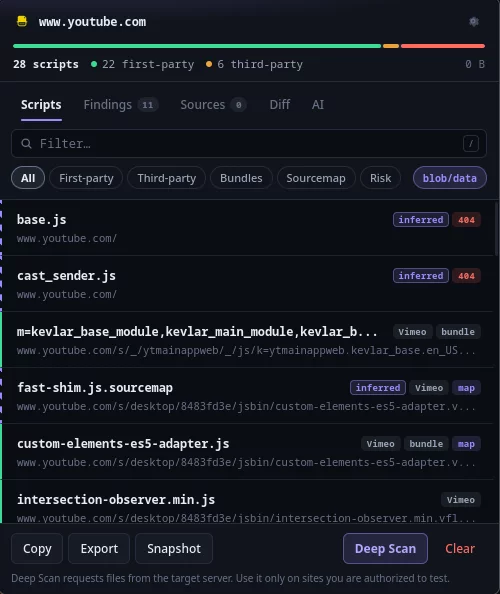
A Manifest V3 extension that builds a deduplicated, classified inventory of every script a page loads, then digs deeper: hidden bundle chunks, recovered source trees, exposed keys, supply-chain risk.


Why
Open DevTools on any real site and the Network tab drowns you. The same file appears three times, cache-busting query strings split identical resources apart, and nothing tells you whether a script is yours or a third party executing code on your page.
JSHarvest answers the question the Network tab does not: what JavaScript is running here, where did it come from, and what should worry me about it.
Collection is passive — it only observes what the browser already loads. The single feature that touches the target server, Deep Scan, is opt-in and clearly labelled.
Features
One deduplicated list, three capture layers
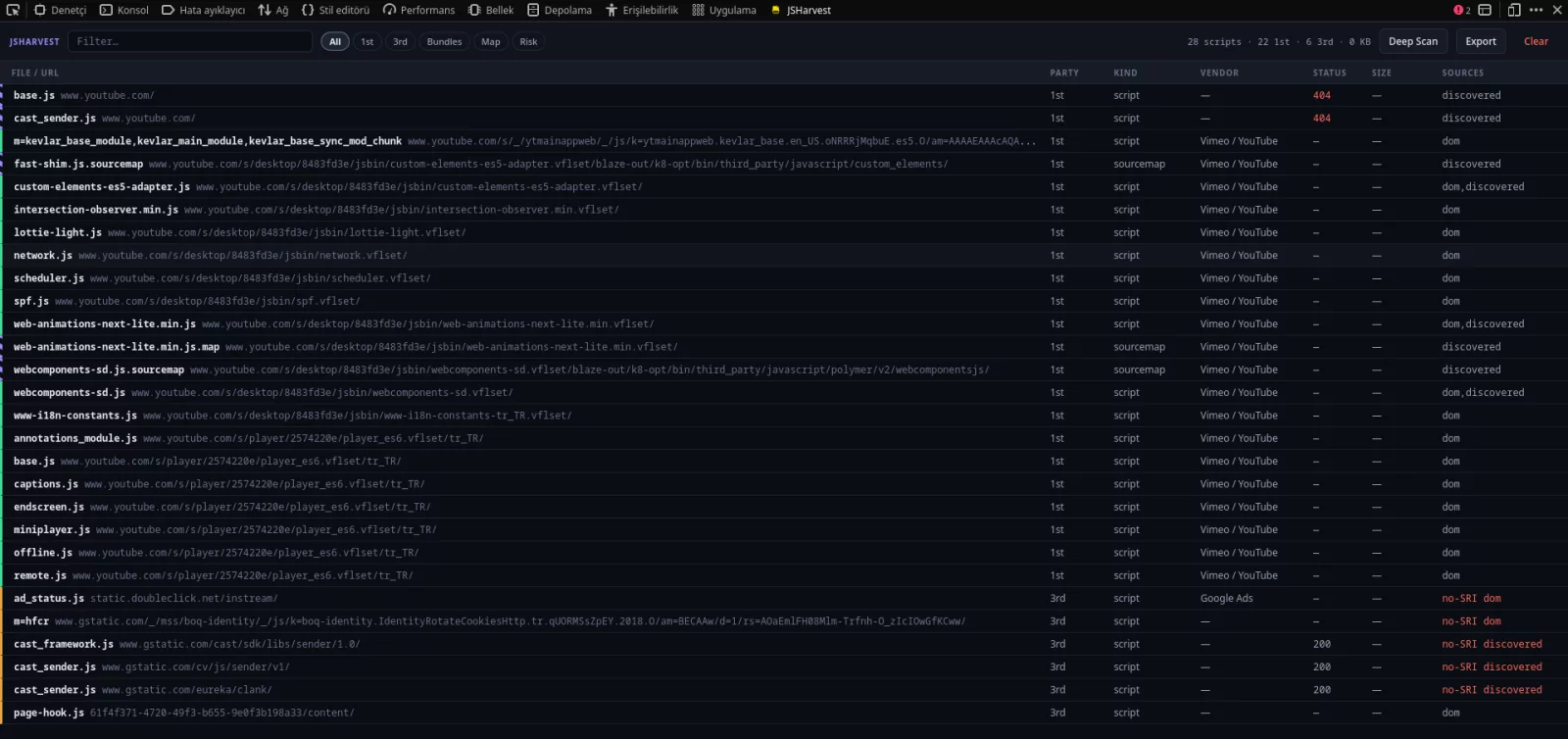
Everything merges on origin + pathname, so one file is one row no matter how many layers saw it.
| Layer | Catches |
|---|---|
| Network | webRequest for script, xmlhttprequest, other — lazy chunks included, detected by extension or Content-Type |
| DOM | script[src], preloads, modulepreload, import maps, inline path references, sourceMappingURL, plus a MutationObserver for later additions |
| Workers | A page-context hook observing Worker, SharedWorker and serviceWorker.register — a class of script the other layers miss |
Each row records where it was seen: network, dom, performance, discovered.
Classification and risk at a glance
The header carries a live spectrum bar: the page's JavaScript composition in a single strip. Colour carries meaning throughout the interface.
🟢 first-party · 🟠 third-party · 🔴 risk · 🟣 inferred by JSHarvest
Risk flags are real signals, not decoration — third-party scripts loaded without Subresource Integrity, mixed content, and failed or 4xx responses.
Deep Scan — what passive capture cannot see

Opt-in. Downloads first-party bundles and analyses them as text — no eval, and nothing fetched is ever executed.
- Hidden chunks — webpack chunk maps (including the Next.js
({…}[e]||e)shape), Vite__vite__mapDeps, dynamicimport(),new URL(…, import.meta.url)workers, SystemJS deps - Verification — discovered URLs are probed with
HEAD; a200promotes them from inferred to confirmed - Recursion — discovered first-party chunks get scanned in turn
- Source recovery —
.mapfiles are parsed back into the original source tree, flagged whensourcesContentis embedded - Secret & endpoint mining — API keys, tokens, private keys, JWTs, internal hosts, S3 buckets, API paths
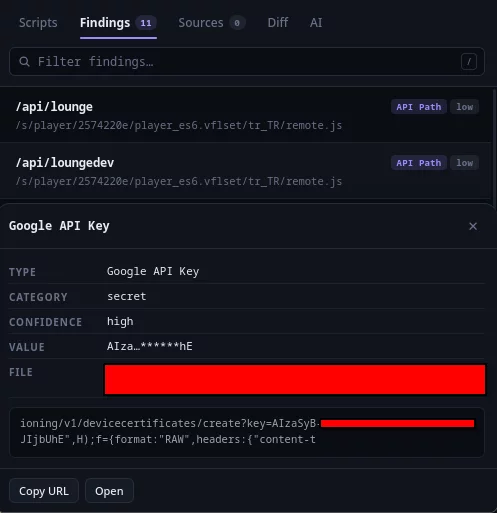
Findings, with secrets masked

Secret values are masked everywhere — the list, the detail panel, the surrounding code context, exports, and anything sent to an AI provider. A raw secret is never stored, so it can never leak.
Engagements — the tool remembers your target, not just your tab
A tab-only capture dies with the browser. An engagement does not.
Attach a tab to a named engagement with a scope (acme.com, *.acme.com) and everything you browse in scope accumulates into one inventory — across tabs, across reloads, across days. Out-of-scope hosts are never written to it, so your personal browsing stays out of the engagement.
- Auth-state capture — flip a switch when you log in. Scripts that only ever appear in the authenticated capture are marked auth-only: admin bundles, internal SDKs, feature-flagged modules. Usually the most interesting surface on the target.
- Triage — mark rows ★ interesting, reviewed or not relevant, and filter by them. On a 400-script list, knowing where you stopped is the difference between working and re-reading.
- Notes — a scratchpad that travels with the engagement.
- Report — export the whole engagement as one self-contained HTML file: inventory, risk flags, findings, auth-only surface, recovered source tree, AI analyses, notes and triage. The first draft of a pentest report.
- Portable — export as JSON and hand it to a teammate.
Diff, export, DevTools
- Diff — snapshot a page, browse or redeploy, then see exactly what was added, removed or changed
- Export — TXT · JSON · CSV · Markdown · HAR · curl probe script · wordlist for
ffuf/gobuster· recovered source tree - DevTools panel — a wider, sortable table for large sites
AI analysis — bring your own key
Optional, off by default. Setup is one field: paste an API key. The provider is detected from its format and a model is chosen for you, falling back automatically if an id has been retired. You can pin a specific model in Options when it matters — leave the field empty to keep automatic selection. The provider and the model actually in use are always shown in the AI tab.
| Key prefix | Provider |
|---|---|
sk-ant-… |
Anthropic (Claude) |
sk-… / sk-proj-… |
OpenAI |
AIza… |
Google Gemini |
gsk_… |
Groq |
sk-or-v1-… |
OpenRouter |
One click produces an attack-surface assessment, findings triage, third-party risk review, DOM sink hunt, tech fingerprint or recon next steps — then you can ask follow-ups. Answers stream in and render through a DOM-only Markdown renderer, so model output can never inject markup.
Beyond the built-ins:
- Live model list — the picker is downloaded from your provider, so everything they actually offer is selectable, with context window and price shown. No hardcoded guesses, no missing models.
- Right-click any row → Send to AI — analyse a single script on its own, with its content fetched and included. Same for a single finding: is this real, or a false positive?
- Your own analyses — define custom one-click prompts in Options; they appear as buttons next to the built-in ones.
- The model reads the actual code — the page's JavaScript is downloaded and sent with the request, so analysis is grounded in what the code does rather than what its filename suggests. A character budget caps how much goes (default 120K, ~30K tokens) and is spread across files rather than spent on the first two, first-party and bundles first, known libraries skipped. Files are chosen from the inventory, not by URL extension, so
app.js.zgz,bundle.js.gzand extensionless endpoints are included. The model is told how many files it did not get and why. Turn it off in Options if you only want metadata. - DOM sinks — a built-in analysis that hunts client-side injection in that source:
innerHTML,document.write,eval,new Function,srcdoc, jQuery.html()and the attacker-controllable inputs that might reach them. - Recovered source code (opt-in) — when Deep Scan has rebuilt original files from source maps, send those too. Original TypeScript beats minified bundles.
- Runs survive the popup — the request is executed in the background, not in the popup page. Click away, close the popup, come back: the analysis is still going and reattaches when you reopen the AI tab.
- History — the analysis is written the moment you submit, so what you asked is never lost. Saved per origin and reopenable from the AI tab; runs the browser cut short are marked interrupted rather than pretending to still be working.
Install
Both browsers share one codebase; only the background manifest key differs, so a copy-only build emits two packages.
git clone git@github.com:abdulhalimaltuntas/JSHarvest.git
cd JSHarvest
node build.mjs        # -> dist/chrome, dist/firefox
Chrome
- Open
chrome://extensions - Enable Developer mode
- Load unpacked → select
dist/chrome(the repo root works too)
Firefox
- Open
about:debugging#/runtime/this-firefox - Load Temporary Add-on… → select
dist/firefox/manifest.json - Required:
about:addons→ JSHarvest → Permissions → enable Access your data for all websites. Firefox MV3 treats host permissions as optional; without this,webRequestnever fires and the list stays empty.
Temporary add-ons are removed when Firefox restarts.
Usage
| Action | Result |
|---|---|
| Click the toolbar icon | The tab's script inventory — the badge shows a live count |
/ |
Focus the filter |
| Click a row | Detail panel with full metadata, copy and open |
Esc |
Close the panel, otherwise clear filters |
Ctrl/Cmd + C |
Copy the filtered list |
Views: Scripts · Findings · Sources · Diff · Session · AI.
Filters: first-party, third-party and risk inline; bundles, source maps, triage state, auth-only and blob:/data: under More.
Right-click any row for triage marks, copy actions and Send to AI.
Warning
Deep Scan requests files from the site you are inspecting, and mining can surface sensitive data. Use it only on sites you own or are authorized to test.
Architecture
background/service-worker.js   webRequest listeners, navigation epochs, badge, router
background/ai-runner.js        AI runs that outlive the popup, with keepalive
content/collector.js           DOM layer, all frames
content/page-hook.js           page-context Worker / ServiceWorker observer
lib/
  browser-api.js               `browser` ?? `chrome` shim
  store.js                     storage.session, epoch model, quota handling
  classify.js                  normalization, dedupe key, party / vendor / risk
  deepscan.js                  chunk discovery, HEAD verification, recursion
  sourcemap.js   mine.js       source recovery · secret & endpoint mining
  diff.js        history.js    snapshots and comparison
  ai.js          markdown.js   AI layer · safe Markdown renderer
  ai-history.js                saved analyses, per origin, with run status
  sessions.js    triage.js     engagements, scope, auth state · triage marks
  report.js                    self-contained HTML report · portable JSON
  export.js      settings.js   serializers · user options
popup/  panel/  options/       three UI surfaces, one token system
test/run.mjs                   77 tests, no dependencies
Navigation epochs. Every entry carries a navigation epoch. onBeforeNavigate bumps it without clearing the list; onCommitted purges only entries from the previous page. A script racing the commit already holds the new epoch, so it survives — while SPA route changes leave the list intact.
Surviving suspension. The MV3 service worker can be killed at any moment, so the in-memory map is only a cache. Every write goes to storage.session, batched with a 300 ms debounce and a 1 s ceiling; the worker rehydrates on wake.
Cross-browser. Every module imports api from lib/browser-api.js rather than touching chrome.* directly — Firefox's chrome.* alias is callback-based, so await chrome.storage.session.get(…) would silently resolve to undefined there.
Persistence split. Live per-tab capture lives in storage.session and clears with the browser. Everything meant to outlive it — engagements, triage marks, settings, Diff snapshots, saved analyses — lives in storage.local.
Engagements are a projection, not a rewrite. Per-tab capture is untouched; when a tab is attached, the same entries are additionally merged into the engagement store, deduplicated on the same key and tagged with the auth state. That keeps the hot path simple and makes the engagement a union across tabs and time.
Privacy
Everything is processed on your device. No analytics, no telemetry, no account, no server operated by the developer — full policy in PRIVACY.md.
Two features reach the network, both off by default and both under your control: Deep Scan contacts only the site you are inspecting, and AI analysis contacts only the provider whose key you supplied. Raw secret values are never stored, so they can never be transmitted.
Development
No dependencies are needed to build or test — plain ES modules and Node built-ins.
node test/run.mjs          # 77 unit tests
node build.mjs             # emit dist/chrome and dist/firefox
npm run lint:firefox       # web-ext lint (needs npm i)
npm run package:firefox    # store-ready zip
CI runs the tests, builds both targets, syntax-checks every module and lints the Firefox package on every push.
Every non-obvious decision is recorded in DECISIONS.md.
Known limits
blob:anddata:scripts are opaque — recorded and grouped separately, but not attributable.- The page-context worker hook is best-effort; a strict CSP can block it, and workers created before
document_idlemay be missed. - Deep Scan results are inferences until
HEADverification confirms them; unusual or heavily obfuscated bundlers may yield nothing. - Mining is heuristic. High-signal key formats are reliable; the generic
key=…pattern is low-confidence by design. - Firefox needs the host permission granted by hand, and temporary add-ons disappear on restart.
License
MIT © 2026