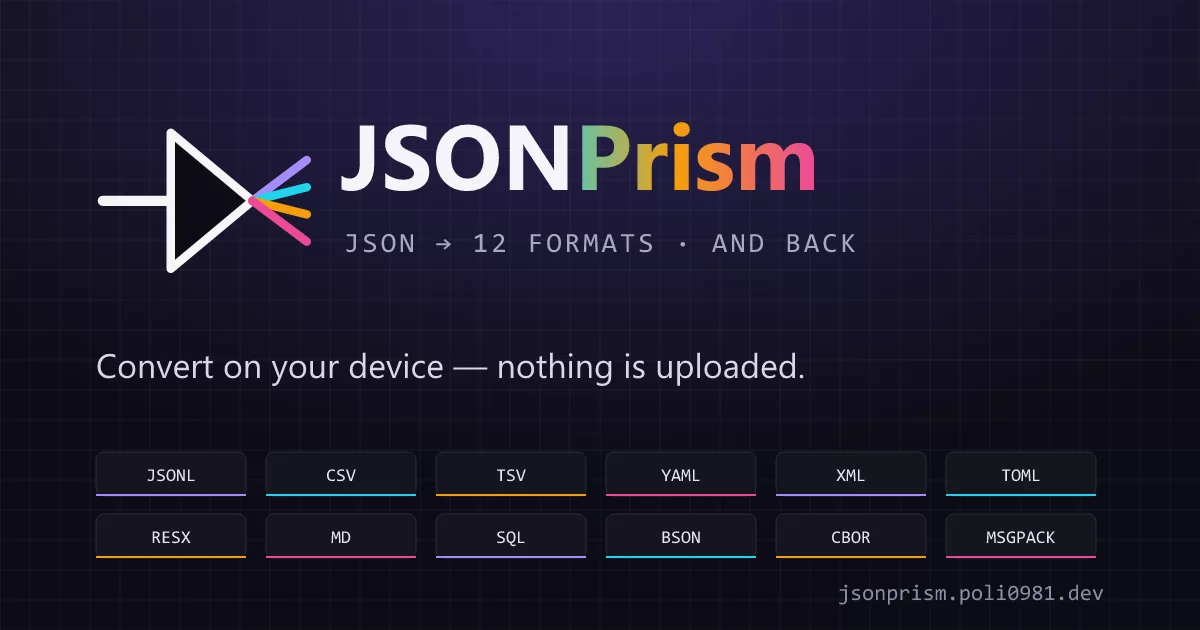
JSONPrism
Disperse JSON into many formats.
One JSON input. Multi-target formats. Fully on your device.

Web app · Downloads · Tiếng Việt · Roadmap
JSONPrism is a refracting tool for developers. It takes a single JSON input and disperses it into many target formats — like white light through a prism. Conversion runs entirely on your device — in the browser, the desktop app or the Android app — so your data never leaves it.
Target formats
| Format | Extension | Status | Reverse (→ JSON) |
|---|---|---|---|
| JSONL | .jsonl |
✅ Phase 1 | ✅ |
| JSONC (input only) | .jsonc, .json |
✅ 2.1.0 | ✅ (only) |
| CSV | .csv |
✅ Phase 1 | ✅ |
| TSV | .tsv |
✅ Phase 1 | ✅ |
| YAML | .yaml |
✅ Phase 1 | ✅ |
| XML | .xml |
✅ Phase 2 | — |
| TOML | .toml |
✅ Phase 2 | ✅ |
| Markdown table | .md |
✅ Phase 2 | — |
SQL INSERT |
.sql |
✅ Phase 2 | — |
| RESX (.NET) | .resx |
✅ Phase 3 | ✅ |
| BSON | .bson |
✅ Phase 4 | — |
| CBOR | .cbor |
✅ Phase 4 | — |
| MessagePack | .msgpack |
✅ Phase 4 | — |
Twelve target formats. Six of them — JSONL, CSV, TSV, YAML, TOML and RESX — also convert back to JSON; in that direction .ndjson, .tab and .yml files are accepted too. JSONC (JSON with comments: tsconfig.json, VS Code settings) is input only: it turns .jsonc and .json files into plain JSON, dropping comments and trailing commas while keeping every value, number and key exactly as written. Paste JSONC in the JSON → direction and the app offers to switch. SQL INSERT speaks standard SQL, PostgreSQL, MySQL, SQLite and MSSQL. BSON, CBOR and MessagePack are binary: the output panel shows them as base64 or hex text, and downloads are real binary files.
Features
- On-device conversion — no upload, no conversion server. What you paste, type or open stays on your device; see Privacy for the few services the website itself uses.
- Fast first paint — routes and the CodeMirror editor are lazy-loaded, and vendor/parser code is split into small per-feature chunks, so the browser only downloads what you actually use.
- Smooth with large inputs — inputs over 256 KB and every batch run convert in a Web Worker, so typing and scrolling stay responsive.
- Batch processing — up to 500 files at once, downloaded as a single
.zip(binary formats as real binary files). - Smart shape detection — recognizes flat objects, arrays of objects, scalars; suggests the best target format.
- Per-format options — pretty-print, indentation, dialect (for SQL), alignment (for Markdown), and more.
- Light, dark or system theme — Prism Spectrum palette with violet / cyan / amber / rose accents on a technical, blueprint-grid look. The Appearance menu can also hide scrollbars.
- Responsive — designed for viewports ≥ 360 × 640. Smaller screens still work but may feel cramped; on mobile, Input and Output use a Tabs UI to give each panel full height. See
docs/tested-viewports.mdfor the full device test matrix. - 4 UI languages — English, Tiếng Việt, 日本語 and 简体中文. The Japanese and Chinese translations are AI-generated; fixes from native speakers are welcome.
- Desktop and Android apps — Tauri 2 builds for Windows, macOS, Linux and Android with native file dialogs and drag-and-drop. They work fully offline.
Privacy
- Your data stays on your device. Every build converts locally; nothing you paste, type or open is uploaded. Settings and workspace state live in
localStorageand are never sent anywhere. - The website (jsonprism.poli0981.dev) adds three Cloudflare services, none of which sees what you convert:
- Hosting — Cloudflare serves the site and, like any host, processes request logs (IP address, user agent) for delivery and security.
- Turnstile — a quick human check, about once a week (a passed check is remembered for 7 days). If Cloudflare can't be reached you can continue after a warning, because conversion never needs the network.
- Web Analytics — cookieless, anonymous page-view counts, loaded only after you accept the Terms and Privacy Policy. Turn it off under Appearance → Anonymous usage analytics; it is off by default when your browser sends Global Privacy Control.
- The desktop and Android apps use none of these — no analytics, no human check, no network requests except links you open yourself.
Details: PRIVACY.md.
Tech stack
- Vite 8 + React 19.3 + TypeScript 7 (native compiler; the
typescriptdependency is a TS 6 alias kept only for typescript-eslint) - Tailwind CSS v4 + shadcn/ui (New York style, neutral base)
- CodeMirror 6 for the input editor and the read-only output view
- PapaParse, js-yaml, smol-toml, fast-xml-parser, bson, cbor-x, @msgpack/msgpack for parsing/serialization; fflate for batch
.zipfiles - i18next for translations, Zustand for state, React Router 8 for routing, Sonner for toasts
- Vitest + Testing Library for tests
- Node.js 26 for the toolchain
- Cloudflare Workers hosts the web app (static assets behind a small Worker that rate limits requests and serves
/api/*) - Tauri 2.12 for the desktop (Windows, macOS, Linux) and Android apps
Quick start
Requirements: Node.js 26 (pinned in .nvmrc).
git clone https://github.com/poli0981/jsonPrism.git
cd jsonPrism
nvm use              # picks Node 26 from .nvmrc
npm install
npm run dev          # http://localhost:5173
The Turnstile human check is off in npm run dev (set VITE_TURNSTILE_DEV=1 to try it). To run the production build the way Cloudflare serves it — static assets plus the Worker:
cp .dev.vars.example .dev.vars   # Cloudflare's always-pass Turnstile test secret
npm run preview:cf               # build + wrangler dev on http://localhost:8787
Scripts
| Script | What it does |
|---|---|
npm run dev |
Start Vite dev server with HMR |
npm run build |
Type-check, then build for production into dist/ |
npm run preview |
Preview the built site locally (Vite) |
npm run lint |
Run ESLint |
npm run lint:fix |
Run ESLint with autofix |
npm run typecheck |
Type-check the app, tests, config files and Worker (TypeScript 7), no emit |
npm run knip |
Find unused files, exports and dependencies |
npm run format |
Format with Prettier |
npm run format:check |
Check formatting (CI uses this) |
npm test |
Run the Vitest suite once |
npm run test:watch |
Run Vitest in watch mode |
npm run test:coverage |
Run the tests with a coverage report (CI uses this) |
npm run cf:types |
Regenerate the Worker's binding types |
npm run cf:check |
Dry-run the Cloudflare deploy (wrangler deploy --dry-run; CI runs it too) |
npm run preview:cf |
Serve a fresh build and the Worker with wrangler dev on http://localhost:8787 |
npm run tauri:dev |
Desktop app in dev mode (Vite + Tauri window with hot reload) |
npm run tauri:build |
Native desktop bundles for the current OS |
npm run tauri:icon |
Render src-tauri/icons/icon.svg into every icon size |
npm run tauri:android:dev |
Android app on a device or emulator |
npm run tauri:android:build |
Universal Android APK |
shadcn/ui components
The components.json is preconfigured. Add components on demand:
npx shadcn@latest add button input textarea tabs select card dialog sheet \
  dropdown-menu switch badge progress tooltip sonner resizable
Desktop app (Tauri 2)
JSONPrism also ships as a native desktop app via Tauri 2. The app uses the same React UI, with native OS dialogs and drag-drop hooked into the existing batch flow. It works fully offline: no analytics, no human check, and no network requests except links you open yourself.
Download (users)
Get the bundle for your OS from the latest release:
| OS | Files | Requirement |
|---|---|---|
| Windows | .msi or NSIS -setup.exe |
WebView2 runtime (preinstalled on Windows 11) |
| macOS | universal .dmg (Apple Silicon + Intel) |
macOS 12 or newer |
| Linux | .deb, .rpm or .AppImage |
Built on Ubuntu 22.04 — needs Ubuntu 22.04 or a similarly recent distro |
The desktop bundles aren't code-signed yet, so Windows SmartScreen or macOS Gatekeeper may warn the first time you open them. Releases from v2.0.0 on also carry SHA256SUMS.txt and GitHub build-provenance attestations, so you can check a download before running it:
sha256sum -c SHA256SUMS.txt --ignore-missing
gh attestation verify <file> --repo poli0981/jsonPrism
Build (developers)
Additional requirements:
- Rust toolchain (
rustup) with the stable channel - Platform build deps:
- Windows: Visual Studio Build Tools (C++ workload) + WebView2 (preinstalled on Windows 11)
- macOS: Xcode Command Line Tools (
xcode-select --install) - Linux:
libwebkit2gtk-4.1-dev,libappindicator3-dev,librsvg2-dev,patchelf,libssl-dev,libgtk-3-dev
Generate icons once (uses Tauri's CLI to render the SVG to PNG/ICO/ICNS):
npm run tauri:icon
Run in dev mode (Vite + Tauri window with hot reload):
npm run tauri:dev
Build native bundles:
npm run tauri:build
Output:
- Windows →
src-tauri/target/release/bundle/msi/*.msi+nsis/*-setup.exe - macOS →
src-tauri/target/release/bundle/dmg/*.dmg+macos/*.app - Linux →
src-tauri/target/release/bundle/appimage/*.AppImage+deb/*.deb+rpm/*.rpm
Automated releases: pushing a v* tag runs .github/workflows/release.yml. It checks that the tag matches the version in package.json and src-tauri/Cargo.toml, runs the tests, builds the Windows, macOS (universal) and Linux bundles plus the Android APK into one draft GitHub release, then adds SHA256SUMS.txt and build-provenance attestations. The maintainer publishes the draft.
Android app (Tauri 2)
JSONPrism also ships as an Android app you sideload from a .apk. Same React UI; native file picker via the dialog plugin. Requires Android 12 (API 31) or newer — the OS refuses to install it on older versions.
System requirements
| Requirement | Detail |
|---|---|
| Android version | 12 (API 31) or newer — older versions are blocked at install time (INSTALL_FAILED_OLDER_SDK) |
| System WebView | Chromium 111+ (Android System WebView / Chrome). Kept current by the Play Store on most devices; a much older WebView renders the layout incorrectly — update "Android System WebView" and Chrome from the Play Store if the UI looks broken. |
| CPU / ABI | arm64-v8a, armeabi-v7a, x86, or x86_64 — the single universal APK runs on all of them (modern phones are arm64-v8a) |
| RAM | 2 GB minimum; 4 GB recommended for large or batch (up to 500 files) conversions |
| Storage | ~100 MB free recommended (install + temporary working files) |
| Network | None — the app runs fully offline and sends nothing off the device |
Install (users)
- Download
JSONPrism_<version>_android-universal.apkfrom the latest release. - Optionally check it against
SHA256SUMS.txtor withgh attestation verify(see Download (users)). - Open it; Android will ask you to allow "install unknown apps" for your browser/file manager — enable it, then install.
- Needs Android 12+. The app runs fully offline.
Build (developers)
Additional requirements (on top of the desktop Rust toolchain):
- Android Studio with SDK Platform 31+, Build-Tools, Platform-Tools, Command-line Tools, and an NDK
- JDK — the JBR bundled with Android Studio is fine
- Environment variables:
JAVA_HOME,ANDROID_HOME,NDK_HOME(seedocs/TAURI-NOTES.md) - Rust Android targets:
rustup target add aarch64-linux-android armv7-linux-androideabi i686-linux-android x86_64-linux-android
The Android Gradle project lives in src-tauri/gen/android/ and is committed. You do not need to run tauri android init for a normal build.
Run on a device/emulator (Android 12+):
npm run tauri:android:dev
Build a universal release APK:
npm run tauri:android:build
Output: src-tauri/gen/android/app/build/outputs/apk/universal/release/app-universal-release.apk. Release signing is read from src-tauri/gen/android/keystore.properties (gitignored); without it the APK builds unsigned. See docs/TAURI-NOTES.md for keystore setup and the CI signing secrets.
Automated releases: the same v* tag also runs the android job in release.yml, which signs the APK with the keystore from repository secrets and attaches it to the draft release as JSONPrism_<version>_android-universal.apk.
Architecture
src/
├── app/                 # Router + global providers
├── components/
│   ├── ui/              # shadcn components (added on demand)
│   ├── layout/          # Header, Footer, AppearanceMenu
│   ├── converter/       # Workspace, panels, format picker, batch
│   └── common/          # ConsentGate, HumanCheck, error boundaries, LanguageSwitcher
├── converters/          # One module per target format
│   ├── types.ts         # Converter interface
│   ├── registry.ts      # Lookup table
│   └── *.ts             # Per-format implementations
├── hooks/               # Custom hooks
├── i18n/                # Translations (en, vi, ja, zh-CN)
├── lib/                 # detect, conversion + Web Worker, batch, theme, logger, utils
├── pages/               # Home, About, error pages
├── stores/              # Zustand stores (workspace, batch, consent, preferences)
├── styles/              # globals.css (Tailwind + theme tokens)
└── main.tsx
Outside src/: worker/ is the Cloudflare Worker (/api/health and /api/turnstile/verify, configured in wrangler.jsonc), and src-tauri/ is the Tauri 2 shell for the desktop and Android apps.
Adding a new format
Each format is a self-contained module implementing the Converter interface:
import type { Converter } from './types';
import { errorMessage } from '@/lib/errors';

interface MyFormatOptions {
  indent: number;
}

export const myFormatConverter: Converter<MyFormatOptions> = {
  meta: {
    id: 'myformat',
    labelKey: 'formats.myformat',
    extension: 'myf',
    mimeType: 'application/x-myformat',
    phase: 1,
    ready: true,
  },
  defaultOptions: { indent: 2 },
  // Drives the auto-generated settings panel.
  optionSchema: [
    { type: 'integer', key: 'indent', labelKey: 'options.myformat.indent', min: 0, max: 8 },
  ],
  convert({ data }, options) {
    try {
      const output = serialize(data, options);
      return { ok: true, output };
    } catch (err) {
      return { ok: false, error: errorMessage(err) };
    }
  },
  // Optional: reverse({ text }, options) parses the format back to JSON.
};
An input-only format (like JSONC) sets meta.inputOnly: true, implements reverse(), and has convert() return an error; the UI then disables it in the JSON → direction.
Then add the id to the FormatId union in src/converters/types.ts, register the converter in src/converters/registry.ts (CONVERTERS and ALL_FORMATS), and add its label keys to all four files in src/i18n/locales/ — a parity test fails when a locale is missing a key.
See docs/ROADMAP.md for the full phase plan.
Contributing
Pull requests welcome — please read CONTRIBUTING.md first. PRs that match the auto-ignored patterns described there (suspicious code, off-topic preamble, no description, etc.) get closed without review.
For bug reports and feature requests, use GitHub Issues. For security vulnerabilities, use the private Security Advisory flow.
Contact
| Address | For |
|---|---|
| security@poli0981.dev | Vulnerability reports (the private Security Advisory flow is preferred) |
| privacy@poli0981.dev | Privacy requests |
| legal@poli0981.dev | Terms, licensing and other legal questions |
| copyright@poli0981.dev | Copyright and takedown notices |
| code@poli0981.dev | The project and its maintainer; Code of Conduct reports |
| sponsor@poli0981.dev | Sponsorship |
Bug reports and feature requests belong in GitHub Issues, not email.
Project docs
| Doc | What's in it |
|---|---|
PRIVACY.md |
What stays on your device, and the web-only Cloudflare services (hosting, Turnstile, Web Analytics). |
TERMS.md |
ToS / EULA — acceptable use, license inheritance, user data ownership. |
SECURITY.md |
How to report vulnerabilities; response SLAs. |
DISCLAIMER.md |
One-person + AI-assisted project; no warranty. |
THIRD-PARTY.md |
Every dependency: version, license, link. |
MAINTAINERS.md |
Who's responsible for what. |
CODE_OF_CONDUCT.md |
Contributor Covenant v2.1. |
CHANGELOG.md |
Release notes for every version. |
docs/ROADMAP.md |
Phase plan, current status. |
docs/pc_spec.md · docs/dev_env.md |
Maintainer's hardware + toolchain. |
docs/TAURI-NOTES.md |
Tauri build / process notes. |
docs/RESX-MIGRATION.md |
i18next JSON → .NET RESX tutorial. |
Community
Hang out, ask questions, or follow