
Kangentic
Drag a card. An agent starts.
An agentic development environment for AI coding agents.
Live demo | Quickstart | Documentation
English | 中文(简体) | 中文(繁體) | Français | Deutsch | Italiano | Español | 日本語 | 한국어 | Русский | Português (Brasil) | Türkçe | Polski | Čeština | Magyar
What it does
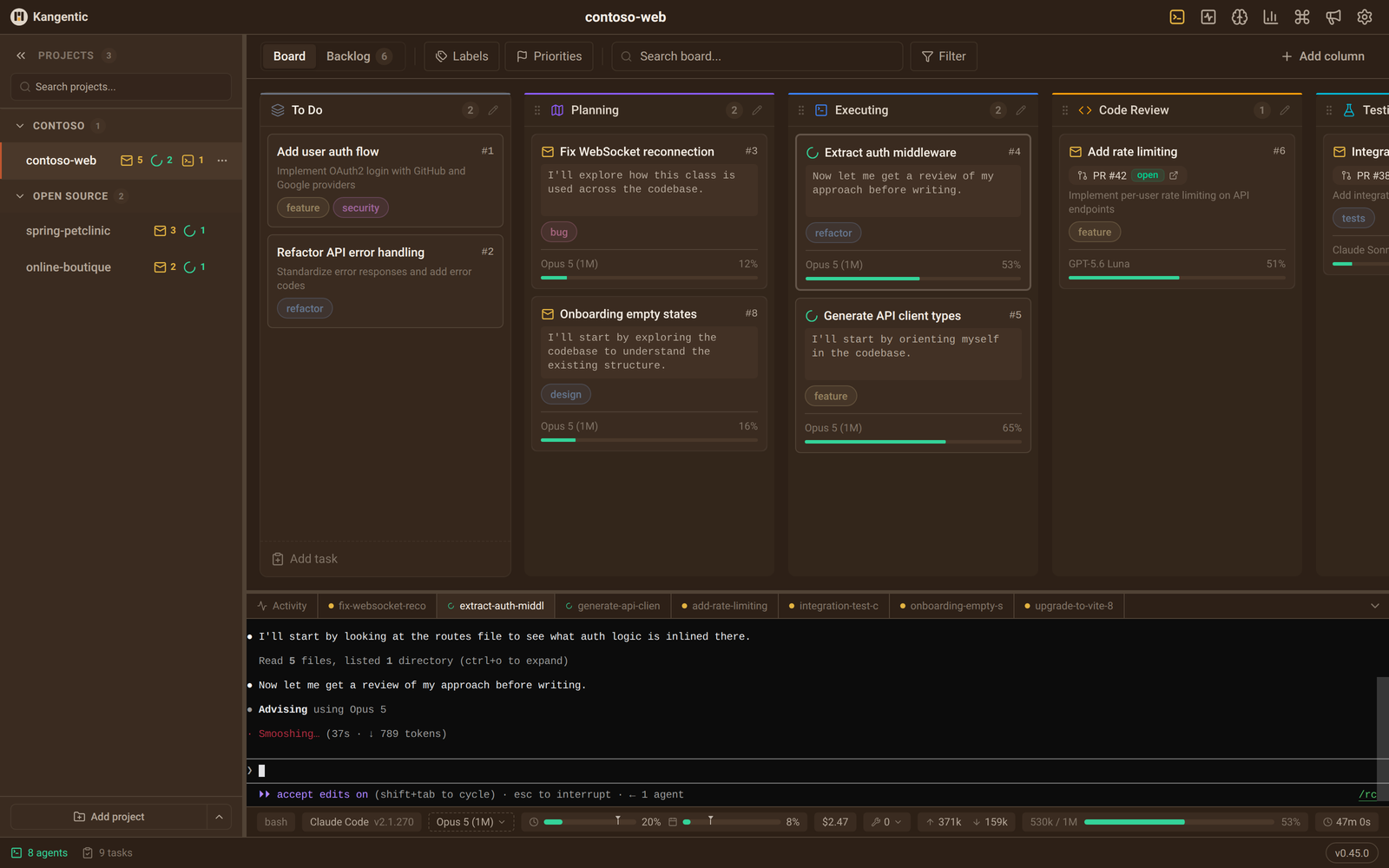
A coding agent can carry a task on its own, and git worktrees let several run at once. The limit then becomes you: which agent is waiting on a prompt, which one finished, and where each branch went. Kangentic puts every session on one board and marks the ones that need you.
Run your agents from one board
- One board, every agent. Each card shows its model, how much of the context window is used, and what the agent last said, with a mark on the ones that need you.
- Kangentic Mobile. Pair your phone once, then check on agents, answer the question one stopped on, and review its diff away from your desk. The connection is end-to-end encrypted, through Kangentic's relay or one you host. Get it on the App Store or Google Play.
- Fifteen agent CLIs. Plan with Claude Code and build with Codex, or use one CLI everywhere. Kangentic runs the CLIs you already have with the credentials you already configured. No API key, no proxy, no Kangentic account.
- Every project in one place. Each repo gets its own board, and the Agent Monitor shows the agents running across all of them.
- Review on the board. The Changes panel shows each task's diff and commit history. A linked pull request on GitHub or Azure DevOps shows its state and whether it is ready to merge.
- Free and open source. AGPL-3.0, with every feature included and no paid tier.
Shape the workflow
- Columns. Rename, add, and rewire columns until the board matches how you ship. Each column carries its own agent, model, effort, and permission mode. The setup commits with the repo in
kangentic.json, so teammates get the same board, while tasks and agent sessions stay on each person's machine. - Automations. When a task enters a column, when its agent finishes a turn, or when the task leaves, a column can send the agent a message or slash command, run a script, call a webhook, notify you, or move the task to the next column. A condition in plain words, checked by an agent, decides whether a step runs.
- Workflows. Give the workflow agent a brief, review the linked tasks it plans, and press Start. Each task starts when the tasks it waits for reach Done, and one workflow can span several projects.
- Agents that work the board. Kangentic's MCP server lets a running agent create tasks, move its own card, search past conversations, and message another task's agent, so a rule written in a prompt can move work along.
Is it right for you?
It's a good fit if you:
- run several coding agents at once and lose track of which one is waiting on you.
- juggle tasks across several projects or clients and want every agent in one view.
- want to mix Claude Code, Codex, and other CLIs on plans you already pay for.
- have a multi-step workflow and want to customize its agents and automations per project.
- want to answer your agents from your phone when you step away.
It's probably not for you if you:
- prefer to work on one task at a time, start to finish.
- work in a single project and rarely switch.
- don't use agent CLIs, or prefer apps like Cursor or Claude Desktop.
- have no use for workflows or automations in how you develop.
- want your agents to run in the cloud instead of on your machine.
If this looks useful, a ⭐ helps other developers find Kangentic.
Install
npx kangentic
This downloads the latest release for your platform from GitHub Releases, installs it, and opens it. The app updates itself after that. The installers are also on the releases page if you would rather run one yourself.
Requirements
- Windows x64, macOS 13 or later on Apple Silicon or Intel, or Linux x64 or arm64 (
.debor.rpm). The Knowledge Graph is unavailable on Intel Macs. - Node.js 20 or later for
npx, and Git 2.26 or later. - At least one supported agent CLI, installed and signed in.
WSL users install the Windows version and can pick a WSL distro as the terminal shell. Agents run the Windows install of each CLI, so a CLI installed only inside the distro is not found. The installation guide covers each platform.
How it works
- Configure your board. Keep the default columns or reshape them, and pick the agent and permission mode each one runs.
- Create a task. Give it a title and a prompt, or import one from GitHub Issues, GitHub Projects, Azure DevOps, or Asana.
- Drag to run. Kangentic creates the worktree, applies the column's permission mode, and starts the agent.
- Watch it code. Follow the agent in its live terminal, answer when it asks, and drag the card on when it is done.
Supported agents
Claude Code, Codex CLI, Gemini CLI, Cursor CLI, GitHub Copilot CLI, Grok Build, Antigravity CLI, Goose CLI, OpenCode, Aider, Qwen Code, Kimi Code, Factory Droid, Warp (Oz CLI), and Ollama for local models as single-turn chat.
Resuming after a restart, the MCP board tools, and handing history to the next agent depend on the CLI. See what each agent supports.
Languages
Kangentic's interface comes in each language listed at the top of this page. Change it under Settings > Language, and Kangentic restarts in it. The translations are machine-made and open to review, and Translations explains how to correct one.
Data and privacy
Your boards, tasks, and transcripts stay in a local SQLite database. The agent CLIs reach their own providers under your own accounts, as they would in your terminal.
Release builds send anonymous usage events (Aptabase) and error reports (Sentry) by default. Usage events never contain task text, prompts, or code. Set KANGENTIC_TELEMETRY=0 to turn both off, or KANGENTIC_ERROR_REPORTING=0 to turn off error reports only. There is no in-app switch. The app also checks GitHub for updates and announcements. See the privacy policy for the full list.
Documentation
Start with the quickstart, then the documentation for columns, automations, workflows, the MCP server, and configuration.
Development
Building from source needs Node.js 22.14 or later, or 24 or later.
git clone https://github.com/Kangentic/kangentic.git
cd kangentic
npm install
npm start
Contributing
See CONTRIBUTING.md for project structure, tests, and conventions. Contributors sign a CLA before their first pull request is merged.
Support
- GitHub Discussions for questions and feature requests
- GitHub Issues for bug reports
- support@kangentic.com if you would rather not post publicly
To report a security issue, see SECURITY.md.
License
AGPL-3.0. For a commercial license, email licensing@kangentic.com.