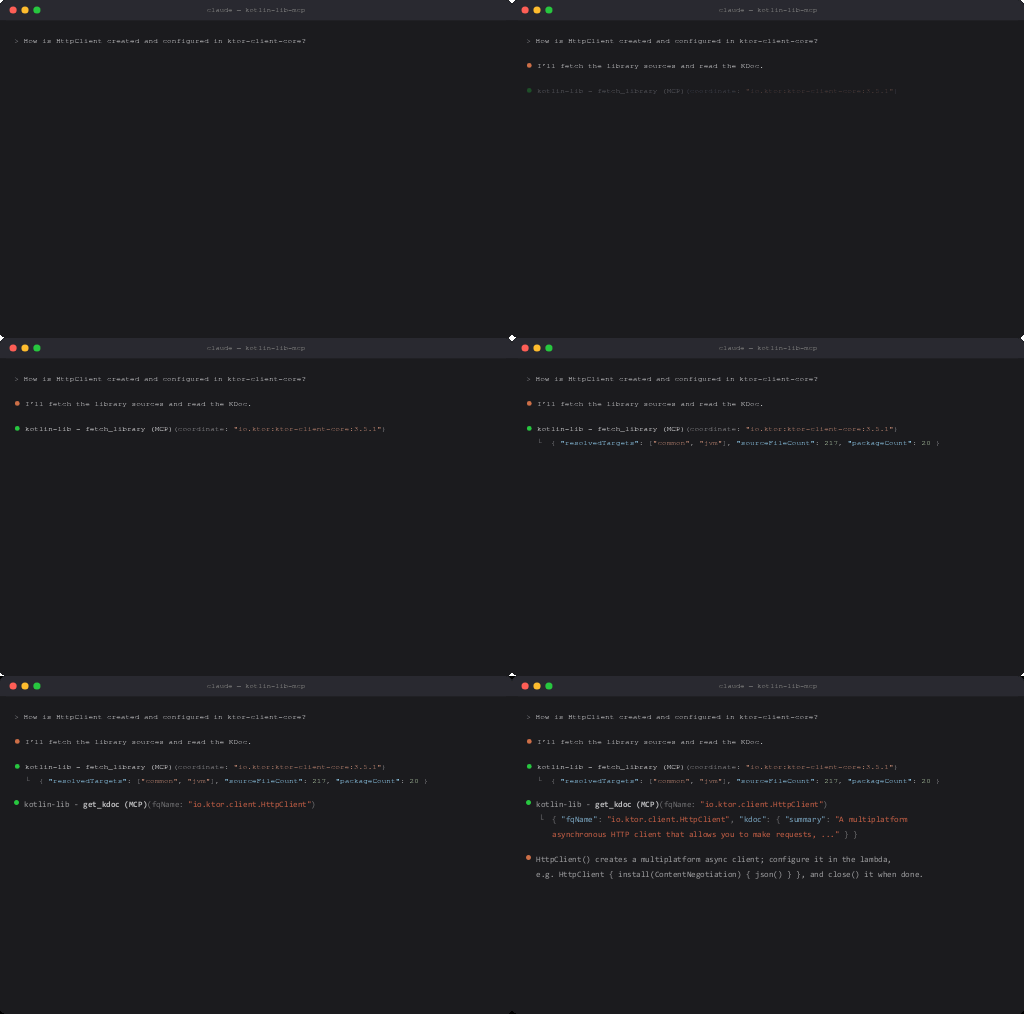

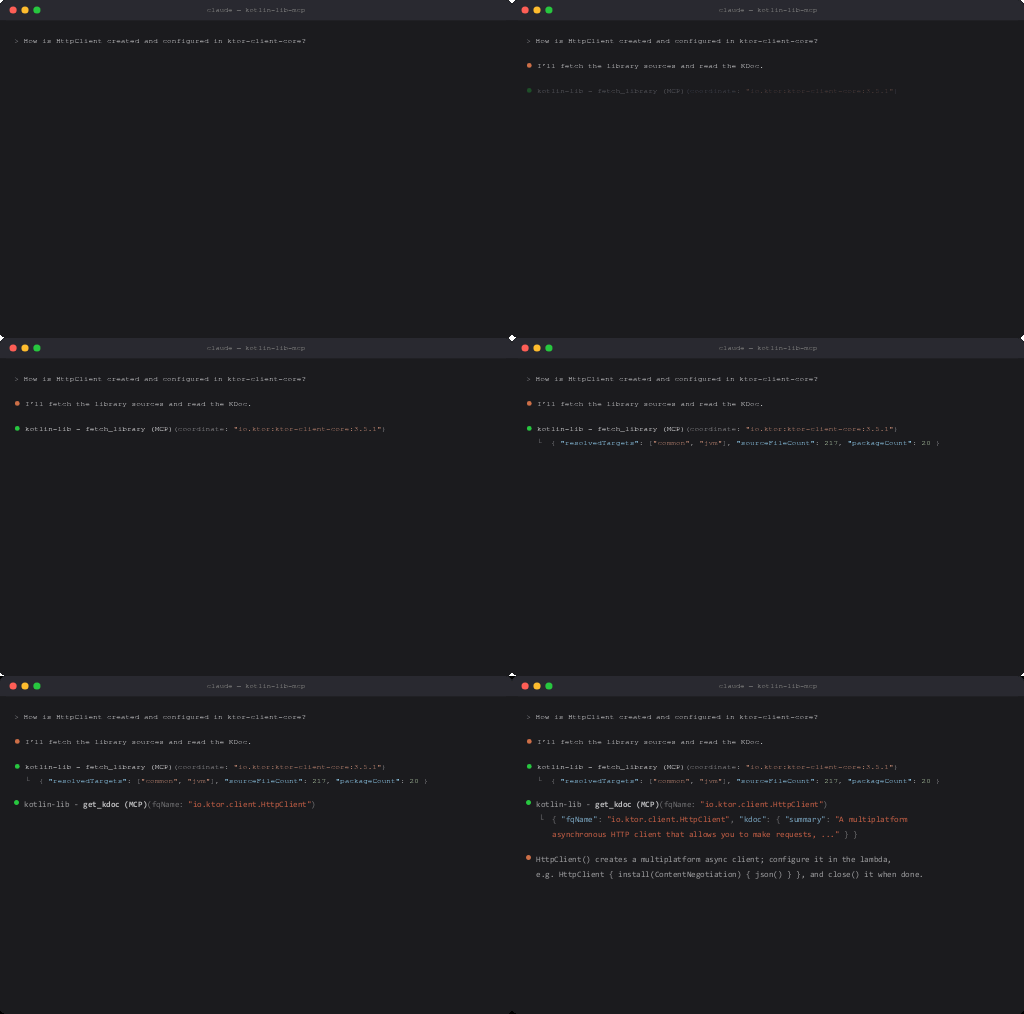
Give your AI agent the real sources of any Maven-published Kotlin/Java library.
An MCP server that, on request, downloads the sources of a
library (e.g. io.ktor:ktor-client-core:3.5.1), parses them with the Kotlin Analysis API
(standalone K2/FIR mode), and exposes structured information — public API surface, KDoc,
dependencies/metadata, raw source + search — to MCP clients: Claude Code, Claude Desktop,
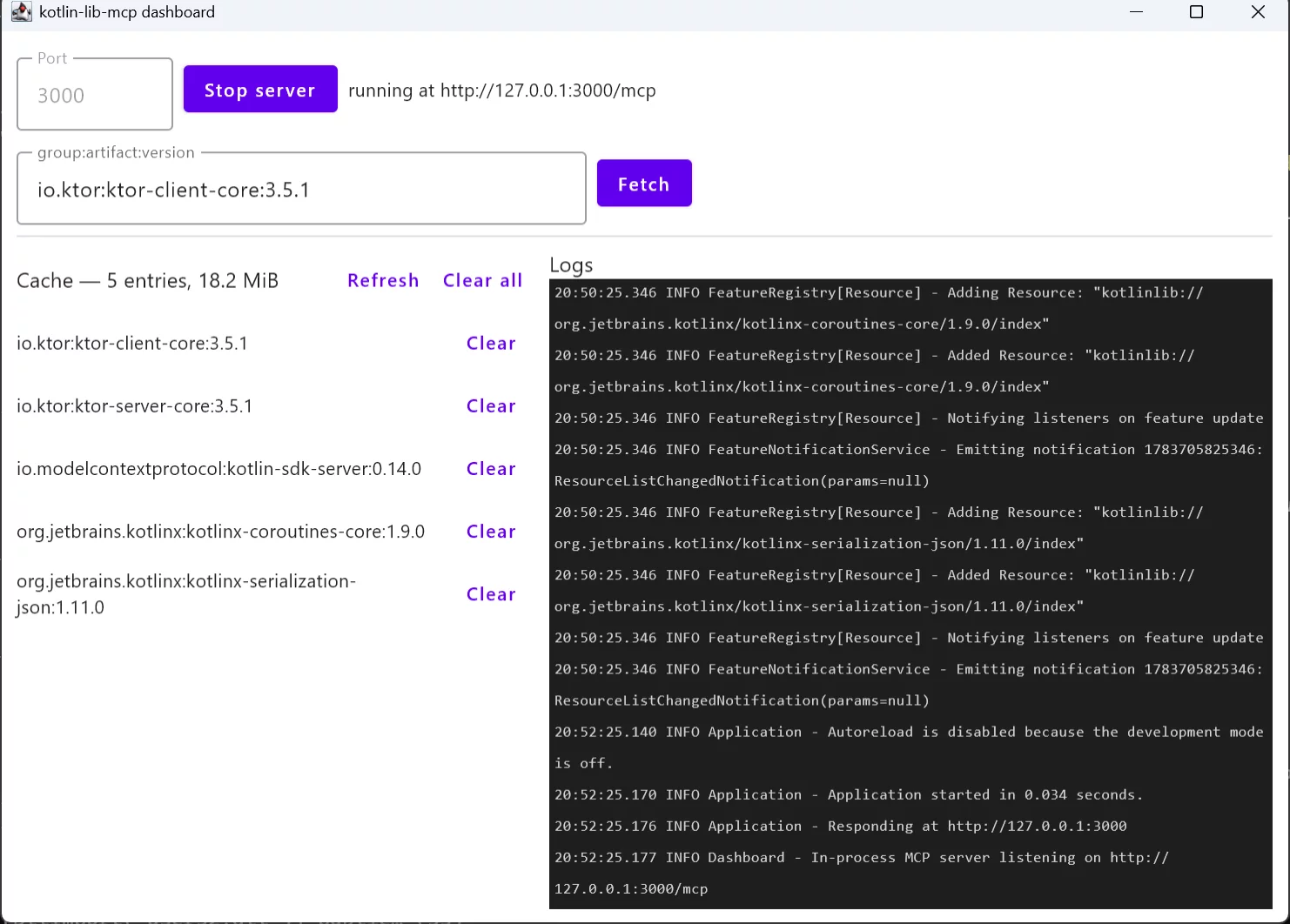
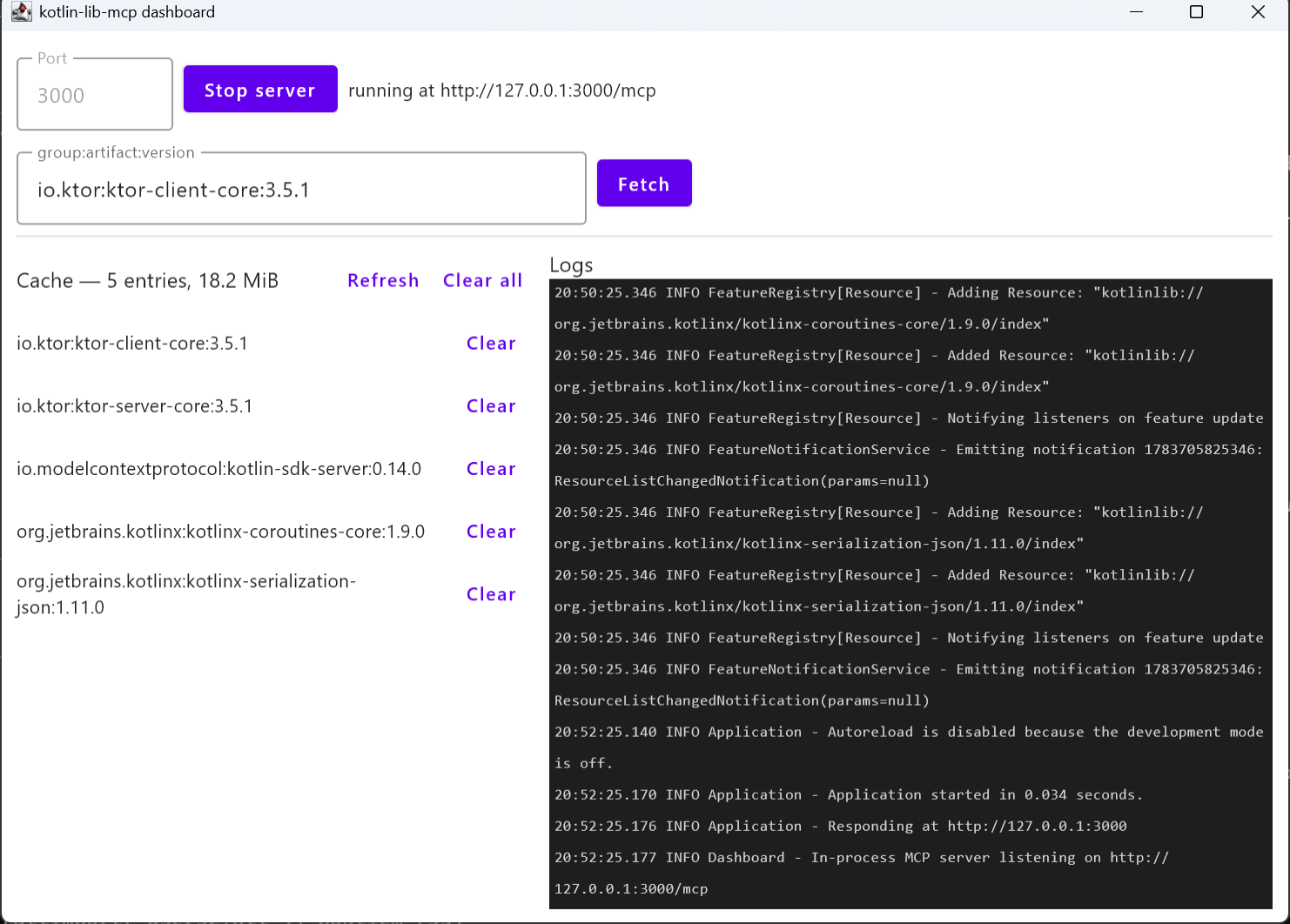
IntelliJ IDEA (AI Assistant / Junie), VS Code and GitHub Copilot. An optional Compose Desktop
dashboard runs the same server in-process.
Twelve tools — fetch_library · list_packages · list_declarations ·
get_api_signature · get_kdoc · get_source · search_source · diff_versions · diff_api ·
get_dependencies · list_versions · get_latest_version — plus MCP resources and a prompt.


Those install the Docker image. For the Claude Code plugin (which runs on your JDK), IntelliJ IDEA, or to run the release zip without Docker, see Quick start.
Compose Desktop dashboard
Why this and not a docs-lookup server?
Most documentation MCP servers scrape rendered doc sites or feed the model pre-digested summaries. This one works from the published sources jar — the ground truth:
- Resolved signatures, not regex guesses. Declarations are analyzed with the same
Analysis API that powers the Kotlin IDE, so
get_api_signaturereturns real, type-resolved signatures (with graceful best-effort fallback when transitive dependencies are missing). - KMP-aware. Kotlin Multiplatform libraries publish per-target sources jars; these are
resolved properly via
.moduleGradle metadata, and every symbol is tagged with its targets. - KDoc as data. Summaries, descriptions and tags are extracted per declaration — not whole HTML pages.
- Exact version you asked for, offline after the first fetch. Everything is cached on
disk keyed by
group/artifact/version; no re-downloads, no drift between the docs and the version you actually depend on. - Raw source when you need it.
get_sourceand boundedsearch_sourcelet the agent read the actual implementation, not just the API.
Quick start (no build required)
Option 1 — Claude Code plugin. The server plus skills that make Claude reach for it, two
commands (/kotlin-lib:api, /kotlin-lib:migrate) and a setup helper. Needs a JDK 25+ — the one on
your PATH, or any other set by path in the plugin's java option; no Docker. It downloads the
release zip on first use:
/plugin marketplace add aoreshkov/kotlin-lib-mcp
/plugin install kotlin-lib@kotlin-lib-mcp
See plugin/README.md for what it bundles.
Option 2 — release zip. Download the latest release, unzip (needs a Java 25+ runtime), then:
claude mcp add kotlin-lib -- /path/to/kotlin-lib-mcp-server-<version>/bin/server --transport stdio
Option 3 — Docker.
claude mcp add kotlin-lib -- docker run -i --rm -v kotlin-lib-mcp-cache:/home/mcp/.cache ghcr.io/aoreshkov/kotlin-lib-mcp
Option 4 — IntelliJ IDEA / Android Studio. JetBrains IDEs are MCP clients too — which is where most Kotlin gets written. Open Settings | Tools | AI Assistant | Model Context Protocol (MCP), click Add, pick the stdio transport and paste:
{
  "mcpServers": {
    "kotlin-lib": {
      "command": "docker",
      "args": ["run", "-i", "--rm", "-v", "kotlin-lib-mcp-cache:/home/mcp/.cache", "ghcr.io/aoreshkov/kotlin-lib-mcp"]
    }
  }
}
Choose global or project level, Apply, and the tools appear in the AI Assistant chat. Junie
takes the same JSON in its own MCP settings. Swap command/args for the release-zip launcher
(bin/server --transport stdio) if you'd rather not use Docker.
Option 5 — MCP Registry. The server is published to the
official MCP registry as
io.github.aoreshkov/kotlin-lib-mcp, and listed in the
GitHub MCP Registry; registry-aware clients can
install it from there. The entry declares two optional arguments a client can ask you for when it
installs: --repo, for each extra Maven repository (a private one, or https://maven.google.com
for AndroidX), and --max-concurrent-fetches.
Or in .mcp.json / Claude Desktop config:
{
  "mcpServers": {
    "kotlin-lib": {
      "command": "C:/path/to/kotlin-lib-mcp-server-<version>/bin/server.bat",
      "args": ["--transport", "stdio"]
    }
  }
}
Streamable HTTP. Run --transport http --port 3000 and point the client at
http://127.0.0.1:3000/mcp. Out of the box it is reachable from this machine only: the server
binds to loopback, and DNS-rebinding protection rejects any Host (or Origin) header other than
localhost, 127.0.0.1 or [::1]. There is no built-in authentication, so to serve other
machines put an authenticating reverse proxy in front, then bind wider with --host (e.g.
0.0.0.0) and name the public host with --allowed-host (plus --allowed-origin for browser
clients).
In Docker, loopback is the container's own, which a published port cannot reach. Bind every
interface inside the container and publish the port on the host's loopback instead — the endpoint
is still http://127.0.0.1:3000/mcp, and still unreachable from other machines:
docker run --rm -p 127.0.0.1:3000:3000 -v kotlin-lib-mcp-cache:/home/mcp/.cache \
  ghcr.io/aoreshkov/kotlin-lib-mcp --transport http --host 0.0.0.0 --port 3000
CLI flags — server --help lists them all with their defaults, the OTEL_* variables and
examples: --transport stdio|http; --port, --host, --allowed-host and --allowed-origin,
which apply to the http transport only, so passing one with stdio is a usage error; --cache-dir;
--repo (repeatable, searched after Maven Central) and --no-maven-central (only the --repo
repositories, for a mirror that proxies Central); --max-concurrent-fetches; and the opt-ins
--forward-logs-to-client (stdio only), --otel (see Telemetry) and --tasks (see
Tasks). --version prints the server's version. A command-line mistake exits 2 and an
internal error 70 (sysexits.h). SIGTERM or Ctrl-C stops the server cleanly within 5 seconds:
task records are saved and buffered traces flushed before the process ends.
Tools
All tools take a Maven coordinate (group:artifact:version). Call fetch_library first —
it downloads, extracts and analyzes the sources once; every other tool answers from the cached
index. fetch_library, list_versions and get_latest_version also accept group:artifact, and
fetch_library accepts group:artifact:latest to resolve the latest stable release.
| Tool | Purpose |
|---|---|
fetch_library |
Download + analyze + cache; returns a summary. Idempotent. Version may be omitted or latest |
list_packages |
Packages with declaration counts and KMP targets; paged |
list_declarations |
Declarations with signatures and deprecations; filter by package, visibility and deprecated; paged |
get_api_signature |
Resolved signature of one declaration by FQ name, with its deprecation and ReplaceWith |
get_kdoc |
KDoc (summary, description, tags) of one declaration |
get_source |
Raw source of a file (path) or one declaration (fqName); paged by line |
search_source |
Substring/regex search; bounded, returns file:line snippets |
diff_versions |
Unified diff between two fetched versions; summary-first, paged, path-filtered |
diff_api |
Public-API changes between two fetched versions — added, removed, changed, deprecated (with ReplaceWith); summary-first, paged, package- and change-filtered |
get_dependencies |
Dependency tree from .pom/.module; bounded depth and maxNodes |
list_versions |
Published versions from maven-metadata.xml, newest-first; paged |
get_latest_version |
Latest stable release (and newest overall) from maven-metadata.xml |
Every tool ships the metadata the MCP spec encourages clients to use: a display title,
behavior annotations (readOnlyHint: true everywhere except fetch_library, which is
additive-only — destructiveHint: false, idempotentHint: true; tools that reach Maven
repositories set openWorldHint: true, cache-only tools false), a typed outputSchema
derived from the response DTO's serializer, and an icon. Results carry both compact JSON text
and the matching structuredContent object, so structured-output clients and plain-text clients
see the same payload.
fetch_library also reports progress notifications (download → analyze → cache) when the
client sends a progressToken. Logs go to stderr by default (which the spec blesses for all
stdio logging); the deprecated MCP logging capability — mirroring logs to clients as
notifications/message (respecting logging/setLevel) — is opt-in via --forward-logs-to-client,
for stdio clients that surface MCP log messages but drop stderr. It is refused with --transport http,
where every session would receive every other session's logs.
Elicitation
When fetch_library is called without a version (io.ktor:ktor-client-core, or …:latest) it has
to guess. If the client advertised the elicitation capability, it asks instead: an
elicitation/create form-mode request carrying a single-select version picker — the titled
oneOf shape from SEP-1330, with the latest stable release pre-selected as the schema default.
| The user | The server |
|---|---|
| accepts a version | fetches exactly that one |
| declines | fetches the latest stable release, as it always did |
| cancels (dismissed the dialog) | downloads nothing and returns a tool error saying to call fetch_library again with an explicit group:artifact:version |
There is no flag: capability negotiation is the opt-in. A client that advertises nothing — or advertises url-mode only, which servers must not answer with a form — keeps the previous silent latest-stable behavior exactly. Only public Maven version numbers are ever requested, so form mode is appropriate; URL mode exists for credentials and third-party authorization, and is deliberately unused here. Accepted values are validated against the offered list before they reach a repository URL, and a client that errors mid-question falls back to the default rather than failing the fetch.
Under --tasks, a task-augmented fetch_library parks in the input_required status while the
question is outstanding and returns to working once answered; the elicitation/create carries the
io.modelcontextprotocol/related-task _meta tying it to the task.
Tasks
Pass --tasks to accept task-augmented tools/call for fetch_library (SEP-1686) and answer
tasks/get / tasks/result / tasks/list / tasks/cancel. Works on both transports.
Task records are persisted under <cache-dir>/tasks, so a completed task and its result are
still retrievable after the server restarts. A task that was still running when the server stopped
comes back as failed — its work did not survive, only the record did. Records are dropped once
their TTL elapses (10 minutes by default, 1 hour maximum). Servers sharing a cache directory, such
as one per Claude Code session, keep their tasks apart: a server picks up only the records of a
server that has stopped, never those of one still running.
Task IDs are bearer tokens for tasks that outlive their session. A task belongs to the MCP session that created it, and while that session is connected no other session can read, list or cancel it. But a session ID is per-connection: after a restart your client reconnects with a new one, so a recovered task is instead reachable by anyone presenting its exact task ID. That is the model the MCP spec prescribes for servers with no authorization context — which this one is, being loopback-first with no auth — and task IDs are 122-bit
SecureRandomUUIDs accordingly.tasks/listnever returns recovered tasks, only the calling session's own. If you expose this server beyond loopback, put authentication in front of it.
Note on concurrency. A server-initiated request from inside a tool call only works because the SDK dispatches inbound requests concurrently once the session is initialized — otherwise the client's reply would be stuck behind the very handler waiting for it. Besides making elicitation possible, this means
ping,tasks/getandnotifications/cancelledare answered promptly during a longfetch_libraryinstead of queueing behind it, and afetch_librarythe client cancels actually stops.
Telemetry
Pass --otel to export a trace span for every MCP request (tools/call, resources/read,
prompts/get, completion/complete) over OTLP/HTTP. It is off by default, and off means
inert: no SDK, no exporter threads, no network.
Configuration is the standard OpenTelemetry environment surface — there are no bespoke flags:
export OTEL_EXPORTER_OTLP_ENDPOINT=http://localhost:4318   # '/v1/traces' is appended for you
export OTEL_SERVICE_NAME=kotlin-lib-mcp                    # this is also the default
export OTEL_RESOURCE_ATTRIBUTES=deployment.environment=dev
server --transport stdio --otel
The protocol defaults to http/protobuf, the endpoint to http://localhost:4318, and the
exporter uses the JDK's built-in HTTP client (no OkHttp on the classpath). Everything is
overridable: OTEL_EXPORTER_OTLP_HEADERS for a hosted collector's API key, OTEL_TRACES_EXPORTER,
OTEL_BSP_SCHEDULE_DELAY, and so on.
Endpoint gotcha. With the generic
OTEL_EXPORTER_OTLP_ENDPOINT,/v1/tracesis appended automatically. With the per-signalOTEL_EXPORTER_OTLP_TRACES_ENDPOINT, the URL is used as-is — you must spell out the path yourself. This is the most common OTLP misconfiguration.
Spans follow the MCP semantic conventions: named {method} {target} (e.g.
tools/call fetch_library), SpanKind.SERVER, and carrying mcp.method.name, gen_ai.tool.name,
mcp.session.id, and network.transport (pipe for stdio, tcp for http). A tool that returns
isError is marked error.type=tool_error. Inbound trace context is picked up from the JSON-RPC
params._meta bag (traceparent/tracestate, per SEP-414), so a client that traces
its own work gets one connected trace.
Those mcp.* and gen_ai.* attributes are still Development status upstream and may be
renamed — one more reason the whole feature is opt-in.
Resources: each cached library is readable at
kotlinlib://{group}/{artifact}/{version}/index — a summary as JSON: KMP targets, declaration, file
and package counts, and its packages (up to 200). Each package's public API (signature and KDoc
summary per declaration, up to 200) is readable at
kotlinlib://{group}/{artifact}/{version}/package/{package}; the tools page through anything past
those caps. The resource list updates as libraries are fetched, both URI shapes are published as
resource templates so any cached coordinate is directly addressable, and template variables —
including package — autocomplete from the cache. Tools point at them too: fetch_library returns
a resource_link to the library's index, and list_packages links the first 20 packages of each page,
so a client can attach them without another lookup. Prompt: explain_public_api(coordinate, package?)
renders an explanation request grounded in the cached signatures and KDoc.
Icons: the server, every tool, the prompt and the library-index resource/template each declare
an SEP-973 icon, so a client can show the surface visually instead of as a wall of
snake_case. They are inlined as data: URIs rather than hosted URLs — a stdio server has no
origin, and the spec asks consumers to prefer same-origin icons and fetch them without credentials,
so inlining removes the third-party fetch entirely and keeps the icons working offline and inside
the container image. The payload is PNG, the one format icon-rendering clients must support
(image/svg+xml is only a SHOULD, and the spec warns it may carry executable content). The glyphs
are drawn by tools/src/main/kotlin/GenerateIcons.kt
(./gradlew :tools:generateIcons) and kept small —
about 800 bytes encoded each, since they ride in every tools/list. The same geometry also
writes the vector brand mark, assets/icon.svg, and a test fails if any committed icon stops
matching it.
Building from source
./gradlew build                                    # build everything
./gradlew test                                     # unit tests
./gradlew :server:run --args="--transport stdio"   # local MCP over stdio (default)
./gradlew :server:run --args="--transport http --port 3000"   # Streamable HTTP at /mcp
./gradlew :dashboard:run                           # Compose Desktop UI
./gradlew :server:installDist                      # standalone launcher in server/build/install/server/bin
Requires JDK 25 (a Gradle toolchain: an installed JDK 25 is detected, otherwise Gradle downloads one).
| Module | What it is |
|---|---|
core/ |
KMP library: domain model + ports (commonMain); Maven fetcher, zip extractor, Analysis API analyzer, on-disk cache (jvmMain) |
server/ |
JVM app: MCP tools/resources/prompts + stdio and Streamable HTTP transports |
dashboard/ |
Compose Desktop control panel embedding the server (optional) |
tools/ |
Generator for the SEP-973 icon PNGs the server advertises and the brand SVG. The module never ships; its output does |
Cache
Downloads and the parsed index live under the OS cache dir + kotlin-lib-mcp
(%LOCALAPPDATA%\kotlin-lib-mcp on Windows, ~/Library/Caches/kotlin-lib-mcp on macOS,
$XDG_CACHE_HOME/kotlin-lib-mcp elsewhere), keyed by `group/ar