
Lalabase
A self-hosted project brain for devs and customers.
RUBY ON RAILS · POSTGRESQL




Tickets, time tracking, docs and meetings for software agencies and their clients, with an AI assistant that answers from your own project data and cites its sources. Free on your own server, or hosted by us in Germany.
Try the live demo: no sign-up, the login is on the page, and everything resets every night.
Website · Self-hosting · Cloud pricing · Changelog
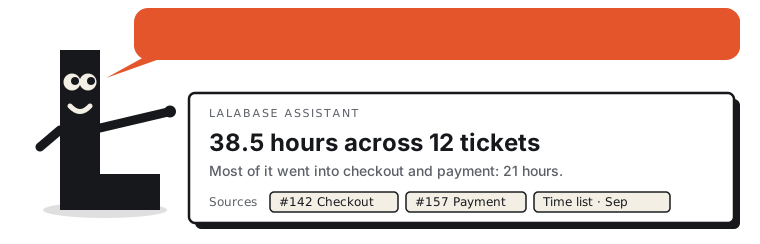
 Ask about a ticket. The answer cites the ticket, a comment and a meeting. |
 Ask about a meeting. Summary, action items and transcript next to the answer. |
 Tickets as a board or a list, with your own statuses per project. |
 Time tracking per ticket. Every session billable on its own. |
Click a picture for the full size. The pictures show the same invented company as the live demo.
In production for customers since September 2025. This repository starts with the first public release, 2026.10.0; more under Status. If Lalabase is useful to you, a star helps others find it.
What it does
- Clients and projects. One organisation per client, any number of projects below it. Clients get their own access, and roles decide what they see.
- Tasks. As a list or a board, with the statuses, priorities and fields you define per project.
- Time tracking. Several sessions per ticket, each one billable on its own, with exports for the invoice.
- Documentation. Notes and documents in the project, and a folder in your GitHub or GitLab repository becomes the project's docs.
- Meetings. Transcript, AI summary and the tasks that follow from it.
- AI assistant. One question across tickets, docs, time and meetings, or about the one ticket or meeting you are looking at, answered with its sources.
- Your data, your AI. The AI stays off until you switch it on. Then you pick the provider: OpenAI, Anthropic, Google Gemini through Vertex AI in the EU, Mistral, IONOS, OVHcloud, or any OpenAI-compatible endpoint, including a model in your own network. No project data goes to a provider you did not choose.
- MCP server and REST API. Connect Claude, Cursor or your own agent with a personal access token: list, create and update tickets, comment, log time, search the knowledge base, read the inbox, and look things up in the indexed code of your repositories.
Built with
Rails 8.1 on Ruby 4, PostgreSQL with pgvector for the assistant's search, Hotwire (Turbo and
Stimulus) with ViewComponent and Tailwind, and no React. Background jobs run on Solid Queue.
Non-trivial writes go through command objects (app/services/actors/), tenants are kept apart
with acts_as_tenant, and the project's own rules are enforced by guard specs in CI
(spec/architecture/) rather than by review comments. More in DEVELOPMENT.md.
Who it is for
Software agencies, freelancers and small software companies that work on projects for clients and want their project data, and the AI that works on it, under their own control. Lalabase replaces the usual mix of ticket tool, wiki, time tracking, chat and reporting spreadsheets.
Most teams come from Redmine, Jira, OpenProject, Asana or spreadsheets. The website compares Lalabase with each of them, starting with what the other tool does well.
Two ways to run it
| Your own server | Our cloud | |
|---|---|---|
| Cost | Free under AGPL-3.0. You pay for the server. | Monthly, see pricing |
| Operation, updates, backups | You | Us, hosted in Germany, with a DPA |
| Features | All of them, with each release | All of them, always current |
| AI | Your own key or your own model | The provider you choose |
Self-host with Docker
You need a server with at least 2 vCPU, 4 GB RAM and 20 GB disk, Docker 24 or later with Docker Compose v2, and a domain pointing at it.
git clone https://github.com/lalabase/lalabase.git && cd lalabase
git checkout "$(git describe --tags --abbrev=0)"   # the latest release, not main
cp .env.docker.example .env      # fill in the values it asks for
docker compose up -d             # pulls the image of that release
docker compose exec web bin/rails lalabase:setup
compose.yml starts the application, a job worker, PostgreSQL with pgvector, Valkey and Caddy,
which fetches a TLS certificate for LALABASE_HOST. If a proxy of your own terminates TLS, drop
the COMPOSE_PROFILES=tls line. Each release has an image ghcr.io/lalabase/lalabase:<version>
for linux/amd64 and linux/arm64, and the compose.yml of the release pulls it. To build the image
from your checkout instead, use compose.build.yml (see its first lines).
The guide covers installation, configuration, AI keys, backups and updates, in English and German: lalabase.com/docs. We help with the installation on request: hello@lalabase.com.
Try it on your own computer
The same steps work without a server, a domain or a mail account. In .env, fill in the keys
and the database password as the file describes, then change three things:
LALABASE_HOST=localhost:3000
LALABASE_FORCE_SSL=false
# and delete the line COMPOSE_PROFILES=tls
After lalabase:setup, sign in at http://localhost:3000/admin and create your first user
there. A user created by the admin needs no confirmation mail, so the mail settings can stay as
they are.
Status
Lalabase has been developed since October 2024: more than 2,300 commits and about 970 pull requests, in production for customers since September 2025. This repository starts with the first public release, 2026.10.0. The earlier history stays private, because it holds customer data and details of our servers. Development continues here, in the open.
License and contributing
Lalabase is licensed under the GNU Affero General Public License, version 3 only
(SPDX: AGPL-3.0-only). Later versions of the license do not apply unless a release says so.
The full license text is in LICENSE. Code from invited contributors is also available
under the Apache License 2.0; their commits end with the line
License: Apache-2.0.
Bug reports, ideas and questions are always welcome as issues. Unsolicited pull requests are not accepted: in other projects we have seen that, since AI coding assistants, outside pull requests take more work to review and fold in than the change itself. The code comes from the maintainer and a few people we invite. An issue that describes the problem helps most. Details in CONTRIBUTING.md. Bundled third-party components keep their own licenses, listed in THIRD_PARTY_NOTICES.txt.
The license covers the code. It grants no rights to the name Lalabase, and none to Lala, the
mascot in .github/readme/lala-*.svg: the figure is not covered by the AGPL, all rights are
reserved, and it may not be copied, modified or used outside this repository.
Working on the code: stack, setup, releases and where things live are in DEVELOPMENT.md.