
One smart RPC endpoint for all your nodes and providers.
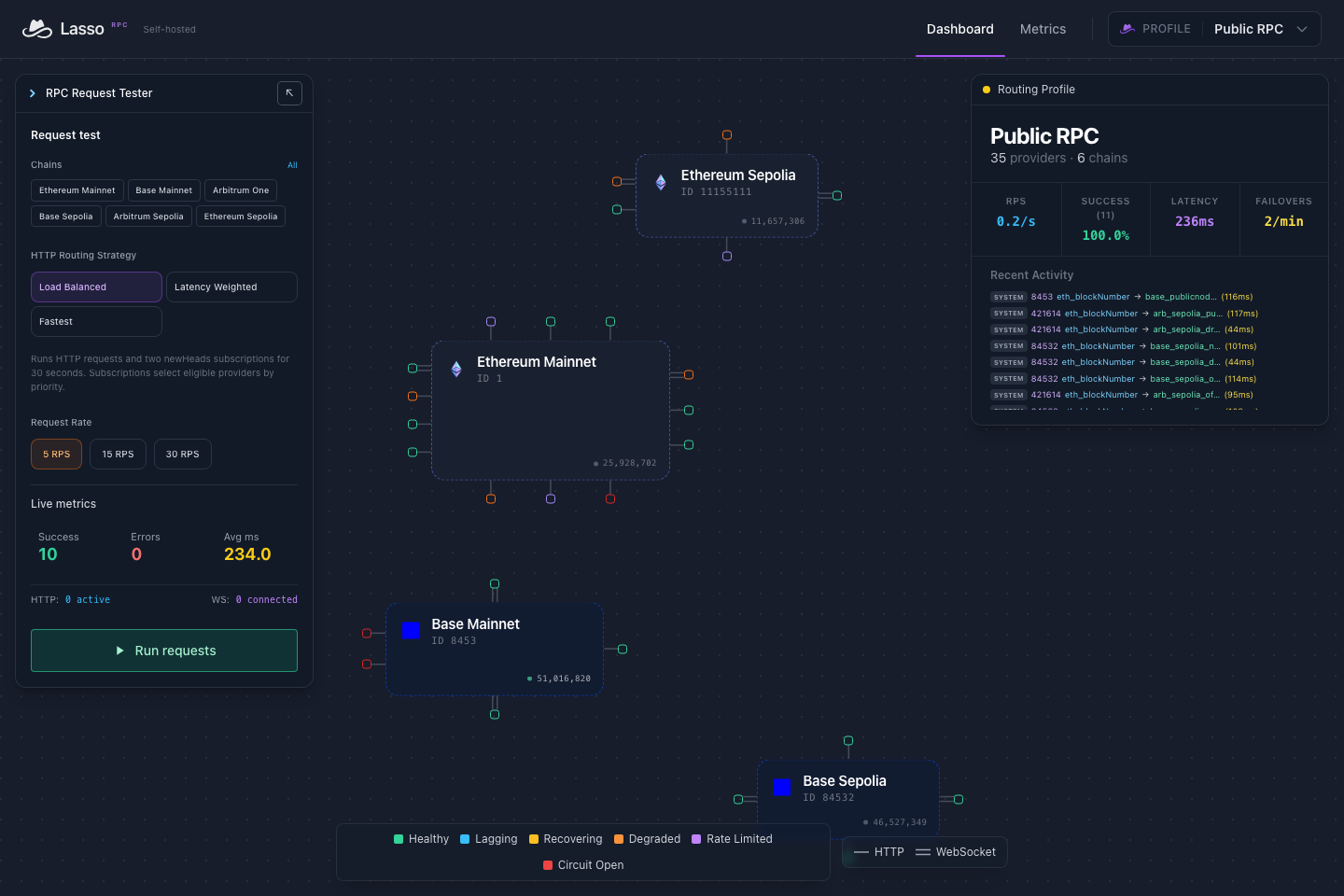
Lasso wrangles your nodes and RPC providers into one fast, resilient, observable JSON-RPC endpoint. It measures every upstream by method and transport, sends each request to the provider best able to serve it, and routes around outages, rate limits, and lagging nodes before your users notice. WebSocket subscriptions survive provider failures, and every routing decision is visible.
Point your client at a Lasso URL instead of a provider's. No SDK, no client library, no application changes.
Self-hosted, Apache-2.0, and built on Elixir/OTP. The bundled public pool covers Ethereum, Base, and Arbitrum (mainnet and Sepolia) with no API keys, so you can try it in one command. Add any EVM chain and your own providers in YAML.
Quick Start · Use it from your app · Configuration · Endpoints · How it works · Migration guide · Documentation · Support
Or get instant access to free curated RPC or hosted BYOK RPC profiles at lasso.sh
Why Lasso
Every RPC provider is a bundle of tradeoffs: latency, uptime, rate limits, archive depth, method support, and cost. Those tradeoffs shift by region, method, and hour, and "compatible" JSON-RPC APIs disagree in the details. A single URL in an environment variable makes all of that your application's problem.
Lasso makes it the RPC layer's problem. Different providers excel at different work: hot reads, archival queries, log scans, subscriptions. Lasso measures that live and routes each request accordingly. You get redundancy without rewrites, and you scale by adding providers instead of replatforming.
What Lasso handles
- Outages and rate limits. Circuit breakers pull a failing provider from rotation and reads fail over to the next healthy one. Recovered providers are eased back in.
- Uneven performance. A provider can be fast for
eth_calland slow foreth_getLogs. Lasso tracks latency per provider, method, and transport, andfastestsends each call to the quickest provider for that method. - Mixed fleets. Declare which providers are pruned, cap log ranges, or skip
debugandtrace, and Lasso routes each request only where it can be served. - Dropped WebSockets. Matching
newHeadsandlogssubscriptions share one upstream. When it fails, Lasso moves to another provider and backfills missed blocks and logs over HTTP. - Block height going backwards. With block regression protection, successive latest-block responses never regress, even as providers change.
- Knowing what happened. Add
?include_meta=bodyto see the provider, strategy, latency, and retries behind any response, or watch routing live in the dashboard.
Profiles give each app or environment its own providers, chains, and routing from one deployment. Run a node per region and each routes from its own measurements; optional clustering brings every region into one dashboard.
Why not client-side fallback?
Fallback in your client runs separately in every service and process you deploy. Each keeps its own picture of provider health, changing providers means a redeploy, and nothing records which upstream answered. Lasso moves that into one endpoint: shared measurements, one place to change providers, and a record of every routing decision.
Quick Start
You need Docker with the Compose plugin, curl, and OpenSSL. Start in an empty directory:
mkdir lasso && cd lasso
curl --fail --location https://github.com/jaxernst/lasso-rpc/releases/download/v0.6.0/compose.yml --output compose.yml
(umask 077; printf 'SECRET_KEY_BASE=%s\nRELEASE_COOKIE=%s\n' "$(openssl rand -hex 64)" "$(openssl rand -hex 32)" > .env)
docker compose up -d --wait
curl --fail http://localhost:4000/api/health
Open http://localhost:4000/dashboard. The prebuilt image supports Linux AMD64 and ARM64; no source checkout or build tools required.
Send a request through the fastest strategy and ask Lasso where it went:
curl --fail-with-body --silent --show-error \
  'http://localhost:4000/rpc/fastest/ethereum?include_meta=body' \
  -H 'Content-Type: application/json' \
  -d '{"jsonrpc":"2.0","method":"eth_blockNumber","params":[],"id":1}'
{
  "jsonrpc": "2.0",
  "id": 1,
  "result": "0x18ba3fb",
  "lasso_meta": {
    "strategy": "fastest",
    "selected_provider": {"id": "ethereum_publicnode"},
    "upstream_latency_ms": 45,
    "retries": 0,
    "circuit_breaker_state": "closed"
  }
}
Drop include_meta and the response is ordinary JSON-RPC. Metadata can also
arrive as headers or, over WebSocket, as a separate frame; see the
API reference.
To watch a live subscription, use the dashboard tester or
wscat:
npx --yes wscat -c ws://localhost:4000/ws/rpc/ethereum
At the > prompt, send:
{"jsonrpc":"2.0","method":"eth_subscribe","params":["newHeads"],"id":1}
You'll get a subscription ID, then an eth_subscription notification for every
new block.
Use it from your app
Any JSON-RPC client works. Swap the provider URL for a Lasso URL:
import { createPublicClient, http, webSocket } from "viem";
import { mainnet } from "viem/chains";

const client = createPublicClient({
  chain: mainnet,
  transport: http("http://localhost:4000/rpc/fastest/ethereum"),
});

const wsClient = createPublicClient({
  chain: mainnet,
  transport: webSocket("ws://localhost:4000/ws/rpc/ethereum"),
});
import { JsonRpcProvider } from "ethers";

const provider = new JsonRpcProvider("http://localhost:4000/rpc/ethereum");
Because the strategy lives in the URL, each client can pick its own: fastest
for user-facing reads, load-balanced for background jobs.
Before exposing Lasso
Lasso does not authenticate clients or enforce incoming RPC quotas. Put externally reachable RPC, metrics, and dashboard endpoints behind your network policy or a reverse proxy. The dashboard tester sends real upstream requests.
Compose binds to localhost and keeps profiles and history in a named volume.
Preserve .env across restarts. docker compose down keeps your data;
--volumes deletes it. See Deployment for
verifying the image,
custom providers, upgrades, and rollback.
Configuration
Profiles are YAML files. In Docker, follow the
host-mounted profile setup;
in a source checkout, edit config/profiles/. Keep a valid public.yml and match
each additional filename to its slug.
Save this as my-app.yml in your profiles directory:
---
name: My App
slug: my-app
---
chains:
  ethereum:
    chain_id: 1
    providers:
      - id: publicnode
        url: https://ethereum-rpc.publicnode.com
        ws_url: wss://ethereum-rpc.publicnode.com
      - id: drpc
        url: https://eth.drpc.org
        ws_url: wss://eth.drpc.org
Swap in your own nodes and providers. URLs and auth headers support
${ENV_VAR} substitution, and an unresolved variable rejects the configuration
instead of starting with a broken provider. Declare
capabilities such as unsupported
methods, log-range limits, and pruning depth so Lasso routes around them. From a
source checkout, mix lasso.probe <provider_url> tests a provider's method
support, limits, and WebSocket subscriptions and recommends capability settings.
It reports eth_sendRawTransaction and eth_sendTransaction as unverifiable:
an invalid payload cannot prove support, and discovery never submits a real
transaction. Test transaction behavior with your own controlled workload.
Recreate the container after adding a profile:
docker compose up -d --force-recreate --wait
Then use http://localhost:4000/rpc/profile/my-app/ethereum or
ws://localhost:4000/ws/rpc/profile/my-app/ethereum. Later YAML edits apply
with a configuration reload;
a failed reload keeps the active configuration. Environment or mount changes
need a container recreate.
Profiles separate routing configuration; they are not access controls. Profile
rps_limit applies to the dashboard tester, not incoming RPC traffic.
Head tracking and provider quota
Lasso tracks every provider's block height so it can tell when one falls
behind. That tracking runs on every node and spends provider quota beside your
own traffic. With no block_time_ms or cadence overrides, each distinct
upstream costs:
| Background request | Rate per upstream, per node |
|---|---|
newHeads notification, when the provider has a ws_url |
One per block |
eth_blockNumber |
One per 12 s, or one per 36 s while its feed is current |
eth_chainId |
One per 12 s |
Successful routed eth_blockNumber and eth_getBlockByNumber("latest")
responses also provide head evidence for the provider that served them. A chain
needs one head feed, and any provider with a free WebSocket can carry it. Turn
background tracking off for providers that bill per request:
providers:
  - id: own-node
    url: http://10.0.0.5:8545
    ws_url: ws://10.0.0.5:8546
  - id: metered
    url: https://rpc.example.com/${METERED_KEY}
    background_observations: false
A provider with background_observations: false keeps serving requests and
subscriptions, and Lasso learns its height from the head reads routed to it.
Profiles sharing the same upstream share its background work; another enabled
reference can keep that work running. The
configuration reference lists the intervals
and per-provider overrides.
Current limits:
- Lag filtering needs
selection.max_lag_blocksand a reference head that a majority of at least two providers agree on. - Head comparison assumes 12-second blocks unless
block_time_msis set, so set it on faster chains. - Methods Lasso does not recognize, such as vendor extensions, get one attempt
on whichever provider the strategy picks. List them in
unsupported_methodson providers that lack them, or send them to/rpc/provider/:provider_id/:chain.
Endpoints
| Route | HTTP (POST) | WebSocket |
|---|---|---|
| Default | /rpc/:chain |
/ws/rpc/:chain |
| Strategy | /rpc/:strategy/:chain |
/ws/rpc/:strategy/:chain |
| Provider override | /rpc/provider/:provider_id/:chain |
/ws/rpc/provider/:provider_id/:chain |
| Profile | /rpc/profile/:profile/:chain |
/ws/rpc/profile/:profile/:chain |
Strategies are load-balanced (the default), fastest, balanced-fast, which
spreads load while favoring the quickest providers, and priority, which tries
providers in their configured priority order; latency-weighted is an alias of
balanced-fast.
Profile routes accept strategies and provider overrides too; see the
API reference.
:chain is a configured name such as ethereum or its EIP-155 ID, 1. Routes
without a profile use public.
GET /api/health reports liveness and bare GET /api/ready reports replica
readiness. Use /api/ready?profile=public&chain=ethereum for strict routing
readiness; Deployment describes these probes.
Troubleshooting
Start with container status and recent logs:
docker compose ps -a
docker compose logs --tail=100 lasso
| Symptom | Check |
|---|---|
| Container fails to start | Look for missing environment variables or invalid YAML in the logs. Keep public.yml; profile filenames must match their slugs. |
| Port 4000 is in use | Set LASSO_PORT=4001 in .env, run docker compose up -d --wait, and use port 4001. |
| Health passes but RPC fails | Health covers Lasso itself, not upstreams. Check provider status in the dashboard, credentials, and network access. |
| Profile changes have no effect | Reload existing profiles on each node. After adding a profile or changing .env or mounts, run docker compose up -d --force-recreate --wait. |
Run from source
Use Elixir 1.18.4 and Erlang/OTP 28 (the CI versions), plus Node.js 18 or newer for assets:
git clone https://github.com/jaxernst/lasso-rpc
cd lasso-rpc
mix deps.get
mix assets.setup
mix assets.build
mix phx.server
Open http://localhost:4000/dashboard. See Contributing for
tests and code quality checks. To build a production container from the checkout,
set SECRET_KEY_BASE and run docker compose up --build -d, or use
./run-docker.sh.
How it works
For each request, Lasso filters providers by method, transport, declared capabilities, and health, ranks the rest with the selected strategy, and executes with retries and failover. Every attempt feeds back into the measurements that drive the next decision and the dashboard. See Routing and Architecture.
A single node works standalone. For global traffic, run a node per region behind geo DNS or a load balancer: each node routes from its own local measurements, so regional latency differences are handled automatically. Optional clustering aggregates observability across regions without touching the routing hot path.
Why Elixir/OTP
RPC routing is a concurrency and failure-handling problem, which is exactly what the BEAM was built for.
- Massive concurrency: lightweight processes model every request, provider connection, and subscription without shared-memory complexity.
- Fault isolation: OTP supervision contains failures and restarts components fast, which matters when upstreams are flaky or rate-limited.
- Fast shared state: ETS serves routing, benchmark, and breaker state on the hot path without a central bottleneck.
- Distributed by design: clustering and remote messaging are built into the runtime.
Direction
Lasso's routing is built to learn. Provider behavior such as limits, history depth, and method support should be discovered from probes and live traffic, attributed to evidence, and shown to operators instead of hand-written into config. Observations stay typed, so provider comparison can grow from head height to fork-aware checks on headers, logs, and responses.
Documentation
- Configuration: YAML, credentials, capabilities, and strategies
- Routing: the selection pipeline and each strategy
- API reference: routes, metadata, subscriptions, and errors
- Block regression protection and reading at one block
- Migration guide: move from direct providers or another gateway with a measured canary
- Deployment: containers, persistence, upgrades, and clustering
- Observability: logs and metrics
- RPC standards: method support and execution semantics
- Testing and Changelog
Prefer a managed deployment? Lasso Cloud runs this engine with hosted providers, API keys, and usage analytics. See the Cloud docs.
Contributing
See Contributing for setup and checks. Report bugs through GitHub issues, and open an issue to discuss major changes before sending a pull request. Ownership and review responsibilities are in Maintainers; deployment help is in Support.
Security
See the Security Policy for deployment guidance and private vulnerability reporting.
License
Apache License 2.0. Built by jaxer.eth.