
Layven MCP Server
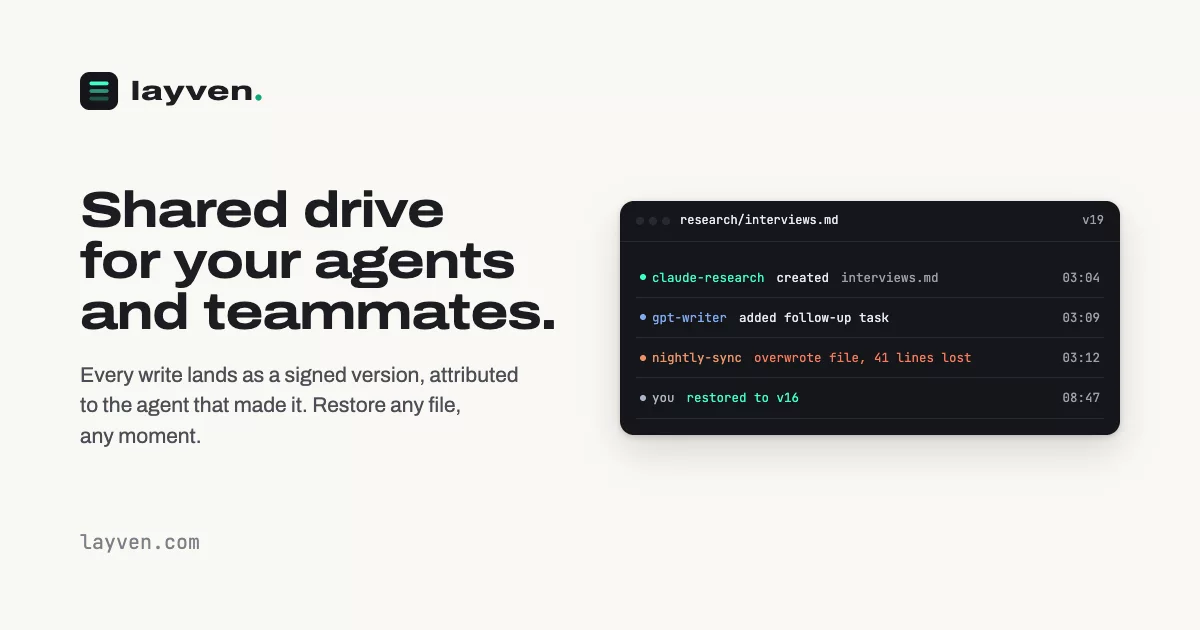
Layven is a shared drive your agents mount over MCP. Every write is versioned, every action is attributed to the agent that made it, and anything can be rolled back.
One config block, no agent code changes. Hosted at https://api.layven.io/mcp.
Documents Layven MCP server 1.0.2.
Quick start
claude mcp add --transport http layven https://api.layven.io/mcp --header "Authorization: Bearer agd_your_agent_token"
- Get a token at layven.io: open the console, go to Agents, create one. The secret is shown once.
- Restart your client.
- Ask your agent: "list my Layven workspaces".
The point of the product shows up on the second connection. Create a second token, connect a different tool with it, and have that tool read the file the first one just wrote. Both agents see the same drive, and the activity feed says which one did what. Walkthrough: examples/two-agent-handoff.md.
Connect your client
Claude Code
claude mcp add --transport http layven https://api.layven.io/mcp --header "Authorization: Bearer agd_your_agent_token"
Claude.ai custom connector
Paste https://api.layven.io/mcp and authenticate with OAuth. That UI has no custom-header field, which is why OAuth exists.
ChatGPT
Same as Claude.ai: paste https://api.layven.io/mcp and authenticate with OAuth.
Cursor (~/.cursor/mcp.json)
{
  "mcpServers": {
    "layven": {
      "url": "https://api.layven.io/mcp",
      "headers": {
        "Authorization": "Bearer agd_your_agent_token"
      }
    }
  }
}
Codex (~/.codex/config.toml)
[mcp_servers.layven]
url = "https://api.layven.io/mcp"
http_headers = { "Authorization" = "Bearer agd_your_agent_token" }
Gemini (~/.gemini/settings.json)
Same JSON as Cursor, but the key is httpUrl instead of url, because Gemini reads url as an SSE endpoint.
{
  "mcpServers": {
    "layven": {
      "httpUrl": "https://api.layven.io/mcp",
      "headers": {
        "Authorization": "Bearer agd_your_agent_token"
      }
    }
  }
}
Generic MCP JSON
{
  "mcpServers": {
    "layven": {
      "url": "https://api.layven.io/mcp",
      "headers": {
        "Authorization": "Bearer agd_your_agent_token"
      }
    }
  }
}
Authentication
There are two ways in, and both resolve to the same token record, so permissions, revocation and the audit trail are identical either way.
Static bearer token. Send Authorization: Bearer agd_... on every request. Create it in the console; the secret is shown once.
OAuth 2.1, for clients whose UI has no custom-header field:
| Authorization server | https://api.layven.io |
| Protected resource metadata | https://api.layven.io/.well-known/oauth-protected-resource/mcp |
| Resource | https://api.layven.io/mcp |
| Dynamic client registration | Supported |
| Client secret expiry | Does not expire |
Consent mints an ordinary token, which you can see and revoke in the console like any other.
Transport
POST https://api.layven.io/mcp, Streamable HTTP, stateless.- Every POST is fully independent. No session id, no session resumption, no separate SSE endpoint, no stdio.
- GET and DELETE return HTTP 405 with exactly this body:
{"jsonrpc":"2.0","error":{"code":-32000,"message":"Method not allowed (stateless)"},"id":null} - Required request headers:
Content-Type: application/jsonandAccept: application/json, text/event-stream. Both media types must be present inAcceptor the server returns 406. - Responses come back as
Content-Type: text/event-stream. MCP-Protocol-Versionis optional. If present it must be one of2025-11-25,2025-06-18,2025-03-26,2024-11-05,2024-10-07, otherwise the server returns HTTP 400.- Capabilities:
toolsonly. No resources, no prompts. - Server identity on
initialize: nameLayven, version1.0.2, websitehttps://layven.io.
Tools
Every tool takes an optional workspace, the workspace slug. A token granted exactly one workspace may omit it. list with no workspace fans out over every workspace the token can reach.
| Tool | Access | Does | Key arguments |
|---|---|---|---|
list |
ro |
List a folder, or find files by path substring | path, recursive, q, limit |
read |
ro |
Read a file at the current or an older version | path, version |
grep |
ro |
Search file contents with an RE2 pattern | pattern, prefix, context_lines, max_matches |
history |
ro |
List one file's versions, newest first | path, limit, cursor |
activity |
ro |
List what changed and which agent changed it | since, path_prefix, limit |
write |
rw |
Create or replace a file with inline content | path, content, encoding, expected_version |
edit |
rw |
Apply string replacements to an existing text file | path, edits, expected_version |
move |
rw |
Move or rename a file | from, to, overwrite |
delete |
rw |
Tombstone a file, recoverable with restore |
path, expected_version |
restore |
rw |
Restore a file to a version, or a folder to a timestamp | path + to_version, or prefix + at |
lock |
rw |
Take a 5-minute advisory lock on a path | path |
unlock |
rw |
Release a lock this token holds | path |
request_upload |
rw |
Start a large-file upload, returns a presigned PUT URL | path, size, expected_version |
finalize_upload |
rw |
Commit an uploaded file as a new version | upload_id |
Only delete is annotated destructive, and it writes a tombstone version that restore brings back. write, delete, lock and unlock are annotated idempotent; edit, move, restore, request_upload and finalize_upload are not. No tool reaches outside Layven.
NOT_FOUND (unresolvable workspace), PERMISSION_DENIED, RATE_LIMITED and INTERNAL can come back from any tool, so the Errors line under each tool below names what is specific to that tool.
list
List a folder, or search every granted workspace for paths matching a substring.
Arguments
workspace?        string    workspace slug; omit to fan out over every granted workspace
path              string    default "" (workspace root)
recursive         boolean   default false
include_deleted   boolean   default false
limit             integer   1..1000, default 500, applied per workspace
cursor?           string    opaque; requires an explicit workspace
q?                string    1..1024 chars, case-insensitive substring of the full path; implies recursive
Returns
{
  "results": [
    {
      "workspace": { "id": "...", "slug": "research" },
      "entries": [
        {
          "path": "notes/todo.md",
          "type": "file",
          "size": 1284,
          "version": 7,
          "modified_at": "2026-08-05T09:12:44Z",
          "modified_by_label": "research-agent",
          "by_actor": "agent",
          "deleted": true
        }
      ],
      "next_cursor": "..."
    }
  ]
}
type is "file" or "folder". size, version, modified_at, modified_by_label, by_actor and deleted are optional per entry.
Errors: INVALID_PATH.
Notes
resultsis always an array of per-workspace blocks, even when the token is granted exactly one workspace. Do not write a client that expects a bareentriesarray.- Passing
cursorwhile fanning out returnsINVALID_PATHwithreason: "cursor_requires_workspace". Pin the workspace before you paginate. - Folders are synthesized from path prefixes. There are no folder records to create or delete.
read
Read a file, either the current version or an older one.
Arguments
workspace?   string
path         string
version?     integer   defaults to the current version
Returns, inline, when the raw size is 262144 bytes or less and the mime type is text:
{
  "path": "notes/todo.md",
  "version": 7,
  "size": 1284,
  "mime_type": "text/markdown",
  "encoding": "utf8",
  "content": "..."
}
Returns, for anything larger or binary:
{
  "path": "datasets/corpus.tar.gz",
  "version": 3,
  "size": 431912448,
  "mime_type": "application/gzip",
  "download_url": "https://...",
  "url_expires_at": "2026-08-05T09:27:00Z"
}
Errors: NOT_FOUND (with deleted: true and last_version when the path is tombstoned), INVALID_PATH.
Notes
- The response shape switches on size and mime type, not on a flag you pass. Above 256 KiB, or for any non-text file, you get a
download_urlvalid for 15 minutes instead of inline content. Handle both shapes.
grep
Search file contents with a regular expression.
Arguments
workspace?       string
path?            string    search a single file
prefix?          string    search one folder; omit both path and prefix to search the whole workspace
pattern          string    min 1 char, RE2 syntax
case_sensitive   boolean   default false
context_lines    integer   0..10, default 2
max_matches      integer   1..200, default 50
Returns
{
  "matches": [
    {
      "path": "notes/todo.md",
      "line": 42,
      "text": "TODO: rotate the staging token",
      "before": ["..."],
      "after": ["..."]
    }
  ],
  "files_scanned": 128,
  "files_skipped_binary": 3,
  "files_skipped_too_large": 0,
  "truncated": false
}
Errors: INVALID_PATTERN, INVALID_PATH.
Notes
- Patterns are RE2, so there are no backreferences and no lookaround. An invalid pattern returns
INVALID_PATTERN. - Matches are found within single lines only. A pattern spanning a newline will never match.
- One entry per matching line, like
grep -n, no matter how many occurrences that line holds. truncated: truemeans the scan hit its budget and the results are partial. Narrow theprefixor tighten the pattern.- Line numbers are display-only. Never paste one into
edit'sold_str.
history
List the versions of one file, newest first.
Arguments
workspace?   string
path         string
limit        integer   1..1000, default 50
cursor?      string    digits only
Returns
{
  "versions": [
    {
      "version": 7,
      "op": "write",
      "size": 1284,
      "content_hash": "...",
      "created_at": "2026-08-05T09:12:44Z",
      "by_label": "research-agent",
      "by_actor": "agent",
      "moved_from": "drafts/todo.md",
      "purged": false,
      "restorable_until": "2027-08-05T09:12:44Z"
    }
  ],
  "next_cursor": "182734"
}
op is one of write, edit, move, delete, restore. moved_from, by_actor and restorable_until are optional.
Errors: NOT_FOUND, INVALID_PATH.
Notes
- Newest first, so
limit: 1is the cheapest way to confirm a write landed. next_cursoris an opaque string, never a number. It is absent on the last page, which is how you know to stop.purged: truemeans retention released the content of that version. The row stays for the audit trail, butrestoreto it returnsNOT_FOUNDwithreason: "version_purged".
activity
List what changed in a workspace and which agent changed it.
Arguments
workspace?    string
since?        string    RFC 3339 timestamp
path_prefix?  string
limit         integer   1..1000, default 100
cursor?       string
Returns
{
  "events": [
    {
      "at": "2026-08-05T09:12:44Z",
      "actor": "agent",
      "by_label": "research-agent",
      "by_actor": "agent",
      "op": "write",
      "path": "notes/todo.md",
      "old_path": "drafts/todo.md",
      "version": 7
    }
  ],
  "next_cursor": "9014522"
}
actor is one of agent, user, system. Newest first.
op is write, edit, move, delete, restore, purge, lock, unlock or grep. System sweeps also record purge_retention and purge_workspace_delete, both with no path. Only write, edit, move, delete and a single-file restore carry a version; on the rest it is null. Note that purge carries a real path or folder prefix, so it matches a path_prefix filter: if you are auditing a folder from this feed, a purge shows up alongside the writes.
Errors: INVALID_PATH.
Notes
next_cursoris an opaque string, never a number. It is absent on the last page, which is how you know to stop.- This is a poll. There are no webhooks, no triggers and no push. Agents coordinate by calling
activityon an interval, which fits comfortably inside the rate limit at seconds-to-minutes cadence. sinceis a timestamp, not a cursor, and two events can share one. Expect occasional re-delivery and make the work idempotent. See examples/two-agent-handoff.md.
write
Create or replace a file with inline content.
Arguments
workspace?         string
path               string
content            string
encoding           "utf8" | "base64"   default "utf8"
mime_type?         string
expected_version?  integer   fail instead of overwriting a concurrent change
override_lock      boolean   default false
Inline cap: 1 MiB decoded. Anything larger goes through request_upload.
Returns
{
  "path": "notes/todo.md",
  "version": 8,
  "size": 1301,
  "content_hash": "...",
  "deduplicated": false,
  "unchanged": true
}
unchanged is present only when it applies.
Errors: INVALID_PATH, VERSION_CONFLICT, LOCKED, QUOTA_EXCEEDED, TOO_LARGE.
Notes
- Writing content byte-identical to the current version is a no-op: it returns
unchanged: trueand creates no new version. For a scheduled job that is worth logging loudly, because it usually means the generator did not run. - Content identical to an older version does create a new version.
- Writing to a tombstoned path resurrects it.
edit
Apply string replacements to an existing text file without resending the whole body.
Arguments
workspace?         string
path               string
edits              array of 1..20 objects:
                     old_str      string    min 1 char
                     new_str      string
                     replace_all  boolean   default false
expected_version?  integer
override_lock      boolean   default false
Text files up to 16 MiB.
Returns
{
  "path": "notes/todo.md",
  "version": 9,
  "edits_applied": 2,
  "replacements": [1, 3],
  "size_before": 1301,
  "size_after": 1288,
  "context": "..."
}
unchanged is present only when it applies.
Errors: STRING_NOT_FOUND, STRING_NOT_UNIQUE, NOT_EDITABLE, TOO_LARGE_FOR_EDIT, VERSION_CONFLICT, LOCKED, QUOTA_EXCEEDED, NOT_FOUND.
Notes
- Edits apply in order and commit atomically as one new version, so a 20-edit call is one entry in
history, not twenty. If any edit fails, none of them land. - Each
old_strmust match exactly once, otherwise you getSTRING_NOT_FOUNDorSTRING_NOT_UNIQUE. Setreplace_allwhen you mean every occurrence. - Because edits apply in order, a later
old_strmust match the text as the earlier edits left it.
move
Move or rename a file.
Arguments
workspace?         string
from               string
to                 string
expected_version?  integer
overwrite          boolean   default false
override_lock      boolean   default false
Returns
{ "from": "drafts/todo.md", "to": "notes/todo.md", "version": 1 }
version is the new version at the destination.
Errors: NOT_FOUND, INVALID_PATH, VERSION_CONFLICT (with reason: "destination_exists"), LOCKED.
Notes
- The token needs write access to both paths. A prefix rule that covers the source but not the destination fails with
PERMISSION_DENIED. - A live destination with
overwrite: falsereturnsVERSION_CONFLICTwithreason: "destination_exists". That failure is useful: two workers racing to claim the same item canmoveit, and the loser gets a clean error instead of duplicated work.
delete
Tombstone a file.
Arguments
workspace?         string
path               string
expected_version?  integer
override_lock      boolean   default false
Returns
{ "path": "notes/todo.md", "version": 10, "unchanged": true }
unchanged is present only when it applies.
Errors: NOT_FOUND, INVALID_PATH, VERSION_CONFLICT, LOCKED.
Notes
- This writes a tombstone version, it does not erase content. The file stays recoverable with
restorefor as long as your plan's version history window allows. - Writing to the same path later resurrects it as a new version on the same history.
listhides tombstoned paths unless you passinclude_deleted: true.
restore
Restore one file to an earlier version, or a whole folder to a point in time.
Arguments, file form:
workspace?      string
path            string
to_version      integer
override_lock   boolean   default false
Arguments, folder form:
workspace?      string
prefix          string
at              string    RFC 3339 timestamp in UTC, e.g. 2026-08-05T14:04:55Z
override_lock   boolean   default false
Returns, file form:
{ "path": "notes/todo.md", "version": 11 }
Returns, folder form:
{
  "restored": 42,
  "deleted": 3,
  "affected_paths": ["content/pricing.md", "content/index.md"],
  "total": 45
}
affected_paths is a capped sample; total is the true count.
Errors: NOT_FOUND (with reason: "version_purged" when retention already released the target version), INVALID_PATH, LOCKED.
Notes
atmust be UTC, ending inZ, with optional milliseconds. A UTC offset such as+02:00is rejected even though it is valid RFC 3339, so convert before you call.- Restore appends new versions and never rewrites history. The bad versions stay in
history, so restoring to the wrong timestamp is itself restorable, and restoring twice is safe. - In the folder form, files that did not exist at
atreceive delete tombstones, counted bydeleted. They are not erased and a later write brings them back. - There is no dry run. Size the operation with
listand confirm a single file withhistoryfirst. Walkthrough: examples/folder-restore-after-bad-run.md.
lock
Take an advisory lock on a path.
Arguments
workspace?   string
path         string
Returns
{ "path": "notes/todo.md", "expires_at": "2026-08-05T09:17:44Z" }
Errors: LOCKED, INVALID_PATH.
Notes
- Advisory and 5 minutes. Call
lockagain with the same token to renew. - Locks never block reads. A foreign valid lock makes writes return
LOCKEDwithlocked_by_labelandexpires_at, unless the caller passesoverride_lock: true, which is recorded in the activity feed. - The file need not exist, so you can lock a path you are about to create.
- For work that can be made idempotent, prefer a claim with
moveover a lock: it survives a crash, and a 5-minute TTL does not.
unlock
Release a lock this token holds.
Arguments
workspace?   string
path         string
Returns
{ "path": "notes/todo.md", "released": true }
Errors: PERMISSION_DENIED (the lock belongs to another token), INVALID_PATH.
Notes
- Unlocking a path that holds no lock returns
released: true, notNOT_FOUND. The call says nothing about whether a lock existed, so it is