Background Mac computer control for AI agents: chain actions, read once with a filter, and verify cleanup.
A chain is several desk actions sent in one command; a filtered read prints only matching lines and saves the full read to a file.
Each filter is one case-insensitive substring (AXStaticText by default); a pipe is literal. Choose a substring shared by the wanted lines, or use two reads when two fields share none. --max bounds printed matches; the printed file always holds the full read for any other line.
Every agent step re-reads its conversation, including the context accumulated before the app task.
What you get: computer use for AI agents such as Claude Code with desk tools, a runner (a fresh subagent that performs the app actions), focused methods, native hooks and a transcript measurement command.
What you can do: give your AI a bounded Mac app task and check the saved result and cleanup.
npx lean-computer-use
After you install, start a fresh Claude Code session, ask it to use the lean-computer-use skill, then run npx lean-computer-use doctor.
Who it is for: people who run native Mac app tasks with an AI agent such as Claude Code.
Remove with npx lean-computer-use --uninstall; preview either operation with --dry-run (or --dry).
Native app control runs on macOS with Python 3 and cua-driver, the background app driver from trycua/cua. The installer, doctor and transcript measurement use Node >=22. Follow the driver installation precautions before granting app permissions.
The process on screen
| Part | Handoff |
|---|---|
| Frame | Main session writes the app, actions and done check. |
| Run | Cheap helper or fresh runner chains background actions. |
| Read | One filtered read keeps the full evidence in a file. |
| Verify | Main session checks the saved value and cleanup proof. |
The main session frames the task and verifies evidence; the runner performs the screen actions. Use the runner for every native app task when a cheap helper is unavailable. The method keeps predictable actions together and preserves the evidence needed to check the result.
What it sets up
| Part | What it does for you |
|---|---|
lean-computer-use skill |
Gives the AI the workflow and a focused method for each decision. |
desk-runner agent |
Runs one app task in a fresh context with a short report. |
desk-brief.md |
Installed with the skill at skills/lean-computer-use/desk-brief.md; captures scope, approvals, read-back and cleanup. |
desk and _resolve.py |
Resolve the named app and run background native actions. |
desk-read |
Prints matching fields and retains a full read for verification. |
desk-clean |
Cleans owned state and gently closes an app launched by the run. |
| Retry guard | Blocks a third identical native attempt after two errors. |
| Batch hint | Encourages a chained action call followed by one filtered read. |
measure |
Compares main-session and subagent input use from local transcripts. |
doctor |
Checks the driver, permissions, installed files and optional hooks. |
Who reads a repo
| Reader | Start here |
|---|---|
| People | This README and the install guide. |
| Agents | SKILL.md and AGENTS.md. |
| AI search | llms.txt and the linked method files. |
| Registries | Package metadata, credits and MIT terms. |
After you install
- Prepare the upstream driver and run
npx lean-computer-use doctor. - Start a fresh Claude Code session so it discovers the installed skill and runner.
- Give the AI a bounded app task with its done signal.
First prompt:
Use lean-computer-use. Give desk-runner a Calculator task to enter 42, read the display, preserve the saved read for verification, and report cleanup. Leave Calculator open if it was already running.
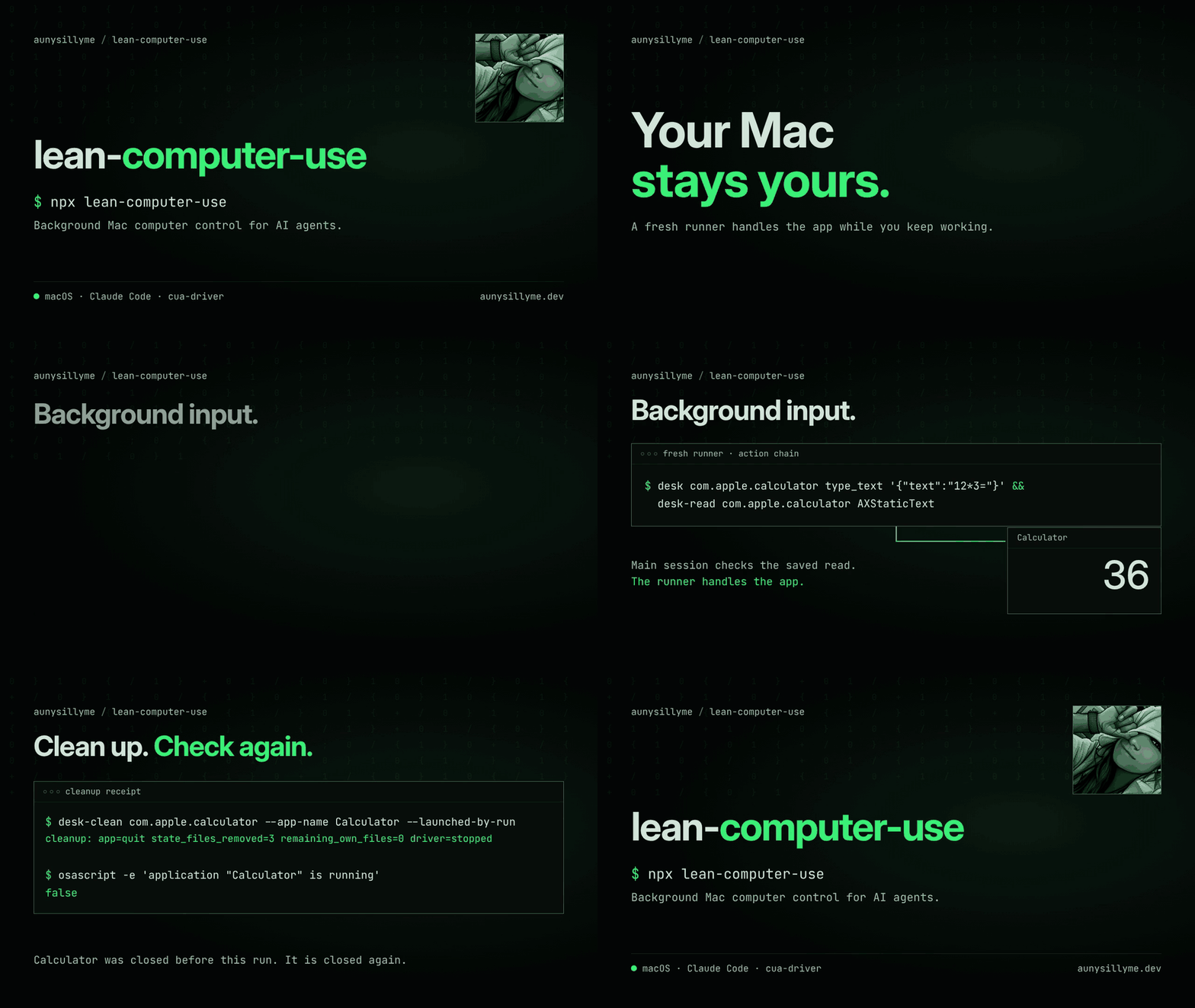
Example run: the runner snapshots whether Calculator is running, tests a background key action, chains the remaining input, and reads the display.
The main session opens the preserved read to check the requested value.
The runner calls desk-clean and checks whether Calculator is running again.
Use the brief template to specify the bundle ID (an app's identifier, for example com.apple.calculator), approved actions, evidence handoff and stopping bound.
Other hosts: manually copy skills/lean-computer-use/ to your host's documented skill directory and connect its app runner to the desk tools.
Copy briefs/desk-brief.md into that skill directory as desk-brief.md.
Part of a set
| Repo | What it gives you |
|---|---|
| agent-personalizer | AI custom instructions from approved entries: a profile and rules for Claude Code, Codex, Cursor, Gemini CLI and ChatGPT, kept in sync from one source. |
| model-orchestrator | Model router for AI coding agents: routes routine work to cheaper models with routing rules, 8 subagents, hooks and a CLI runner |
| repo-build-skill | Skill pack that teaches your AI to build, release and launch a GitHub repo: stack pick, README, AGENTS.md, llms.txt, repo SEO and AEO, trusted publishing. |
| website-build-skill | A skill pack that turns your AI into an expert website builder: current research, design, code, accessibility, speed, SEO and security, alone or as a team. |
| lean-browser-use | Cut browser use cost by about 25% in Claude Code: fresh runner subagent, bulk reads, three guards and a token meter. One npx command |
| lean-computer-use | Background Mac computer control for AI agents: desk tools, a fresh runner subagent, retry guards and a transcript token meter, installed with one command |
Install where you work
Preview a host and share directory of your choice:
npx lean-computer-use install --dir <host-dir> --share <share-dir> --dry-run --yes
The default targets are ~/.claude and ~/.local/share/lean-computer-use.
LEAN_COMPUTER_USE_HOME can set the share root.
The installer previews paths and asks for confirmation; --yes supports a reviewed unattended run.
Read the installer contract for backups and owned-file removal.
Add native hooks
npx lean-computer-use install --with-hooks
This merges marked retry and batching entries into the host's settings while preserving other settings.
The default installation prints a snippet path and manual merge instructions.
The retry guard and batch hint support the workflow; the runner enforces the brief's boundaries. Malformed input or an internal error lets the call through.
The stop gate blocks a turn once while desktop control is still held and names the release tool. Hold control for the user with npx lean-computer-use keep --reason "<why>", or install with --no-stop-gate to leave it out. See the stop gate.
Cleanup: nothing keeps running
desk records a lease for the driver daemon it starts, and desk-reap spawn records one for any helper. When the run ends, the runner executes:
"$DESK/desk-reap" cleanup --apply
It ends only leased processes, children first, with SIGTERM and a 3 second wait before SIGKILL for the same process. The registered hooks repeat it when a runner stops, a turn ends or the session ends, and doctor reports any leftover.
Your apps, browsers, a driver you started yourself and any process without a lease stay as they are. npx lean-computer-use cleanup is a dry run until you add --apply. See cleanup.
Check your environment
npx lean-computer-use doctor
npx lean-computer-use doctor --json
Each check includes a short fix when action is needed.
A stopped daemon is a warning because desk starts it on demand.
Package checks run on every platform; macOS adds the native driver checks.
Measure your own transcripts
npx lean-computer-use measure
npx lean-computer-use measure --projects-dir <transcripts-dir> --since YYYY-MM-DD --json
The command scans local Claude Code transcript files, counts each native assistant message id once, and keeps its largest input total.
It separates main-session and subagent steps and reports median, p90 (the value 90 percent of steps stay under), mean, total and re-read share.
Use --tool-pattern <regex> for a different native MCP tool prefix.
Fixture data from the bundled synthetic transcripts, showing the output shape:
Group     Steps Median P90 Mean Total Re-read
main          3    200 300  200   600   60.0%
subagent      2    100 150  100   200   50.0%
These values describe the fixture calculation. Run the command on your own transcripts before drawing a conclusion about your tasks. The calculation is described in the skill.
What is measured
Package receipts include the command, measurement date and expiry in proof/results.json.
They measure the package and synthetic fixture.
Regenerate them with npm run proof after running the checks.
| Measurement | Value | Measured | Expires |
|---|---|---|---|
| Runtime dependencies | 0 packages | 2026-10-29 | 2027-01-27 |
| Fixture main median | 200 tokens | 2026-10-29 | 2027-01-27 |
| Documented desk exits covered | 11 exit codes | 2026-10-29 | 2027-01-27 |
Common questions
How do I use computer use on a Mac in the background?
Use desk for background keys, then chain predictable actions in one call with desk <bundle> <tool> '<json>' && desk <bundle> <tool> '<json>' && desk-read <bundle> '<filter>'.
Test one action first, then verify the saved read and run desk-clean <bundle> --app-name <Name>; add --launched-by-run only when this run opened the app.
What is cua-driver and how do I check its permissions?
Run npx lean-computer-use doctor to check cua-driver permissions and get fixes.
Review the upstream source and verify the app with docs/cua-driver-install.md before granting permissions.
How do I reduce tokens when an AI agent controls Mac apps?
Use a fresh desk-runner, one chained desk call and one filtered desk-read to keep app work in a small context.
Choose one case-insensitive substring shared by the wanted lines; use two reads when two fields share none. Open each saved full read to inspect any other line.
Run npx lean-computer-use measure on your own transcripts to check the result.
How do I measure main-session and subagent tokens?
Run npx lean-computer-use measure --json.
The report separates both groups and deduplicates assistant message ids.
How do I install the optional retry hook for native app errors?
Run npx lean-computer-use install --with-hooks and review the settings change.
The retry hook blocks the third identical error attempt; the installer backs up the settings file and preserves unrelated registrations.
How do I keep my edited skill when uninstalling?
Run npx lean-computer-use uninstall --dry-run to review the plan.
Uninstall preserves an owned file whose hash differs from the installed copy and reports it for manual review.
Uninstall
npx lean-computer-use uninstall
The npx lean-computer-use --uninstall alias does the same operation.
Removal budget: uninstall removes every file the installer wrote that still matches its recorded hash; a file you edited stays in place and is listed for review.
Removal checks the manifest and current file hashes and removes only marked hook registrations.
Use --dir and --share with the same roots when you installed to custom locations.
See manifest recovery and manual steps if the manifest is missing.
For agents
Read llms.txt, AGENTS.md and the skill.
Use npx lean-computer-use doctor --json for a structured environment report.
Use npx lean-computer-use measure --json for structured transcript results.
Read next
The documentation index links the driver guide, installer contract, method, desk reference and provenance.
Contributing
Bring a host adapter, rule, docs fix or reproducible failure through CONTRIBUTING.md. Use synthetic app content in issues and tests.
Credits
Built on trycua/cua, the Jev research client from typesafe-sdk, Crawl4AI, rtk, SearXNG, Anthropic's Claude Code, and the lean-browser-use sibling. See CREDITS.md for techniques, files and upstream licence links.
License
MIT, Auny LLC and contributors.