LightTable
Highly performant digital darkroom with realistic film stock effects.
A free, open-source photo browser and RAW editor with a native macOS app, a Rust and GPU-driven render core, and physical film simulation built on spektrafilm.
Website · Screenshots · Features · Get started · Contribute · Contact
For searchable guides inside the app, click Help in the top bar or press F1 or ?. Help is bundled for offline use and linked from inspector sections. Contributors can follow Maintaining in-app help to keep articles and their implementation evidence current.
Maintainers wanted
LightTable needs platform maintainers for Windows, macOS, and Linux. A maintainer builds and tests releases on real hardware, triages bugs specific to that platform, and keeps its packaging channels current. Linux help is welcome across the Debian/Ubuntu and Arch families and the common desktops. Open an issue and tell us which platform you'd like to maintain.
What makes LightTable great?
The photograph comes first
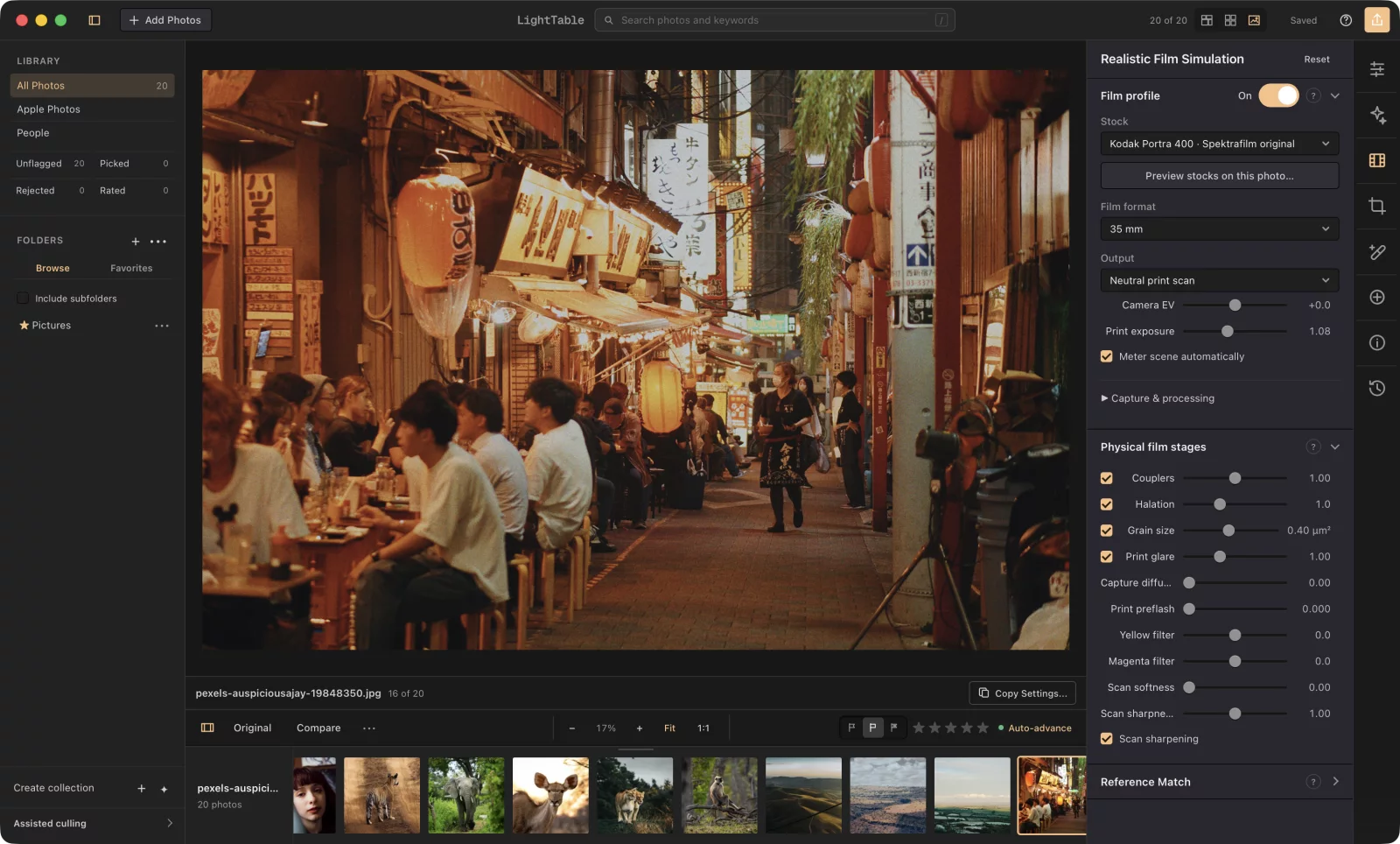
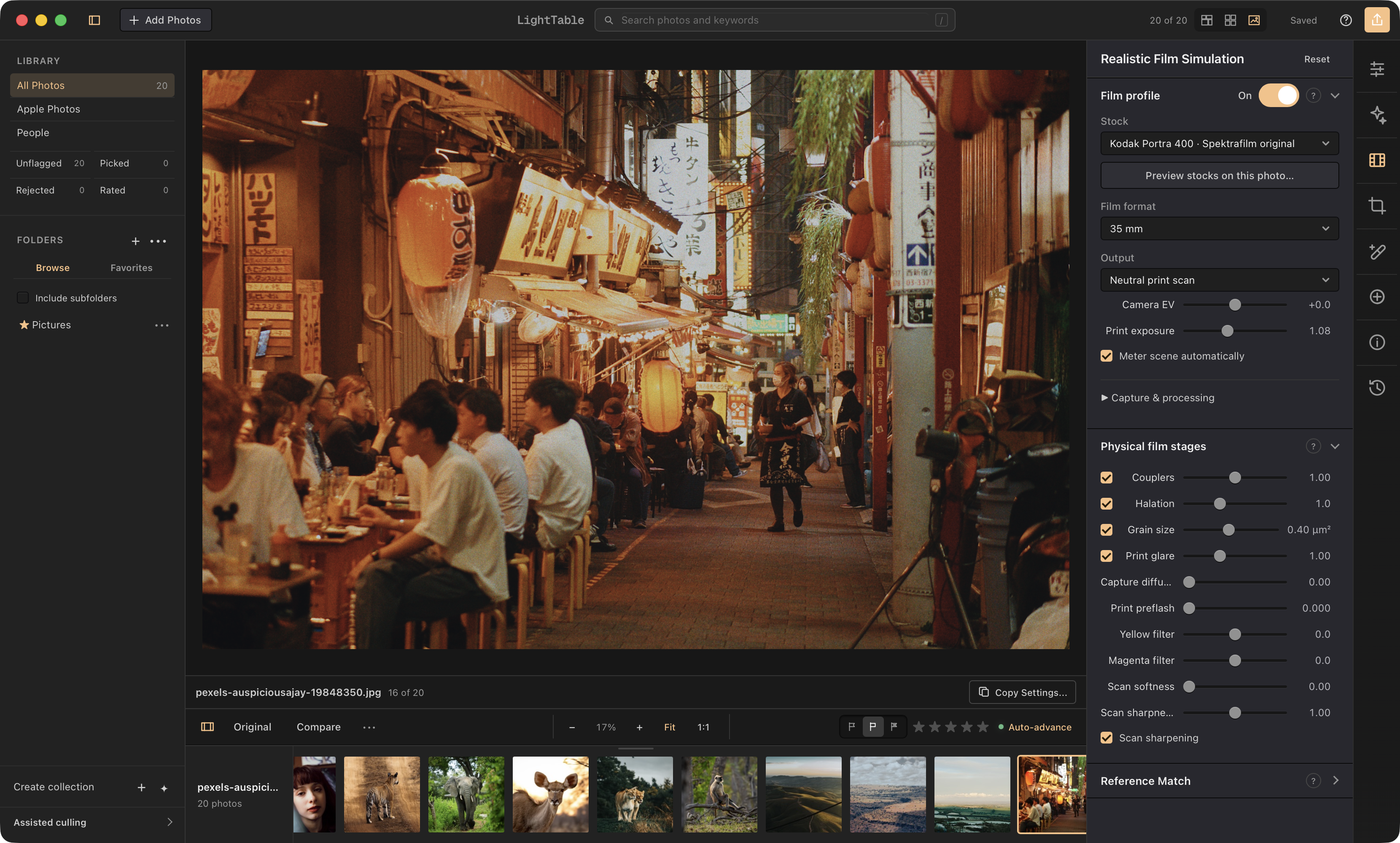
The photograph stays large while the library, film controls, and editor share one quiet workspace. Catalog originals in place, keep edits separate, and use ratings, flags, collections, stacks, and virtual copies to organize your work. Film can be switched off for conventional RAW development. Use Copy Settings... and Paste below the photo in Detail view to choose adjustment groups and transfer them to other selected photos.
Find and curate a shoot
Combine camera, lens, ISO, focal length, aperture, shutter time, capture date, and hierarchical keyword filters with ratings and flags. Save the combination as a smart collection. Open Info beside either grid to add or remove keywords across a selection while keeping each photo's other tags, with batch undo.
Optional XMP writing preserves unrelated sidecar metadata, detects conflicting external changes, and keeps failed writes queued for retry. Supported Photo Mechanic and digiKam metadata conventions have representative fixture coverage; this does not establish complete compatibility with either application. See Digital asset management for the workflow and catalog measurements for the performance evidence.
The interface and searchable Help support 20 languages. Choose a language in Settings → General; applying it saves pending edits and reloads the window. See localization maintenance for contributing translations and keeping Help current.
Film is a complete image pipeline
Choose from 23 film stocks, each with its own spectral response, density curves, and grain. Spektrafilm models the photograph from exposure through scan, using published sensitivity and density data.
- Capture: stock, film format, exposure, white balance, and diffusion.
- Development: development controls, halation, and physical grain scaled to the stock and film format.
- Print: paper, exposure, preflash, and yellow/magenta filtration.
- Scan: glare, softness, and sharpening, levelled to the paper's own black and white the way a lab scanner is calibrated. Reversal film goes straight to scan.
Processed JPEG, HEIF, and TIFF sources are expanded back toward scene light around middle grey before filming, so a finished photograph keeps its contrast instead of being toned twice. The print and scan stages remain editable. Profile sources and the distinction between measured data and modeled assumptions are documented in Film profiles and the calibration guide.
LightTable tuned versions of Portra 160, 400, and 800 appear first in the stock list. They reduce the yellowward shift of yellow-green foliage while keeping paper, output, and physical film controls available. These are visual interpretations informed by reference photographs and numerical color checks, not measured matches to real film. Spektrafilm original keeps all original stock renderings and remains the default. Existing edits and older stock presets keep their original rendering; edits and native presets save the selected variant and tuning version.
Bring your Lightroom library
LightTable reads a copy of a Lightroom Classic catalog. Ratings, flags, labels, keywords, collections, stacks, virtual copies, metadata, and supported develop settings can come across without changing the original catalog.
It also imports Lightroom / Camera Raw XMP, legacy .lrtemplate presets, and
Capture One styles. A conversion report names what was mapped and what was
skipped, and labels converted settings as approximate:
different render engines produce different results. See
preset interchange for compatibility details.
In Detail, pinch on the trackpad over the photo to zoom around the pointer. Switching photos keeps the current zoom level and restores each photo’s pan position for the current window session. New photos start centered.
A full editing workflow
RGB curves, Point Color, four-way Color Grading, local masks, heal and clone, lens correction, crop and perspective, versions, and reusable export recipes sit alongside the film controls. HDR, panorama, and focus merge create new masters. Soft proofing covers sRGB, Display P3, matte paper, and gloss paper.
Linear gradients stay adjustable: drag either endpoint to change the transition, or drag the connecting line to move the whole gradient. Local masks support gradual dodging and burning with cumulative brush Flow, a Density ceiling, and Auto Mask color matching. Radial gradients can be oval and rotated. Each mask has Whites, Blacks, and RGB or individual-channel tone curves. Subject, Sky, and Object selections retain up to 1,024 pixels along their longest edge, with edges refined against the source image. Automatic selections remain starting points that need inspection and painted refinement. Hair uses a bundled local segmentation model that follows hair below the face and distinguishes it from skin and clothing. Fine strands, bright highlights, and small distant people can still be missed.
Remove paints strokes as well as spots and can fill them from matching texture elsewhere in the photo. Dust and scratches clears small marks from film scans across the whole photo and shows what it found before you keep it. Masks add Lens blur, whose radius follows the mask’s strength, and luminosity-only tone curves. Curve eyedroppers set black, grey, and white points, and up to four colour samplers read RGB and L* values as you edit. Exports can add a plain border, and Contact Sheet lays a selection out on one captioned JPEG.
In Effects, Vignette darkens or brightens the edges. Size controls how much of the center stays clear, and Feather controls how softly the effect blends in. Existing edits keep their original vignette appearance with the default Size and Feather values; setting Vignette to zero turns the effect off.
RAW decoding uses rawpy and LibRaw. Capture white balance and demosaicing happen
before film; processing stays floating point until the final encoder. A RAW
starts with capture sharpening and colour noise reduction. Its Film-off
develop starts from the bundled LightTable Standard look, a modelled generic
rendition, or from a DCP camera profile in your own profile folder, applied
following the DNG specification: the profile's colour matrices replace the
decoder's at the RAW decode and its tables and tone curve shape the develop.
See docs/camera-profiles.md. Export
JPEG, PNG, macOS HEIF, or true RGB16 TIFF with an embedded ICC profile for sRGB,
Display P3, or ProPhoto RGB.
Export recipes can use one destination, a subfolder beside each original, or the original folder hierarchy beneath a destination. The dialog previews paths across source folders before starting. Optional capture-time file timestamps use the embedded timezone; missing timezones are reported unless you explicitly choose this computer's local timezone. Metadata and recipe-sidecar policies are saved with the recipe. Cancel stops queued work, waits for active cleanup, and retains completed files. Export details list skipped files, errors and warnings.
The 23 built-in presets work offline and are grouped into collapsible packs. Click a preset to apply it, adjust Amount, or click it again to disable it. The selected preset and amount are saved with each photo.
The Film Simulation Drama preset pack includes eight looks that enable film simulation and layer creative effects over it: Cinema Teal, Tungsten Rain, Portra Ember, Gold Rush, Velvia Storm, Faded Epic, Silver Noir, and Velvet Dusk. Each combines a film stock with tone, color, grain, glow, or vignette adjustments.
Local by design
Photos, the SQLite catalog, edit history, and render caches stay on your machine. Optional Apple Vision analysis runs on your Mac and adds searchable scene and object tags, visible text, face counts, and subject masks. It does not identify people or upload the analysis.
One RAW, three paths
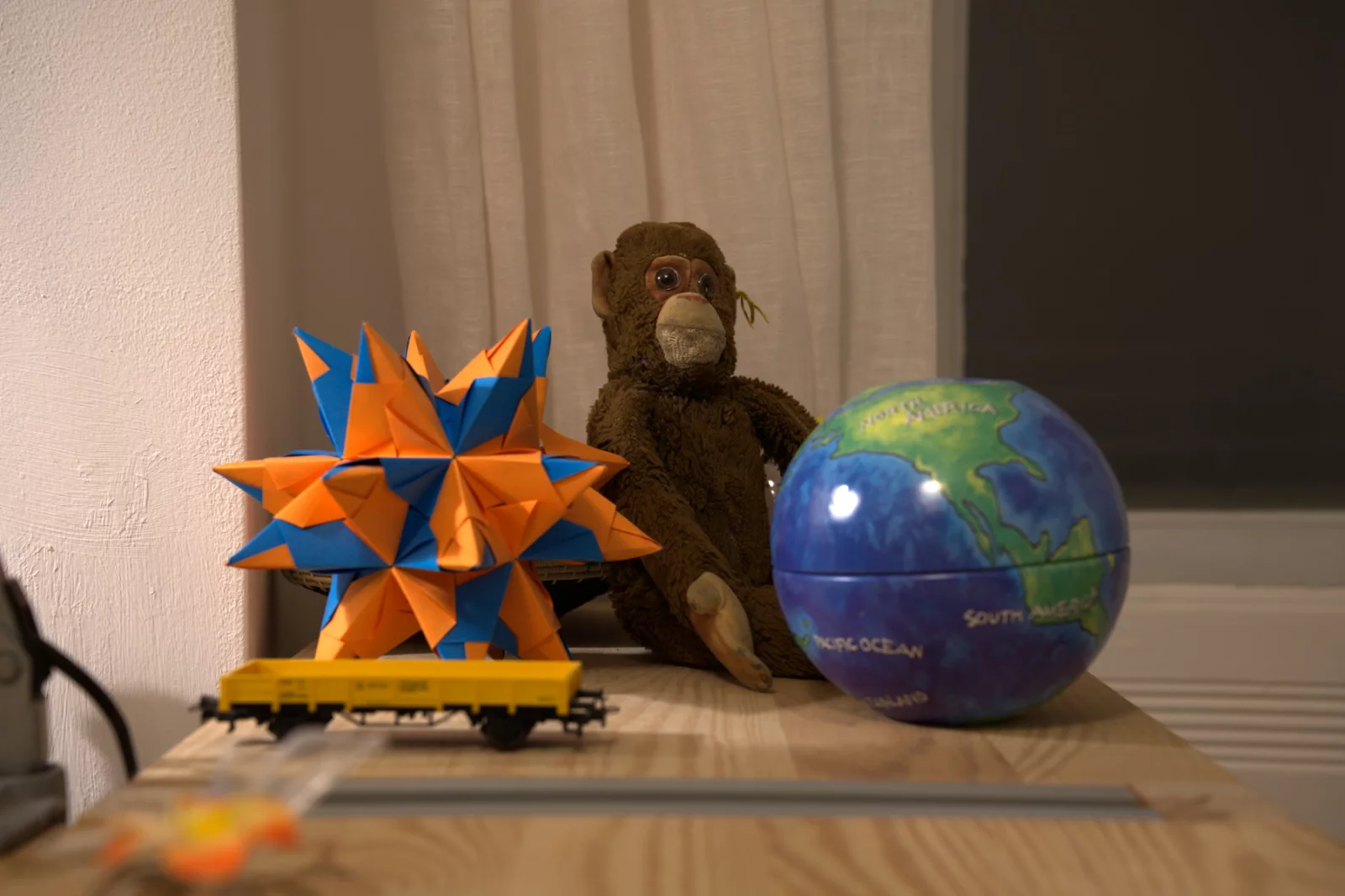
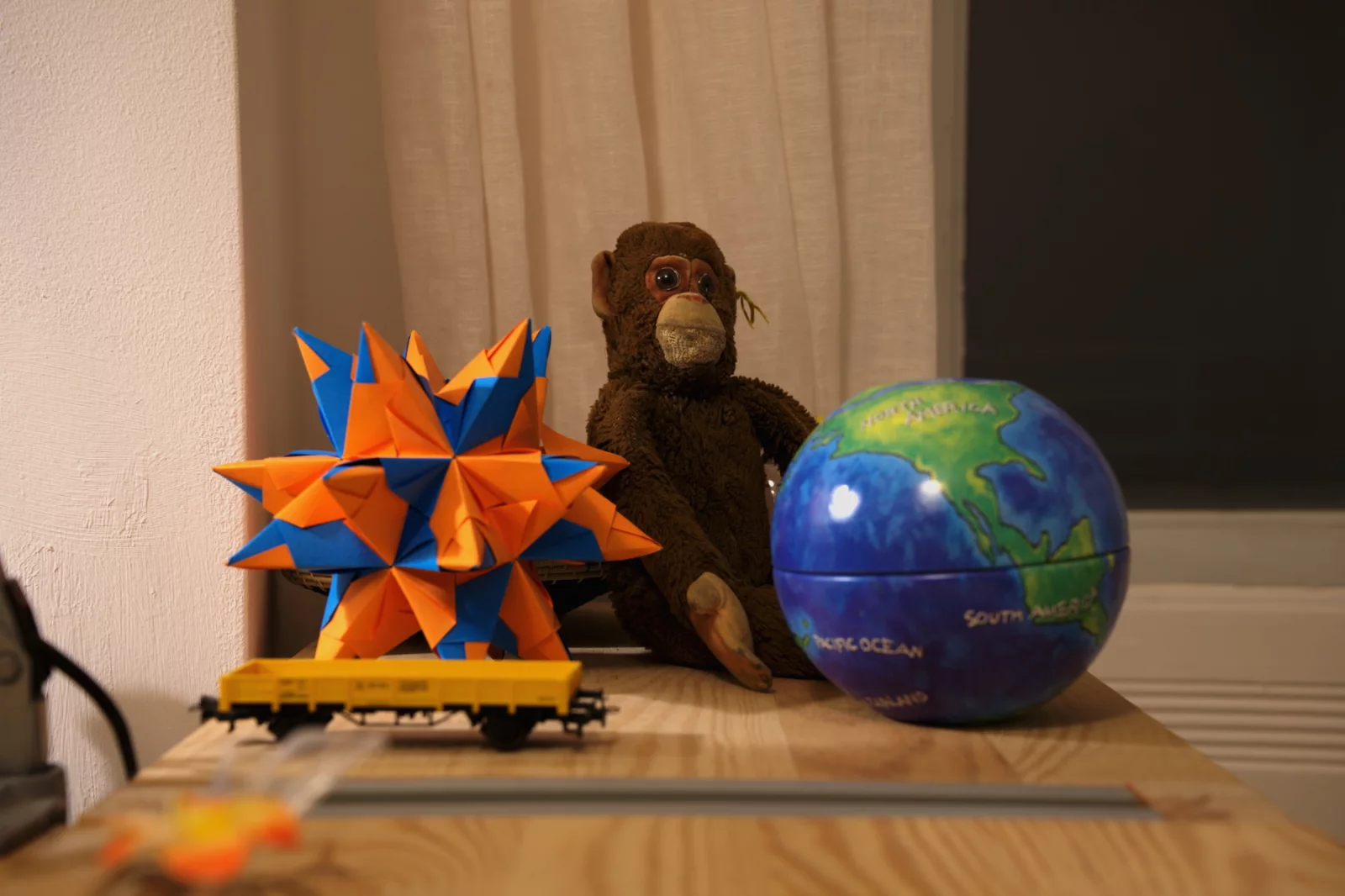
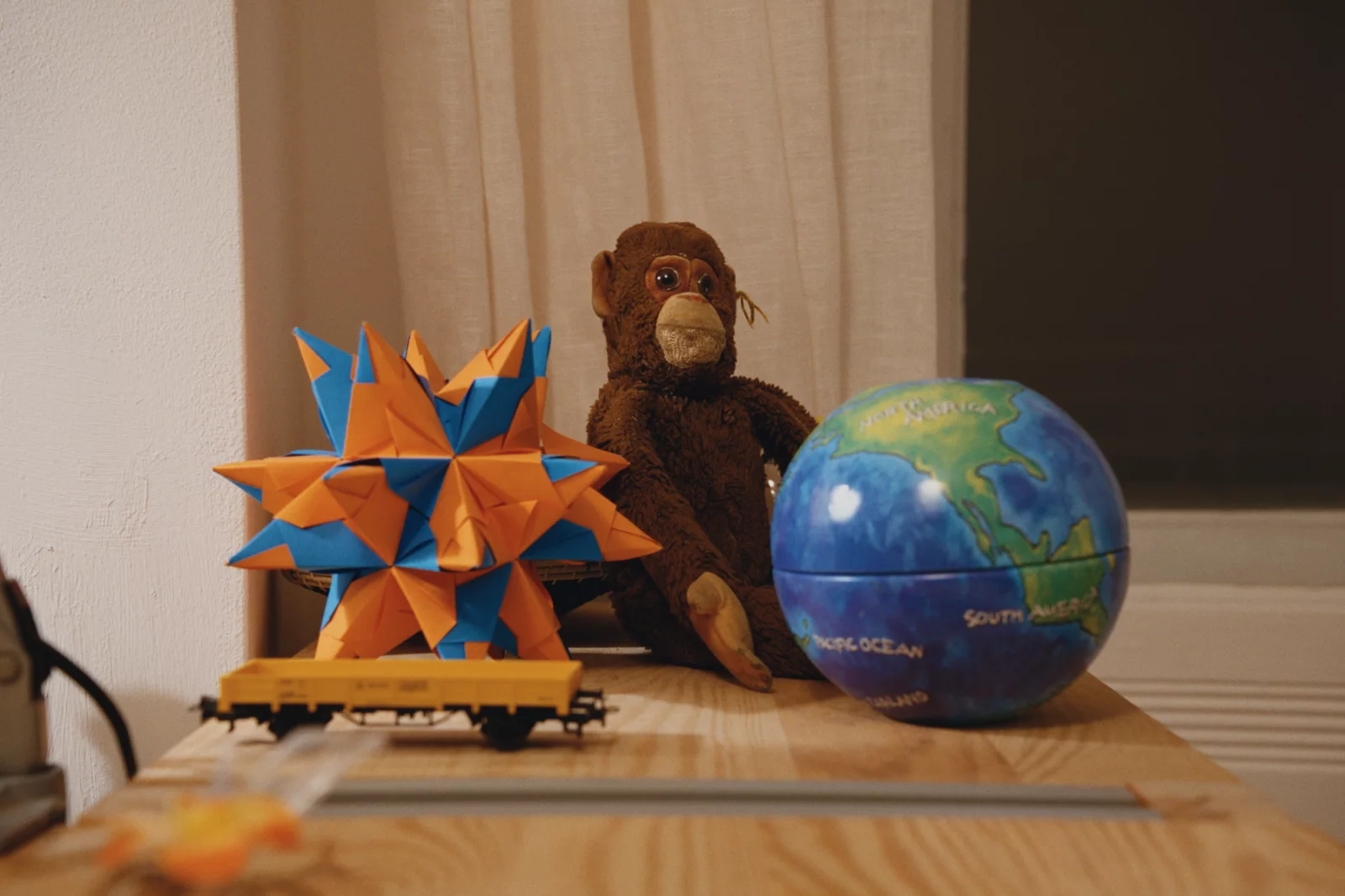
The same Nikon Z6 RAW feeds all three renders, with no manual matching after the render.
| Neutral conversion | Imported preset | LightTable film process |
|---|---|---|
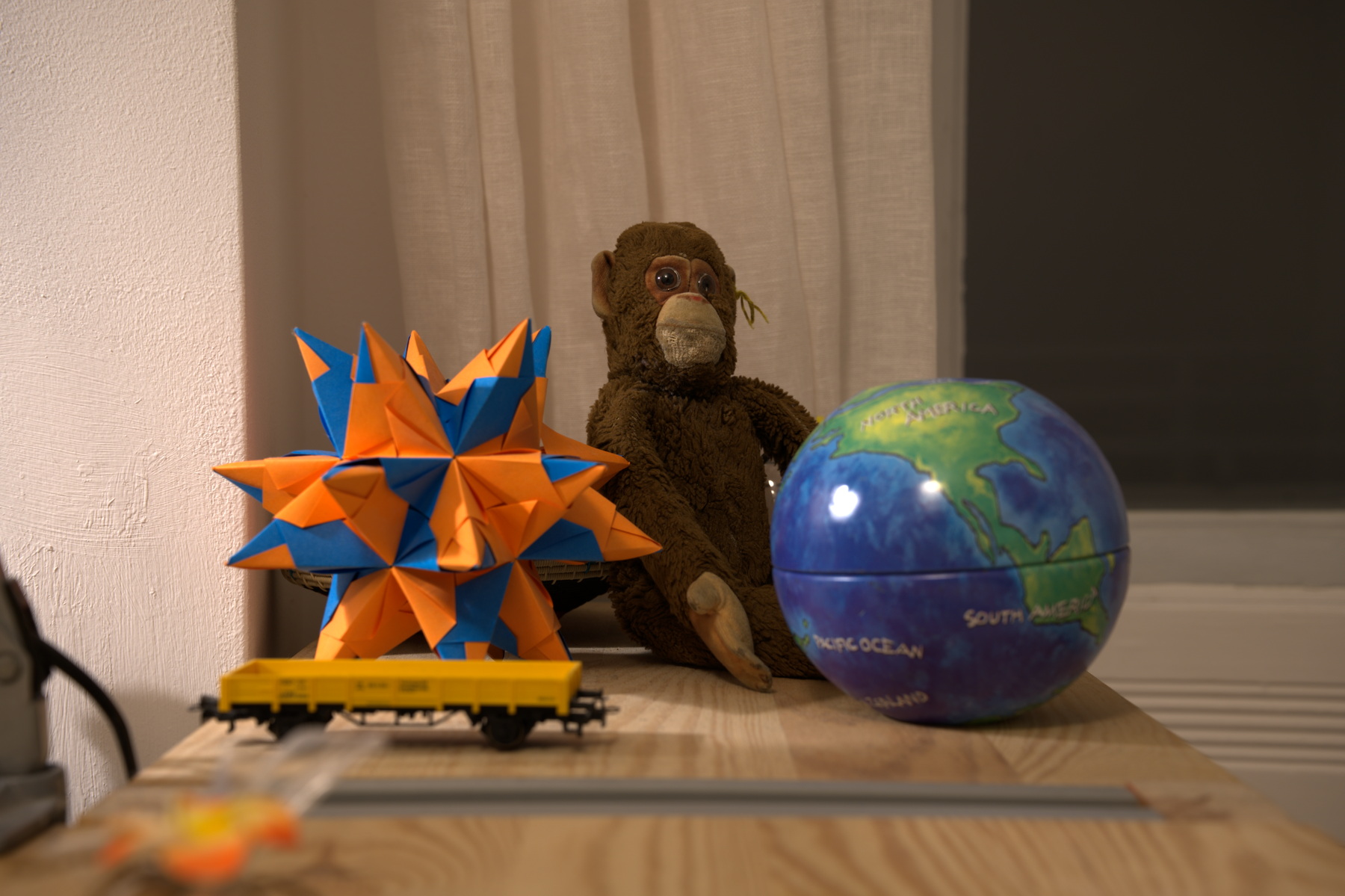 |
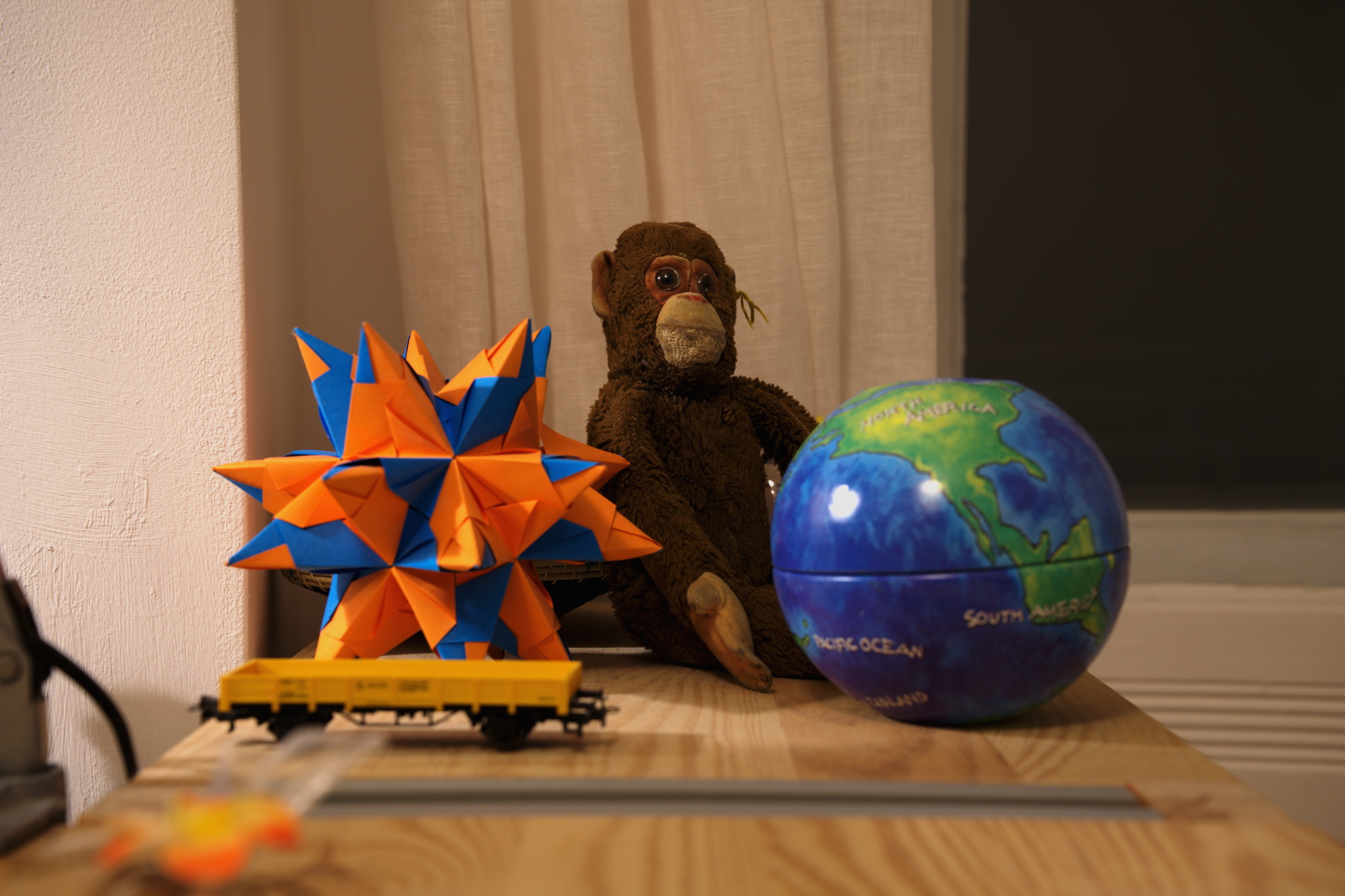 |
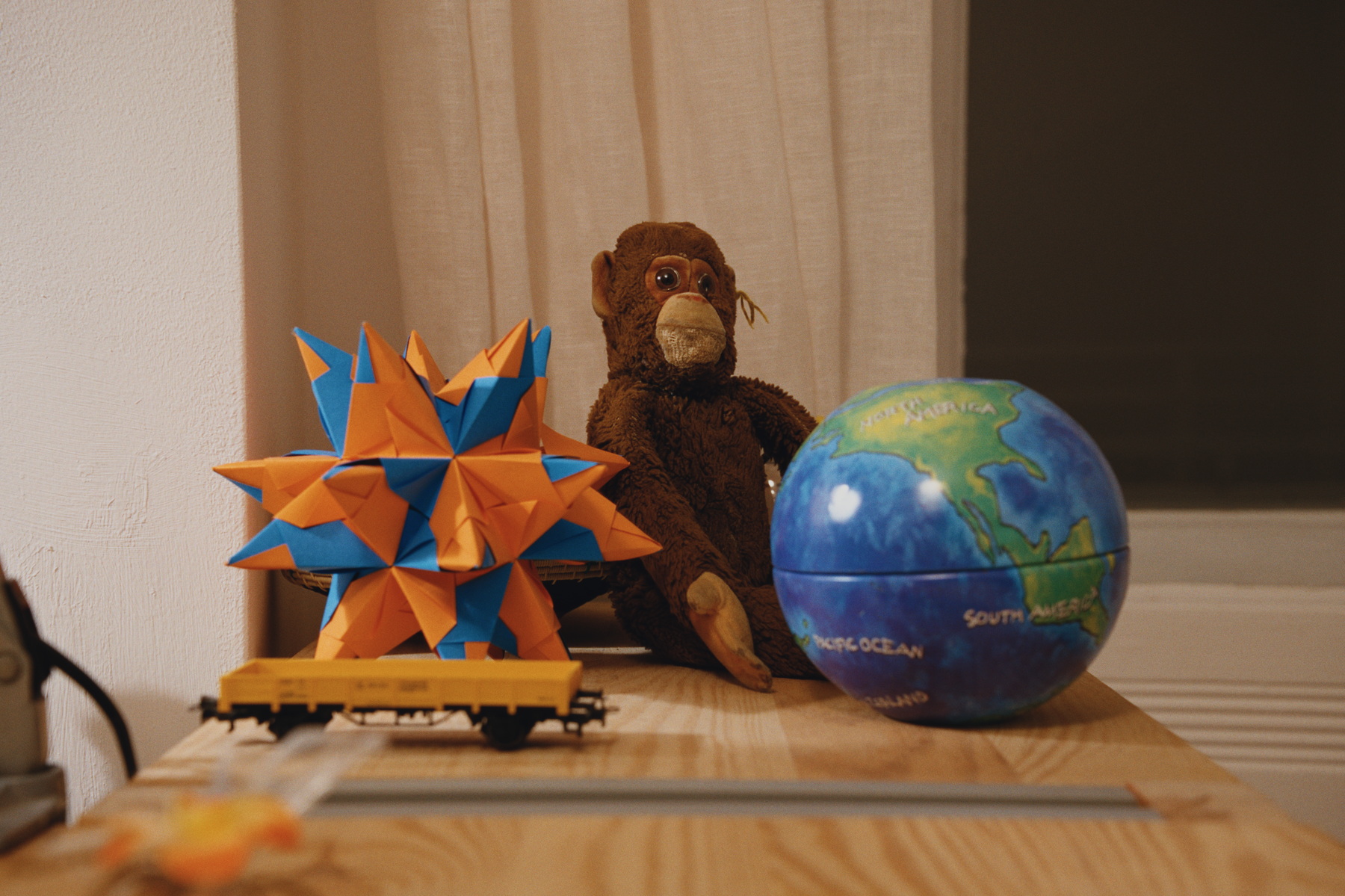 |
| Film off, standard base curve | 16 controls mapped, Film off | Gold 200 → Portra Endura paper → modeled neutral scan |
The middle image is a Lightroom-compatible XMP imported and rendered by LightTable, not an Adobe Lightroom render. The homepage comparison includes matched 100% crops and print/scan variations. Its build manifest records the source, parameters, crop coordinates, hashes, and renderer revision.
Get started
LightTable is in active development. The first public desktop release is still being prepared. Check Releases for published downloads; package-manager installers are not available yet.
| Platform | Current status |
|---|---|
| macOS 13+, Apple silicon | Native AppKit/WebKit app with a Metal preview. Source builds are available; signed public packages are being prepared. |
| Windows 10/11, x64 | Windows shell and installer build tooling are present, using WGPU/DirectX 12. Public packages and broader platform validation are still needed. |
| Linux, x86-64 | Experimental GTK/WebKitGTK desktop port, Vulkan rendering, and portable-bundle build tooling. The initial targets are Ubuntu 24.04+ and current Arch. Hardware and desktop validation remain; no supported Linux release yet. |
For development, follow the source setup guide. A fresh clone needs the Python runtime dependencies and pinned film data before it can run. See release setup for bundled builds and Windows and Linux for their build instructions and platform boundaries.
Signed Windows installations and configured Linux portable bundles include in-app update checks. Package-manager installations use their manager for updates; Windows portable ZIPs are upgraded manually. The update flow saves pending edits, backs up the catalog, and waits for active work before closing. Signing, feed publication, and native upgrade validation are release requirements; the source integration does not make a public update available.
How it's made
| Layer | Implementation |
|---|---|
| Desktop hosts | Swift, AppKit, WebKit, and Metal on macOS; Rust with Tao/Wry, WebView2 on Windows, and GTK/WebKitGTK on Linux. |
| Interface | HTML, CSS, and native JavaScript modules in web/. No frontend bundler or build step. |
| Local application | Python handles the HTTP API, catalog, imports, edit state, render scheduling, and exports. SQLite stores the library. |
| Film renderer | A resident Rust/WGPU process in rust-engine/, adapted from spektrafilm-rs. The Python spektrafilm implementation provides a reference and fallback. |
| Image processing | rawpy/LibRaw decode RAW; NumPy and the native GPU paths implement grading and finishing. Platform image services handle decoding and color management where available. |
The render order is RAW decode → film (optional) → optical/healing corrections → global grade → local masks → crop and resize → encoded output. The resident engine keeps its GPU device, image buffers, and pipelines warm; ordinary grade changes run in the live Metal preview or WebGL fallback. The WebGL viewer reuses recently displayed textures by render identity, with a six-preview / 256 MiB texture budget (one larger current preview can stand alone). Original loads on demand when Compare or held Original is active.
When switching photos while zoomed in, LightTable reuses an accurate cached preview with matching edits, then loads sharper detail in the background. Neighboring photos preload a small accurate preview before detail for the retained zoom level. A first uncached RAW conversion can still take a moment.
On the documented benchmark Mac, a warmed 1100 px film render had a median of 50.5 ms across 30 runs. That measures the film stage for that workload, not total application latency.
Engineering choices
- One edit contract across renderers. Metal, WebGL, and export must agree on operation order and grading behavior. Pixel changes need parity checks.
- Originals stay separate from edits. Edits live in the catalog; exports produce new files. Catalog recovery and backups have an explicit recovery workflow.
- No silent approximation. Imports report unsupported controls. Automatic lens correction requires a confident profile match; manual controls remain available when profile data is missing.
- Reproducible output. Cache identity includes the source, recipe, profile catalog, and renderer. Saved edits and export sidecars record provenance. Modeled film parameters are labeled as modeled.
- Native platform strengths. macOS keeps its Metal and image-services paths; other hosts share the film and edit model while providing their own integration.
Command line and MCP
The app exposes a local API, a command-line client, and an MCP server. With the source environment prepared and an app running:
./lighttable status --json
./lighttable photos list --limit 5 --json
./lighttable schema
Use ./lighttable mcp for the stdio MCP server. Programmatic edits appear in
History and support Undo. See the CLI reference for commands,
installation on your PATH, and isolated review profiles.
Contributing
Platform maintenance, RAW compatibility reports, renderer work, documentation, and reproducible bug reports are welcome. For a substantial change, open an issue to discuss the approach before building it. For bugs, include your platform, app revision, reproduction steps, and a sample image you have permission to share when the problem depends on a particular file.
The contributor guide covers source setup, local builds, tests, and what to include in a pull request. The repository has Python unit and contract tests, Rust tests, renderer parity checks, and real macOS product journeys. Run the checks that exercise your change and report what you verified.
The processing correctness pipeline compares film stages, exports, and displayed previews with independent numerical references, and saves per-case pixel differences and CI reports.
Contact
- GitHub Issues: bug reports and feature requests.
- GitHub Discussions: general questions and community conversation.
- hello@lighttable.app: private questions, collaboration, press, or just getting in touch.
Project documentation
docs/ indexes everything: the CLI reference, catalog and film guides, per-platform build notes, engineering notes, and the roadmaps. Start there. Release and installer setup covers publishing.
Roadmaps record implementation plans, not release guarantees; check Releases for what has shipped.
License and credits
LightTable is free software under the GNU GPL v3, distributed as GPL-3.0-only. You can inspect, modify, and redistribute it under that license.
The film pipeline builds on Andrea Volpato's agx-emulsion / spektrafilm and the spektrafilm-rs Rust port. See third-party notices for pinned upstream revisions, component licenses, and test-image attribution. The website source is maintained separately.
Cloud placeholders and lens matching: LightTable recognizes macOS File Provider dataless photos, legacy Dropbox placeholders on Mac, and Windows offlin