Get more work from your AI coding plan. Forecast usage limits, control subagent burn, and trim unused starting context across Claude Code, Codex and Grok. Runs locally, with keep-lists, backups and undo.
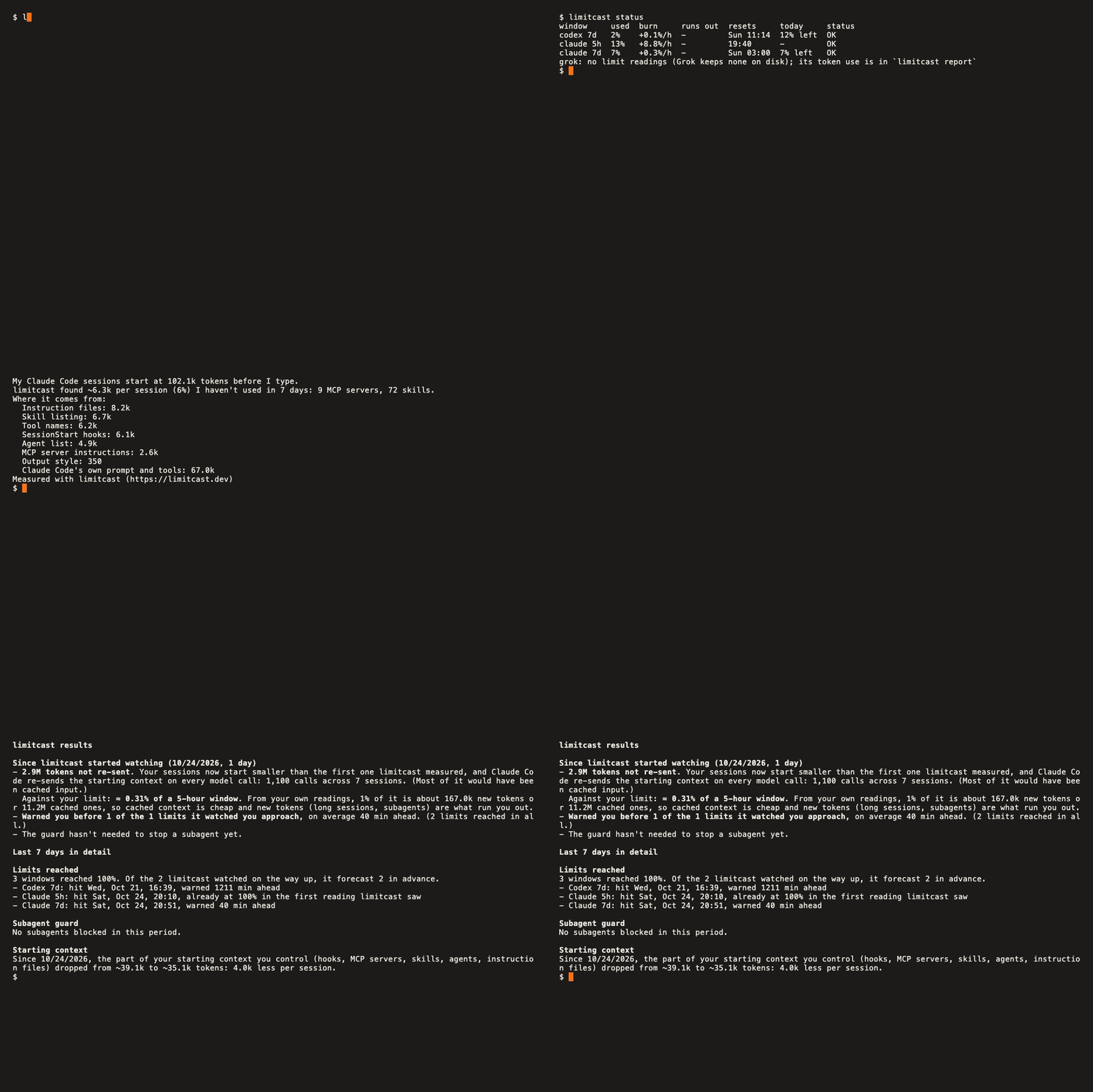
$ limitcast trim
Your recorded Claude Code sessions start at 102.7k tokens before your first message.

## Estimated removable context: ~6.2k tokens per session (6% of your starting context)
- Disable 9 MCP servers you haven't used in 14 days (~0.9k): postman, context7, ...
- Hide 66 skills from the model (~5.3k): dataviz, block-kit, ...
- Trim advisor: measures your latest session's starting context from its transcript (SessionStart hook output, MCP server instructions and tool names, skills, agents, instruction files). Free shows the total and how much of it you haven't used; Names each item and what it costs, and
trim --applymakes the cuts for you (reversible).trim --codexdoes the same for Codex (AGENTS.md, MCP servers). - Subagent guard for Claude Code and Codex: blocks a new subagent when that tool's own window is on pace to run out before it resets, and while a Claude window is tight runs new subagents on Sonnet instead of your main model. Free installs get a preview that never acts and shows what it would have done.
- Subagent receipts and budgets: when a subagent finishes you see what it cost: "that Explore subagent used ≈2.1% of your 5-hour window (34 calls)". Before a new one starts you see what that kind has cost you so far: "Explore subagents have cost you a median ≈1.2% (max ≈3.6%) of a 5-hour window over 7 runs" (once there are 3 priced runs, and only when a typical run is over 1% of a window or the window is NEAR).
limitcast budget subagents 15holds new subagents once they have used 15% of the current window. - Cold-cache warning: after a long pause (60 min,
LIMITCAST_CACHE_MINUTES) the prompt cache has expired and your next message re-sends the whole context as new tokens. limitcast holds that first message once and tells you what it will cost; send it again to go ahead, or/compactfirst. - Large tool-output notice (with
install --alerts): when one tool result is very large (about 20k tokens or more;LIMITCAST_TOOL_TOKENSchanges that), you see it once per tool per session with what to ask for next time: "that HubSpot get_crm_objects result was ≈25k tokens. Next time: ask for fewer fields and a smaller limit". It is shown to you, never to the model, andlimitcast report --whylists the same advice for the sources that cost you most. - Limit-change alert: limitcast re-measures how many tokens move your meter by 1% every day and notifies you when that shifts by 15% or more, so you know when the limit itself changed.
- Daily allowance (free): today's even share of each weekly window, so you can pace the week:
7d 41% · today 6% left. - More controls: desktop notifications (
limitcast notify on), also to your phone (notify ntfy <topic>) or a Slack/Discord webhook (notify webhook <url>), run a job after the reset (limitcast after-reset -- …), a pointer to your other account when this one is near its limit, a/compactnudge in long sessions, and an HTML dashboard (limitcast results --html). - Capacity report:
limitcast resultsseparates recorded consumption by provider, applied protection decisions and historical previews, and estimated Claude context tokens not re-sent relative to a recorded baseline. Calls crossing a week boundary are counted in the period they happened. It also shows lifetime context estimates, forecast replay and next steps. Unknown evidence stays unavailable; controls are not converted into invented saved tokens. - Burn report: Claude Code, Codex and Grok tokens by day, project, model and session.
- Runout forecast (free): burn rate and the clock time each window runs out.
- Local only. Reads the limit readings Claude Code passes to your status line and the logs Claude Code, Codex and Grok already write. No logins, and your usage data never leaves your machine. No license validation or payment-service connection is required. If you turn on phone or webhook notifications (off by default), each notification's text goes to the service you chose (ntfy.sh or your webhook) and nothing else. The one other exception is also off by default:
limitcast grok-usage onreads the login Grok keeps in~/.grok/auth.jsonand sends it to grok.com, and nowhere else, to ask for your weekly Grok usage (details under Grok below).
| Claude Code | Codex | Grok | |
|---|---|---|---|
Limit forecast (status) |
✓ status-line feed | ✓ session logs | spend from usage.json; % / runout after limitcast budget grok <usd> |
| Subagent guard | ✓ Task/Agent |
✓ spawn_agent |
✓ spawn_subagent (blocks once a dollar cap is set) |
Token report (report) |
✓ | ✓ | ✓ per-turn ledger |
Trim advisor (trim) |
✓ | --codex |
--grok |
Requires Node 20+ on macOS or Linux.
Upgrading to 0.15.0
All features are now free. A guard previously installed in preview mode will enforce its forecast and enabled budgets after this update. It only holds new spawns; existing agents continue. Use LIMITCAST_ALLOW=1 to override, or limitcast uninstall to remove the integration. Existing budgets, notification preferences, keep-lists and license files are left untouched. No activation or trial is needed.
Install
npm install -g limitcast     # or: brew trust samstull9007/limitcast && brew install samstull9007/limitcast/limitcast
limitcast onboard            # read-only: setup checks and a first useful result
limitcast install            # free: status-line recorder
limitcast install --guard    # also the subagent guard (free; holds new subagents when a limit is on pace to run out)
limitcast doctor
In Claude Code you can also add the plugin, for /limitcast:status, /limitcast:results, /limitcast:trim, /limitcast:memory-audit and /limitcast:memory-split: /plugin marketplace add SamStull9007/limitcast, then /plugin install limitcast@limitcast. The status-line recorder still comes from limitcast install.
install backs up ~/.claude/settings.json and wraps your existing status line: it looks exactly the same, and the limitcast line (for example limitcast: 5h 14% · 7d 18% · today 9% left) goes on the line under it. --guard adds the subagent guard (all features are free). Restart Claude Code to load it. limitcast uninstall puts everything back.
Codex: forecasts and reports need no setup (~/.codex/sessions, or $CODEX_HOME/sessions). With --guard, install also appends the guard to ~/.codex/hooks.json, after your existing hooks so the ones you've already trusted keep their trust. Codex runs a new hook only once you approve it: start Codex and accept it. limitcast doctor shows whether it's trusted.
Grok: report reads each session's ~/.grok/sessions/*/*/usage.json and prices Grok models at xAI list prices (the same API-equivalent column as Claude). install wraps [ui.status_line] in ~/.grok/config.toml (session model, context % and cost on one line; the limitcast forecast under it). --guard writes ~/.grok/hooks/limitcast.json matching spawn_subagent. Grok stores spend, not a % used, so by default the status line shows grok 5h $X · 7d $Y until you set a dollar cap (limitcast budget grok <usd>); then status forecasts that window and the guard blocks new spawns when it is on pace to run out. For the real weekly %, run limitcast grok-usage on: about every 5 minutes limitcast reads the login Grok keeps in ~/.grok/auth.json and asks grok.com for your billing cycle. The login goes only to grok.com (redirects are refused) and is never stored or logged; the readings are kept locally, so status, the Grok status line and the guard forecast the weekly window like the Claude and Codex ones, and a weekly dollar cap steps aside for it. limitcast grok-usage off stops it, and doctor shows the last reading or why there is none (an expired login: run grok login). It tracks weekly plans only; a monthly credit plan is reported but not forecast. limitcast subagent-model explore grok-4.3 writes [subagents.models] (restart Grok). Restart Grok to load the status line and hook.
Commands
| Command | |
|---|---|
limitcast onboard |
Read-only guided setup: local tools, readiness, free feature availability, personal context finding, keep/undo/override controls and next commands. Never changes settings |
limitcast status [--json] |
Used, burn rate, runout time and reset for each window, and today's share of each weekly one. When a window is on pace to run out, one line names the one that binds first and where else there is room ("You'll hit Claude 7d first (Thu 14:00). Grok 5h still has $38."). also lists your other Claude accounts |
limitcast trim --codex [--apply / --undo] |
Codex: AGENTS.md size and MCP servers in ~/.codex/config.toml you haven't used. names them and turns them off (enabled = false; --undo restores the file exactly) |
limitcast trim --grok [--apply / --undo] |
Grok: system prompt and tool-definition size, and MCP servers in ~/.grok/config.toml you haven't used. names them and turns them off (enabled = false; --undo restores the file exactly) |
limitcast notify on/off/test |
A desktop notification when a Claude window turns NEAR, AT_RISK or HIT, and when it resets after a HIT. On macOS they come from a tiny limitcast notifier app, listed as "limitcast" in System Settings → Notifications |
limitcast notify ntfy <topic or https URL> / notify webhook <https URL> |
Also send every notification to your phone through ntfy (install the app, subscribe to the topic) or to a Slack or Discord incoming webhook. off removes it. Sent in the background, so no hook waits on the network |
limitcast budget subagents <percent> / off |
Once subagents have used that share of the current 5-hour window, the guard holds new ones until it resets. Priced from your own readings (needs about a day of use first) |
limitcast budget today on / off |
The today N% left pace of a weekly window becomes an action. With notify on you get one notification a day at 80% of today's share. With budget today on the guard also holds new subagents once today's share is used up, until local midnight. Off by default; a window already at 100% is left to the tool; LIMITCAST_ALLOW=1 overrides. Applied holds appear in results |
limitcast subagent-model <type> <sonnet|opus|haiku|claude-id|grok-id> / off |
Run new subagents of that type (for example Explore or explore) on that model, unless the spawn names a model itself. Grok ids also write [subagents.models] in ~/.grok/config.toml (restart Grok). Without arguments it lists what is pinned and the types you ran in the last 30 days. Needs install --guard; results counts the subagents it moved |
limitcast plan [--days N], limitcast plan set <pro|max5|max20> / off |
Does your Claude plan fit how much you use? From a long-lived record of the peak of every 5-hour and weekly window (kept 120 days; it starts when you install this version) it says whether you reached your limits often enough to look at the next plan, or used so little that a smaller one would have fit, with the monthly price difference, and shows what your Claude Code tokens would cost at API list prices. Tell it your plan first with plan set. Plan prices (Pro $20, Max 5x $100, Max 20x $200) and the 5x / 20x multipliers are from claude.com/pricing (2026-10-26; the Max 20x price was not on that page: change any price in prices.json, {"plans": {"max20": 200}}). It assumes weekly limits scale like the 5-hour limit, and it cannot see extra-usage spend |
limitcast budget grok <usd> / off / 7d <usd> |
Dollar cap for Grok's aligned 5-hour window (optional 7-day cap). Turns Grok spend into a % so status can forecast runout and the guard can block spawn_subagent |
limitcast after-reset [--src claude/codex] [--window 5h/7d] [--detach] -- <cmd> |
Wait for the window to reset, then run the command |
limitcast results --html [--out FILE] |
Results, current windows and the burn report on one page, opened in your browser |
limitcast install [--guard] [--alerts] / uninstall |
Wire into Claude Code / restore your settings |
limitcast doctor [--fix] |
Check the setup, data freshness, this project's auto-memory index (see memory), and that Claude Code, Codex and Grok logs are still in a format limitcast reads. Also runs daily in the background and flags problems in the status line (the memory line only shows when you run doctor yourself). --fix re-installs with the current Node (after a Node upgrade) |
limitcast grok-usage [on|off] |
Grok's real weekly % used, from grok.com with the login Grok already holds (off by default; see Grok above for exactly what it reads and sends). With no argument it shows the current reading |
limitcast memory [dir] |
Check this project's auto-memory folder (~/.claude/projects/<project>/memory): how much of MEMORY.md fits in what Claude Code loads each session (the first 200 lines or 25 KB; anything past that is never read), broken links, topic files nothing links to, and files over 150 lines. Read-only. In Claude Code, /limitcast:memory-audit takes it from there (stale, contradictory and unlinked notes) and /limitcast:memory-split splits an oversized file into a short hub plus topic files |
limitcast report [--days N] [--out FILE] |
Tokens by tool, day, project, model and session; subagent share; and the API-equivalent cost: what the tokens would cost at the API's list prices (Claude and Grok models; a subscription is not billed this way). Prices are in the code as of 2026-10-26; add or change a model in ~/.local/state/limitcast/prices.json ({"models": {"claude-opus-4-1": {"input": 15, "output": 75}}}, dollars per million tokens) |
limitcast report --why [--days N] |
Where your new tokens went: subagents, session starts, cache rebuilds after idle, tool results by tool, model output, and the largest single steps (Claude Code only) |
limitcast report --jobs [--days N] |
The scheduled (headless) jobs that spend the most tokens just starting: runs, average start, share of all new tokens, and how to launch a job leaner (Claude Code only) |
limitcast trim [--days N] [--share] |
Measured starting context of your latest session and how much you haven't used in N days (default 7). names each item. --share: totals only, no names, safe to post |
limitcast saved |
How much the part of your starting context you control has dropped since limitcast first measured it, times your sessions since |
limitcast trim --apply / --undo |
Hide the unused skills from the model and turn off the unused MCP servers for that project, through Claude Code's own settings. Backed up; --undo reverses exactly what it changed |
limitcast trim keep <name>[,<name>] |
Servers or skills no trim --apply (Claude, Codex or Grok) ever turns off or hides, e.g. trim keep ego-browser. --remove <name> drops one; no name lists them. Free to set; trim shows what it would keep |
limitcast results [--days N] [--share] |
Capacity report plus forecast evidence: each limit window that reached 100% and how far ahead limitcast warned, and what the guard blocked and whether that window then ran out. adds baseline context estimates. --share: voluntary totals only; nothing uploads automatically |
install --alerts |
A SessionStart hook that tells you (never the model) when your starting context grew ~1k+ tokens, and what grew, plus a one-line weekly summary of what limitcast did |
limitcast license |
Show the free MIT license status; no network call |
Subagent guard
The guard is free for everyone and acts when installed with --guard. Blocks a new subagent only when the spawning tool's window is on pace to run out before it resets, within 30 minutes (LIMITCAST_GUARD_MINUTES). A window already at 100% is left to Claude Code, so extra usage keeps working. LIMITCAST_ALLOW=1 overrides. If the guard itself fails, it allows the call.
install --guard also adds two more hooks. A SubagentStop hook prices each finished subagent from its own transcript and shows you the receipt (never the model); limitcast budget and results use the same record. A UserPromptSubmit hook holds the first message after the prompt cache expired, once per pause, when the session re-sends 100k+ tokens; messages from background agents and /compact or /clear are never held. Installed --guard before 0.11? Run limitcast doctor --fix to add them.
How the forecast works
Each limit reading is saved to ~/.local/state/limitcast/samples.jsonl when it changes (kept 8 days). The burn rate is the least-squares slope of percent used over the last hour of the current window, and the runout time is where that line reaches 100%. Windows of a day or more (the weekly one) use the average pace over the last full day, idle time included, unless the last hour's pace runs them out within the hour. AT_RISK means that happens before the reset; NEAR means 95% or more is used. Claude sessions of the same account share one history (matched by window reset times, and usage that only rises), so two accounts used in parallel never mix.
Free and open source
All features are free. No account, subscription, card, license key, trial or device limit. Install the current version and enable only the controls you want. Earlier trial, activate and deactivate commands remain harmless compatibility messages and do not contact a billing service.
Created by Sam Stull. The project and its history remain available as a portfolio and community tool. Feedback and contributions are welcome through GitHub.
Measuring recurring value
results uses exact activity timestamps for its rolling period and UTC calendar dates for active-day counts. New input/cache writes, cached reads and model output are separate. Context reductions are estimated at characters / 4 against the first recorded baseline; different projects or manual configuration changes can affect that baseline. This is not measured causal savings or a lower subscription bill. Legacy records without call timestamps remain readable but are excluded from period estimates until their transcripts can be rescanned. Codex/Grok context savings remain unavailable. A previous-period estimate requires two complete observed periods.
Protection events retain the tier at decision time. Host operation IDs deduplicate retries when supplied; older/unidentified events remain labeled attempts. Forecast history is replayed from readings and does not prove that a notification was delivered. Controls cannot establish how many interruptions were prevented.
Operational automation, contact lists and internal research are maintained outside this public repository. Reports remain local, and sharing totals is voluntary.
License
MIT License. Copyright (c) 2026 Sam Stull. Use, modify and redistribute the software, including commercially, with the required copyright and permission notices.