LiteMindUI
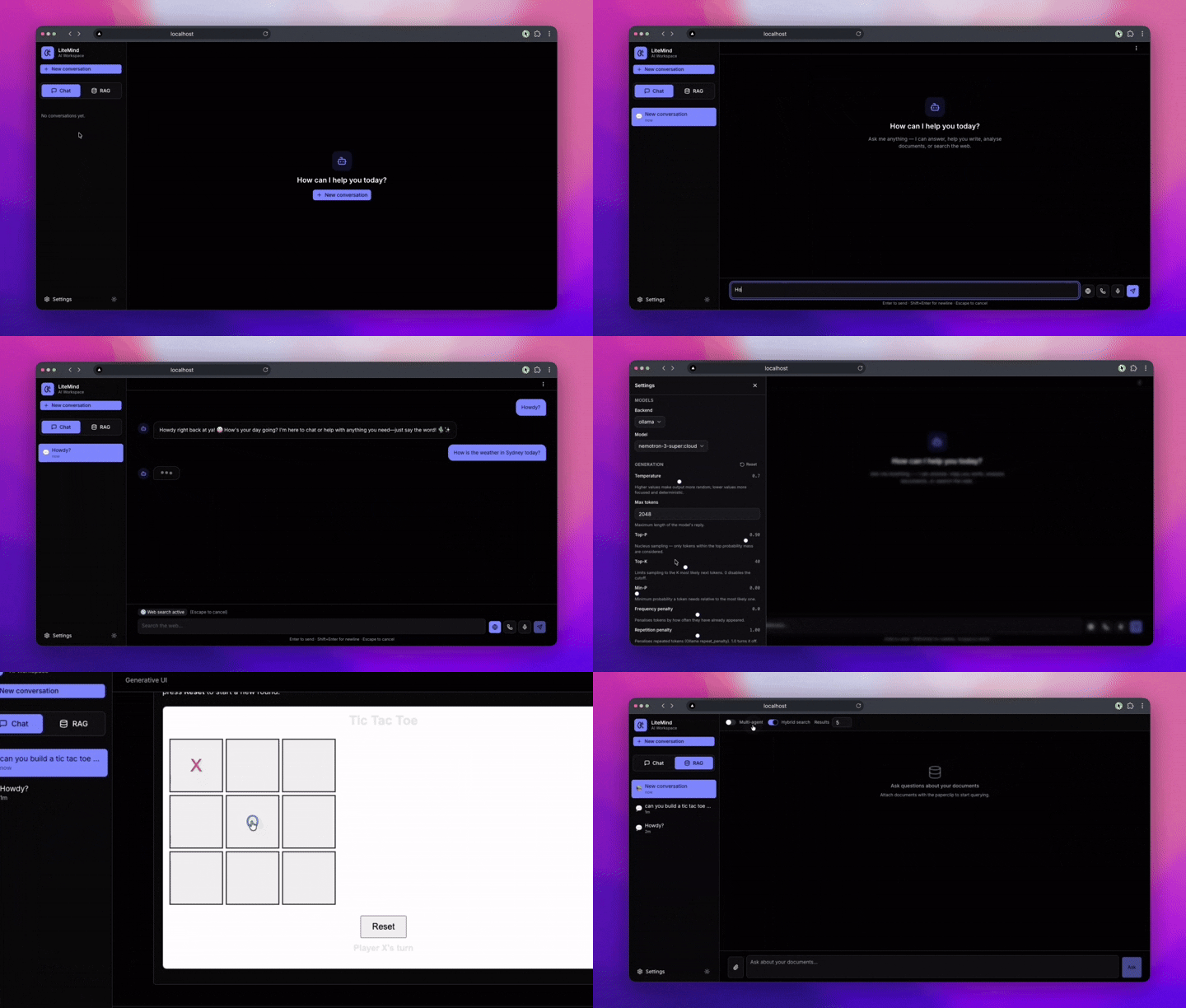
LiteMindUI is a local-first AI workspace with a FastAPI backend and a production-grade Next.js / TypeScript frontend for chat, RAG, web search, and voice-enabled workflows. It supports Ollama for local models plus OpenRouter and Nvidia NIM for LiteLLM-hosted models.
Quick start
| Mode | Best for | Command |
|---|---|---|
| Quick install | Fastest path with prebuilt Docker images | curl -fsSL https://raw.githubusercontent.com/debabratamishra/litemind-ui/main/install.sh | bash |
| Docker from source | Running the repo locally with the checked-out source | make up |
| Native install | Development on the Python + Node.js codebase | uv sync --group all && npm --prefix nextjs-frontend install |
1. Quick install with prebuilt Docker images
curl -fsSL https://raw.githubusercontent.com/debabratamishra/litemind-ui/main/install.sh | bash
This downloads docker-compose.hub.yml, prepares the required runtime directories, and starts the app with prebuilt images.
2. Run from source with Docker
git clone https://github.com/debabratamishra/litemind-ui.git
cd litemind-ui
make up
Useful variants:
make dev- development compose stackmake prod- production-style compose stackmake hub-up- pull and run Docker Hub images from this repo
3. Run natively for development
git clone https://github.com/debabratamishra/litemind-ui.git
cd litemind-ui
uv sync --group all
mkdir -p uploads
If you want to override defaults, copy .env.example to .env before starting the services.
Backend:
uv run uvicorn main:app --host 0.0.0.0 --port 8000
Frontend (Next.js):
cd nextjs-frontend
npm install
npm run dev       # development server at http://localhost:3000
# or
npm run build && npm start   # production server
Default URLs
| Surface | URL |
|---|---|
| Next.js frontend | http://localhost:3000 |
| FastAPI backend | http://localhost:8000 |
| API docs | http://localhost:8000/docs |
| Health check | http://localhost:8000/health |
Authentication
LiteMindUI requires every user to register or sign in before using the app. Auth is powered by self-hosted Supabase Auth (GoTrue) — an open-source, JWT-based identity server you run yourself (no third-party account required).
- Login methods: email + password.
- Session (hybrid): on login the backend sets an HTTP-only
access_tokencookie for the browser and returns the JWT in the response body for CLI/desktop clients (e.g.litemind-cli,litemind-desktop). The web client keeps the token in memory only (neverlocalStorage) and revalidates viaGET /api/auth/meon page load. - Per-user isolation: every chat session, persisted conversation, and RAG context is namespaced by the authenticated user's id, so one user can never read or mutate another user's data.
- Multiple clients: the same backend auth API is shared by the Next.js web UI, the CLI, and future desktop apps.
Running GoTrue (the auth server)
Mode is selected by AUTH_MODE in .env:
- Docker (recommended with
make up): auth infrastructure (gotrue+dbPostgreSQL) lives indocker-compose.auth.yml, whichmake uplayers automatically withdocker-compose.yml. SetGOTRUE_JWT_SECRET(a long random string, e.g.openssl rand -hex 32) andPOSTGRES_PASSWORDin.env, thenmake up. The backend reaches GoTrue athttp://gotrue:9999and Postgres atdb:5432inside the compose network. The browser talks to the backend exclusively through the Next.js frontend server via same-origin requests — the internalbackendhostname is never exposed to the browser. - Standalone (native
uv run): run GoTrue as a container while the backend and Postgres run natively on the host:make gotrue-up # starts Postgres + GoTrue containers make gotrue-down # stops and removes them
Required environment variables
Copy .env.example → .env and set at minimum:
| Variable | Purpose |
|---|---|
GOTRUE_API_URL |
GoTrue REST base URL (default http://localhost:9999) |
GOTRUE_JWT_SECRET |
HS256 secret GoTrue signs JWTs with — must match the value GoTrue runs with. Leave blank to disable JWT verification. |
AUTH_MODE |
docker or standalone |
DATABASE_URL |
PostgreSQL connection string for users + conversations |
POSTGRES_PASSWORD / POSTGRES_USER / POSTGRES_DB |
Postgres credentials |
On first run, register an account at /register, then sign in at /login. SMTP variables (SMTP_*) are optional and only needed later for email verification / password reset.
Features
- Streaming responses — SSE for chat, plain-text streams for RAG and web search
- Generative UI — AI responses can embed charts (bar/line/pie), tables, metrics, progress bars, and interactive buttons using fenced
ui:*blocks - Voice input — Web Speech API microphone capture with live transcription, auto-submits on recognition
- Markdown rendering — syntax-highlighted code blocks, GFM tables, and more via
react-markdown - RAG / Knowledge Base — drag-and-drop file upload, duplicate detection, multi-agent and hybrid search options
- Web Search — SerpAPI-grounded responses with inline streaming results
- Persistent personalization — LiteMindUI remembers durable facts you share (preferences, projects, corrections) across sessions and providers, injects them into new chat/RAG/voice conversations (multi-agent RAG mode excluded), and lets you manage them in Settings → Memory.
- Settings page — model catalogue (local + cloud), backend configuration (Ollama, OpenRouter, Nvidia NIM), generation parameter tuning
Repository layout
app/
  backend/         FastAPI routes, schemas, and API logic
  core/            shared configuration and application wiring
  ingestion/       document ingestion and knowledge-processing flow
  services/        model, RAG, speech, and web-search integrations
  skills/          pluggable chat and RAG capability layer
nextjs-frontend/   Next.js / TypeScript production frontend
  src/
    app/           App Router pages (chat, rag, web-search, settings)
    components/    Shared UI components (markdown, generative-UI, voice, sidebar)
    hooks/         Custom React hooks (useVoiceInput)
    lib/           API client, Zustand store, types, generative-UI parser
scripts/           setup, Docker, release, and health-check helpers
docs/              deeper documentation and docs assets
main.py            backend entrypoint
Dockerfile         backend container
Dockerfile.nextjs  Next.js frontend container
docker-compose*.yml supported container workflows
Documentation
docs/README.md- documentation indexdocs/api-contract.md- full backend API contract (used by the Next.js client)DOCKER.md- Docker guide shortcutdocs/docker/README.md- Docker workflows, health checks, and compose filesdocs/docker/publishing.md- image publishing and release automation
Testing
Backend tests (Python/pytest)
# Run all tests with coverage
uv run pytest

# Run with verbose output
uv run pytest -v

# Run specific test file
uv run pytest tests/test_rag_skills.py

# Run with coverage report
uv run pytest --cov=app --cov-report=term-missing

# Run with HTML coverage report
uv run pytest --cov=app --cov-report=html
# Open htmlcov/index.html in a browser to view coverage
Frontend tests (React/Vitest)
cd nextjs-frontend
npm run test