Run multiple signed-in copies of your AI coding apps on one Mac.
Grok Bot, Cursor, Claude, and ChatGPT (Codex) don’t give you a clean work/personal switcher. Lots of Agents launches the same installed app with a private data folder per clone — so Work and Personal stay signed in at the same time.
One binary. Update once. Every clone picks it up. No copying .app bundles.
Not affiliated with xAI, Anysphere, Anthropic, or OpenAI.
Download: Latest Release (Lots-of-Agents-unsigned.zip)
Agent setup (copy this)
If you are an AI agent installing this for a human on their Mac, follow only this section. Do not notarize. Do not open a PR. Do not invent alternate install paths.
Prefer the Release zip (no Swift toolchain needed). Fall back to building from source only if the download fails.
0. Preconditions (fail fast)
Run on the target Mac (macOS 14+). Confirm at least one supported app:
sw_vers
ls -d \
  "/Applications/Grok Bot.app" \
  "/Applications/Cursor.app" \
  "/Applications/Claude.app" \
  "/Applications/ChatGPT.app" 2>/dev/null
If none of those apps exist, tell the human to install Grok Bot, Cursor, Claude, and/or ChatGPT first. This repo does not ship those apps.
1a. Preferred — install from GitHub Release
cd /tmp
curl -sL "https://github.com/carllippert/lots_of_agents/releases/latest/download/Lots-of-Agents-unsigned.zip" -o Lots-of-Agents-unsigned.zip
rm -rf "Lots of Agents.app"
unzip -o Lots-of-Agents-unsigned.zip
mkdir -p "$HOME/Applications"
rm -rf "$HOME/Applications/Lots of Agents.app"
mv "Lots of Agents.app" "$HOME/Applications/"
xattr -dr com.apple.quarantine "$HOME/Applications/Lots of Agents.app" 2>/dev/null || true
open "$HOME/Applications/Lots of Agents.app"
1b. Fallback — clone and build
Needs Command Line Tools (xcode-select --install) and swift:
xcode-select -p
swift --version
git clone https://github.com/carllippert/lots_of_agents.git
cd lots_of_agents
swift run TwoCursorsTests
./scripts/build-app.sh
mkdir -p "$HOME/Applications"
rm -rf "$HOME/Applications/Lots of Agents.app"
cp -R "dist/Lots of Agents.app" "$HOME/Applications/"
xattr -dr com.apple.quarantine "$HOME/Applications/Lots of Agents.app" 2>/dev/null || true
open "$HOME/Applications/Lots of Agents.app"
2. What the human does in the UI (you cannot fully automate this)
- In Lots of Agents, click New Clone (or an app icon on the landing screen).
- Pick an installed app (Grok Bot / Cursor / Claude / ChatGPT).
- Name it (e.g.
WorkorPersonal) → create. - Select the clone → Launch.
- Sign in inside that app window with the correct account.
- Repeat for a second clone if they want two logins.
Dock wrappers appear as e.g. Grok Bot Work.app in ~/Applications.
3. Verify
test -d "$HOME/Applications/Lots of Agents.app" && echo "app installed"
ls "$HOME/Library/Application Support/LotsOfAgents/profiles.json" 2>/dev/null && echo "catalog exists"
ls "$HOME/Applications" | grep -E 'Grok Bot|Cursor|Claude|ChatGPT' || true
After they create a clone, profiles.json should list it and a wrapper .app should exist under ~/Applications.
4. Gatekeeper / “blocked” app
Ad-hoc builds are normal. If macOS blocks launch:
xattr -dr com.apple.quarantine "$HOME/Applications/Lots of Agents.app"
Then: right-click the app → Open → Open, or System Settings → Privacy & Security → Open Anyway.
Do not
- Do not require Apple Developer ID or notarization for a personal install
- Do not copy Grok/Cursor/Claude/ChatGPT into this project
- Do not store clones under a fake/sandbox
$HOME(Parall, etc.) — the app writes to the real account home viagetpwuid - Do not
sudoanything for this install
Who it’s for
You have two Cursor / Grok / Claude / ChatGPT logins (work + personal, client + side project) and you’re tired of signing out, using a second Mac user, or juggling browser profiles.
What you get
- Isolated logins & chats — each clone has its own
--user-data-dir/ extensions dir - Shared app updates — still the official app in
/Applications - Dock wrappers —
Grok Bot Work.app,Cursor Personal.app, etc. in~/Applications - Optional deeper isolation — private
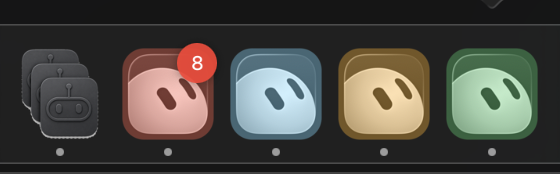
~/.cursor(skills / user rules) via a full-home overlay that still symlinks your real home - Tinted icons — tell clones apart in the Dock
Supported today (if installed under /Applications):
| App | Notes |
|---|---|
| Grok Bot | Bundle ID com.anysphere.sand |
| Cursor | Same clone model |
| Claude | com.anthropic.claudefordesktop |
| ChatGPT (Codex) | com.openai.codex — app is named ChatGPT.app |
How a clone works
/Applications/Grok\ Bot.app/Contents/MacOS/Grok\ Bot \
  --user-data-dir=~/Library/Application\ Support/LotsOfAgents/Profiles/<id>/user-data \
  --extensions-dir=…/extensions
| Isolated per clone | Shared |
|---|---|
| Account / plan login | The real .app + its updates |
| Chats, settings, extensions | Git, SSH, project files |
Optional private ~/.cursor |
Your real home (symlinked in overlay mode) |
- Catalog / data:
~/Library/Application Support/LotsOfAgents/ - Wrappers:
~/Applications/
Wrapper identity & Cmd-Tab icons
Each clone is a thin wrapper app (e.g. ~/Applications/Grok Bot Personal.app) with:
- Custom bundle ID (e.g.
app.lotsofagents.clone.grok.personal) - Tinted icon from the catalog
- A launcher binary that spawns the official app as a child process with custom args
The wrapper process stays alive, preserving its Launch Services identity. This ensures the Cmd-Tab switcher shows your clone's custom icon and name, not the official app's generic icon. Multiple clones appear as separate apps.
We do not copy the full Grok Bot.app bundle (that would break Electron helpers, file pickers, uploads, updates, and code signing). One official binary, many wrapper identities.
Human install (no agent)
- Download Lots-of-Agents-unsigned.zip
- Unzip → move Lots of Agents.app to
~/Applications - Clear quarantine (or right-click → Open):
xattr -dr com.apple.quarantine ~/Applications/"Lots of Agents.app"
open ~/Applications/"Lots of Agents.app"
Or build from source: ./scripts/build-app.sh → copy dist/Lots of Agents.app.
Notarized DMG (optional, Apple Developer ID required): docs/NOTARIZE.md.
Uninstall
rm -rf "$HOME/Applications/Lots of Agents.app"
# Optional: remove clones + wrappers you created
# rm -rf "$HOME/Library/Application Support/LotsOfAgents"
# rm -rf "$HOME/Applications/Grok Bot "*.app   # only Lots-of-Agents wrappers you no longer want
Removing Lots of Agents does not uninstall Grok/Cursor/Claude/ChatGPT.
Privacy
Runs only on your Mac. No analytics. See PRIVACY.md.