🚨 model-guard
Model and account visibility for Claude Code and Codex CLI. Codex flags routing differences and suspicious reasoning usage.
English · 简体中文
The problem
You hit a usage limit mid-session. Claude Code falls back to a weaker model — quietly. No flash, no bell, just a subtly dumber pair programmer. You keep prompting for another hour, wondering why the code got sloppy, while the tokens keep burning.
This plugin exists because exactly that happened to us: half a working session on a silently-downgraded model before anyone noticed the tiny model name in the corner. Never again.
What you get
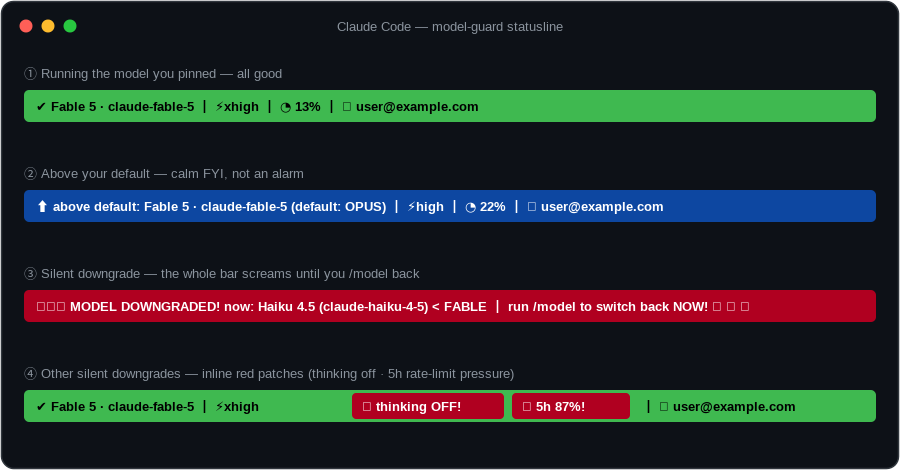
One always-on, full-width color band at the bottom of every session. You don't read it — you notice it.
| Band | Meaning |
|---|---|
🟩 ✔ |
Model matches what this machine expects |
🟦 ⬆ |
Running above your default — FYI, no alarm |
🟥 🚨 |
Silent downgrade — the whole bar turns red and tells you to /model back |
🟧 🔁 |
Recovered — a flag downgraded the session, the plugin switched it to the recovery model |
🟦 ● |
No expectation configured — neutral display |
And model identity is only half the story. Red inline patches catch the other silent downgrades:
- ⚡ Reasoning effort dropped below the current model's saved
modelSettings[model].effortLevel, falling back to the globaleffortLevel - 🧠 Extended thinking switched off
- ⏳ 5-hour rate-limit window ≥ 80 % — the precondition for a forced fallback, flagged before it happens
Plus the useful everyday bits: current model & effort, context-window usage, your account's 5-hour and 7-day usage (⏳ 5h 37% · 7d 18%), the session's working directory (📁 ~/code/my-repo), and which account you're logged in with (multi-account users know the pain).
The effort baseline is reread on every update. Saving high in /model or /effort takes effect even if the old global field still says xhigh; a later drop to medium still alarms. Canonical Claude model IDs share their saved effort with their [1m] context variants.
Auto-recovery
Showing a downgrade is half the job. The most common silent downgrade today is a safeguard flag: Fable's (or Opus 5's) safeguards flag a message, Claude Code re-runs it on Opus 4.8 — and keeps the whole session there. With the 1.1 hooks the session instead
- stops — the next tool call is denied and the turn ends (
PreToolUse); - switches — a detached driver presses Esc, types
/model <recovery model>and/effort <level>into the session's own terminal, and waits for Claude Code'sPostModelSwitchevent to confirm the switch (the plugin'sPreModelSwitchhook answers allow, so no cache-miss dialog gets in the way); - continues — sends the continue prompt, and the interrupted task resumes on the recovery model.
Default: claude-opus-5[1m] at max effort, continue prompt Continue. (or 继续 when the band language is Chinese). Measured round trip: about 8 seconds from the downgrade to the first token on the recovery model.
Steps 2 and 3 only exist where the terminal can be driven: a tmux pane (send-keys), a zellij pane (action write-chars), or kitty with remote control over a socket (allow_remote_control socket-only + listen_on unix:@kitty in kitty.conf, then restart kitty — setup offers to add both lines). tmux and zellij need no configuration at all. Anywhere else the plugin does step 1 and nothing more: the turn stops once, the band names the /model to run, and the hooks stay out of your way.
Inside a multiplexer the keystrokes address one pane by id, never "the focused window", so a recovery in one pane cannot type into the session next door.
Two details worth knowing:
/model <id>in an interactive session also saves<id>as your default for new sessions. The plugin puts your previous default back after its own switch, so a recovery never changes what tomorrow's sessions start with.- If the recovery model itself gets flagged (Opus 5 → Opus 4.8), or a session is downgraded more than
RECOVER_MAXtimes, the plugin only stops. The band says so; pick a model with/model.
Install
/plugin marketplace add ventusff/cli-model-guard
/plugin install model-guard@cli-model-guard
/model-guard:setup
The last step is interactive — arrow keys, two questions, done. It copies the script, writes the config, and registers the statusLine in ~/.claude/settings.json with a timestamped backup. No copy-pasting shell commands from a README.
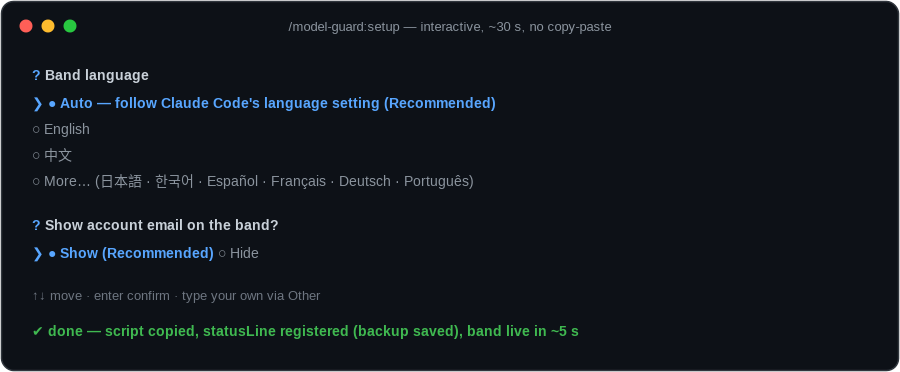
Why is there a setup step at all? Claude Code plugins can't register a main statusline by themselves (plugin
settings.jsononly supportsagentandsubagentStatusLine).setupis the one honest extra step, and it is a one-time one: when a later plugin update ships a newer script, the session-start hook refreshes the installed copy itself and says so.
Requirements: bash 4+, jq and curl; the recovery hooks also use flock and setsid (util-linux) and, when present, notify-send for a desktop notice. No daemon. The one network call is the statusline asking Claude Code's own usage endpoint (the one behind /usage) for your account's rate-limit usage, with the login token Claude Code stored, at most once every 30 s per machine; nothing else leaves the machine. Plugin hooks load at session start — restart your sessions after installing or updating.
Codex CLI
Model Guard uses Codex's native status line, and it stops a downgraded thread. Model, requested reasoning effort and account share the existing footer. A request for a model other than the one you selected, a disclosed routing difference and a response body labeled with another model each end the turn at once and hold the thread until you choose a model again; repeated 516-token reasoning signals appear as a warning. Normal use has no extra terminal layer and no permanent warning banner.
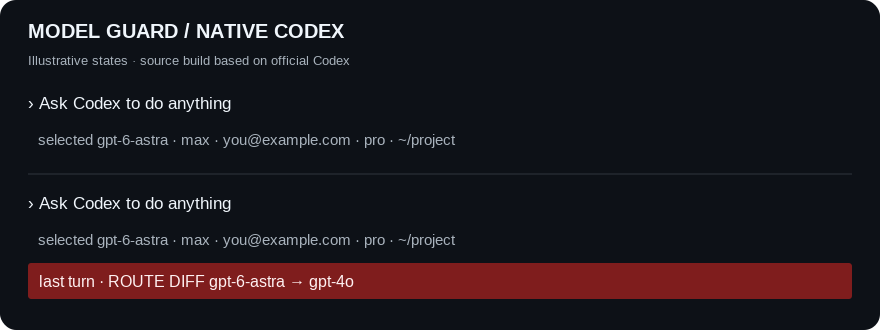
Run codex or cx normally, including resume and fork. Native input handling, scrollback, paste, resizing, profiles and directory selection remain owned by Codex. Background title generation and agent threads cannot replace the visible conversation's model.
The footer says selected until live request metadata arrives; it then says request, using the model and effort pinned to that request, followed by the account (email and plan), the context used and the account's 5-hour and weekly usage (ctx 18% · 5h 42% used · 7d 21% used, from Codex's own readings; any of them already in your tui.status_line is not repeated). An attachment never guesses the settings of a request that started before it subscribed. A disclosed different model shows both names in red.
Codex changes models on its own, and the guard refuses. Codex 0.155 moves a thread to its hidden reserve model (gpt-reserve, a GPT-5-class "fast and affordable" fallback) when the account's ordinary usage is exhausted, announces it with one info line, and moves back hours later. Every request in between is made for gpt-reserve and labeled gpt-reserve by the server, so comparing the request with the disclosure sees nothing. Model Guard therefore keeps the model you selected — the configured default (model in config.toml or -m) or your last /model choice — and holds Codex to it:
- The usage-limit switch to Luna Reserve, and the fallback switches that backend banners announce, are declined. A warning names the blocked and the offered model, an amber
usage limit on … · automatic switch to … refusedline stays under the footer until usage recovers, and your input is not held for a switch that will not happen: requests on the exhausted model fail loudly, or you pick another model yourself. Codex's own switch back to the saved model when usage returns goes through only when that model is your selection, and it never lifts a stop. - A request for a model other than your selection, an effective-model header naming another model, or a response body labeled with another family or size tier holds the thread. The guard runs where Codex makes the thread's model requests, so it judges every request of the thread, whoever started the turn: your prompt,
/compact, a review, a command queued earlier, a goal continuing on its own, a message from another thread. A request for another model is never sent, a response that discloses another model is cut off there, and a held thread sends no request at all; the turn ends with a red error, a bold redSTOPPED …line stays under the footer, and a prompt you type stays in the composer until you select a model with/model(selecting the same model again counts). The three causes rank request > header > label; a stronger one replaces a weaker one. The hold belongs to the thread for as long as the Codex process hosting it runs: switching threads, side conversations, forks, and quitting and resuming keep it, and a thread working in the background is held the moment its request or disclosure differs. When you leave a model, the history it wrote is summarized with the model you selected. Reviews, sub-agents and approval reviews run as threads of their own on the model they are configured with; they are held while the thread they work for is held, and selecting a model for that thread releases them too. - A thread restored on a different model than the configured one is held before its first turn, so a session that went to sleep on
gpt-6-astraandresumes ongpt-reservecannot send a request. Whenever the active model isgpt-reserve, whoever chose it, the footer carries a bold redRESERVE MODELline. (A custom collaboration-mode preset that carries its own model trips the same stop;/modelclears it.)
Every response body also carries a model label written by the server. The official client stopped comparing it in February 2026 (PR #12061) because slug variants produced false positives, and on a ChatGPT login the effective-model header is usually absent, so the label is the one routing fact the server states on every everyday request. Model Guard keeps it as a second-tier signal: a label of the request's own family stays quiet (gpt-6-astra-2026-09-01, bare gpt-6), while another family or a size tier (gpt-4o, gpt-6-astra-mini) holds the thread like a header difference, ranked below it. /status always shows the label. At high or greater effort, at least three of the last five measured responses with exactly 516 reasoning tokens show a reasoning anomaly warning. Single hits and sample counts are available in /status. Statistics use unique response IDs and reset when the model, provider, effort, service tier or account changes.
These are three distinct signals: the effective-model header and the body label record what the server disclosed, at two levels of trust; 516 is a community heuristic with no calibrated false-positive rate, so it warns but does not stop unless halt_on_reasoning_anomaly is on. None of them proves the underlying weights. Missing disclosure is explained in /status and does not turn the normal footer yellow. The guard refuses and holds; it never sends inference requests, retries or changes the model itself. See the routing research for inspected Reddit/GitHub approaches and their limits.
After installing and enabling the Codex plugin from your personal marketplace, install its native runtime:
python3 codex/model-guard/scripts/install.py --language en
model-guard-codex doctor
The prebuilt runtime supports Linux x86_64, glibc 2.36+, Python 3.12+ and the official standalone Codex 0.162.1. The installer verifies a release checksum, prepares a versioned package and atomically switches the existing ~/.local/bin/codex symlink. Your next codex or cx resume invocation picks it up in the current shell.
A running Codex process keeps the executable it started with, so an open session never gains Model Guard by installation alone; that is how every native program behaves, and no installer can change it. Instead of leaving you to wonder, the installer and doctor list the sessions still on another executable, with their directories: finish or /quit each one, then codex resume there. Earlier versioned packages no session uses any more are removed.
Codex can host threads in a background server (codex app-server daemon) that the sessions of several terminals attach to, and the guard decides inside whichever process hosts a thread. The installer therefore makes that server this build: when none is running, the next session starts this build. A running server of another build keeps running, because switching restarts it and interrupts work in every session attached to it. Until it is switched, a new session declines it, hosts its threads itself under the guard, and says so in one line that names the command switching the server, codex app-server daemon update --from-cli. A thread hosted by a server without this build's guard shows a red error. doctor names the build the background server runs.
This is a disclosed custom build of official Codex, pinned to one source commit, with reviewable patches and a build recipe. Stock Codex does not currently expose a plugin footer renderer. Model Guard adds metadata and native rendering inside that source; it adds no tmux server, terminal proxy, provider proxy or transport logging. Account and quota handling use Codex's existing state. Model/provider defaults and login files are not changed. The supplied package includes the official code-mode host and sandbox helpers from the same release.
Native builds must be updated together with the plugin, and the plugin tracks one official Codex version at a time. A new Codex release is one command on the maintainer's machine: python3 codex/model-guard/native/release.py rebases the patches onto the new stable release, builds in the pinned Rust image, runs the Rust and Python checks including real terminal sessions, and publishes; a patch that no longer merges stops it with the files listed, and --resume continues after they are resolved. A daily GitHub job only watches for the new release and opens an issue; nothing is compiled there. Installed machines update themselves: when a Model Guard build finds a newer plugin release during Codex's own startup update check, it runs model-guard-codex update detached (log in ~/.local/share/model-guard-codex/update.log), so the next codex or cx resume uses the new build; sessions already running keep their executable. Codex makes that check at most once every 20 hours, so a machine follows a release within a day of its next start. Run model-guard-codex update yourself to update at once, never the official installer alone: it downloads the plugin's current release, brings the official standalone package to the Codex version that release tracks (with OpenAI's own installer), then installs the native package on top. Inside a Model Guard build, codex update and the update banner run exactly that command, and the banner compares against the plugin's release rather than upstream's latest tag, so a stock update can no longer replace the guard behind your back. If an official installer did replace the entry (curl … install.sh | sh does), doctor says so and names the command. An explicit remote app-server must run the same metadata extension for complete routing details; connection and CLI semantics remain native.
Preferences live in ~/.local/share/model-guard-codex/config.json: language (en or zh), show_account (boolean), halt_on_reasoning_anomaly (boolean, default false: also stop on the 3-of-5 exact-516 heuristic) and auto_update (boolean, default true: install a newer plugin release in the background when Codex checks for updates at startup). MODEL_GUARD_CODEX_HOME selects another installation root. Disable the plugin in Codex to disable its display, its stops and its refusal of automatic switches together.
model-guard-codex probe --json   # A separate read-only request; consumes provider quota
model-guard-codex doctor        # Verify the native executable, compare it with the official package, list sessions on another one
model-guard-codex update        # Move to the plugin's current release, official Codex version included
model-guard-codex remove        # Restore the original official executable symlink
Live session details are accessed inside Codex with /status, which starts with the selected model and the reason for a stop or a refused switch; the old external status and check commands now direct you there. probe accepts -m MODEL -r EFFORT for that request only. Its exit codes are 0 for matching effective-model disclosure, 2 for a difference, 3 for missing disclosure, 4 for an unavailable/failed probe, and 5 for a body label that differs while nothing was disclosed. JSON omits account identity and conversation text. A separate probe cannot certify an existing conversation.
Removal preserves running sessions, packages and preferences. Legacy managed shell blocks are removed during migration; no new shell PATH blocks are needed. Validation uses isolated Codex homes, local HTTP/SSE and WebSocket fixtures, Rust state/layout tests, and real native PTYs. See the build recipe for commands.
How "downgraded" is decided
Expected model — first hit wins:
EXPECTED_MODELin~/.claude/model-guard.conf(agrep -Eipattern, manual override)~/.claude/statusline-expected-model(legacy override file)- The
modelyou pinned in~/.claude/settings.json(opus[1m]→opus;default= no expectation)
Strength ranking: family fable/mythos > opus > sonnet > haiku, then version within the family (claude-opus-5 > claude-opus-4-8).
- Actual model ranks below expected → 🟥 full-width alarm.
- Unknown ids score zero → 🟥. We can't prove it isn't weaker, so we don't guess. Conservative by design.
- Actual ranks above expected → 🟦 calm blue. Free upgrades are not emergencies.
- Automatic downgrades (Claude Code's
PostModelSwitchwith sourceautoorresume) use the same ranking to decide whether a recovery starts.
Where the usage numbers come from
The 5-hour and 7-day numbers are your account's, asked from Claude Code's own usage endpoint (the one behind /usage) with the login token Claude Code stored — environment variable, macOS keychain or ~/.claude/.credentials.json, in that order. One reading is shared by every session on the machine for 30 s.
They are deliberately not the rate_limits Claude Code hands to statuslines. That value is what one session last read from a response header: it stands still until that session gets another response, and it survives /login. After an account switch it keeps reporting the previous account — and keeps climbing while requests already in flight finish on the old token. Here a new login is a new cache key, so the next refresh asks again immediately; until the answer is in, the segment stays empty rather than showing another account's number. Se