



Muse Spark Code puts Meta's Muse Spark model to work in your editor as a coding agent: as an extension in VS Code, Cursor, Windsurf, VSCodium and other VS Code-based editors, and through its ACP agent in Zed, JetBrains IDEs, Neovim, Emacs and more (install). A chat panel streams answers, reads and edits your files with reviewable diffs, runs commands behind permission modes, and delegates to subagents you can watch and steer. It also remembers past conversations and takes dictation from your microphone. It runs on your Muse subscription through the Muse Code CLI, or on a Meta Model API key, and never hands the key to the CLI.
Unofficial. Not affiliated with or endorsed by Meta. "Muse Spark" and "Muse Code" are Meta trademarks. You bring your own credentials.
Enjoying Muse Spark Code? A star on GitHub helps other people find it.
The roadmap shows what is in the next release, what is being built, what is planned and what each release shipped.
Contents: What's new · Roadmap · Highlights · Screenshots · Get started · Backends · Subscriptions · Permission modes · Several accounts · Developer options · Rules, skills and memory · Muse Code's own tools · Web fetch · Browser check · Design · The panel · Voice dictation · Paid features · Languages · Limits · Commands · Settings · Requirements · Privacy · Troubleshooting · Reporting a problem · Development
Candidate schedule budgets and consent, and rental cost evidence, use exact decimal USD. Saved reports write money version 2; historical numeric reports retain their original hash verification and migrate when read.
What's new in 0.19.0
- Provider refusals read as the provider's refusal. A wrong key reads as a rejected key and an unknown model as no such model; a quota or spend-cap refusal is never retried, while a bare rate limit still is.
- The conversation keeps the model you chose. After a restart the next message goes out on the model shown, the panel shows the model each request really used, and a message that would run on another model is not sent.
- The chat no longer takes the keyboard from a file you just opened, and a question that arrives while you are elsewhere waits with its badge.
- No time limits of ours on slow machines. Reports wait for a slow
GitHub, Marketplace, Open VSX or npm answer instead of giving up after
5 seconds, and steps that read or end processes through Windows
PowerShell,
taskkillor the process table are no longer killed after 20 seconds. Stop, or a deadline you set, still ends them. - GitHub sign-in and Git without VS Code's Git extension: commit, push and open pull requests from editors that have no Git extension of their own.
- llama.cpp server and LM Studio presets in Models & Agents, and reports that cover more ground without a model call.
- One package per platform: the Marketplace and Open VSX serve your platform's own package, carrying only its native pieces, with a fallback for other systems.
- The browser check runs on Chrome for Testing 156.
- Known issue: in VS Code on Linux the vault can be set up only when your
account can reach the machine's TPM (usually the
tssgroup); the terminal agent uses your desktop keyring.
The full list is in the CHANGELOG.
Earlier in 0.18.2
- The landing screen shows the extension's own mark. The empty chat panel showed the Meta logo beside the product name; it now shows the product's own squiggled "m", blue in dark and light themes and in the theme's text colour in high-contrast themes.
Earlier in 0.18.1
- Your own providers, a ChatGPT plan and Copilot work again. In 0.18.0 a turn on any of them stopped before it was sent, with an internal error. Sorry for the broken release; Meta's own models were not affected.
- Usage from earlier versions is counted again. 0.18.0 left those records out as not exact; nothing was deleted.
- Report a Problem opens again if you had changed a setting with a second dot in its name; it used to answer "That did not work".
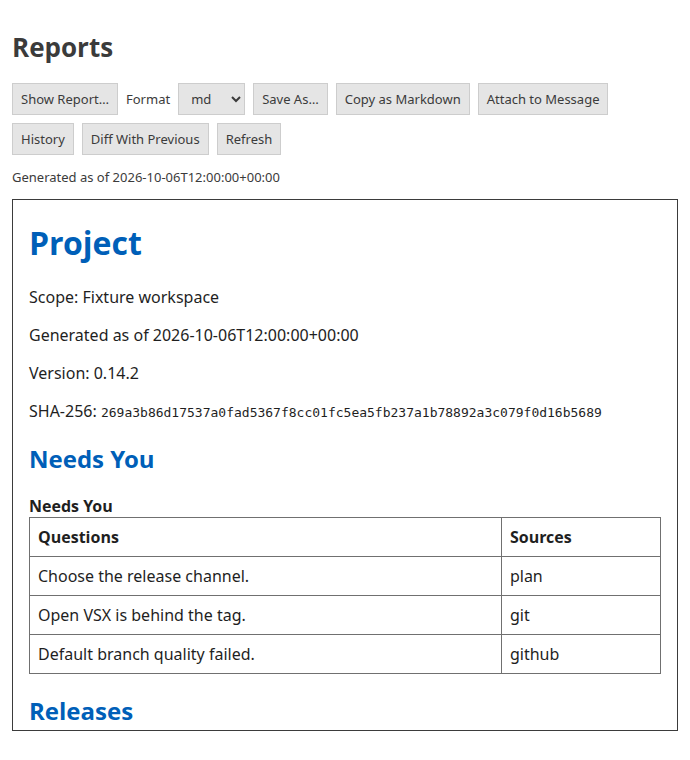
/report
Open the local kind picker with /report, Muse Spark: Show report…, or
Account & usage's Usage Report. A report reads named sources without a
model call or a charge. Needs You comes first; every source names its
availability, freshness and observation time. Missing integrations remain
visible as unavailable.
| Kind | Input |
|---|---|
| Project | /report project |
| Milestone | /report milestone M113 |
| Release | /report release latest |
| Changes | /report changes; since <tag, branch, or YYYY-MM-DD> selects Git ancestry |
| Quality | /report quality |
| Usage | /report usage; 30d --by model scopes the window and breakdown |
| Session | /report session |
| Key Bindings | /report keybindings |
| Accounts | /report accounts |
| Security | /report security |
| Estimate | /report estimate M113; --by <date> sets the deadline, --fleet minimum picks the setup |
| Engineering Playbook | /report playbook |
| Schedules | /report schedules |
Each table shows at most ten rows with an omitted-row count; --full retains
all available rows. Next steps follow the plan's declared delivery order and
only become ready when their required milestones are complete. At most three
next steps are shown.
The tab provides Save As…, Copy as Markdown, Attach to Message,
History, Diff With Previous and Refresh. Save as exports Markdown,
HTML, JSON or text through the editor's save dialog. A saved report retains
its original observation time; Refresh collects again. History is scoped to
this workspace and kind. Identical comparisons say No change since the
previous observation. Turning off museSpark.reports.keepHistory stops new
history saves. Existing entries remain readable. A malformed or unfinished writer lease can
block publication; it is preserved because ownership cannot be proved. Manual
repair requires every relevant writer to have stopped. No automatic deletion
is attempted.
museSpark.reports.network is machine-scoped: whenSignedIn (default) reads
GitHub using the editor's existing sign-in, always also reads GitHub without
requiring sign-in, and off forbids network collection. Reports never open a
sign-in prompt.
The terminal requires --network on every collection, and uses gh's own
identity. CI egress remains denied. Cache reads and writes use confined,
owner-only storage, validated decoded data and ETags; interrupted requests
retain honest unavailable or partial status. Store, workflow and release
adapters await approved live captures.
museSpark.reports.agentSources defaults to an empty array. Only agents you
explicitly enable (claudeCode, codex) have their confined local usage files
read. A missing usage capability, ledger, account or future feature produces
an unavailable source; a subscription never implies known token or cost data.
museSpark.reports.planMaxBytes caps the plan file reports read, in bytes.
No limit unless you set one: 0 (the default) reads the whole plan however
large, and a plan past a set value is refused with input-size drift naming
your limit. Machine-scoped. In a terminal or an ACP editor the same bound is
reportsPlanMaxBytes in the agent data folder's settings.json (0, the
default, reads whole).
The shared CLI/ACP engine supplies the same report data to every editor.
Installed native editor tabs are certified by M104; the portable MHP 1.2
report methods are already validated. In a terminal, the command is
muse-spark-code-acp report <kind>; bare report retains the problem-report
command. See the ACP guide.
The estimator also checks the workspace plan without forecasting.
/estimate --check-plan checks every plan row independently of any forecast's
dependency closure and answers empty for a clean plan. Use the flag alone,
with no goal or other flags; it requires plan-format-v1 and a lane table.
The exclusive standalone check is muse-spark-code-acp estimate --check-plan:
exit 0 means a clean plan, 1 means problems or an unavailable check, 2 means
usage.
Orchestrator playbook policy (M116)
The CLI playbook <status|record|settings ...> and ACP
/playbook <status|record|settings ...> read journal records and settings
locally without starting a backend or a model turn. Settings changes need a
reason and record the owner. The reviewer charter ships as the
orchestrator-playbook skill.
Highlights
- Streaming chat with tools you can see. Every read, edit, write and shell command is a row in the transcript: green when done, pulsing while running, red when refused, grey when a stopped turn cut it off. Edit rows show the diff, the path opens the file with the changed lines selected, Click to expand opens VS Code's diff editor, and any output opens in an editor tab with a click.
- Code intelligence from your editor. The agent finds definitions, references, symbols and callers, reads hovers, maps the repository and renames symbols through VS Code's own language services instead of searching text, on both backends (more).
- Permission modes, like Claude Code. Manual, Edit automatically, Plan and
Auto (Bypass behind a setting), switched from the mode button or
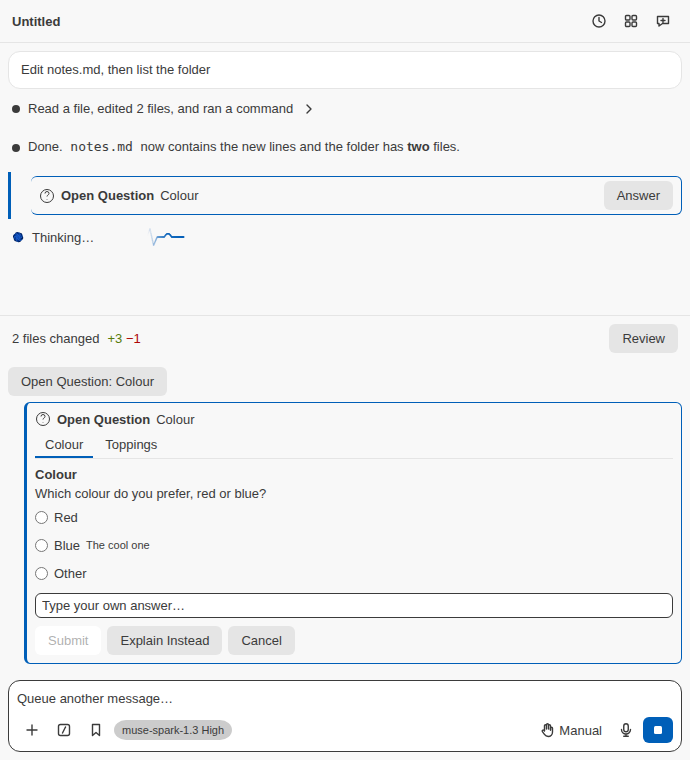
Shift+Tab. Gated commands arrive as approval cards with the CLI's own choices; questions from the agent arrive as question cards with radios, checkboxes, tabs and an "Other" answer. /for everything. The palette loads its action registry on first use, with loading, failure and retry available. It holds the actions, the model, effort and thinking, the permission mode and your skills; type a letter after the/and it narrows to the slash commands, as in Claude Code.- Subagents on a map. When Muse Code delegates, or the Model API backend runs the paid subagents you turned on, each agent is a row and an N agents pill opens the Agent map: role, status, tokens, each agent's own transcript, and the controls the backend offers.
- Workflows you can follow. When Muse Code runs a multi-agent workflow, the run is a card that keeps updating after the reply: its agents with their state, time and tokens, and the result it returned. Owner controls wait for a live accepted-command capture.
- Reply and quote with context. A reply's ⋯ menu has Reply to This Output; highlight anything in the chat and right-click for Ask About This or Comment on This. The passage, its author and your intent travel with the message.
- Voice dictation at no cost. Tap or hold the microphone (
Ctrl+D) and speak; the words land at the caret. Windows and macOS use the recogniser built into the operating system; Linux x64/arm64 uses offline English Whisper tiny.en after one consented helper and model download, so no audio goes to a paid service unless you turn on Muse Voice. - Paid extras, only if you ask. On a Model API key: web search with its sources, image files made on request, and Meta's Muse Voice for dictation. Each is available by default on Model API; spending requires paid-use consent, marked paid wherever it is used, and tallied in Account & usage.
- Scheduled prompts under your control. On the Model API backend,
/loopsaves a recurring prompt in this conversation. By default a due prompt waits for you to run and confirm it; unattended v2 delivery is disabled, and the running editor does not request v2 consent or reserve its paid caps. Your key is never spent without your consent. Scheduled turns currently cannot read video or audio: verified upload storage, the captured media codec and production calibration bindings are unavailable (PLAN D85.6, M105). The shared paid accounting refuses bills above an admitted reserve and retains that reserve as uncertain liability. - Two backends, one per conversation. Your Muse subscription through the Muse Code CLI, or a Meta Model API key (pay as you go) with the extension's own tools. The pasted key is never handed to the CLI.
- Set up from the panel. No Muse Code yet? Install Muse Code shows Meta's command and runs it in a terminal; Sign in with your Meta account shows its approval code in the panel.
- Context the way you work.
@mentions with.gitignore-aware fuzzy search, the open file or selection as a chip, images (and, on the Model API backend, PDFs) pasted or dropped, andAlt+Kto mention the editor selection. On either backend the agent can also read the Problems panel. - History that survives the window. Every conversation in the workspace, searchable, resumable with its full transcript, archivable, with fork and rewind on every sent message. The sidebar picks its last conversation back up within ten minutes, and an editor-tab conversation comes back after a window reload.
- Account & usage. On Muse Code, your subscription's current and weekly
windows; this conversation's tokens (and cache hits, on the Model API); and
what has been eating your usage (reminder agents, subagents, long
sessions), from
/usage. - In your language. English and fourteen more of VS Code's display languages, with the model's side kept in English so it behaves the same everywhere.
- Accessible and observable. Checked against WCAG 2.2 AA in every default theme, and a log that records what happened without what you wrote.
- No telemetry, no hosted server of its own. What leaves your machine and where it goes is written down in PRIVACY.md.
Screenshots
M106 development: the Model API client paces tagged background requests from the provider's observed rate-limit headers and 429 answers, with no invented pace of its own. A queued request reports that it is waiting for rate-limit headroom and keeps waiting until Stop; retries follow the provider's Retry-After and its documented guidance. Public status failures expose fixed text and safe status fields. Its service-status read and usage/report presentation ports await the integration bindings listed in the lane R certification.
Rendered from the shipped panel by its own UI harness (npm run readme:shots, one harness scenario per image) against a scripted session,
so they match the build.
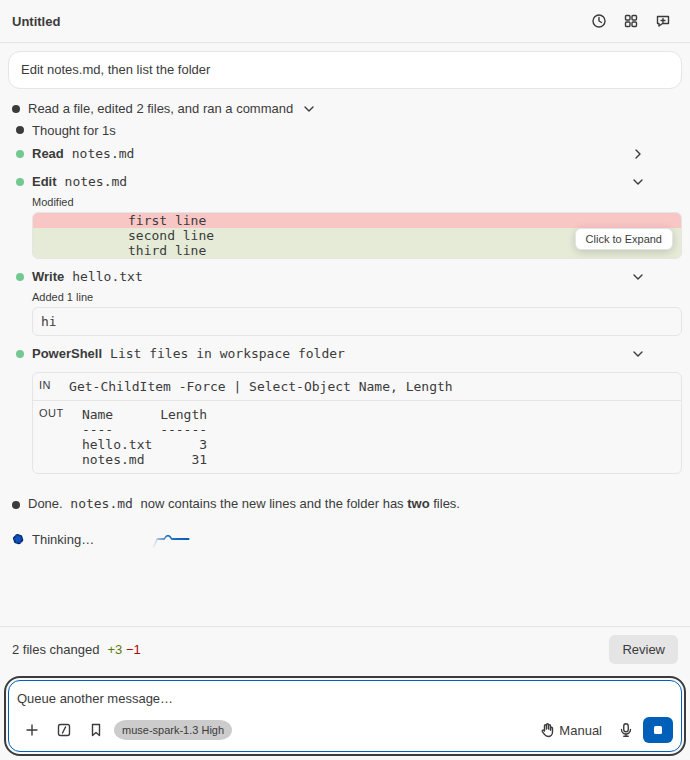 A turn: thinking, read, edit with its diff, write and shell under one summary row, the reply, and the diff tally |
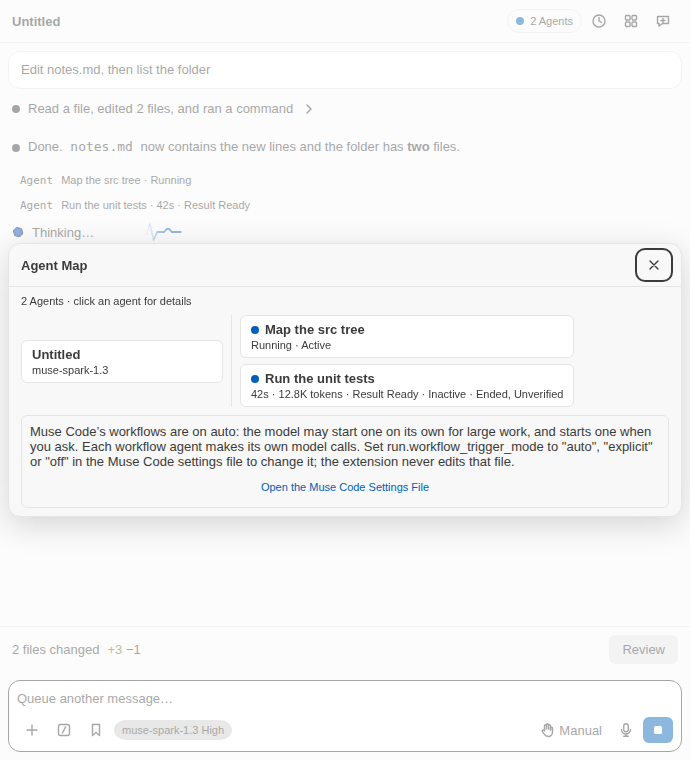 Subagents: the 2 agents pill and the Agent map |
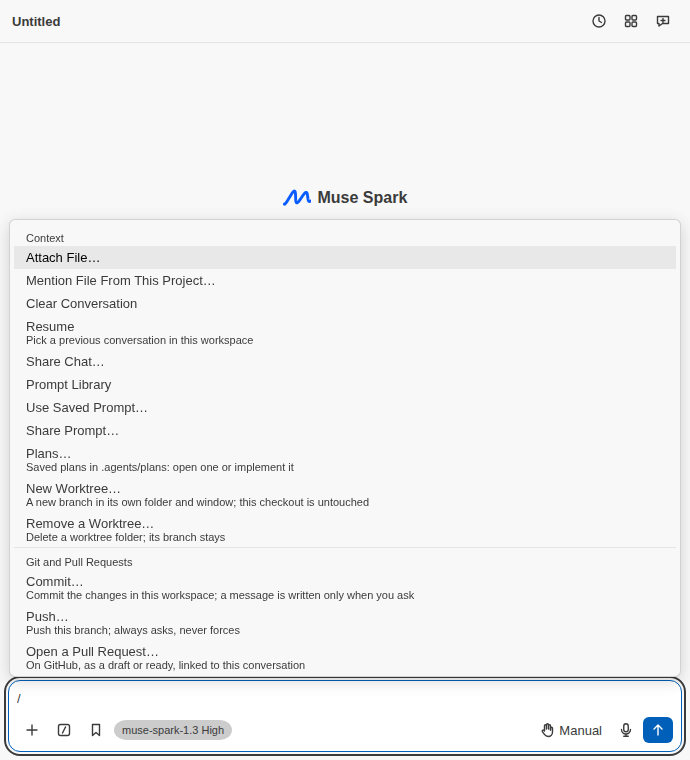 Type /: context, Git and model actions above the prompt |
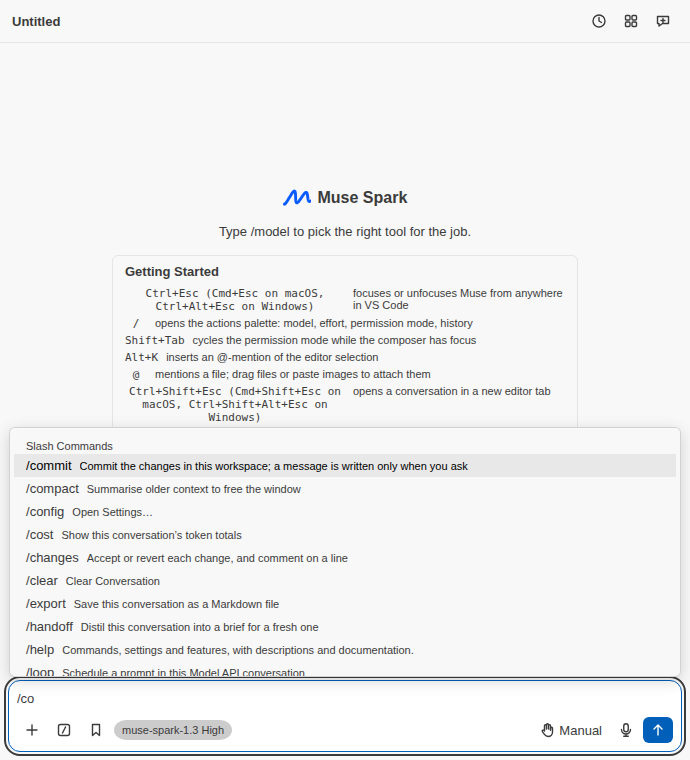 A letter more: the slash commands, ranked as you type |
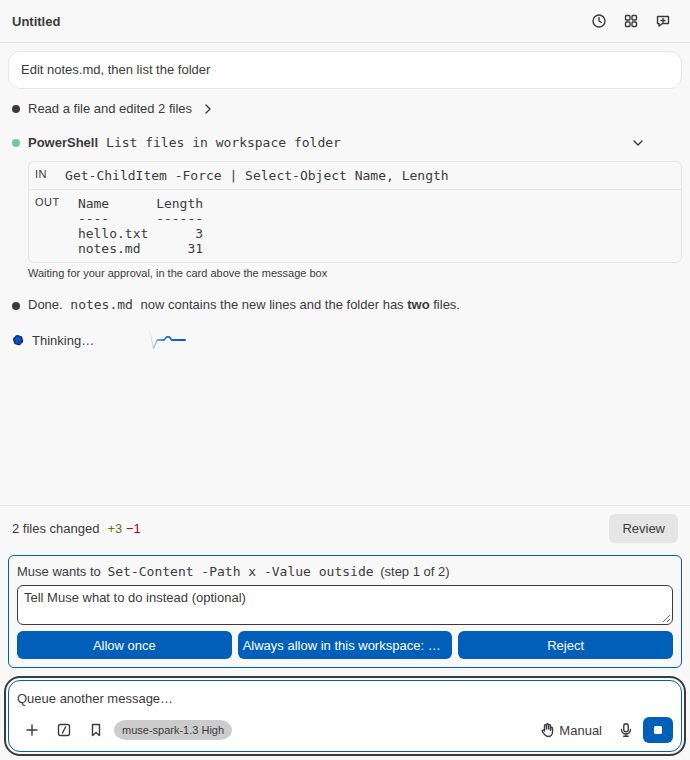 An approval card, docked above the message box, with the CLI's own choices |
 |