



What's inside
| Page | What it does |
|---|---|
 |
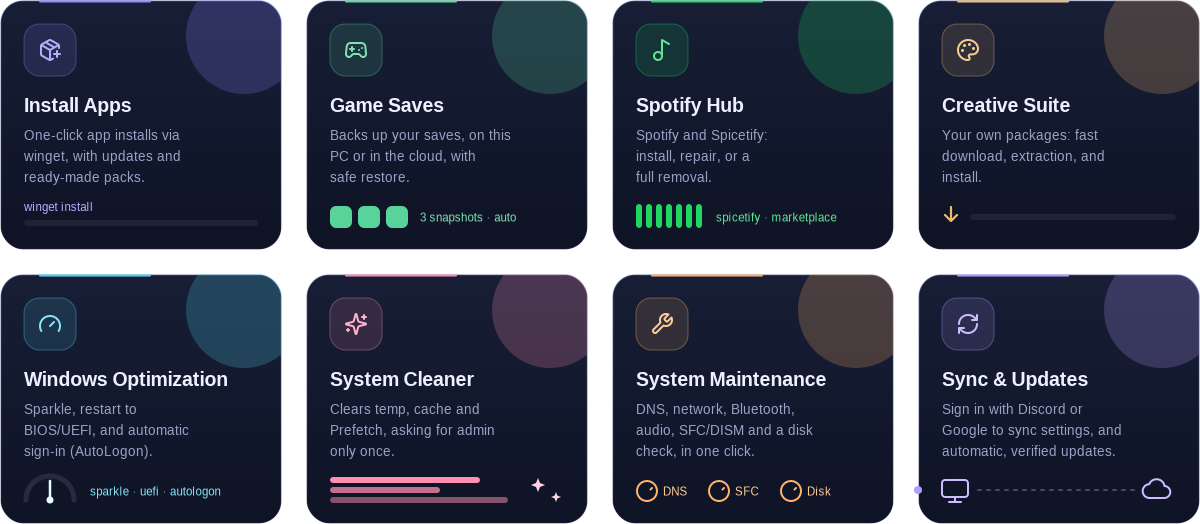
An app store on top of winget: install, update and keep track of your programs, with your own list and app packs |
 |
Your own creative packages (Adobe, Clip Studio Paint, Office…): download, unpack and run the setup in one click |
 |
Customize Spotify with Spicetify and a theme, or put it back to stock; Purge removes the leftovers |
 |
Finds your game saves and backs them up (three snapshots each), restores them with a safety copy, and can back up daily or weekly by itself |
 |
Zips your project folders into Google Drive or Dropbox, checked twice before they are kept, with a diff between any two backups |
 |
Commit, build and release your own projects to GitHub — version files, notes, tag, upload, or the tag's Actions workflow |
 |
Bloat removal and tuning in profiles (Light, Recommended, Maximum), with a full undo and a restore point |
 |
Finds and removes the files Windows leaves behind, and reports honestly what is in use |
 |
Windows diagnostics and repairs, one at a time, with their output on screen |
 |
Shows what is filling a drive — as a treemap, a folder tree, the largest files and file types — and moves what you pick to the Recycle Bin. Also makes cloud files online-only |
 |
Repeats clicks at an interval, or runs a sequence of recorded points, with F6 to start and stop |
 |
An end-to-end encrypted vault for your logins and 2FA codes, with Windows Hello, passkeys and browser filling |
 |
Your account and sync, the appearance, start-up and the tray, and updates |


Install

Install for your own account — no administrator rights. If the WebView2 Runtime is missing, the setup installs it from Microsoft. Your settings and data are kept across every update.
How it works
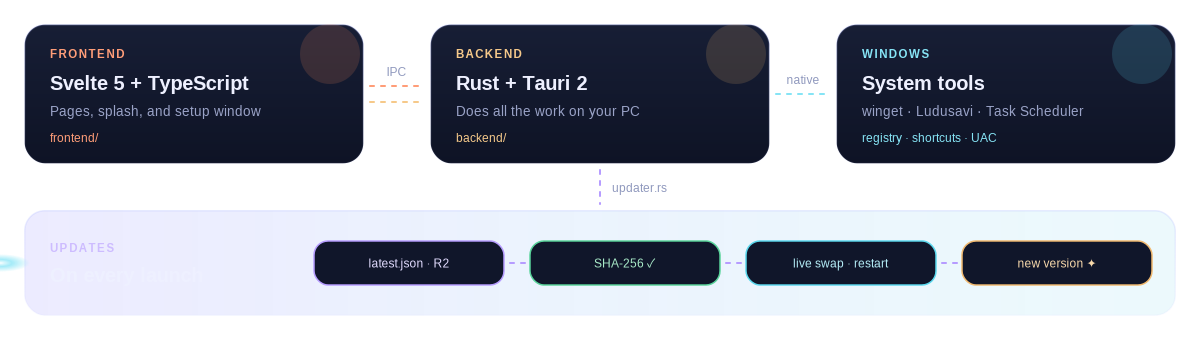
- One window, thirteen pages. Svelte 5 in front, Rust and Tauri behind, on the WebView2 runtime Windows already has.
- Your data stays yours. Everything that matters is written to your own profile: no account is needed, and the parts that can sync are end-to-end encrypted (the Password Manager's vault never leaves a PC unsealed).
- Nothing needs administrator rights until it truly does, and then it is one prompt, through the same program.
- Updates are verified. The app checks its feed, downloads the installer, and installs it only if its SHA-256 matches. If the update fails, it falls back to the setup's own window.
For developers
npm install
npm run dev      # the app, with hot reload
npm run build    # installer → backend/target/release/bundle/setup/MYLE.exe
npm run check    # svelte-check, TypeScript and the site check
npm test         # Rust tests (workspace), then the script tests
npm run lint     # cargo clippy -D warnings
You'll need Node.js 20+, Rust (stable, MSVC) and the Visual Studio 2022 Build Tools with the C++ workload, on Windows 10 or 11.
The flow of the app, the structure of the repository, every page's internals, the updater, the release workflow and the setup are all in the development guide.

License
A proprietary project by ThomasThanos. You're free to use the official, unmodified builds for personal use. Copying, modifying, or redistributing the code needs written permission.