
nodeterm
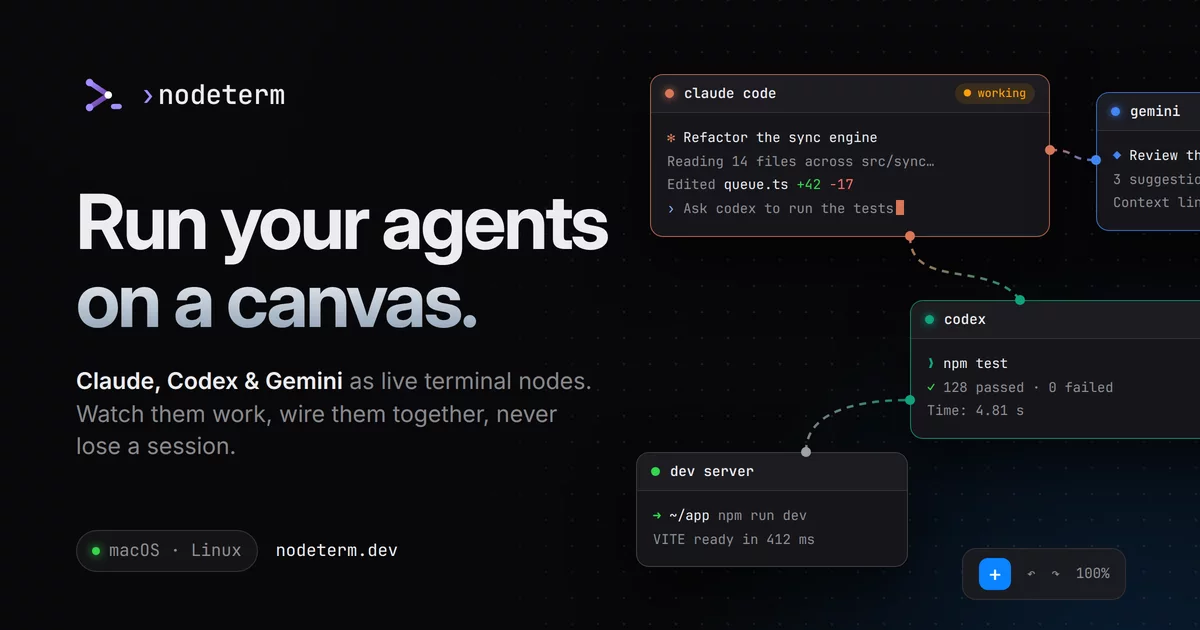
A node-based terminal manager — your terminals and agents on an infinite canvas.
Multiple real terminals live as draggable nodes on a single pan/zoom canvas, and every project doubles as a Trello-style board of live Claude Code sessions. Built for people with ADHD and scattered workflows: a spatial layout instead of a stack of hidden tabs.
%20·%20Linux%20(x64)%20·%20Windows%20(x64%2C%20beta)-black)




Download · Docs · Features · Build from source · Architecture · Sponsor · License

Why nodeterm
Stacked terminal tabs hide context — you lose track of what's running where. nodeterm turns that into a map: every shell is a node you can place, group, label, and zoom into. Sessions are spatial and persistent, so your mental model stays intact across restarts. And because the app is built around a clean service seam, the same canvas runs three ways — as the desktop app for macOS, Linux and Windows (beta), as a self-hosted browser app you reach from anywhere (Server Edition), and an iOS companion that attaches to the same live sessions.
📚 Full documentation lives at nodeterm.dev/docs — get started, concepts, agents, remote access, troubleshooting.
✨ Features


Everything is a nodeRight-click the canvas to open a terminal — or an AI agent. Each runs in its own persistent tmux session, next to sticky notes (link one to feed an agent context), Monaco editors, diff views, and web/video nodes — arranged spatially, like a map. Quit the app, even restart the machine — every session comes back. |
 |

Know when an agent needs youHook-driven status — no output scraping: pulsing RUNNING / NEEDS YOU badges, subagent cards with live transcripts, a per-node context meter, and OS notifications. Click the ping, answer the permission prompt right in the node, and get told the moment the turn is done. On a MacBook, agents live in the notch too. |
 |
One project, two viewsEvery project is a canvas — and also a kanban board. Cards are your live
sessions: drag them across columns while the agent keeps running, open a card into a
live card modal (the real session + members, due date, priority, comments), and
assign teammates. Toggle with |
 |
Your sessions, anywherePair your phone with one QR — scan with the nodeterm iOS app — and the same live session continues in your pocket, E2E encrypted over the relay, not just your LAN. The same canvas also runs self-hosted in any browser (Server Edition). |
 |

Talk to your terminalHold |
 |
Node kinds
🖥 Terminal (xterm + tmux, AI naming) · 🤖 Agent (Claude Code / Codex / Antigravity / Gemini / GitHub Copilot / opencode / Grok / Cursor / custom) · 📝 Sticky note (link to an agent as context) · 🗂 Group (bind to a git worktree for agent-per-branch) · ✏️ Editor (Monaco, ⌘S) · 🔀 Diff · 🌐 Web / Video
More
- Session continuity (tmux) — terminals keep running across node remounts and full
app restarts, including live processes; machine reboots restore scrollback and resume
agent sessions (
claude --resume). The macOS app ships its own tmux, so this works with nothing installed; a tmux already on your system is always used in preference to it, and terminals opened before an upgrade stay as they were until you refresh the node. - Agent superpowers — context links so agent nodes read each other's transcripts on demand; Claude-only branch a conversation and managed accounts for several logged-in Claude identities side by side; agents can drive the canvas (open nodes, spawn teams, verify each other's work) via the built-in canvas-control CLI.
- Remote / SSH projects — open a project on a remote host over SSH; terminals, files, git, and even the board run there while the canvas stays local.
- Source control — VS Code-style stage/unstage, discard, branch switch/create,
commit, push/sync/publish, worktrees, and
ghsign-in — backed by systemgit. - GitHub Issues on Kanban – opt-in issue cards, exact label-to-column mapping, All / GitHub / Sessions filtering, and two-way move, close, and reopen sync. See setup and security details.
- AI commit messages & terminal names — bring-your-own local agent CLI run read-only on the staged diff or captured output.
- Your sessions, in your pocket — nodeterm mobile (iOS) attaches to the same live tmux sessions: watch an agent work, answer a "needs you", or type into any terminal from your phone — plus push notifications and a mobile board view.
- Power & sleep — while an agent is working, nodeterm keeps the machine from idle-sleeping, and lets go the moment it finishes (on by default; toggle in the setup tour or Settings → Behavior). It lets the machine sleep anyway on battery below 5% or when the machine runs critically hot. No app can hold a machine awake through a closed lid (a Mac with the lid closed stays awake only while plugged in with an external display) — for overnight runs keep the laptop open and plugged in, or run the agents on a box that doesn't sleep via the Server Edition.
- Command palette (⌘K), file explorer (⌘⇧E), markdown view (⌘M), undo/redo, and a native macOS dark UI.
- Auto-update & in-app announcements — the app checks a self-hosted feed and surfaces a "Restart to update" banner and product news.
🌍 Server Edition — nodeterm in your browser
The same canvas runs headless on a Linux (or macOS) host and is used from any browser — so your terminals, editors, source control, board, and agents live on a server you reach from anywhere. Single-user auth (password + secure cookie), a WebSocket bridge, and the exact same renderer as the desktop app.
npm run server:dev # build + serve; open http://127.0.0.1:8443 and set a password
Terminals, files/editor/diff, the full git panel, the kanban board, and agent-status
badges all work in the browser today. See docs/SERVER.md for the
quickstart, security model, and current limitations.
🔔 Get push notifications from any SSH host
The same server also runs headless as a background notification host: install it on any Linux box you SSH into, and your phone gets RUNNING / NEEDS YOU push + Live-Activity coverage for the agents running there — with zero open ports (the hook server stays loopback-only and push goes out over HTTPS under a grant your phone drops over SSH).
curl -fsSL https://raw.githubusercontent.com/eneskirca/nodeterm/main/scripts/install-server.sh | bash
One line installs, builds, and runs it as a systemd service (NODETERM_HEADLESS=1); re-run it
to update. See the headless notification host
section for details.
📦 Download
Grab the latest build from nodeterm.dev — the download button detects your platform. Everything is also listed at nodeterm.dev/releases:
-
macOS —
.dmgfor Apple Silicon and Intel (auto-updates), or Homebrew:brew install --cask nodetermThe cask is in the official
homebrew/cask, so no tap is needed. The app updates itself (electron-updater), sobrew upgradeis rarely needed for it. If you installed from the oldnodeterm/tap, you can drop it withbrew untap nodeterm/tap: the short namenodetermalready resolves to the official cask. -
Linux (x64) — self-updating AppImage, a
.debfor Debian/Ubuntu (sudo apt install ./node-terminal_*.deb), or an.rpmfor Fedora/RHEL (sudo dnf install ./node-terminal-*.rpm). Updates are manual for both packages: the app tells you when a new version is out and links the download. The AppImage needs FUSE 2, which Fedora does not install by default:sudo dnf install fuse-libsif it exits with alibfuse.so.2error. -
Windows (x64) — beta —
nodeterm-Setup-<version>.exe(per-user installer) or a portable-win.zip. Early support, so know what you are getting: the installer is unsigned (SmartScreen will ask — More info → Run anyway), updates are manual for now (the app tells you when a new version is out and links the download), and session continuity across restarts is still landing — Windows has no tmux, so the standalone session host that replaces it is being packaged in #579. Everything else — canvas, agents, kanban, hooks — is the same app. Please report what breaks. -
iOS — nodeterm mobile on the App Store.
Trying it out? Removal is one script — it stops every process nodeterm started, reverts
the status-hook/skill entries it merged into your agent CLIs' config (your own hooks and
credentials are never touched), and deletes all of nodeterm's own state. Run it with
--dry-run first to see the full list of what it found:
curl -fsSL https://raw.githubusercontent.com/eneskirca/nodeterm/main/scripts/uninstall.sh | bash -s -- --dry-run
curl -fsSL https://raw.githubusercontent.com/eneskirca/nodeterm/main/scripts/uninstall.sh | bash -s -- --yes
The full inventory of what nodeterm writes where (and what the script keeps, like the
.nodeterm/ canvas folders inside your own repos) is documented in
docs/uninstall.md.
Sponsor
nodeterm is an indie project, built with Claude across several Claude accounts — about $2,000 a month to keep running. There are 10 Founding Sponsor spots at $200/month: your logo goes in this grid and on nodeterm.dev, and your feature requests go first.
0 of 10 spots taken · Become a Founding Sponsor →
 |
|
|
|
|
|
|
|
|
|
Prefer a smaller amount, need an invoice, or want a different arrangement? Write to support@nodeterm.dev — and a ⭐ helps too.
🛠 Build from source
Requires Node.js 20+ on macOS or Linux (tmux recommended — it's what makes sessions
survive restarts). A source checkout does not carry the bundled tmux: run
node scripts/build-tmux.mjs once on macOS to build it into resources/bin/tmux (the
release job does this automatically), or just install tmux yourself. On Windows, run
bootstrap-windows.bat from a fresh checkout first — it checks for Node, the Visual Studio
C++ build tools and Python 3 (needed to compile node-pty) and points you at the exact
winget commands for anything missing, then runs npm ci.
On Fedora (and any distro shipping GCC 14 or newer), export CFLAGS=-D_GNU_SOURCE for the
install: smart-whisper's bundled whisper.cpp uses GNU-only CPU-affinity calls without asking for
them, and GCC 14 turned that from a warning into an error, so a plain npm install fails while
building it. Packaging additionally wants rpm-build (for the .rpm target) and
libxcrypt-compat (electron-builder's bundled fpm runs a Ruby that still links
libcrypt.so.1, without which both .deb and .rpm fail):
sudo dnf install -y rpm-build libxcrypt-compat
CFLAGS=-D_GNU_SOURCE npm install
npm install        # deps + rebuilds node-pty against Electron's ABI (postinstall)
npm run dev        # dev mode with renderer HMR
npm run build      # production build into out/
npm start          # preview the production build
npm run typecheck  # fastest correctness gate
npm test           # vitest unit + integration suite
npm run dist       # local UNSIGNED .dmg into dist/ (smoke test)
npm run dist:linux # AppImage + .deb + .rpm into dist/ (on a Linux host; .rpm needs rpmbuild)
npm run dist:win   # unsigned NSIS installer + zip into dist/ (on a Windows host)
npm run server:dev # build + run the browser Server Edition (needs Node 22 + tmux)
⌨️ Keyboard shortcuts
These are the defaults — every one of them is remappable in Settings → Keyboard Shortcuts.
| Shortcut | Action |
|---|---|
⌘K |
Command palette |
⌘T / ⌘⇧C |
New terminal / New Claude Code |
⌘⇧B |
Toggle t |