

Obsidian Safe & Secure Messaging
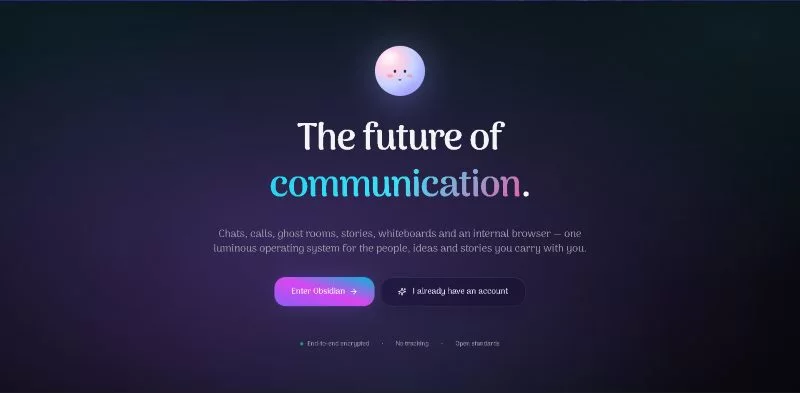
The Future of Communication.
Obsidian Safe & Secure is a futuristic messaging and communication OS — real-time chats, stories, voice & video calls, ghost rooms, communities, a collaborative whiteboard and an encrypted vault, all wrapped in a luminous glassmorphic interface and backed by Supabase + LiveKit.
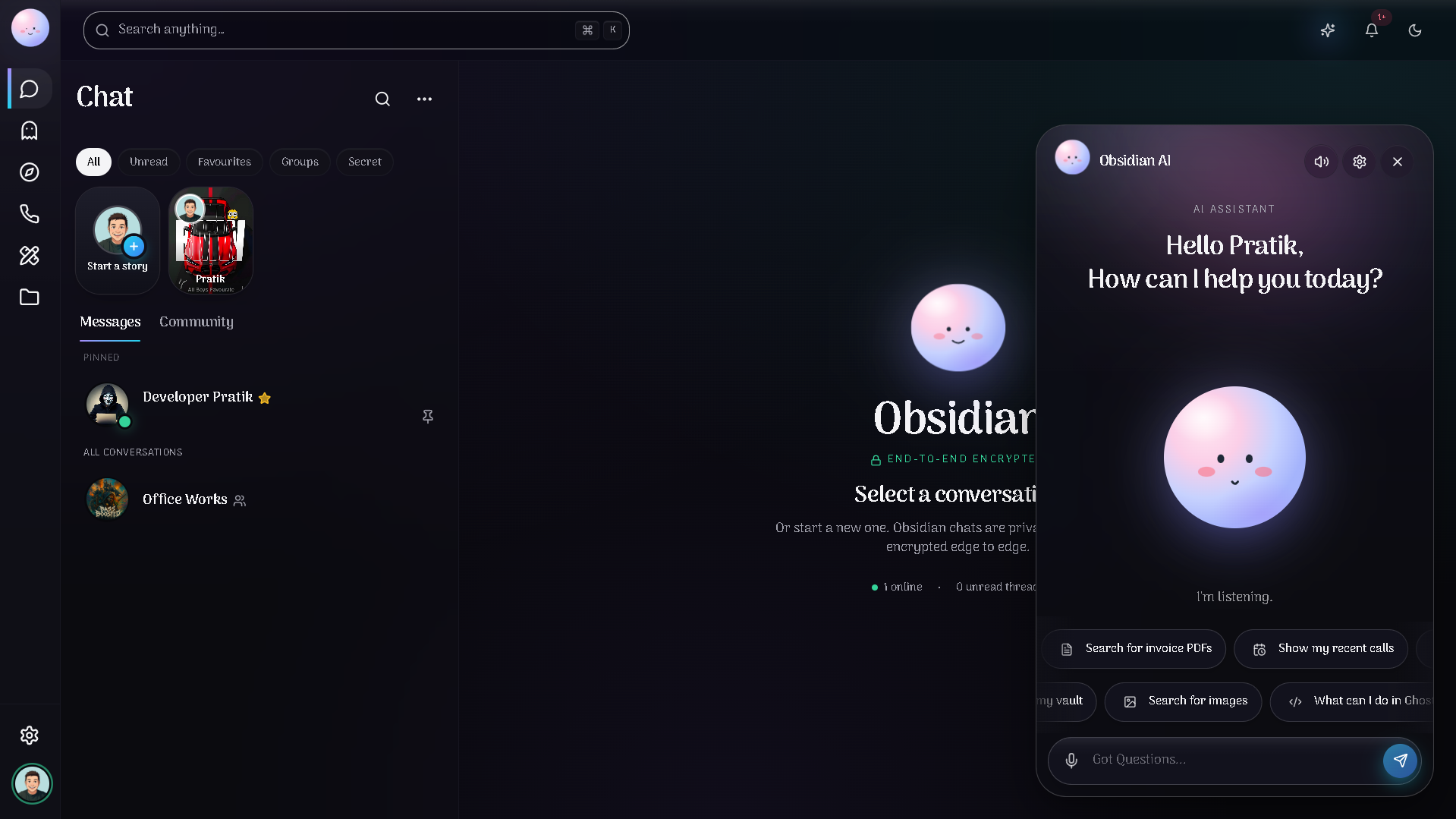


Think Telegram × Discord × Instagram × WhatsApp × Linear × Arc — distilled into a single secure, animated OS for messages, calls, ghost rooms, stories, files and whiteboards. Built with a real-time Supabase backend and a LiveKit-powered call stack.
Complete documentation: Browse the architecture, codebase, and implementation guides on DeepWiki.


Table of contents
- Overview
- Features
- Architecture
- Tech stack
- Docker quick start
- Getting started from source
- Supabase setup
- LiveKit setup
- Environment variables
- Scripts
- Project structure
- Realtime channels
- Internationalization
- Keyboard shortcuts
- Notes & caveats
Overview
Obsidian is a premium, production-grade communication platform built on Next.js 16 (App Router) with React 19. Every surface is fully wired end-to-end to a Supabase backend (Postgres + Auth + Realtime + Storage + pg_cron) and a LiveKit Cloud call stack — chats, stories, presence, typing, reactions, calls, scheduled messages, blocked users and storage all persist and sync across devices in real time.
The product ships with a theme engine (dark / light / system + accent colors + glass intensity), 9-language internationalization with RTL, a command palette, a native AI assistant also named Obsidian, route-level skeleton loaders, and motion polish on every interaction.
Features
💬 Chats — full-stack real-time
- DMs, groups, channels, and secret chats, with member add/remove dialogs and "Block contact" / "Clear chat" / "Export chat" actions.
- Rich messages: text, voice notes with live waveform, images & videos, stickers, GIFs (Klipy), memes, polls (with image + voter avatars + slim progress bars), files (PDFs render inline), contacts, location, and scheduled messages (clock-only tick on the author side until pg_cron flips them to "sent" at the scheduled time).
- Realtime sync: messages, reactions, pins, edits and deletes propagate over a per-user Postgres-changes channel with
REPLICA IDENTITY FULLso DELETE events carry full row context. - Presence: online/offline with
last_seen_atupdates on disconnect. - Typing: dedicated Supabase Realtime broadcast channel — instant
typing…on first keystroke, auto-clears 1.2s after the last keystroke (or instantly on blur / send / chat switch / disconnect via a recipient-side 2.5s heartbeat fallback). - Reactions / pin / reply / multi-select / forward, per-chat shared theme (both participants see the same wallpaper).
- Delete for me (per-user soft-hide via
message_hidden_for) vs Delete for everyone (hard DELETE, recipient sees it disappear live). - Unread badges computed from
last_read_atvia a singleget_unread_counts()RPC. - Status line shows
typing…⇆online⇆last seen at HH:mm.
👻 Ghost Rooms
- Anonymous, ephemeral spaces — Trending / New / My / Joined tabs.
- PIN-protected private rooms, share-by-PIN flow, capacity enforcement, auto-expiry.
📞 Calls — LiveKit-powered
- Voice + video with a real LiveKit Cloud backend (
/api/livekit/tokenmints 6-hour access tokens scoped to the room). - Ghost call (no-identity ring), Schedule flow that lands as a call-invite bubble in chat.
- Active-call grid with mute / camera / share / hangup, screen-share, recent-calls log (all / missed / dialed / rejected), upcoming list, and a floating mini-call dock that follows you around the app.
- Graceful mock fallback when LiveKit env vars aren't set — the call UI still renders a placeholder grid so the surface is browsable without provisioning.
📸 Stories — Instagram-grade
- Editor: Media (background + overlays, camera & upload, stock backgrounds, gradients), Text (full font stack, color + EyeDropper, bg, alignment, bold), Stickers / Emoji / GIF / Meme picker, Draw (brush + eyedropper), Music (live iTunes search with trending defaults, four sticker variants including a spinning vinyl, 30-second autoplay preview), Filters, and a draggable layers panel + one-tap PNG download.
- Story rings everywhere — chat list, header, profile panel, sidebar, profile page — with rotating gradient (active) / dim (seen) and a WhatsApp-style "View story / View profile photo" prompt.
- Viewer: swipes across people, progress bars, 30s music slides, live animated GIF overlays + spinning music sticker (kept out of the baked PNG so they truly animate), tap-zone navigation, like with flying-heart animation, reply (lands as a DM with a small story thumbnail next to the text), your-story viewers + likers lists with realtime counts (subscribes to
story_views+story_likesfor the visible slide). - Persistence: composed PNG uploaded to a public
chat-attachmentsStorage bucket; music + overlay payload stored instories.metadataJSONB. - 24-hour expiry via pg_cron (
*/5 * * * *runsDELETE FROM stories WHERE expires_at <= NOW()). - Upload progress bar in the chat-list header — instant editor close on Share.
🧭 Discover & Communities
- Community cards with AI-assisted search, filters (all / joined / trending / mine).
- Create-community flow, community detail view with posts, polls, songs, mentions and reactions.
🎨 Whiteboard
- Collaborative canvas with sticky notes, shapes, arrow connectors (connect + disconnect), drag-to-arrange, access / share controls.
🔒 Vault (Files)
- Encrypted folders, lock / unlock with a vault password, starring, grid / list views, drag-and-drop upload, storage meter, file preview, password-gated delete for locked items.
🙋 Profile & ⚙️ Settings
- Profile with banner, story-ringed avatar, stats, bio, links, tabs.
- Settings: Appearance (theme / accent / font / glass intensity / reduce motion / default chat theme), Notifications, Privacy, Security, Devices, Storage, AI, Language.
✨ Across the app
- Command palette (
⌘ / Ctrl + K). - Obsidian AI assistant dock (
⌘ / Ctrl + J) — the in-app AI companion shares the product's name. - Notification center, global search, route-level skeleton loaders.
- Animated aurora theme, glass surfaces, self-hosted
next/font+ bundled Noto Color Emoji, global reduce-motion toggle.
Architecture
Obsidian connects authentication, real-time messaging, social spaces, collaboration tools, and external services through a unified application shell.
Explore the complete system architecture
flowchart TD

subgraph group_entry["App entry"]
  node_auth["Auth flows<br/>[page.tsx]"]
  node_shell["App shell<br/>[app-shell.tsx]"]
  node_authlistener["Auth listener<br/>[auth-listener.tsx]"]
  node_settings["Profile and settings<br/>[page.tsx]"]
end

subgraph group_messaging["Messaging"]
  node_chatui["Chats and stories<br/>[chat-thread.tsx]"]
end

subgraph group_social["Social spaces"]
  node_communities["Communities<br/>[community-post.tsx]"]
  node_ghost["Ghost rooms<br/>[ghost-chat.tsx]"]
end

subgraph group_collaboration["Calls and tools"]
  node_calls["Calls<br/>[livekit-stage.tsx]"]
  node_callapi["Call APIs<br/>[route.ts]"]
  node_whiteboard["Whiteboard<br/>[board-canvas.tsx]"]
  node_vault["Encrypted vault<br/>[use-vault-store.ts]"]
  node_ai["AI assistant<br/>[ai-assistant.tsx]"]
  node_aichatapi["AI chat API<br/>[route.ts]"]
end

subgraph group_platform["State and services"]
  node_authstate["Auth state<br/>[use-auth-store.ts]"]
  node_chatstate["Chat state<br/>[use-chat-store.ts]"]
  node_callstate["Call state<br/>[use-call-store.ts]"]
  node_settingsstate["Settings state"]
  node_supabaseclient["Supabase client<br/>[client.ts]"]
  node_supabaseserver["Supabase server client<br/>[server.ts]"]
  node_supabase[("Supabase services")]
  node_livekit["LiveKit Cloud"]
  node_klipy["Klipy"]
end

node_user(("User"))

node_user -->|"signs in"| node_auth
node_auth -->|"authenticates"| node_supabaseserver
node_supabaseserver -->|"connects to"| node_supabase
node_authlistener -->|"updates session"| node_authstate
node_user -.->|"uses app"| node_shell
node_shell -.->|"opens conversations"| node_chatui
node_chatui -->|"reads and updates"| node_chatstate
node_chatstate -->|"syncs data"| node_supabaseclient
node_supabaseclient -.->|"realtime and storage"| node_supabase
node_chatui -.->|"loads GIFs"| node_klipy
node_user -.->|"discovers and posts"| node_communities
node_user -.->|"joins rooms"| node_ghost
node_user -.->|"starts or joins"| node_calls
node_calls -->|"tracks sessions"| node_callstate
node_callstate -->|"reads call data"| node_supabaseclient
node_calls -.->|"requests token"| node_callapi
node_callapi -->|"checks session"| node_supabaseserver
node_callapi -.->|"mints access token"| node_livekit
node_user -.->|"collaborates"| node_whiteboard
node_whiteboard -.->|"persists board"| node_supabaseclient
node_user -.->|"manages files"| node_vault
node_vault -->|"stores files"| node_supabaseclient
node_user -.->|"asks assistant"| node_ai
node_ai -.->|"sends prompts"| node_aichatapi
node_aichatapi -.->|"uses backend"| node_supabaseserver
node_user -.->|"configures account"| node_settings
node_settings -->|"updates preferences"| node_settingsstate
node_settingsstate -.->|"persists preferences"| node_supabaseclient

classDef toneNeutral fill:#f8fafc,stroke:#334155,stroke-width:1.5px,color:#0f172a
classDef toneBlue fill:#dbeafe,stroke:#2563eb,stroke-width:1.5px,color:#172554
classDef toneAmber fill:#fef3c7,stroke:#d97706,stroke-width:1.5px,color:#78350f
classDef toneMint fill:#dcfce7,stroke:#16a34a,stroke-width:1.5px,color:#14532d
classDef toneRose fill:#ffe4e6,stroke:#e11d48,stroke-width:1.5px,color:#881337
classDef toneIndigo fill:#e0e7ff,stroke:#4f46e5,stroke-width:1.5px,color:#312e81
classDef toneTeal fill:#ccfbf1,stroke:#0f766e,stroke-width:1.5px,color:#134e4a

class node_auth,node_shell,node_authlistener,node_settings,node_user toneBlue
class node_chatui toneAmber
class node_communities,node_ghost toneMint
class node_calls,node_callapi,node_whiteboard,node_vault,node_ai,node_aichatapi toneRose
class node_authstate,node_chatstate,node_callstate,node_settingsstate,node_supabaseclient,node_supabaseserver,node_supabase,node_livekit,node_klipy toneIndigo
Runtime topology
┌────────────────────────────────────────────────────────────────────────┐
│  Browser (Next.js 16 App Router, React 19)                             │
│  ┌───────────────┐  ┌──────────────────┐  ┌────────────────┐           │
│  │ Zustand store │  │ Realtime client  │  │ LiveKit client │           │
│  │ chat / story  │◀▶│ presence / msgs  │  │ /components-   │           │
│  │ auth / theme  │  │ typing / stories │  │   react        │           │
│  └───────┬───────┘  └────────┬─────────┘  └────────┬───────┘           │
└──────────┼───────────────────┼─────────────────────┼───────────────────┘
           │                   │                     │
           ▼                   ▼                     ▼
   ┌────────────────────────────────────┐   ┌─────────────────┐
   │  Supabase                          │   │  LiveKit Cloud  │
   │  • Postgres (RLS-secured)          │   │  • SFU          │
   │  • Realtime (postgres_changes +    │   │  • Recording    │
   │    presence + broadcast)           │   └─────────────────┘
   │  • Storage (chat-attachments)      │            ▲
   │  • pg_cron (scheduled msgs,        │            │
   │    24h story expiry)               │   ┌────────┴────────┐
   │  • Auth (email / OAuth)            │   │ /api/livekit/   │
   └────────────────────────────────────┘   │ token (server)  │
                                            └─────────────────┘
Key design choices:
- Optimistic UI +
client_iddedupe. Sends append to local state instantly; the realtime echo replaces the temp row byclient_idso there's never a flash of duplication. - Typing on broadcast, not presence. Presence's
syncevent was unreliable for transient "stopped typing" updates. The dedicated broadcast channel + 2.5s auto-clear heartbeat is bulletproof. - REPLICA IDENTITY FULL on
messages,chats,chat_members,storiesso realtime DELETE events carry enough context to route on the recipient side. - One-shot SQL bundle (
supabase/APPLY_PENDING.sql) — every section isIF NOT EXISTS/OR REPLACE/ON CONFLICT, so applying twice is a no-op.
Tech stack
- Framework: Next.js 16 (App Router), React 19, TypeScript 5
- Styling: Tailwind CSS 3.4, custom design tokens & glass utilities,
next-themes - Motion: Framer Motion 11
- UI primitives: Radix UI wrapped shadcn-style,
cmdk,lucide-react - State & data: Zustand (11+ stores), TanStack Query
- Forms: React Hook Form + Zod
- Backend: Supabase (Postgres 15 + Realtime + Storage + pg_cron + RLS)
- Calls: LiveKit Cloud +
livekit-server-sdk+@livekit/components-react - External APIs: Klipy (GIFs / stickers / memes), iTunes Search (music previews), browser EyeDropper API
Docker quick start
The prebuilt image is the fastest way to run Obsidian. It includes the optimized Next.js standalone server and does not require Node.js or npm on the host.
Image: code2withpratik/obsidian-safe-and-secure:latest


Tip
Recommended path: Pull the published image for the quickest setup. Build from source only when you need to replace the public Supabase, LiveKit, or site configuration embedded in the browser bundle.
1. Install Docker 🐳
Install Docker Desktop on Windows or macOS, or Docker Engine on Linux. Confirm that it is running:
docker --version
2. Pull the image 📦
docker pull code2withpratik/obsidian-safe-and-secure:latest
3. Configure the environment ⚙️
Create a .env.local file and add the credentials for the services you use. Start from .env.example when the repository is available:
# Supabase — required for authentication and persisted application data
NEXT_PUBLIC_SUPABASE_URL=https://<project-ref>.supabase.co
NEXT_PUBLIC_SUPABASE_PUBLISHABLE_KEY=<publishable-key>
SUPABASE_SECRET_KEY=<server-side-secret-key>
NEXT_PUBLIC_SITE_URL=http://localhost:3000

# LiveKit — optional; required for real voice and video calls
LIVEKIT_URL=wss://<project>.livekit.cloud
LIVEKIT_API_KEY=<api-key>
LIVEKIT_API_SECRET=<api-secret>
NEXT_PUBLIC_LIVEKIT_URL=wss://<project>.livekit.cloud

# Optional integrations
KLIPY_API_KEY=
GEMINI_API_KEY=
NEXT_PUBLIC_AI_MODEL=gemini-2.5-flash-lite
ELEVENLABS_API_KEY=
ELEVENLABS_VOICE_ID=21m00Tcm4TlvDq8ikWAM
ELEVENLABS_MODEL_ID=eleven_turbo_v2_5
Important
Variables prefixed with
NEXT_PUBLIC_are browser-visible and are embedded into the application at build time. They must contain only public service configuration.
Warning
Never commit
.env.localor expose server-side keys. KeepSUPABASE_SECRET_KEY,LIVEKIT_API_SECRET,GEMINI_API_KEY, andELEVENLABS_API_KEYprivate.
4. Start the container 🚀
The following command works in PowerShell, Command Prompt, Bash, and other standard shells:
docker run -d --name obsidian --restart unless-stopped --env-file .env.local -p 3000:3000 code2withpratik/obsidian-safe-and-secure:latest
5. Verify the deployment ✅
Open http://localhost:3000, then confirm that the container is healthy:
docker ps --filter "name=obsidian"
docker logs -f obsidian
Tip
If the page is not available immediately, follow the logs for startup or environment errors with
docker logs -f obsidian.
Container lifecycle commands
Use these commands to manage the existing container without recreating it:
docker stop obsidian
docker start obsidian
Advanced: use your own public service configuration
Next.js embeds NEXT_PUBLIC_* variables into the browser bundle at image-build time. The published image therefore uses the public configuration with which it was released. To connect the client to a different Supabase, LiveKit, or public site URL, clone the repository and build your own image:
docker build --build-arg NEXT_PUBLIC_SUPABASE_URL="https://<project-ref>.supabase.co" --build-arg NEXT_PUBLIC_SUPABASE_PUBLISHABLE_KEY="<publishable-key>" --build-arg NEXT_PUBLIC_SITE_URL="htt