
One Design for Claude (MCP)
Every one.design tool that can run outside a browser, for Claude and any app that speaks MCP. Everything runs on your own computer: your files are read and saved locally and never uploaded.
Setup guide, examples and questions: https://one.design/mcp
The few tools that run an AI model in the browser (Cutout, Blur Faces, Magic Eraser, Brand Guidelines) open on one.design instead, where they also run on your device.
Tools
Optimise
| Tool | Plan | What it does |
|---|---|---|
compress_images |
Free | Smaller images, by quality or to a size (e.g. under 500 KB) |
resize_images |
Free | To a width, height, both or a percent: fit inside, fill and crop, or pad |
convert_images |
Free | To WebP, JPEG, PNG or AVIF, including iPhone HEIC photos |
fit_fill |
Free | The whole picture on a set canvas, with a blurred or colour fill |
rename_files |
Free | Rename a set with a pattern: {name}, {n}, {date}, {w}x{h} |
slim_svg |
Free | Smaller SVGs, with a render check |
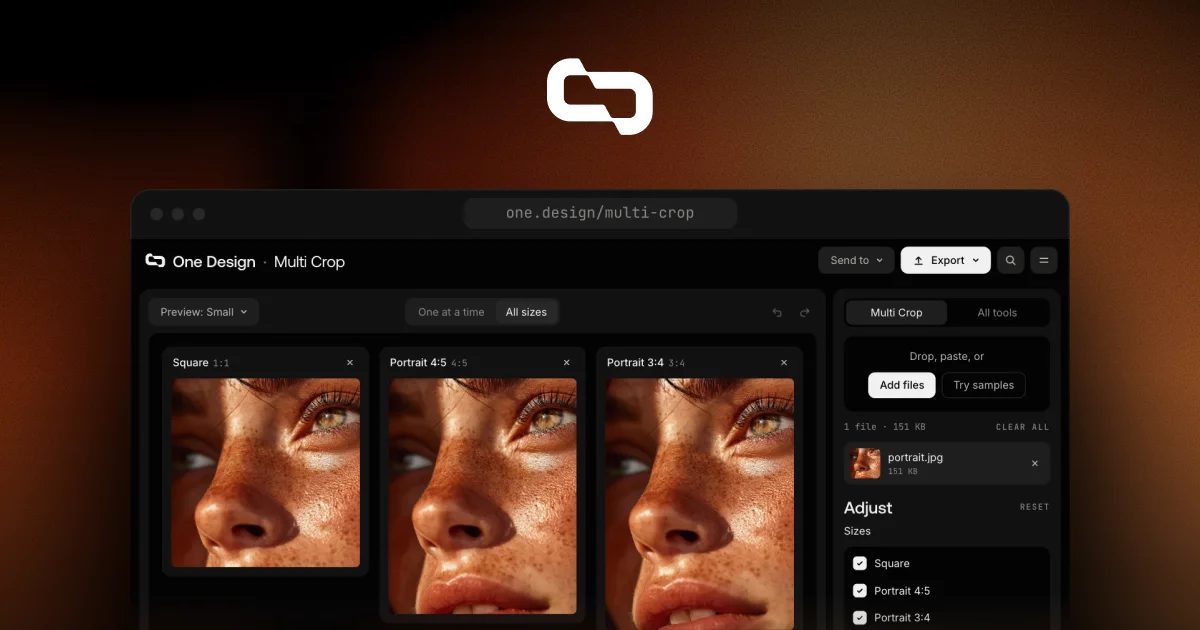
multi_crop |
Pro | Several crops and sizes from each image at once |
grid_slide |
Pro | Profile grids in posting order, and carousel slides |
make_web_image_set |
Pro | Responsive widths and formats plus the srcset snippet |
make_listing_photos |
Pro | Product photos framed for Amazon, Etsy, eBay, Shopify… |
make_campaign_kit |
Pro | One creative as a matched set of social, web and ad sizes |
Privacy
| Tool | Plan | What it does |
|---|---|---|
clean_metadata |
Free | Removes GPS, camera, dates, XMP, IPTC and AI labels without touching the pixels |
redact_images |
Free | Covers parts of screenshots: solid, blur or pixelate; same boxes across a set |
lock_link |
Free | Any link behind a password (AES-256, nothing stored on a server) |
Brand
| Tool | Plan | What it does |
|---|---|---|
make_qr_code |
Free (1 at a time) / Pro (batches) | QR codes in your colours, PNG or SVG |
watermark_images |
Free | Text or logo, in a corner or tiled |
extract_palette |
Free | The colours in an image, with swatches |
make_icon_pack |
Free | Favicons, app icons, a web manifest and the HTML |
make_stamps |
Free | Postage stamps, rubber stamps and seals |
make_stat_shot |
Free (with a small credit) / Pro | Milestones as shareable images |
make_logo_package |
Pro | A master logo as a full delivery folder |
frame_screenshots |
Pro | Screenshots in browser, phone, tablet or laptop frames |
make_store_screenshots |
Pro | App Store and Google Play screenshots with titles |
make_bento |
Free | A bento grid of photos, text and colour tiles |
Documents
| Tool | Plan | What it does |
|---|---|---|
pdf_toolkit |
Free | Merge, split, extract, reorder, rotate, info, clean PDF metadata |
make_proof_sheet |
Pro | Images as a PDF contact sheet |
make_cards |
Pro | Spreadsheet rows into branded cards |
check_delivery |
Pro | Checks a batch against a delivery spec and says which tool fixes what |
Account and guide
| Tool | What it does |
|---|---|
plan_and_pricing |
Your plan, what Free and Pro include, and the price |
buy_pro |
Opens Stripe checkout for Pro (Lifetime) in your browser |
sign_in, verify_sign_in, sign_out |
Sign in with an emailed code to unlock Pro here |
manage_billing |
Receipts, card and invoices |
brand_library |
Your synced Brand Libraries: colours, fonts, logos (Pro) |
list_tools |
Every one.design tool, its plan and how to run it |
open_in_one_design |
Opens a tool on the site (for Cutout, Blur Faces, Magic Eraser, Brand Guidelines) |
Prompts (ready-made jobs)
blog-images, social-post, client-delivery, portfolio-piece, shop-listing,
app-store-launch, brand-kit, share-privately, website-images, milestone-post.
Resources
one-design://guide (how to get good results), one-design://presets/sizes (social, store, web,
marketplace and print sizes), one-design://tools (the full catalogue), one-design://plans.
Plans
- Free: the Free tools, 5 files per batch, 1 QR code at a time, a small credit on Stat Shot, no Brand Libraries.
- Pro: every tool, batches of 50, 50 QR codes at once, no credit, Brand Libraries. Lifetime £29.99 once (launch price, was £79.99).
Pro is bought on Stripe (buy_pro, or one.design/pricing) and unlocks here when you sign in with
the same email (sign_in). The session is kept in ~/.config/one-design/mcp-account.json.
Try asking
- "Compress everything in ~/Desktop/shoot to under 500 KB"
- "Remove the location from these photos before I post them"
- "Make App Store screenshots from these with these titles…"
- "Turn this logo into a favicon pack and a full logo package"
- "Merge these PDFs and take out page 3"
- "What's free and what's Pro?" / "Buy Pro"
Install
Needs Node.js 20 or newer.
One command (adds it to Claude Desktop, Claude Code, Codex and Cursor, wherever they're installed, and
keeps a .bak of any config it changes):
npx -y one-design-mcp setup
--dry-run shows what it would change, --app desktop|code|codex|cursor picks one app, and --remove
takes it out again. An agent with a terminal (Claude Code, Codex, Cursor) can run it for you: ask it to
"set up the One Design MCP server with npx -y one-design-mcp setup".
Claude Code
claude mcp add one-design -- npx -y one-design-mcp
Codex
codex mcp add one-design -- npx -y one-design-mcp
Claude Desktop: Settings → Developer → Edit Config, then add to claude_desktop_config.json:
{
  "mcpServers": {
    "one-design": { "command": "npx", "args": ["-y", "one-design-mcp"] }
  }
}
About this repository
This repository holds One Design MCP's documentation and its entry for the MCP Registry
(server.json). The server itself is published on npm as
one-design-mcp; npx -y one-design-mcp always runs
the latest version.
- Website and setup guide: https://one.design/mcp
- All the tools in the browser: https://one.design
- Questions and feedback: hello@one.design
© One Design. All rights reserved.