OpenShelf
Your store. Your infrastructure. Your freedom.
Open-source, single-tenant e-commerce that runs as one Cloudflare Worker with D1.

About the Deploy button. The button only works when the repository is public on GitHub. Replace
<ORG>in the button URL with your GitHub organization or username (for example your fork). Details in Quick start.
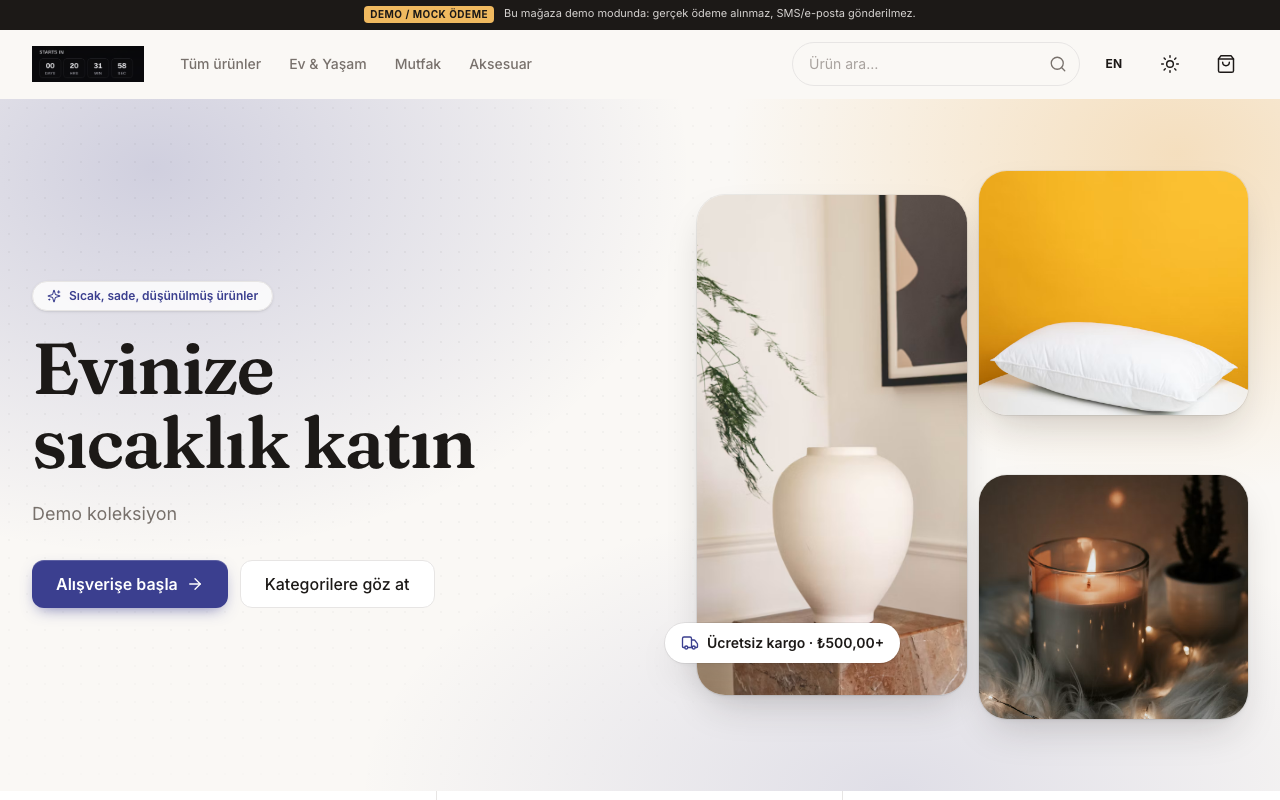
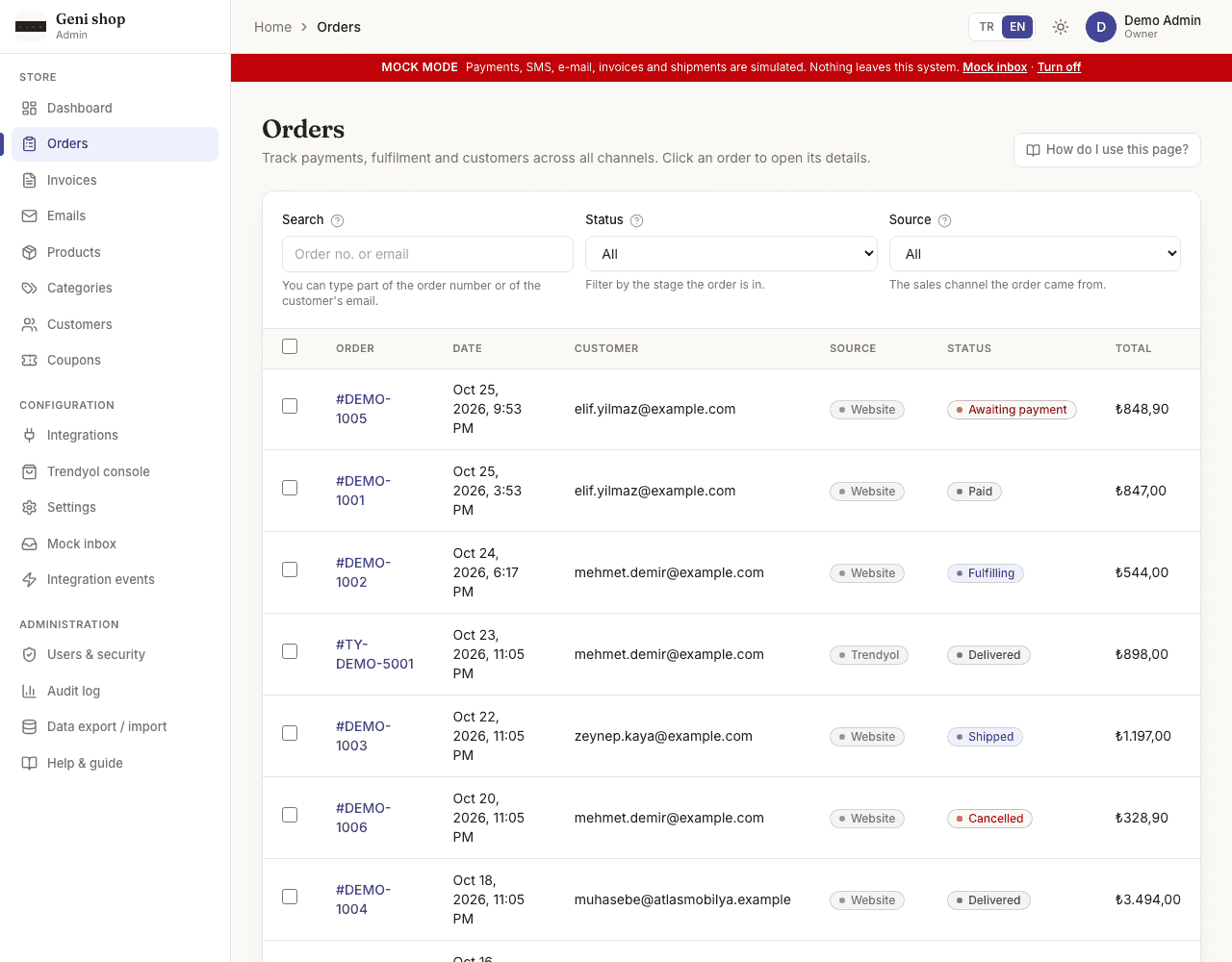
Storefront (left) and admin orders page (right), shown with demo data in Mock Mode.
What you need before you start
Only two things are required to deploy. Everything else is optional and can be added later from the admin panel.
1. Required Worker secrets (the Deploy button and pnpm run setup both ask for them):
| Name | How to create it | Purpose |
|---|---|---|
APP_ENCRYPTION_KEY |
openssl rand -base64 32 |
Encrypts integration credentials stored in D1. Keep a copy: losing it makes stored keys unreadable. |
SETUP_TOKEN |
openssl rand -hex 24 |
One-time token to create the owner account at /admin/setup. |
Also needed: a free Cloudflare account and, for the Deploy button, a public GitHub repository.
2. Integration credentials (optional, entered in Admin → Settings → Integrations, stored encrypted, never Worker secrets). Skip them to run in Mock Mode.
| Integration | You need from the vendor |
|---|---|
| iyzico (payments) | API key, Secret key, environment (sandbox or production) |
| Trendyol Marketplace | Seller (supplier) ID, API key, API secret, environment (production or stage); optional webhook username and password |
| Geliver (shipping) | API token, sender address ID |
| Trendyol e-Faturam | Service URL, username, password |
| Netgsm (SMS) | Usercode, API password, sender header |
| Twilio (SMS) | Account SID, Auth Token, From number or Messaging Service SID |
| Cloudflare Email Service | Account ID, API token, default From address |
| Google Analytics 4 | Measurement ID, Measurement Protocol API secret |
| Meta Pixel / CAPI | Pixel ID, Conversions API access token |
Where to find each key: see the integration docs. Use each vendor's sandbox first; nothing here has been verified against a live account yet.
What is OpenShelf
A small merchant can run a real storefront without handing the catalog, customers and orders to a central platform. OpenShelf deploys to your own Cloudflare account as a single Worker that serves the storefront (/), the admin panel (/admin/) and the API (/api/*, /webhooks/*, /media/*, /feeds/*). Data lives in your D1 database. One store per deployment.
Status: early development (v0.1). See Integrations for what has and has not been verified.
Features
- Catalog: products, variants, categories, media, coupons, customers.
- Inventory ledger: append-only stock movements, transactional reservations at checkout (no overselling under concurrency).
- Hosted checkout: card data never touches OpenShelf; server-side pricing; payment confirmed by verified webhook plus server-to-server re-check.
- Channels: own storefront plus Trendyol marketplace sync through the outbox, and a Trendyol API console in the admin (guide).
- Admin settings: store name, logo, banner, brand colors, SEO, legal texts, checkout rules, tracking, notifications, integrations.
- Security: PBKDF2 password hashes, optional TOTP MFA,
__Host-session cookies, CSRF + Origin checks, RBAC, audit log, AES-256-GCM encrypted integration secrets, fixed outbound host allowlists, rate limits, optional Turnstile. See docs/security.md. - Analytics: GA4 and Meta Pixel/Conversions API with consent mode and shared
event_idfor browser/server deduplication. See docs/tracking.md. - Notifications: transactional SMS (Netgsm, Twilio) and e-mail (Cloudflare Email Service), editable TR/EN templates. See docs/notifications.md.
- Mock Mode: try the whole shop with no real provider accounts. See docs/mock-mode.md.
Integrations
All adapters are written against vendor documentation and covered by mocks and contract tests. None has been verified against a live account yet. Use each vendor's sandbox first.
| Integration | Kind | Docs | Status |
|---|---|---|---|
| iyzico | Payment (hosted form) | iyzico | Implemented, UNVERIFIED live |
| Geliver | Shipping | Geliver | Implemented, UNVERIFIED live |
| Trendyol Marketplace | Marketplace sync | Trendyol | Implemented, UNVERIFIED live |
| Trendyol e-Faturam | Invoicing | e-Faturam | Implemented, UNVERIFIED live |
| Google Analytics 4 | Analytics | GA4 | Implemented, UNVERIFIED live |
| Meta Pixel / CAPI | Ads | Meta | Implemented, UNVERIFIED live |
| Netgsm | SMS | Netgsm | Implemented, UNVERIFIED live |
| Twilio | SMS | Twilio | Implemented, UNVERIFIED live |
| Cloudflare Email Service | Cloudflare Email | Implemented, UNVERIFIED live. Beta: arbitrary recipients need Workers Paid; on Free you can only send to verified addresses |
Quick start
Three ways, easiest first.
1. Deploy to Cloudflare button
Requirements: the repo is public on GitHub, and you replaced <ORG> with your GitHub org/user in the URL above.
What the button does:
-
Clones the repo into your GitHub account and connects it to Workers Builds.
-
Creates the D1 database automatically from the
DBbinding inwrangler.jsonc(nothing to copy). -
Asks for two secrets (and one optional):
Field Value APP_ENCRYPTION_KEYopenssl rand -base64 32SETUP_TOKENopenssl rand -hex 24(write it down)TURNSTILE_SECREToptional, leave empty -
Builds (
pnpm build) and runs the deploy script (pnpm run deploy= apply D1 migrations, thenwrangler deploy). -
Deploys one Worker: storefront at
/, admin at/admin/, API under/api/*. Every later push redeploys.
First run:
- Open
https://<your-worker>.workers.dev/admin/setup, enterSETUP_TOKEN, create the owner account (12+ character password) and enable MFA. - Fill in Settings (store name, logo, legal texts) and enable integrations from Settings → Integrations.
- Optional demo: set the Worker variable
ALLOW_MOCKand turn on Mock Mode (see Mock Mode).
2. Guided CLI
pnpm install
node tooling/setup/setup.mjs --dry-run   # show planned commands, change nothing
pnpm run setup                           # login, create D1, build, migrate, deploy, set secrets
Idempotent. (Use pnpm run setup: plain pnpm setup is a built-in pnpm command.) Flags: --yes, --enable-r2, --skip-deploy, --domain=https://shop.example.com, --db-name=NAME, --local, --dry-run, --mock. Full guide: docs/deploy-cloudflare.md.
3. Local development
Requirements: Node >= 20, pnpm.
pnpm install
pnpm setup:local            # writes .dev.vars + workers/api/.dev.vars, migrates local D1
pnpm seed                   # optional demo store (12 products, 2 coupons)
pnpm dev                    # storefront :5173, admin :5174/admin/, API :8787
Open http://localhost:5174/admin/setup and use the SETUP_TOKEN from workers/api/.dev.vars. To preview the real single-Worker layout: pnpm dev:site. More: docs/quickstart.md.
npx create-openshelf@latest is a roadmap item, not a working command today.
Mock Mode
Mock Mode swaps every external provider for an offline stand-in so you can demo or develop without any accounts.
- Checkout redirects to a fake payment page (
/mock/pay/...) with Success / Fail / Cancel buttons. - SMS, e-mail, invoices, shipping labels and analytics events are written to the Mock Inbox (admin sidebar) instead of being sent.
- Nothing contacts a real provider.
Enable it: set ALLOW_MOCK on a deployed Worker (Dashboard → Worker → Settings → Variables, or wrangler.jsonc vars; the local dev example already sets it), then an owner switches on Settings → System → Mock mode.
Safety rules (intended behaviour):
- Deployed Workers refuse to enable mock mode unless
ALLOW_MOCKis set. - Mock and real are exclusive: it cannot be enabled while a real payment provider is enabled or real paid orders exist. Mock payments are flagged (
payments.is_mock). - Mock inbox keeps 7 days / 2000 rows. Only an owner can toggle or clear it. Turn it off before real orders.
Demo walkthrough: pnpm seed, enable Mock Mode, open the storefront, add a product, check out, press Success on the mock payment page, then open the admin: the order is paid and the Mock Inbox shows the confirmation SMS/e-mail. Full guide: docs/mock-mode.md.
Notifications
Transactional only (no marketing). Six events: order_paid, order_shipped, order_delivered, order_cancelled, order_refunded, admin_new_order. Each can use SMS, e-mail or both. Templates are editable per language (TR/EN) with variables like {{orderNumber}}. Safeguards: SMS recipients are limited to an allowlist of country codes (default +90) with per-recipient daily caps, and test sends are rate limited. Send a test from Settings → Notifications. Guide: docs/notifications.md.
Configuration reference
| Name | Kind | Required | Purpose |
|---|---|---|---|
APP_ENCRYPTION_KEY |
secret | yes | base64 of 32 random bytes; encrypts integration credentials in D1 |
SETUP_TOKEN |
secret | yes (first run) | one-time token for /admin/setup |
TURNSTILE_SECRET |
secret | no | Turnstile bot protection on checkout/login |
ALLOW_MOCK |
var | no | must be set to allow Mock Mode on a deployed Worker |
STOREFRONT_ORIGIN, ADMIN_ORIGIN, API_ORIGIN |
vars | no | default to the request origin; pin exact https:// origins in production for a strict allowlist |
MEDIA (R2 bucket) |
binding | no | opt-in paid add-on; without it, media is stored in D1 |
Integration API keys are not Worker secrets: enter them in Settings → Integrations (stored encrypted).
Architecture
 Browser ──► Cloudflare Worker (Hono) ◄──► D1 (SQLite)
              ├─ /            storefront (static assets)
              ├─ /admin/      admin panel (static assets)
              ├─ /api/*  /webhooks/*  /media/*  /feeds/*  /mock/*
              └─ scheduled(): cron every minute
                    │
                    ▼
              outbox jobs ──► payment, shipping, invoicing, marketplace,
                              analytics, SMS, e-mail adapters
              optional: R2 (media)
Details: docs/architecture.md.
Free-tier honesty
The core (Worker + D1 + static assets) is designed to fit Cloudflare's free plans for a small shop. That is a design goal, not a promise.
- Cloudflare sets and may change limits and billing; we do not claim OpenShelf is or will stay free.
- Traffic, catalog size and order volume can exceed free limits (requests/CPU, D1 reads/writes/storage).
- R2 and Queues are opt-in and may need a payment method. Cloudflare Email sending is Beta and needs Workers Paid for arbitrary recipients. SMS providers charge per message.
- Payment, shipping, invoicing and marketplace services have their own fees.
Check current limits: Workers, D1.
Security
Summary in docs/security.md; report vulnerabilities privately per SECURITY.md. In production, pin the origin variables and keep Mock Mode off.
Project structure
apps/storefront     public shop (React + Vite)
apps/admin          admin panel (React + Vite, served under /admin/)
workers/api         Hono API, webhooks, cron (outbox runner), D1 migrations
packages/           core, db, shared, ui, integration-sdk, integrations/*
tooling/setup       guided Cloudflare setup
tooling/seed        demo data
tooling/deploy      assembles dist-site/ for the single Worker
docs/               guides (each with a .tr.md twin)
wrangler.jsonc      canonical single-Worker config
Scripts
| Command | What it does |
|---|---|
pnpm dev |
API + storefront + admin dev servers |
pnpm dev:site |
build, then single-Worker preview with wrangler |
pnpm build |
build everything and assemble dist-site/ |
pnpm run deploy |
apply remote D1 migrations, then wrangler deploy |
pnpm run setup / pnpm setup:local |
guided deploy / local setup |
pnpm seed |
load demo data into local D1 |
pnpm db:generate / pnpm db:migrate:local |
generate / apply migrations |
pnpm typecheck / lint / test / format |
quality gates |
Roadmap
create-openshelfCLI (npx create-openshelf@latest)- Queues adapter for the outbox
- More providers (payments, shipping, SMS, e-mail)
- Live-account verification of existing integrations
Contributing and license
See CONTRIBUTING.md and CODE_OF_CONDUCT.md. MIT licensed (LICENSE). Templates and documentation are not legal or tax advice.