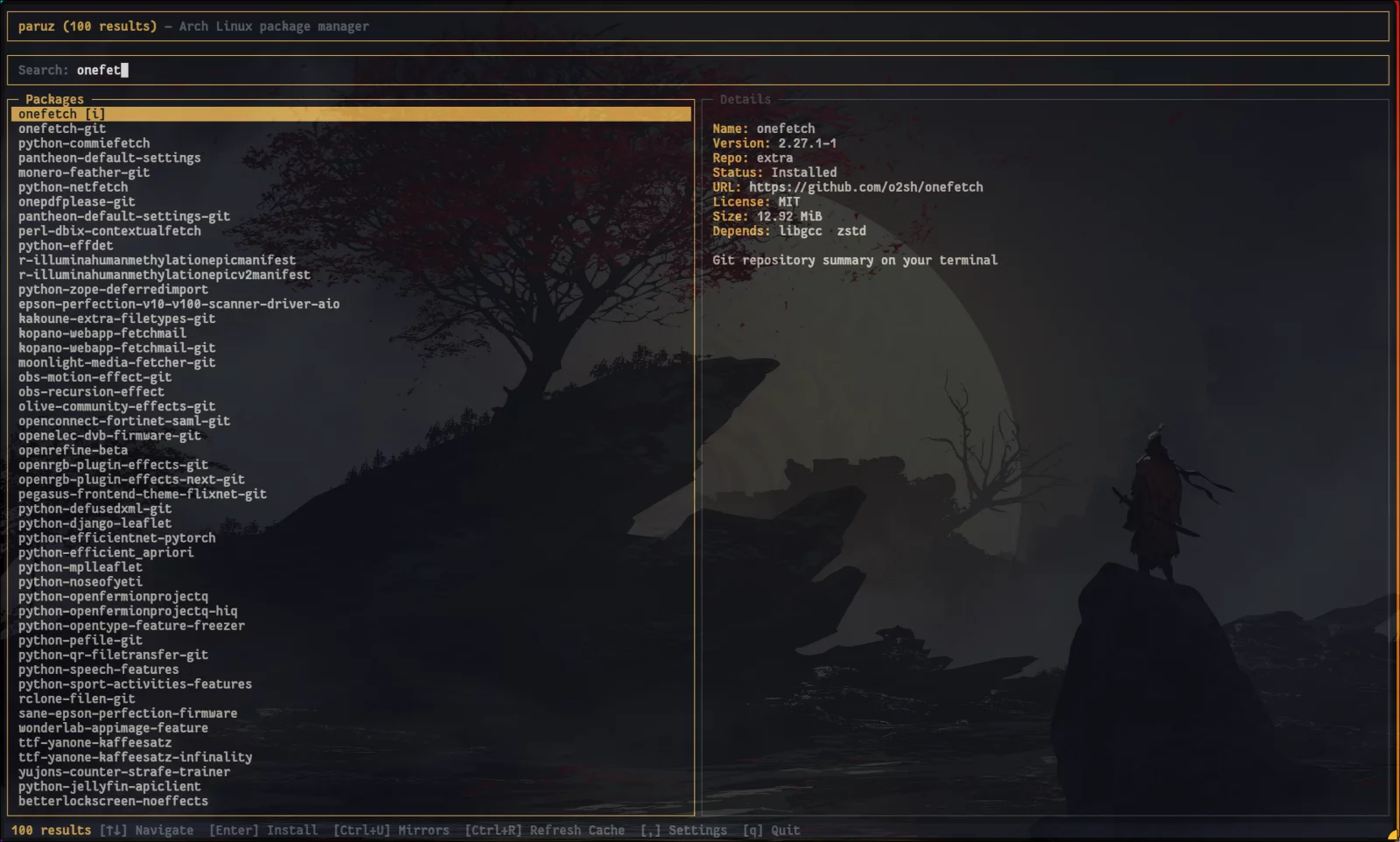

A terminal UI package manager frontend for Arch Linux and macOS, built with OpenTUI + React and Bun.
On Arch it drives paru/yay; on macOS it drives Homebrew. The backend is detected from the platform at startup — same UI, same keybindings, either way.
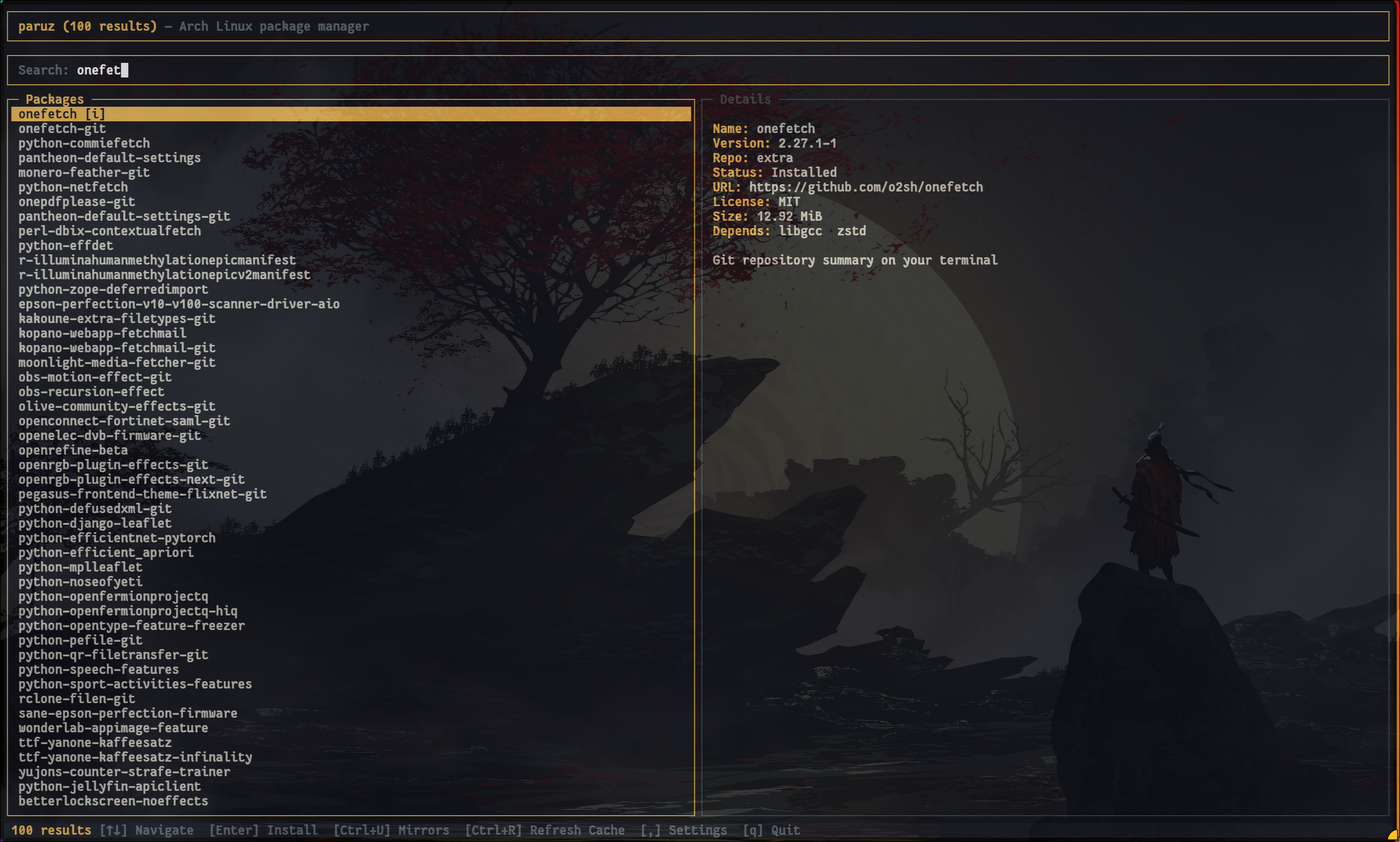
Features
- Fuzzy search against a local package cache — instant results as you type
- Full package details (version, repo, license, dependencies, description) fetched on demand
- Install packages via
paru/yay(Arch) orbrew(macOS) with full terminal handoff (sudo prompts work) Ctrl+Umaintenance — update the mirrorlist on Arch,brew update && brew upgradeon macOS- Switchable themes:
ayu-dark,dracula,nord,catppuccin,gruvbox+ custom themes - In-app settings — change AUR helper, mirror helper, and theme without editing config files
- Always-on search input — type to search,
↑↓to navigate simultaneously - Installed packages are marked
[i], updated immediately after an install or upgrade
Requirements
macOS: Homebrew (required)
paruz shells out to brew for search, info, install, and upgrade. Install it from brew.sh if you don't have it. Apple Silicon only — no Intel builds are published.
Arch: AUR Helper (at least one required)
paruz needs an AUR helper to search and install packages. It auto-detects whichever is installed and prefers paru over yay.
| Helper | Install |
|---|---|
| paru (recommended) | sudo pacman -S --needed base-devel git && git clone https://aur.archlinux.org/paru.git /tmp/paru && cd /tmp/paru && makepkg -si |
| yay | sudo pacman -S --needed base-devel git && git clone https://aur.archlinux.org/yay.git /tmp/yay && cd /tmp/yay && makepkg -si |
Note: There is no fallback to raw
pacman. AUR helpers are required because they wrap pacman and also handle AUR packages. If neitherparunoryayis installed, paruz will fail to search or install packages.
Arch: Mirror Helper (optional)
Only needed if you use the Ctrl+U mirror update feature.
| Helper | Install |
|---|---|
| rate-mirrors (recommended) | paru -S rate-mirrors |
| reflector | sudo pacman -S reflector |
Installation
macOS — Homebrew
Every release ships a ready-made formula, so no tap is needed:
brew install https://github.com/achintya-7/paruz/releases/latest/download/paruz.rb
Once a homebrew-tap repo exists, the formula can also be consumed the usual way:
brew install achintya-7/tap/paruz
Arch — AUR
paru -S paruz-bin
Install script (Arch x86_64 + Apple Silicon)
curl -fsSL https://raw.githubusercontent.com/achintya-7/paruz/main/install.sh | bash
From source
Requires Bun v1.0+.
git clone https://github.com/achintya-7/paruz.git
cd paruz
bun install

# Run directly
bun run src/index.tsx

# Or compile a standalone binary
bun run build
./paruz
Configuration
Config is stored at ~/.config/paruz/config.toml and is created automatically on first run with sensible defaults:
backend = "arch"             # detected from the platform: "arch" or "brew"
aur_helper = "paru"          # Arch only — or "yay"
mirror_helper = "rate-mirrors" # Arch only — or "reflector"
theme = "ayu-dark"
backend is detected at startup and always reflects the current machine — editing it has no effect. On macOS the AUR and mirror helper settings are hidden from the settings view since they don't apply.
You can also change settings from within the app by pressing ,.
Custom Themes
Add custom themes to ~/.config/paruz/themes.toml:
[my-theme]
titleBg  = "#1a1b26"
titleFg  = "#7aa2f7"
border   = "#3b4261"
accent   = "#7aa2f7"
error    = "#f7768e"
statusBar = "#16161e"
text     = "#c0caf5"
textDim  = "#565f89"
Then set theme = "my-theme" in config.toml or change it in the settings view.
Keybindings
| Key | Action |
|---|---|
| Type anything | Search packages |
↑ / ↓ |
Navigate package list |
Enter |
Install selected package |
Esc |
Clear search |
Ctrl+R |
Force refresh local package cache |
Ctrl+U |
Update mirrorlist (Arch) / brew update && brew upgrade (macOS) |
Ctrl+P |
Open settings |
Ctrl+C / Ctrl+Q |
Quit |
The search input is always focused, so every shortcut is chorded — plain letters always go into the search box.
Settings view
| Key | Action |
|---|---|
↑ / ↓ |
Move between settings |
← / → |
Cycle option values |
Enter |
Save and return |
Esc |
Cancel |
Package Cache
On first run paruz builds a local cache of package names. This makes search instant. The cache lives at ~/.cache/paruz/packages.txt and is refreshed automatically every 24 hours, or manually with Ctrl+R.
| Platform | Cache source | Details source |
|---|---|---|
| Arch | pacman -Slq + the AUR package list |
paru -Si / yay -Si |
| macOS | brew formulae + brew casks |
brew info --json=v2 |
Details (version, description, dependencies, etc.) are fetched live when you select a package, with results cached in memory for the session.
Releases
Releases are cut by CI, not by hand. Bump version in package.json and merge to main — the Release workflow sees a version with no matching tag, builds linux-x86_64 and darwin-arm64 on native runners, creates the v<version> tag, and publishes the archives, checksums, and a rendered paruz.rb formula. Merges that don't change the version are no-ops. Pushing a v* tag by hand still works and forces a release.
Every PR runs lint, typecheck, and a build via the CI workflow.