
Read and write phpBB forums from the terminal. Write posts in Markdown in
your own $EDITOR; they are converted to BBCode on send.
🇩🇪 Deutsche Fassung: ganz unten. 👇
Honest foreword
I am not a programmer. I write in a phpBB forum every day and wanted to do it from the terminal, where the rest of my work happens. The code was written for me by Claude Code; I said what I wanted, tried it out and said what still bothered me. I am publishing it because there is nothing else of its kind, and because the pitfalls we ran into are documented nowhere — the afternoon they cost us is written down below. 🙂
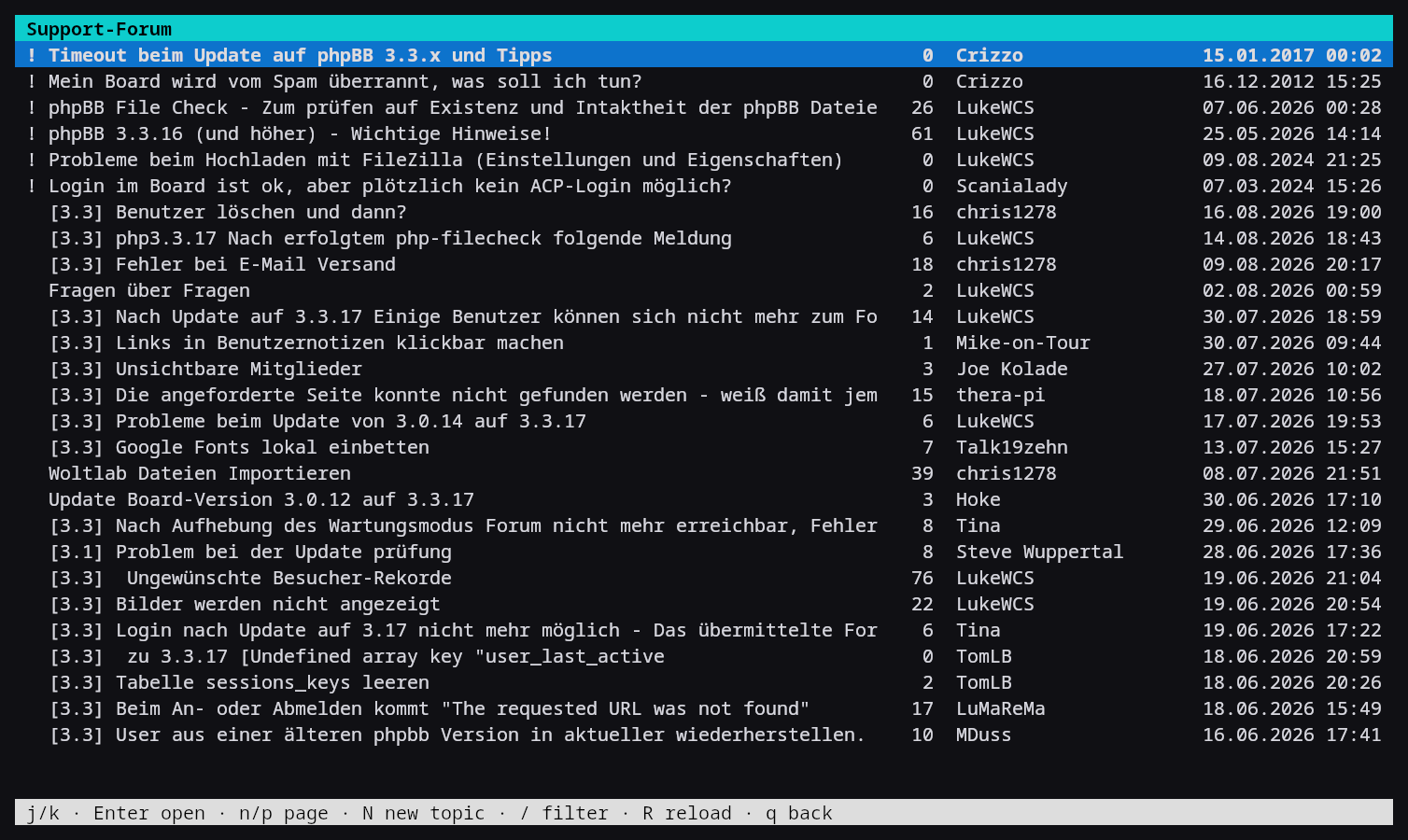
One line per topic — about thirty per screen. In a text browser the same page
shows two, because phpBB ships every topic row twice (desktop columns plus
a responsive-show block for phones) and a graphical browser hides one of them.
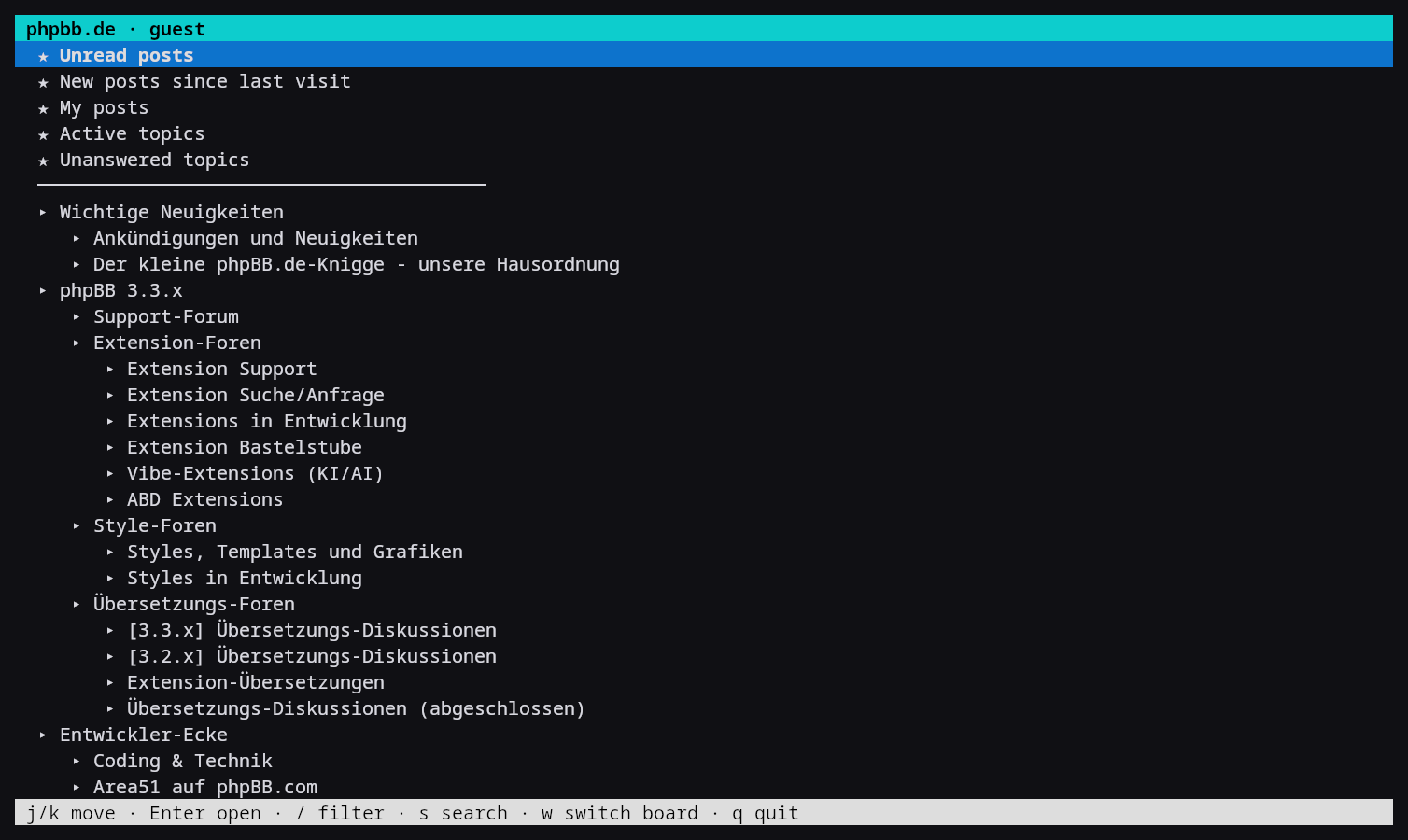
The forum tree comes from the board's own jump box, so it includes every forum you may see:
Threads are plain text, with ┌─ author · date between posts and quotes
indented:
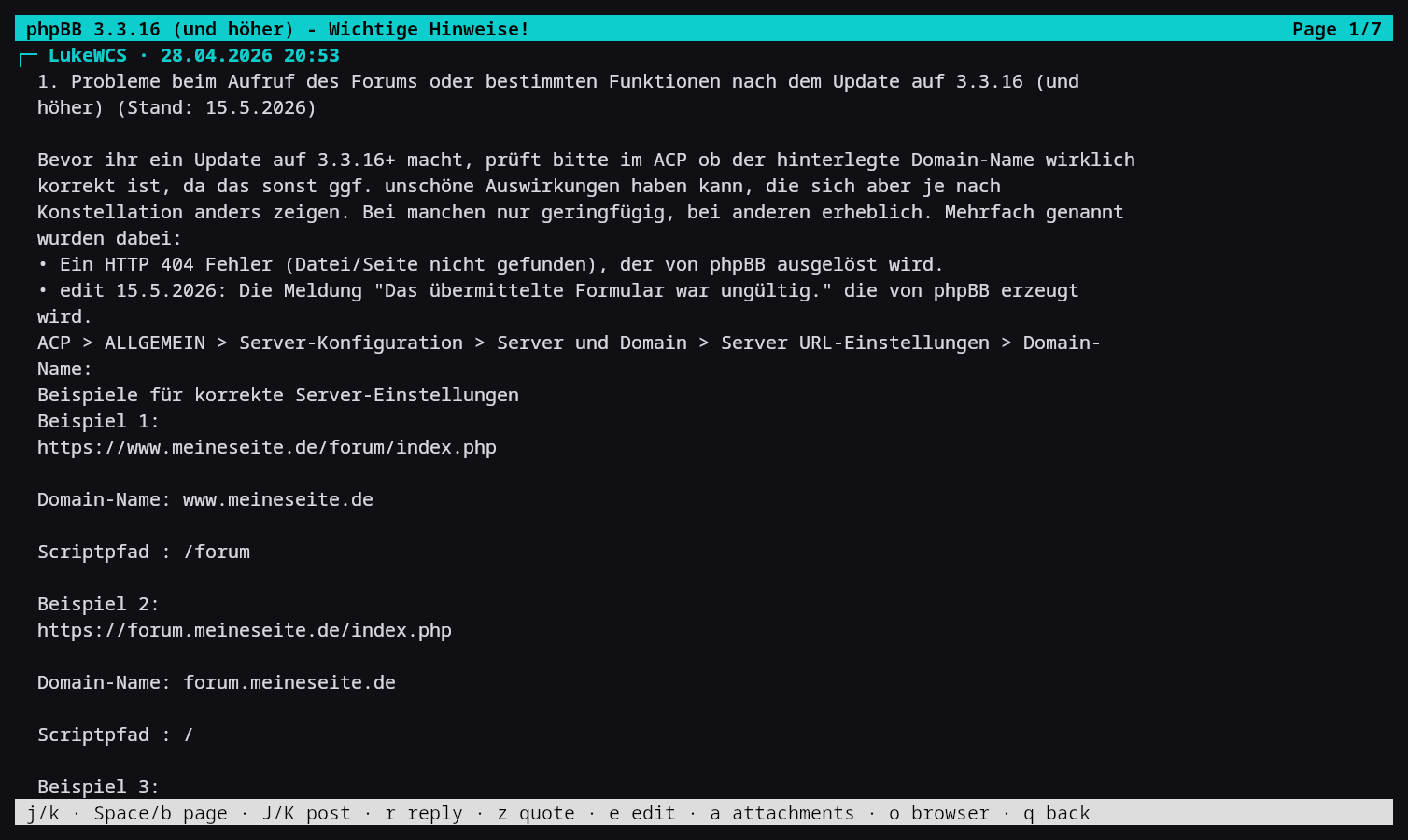
(Screenshots taken from the public phpBB.de support board, read as a guest
with phpbb-tui phpbb.de --guest.)
Why this exists
There is no maintained terminal client for phpBB. The only one findable is
xqtr/phpbb-cli — Pascal, two commits, 2017, read-only. forum-dl handles
phpBB but cannot log in. NNTP bridges and the unofficial REST API are
server-side extensions: the board owner must install them, so they are no
help to a normal user.
The reason the field is empty: phpBB has no public API (the bundled CLI is server administration), and every board renders its own HTML. A client aiming at all phpBB boards breaks on the next theme update. This one aims at the subset every prosilver-derived board shares, which in practice is most of them.
Tests
Run the offline regression suite with python3 -m unittest discover -s tests.
See tests/README.md for its scope and limitations.
Install
Python 3.11+ and requests. Nothing else — the interface uses curses from
the standard library, and HTML is parsed with re and html.parser.
git clone https://github.com/drdewes/phpbb-tui ~/src/phpbb-tui
ln -s ~/src/phpbb-tui/phpbb-tui.sh ~/.local/bin/phpbb-tui
phpbb-tui add https://forum.example.org/forum
add fetches the board, stores it in ~/.config/phpbb-tui/boards.toml and
logs you in. Your password is never stored — only the session cookie, in
~/.local/state/phpbb-tui/<board>.cookies.txt (mode 600).
Usage
phpbb-tui                 start (asks which board if several)
phpbb-tui <name>          open a specific board
phpbb-tui add <url>       add a board
phpbb-tui login <name>    log in again
phpbb-tui list            show configured boards
phpbb-tui logout <name>   drop the session
phpbb-tui <name> --guest  read without an account (boards that allow guests)
Vim keys throughout:
| Key | Action |
|---|---|
j k |
move |
l Enter |
open |
h q |
back |
Ctrl-D Ctrl-U |
half page |
g G |
top / bottom |
Space b |
page down / up |
n p |
next / previous page of results |
/ |
filter the list |
s |
search the board |
w |
switch board |
m |
private messages |
N |
new topic / new message |
r |
reply |
z |
quote reply |
e |
edit your own post |
a |
attachments of the current post |
J K |
next / previous post in a thread |
o |
open in the system browser |
f |
next mailbox (inbox → sent → outbox) |
d |
delete the message under the cursor |
Non-interactive / Automation
Read and write without entering curses, opening an editor or browser, or answering prompts. The existing interactive commands and key bindings remain available.
phpbb-tui login example
phpbb-tui forums example --json
phpbb-tui topics example --forum 2 --page 1 --json
phpbb-tui topic example --topic 42 --json
phpbb-tui search example --unread --json
phpbb-tui search example --query "extension development" --json
phpbb-tui post example --forum 2 --subject "Report" --body-file report.md --dry-run
Run login explicitly to establish a session; automation commands reuse it and
fail if it expires. Use --guest for an isolated anonymous session on boards
that allow guest access. --quiet suppresses successful output; it conflicts
with --json. Each command has --help.
See the automation reference for search modes, pagination, local filtering, JSON fields, exit codes, and unattended examples. The posting reference covers new topics, replies, quotes, edits, preview, dry-run, and uncertain submissions. The PM reference covers mailboxes, sending, replies, quotes, and explicit deletion. Attachment downloads/uploads remain a future stage.
Private messages
m from the forum tree — or the ✉ entry at the top of it — opens the inbox.
The entry carries the number of unread messages; ● marks them in the list.
f cycles through the three mailboxes phpBB always has: inbox, sent, and
outbox (sent but not yet read by the recipient).
Reading, replying and quoting work exactly as in a thread, because phpBB
serves messages through the same machinery — the compose form is even called
postform again. Only the recipient is different. phpBB does not accept a
name on submit: the name has to be resolved to a user id first, through its
own round trip, and comes back in the form as address_list[u][id]. So N
asks for recipients one at a time and checks each against the board
immediately; a typo is caught there rather than after you have written the
whole message. Enter on an empty line ends the list. Replies skip the
question — the board ships the recipient with the reply form.
Most boards switch attachments off for private messages. When the form has no
upload field, the preview simply does not offer d and x.
Writing
r, z, e and N open $EDITOR on a Markdown file. The first line
(# …) is the subject. On save, the forum itself renders the preview — so you
see exactly what will appear — and only a sends it.
| Markdown | becomes |
|---|---|
**bold** |
[b]…[/b] |
*italic* |
[i]…[/i] |
> quote |
[quote]…[/quote] |
> **Name:** as first line |
[quote="Name"] |
- item / 1. item |
[list] / [list=1] |
[text](https://github.com/drdewes/phpbb-tui/blob/HEAD/url) |
[url=…]…[/url] |
| fenced block | [code]…[/code] |
# heading |
bold — BBCode has no headings |
Quoting round-trips losslessly: [quote="someone"] becomes
> **someone:** for editing and turns back into [quote="someone"] on send.
Inline code stays plain text, because plain phpBB has no inline-code tag and
[c] would appear literally in the post.
Attachments
In a thread, a lists the attachments of the post under the cursor; Enter
downloads and opens one, s only saves it (to ~/Downloads by default).
While composing, d in the preview uploads a file to the open form and x
removes the last one. phpBB accepts the upload separately from the post and
hands the file back through the form as attachment_data[n][…] fields, which
must travel with the final submit — this client re-reads the whole form after
each upload so nothing is lost.
Configuration
~/.config/phpbb-tui/boards.toml:
downloads = "~/Downloads"
browser   = "xdg-open"

[[board]]
name = "example"
url  = "https://forum.example.org/forum"
user = "myname"
$BROWSER is deliberately not used: on many systems it points at a
terminal browser, which is the last thing you want when opening an attachment.
Override with PHPBB_TUI_BROWSER, the editor with PHPBB_TUI_EDITOR.
The interface speaks English or German. It follows your locale; force it with
PHPBB_TUI_LANG=en or PHPBB_TUI_LANG=de.
Two things phpBB does that will cost you an afternoon
A form submitted in the same second is rejected. check_form_key computes
$diff = time() - $creation_time and then tests if ($diff && …) — which is
false when $diff is 0. A human typing a password always takes longer than a
second; a program does not, and gets "The submitted form was invalid", which
reads exactly like a wrong password. This client waits until the form is old
enough before every POST.
Do not treat class="error" as failure. It also occurs in the page
scaffolding of successful posts. Check positively instead: the success message,
or the meta-refresh to viewtopic.php…#pNNN.
Two smaller ones, for anyone parsing prosilver: do not cut topic rows at the
next </li> (multi-page topics carry their own <li> page list inside the
row), and read the topic starter from topic-poster — the first username in
the row belongs to the mobile block and is the last poster.
Finding the forums
The board index is not a reliable source: some boards list only a fraction of their forums there. The jump box at the bottom of every forum page lists every forum the logged-in user may see, with indentation, so that is what this client reads.
Limitations
Polls, moderation and the message rules of the personal area are not
implemented; press o and continue in the browser. Custom message folders
beyond the three built-in ones are ignored. Tested against phpBB 3.3 with a
prosilver-derived style.
Acknowledgments
- The automation interface, tests, and documentation were assisted by Codex.
License
MIT
phpbb-tui (deutsch)
phpBB-Foren im Terminal lesen und schreiben. Beiträge entstehen in Markdown
im eigenen $EDITOR und werden beim Senden nach BBCode gewandelt.
Ehrliches Vorwort
Ich bin kein Programmierer. Ich schreibe täglich in einem phpBB-Forum und wollte das vom Terminal aus tun, wo auch der Rest meiner Arbeit stattfindet. Den Code hat mir Claude Code gebaut; ich habe gesagt, was ich will, es ausprobiert und gesagt, was mich noch stört. Ich veröffentliche es, weil es nichts Vergleichbares gibt — und weil die Stolpersteine, über die wir gefallen sind, nirgends dokumentiert sind. 🙂
Es gibt keinen gepflegten Terminal-Client für phpBB — der einzige auffindbare hat zwei Commits von 2017 und kann nur lesen. Der Grund: phpBB hat keine öffentliche Schnittstelle, und jedes Board liefert eigenes HTML.
Einrichten
ln -s ~/src/phpbb-tui/phpbb-tui.sh ~/.local/bin/phpbb-tui
phpbb-tui add https://forum.example.org/forum
Das Passwort wird nirgends gespeichert, nur das Sitzungs-Cookie. Boards mit
Gastzugang lassen sich auch ohne Konto lesen: phpbb-tui <name> --guest.
Bedienung — Vim-Tasten: j/k bewegen, l/Enter öffnen, h/q zurück,
^D/^U halbe Seite, g/G Anfang/Ende, n/p Seite blättern, /
filtern, s suchen, w Forum wechseln, m Postfach, N neues Thema bzw.
neue Nachricht, r antworten, z zitieren, e eigenen Beitrag bearbeiten,
a Anhänge, J/K Beitrag weiter/zurück, f Ordner wechseln, d löschen,
o im Browser öffnen.
Private Nachrichten — m im Forenbaum (oder der ✉-Eintrag ganz oben)
öffnet den Posteingang; daneben steht die Zahl der ungelesenen, ● markiert
sie in der Liste. f schaltet durch die drei Postfächer, die jedes phpBB hat:
Eingang, Gesendet und Postausgang — letzteres sind abgeschickte Nachrichten,
die der Empfänger noch nicht gelesen hat.
Lesen, Antworten und Zitieren gehen wie im Thread, denn phpBB liefert
Nachrichten über dieselbe Mechanik; das Schreibformular heißt sogar wieder
postform. Anders ist nur der Empfänger: einen Namen nimmt phpBB beim
Absenden nicht entgegen, er muss vorher in einem eigenen Gang zu einer
Benutzernummer aufgelöst werden und kommt als address_list[u][nummer]
zurück. Deshalb fragt N die Empfänger einzeln ab und prüft jeden sofort
gegen das Board — ein Tippfehler fällt so vor dem Schreiben auf und nicht
danach. Enter auf leerer Zeile beendet die Liste. Beim Antworten entfällt die
Frage, da bringt das Formular den Empfänger schon mit.
Die meisten Boards schalten Anhänge für Nachrichten ab. Fehlt das Feld im
Formular, bietet die Vorschau d und x gar nicht erst an.
Schreiben — erste Zeile mit # ist der Betreff. Nach dem Speichern zeigt
das Forum selbst die Vorschau; erst a sendet ab. Zitate laufen verlustfrei in
beide Richtungen.
Anhänge — im Thread listet a die Anhänge des Beitrags, Enter lädt und
öffnet, s speichert nur. Beim Schreiben hängt d in der Vorschau eine Datei
an, x entfernt die letzte.
Zwei phpBB-Eigenheiten, die Zeit kosten: Ein Formular, das in derselben
Sekunde zurückkommt, gilt als ungültig (if ($diff && …) in check_form_key)
— das sieht aus wie ein Passwortfehler. Und ein class="error" im HTML ist
kein Fehler; das steht auch auf Erfolgsseiten. Erfolg positiv prüfen.