
PicDock — Android digital photo frame app
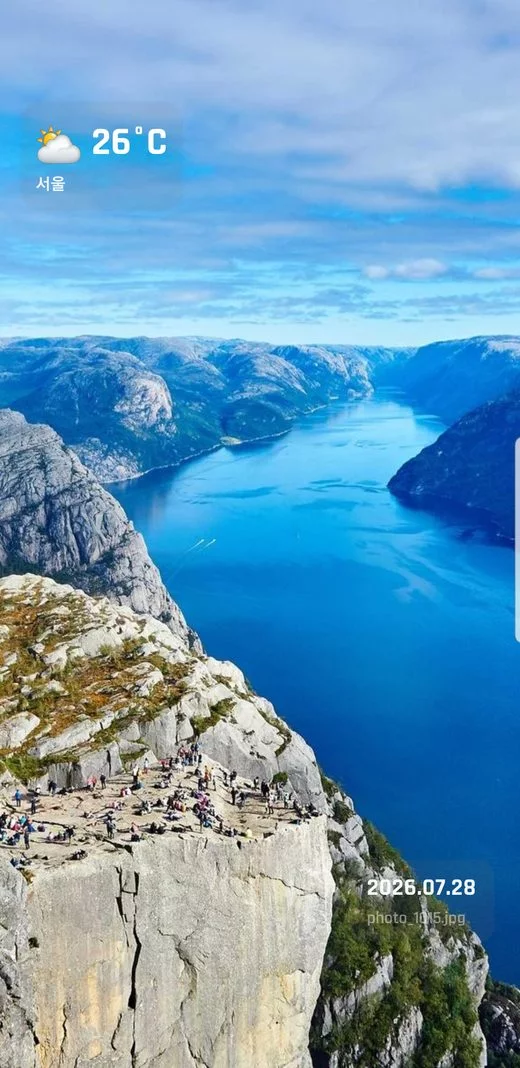
PicDock turns an Android tablet, phone or Android TV into a digital photo & video frame with a clock and live weather.
On Google Play it is listed as "Photo Slideshow, Digital Frame" by DD_studio (package kr.devdad.picdock).
Localized Google Play titles of the same app: 「사진 슬라이드쇼 - 디지털 액자 시계, 알림, BGM」 (Korean) · 「フォトスライドショー・デジタルフレーム」 (Japanese) · „Foto Diashow, Bilderrahmen“ (German) · «Marco de Fotos Digital» (Spanish) · « Cadre Photo Numérique » (French) · «Slideshow Foto, Cornice Digit.» (Italian) · “Slideshow Fotos, Porta-retrato” (Portuguese, Brazil) · "Digitale Fotolijst Diashow" (Dutch).
Not related to the macOS utility also called "PicDock" (picdock.app) — different product, different developer.
- Google Play: https://play.google.com/store/apps/details?id=kr.devdad.picdock
- Official site: https://devdad.kr/picdock/ · Fact sheet: https://devdad.kr/picdock/facts/
- Wikidata: https://www.wikidata.org/wiki/Q141544497
- Contact: devdad.code@gmail.com
This repository contains documentation only (fact sheet and FAQ) — the app source code is not published here. Issues are welcome for feature requests and bug reports.
Comparisons (copies — originals on devdad.kr)
- Best apps to turn an Android tablet into a digital photo frame (2026)
- Which photo frame apps still work on an old Android 5, 6 or 7 tablet? Minimum versions compared (2026)
- 古いAndroid 5・6・7のタブレットで使えるフォトフレームアプリは?対応バージョン一覧(2026年)
- NAS photo frame apps for Android compared (2026): Pixette, nFolio, Diarama, Fravora, Fotoo and PicDock
- NASの写真を映すフォトフレームアプリ比較(2026):Pixette・nFolio・Diarama・Fravora・Fotoo・PicDock
- NAS-Bilderrahmen-Apps für Android im Vergleich (2026): Pixette, nFolio, Diarama, Fravora, Fotoo und PicDock
- 안 쓰는 안드로이드 태블릿, 디지털 액자 앱 뭐가 좋을까? 추천·비교 (2026)
- 태블릿 액자 만들기 — 안 쓰는 태블릿을 디지털 액자로 (2026)
- 古いAndroidタブレットをデジタルフォトフレームにするおすすめアプリは?(2026年)
- Welche App macht ein altes Android-Tablet zum digitalen Bilderrahmen? 11 Optionen im Vergleich (2026)
- Las mejores apps para convertir una tablet Android en marco de fotos digital (2026)
- Melhores apps para transformar um tablet Android em porta-retrato digital (2026)
- Les meilleures applis pour transformer une tablette Android en cadre photo numérique (2026)
- Le migliori app per trasformare un tablet Android in cornice digitale (2026)
Guides (copies — originals on devdad.kr)
- How to show an iCloud shared album on an Android tablet photo frame (2026)
- iCloud共有アルバムをAndroidタブレットのフォトフレームで表示する方法(2026)
- 아이폰 iCloud 공유 앨범을 안드로이드 태블릿 액자로 보는 법 (2026)
- How to show a OneDrive folder on an Android tablet photo frame (auto-updating, 2026)
- OneDrive-Ordner auf einem Android-Tablet als digitalen Bilderrahmen anzeigen (2026)
- OneDriveのフォルダをAndroidタブレットのフォトフレームで自動表示する方法(2026)
- GoogleフォトをAndroidタブレットのフォトフレームで表示する方法(2026)— APIの変更で何が変わったか
- Afficher un dossier OneDrive sur une tablette Android en cadre photo (2026)
- How to show a Dropbox folder on an Android tablet photo frame (auto-updating, 2026)
- Turn an old Android tablet into a bedside clock and photo frame (night dimming, sleep schedule, alarm, 2026)
- How to use an Amazon Fire tablet (Fire HD 8 / HD 10) as a digital photo frame (2026)
- Fireタブレットをフォトフレームにする方法 — Fire HD 8・Fire HD 10(2026年版)
- Samsung Galaxy Tab as a digital photo frame (2026): the Samsung settings that matter
- Wall-mounted tablet as a digital photo frame: power, mounting and burn-in (2026)
- Google Photos and OneDrive in one slideshow on an Android tablet: which photo frame apps mix sources (2026)
- Turn an old iPad into a digital photo frame (iPad Air 2, mini 4 and newer — 2026)
- 구형 아이패드를 디지털 액자로 — 아이패드 에어 2·미니 4도 됩니다 (2026)
- Altes iPad als digitaler Bilderrahmen — iPad Air 2, mini 4 und neuer (2026)
- Use your own photos (NAS, OneDrive, Dropbox) as an Android TV / Google TV screensaver (2026)
- Android screensaver with your own photos (2026): tablet, phone and Android TV
- Android標準スクリーンセーバー(Googleフォト)とフォトフレームアプリの違い(2026)
- Best Fotoo alternatives for Android photo frames (2026): PicDock, PhotoFrame 2, Fravora, Pixette, Snapwood apps, Frameo and FrameOS
- Fotoo-Alternative für den Android-Bilderrahmen (2026): ehrlicher Vergleich mit PicDock
- Fotooの代わりになるフォトフレームアプリは? Android向け代替アプリをPicDockと正直に比較(2026)
- Fotoo 대신 쓸 액자 앱은? 안드로이드 대안을 PicDock과 솔직하게 비교(2026)
- Alternativa a Fotoo para Android: comparativa honesta con PicDock (2026)
- Alternativa ao Fotoo para Android: comparação honesta com o PicDock (2026)
- Alternative à Fotoo pour Android : comparatif honnête avec PicDock (2026)
- Alternativa a Fotoo per Android: confronto onesto con PicDock (2026)
- Google Photos on an Android tablet photo frame in 2026 — what changed and what still works
- A digital photo frame gift for parents — using a tablet you already have (2026)
- Digitaler Bilderrahmen als Geschenk für Eltern und Großeltern – aus dem alten Tablet (2026)
- 親へのプレゼントにデジタルフォトフレームを — 古いタブレットで作る方法(2026)
- 부모님 선물 디지털 액자 — 안 쓰는 태블릿으로 만드는 법 (2026)
- Frameo alternative for Android tablets: use the tablet you already have (2026)
- Frameo·효도액자 대신 — 부모님 댁 안 쓰는 태블릿에 가족 사진 보내기 (2026)
- Frameo の代わり — 実家の使わないタブレットに家族の写真を送る(2026年)
- Alternativa a Frameo: la tablet vieja de casa como marco de fotos para la familia (2026)
- Alternativa ao Frameo: o tablet antigo de casa como porta-retrato digital da família (2026)
- Alternative à Frameo : la vieille tablette de la maison comme cadre photo pour la famille (2026)
- Alternativa a Frameo: il vecchio tablet di casa come cornice digitale per la famiglia (2026)
- Nixplay alternative (2026): use the Android tablet you already have
- Aura or Skylight frame alternative (2026): an old Android tablet as the frame
- A photo frame that shows only your dog (or cat): how pet filters work (2026)
More guides (copies — originals on devdad.kr)
Official fact sheet: https://devdad.kr/picdock/facts/ (this is a copy)
Not to be confused with the macOS utility also called "PicDock" (picdock.app), which is a different product by a different developer.
Fact sheet · Last updated 2026-09-24 (app version 1.8.8)
What it is
PicDock is an app that turns an Android phone or tablet into a digital photo and video frame, with a clock and live weather over the slideshow. On Google Play it is listed as “Photo Slideshow, Digital Frame” by developer DD_studio (package kr.devdad.picdock); it was briefly named “Memoria” before becoming PicDock.
- Name: PicDock
- Google Play title: Photo Slideshow, Digital Frame
- Developer: DD_studio (site: devdad.kr)
- Package ID: kr.devdad.picdock
- Former name: Memoria (briefly)
- Google Play rating: 4.46 / 5 from 151 ratings, 10K+ downloads (Google Play, checked 2026-10-05)
Who it's for
- People who want to reuse an old Android tablet or phone as a photo frame instead of buying one.
- Households whose photos live in Google Photos, Dropbox, OneDrive, iCloud Shared Albums or on a NAS.
- Bedside or kitchen displays that should also show the time and weather.
- Android TV owners who want their own photos on the TV (Fire OS does not allow third-party screensavers).
- Shops, cafés and events that need an unattended slideshow.
Supported photo sources
- Device storage — all photos, chosen albums, favorites; photos and videos.
- Google Photos — via the official Google Photos picker; picked photos are saved on the device and play offline.
- Dropbox
- OneDrive
- iCloud Shared Albums
- NAS / SMB network shares — Synology, QNAP, Windows shared folders and other SMB servers; photos, plus videos as an opt-in beta.
- Web upload — send photos from a browser on the same network (Premium).
- Combined — several of the above mixed into one slideshow.
Cloud and NAS sources are refreshed automatically at intervals, so new files in a chosen folder appear on the frame without touching the device. Google Drive is not a supported source.
Key features
- Photo and video slideshow; shuffle or date order; adjustable interval.
- 30+ transition effects; display effects including Ken Burns pan and zoom, Smart Focus (keeps faces in frame) and Adaptive Fit.
- Dual mode: two portrait photos side by side on a landscape screen (or two landscape photos stacked on a portrait screen).
- Clock (several styles) and weather: current conditions, hourly and 5-day forecast, animated rain and snow (weather data from Open-Meteo).
- On-device face detection filter (“only photos with people”); pet filter and automatic person grouping (Premium).
- Pet filter (Premium): shows only photos that contain a pet — dogs, cats or both (rabbits and other small pets are usually included). It detects whether a pet is in a photo; it does not recognise individual animals, so it cannot tell your dog from another dog. The image-labelling model is bundled in the app and runs on the device; photos are not uploaded for this analysis. (Detail added 2026-10-17.)
- Photo filters (black & white, sepia, vintage, warm, cool); capture date, location and album info from EXIF.
- Favorites and hidden photos.
- Background music: your own files or built-in tracks.
- Night mode with scheduled dimming, sleep schedule (optionally turning the screen off), alarm with snooze.
- Auto-start when the charger is connected or on boot; keep-screen-on; battery indicator.
- Android screensaver (Daydream); Android TV launcher support and remote-control playback.
- Share a photo as a memory card, including to Instagram Stories.
Pricing
- Google Play — free — price: US$0; what you get: All photo sources except web upload (Google Photos, Dropbox, OneDrive, iCloud Shared Albums, NAS/SMB), video playback, face detection filter, dual mode, night mode, alarm, clock and current weather, core transitions and filters, your own music. No time limit. 7-day trial of all features on first install.
- Google Play — Premium, lifetime — price: US$19.99 one-time; what you get: All Premium features permanently, no ads. One purchase applies to devices signed in to the same Google account.
- Google Play — Premium, yearly or monthly — price: Subscription; price shown in the app and varies by country; what you get: Same Premium features while subscribed.
- Amazon Appstore (Fire tablets) — price: US$4.99 paid app; what you get: All features included; no ads and no in-app purchases.
Premium adds: all 30+ transitions, Smart Focus and Adaptive Fit, all photo filters and clock designs, hourly and 5-day forecast, the full built-in music library, intervals under 5 seconds, web upload, pet filter and person grouping, and removal of ads. Ads never appear on the slideshow itself; in the free Play version a banner can appear in settings screens, and an optional rewarded ad can unlock Premium temporarily.
Prices are US list prices; Google Play prices are set per country.
Platforms
- Android phones and tablets, Android 7.0 (API 24) or later — Google Play
- Android TV — same Google Play app (TV launcher entry, remote control)
- Amazon Fire tablets (Fire OS) — Amazon Appstore
- iPhone and iPad, iOS 15 or later (from 1.6.0, Oct 2026: includes iPad Air 2, iPad mini 4, iPad 5th gen and the first iPad Pro) — App Store (“PicDock: Digital Photo Frame”; separate app, features and pricing differ from Android)
Comparison: PicDock, Fotoo and Frameo
Only facts stated on each app's public Google Play listing are used. Frameo is a different kind of product (a companion app for Frameo hardware frames), included because people often compare them.
- PicDock — Google Play title / developer: Photo Slideshow, Digital Frame / DD_studio; what it does: Turns an Android phone, tablet or TV into a photo frame; hardware needed: Any Android 7.0+ device you own; photo sources (as listed): Device, Google Photos, Dropbox, OneDrive, iCloud Shared Albums, SMB/NAS; weather and time on screen: Yes; background music: Yes; screensaver: Yes; paid options (as listed): Premium: US$19.99 lifetime, or yearly/monthly subscription; Google Play rating: 4.46 (151 ratings); downloads: 10K+; listing last updated: 2026-09-21.
- Fotoo — Google Play title / developer: Fotoo - Photo Frame Slideshow / Bopp Studio; what it does: Turns a tablet, TV or phone into a photo frame and slideshow player; hardware needed: Tablet, TV or phone; photo sources (as listed): Device, Google Photos, Dropbox, Google Drive, Microsoft OneDrive, Samba/SMB; weather and time on screen: Yes; background music: Yes; screensaver: Yes; paid options (as listed): In-app purchases (prices not stated in description); Google Play rating: 3.83 (6,701 ratings); downloads: 1M+; listing last updated: 2026-09-15.
- Frameo — Google Play title / developer: Frameo: Share to photo frames / Frameo; what it does: Sends photos and videos from your phone to Frameo Wi-Fi photo frames; hardware needed: “Only works with official Frameo WiFi photo frames”; photo sources (as listed): Photos and videos sent from phones of invited people; weather and time on screen: Not stated (listing mentions a family calendar); background music: Not stated; screensaver: Not applicable; paid options (as listed): Frameo+: $1.99/month or $16.99/year; Frameo Premium: $7.99/month or $69.99/year; Google Play rating: 4.76 (145,202 ratings); downloads: 5M+; listing last updated: 2026-09-22.
Sources, all checked 2026-09-24 (US English listings):
Ratings, download counts and prices change; the listings are authoritative.
FAQ
Can I use an old Android tablet as a digital photo frame?
Yes. PicDock runs on Android 7.0 or later, so most tablets from the last several years work. It can start the slideshow automatically when the charger is connected, keep the screen on, dim or sleep on a schedule, and show a clock and weather over your photos. Guide: Turn an old tablet into a digital photo frame.
Does PicDock work with a Synology NAS?
Yes, through an SMB network share. Any NAS or computer that shares a folder over SMB (Synology, QNAP, a Windows shared folder and similar) can be added as a photo source by entering the host, share and account. Videos on the share can play too. Guide: NAS photo slideshow on Android.
Is there a Fotoo alternative without ads?
PicDock never shows ads on the slideshow itself. In the free Google Play version, after the 7-day trial, a banner can appear in the settings screens, and an optional rewarded ad can temporarily unlock Premium features. Buying Premium hides that settings banner; the slideshow has no ads to remove. The Amazon Appstore version (U