

A Chrome and desktop Firefox extension that automatically adds the authuser parameter to Google domains, allowing you to set your preferred Google account for each service.
Overview
If you use multiple Google accounts (personal, work, school), you know the frustration of constantly being logged into the wrong account when visiting different Google services. This extension solves that problem by automatically adding the appropriate authuser parameter to URLs based on the domain, ensuring you're always using your preferred account for each Google service.
Features
- Domain-Specific Account Selection: Set different preferred accounts for different Google domains (e.g., YouTube, Gmail, Drive)
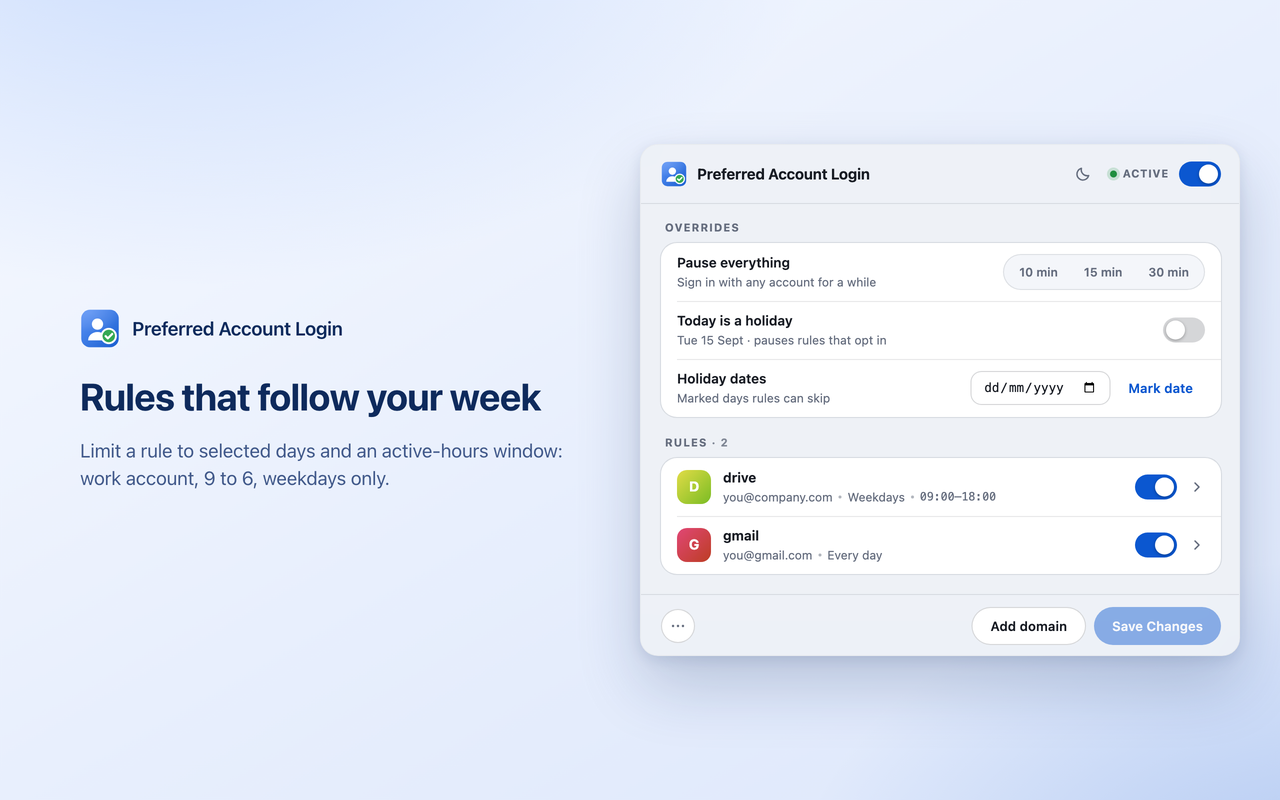
- Day-Based Rules: Choose which days each domain rule should apply
- Optional Active Hours: Add a start and end time so a rule only runs during a specific window on the selected days
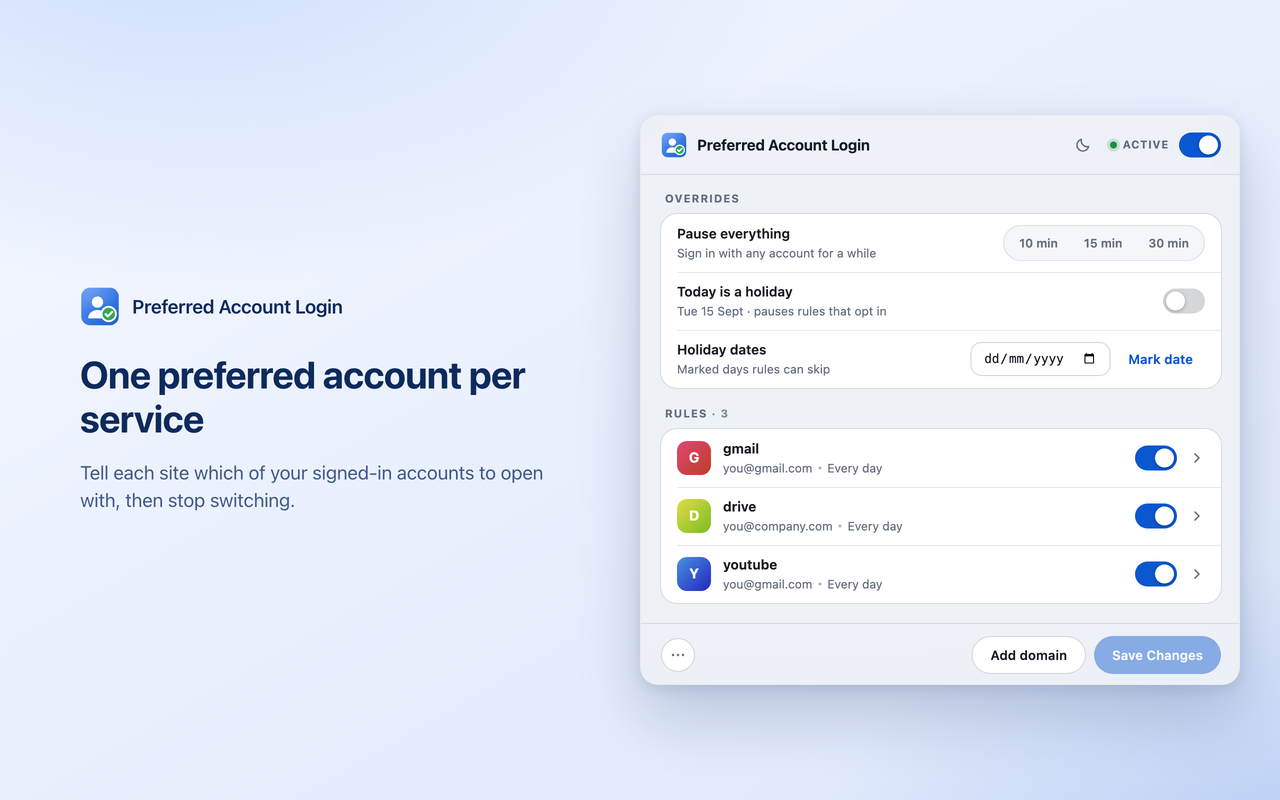
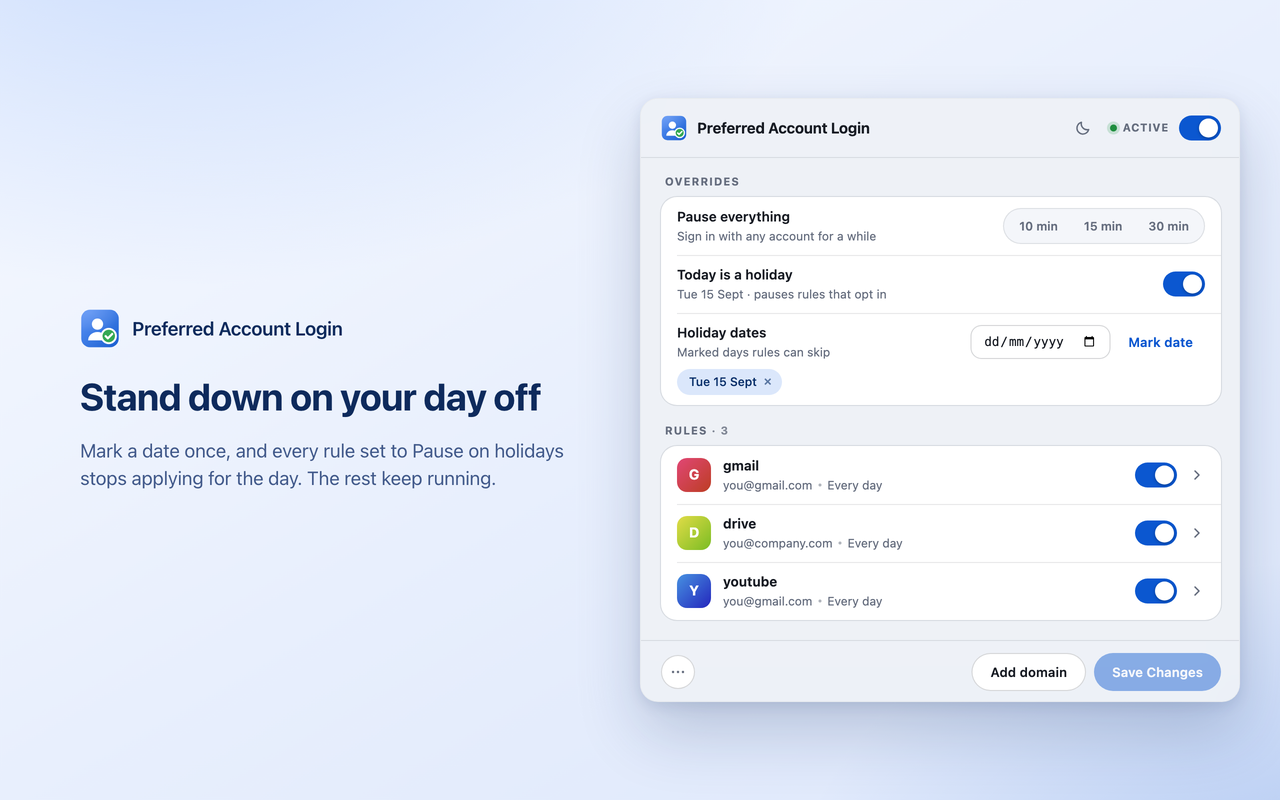
- Holidays: Mark a date as a holiday and every rule set to "Pause on holidays" stands down for that day, leaving the rest running
- Global Pause: Pause the entire extension for 10, 15, or 30 minutes from the popup header when you need every rule to stand down at once
- Dark Theme: Toggle between light and dark from the popup header; the choice is remembered per-profile
- Auto-Redirect: Automatically redirects to add the
authuserparameter when you visit a configured Google domain - Smart Loop Prevention: Intelligently prevents redirect loops
- Any Google Domain: Enter any domain under
google.com,youtube.com, orai.google— new Google services work without an extension update - Google Domain Autocomplete: Includes autocomplete suggestions for popular Google domains
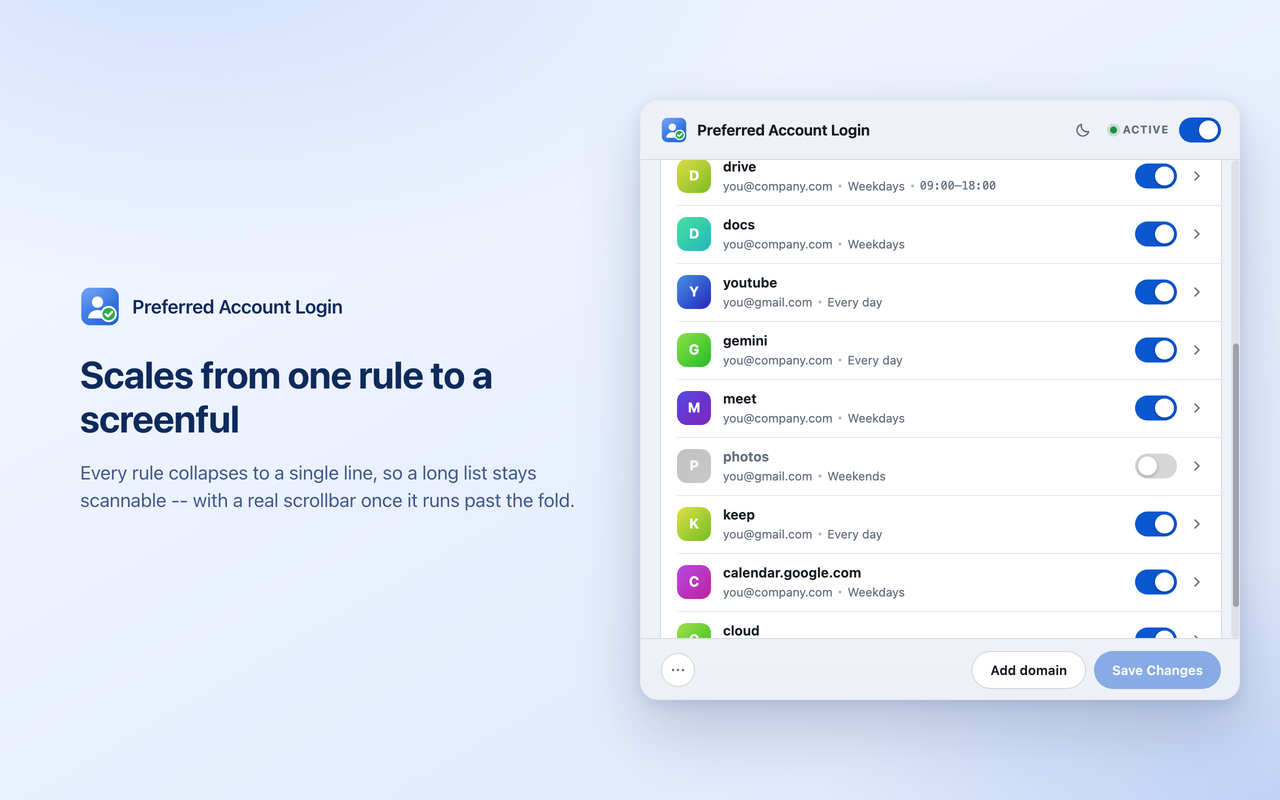
- User-Friendly Interface: Clean, modern UI with a collapsible rule list and toggle to quickly enable/disable the extension
- Multiple Account Support: Easily manage multiple Google accounts across different services
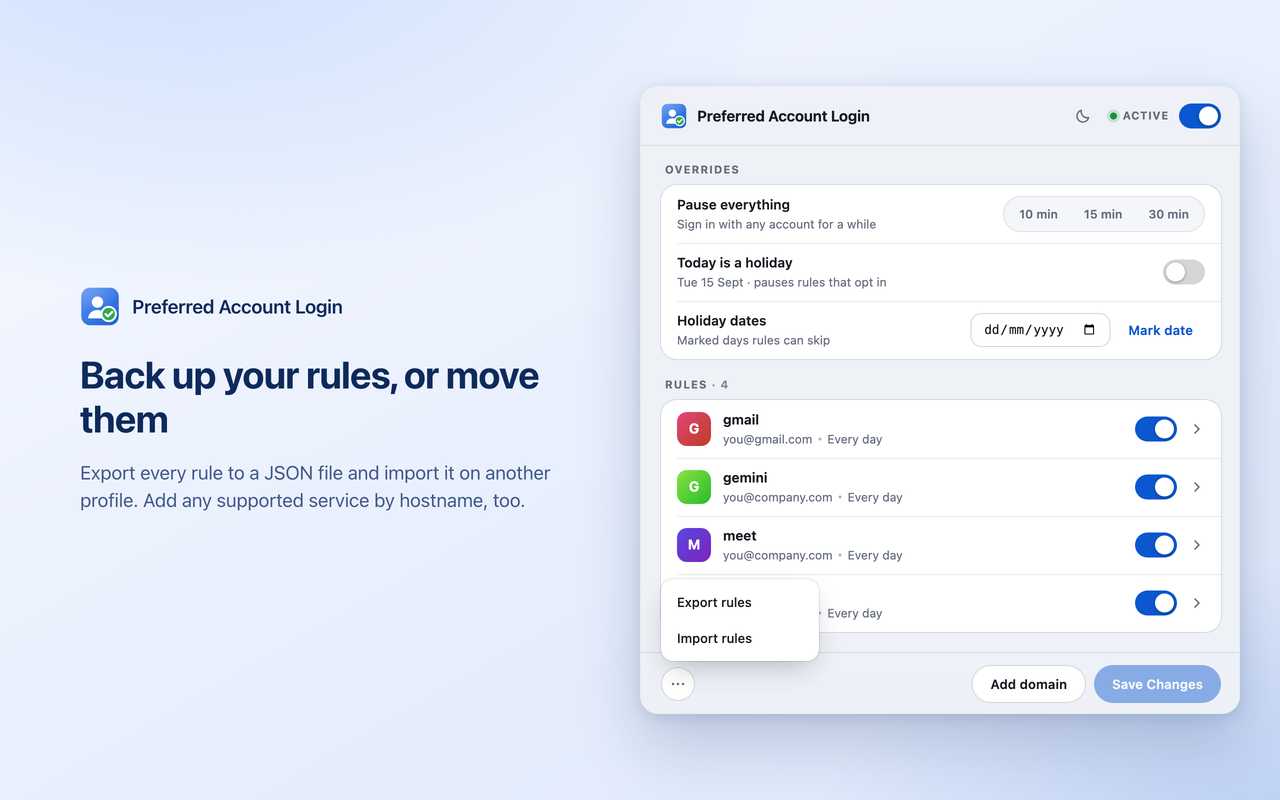
- Export & Import: Save your rules to a JSON file and load them back on another profile or browser
- Privacy-Focused: No data collection, all settings stored locally in your browser
Screenshots
| Overview | Many Rules |
|---|---|
 |
 |
| Day & Active Hours | Holidays |
|---|---|
 |
 |
| Export & Import |
|---|
 |
Installation
Manual Installation (Developer Mode)
- Download or clone this repository:
git clone https://github.com/altersquare/preferred-account-login.git - Open Chrome and navigate to
chrome://extensions/ - Enable "Developer mode" in the top-right corner
- Click "Load unpacked" and select the directory containing the extension files
Local Firefox installation (Firefox 140 or later)
- Open
about:debugging#/runtime/this-firefoxin Firefox. - Click Load Temporary Add-on….
- Select this repository's
manifest.json. - Open Preferred Account Login from Firefox's Extensions menu and configure your rules, or import a JSON export from your Chrome installation.
This uses the same source files as Chrome; no build, signing, or public listing
is needed. Firefox removes temporary add-ons when it closes, so repeat the load
step after restarting Firefox. Export your rules before restarting to keep a
backup; temporary installation is intended for development and testing.
After editing the source, click Reload next to the add-on in about:debugging.
The stable Firefox add-on ID enables extension sync storage. Chrome and Firefox have separate storage and sync systems; use Export/Import to move rules between them. This local setup targets desktop Firefox.
Usage
- Click the extension icon in your browser toolbar
- Toggle the extension on/off using the switch in the header
- Add domain and email pairs:
- Click "Add Domain" to create a new entry
- Enter a Google domain — pick a service from the autocomplete suggestions, or type any hostname (or paste a URL) under
google.com,youtube.com, orai.google - Enter the Gmail address you prefer to use for that domain
- Choose the days when the rule should be active
- Optionally enable
Active hoursand set a start and end time - Optionally tick
Pause on holidaysif the rule should stand down on the dates marked as holidays
- Click "Save Changes" to apply your settings
- Visit any Google service - the extension will automatically redirect you to use your preferred account
Taking a day off
- Tick "Today is a holiday" in the popup header to mark the current date. Once
saved, rules with
Pause on holidaysstop applying; every other rule carries on as usual. - Use the date field next to it to mark a day in advance — a public holiday or a day of leave — and the chips below list every date currently marked.
- Marking or clearing a date is a pending change like any other: it shows in the header and enables "Save Changes", which writes it and reloads the active tab so the change takes hold. Closing the popup without saving discards it.
- Dates that have passed are dropped automatically the next time the popup opens.
Backing up and moving rules
- Click "Export" to download the current rules as
preferred-account-login-rules-<date>.json. Export uses the same validation as saving, so fix any highlighted errors first. - Click "Import" and pick a previously exported file to load those rules. The imported rules replace what is in the list, but nothing is written until you click "Save Changes" — closing the popup discards the import.
- In Firefox, Import opens an editor tab. Choose your JSON file there, review the rules, and click "Save Changes". Keeping import in a tab prevents Firefox's file picker from closing the extension popup before the file can be read.
- Rows that name an unsupported domain or an invalid email address are skipped, and the popup reports how many were loaded and how many were skipped.
- Exported files carry the holiday dates and each rule's
Pause on holidayssetting alongside the rules themselves, so a restore brings back a working set rather than rules whose holiday setting has nothing to point at. - Imported holiday dates are staged exactly like the rules: they appear in the header, replacing what was there, and reach storage only when you click "Save Changes". A file written before this feature carries no dates and leaves the ones you have marked alone.
Rule Behavior
- A domain rule runs only when the rule is enabled and the current day matches one of the selected days.
- If
Active hoursis turned off, the rule stays active for the full selected day. - If
Active hoursis turned on, the rule only runs when the current local browser time is between the configured start and end time. - Start and end times are inclusive.
- End time must be later than start time. Overnight windows are not supported.
- At least one day must be selected. If all day buttons are deselected, the popup shows an error and the rule cannot be saved.
- Turning
Active hoursoff clears the saved start and end times for that rule. - If
Pause on holidaysis turned on, the rule does not run on a date marked as a holiday, whatever its days and hours say. Rules that leave it off are unaffected by holidays. - Holiday dates are compared in your own time zone, not UTC, so a date marked as a holiday covers your local day.
Domain Configuration Examples
| Domain | Result | |
|---|---|---|
| youtube.com | work@gmail.com | YouTube always uses your work account |
| mail.google.com | personal@gmail.com | Gmail always opens with your personal account |
| drive.google.com | school@gmail.com | Google Drive defaults to your school account |
You can further narrow any of those rules with selected days and optional active hours. For example, drive.google.com can use your work account only on weekdays from 09:00 to 18:00, while youtube.com can stay active all day every day.
Supported Google Domains
The extension works on any domain under these roots (which match the extension's host permissions):
google.comand all of its subdomains (mail.google.com, drive.google.com, docs.google.com, meet.google.com, gemini.google.com, ...)youtube.comand all of its subdomains (studio.youtube.com, ...)ai.googleand all of its subdomains
The popup's dropdown suggests popular services, but you can type any hostname under those roots — including Google services that launch in the future. You can also paste a full URL and the extension will extract the hostname.
How It Works
The extension:
- Checks if the current website is a Google domain
- Determines if you've configured a preferred account for that domain
- Checks whether the rule is active right now: enabled, on a selected day, inside its active hours if configured, and not held back by a holiday
- Adds the appropriate
authuserparameter to the URL - Implements safeguards to prevent redirect loops
- Provides an intuitive UI for managing your preferences
Technical Details
- Built with vanilla JavaScript, HTML, and CSS
- Uses the browser's extension Storage API for persistent settings
- Content script runs at document start to ensure timely redirects
src/rules.jsholds the rule schema and the ordered activation checks that decide whether a rule applies; the popup and the content script both load it, so a new condition is added in one placesrc/theme.jsstamps the saved light/dark choice on<html>fromlocalStoragebefore the popup's first paint, avoiding a flash of the wrong theme- Modern ES6+ JavaScript features for clean, maintainable code
- Responsive UI design that works across different screen sizes
- Code formatting with Prettier and linting with ESLint
Privacy
Full policy: PRIVACY.md
In short, this extension:
- Does NOT collect any user data
- Sends your chosen email address to the matching Google service as the
authuserURL parameter, so Google can select that account - Stores your rules in extension storage (
storage.sync), which your browser can sync when enabled. Nothing is sent to the developer. - Requires a single API permission (
storage), plus host access to the domains the content script runs on
Contributing
Contributions are welcome! To contribute:
- Fork the repository
- Create a feature branch (
git checkout -b feature/amazing-feature) - Commit your changes (
git commit -m 'Add some amazing feature') - Push to the branch (
git push origin feature/amazing-feature) - Open a Pull Request
Development
Project Structure
├── .vscode            # VS Code configuration
├── icons              # Extension icons (PNG sizes + SVG master source)
├── scripts            # Build scripts for the Web Store upload zip
├── src                # Source code
│   ├── content.js     # Content script for adding authuser parameter
│   ├── browser-api.js # Shared Firefox/Chrome API selection
│   ├── popup.css      # Extension popup styles
│   ├── popup.html     # Extension popup interface
│   ├── popup.js       # Popup functionality
│   ├── rules.js       # Shared rule schema and activation checks
│   └── theme.js       # Blocking script that applies the saved light/dark theme before first paint
├── .gitattributes     # Git attributes (keeps LF endings on shell scripts)
├── .gitignore         # Git ignore file
├── .prettierrc.js     # Prettier configuration
├── CHANGELOG.md       # Release history
├── eslint.config.mjs  # ESLint configuration
├── manifest.json      # Shared Chrome and desktop Firefox manifest
├── package.json       # NPM package configuration
└── README.md          # This file
Getting Started
# Install dependencies
npm install

# Run lint checks
npm run lint

# Format code
npm run format
Building the Web Store zip
Both scripts read the version from manifest.json and create
preferred-account-login-v<version>.zip in the repository root, containing
only manifest.json, icons/, and src/.
On Windows (PowerShell):
.\scripts\build-zip.ps1
On macOS/Linux (requires zip):
./scripts/build-zip.sh
License
MIT License

Copyright (c) 2025 Rohan Dhamapurkar

Permission is hereby granted, free of charge, to any person obtaining a copy
of this software and associated documentation files (the "Software"), to deal
in the Software without restriction, including without limitation the rights
to use, copy, modify, merge, publish, distribute, sublicense, and/or sell
copies of the Software, and to permit persons to whom the Software is
furnished to do so, subject to the following conditions:

The above copyright notice and this permission notice shall be included in all
copies or substantial portions of the Software.

THE SOFTWARE IS PROVIDED "AS IS", WITHOUT WARRANTY OF ANY KIND, EXPRESS OR
IMPLIED, INCLUDING BUT NOT LIMITED TO THE WARRANTIES OF MERCHANTABILITY,
FITNESS FOR A PARTICULAR PURPOSE AND NONINFRINGEMENT. IN NO EVENT SHALL THE
AUTHORS OR COPYRIGHT HOLDERS BE LIABLE FOR ANY CLAIM, DAMAGES OR OTHER
LIABILITY, WHETHER IN AN ACTION OF CONTRACT, TORT OR OTHERWISE, ARISING FROM,
OUT OF OR IN CONNECTION WITH THE SOFTWARE OR THE USE OR OTHER DEALINGS IN THE
SOFTWARE.
Contact
Rohan Dhamapurkar - dhamapurkar54@gmail.com
Project: https://github.com/altersquare/preferred-account-login