
QueryHub
Per-query approval for production databases. Developers never hold a production credential. They submit a statement, and a DBA approves that statement. QueryHub then executes it under a role that matches its classification: RO, RW or DDL. It masks the result, delivers it, and audits every decision. Apache-2.0, no enterprise tier.



Two surfaces over one core: /sql in Slack, or the web UI. Engines:
PostgreSQL, SQL Server, Amazon Athena and ClickHouse. Athena and
ClickHouse are read-only.
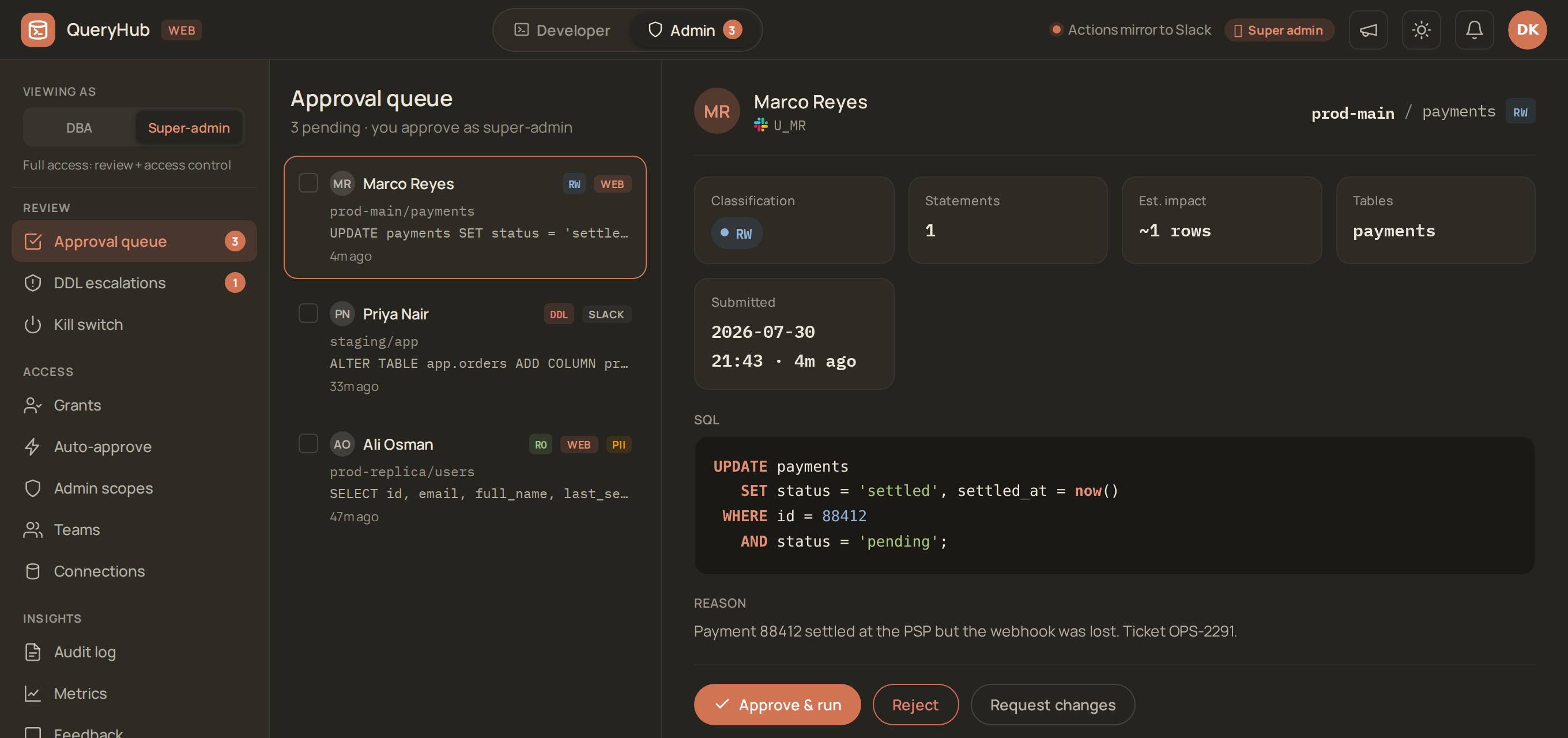
The product in one screen: a developer's write is pending. The DBA sees the
exact statement, its classification, what it will touch, and why the developer
asked for it. Then the DBA approves that statement, not a session.
- What this is instead of · Screenshots · Try it · Install · Architecture · Portal door (IdP) · Operations · Backup & recovery · Key rotation · Personal data · Versioning · Contributing · Changelog · Roadmap
Status: experimental / early. This project runs in production for its author, but the public release is young. Interfaces, schema, and defaults may change, and hardening continues. Run it behind your own network controls. Do not expose it to the internet. See docs/KNOWN_LIMITATIONS.md for an honest inventory and ROADMAP.md for what's next.
The problem this solves. In a typical engineering org, the DBA team is the bottleneck for ad-hoc data questions. Examples: "why is this user missing?", "how many of X happened yesterday?", "I need a CSV of all Y for the report". Each question is a Slack DM or a ticket, and each one costs a context switch. The data path is informal and unaudited. Over time, access escalates as developers accumulate long-lived read-only roles "just for this one report".
This bot is the paved path. Developers submit, and an admin approves. The bot executes against the right credential tier, and the results return as a CSV in a DM. Every step is in
audit_log. Production access stays narrow, and ad-hoc work no longer blocks the DBA's calendar.
How this compares
Two products solve adjacent problems. If you know either one, you should be able to tell in twenty seconds whether this one is redundant.
| QueryHub | Bytebase | Teleport | |
|---|---|---|---|
| What it governs | one statement at a time | schema changes (migration review is the product) | access to a session — it brokers a connection and records the transcript |
| Reads your SQL? | yes — classifies each statement RO/RW/DDL and picks the credential to match | yes, for migration review | no — it cannot tell a SELECT from a DROP |
| Developer holds a credential? | never | for ad-hoc query, usually yes | yes — a short-lived one, but it is theirs |
| Approve one query | the whole model | secondary to change management | not a concept |
| Where approval happens | Slack DM or the web panel, and the result arrives as a CSV | web console | web console / CLI |
| Cost of the approval workflow | Apache-2.0, all of it | custom approval flows are Enterprise | access requests are Enterprise |
In short: the alternatives charge for the two features that this project is entirely about — per-query approval and a custom approval workflow.
Where you will lose by choosing this
Here are the losses, stated plainly. The wins above are only worth reading if the losses are here too:
- No schema-migration pipeline, no GitOps. If reviewing and shipping migrations is your problem, Bytebase is built for it, and this project is not.
- Four engines. PostgreSQL, SQL Server, and Athena and ClickHouse (both read-only). Bytebase supports more than a dozen.
- No HA. One process, one host. See docs/KNOWN_LIMITATIONS.md.
- No infrastructure access. Teleport governs SSH, Kubernetes and more. This project governs SQL statements and nothing else.
- One maintainer, against funded companies. The status banner is not false modesty.
Why this shape is about to matter more
People give agents database credentials right now, because that is the easiest way to let an agent answer a question. The problem is not new, and the fix is not new either:
- A caller that should not hold a credential submits a statement.
- A human approves that statement.
- The statement runs under a role that matches what it actually does.
QueryHub already does that, for humans.
Extending it to agents is a small addition, not a new product. The addition is a principal kind for non-human callers, a hard read-only ceiling for them, and their prompt recorded next to the SQL. It is on the roadmap (P3, agent access), but it is not built yet. This section is positioning, not a feature claim. Note what it is not: QueryHub would govern the SQL that an agent writes. It would not write SQL from natural language.
Not this project's job
QueryHub is not an ORM, a BI tool, or a general query IDE. It has no dashboards, no charts, and no scheduled reports beyond "run this statement later". If you want to explore data, use Metabase. QueryHub is the gate in front of the database. It is not a tool to explore the data.
Engines
An engine is in one of three states. Today, every engine that QueryHub names is in the first state. The second state is the one that a new engine passes through.
| Engine | State | What that means |
|---|---|---|
| PostgreSQL | Executes | Full three-tier model: RO / RW / DDL, per-tier credentials, streamed results, EXPLAIN pre-flight, PII lineage from the planner. It is the reference engine. |
| SQL Server | Executes | Same model. T-SQL safety dialect. QueryHub refuses cross-catalog and linked-server references. AG read-routing for RO. |
| Amazon Athena | Executes, read-only | For data that is now in object storage, not in the database. No host and no stored credential: the gateway assumes a role. QueryHub accepts only SELECT / WITH. On this engine, that rule is what refuses the statements that would WRITE (CREATE TABLE AS, INSERT, UNLOAD, MSCK REPAIR). The schema comes from the data catalog. Every query records what it scanned, because on a pay-per-byte engine the scan is the risk. |
| ClickHouse | Executes, read-only | Native protocol over TLS, as a login that the server holds at readonly=1. readonly=1 refuses every setting, so the gateway sends none. The gateway enforces the time limit itself: it closes the connection at the deadline, which cancels the query. QueryHub accepts only SELECT / WITH. Table functions are default-deny (benign generators only). QueryHub refuses dictionary, remote and file reads. system.* and information_schema are readable. The schema catalog never wakes a service that idles to save compute. |
| A new engine | Parses, refuses to run | A safety spec, but no execution path yet. QueryHub rejects a target tagged with it at execution time, and does not silently run it through the PostgreSQL driver. |
| Anything else | Not started | No spec, no driver. Nothing to configure. |
That middle row is deliberate, not an unfinished corner. Connecting psycopg to a non-PostgreSQL server would "work" often enough to be dangerous. It would also skip the safety dialect of that engine. So a statement that PostgreSQL rules classify as read-only could be a write under the rules of the target. QueryHub refuses an engine that it can parse but cannot execute. This is the same discipline as refusing SQL whose meaning is ambiguous: if QueryHub cannot make the guarantee, the query does not run.
Adding an engine is a spec in engines.py —
sqlglot dialect, banned leading keywords, driver — plus a resolver in the
lineage and statement-count seams. It is not a fork.
Screenshots
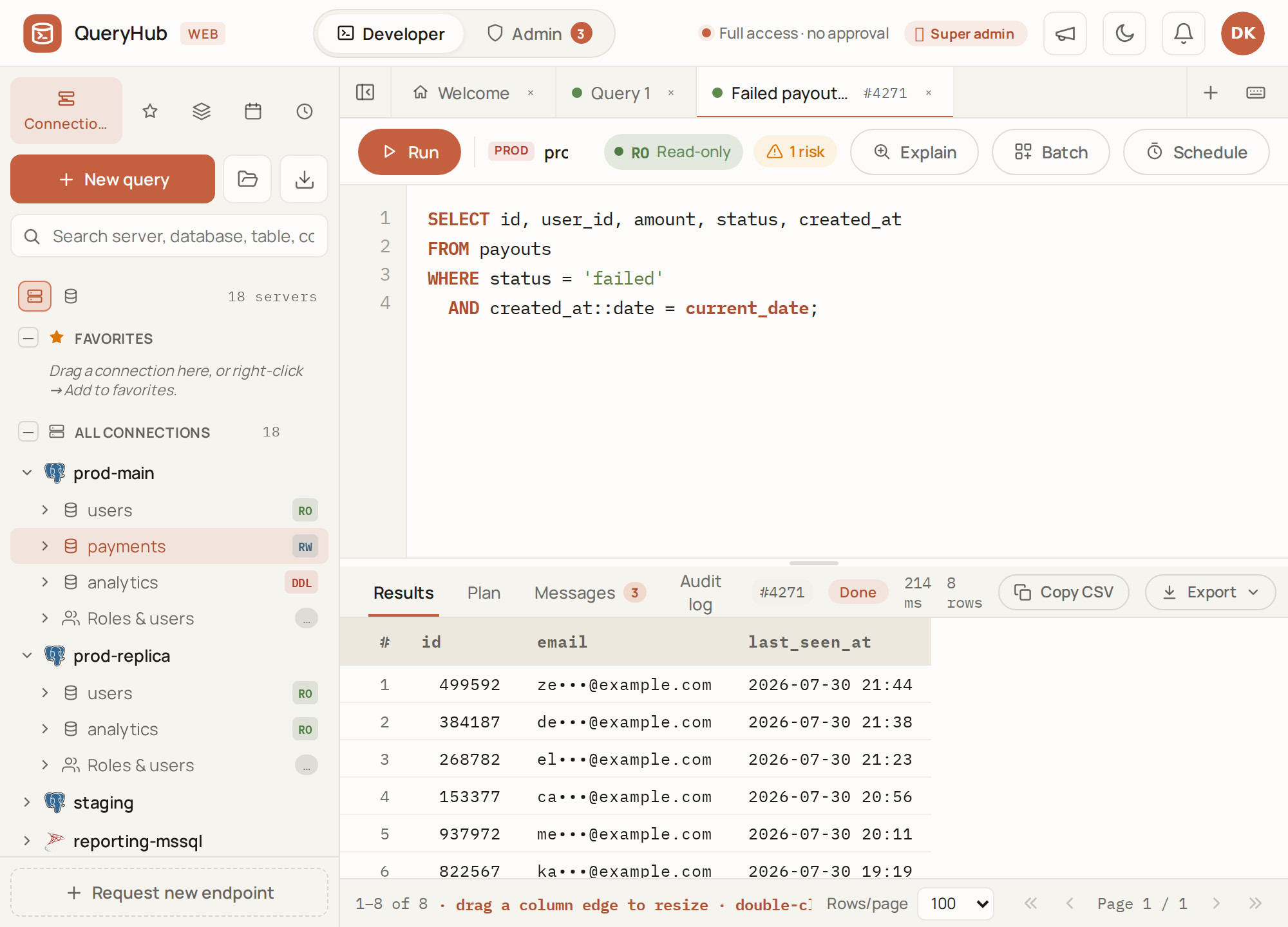
All of these are the shipped UI, rendered from the design prototype's mock data. No real connection, person or query appears in any of them.
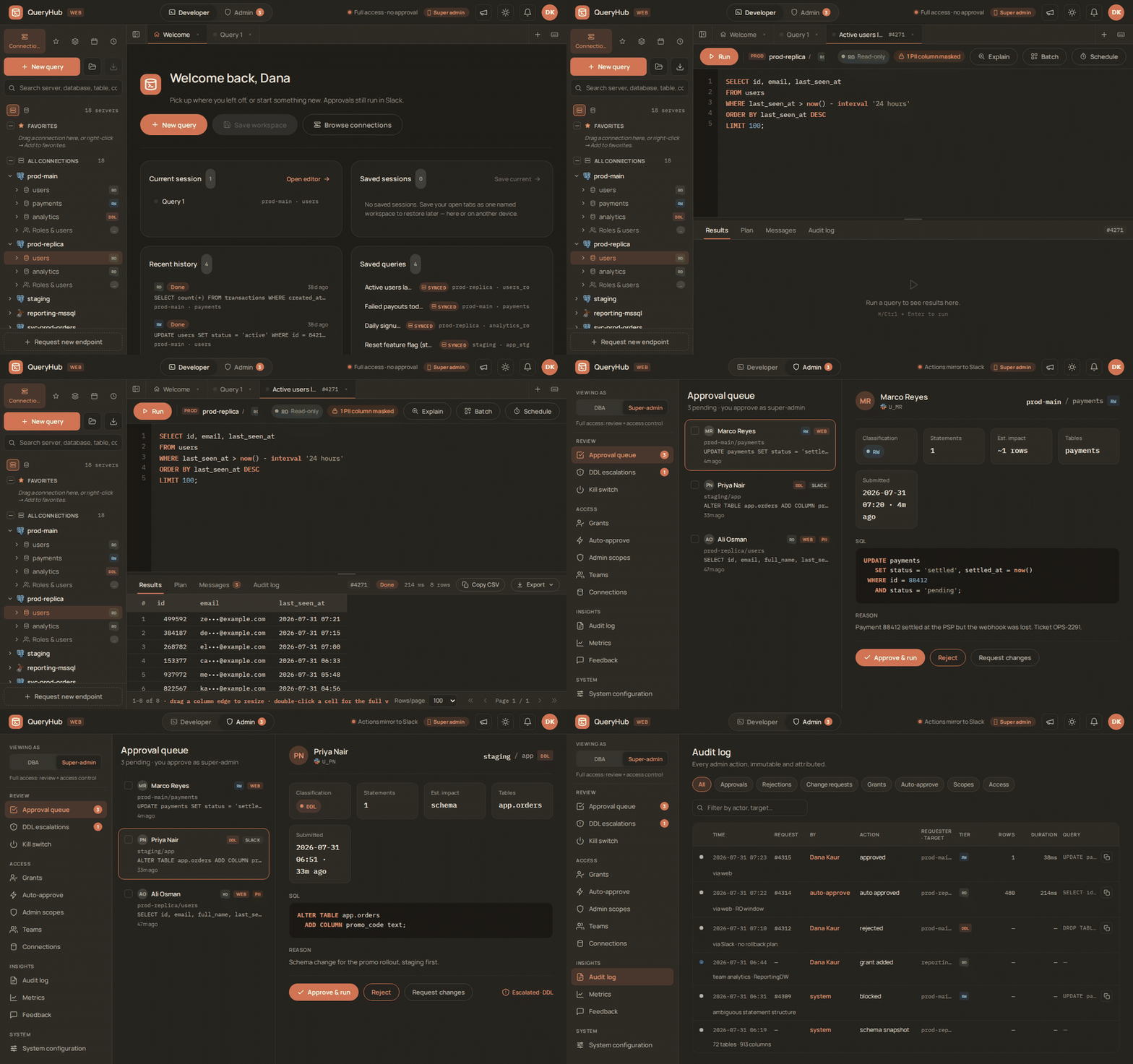
The whole loop: you run a read-only query. QueryHub auto-approves it within
your grant and masks PII in the result. Then you switch to the DBA side, review
a pending write, and approve it. The audit log records the decision.
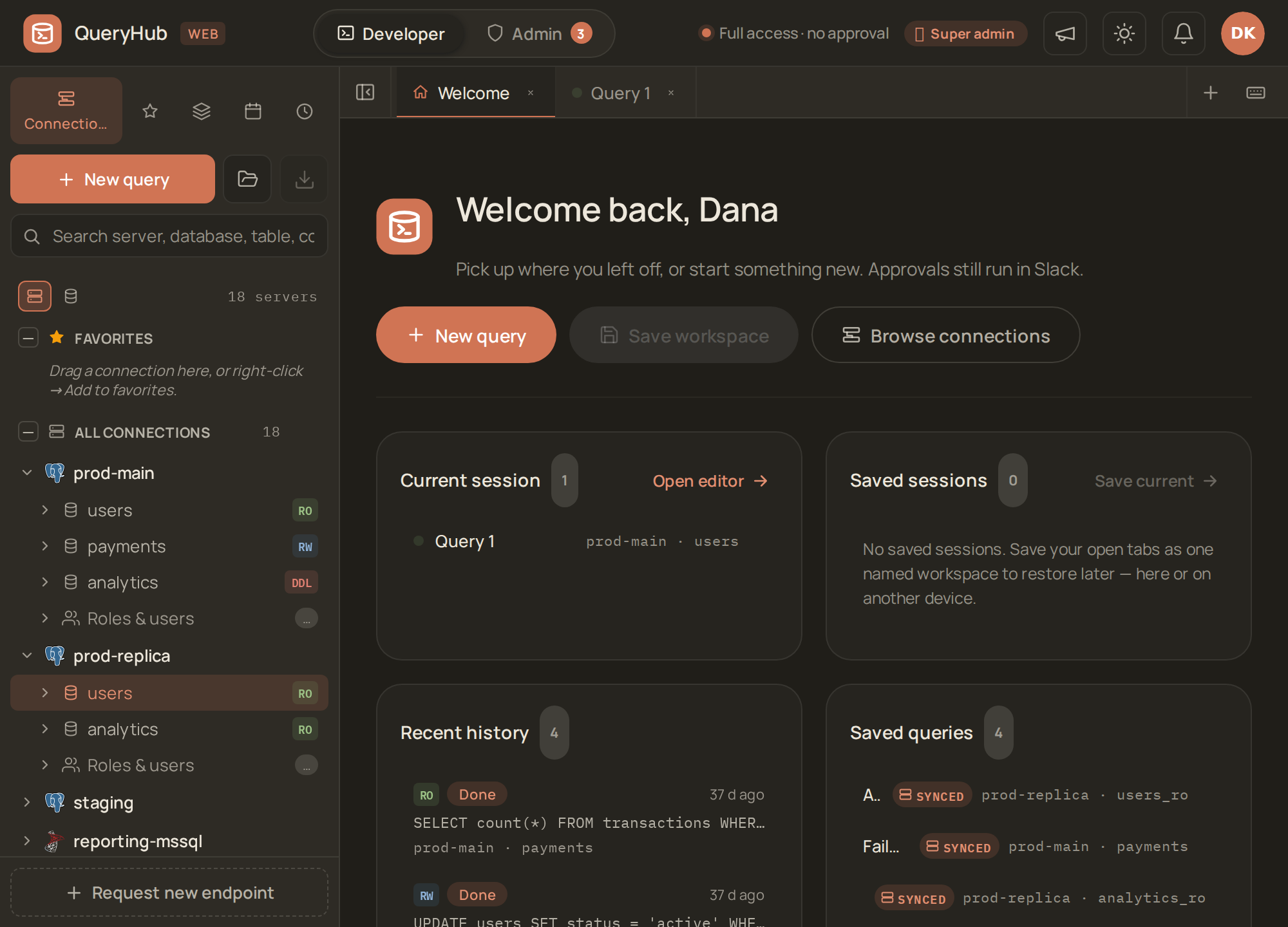
The workspace: your connections by tier (RO/RW/DDL), recent history,
saved queries, and open sessions — everything in one place.
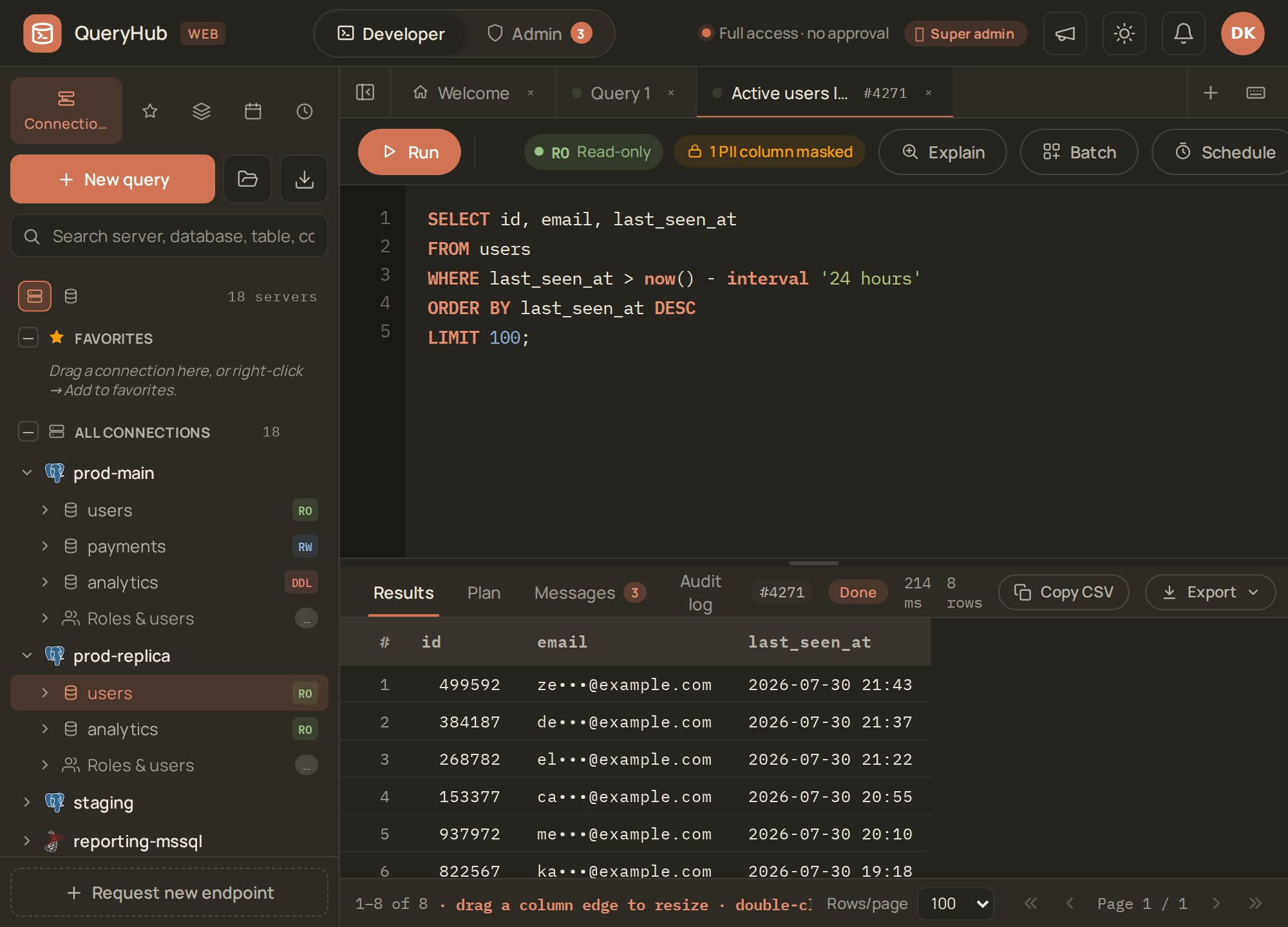
You write SQL against a tier-matched connection and run it. QueryHub masks
PII columns in the result and audits every run.
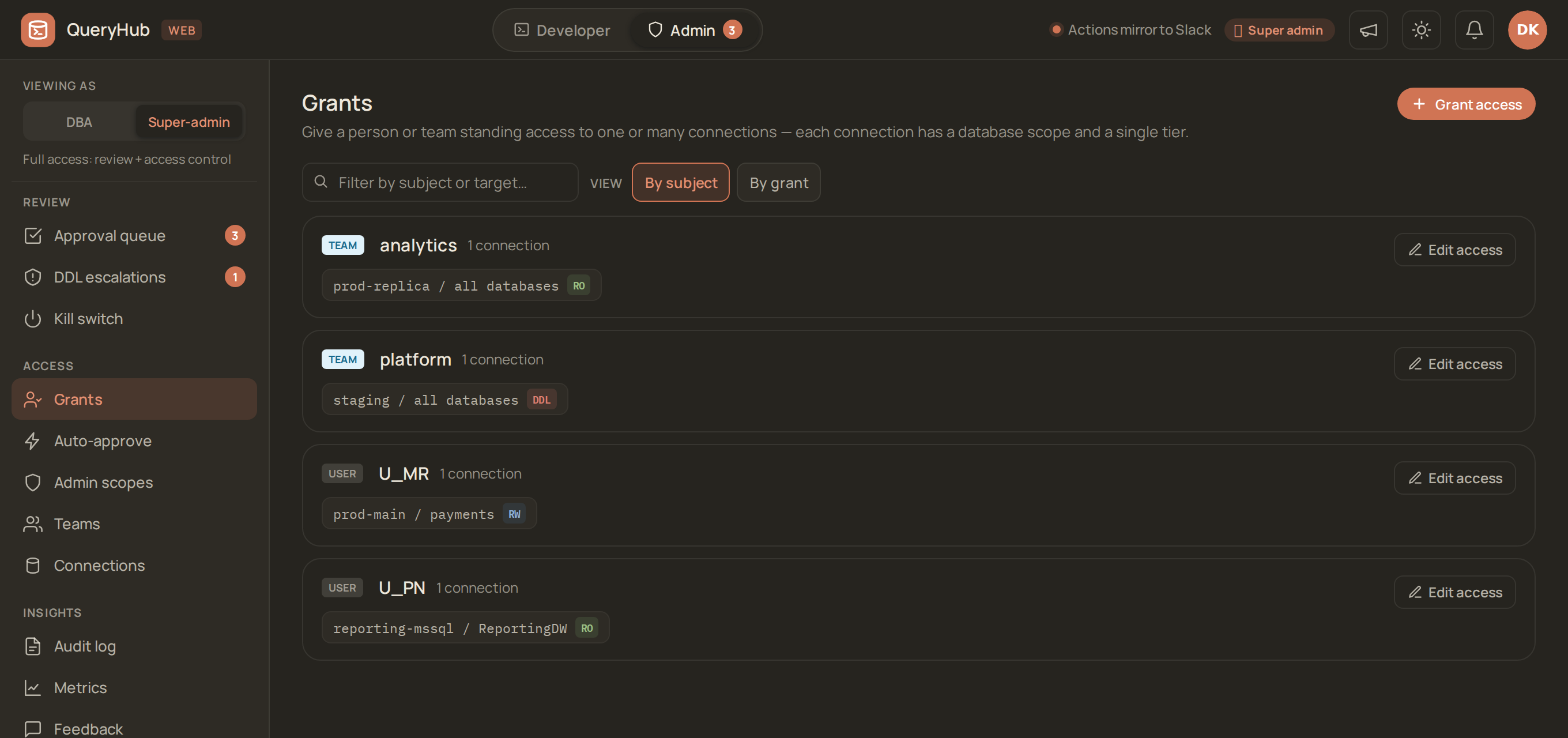
The three-tier model, made visible: who holds RO / RW / DDL, on which
connection, scoped to which databases. A team grant and a user grant read the
same way. The user grant wins.
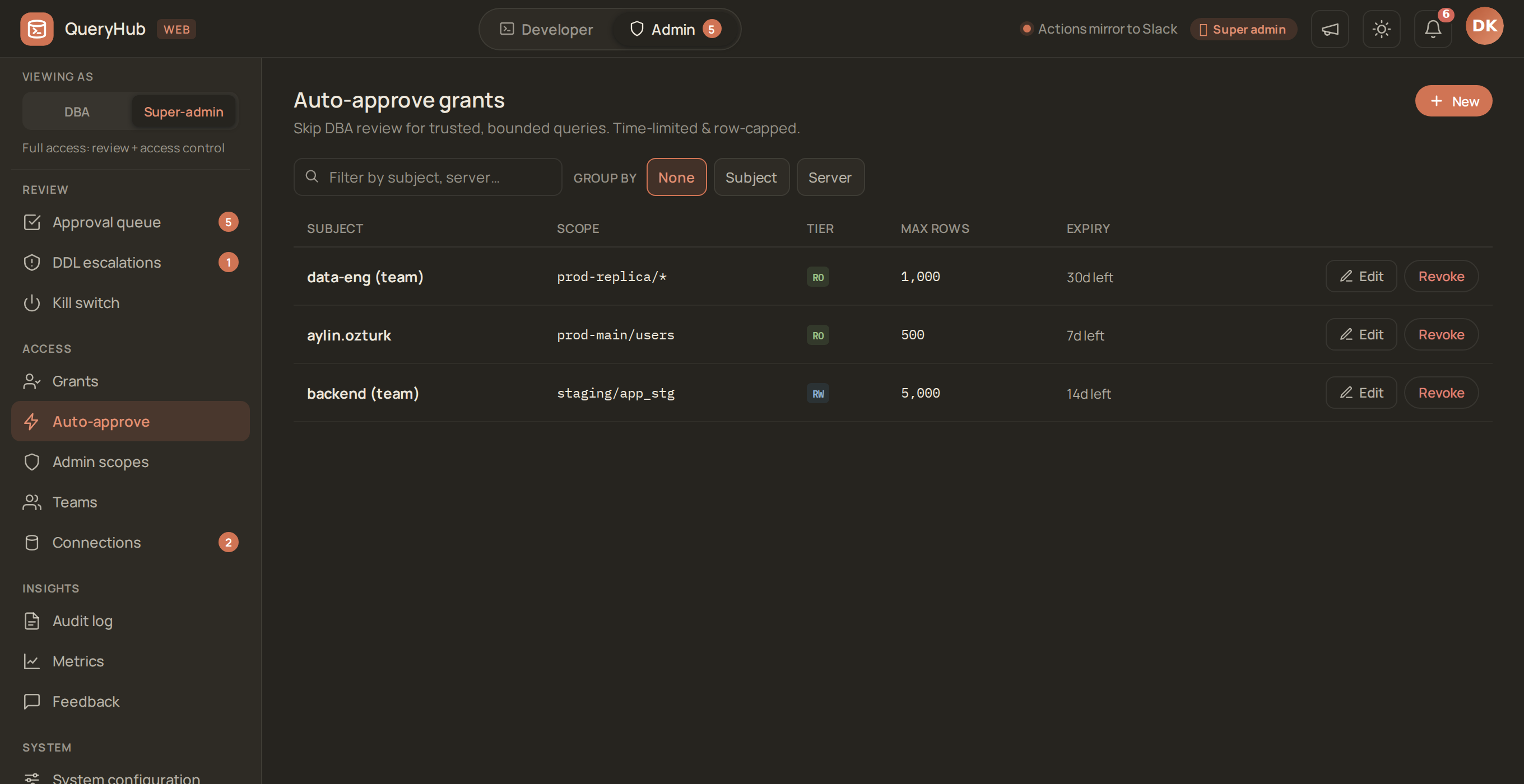
The controlled bypass: a trusted subject can skip review for reads that stay
inside a row cap and an expiry. Both bounds are deliberate. An exemption with no
time limit is a permanent grant with extra steps.
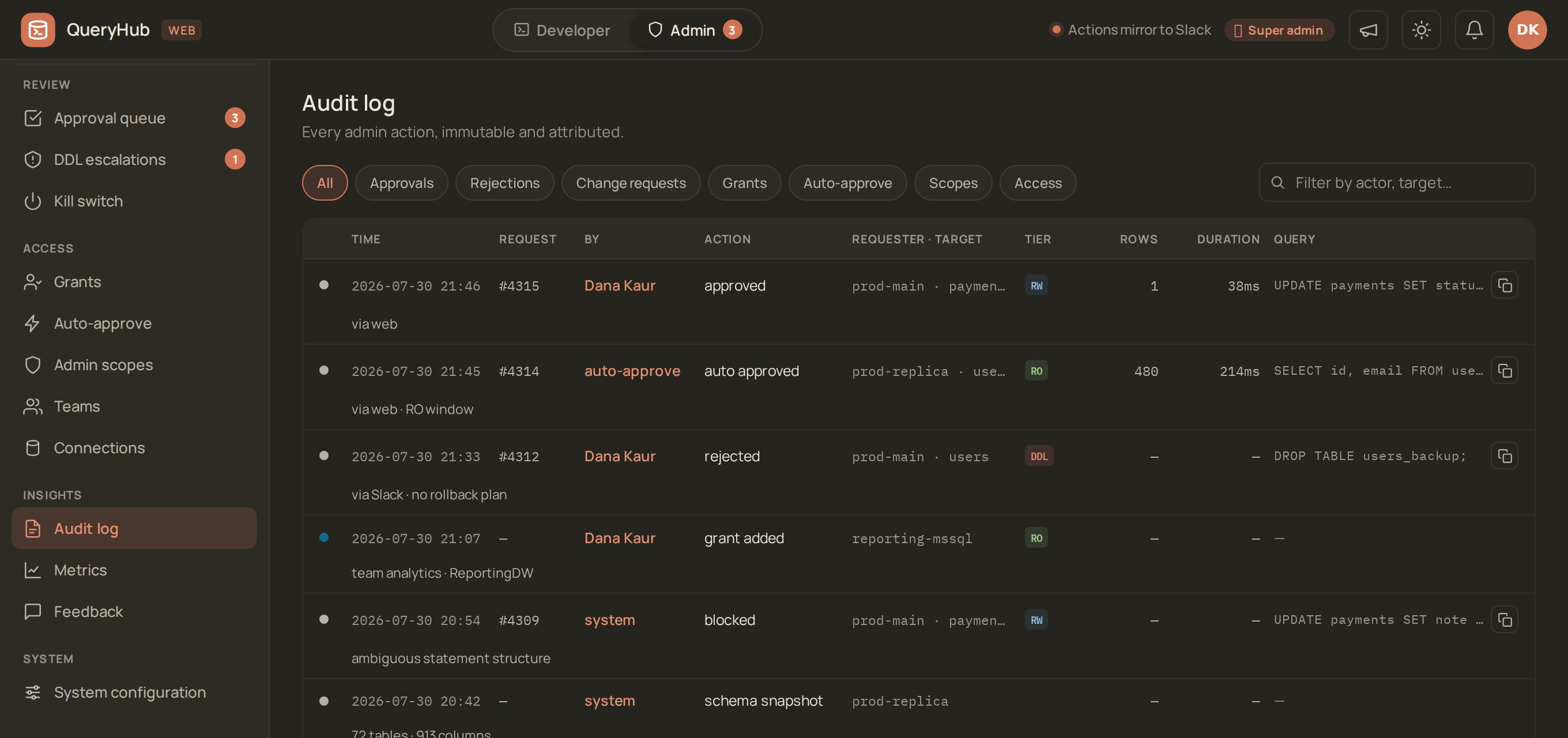
Every decision, attributed and recorded — approvals, rejections,
auto-approvals, grant changes, and queries that the safety pass refused.
Light theme, with a SQL Server schema in the schema browser. QueryHub
supports PostgreSQL and SQL Server behind one pluggable engine layer.

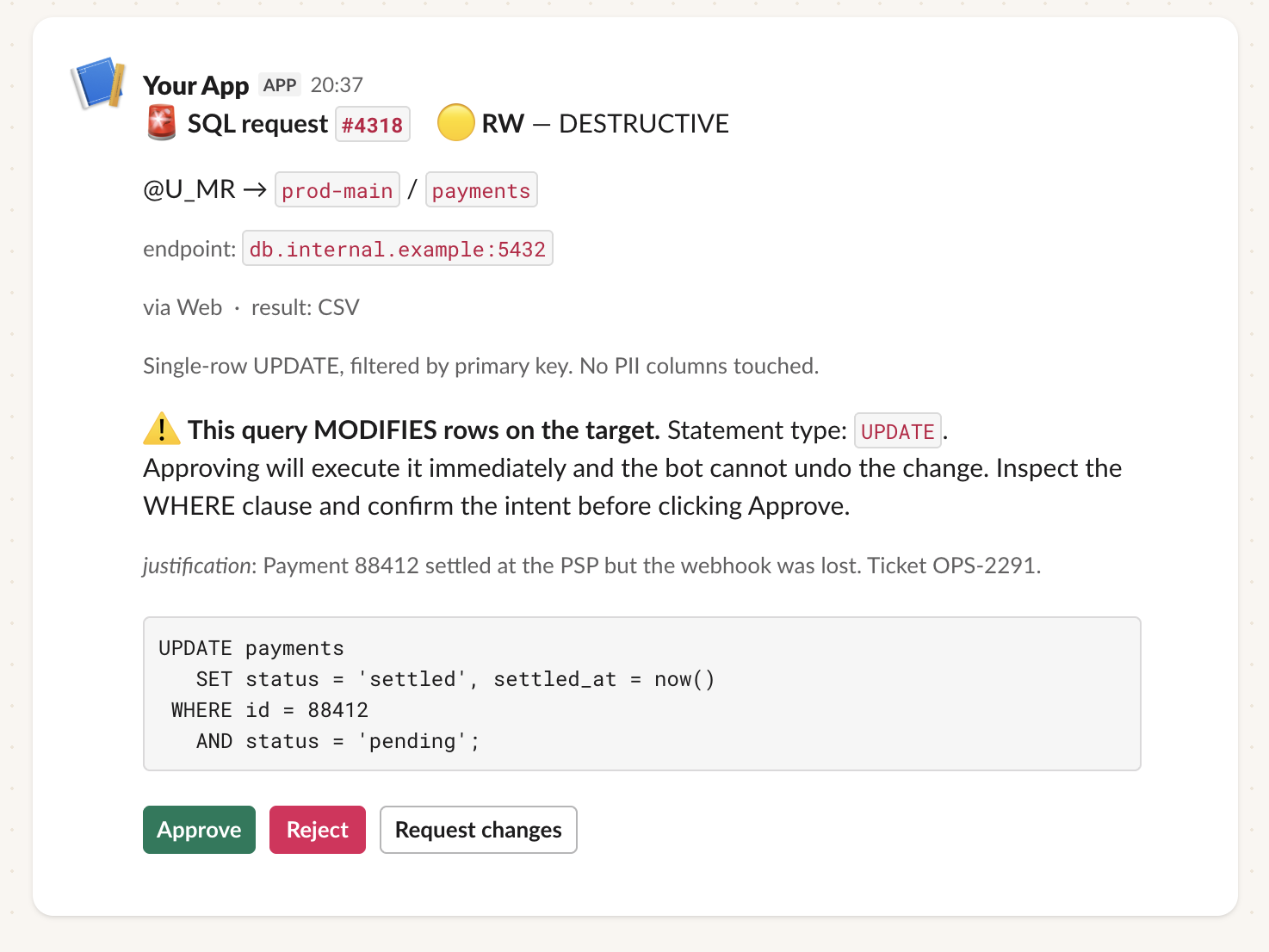
The same two moments in Slack, for teams that prefer not to open a web app.
They are /sql to submit, and the card that a DBA acts on. The card
shows the statement, its classification, and why the developer asked for it.
When the DBA approves, the statement runs. The result returns as a file in a
DM.
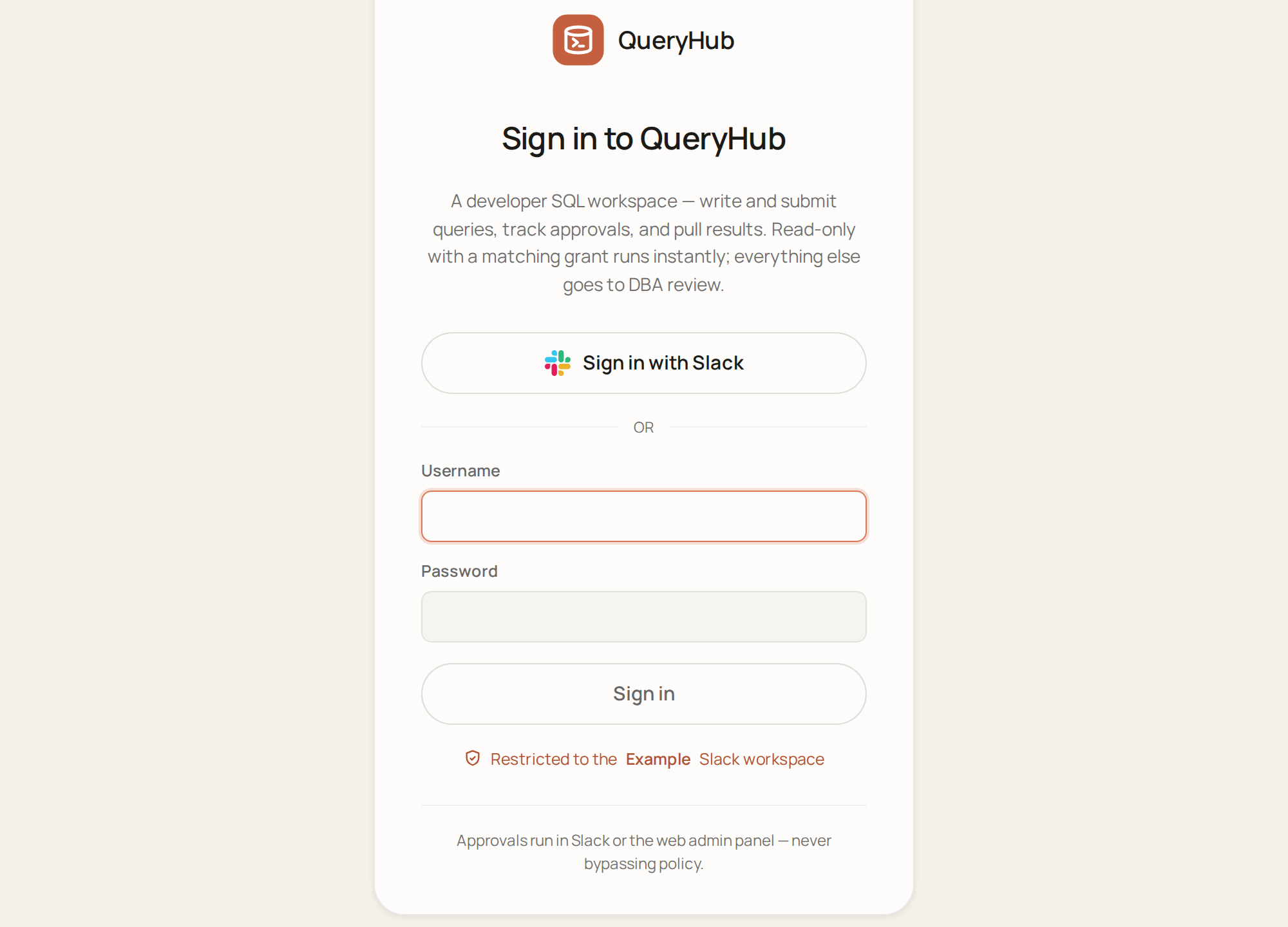
Sign in with Slack, or with a local username/password in the vanilla
(no-Slack) profile.
What it does
- Per-statement approval. The DBA approves the exact SQL that runs. QueryHub executes nothing on a credential that the developer could have used themselves.
- Tier-matched execution. QueryHub classifies every statement as RO / RW / DDL and runs it under the credential for that tier. It re-derives the tier at execution time, so an edited or superseded query cannot execute at a stale tier.
- PII masked on output. QueryHub masks values as they stream into the result file. It masks by content (IBAN, card, email, phone, national ids — checksum-validated, so false positives stay near zero). It also masks by column-name catalog, for free-text PII with no detectable shape. This is accidental-exposure mitigation, not a data boundary: the boundary is column privileges and RLS on the database itself. COMPLIANCE.md says exactly where the limits are.
- Two surfaces, one core.
/sqlin Slack and the web UI drive the same submit → approve → execute → audit path. Approve wherever the interrupt arrives. The result returns as CSV/XLSX either way. A third, optional door lets a trusted portal call the same API (below). - Auto-approve, deliberately narrow. Read-only requests can run instantly under a per-user, time-bounded, tier- and target-scoped grant. Everything else waits for a human.
- An audit row for every state change, written in the same transaction as the change. So there is no "it happened but nobody logged it" state.
docs/FEATURES.md has the full feature list. It covers batch submission, CSV bulk import, scheduled execution, schema browser, inline EXPLAIN plans and DDL escalation. It also covers admin scopes, per-team grants, product metrics, ratings, and the full slash-command list.
Try it in two minutes
git clone https://github.com/ahmetrende/database-queryhub.git
cd database-queryhub
docker compose up
Then open http://localhost:8080 in a browser. Sign in as demo-admin /
queryhub-demo, or as demo-dev for the developer's view.
You get three containers: the app, its metadata database, and a throwaway "production" Postgres. That Postgres holds a seeded shop schema (10k users, 24k orders, 40k events) plus the three per-tier login roles. The demo developer holds an RO grant. Try this:
- Submit
SELECT id, email, phone FROM users LIMIT 10;. - Approve it as
demo-admin. - Watch the result arrive with the email and phone masked.
- Try an
UPDATE. Watch QueryHub refuse it, because it exceeds the grant.
Demo only. It has fixed passwords, a generated master key with no custody plan, and plain HTTP on localhost. It also relaxes
target_ssl_modetoprefer, because the demo target has no TLS. Use it only to try QueryHub. Do not run anything real on it. The install below is for real use.
Prerequisites
Before you install, you need:
| (Optional) Slack workspace | Only for the Slack surface (/sql + Slack approvals/DMs). You need admin access to create / install a custom Slack app with Socket Mode + Bot Token + App Token. Without it, QueryHub runs web-only with built-in local accounts — the vanilla profile (see below) |
| PostgreSQL — bot metadata DB | A Postgres instance that can give the bot one dedicated DB (queryhub by default). Hosting agnostic: RDS, self-managed, or local for dev |
| At least one target DB | The cluster(s) that developers query — PostgreSQL or SQL Server. Per-tier login roles: queryhub_ro / _rw / _ddl on Postgres, matching logins on SQL Server |
| Linux host | A small VM or container that can run Python 3.11+ continuously and reach Slack + your DBs. The docs describe the install path for systemd. A different supervisor works fine |
| Python 3.11+ | Plus python3.11-venv, libpq-dev, git |
| (Optional) Web UI | To expose the web surface, run python -m queryhub.web (FastAPI/uvicorn) behind TLS. Serve the QueryHubWeb/ bundle. Web login is either Slack OIDC (a Slack app's client id/secret) or built-in local accounts (username/password, no Slack) |
| (Optional) SQL Server driver | For SQL Server targets: Microsoft ODBC driver (msodbcsql18) + the mssql extra — pip install '.[mssql]' (pulls pyodbc) |
| (Optional) ClickHouse driver | For ClickHouse targets: the clickhouse extra — pip install '.[clickhouse]' (pulls clickhouse-driver). Native protocol over TLS, port 9440 |
| A Postgres superuser (or rds_superuser) for bootstrap | deploy/setup_db.sql uses it once, to create the bot's metadata DB and login role |
docs/PREREQUISITES.md has the full pre-install checklist: Slack app scopes, per-target role provisioning, network rules, and optional integrations.
Install
Run two commands. Then do everything else in the UI.
cp .env.example .env && $EDITOR .env     # metadata DB + first admin
docker compose -f docker-compose.install.yml up -d
The first up builds the image from this checkout. That takes a few
minutes, once. This default is deliberate: an approval gateway should not change
what it runs because a shared tag moved. To skip the build, pull a released
image. Then name it in the up command:
docker pull ghcr.io/ahmetrende/database-queryhub:1.0.38
QH_IMAGE=ghcr.io/ahmetrende/database-queryhub:1.0.38 docker compose -f docker-compose.install.yml up -d
Every release publishes its own immutable tag alongside :latest. Reference the
version, not latest, in anything that you deploy.
Four values in .env matter. BOT_DB_HOST / BOT_DB_PASSWORD are for the
metadata database. QH_ADMIN_USER names the