Rooms by I-Ops
See who built your project and which AI helped. Share your team's status and AI setups through your own GitHub.
One of the layers of I-Ops, open sourced — the share and observe layer. Not runtime control, not assurance; those are separate products.
Status: early / in testing. The spine (local events → team/org projections → dash) is
shipped and dogfooded, but the product is still settling. Collaborators and suggestions are
welcome — issues, PRs, and security notes especially. Pin a version; do not use @latest.
Rooms works from your own machine and your own GitHub: no account, no I-Ops server, and no model deciding anything. It helps with observability and traceability of people and their AI agents — what was recorded on a laptop, then thin projections a team opts to share. It does three things.
- Who built a project, and which AI helped. Point it at a git repository and it reads the history: which agent signed which commit, recomputed from the repository every time.
- A team room. A private repository your team owns holds each member's status: work not yet committed, pull requests and agent sessions, on a board everyone can open. More below.
- Shared AI setups. Export your Claude Code, Codex or Cursor setup for a role. A teammate adopts it with a plan they approve first, and can put every byte back. More below.
The first needs nothing but a repository:
npx iops-rooms week
Claude co-authored 68 of the last 137 commits here, and Cursor 1.

i-ops-hq/iops-rooms · last 90d
137 commits · +21k −2.4k · 1 person

  Claude             68  ███████████░░░░░░░░░░░  49%
  Cursor              1  █░░░░░░░░░░░░░░░░░░░░░   2%
  no agent recorded  68  ███████████░░░░░░░░░░░  49%

"no agent recorded" is not "no agent used". Cursor and Copilot often write
no Co-Authored-By trailer, so a plain commit only means none was recorded.
Every share here is a floor.

Configured for: Cursor (.cursor/).
A config file says a tool was set up here, never that it was used — and
never how much. These are not commits and do not belong in the percentages
above.
That is this repository, which is unusually well attributed because it is built by an agent that
writes the trailer. Most repositories look nothing like it. Here is anthropic-sdk-python, and
it is the more honest picture of what you should expect on a first run:
Claude co-authored 35 of the last 500 commits here.

anthropics/anthropic-sdk-python · last 3650d
500 commits · +165k −31k · 35 people

  Claude                                        35  ██░░░░░░░░░░░░░░░░░░░░   7%
    Claude                                      31
    Claude Code                                  1
    Claude Opus 4.6                              1
    Claude Opus 4.7                              1
    and 1 more                                   1
  co-author that says it is a bot                5  █░░░░░░░░░░░░░░░░░░░░░   1%
  co-author, no bot marker — usually a person    7  █░░░░░░░░░░░░░░░░░░░░░   1%
  no agent recorded                            453  ████████████████████░░  91%

Reading the newest 500 of 1423 commits in this window.

"no agent recorded" is not "no agent used". Cursor and Copilot often write
no Co-Authored-By trailer, so a plain commit only means none was recorded.
Every share here is a floor.

Configured for: Claude Code (CLAUDE.md).
A config file says a tool was set up here, never that it was used — and
never how much. These are not commits and do not belong in the percentages
above.
Six percent, in the repository of the company whose tool writes the trailer by default. Across six
well-known repositories — Anthropic's, OpenAI's, LangChain's, Astral's, Vercel's and tinygrad's —
1.5% of 3,000 commits carried a trailer this could attribute. If your repository comes back
mostly no agent recorded, that is the normal result and not a fault in your history. The
number is a floor, and on most repositories it is a very low one.
Four commands, all read-only, none of which needs a room:
rooms week |
what shipped this week and which agent helped, against last week |
rooms branch |
the mix for the commits on this branch — read it before you open the PR |
rooms file src/auth.ts |
who and which agent last touched a file that looks wrong |
rooms badge --out agents.svg |
a stacked bar for your README — like the one below |
Run them from anywhere inside the project. A repository is one project, so a command typed in
packages/web/src reports the whole repo — and rooms file app.ts still means the file next to
you, not one of the same name at the root.
On a branch other than the default one, rooms week, rooms badge and the board read the default
branch's history: origin/main as your last git fetch left it, or your own main without a
remote. Rooms never switches your checkout. A last line says what your branch adds, and rooms branch shows those commits. Reports and the board name the project as its remote does, owner/repo.
Not sure where to start? Type rooms on its own, in any folder: it says what it found there, a
project on some branch, a folder without git, or a folder of projects, and the few commands that
fit. rooms help lists them all.

This one is real, generated from this repository by rooms badge.
no agent recorded is not no agent used. Cursor and Copilot often write no
Co-Authored-By trailer at all, so a plain commit only means none was recorded. Every share here is
a floor, never a measurement of how much of your code an AI wrote — and unlike a vendor
dashboard, it is blind to which vendor you use.
A trailer this tool does not recognise gets its own row rather than being folded into
no agent recorded. Ten agents are recognised by name today — Claude, Cursor, Codex, Copilot,
Devin, Gemini, Jules, aider, Amazon Q, Windsurf — and the eleventh appears in that row instead of
quietly lowering the floor.
There are two such rows, and neither of them says "agent". Until 0.5.7 there was one, labelled
co-author, not a known agent, and on astral-sh/uv it read 47% with a long bar sitting directly
above no agent recorded — so the page said, to any eye scanning it, that half the repository was
agent-written. Inside that row were Zanie Blue with 157 commits, Charlie Marsh with 14, and a
handful of release bots. Not one AI agent in the top twelve. The label was true and the number read
as something else, which is the failure this tool exists to refuse.
They are split on [bot], which GitHub appends to every App account, so it is the platform's own
marker rather than a guess about anybody's name. A release bot that does not mark itself lands with
the people — that understates automation instead of overstating it, and calling somebody's
colleague a robot is the more expensive mistake.
One row per agent; the model goes underneath it. anthropic-sdk-python reported Claude Code
five separate times — Claude, Claude Opus 4.6, Claude Opus 4.7, Claude Opus 4.7 (1M context)
and, from a hook that wrote its template instead of its value, Claude Code (${CLAUDE_PROJECT_DIR})
— so the one agent anybody was looking for never appeared as a number. The agent and the model are
two different questions; the row answers the first and the lines beneath it answer the second.
Counts can overlap; percentages cannot. A commit with two agents on it appears in both of their counts, because both of them were there. The percentages split that commit evenly so the rows always total 100, and the output says how many commits were split.
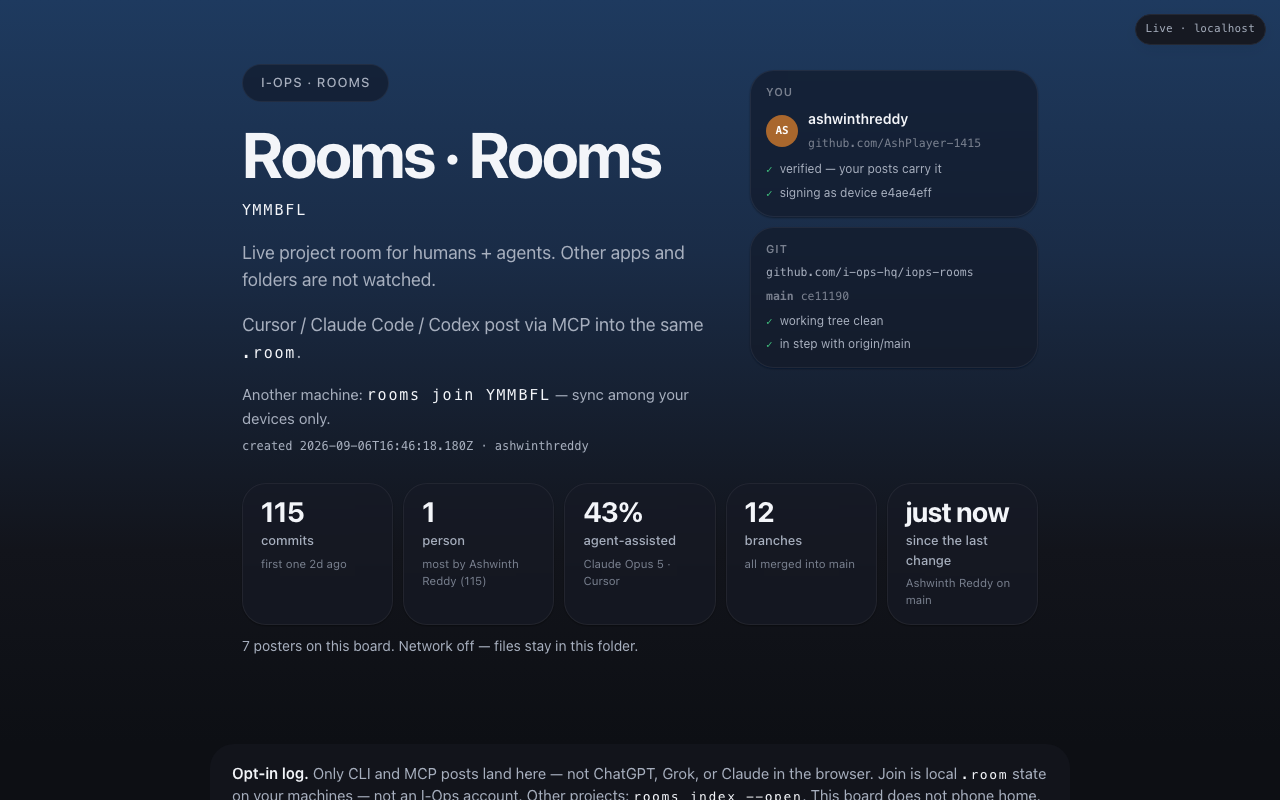
Then, when you want the picture rather than the number:
npm i -g iops-rooms
rooms open
The room lands at the root of the repository however deep in it you were standing, so everyone on
the project shares one, and every worktree of it shares the main checkout's. Run it in the folder
that holds your repositories and it names them rather than making a room there. If git cannot read
the project, the board says why, in git's own words. The first time, if you have the gh CLI
signed in, it offers once to link your GitHub account so your posts carry a verified name — after the
board has opened, never before, and never at all in a pipe, in CI, or a second time if you say no.
ROOMS_NO_PROMPT=1 turns it off outright. Nothing is uploaded either way.
Where that comes from, and what it is not. Claude Code and Cursor both write a
Co-Authored-By trailer on the commits they help with, so the attribution is already in your repo
and in every clone of it. Rooms reads git and nothing else — not .cursor/, not Claude's session
files, not any tool's private state. A commit with no trailer is shown as the person's own, not
as an unknown.
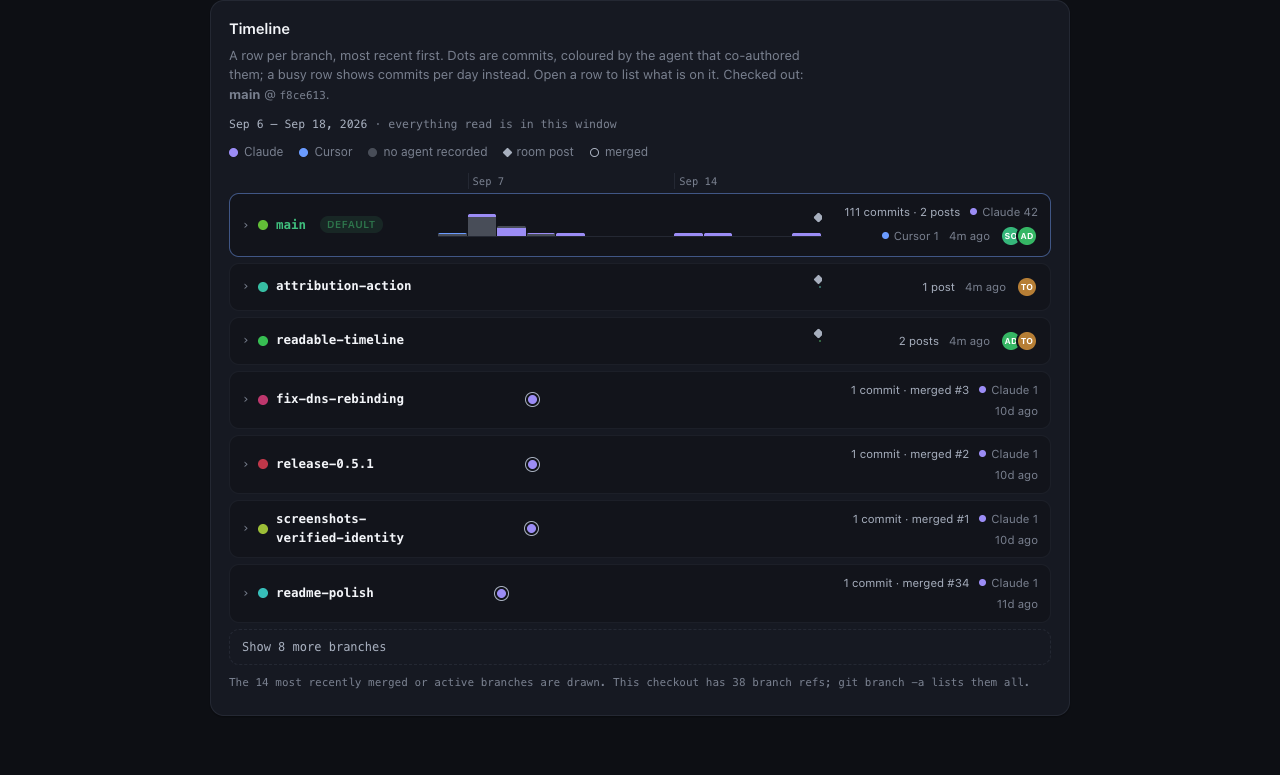
On top of that, a live room: a timeline with a row per branch and one zoomable time axis, a dot per commit and per post that opens into a list, and a shared transcript on disk that a team syncs through their own git remote. Terminal plus a static HTML board. Network off for individual use.
Runs on macOS, Linux and Windows, on Node 20, 22 and 24. Linux and Windows are tested on every change; macOS runs weekly and on demand, because it bills at ten times the minutes and is the platform this is developed on.
Pin a version. Do not run @latest.
What the board shows about your project
| from | needs | |
|---|---|---|
Every commit, its author, its +/− lines |
git log |
nothing |
| Which agent co-authored it — Claude Opus 5, Fable, Cursor, Codex | Co-Authored-By trailers |
nothing |
| Branches splitting from main and rejoining, with PR numbers | merge commits | nothing |
| Per-person totals: commits, merges, lines, which agent they lean on | git log |
nothing |
The last 7 days as rooms week prints them: the finding, the rows, every caveat |
git log |
nothing |
| Each agent session on this machine: its model, the files it edited, the commits that carry them | the agents' own hooks | rooms hooks install --agent claude-code|codex|cursor |
| This checkout right now: what is not committed, its upstream, its pull request | git, and your own gh for the pull request |
gh signed in, for the pull request |
| Live posts, presence, who is on which branch right now | .room/ |
the CLI or MCP |
The first five work on a repo that has never heard of Rooms, including for teammates who never
install it — because every clone already carries the whole history. The week is built from the same
report as rooms week, with the same sentences, so a teammate who never opens a terminal reads
what the terminal says, in the board's own window. Agent sessions need the hooks, the pull request
needs your own gh signed in, and live posts need someone to post. An open rooms live board
updates as an agent edits.
Every rooms week ends with the checkout as it stands, in the words the board's Git card uses:
Right now, in this checkout (now/right-now):
  uncommitted: +38 −5 in 3 files, and 1 new file
  this branch tracks nothing yet
  not pushed yet, so no pull request
Counts only, never which files. The pull request is asked of GitHub through your own gh, only
for a branch your remote already has, at most once a minute per branch and never on the default
branch. A branch only on your machine reads "not pushed yet", and its name goes nowhere. "No pull
request yet" means GitHub said so; anything short of that reads "pull request unknown", with the
reason. ROOMS_NO_GH=1 turns the question off.
A team room, through your own GitHub
When several people work on a project, each one's Rooms can share a small status with the others through a private repository the team owns. Nothing goes through an I-Ops server.
rooms team init --name acme       # once, in a clone of a new private repository; then git push
rooms team join acme/team-room    # in each project, on each member's machine
rooms team sync                   # shows your status and asks before the first push
rooms team board                  # everyone's status, in its own window
rooms team live                   # the same board, kept current while it is open
rooms team workflow               # once, in the team room: BOARD.md, for people who only read GitHub
rooms team coverage               # who synced, who looks stale, hooks-seen floor
rooms team packages               # package names/versions across members (observe)
rooms team packages --multi       # only packages on more than one member
rooms dash                        # localhost board: local + team floors (incl. packages / catalog)
A status holds the project; if you share it, the branch and its upstream; how far it is ahead or
behind; its pull request's state; what is not committed yet, as counts of files and lines; and how
many agent sessions your hooks saw in the last seven days. Never a file name, a line of code, a
commit message or a prompt. --no-branch leaves the branch out, and --dry-run shows the file
without sharing it. Rooms pushes only your own status file, one per project, with your own git, and
only after you have seen it and said yes; an unchanged status is not pushed again.
rooms team live keeps the board current while its window is open: every five minutes (--every,
thirty seconds at the least) it fetches the team room with git, which asks nothing of GitHub's API,
and the page says when it last looked. If you have already shared once with rooms team sync, it
also shares your status for this project when it changes; --no-share keeps it read-only. It runs
only while it is open, with nothing left running in the background.
For people who read the team room on GitHub and run nothing, rooms team workflow adds a GitHub
Action that rebuilds BOARD.md from the status files every hour (--hours) and on demand. GitHub
shows it only to people who can read the repository, so a stakeholder needs read access and nothing
else. The Action runs an exact version of Rooms, may only write the repository, and commits
BOARD.md only when a status changed; it tells you what it costs in Actions minutes before you add
it. Pushing it needs a login that may change workflows (gh auth refresh -s workflow).
A team room on GitHub must be private. Rooms asks GitHub through your own gh on every sync, and
refuses a public one unless you pass --public; where it cannot ask, you confirm with
--confirm-private. The board is built on each viewer's machine rather than published, because
GitHub Pages serves a site to the whole internet on every plan except Enterprise Cloud. Anyone who
can write to the team room can write any file in it, so a status is as trustworthy as that access.
An org room, for leads
When several team rooms exist, a lead can keep a separate private org room that holds only a rollup of those teams: member counts, session floors, package names shared across machines, and who has not synced in a week. It never embeds file paths, prompts, or setup bodies.
rooms org init --name acme-org    # once, in a clone of a new private repository; then git push
rooms org join acme/org-room      # on the lead's machine
rooms org link acme/team-room     # add a team already joined with rooms team join
rooms org refresh                 # shows the rollup and asks before pushing
rooms org show                    # print ORG.md
Share requests and inbox
To ask for or grant a setup without a new repository per share, Rooms writes small share_meta
records under shares/ in the team room (who, what kind, ref, optional pointer). Optional
--encrypt <file> uses age and the recipient's GitHub SSH keys when both are available.
--issue opens a GitHub Issue on the hub assigned to the recipient. rooms inbox lists meta for
you and open Issues titled [rooms].
rooms share request --to bob --ref setup/backend/go-claude --issue
rooms share grant --to alice --ref setup/backend/go-claude
rooms share show <id>
rooms inbox
Episodes on this machine
rooms episode stitches the local activity log into work episodes: one agent session, the files it
edited, packages seen in that window, and commits linked by an in-session mark or overlapping
paths. Floors only — unrecorded work stays blank.
rooms episode
rooms episode --days 14 --json
Dash and companion
rooms dash opens a localhost page (default 127.0.0.1:7841) with this machine's sessions and
packages, the week floor, and — when linked — team pulse, org rollup, and inbox. Read-only JSON
under /api/*.json; same Host check as rooms live. If the team or org room could not be fetched,
the panel says so, with git's reason, and shows what this machine last fetched; the JSON carries
pullOk and pullWhy, as rooms team packages --json does.
rooms companion runs in the foreground and posts OS notifications for new shares/issues (and when
the team room's HEAD moves). It does nothing while the process is stopped (laptop sleep included).
rooms companion install writes an opt-in launcher; login-items stay yours to enable.
rooms dash
rooms companion --every 5m
rooms companion install --yes
Setups: share a Claude Code, Codex or Cursor setup, and adopt a teammate's
A setup is how someone has Claude Code, Codex or Cursor set up for a kind of work: their CLAUDE.md,
AGENTS.md or Cursor rules, agents, commands, skills, prompts, hooks, permission rules, model and
sandbox settings, and MCP servers. The team room holds them, one folder per setup, reviewed like any other change.
rooms setup export --role backend --name go-claude   # in your project; shows it all, then commits to a branch
rooms setup show                                     # every setup in the team room
rooms setup catalog                                  # metadata only (names/roles/owners — no file bodies; secret-looking words withheld)
rooms setup show backend/go-claude                   # what it holds, runs and needs, and who added each part
rooms setup adopt backend/go-claude                  # a plan first; nothing changes until you approve it
rooms setup rollback                                 # every file back as it was
rooms setup status                                   # what you adopted here, and whether there is newer
Export reads only what it lists: the project's Claude Code, Codex and Cursor files, and yours from
~/.claude, ~/.codex, ~/.agents/skills and ~/.cursor with --user (--tool cursor takes one
tool only). Of a Codex config it takes the servers, and with --user the model, approvals, sandbox and
notify; never a project's trust entry, an environment value, or danger-full-access. Of Cursor's it
takes the servers,