
ScreenTinker — Open-Source, Self-Hosted Digital Signage Software
Live demo · API reference · Self-hosting guide · Discord · What's new in 2.1 (video)
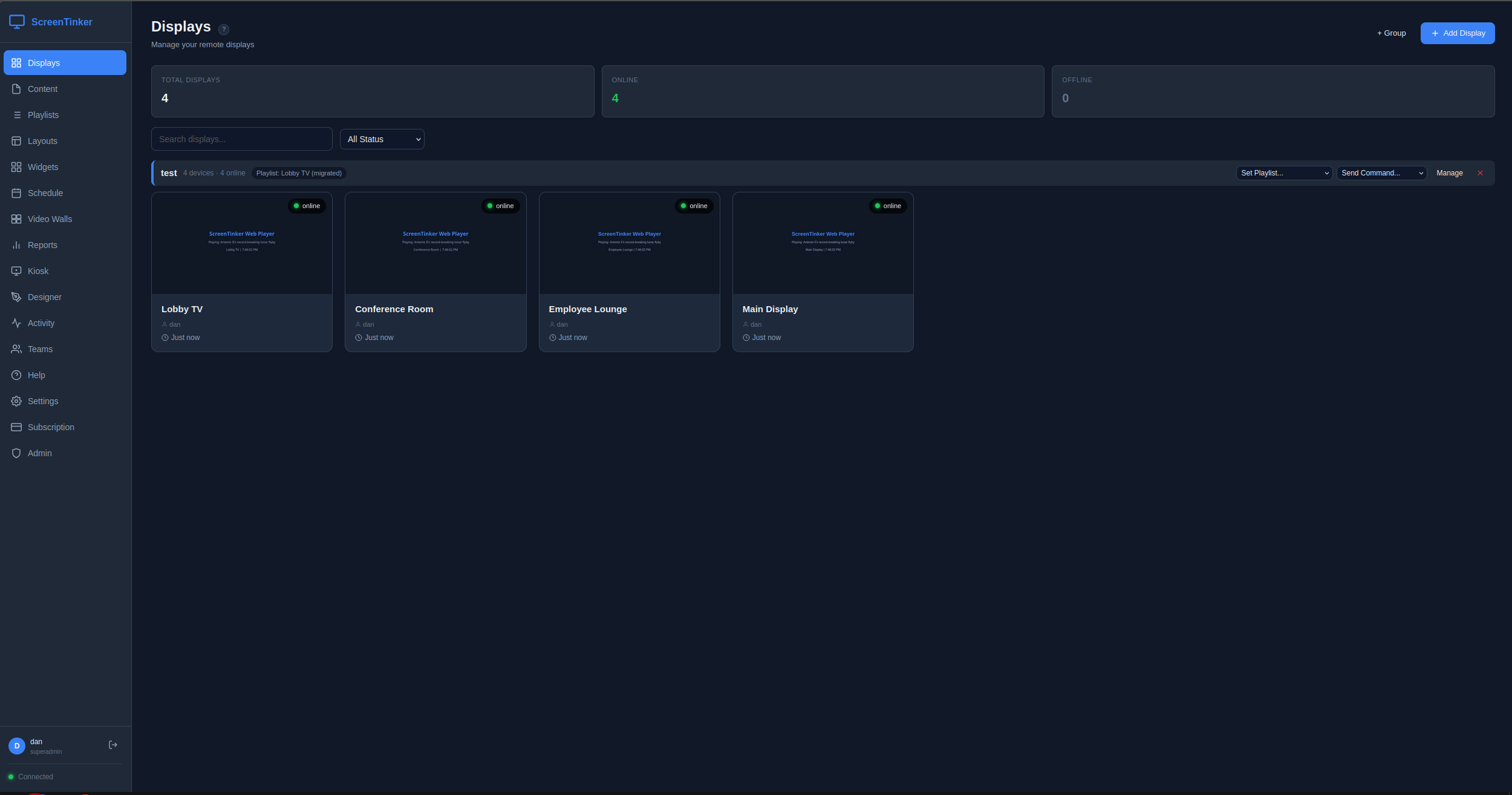
ScreenTinker is a free, open-source digital signage CMS you can self-host on your own server — or run in our managed cloud. Manage TVs, video walls, and kiosks across multiple locations from one dashboard, with remote control, scheduling, playlists, and analytics. Built for retail, QSR menu boards, offices, lobbies, education, and any environment where you need centralized control over remote screens. Multi-tenant, MIT-licensed, single-developer maintained with direct contact access.
Runs on any screen — Android TV, Fire TV, Samsung Tizen, LG webOS, Amazon Vega OS, Roku, Raspberry Pi, Windows, ChromeOS, or any web browser. No per-device player licence, no hardware lock-in.
Why self-host? Keep your content and data on your own infrastructure, avoid per-screen SaaS fees, run air-gapped on a private LAN, and read or fork the source. Set SELF_HOSTED=true and a $5 VPS drives hundreds of screens.
Hosted version: screentinker.com — free tier available, no credit card required. Guides: What is digital signage? · Open-source digital signage · Self-hosting guide Community: Discord What's new in 2.1: watch the release video — every scene in it is a real ScreenTinker slide, played on a real ScreenTinker screen.
Features
- Playlists — first-class playlist objects: create, reorder, set per-item duration, share one playlist across multiple displays; draft/publish workflow with revert-to-published
- Slides — a built-in slide editor: build decks of slides with templates, fields, and per-element entrance animations, an optional voiceover per slide and a music bed across the deck, then publish a deck straight to a playlist. (The 2.1 launch video is itself a ScreenTinker deck.)
- Device groups — organize displays into groups, assign a playlist to an entire group, send bulk commands (reboot, screen on/off, launch, update, shutdown), schedule content group-wide
- Multi-zone layouts — split screens into zones with drag-and-drop editor; 7 built-in templates (fullscreen, split, L-bar, PiP, grid)
- Video walls — combine multiple displays into one screen with bezel compensation, device rotation, and leader-based sync
- Remote control — live view, touch injection, key input, power on/off
- Live video & Talk — optional WebRTC path via a go2rtc sidecar: sub-second live video of what a screen is actually playing (one screen watched by many dashboards without re-encoding), plus Talk — one-way announce or two-way intercom to a single screen, and one-way PA broadcast to a whole group or workspace, with an optional operator webcam shown fullscreen. Off by default and enabled per organization; an org can bring its own TURN/STUN. See
docs/live-video.md - Live TV / IPTV & camera feeds — play a live stream on a screen as an ordinary playlist item: an IPTV/TV channel over HLS (
.m3u8, every player type), or an RTSP camera/NVR on native Android (lowest latency). On an Android TV box with an HDMI input (Fire TV Cube), the box's own HDMI IN plays as an item too: full screen or in a zone, with logos and lower-thirds layered on top. The screen opens the URL itself, so it can be a LAN address and the server never ingests or restreams it — a channel on 40 screens is 40 pulls from your source, not 40 through ScreenTinker. Capability-gated per transport, so a player only receives a stream it can decode. Seedocs/live-playback.md - Scheduling — visual weekly calendar with recurrence rules (daily/weekly/monthly), priority-based conflict resolution, both device-level and group-level schedules (device-level overrides win over group-level), timezone support
- Resumable uploads — large files upload in 1 MiB chunks, one file at a time, so a dropped connection costs one chunk instead of the whole file and progress survives a page reload. This is what makes uploading workable on a slow or distant connection: a single-request upload has to finish inside the shortest timeout between browser and server (behind a CDN, roughly two minutes), and that ceiling does not scale with file size. Declaring the size up front also means a workspace near its storage limit is told before the upload rather than after
- Device-side REST — make a screen perform an HTTP request from its own network, so a LAN target is reachable at all: a PLC, a sensor, a local Home Assistant on the shop's
192.168.x.xthat the ScreenTinker server has no route to. Nothing is proxied through the server. Up to 64 KiB of the response comes back for the dashboard to show. ⚠️ Onlyhttp:///https://—file://andcontent://are refused, because the boundary worth defending is not "which host" but "is this still an HTTP fetch or has it become a local file read". Cloud metadata addresses are refused too, a hostname that resolves to one is caught by re-checking and pinning the resolved address, and redirects are not followed. ⚠️ Deliberately not a mesh command: a hub must not be able to aim someone else's panel at addresses inside their private network. Seedocs/android-troubleshooting.md - Display power schedules — blank the screen on a weekly clock ("off 22:00–06:00, Mon–Fri") to save backlight hours, per device or per group, with device-level overriding group-level as everywhere else. The panel keeps running the whole time — playlists, downloads, heartbeats and remote control all continue, and waking it is instant — so this is not the same as switching the device off, which ScreenTinker deliberately does not schedule (see
docs/android-troubleshooting.md). Windows are evaluated on the player against its own timezone, so a screen sleeps and wakes on time with the network down. Android today; other players accept and store the schedule and report it as unsupported until their local evaluator lands - Widgets — clocks, weather, RSS tickers, text/HTML, webpages, social walls (moderated posts from Instagram, Facebook, YouTube, X, Bluesky and Mastodon — see
docs/social-feeds.md), and Directory Board (scrolling lobby tenant/room/staff directories with dark/light themes, category management, and anti-burn-in motion) - Data sources — bind live external data into a slide or widget with
{{ds:slug.field}}: an iCal/Webcal calendar or any JSON-over-HTTP feed, refreshed on its own schedule. Secret fields in a source's config are encrypted at rest - Meeting-room signs — point a slide at a room's calendar to show Busy / Available, what's on now, and when the room frees up — in every dashboard language, defaulting to English
- Kiosk mode — interactive touchscreen interfaces
- Proof-of-play — per-content and per-device analytics, hourly/daily breakdowns, CSV export for ad verification
- Device telemetry — battery, storage, RAM, CPU, Wi-Fi signal strength and uptime reported by the players, plus both of a display's addresses: its local (LAN) IP as the player sees itself, and the public/WAN address the server saw it connect from. Wi-Fi network name is included where the platform allows it (Android 10+ needs an opt-in location permission — see Device Setup)
- Offline resilience — both web and Android players keep displaying cached content during server or internet outages (Android ContentCache, web player Service Worker); state syncs when connectivity returns
- Mobile-responsive — full management dashboard and landing page work on phones and tablets
- Workspaces — multi-tenant data model: organizations contain workspaces, workspaces contain devices/content/playlists/schedules; users can be members of multiple workspaces and switch via a dropdown in the sidebar
- Member roles — six-level hierarchy (platform_admin / org_owner / org_admin / workspace_admin / workspace_editor / workspace_viewer) gated at every API route
- Approval & version history — optional per-workspace review before a change goes live, with retained past versions of content, playlists, and slides and one-click restore (restoring never changes what is currently playing until you publish)
- Alerts — email notifications via Microsoft Graph when devices go offline; built-in spam protection (2h dedup, 24h long-offline cutoff, sequential send pattern); per-user opt-out via Settings → Account
- White-label — custom branding, colors, logo, favicon, CSS, and domain
- Content management — folder organization, remote URL content (no upload needed), YouTube embeds, video duration detection via ffprobe, automatic thumbnail generation, Unicode-safe filenames (NFC normalization + UTF-8 multipart decoding)
- PDF to playlist — drop in a PDF and every page becomes a full-screen slide in a playlist, rendered in your browser (no server-side PDF dependency)
- Storage backends — keep media on local disk (the default, unchanged), Amazon S3 or any S3-compatible store (MinIO, Garage, Ceph RGW, SeaweedFS, Cloudflare R2, Backblaze B2, Wasabi, DigitalOcean Spaces), or Azure Blob — instance-wide from env, or per organization so an MSP customer's media stays in their own account. Attach an existing bucket and import from it by reference or copy. Moving media between backends is live: files are copied and verified, both copies serve until you switch, and old copies are removed only when you say so — screens keep playing throughout. Players still just fetch a URL: a presigned link when the screen can reach the bucket, otherwise the server streams it, so air-gapped screens keep working. See
docs/storage.md - Export/Import — v2 format with playlists, device groups, schedules, and optional media bundling (ZIP); backward-compatible v1 import with automatic playlist migration
- Device authentication — per-device tokens for secure WebSocket connections; devices authenticate on every reconnect
- Account management — in-app password change, profile editing, email-based password reset
- Security — JWT auth, bcrypt hashing, parameterized SQL, rate-limited endpoints, per-user ownership checks on all resources, ongoing auth/IDOR/XSS audits
- Built-in billing — Stripe integration for SaaS subscriptions (optional)
- Auto-update — OTA updates pushed to devices automatically
- Public REST API — scoped personal access tokens (
read/write/full) over the same resources the dashboard uses, workspace-confined by construction. Documented as an OpenAPI 3.1 contract (docs/openapi.yaml) and browsable on any instance at/docs(served locally, no CDN, so it works air-gapped) - Node Mesh — link ScreenTinker servers together so one dashboard can watch many. A site server reports upward to a hub over a consent-scoped link; a hub can relay content back down to a customer's server. Data flows up by default and nothing flows down uninvited: every write is a request the receiving server decides on against its own grant. See Node Mesh below
- Triggers — let an external system interrupt a playlist with different content, fired over the LAN by HTTP POST or a UDP datagram (
ST1 <secret> <token>). Resolved entirely on the device, so an evacuation message still appears with the WAN down. Targets a published playlist whose items are all cached locally, checked when you save rather than when it fires - Embedded & E-Paper Displays — server-side renderer for low-power MCUs (ESP32-S3, Seeed Studio reTerminal Sticky & E-Series E1001–E1004, Waveshare e-paper, SPI TFTs). Delivers pre-dithered 1-bit bitstreams, 6-color Spectra 6 (
x-epd-spectra6), 16-level grayscale (x-epd-gray16), RGB565, BMP, or PNG over HTTP with ETag/304 caching, panel-stated orientation/rotation (0°/90°/180°/270°), battery & environmental telemetry (SHT40temp/humidity, USB/battery power source), diagnostic log uploads, and operator-started OTA firmware updates for Seeed reTerminal panels from binaries this server hosts (SHA-256-verified). Seedocs/embedded-renderer.md - Activity log — full audit trail of user and system actions
Architecture
Multi-tenancy model
Three nested primitives:
organizations (billing + branding container)
   workspaces  (resource scope: devices, content, playlists, schedules, walls, layouts, widgets, groups)
      members (users with a role on that workspace)
Every resource (device, content row, playlist, schedule, etc.) carries a workspace_id. Every API route filters by it. Cross-workspace access requires switching workspaces via the sidebar dropdown — there are no magic role-based "see everything" bypasses on individual resource routes.
Role hierarchy
Six roles, top wins:
| Role | Scope | Cap |
|---|---|---|
platform_admin |
every workspace in the system | full read/write (via acting-as on workspaces they're not a direct member of) |
org_owner |
one organization | billing + delete + admin within all workspaces in the org |
org_admin |
one organization | admin within all workspaces in the org (no billing) |
workspace_admin |
one workspace | manage members, rename, full read/write |
workspace_editor |
one workspace | create/edit content, devices, playlists, schedules; no member changes |
workspace_viewer |
one workspace | read-only |
Workspace switcher
Users who are members of more than one workspace see a dropdown in the sidebar header. Switching mints a fresh JWT with the new current_workspace_id claim and reloads the page. Platform admins see every workspace in the system.
Auto-migration on boot
Schema migrations run automatically the first time the server starts after a git pull. Self-hosters never need to run a manual migration command. On detecting a pre-multi-tenancy database, the server takes a timestamped snapshot (server/db/remote_display.pre-migration-<timestamp>.db), runs the Phase 1 migration (creates organizations / workspaces / workspace_members tables, backfills workspace_id on every resource, one auto-created Default workspace per existing user), then continues startup. If the migration fails the server prints the restore command and exits.
Node Mesh
Two or more ScreenTinker servers can be linked, so an MSP, a franchise group or a multi-site estate can see everything from one place without merging anybody's data into one tenant.
It is off until you turn it on. With MESH_ACCEPT_ENROLLMENT and MESH_ALLOW_UPLINK both unset
— the default — there are no mesh routes at all. Not routes that return empty: no routes. An
ordinary install cannot tell the feature exists.
| Variable | Meaning |
|---|---|
MESH_ACCEPT_ENROLLMENT |
This server may host others (it can hand out pairing codes) |
MESH_ALLOW_UPLINK |
This server may report to another one |
MESH_MAX_DEPTH |
How deep a chain may be (default 2) |
Pairing is a one-time code, generated by the server that will receive the data, redeemed on the one that will send it. The side handing over the code chooses what is shared — screen health, identity, playback history, screenshots, diagnostics — because the grant belongs to whoever owns the data, never to whoever asked for it.
Data travels up. Nothing travels down uninvited. A hub holds a mirror of what its children report, and it cannot change what plays on their screens. Where a hub can act — pushing content to a customer's server, or asking a screen to reboot — it is a request, and the receiving server applies its own grant, its own disk budget and its own rules before doing anything. It may refuse, and the hub is told so. A relay can pass content on to a server further down only when all three parties have agreed: the content's owner marked it relayable, the relay operator opted that client in, and the receiving server's own grant allows it.
Naming your servers. Every server has a name that its peers display. It defaults to the
machine's hostname, which is fine until you have three of them called srv1 — so an instance owner
can change it under Servers → Rename. The new name reaches every peer on the next report; it
travels upward only, so nobody above can rename your server for you. Names are labels, never
identifiers: routing and permissions key on the node id, which never changes.
A replica is a server that holds a live copy of another server's workspaces and serves their dashboards, so operators far from the primary — or many of them — read locally while every change still goes to the one server that owns the data. It is the same pairing with one more grant; see docs/scale-out.md.
Topology shows the estate as a tree: which servers are direct neighbours, which are further away, how many hops a screen's data crosses to reach you, and which server relayed it.
Data flow
- Android / web players → device-namespace WebSocket → server. Authenticated per-device with a long-lived device token. Each device joins a room keyed on its
device_id. - Admin dashboard → dashboard-namespace WebSocket → server. Authenticated with the user's JWT. Each socket joins one room per accessible workspace so outbound events (device status, screenshots, playback progress) only reach dashboards that should see them.
- Admin REST →
/api/*HTTPS → Express → SQLite. Everything scoped byworkspace_idfrom JWTcurrent_workspace_idclaim. - Email → pluggable transport (
EMAIL_TRANSPORT): Microsoft GraphsendMailvia client-credentials OAuth (in-memory token cache) or SMTP via nodemailer. Sequential send pattern through alert backlogs to respect per-app concurrency limits.
Supported Platforms
Android TV, Fire TV, Roku, Raspberry Pi, Windows, ChromeOS, LG webOS, Samsung Tizen, BrightSign, and any device with a web browser. Roku has limits a sign owner should read first: see the Roku guide.
Anything with a reasonably modern browser can be a display without installing anything: point it at
/player. The native players add what a browser cannot: the Android APK gives you unattended boot,
OTA self-update, remote power and touch injection, and a content cache that survives a reboot; the
Tizen .wgt gives you an installed app