
A keyless web unlocker and reader for AI agents. (Off the record: "search this shit".)
It reads the page, or it tells your agent plainly that it can't.
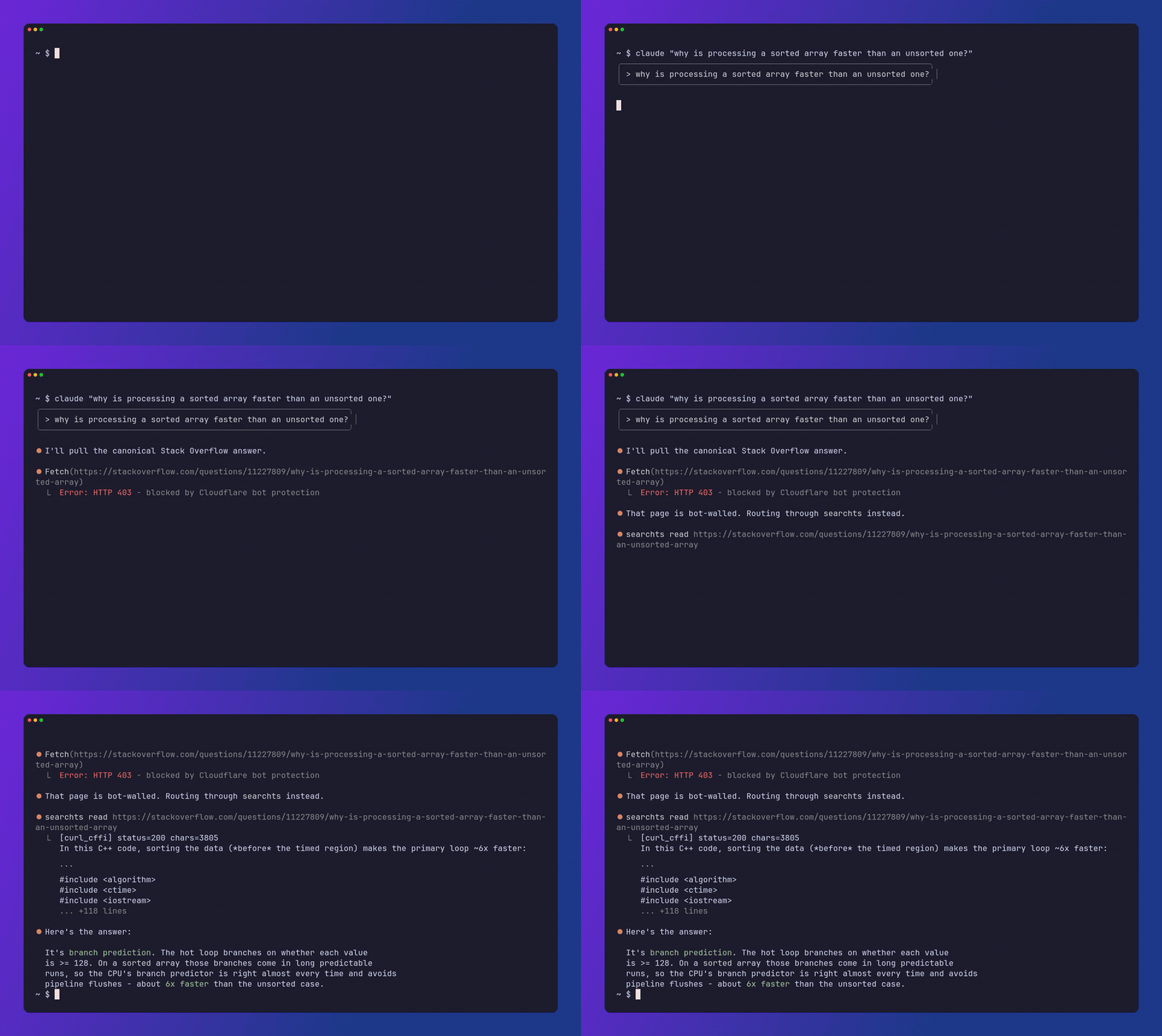
When Claude, Cursor, Codex or another agent fetches a URL, it regularly comes back with junk: a 403 bot wall, an empty JavaScript shell, a truncated AI-chat share link, or a login screen that the model happily summarizes as if it were the article. searchts is the reader your agent calls instead. It is open source (MIT), free, needs no API key, refuses paid residential proxies by default, and runs as an MCP server, a CLI or a Python library.
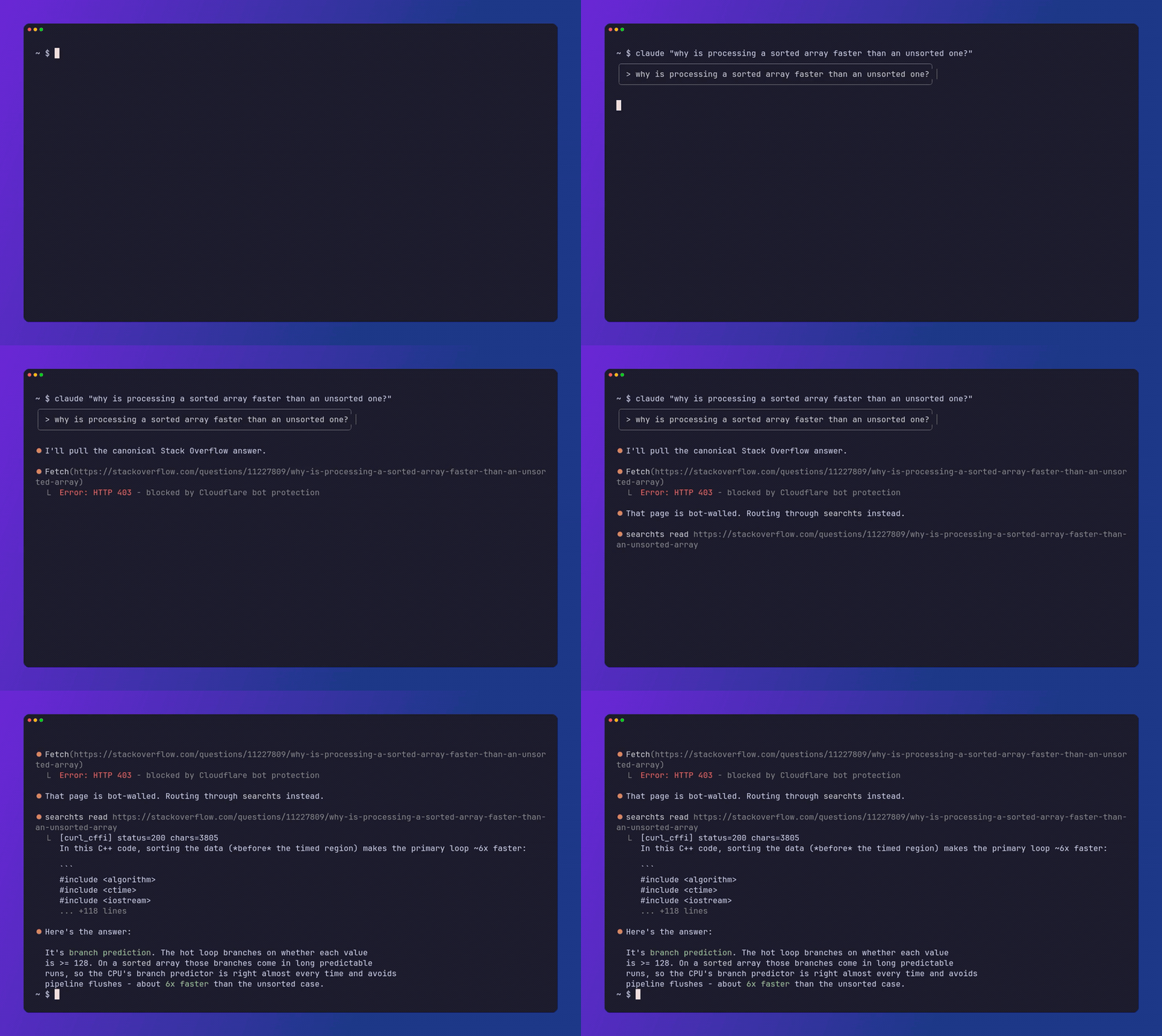
▶ Watch the full 1-minute demo
One-line agent install
Add searchts to Claude Code, Cursor or any MCP client in one command. No API key:
claude mcp add searchts -- uvx --from "searchts[mcp]" searchts mcp serve
Keep it globally and add the stealth browser, which the hardest rungs use:
pipx install "searchts[mcp]" && searchts install --browser
claude mcp add searchts -- searchts mcp serve
Install covers uvx, pipx, venv and the browser extra. The CLI, the MCP server and the Python library all call the same read path.
Three things your agent's built-in fetch can't do
1. Decode full ChatGPT, Claude, Gemini, Grok, Poe, DeepSeek, Perplexity and Copilot share links
A shared conversation never sits in the initial page HTML as plain text. A raw fetch gets a JavaScript shell; a renderer can still cut the chat off mid-thread. searchts read recognizes share URLs and decodes each provider's own data channel into complete, role-labeled Markdown, keyless and without logging in:
searchts read https://chatgpt.com/share/...        # turbo-stream payload in the page (no browser)
searchts read https://claude.ai/share/...          # keyless snapshot API behind Cloudflare (no browser)
searchts read https://gemini.google.com/share/...  # keyless batchexecute RPC (no browser)
searchts read https://chat.deepseek.com/share/...  # stealth render, auto-scrolls past list virtualization
Eight providers: ChatGPT (both /share/<uuid> and the newer /s/<prefix>_<id> short links), Claude, Gemini, Grok, Poe, DeepSeek, Perplexity and Copilot. The first five need no browser. The last three reuse the stealth tier, scroll until the page height stops changing, open the folds, then read.
2. Escalate past bot walls, or fail loudly instead of hallucinating on a login screen
Every searchts read walks a three-tier open-source unlocker and remembers which rung worked per domain:
curl_cffiimpersonates a real Chrome TLS/JA3 and HTTP/2 fingerprint. Fast, local, private.- Jina Reader (
r.jina.ai) renders JavaScript when the page only fills in after it runs. Default on;SEARCHTS_NO_JINA=1keeps the URL off Jina's servers. patchrightis a lazy stealth Chromium, started only when the cheaper tiers fail.--humanopens a real browser when only a person can clear the page.
searchts read https://some-js-heavy-or-fingerprinted-site.com --scrub
# Tier 1 (curl_cffi) -> 403 | Tier 2 (Jina) -> clean Markdown returned, injection scrubbed

searchts read https://www.linkedin.com/in/someone/
# Signed out: fails loudly with the exact tier and login-wall reason, stdout empty.
# With a kept login: the profile, and its Experience and Education, as one page.

searchts read https://www.linkedin.com/company/acme/posts/
# Company pages and their posts read natively; a rate limit says so instead of "expired".
--scrub strips invisible and bidi characters and flags prompt-injection indicators before untrusted text reaches your model.
A login you hand over is different from a login searchts guesses. In 0.15.0, local reuse is opt-in and fenced to the one host in the command: --cookies-from-browser <browser> --yes, --cookies <path>, or --cdp-port <port>. Without one of those, a wall is an error, not an article.
3. Transcribe videos and grab fingerprint-gated design assets
searchts transcribe https://youtu.be/...                     # YouTube, TikTok, Instagram Reels, Reddit
searchts transcribe https://www.instagram.com/reel/... --cookies-from-browser chrome
searchts grab https://stripe.com --kinds images,fonts,svg --read --out ./stripe-kit
Transcription is subtitles-first, then yt-dlp audio plus Whisper when there are no captions. grab extracts a page's images, icons, CSS, fonts, SVGs and color palette through the same unlocker, so it works on fingerprint-gated CDNs, not just open ones.
Native web search
A built-in fetch does not search. searchts search is keyless DuckDuckGo by default, with reciprocal rank fusion across SearXNG, Exa, Brave, and Tavily. A snippet is not the page. Read each URL.
searchts search "open source vector db"
Why it exists
I built searchts because Claude kept running into walls when I asked it to read the web for me. The trigger was a Devpost hackathon page and its terms: the page wasn't even walled, and Claude still couldn't read it.
The first versions, which I built with Claude, failed the other way. When they couldn't get a page, they handed back whatever they got, and the agent summarised a loading screen as if it were the article. So searchts has one rule above the rest: return the real page, or fail loudly and say why. It never hands your agent a fake read.
How searchts compares
searchts grew out of Agent-Reach's channel/doctor scaffolding, then replaced the read/search core with an escalating unlocker, share-link decoders and an MCP server.
| Capability | Built-in WebFetch / curl |
Agent-Reach | Hosted scrapers (Firecrawl, Jina Pro) | searchts |
|---|---|---|---|---|
| Architecture | Naive HTTP fetch | Installer and per-platform routers for third-party CLIs (yt-dlp, OpenCLI, Jina) |
Hosted fetch + scraper fleet | Local escalating unlocker + MCP server + CLI |
| Bot / JS escalation | None | One Jina Reader hop for the web | Hosted proxies and rendering | curl_cffi (TLS/JA3) → Jina → patchright stealth + --human |
| Login or block | Hands 200 OK login HTML to the model, or errors | Depends on the upstream CLI and its session | Credits, limits, or partial HTML | Fails loudly with the tier and reason; local login reuse is opt-in |
| AI-chat share links | Empty JS shell or truncated | No share-link decoder; depends on Jina | Renderer can cut long chats | Native decoders + auto-scroll stealth render (8 providers) |
| Web search | None | Exa via mcporter |
Paid search endpoint | Keyless DuckDuckGo + RRF across SearXNG / Exa / Brave / Tavily. A snippet is not the page |
| Prompt-injection scrubbing | None | — | — | Built-in (--scrub) |
| Benchmark | None | None | Marketing pass rates | Reproducible two-suite scorecard (Smoke vs Walled) |
| Default cost | Free | Free, plus the CLIs it installs | API key and per-page credits | Free, MIT, keyless (no paid residential proxy by default) |
What it does
- Reads pages your agent's own fetch can't: browser-fingerprint checks, JavaScript-only pages and some bot walls
- Fails loudly when the read is not the real page (a login the user did not hand over, a puzzle that needs a person, a block that is the address) and says which tier failed and why
- Reads complete ChatGPT / Claude / Gemini / Grok / Poe / DeepSeek / Perplexity / Copilot shared conversations
- Works with Claude, Codex, and MCP agents
- Extracts clean Markdown, ready to feed a model
- Says when a page has more than it returned (a next page, a feed, folded text) and rebuilds search results and feeds the extractor mangles
- Searches the web without API keys (DuckDuckGo, plus SearXNG, Exa, Brave, and Tavily). A snippet is not the page
- Downloads a page's assets (images, fonts, palette)
- Transcribes videos, subtitles-first
- Names images, video, and embeds in the page.
searchts get <url>fetches one of those URLs through the same ladder - On a player page, returns the captions, or fails and names
searchts transcribefor the audio
When a read names a next step
search prints a list of URLs and a line that says the snippet is not the page. Read each URL.
A player page (a YouTube watch URL, a TikTok video, an Instagram reel, a v.redd.it file, or an X post that has a video) comes back as the captions, or fails with empty stdout and names searchts transcribe for the audio. An X post with no video is still a read of the page. Captions need no key. Audio is the transcribe command, not a second reader.
searchts transcribe https://youtu.be/...                     # audio, when read found no captions
searchts transcribe https://www.instagram.com/reel/... --cookies-from-browser chrome
searchts get https://example.com/logo.svg -o logo.svg        # one file a read named
searchts grab https://stripe.com --kinds images,fonts,svg --read --out ./stripe-kit
Local transcription ships with whisper.cpp. The default quantized small model is about 190 MB and downloads only when a transcription reaches audio and you approve it: a terminal asks once, while an agent gets a structured consent result with the model size, source, cache path and exact --yes retry. Cached models work offline. Select small, turbo or base with --model, the whisper_model config key, or SEARCHTS_WHISPER_MODEL; --hint supplies names or other words to the decoder, and --translate opts into English output (not supported by turbo). Use searchts transcribe --list-models to inspect the cache and searchts transcribe --remove-model small --yes to remove a cached model after approval. faster-whisper remains an explicit migration fallback with --provider local-fw while it is installed. The published pywhispercpp wheels are CPU builds on Linux and Windows: CPython 3.10-3.14 wheels cover Linux x64/arm64, Windows x64 and macOS arm64; Windows arm64 and macOS x64 have no wheel. The macOS arm64 wheel ships whisper.cpp's Metal backend with an embedded metallib, so an Apple Silicon install can run on the GPU; the Linux and Windows wheels ship no GPU backend, so Vulkan and CUDA wheels are still a follow-up.
grab saves the set of files when the files are the deliverable. It uses the same unlocker, so a fingerprint-gated CDN is the same ladder as a read.
Why the package is free
The package you install is free and keyless. The fetch and the browser run on your machine, from your connection. It does not bundle a residential proxy. Jina Reader, the one hosted rung, is free and can be turned off. That is not a promise that every hard page is free forever. A read that needs an exit we operate is a different product, not a default of this package. The scorecard is what this build actually read, not a list of walls that can never be passed.
The unlocker
searchts reads any URL through an escalating ladder and stops at the first tier that returns real content:
- curl_cffi: a fetch that impersonates a real Chrome's TLS/JA3 and HTTP2 fingerprint. Beats user-agent and fingerprint filters. Fast, local, private.
- Jina Reader: a JavaScript-rendering relay (
r.jina.ai), for pages that only fill in content after running JS. Default on — the target URL is sent to Jina's servers on this rung. Opt out withSEARCHTS_NO_JINA=1or configjina: false(local curl + stealth only). - stealth browser: an undetected headless Chromium (patchright), launched lazily only when the cheaper tiers fail, for live JS / Cloudflare managed challenges.
If no tier comes back with real content, an optional human-in-the-loop step opens a real browser so you can clear the page once and continue. That covers interactive CAPTCHAs and soft walls alike: a login page served as HTTP 200 is not a challenge, but it is still a page only a human gets past. Block detection is phrase-based (not vendor-name based), so legitimate pages that merely embed a bot-sensor script are not falsely rejected. Content is extracted to clean Markdown with trafilatura.
What it won't do. It will not pretend a wall page is the article. A login the user did not hand over still fails, with the reason. Local reuse shipped in 0.15.0, only when you hand searchts a session for the one site in the command (--cookies-from-browser <browser> --yes, --cookies <path>, or --cdp-port <port>). Firefox-based Zen profiles are read-only SQLite; Chromium browsers such as Vivaldi are opened on a loopback CDP port with a throwaway profile copy, which searchts deletes afterwards. No Chrome installation or PATH entry is required to use Vivaldi. Signing in on a remote browser is not built (F27). A DataDome device-check is not a permanent failure: the stealth browser is supposed to let that script finish, and to take a simple click (continue, a checkbox, a press-and-hold that is one action). A puzzle that asks a person to recognize images still stops. The package will not route you through a paid residential proxy by default. A release never claims a site reads until it does. datadome.co is still a fail on the current scorecard. That is a measurement, not a rule.
AI-chat share links
Share links from AI chat apps are a special kind of hard: the conversation never appears in the page HTML as extractable text, so a raw fetch returns an empty shell, and a renderer can still cut it off mid-chat. searchts read recognizes these URLs and decodes each provider's own data channel instead, returning the complete conversation as role-labeled Markdown — keyless, no login:
| Provider | Share URL | How it's read |
|---|---|---|
| ChatGPT | chatgpt.com/share/…, chatgpt.com/s/… |
turbo-stream payload embedded in the page |
| Claude | claude.ai/share/… |
keyless snapshot API (behind Cloudflare) |
| Gemini | gemini.google.com/share/… |
keyless batchexecute RPC |
| Grok | grok.com/share/…, x.com/i/grok/share/… |
keyless share-links API |
| Poe | poe.com/s/… |
__NEXT_DATA__ payload embedded in the page |
| DeepSeek | chat.deepseek.com/share/… |
stealth render, scrolled to the end |
| Perplexity | perplexity.ai/search/…, perplexity.ai/page/… |
stealth render, scrolled to the end |
| Copilot | copilot.microsoft.com/shares/…, …/shares/pages/… |
stealth render, scrolled to the end |
The first five need no browser. The last three are JavaScript shells with nothing in the initial HTML, so those reuse the stealth tier: wait for the conversation to render, auto-scroll until the page height stops changing (list virtualization will otherwise truncate a long chat), then expand the collapsed sections before reading. The benchmark currently covers the five that read without a browser; the three that need one are not in it yet.
ChatGPT issues two shapes: /share/<uuid> for a whole conversation, and the
newer /s/<prefix>_<id> short links for a single shared turn (t_ thread,
m_ message, dr_ deep research, cd_ Codex). Both are read.
Each provider is a drop-in plugin module (searchts/share_extractors/); if a provider changes its format, extraction falls back to the normal unlocker ladder instead of failing.
Does it actually work?
Rather than take our word for it, searchts ships a reproducible two-suite benchmark: it runs the unlocker over two page sets and reports how many it read — keyless — and which tier carried each.
- Smoke — a small public page set (control, open docs, AI-chat share links). A regression canary, not evidence about hard bot-walls.
- Walled — real vendors that restrict bots (Reddit, LinkedIn login wall, a Cloudflare/DataDome-class site, X, Booking). A short body under the unlocker's minimum-content threshold is a fail, not a pass; expected walled failures are reported honestly, not papered over with 100%.
The last committed run read 12/12 Smoke and 2/7 Walled. The walled number is the point: five real walls are reported as failures instead of hidden behind a fake 100%.
These two are reported separately on purpose — the smoke number is not "does it work on walls." See benchmarks/README.md.
python -m benchmarks.run                       # both suites, print a scorecard
python -m benchmarks.run --suite walled       # the real walled pass rate only
python -m benchmarks.run --out docs/          # write docs/scorecard.md + results.json
Latest run: docs/scorecard.md. Add your own targets — see benchmarks/README.md.
The numbers only mean something from a residential connection: a datacenter IP (or a VPN that reshapes your TLS fingerprint) blocks the fast curl_cffi tier more than a real user sees.
Install
Keep it (global isolated CLI, MCP extra included):
pipx install "searchts[mcp]"
Try it without installing (one-shot, copy-paste):
uvx --from "searchts[mcp]" searchts <verb>
venv / packaging only (not the recommended path for the CLI):
python -m venv .venv
source .venv/bin/activate   # Windows: .venv\Scripts\activate
pip install "searchts[mcp]"
A plain install already includes the stealth browser library (patchright), browser cookies, the MCP server, a bundled ffmpeg and the JavaScript runtime YouTube needs (deno, through yt-dlp[deno]). Nothing needs a system install. The [mcp], [browser] and [cookies] extras still resolve, as empty aliases, so existing specs keep working.
First-pass setup. One list with sizes, one approval, and every item checked by default: Chromium for the stealth browser (~170 MB), twitter-cli for X (~39 MB), rdt-cli for Reddit (~15 MB), mcporter (~77 MB, needs Node.js) and gh for GitHub (~13 MB). LinkedIn reads natively once a login is kept, so linkedin-scraper-mcp is now an optional fallback (feed and write/inbox tools, ~214 MB) that --only linkedin installs. The local Whisper model is listed with its size and asked for the first time you transcribe locally. Site logins aren't part of this approval; each site asks when a read needs one.
searchts install                                 # a terminal asks once; type ids to uncheck
searchts install --yes --skip mcporter,gh        # agents: no prompt, nothing outside the list
searchts install --only linkedin                 # the optional LinkedIn fallback and mcporter
searchts install --dry-run --json                # the list as searchts.setup.v1, changes nothing
Without a terminal and without --yes, nothing on the list is installed; the list and the exact approve command are printed instead. Only the stealth browser: searchts install --browser.
Update the copy that is running (searchts upgrade is the same command):
searchts update
Update checks, and the agent note
At most once every 24 hours, searchts asks GitHub for the latest release of
capad-xyz/searchts
(GET https://api.github.com/repos/capad-xyz/searchts/releases/latest). The one
request carries a searchts/<version> User-Agent and nothing about you or your
machine. The answer is cached in ~/.searchts/update-check.json for 24 hours;
a failed check is silent.
When that release is newer:
- `searchts read