A node-based modular synthesizer, written in Rust. Patch oscillators, filters, envelopes and effects together on a canvas, the way you would in Blender's node editor, and hear the result as you go.
Why Soba: Blender calls the wires between nodes noodles, and soba are long, fine ones. In Japanese, soba (傍) also means "beside": an instrument whose patches sit by you and explain themselves.
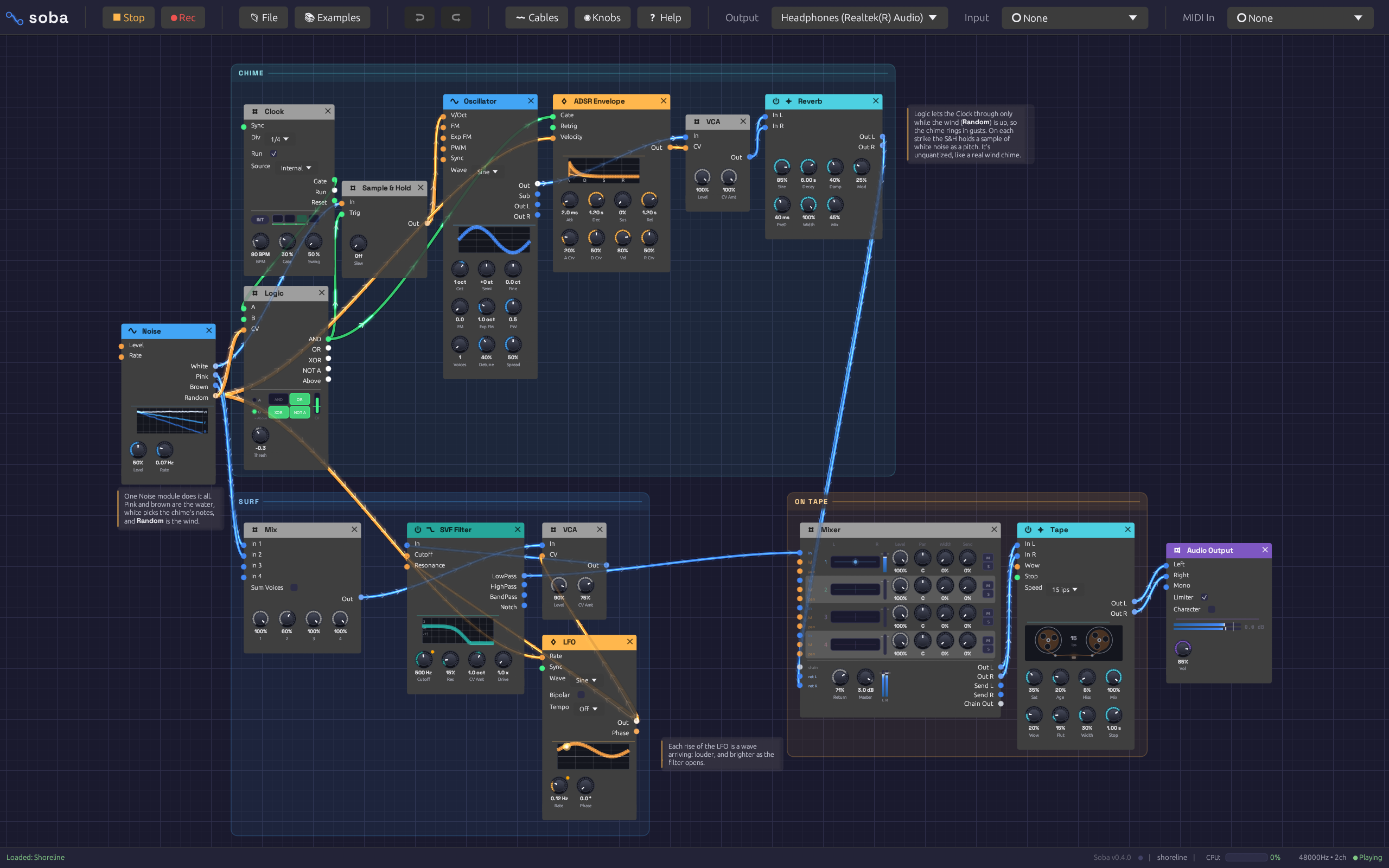
It doesn't imitate hardware panels. Every module is a node with jacks on its sides and knobs along its bottom, and every cable is coloured by what it carries. Knobs that are being modulated turn on their own, so you can watch the patch move.
Documentation: docs.chaps.dev/soba has a first-patch walkthrough, a page for every module, and recipes to build.
Project page: chaps.dev/projects/soba shows it playing, with sound: a first patch built from nothing, chords travelling down one cable, and a whole song from one patch.
Features
-
Colour-coded signals. Blue cables carry audio, orange carry control voltage, green carry gates, and purple carry MIDI. Connections that can't work are refused as you make them.
-
Inputs vs. knobs. Most parameters have a knob and a jack. Patch a cable into the jack and it takes over: the knob dims and follows the incoming signal, as on an analog modular.
-
Polyphony on a single cable. Note In and the Chord Sequencer send up to 8 voices down one cable, and every module after it plays each voice on its own. Poly cables are drawn as a bundle of strands, one per voice.
-
44 modules:
Category Modules Sources Oscillator (BLEP anti-aliasing, sync, through-zero FM, sub, supersaw unison), Noise (white, pink, brown, smooth random), Drum (kick, snare, tom, clap, hats, cymbal, rim, cowbell, shaker, with accent and choke), Resonator (physical models: a Karplus-Strong string, or a bell, bar, glass or wood body of tuned modes, played by a gate or by any sound), Sampler (one-shots, a poly instrument, or slices by note from a WAV, MP3, FLAC or Ogg), Chopper (a sliced break in time with the Clock at any tempo, rearranged step by step), Cloud (granular, from a file or live audio, with Freeze; a cloud per voice of a chord), Audio Input (mic or line in, envelope follower, gate), Note In (the computer keys, its own piano or MIDI; one voice or chords) Filters SVF Filter (self-oscillating, notch), Ladder Filter (oversampled) Modulation ADSR Envelope, LFO, Slope (slew, trigger envelopes, cycling with skew, EOR/EOC), Clock Effects Stereo Delay (with tape mode), Reverb (8-line FDN), Chorus, Distortion (oversampled, wavefolder), Tape (wow, flutter, saturation, age and hiss for a bus), Slicer (chops a held sound into a rhythm, with a step filter), Compressor, Parametric EQ, Vocoder (8 to 24 bands, formant shift) Utilities VCA, Mix, Mixer (4 stereo channels, pan, mute, poly spread), Attenuverter, Sample & Hold, Quantizer (scales, custom scale from a clickable piano), Clock Divider, Logic (AND/OR/XOR/NOT, comparator), Looper (record, overdub and undo live layers, clock-synced), Step Sequencer, Chord Sequencer (16 chords with slash basses, voice-led, on poly cables), Trigger Sequencer (8 drum lanes, chained patterns, probability, ratchets), Arranger (song sections and automation lanes) Output Audio Output (with metering and limiter), Link Out (plays the Seoul visualizer over OSC), Oscilloscope, Dancer, MIDI Monitor -
Visual feedback. Waveform, envelope and filter-response displays sit on their modules, LEDs light on active outputs, and the scope shows what's actually there. Hover any jack or knob to see what it does.
-
Fast editing. Space opens a fuzzy quick-add palette at the cursor. Undo and redo cover every edit. Copy, paste and duplicate work across windows, because the clipboard holds patch JSON.
-
Modules of your own.
Ctrl+Gcollapses a selection into a group: one node with its own jacks, a miniature of what's inside, and the knobs you pin to its face. Open it to edit, and save it to My Modules to use in any patch. The engine only ever sees the modules, so groups cost nothing to run. -
A Library of ready-made groups. Fifteen voices, drums, generators and effects to drop in and open up: a subtractive voice, two FM voices, an electric piano, a supersaw pad, a string machine, a tuned mallet, acid and Reese basses, a drum kit, a random melody, wind, a stereo effects chain, a sidechain pump and an auto-pan. Every voice plays chords from Note In.
-
Patches that explain themselves. Frames group modules under a title, like sections of a front panel, and drag as one. Notes put a word of explanation beside them. Every example is laid out this way, so it reads as a lesson you can play.
-
Record what you hear. ● Rec (
Ctrl+R) writes the output to a WAV, sample for sample, while you play and tweak. It never gets in the audio's way, and every take is saved with the patch that made it. -
Live input. Put a microphone, guitar or line source through the filters and effects. Audio Input follows its level and opens a gate on loud hits, so a drum loop can play a synth.
-
MIDI. Play from any MIDI controller, map any knob to a CC with MIDI Learn, or play the computer keyboard.
-
Your work is safe. Soba asks before New, Open or Quit would lose unsaved changes. A patch with unsaved changes is autosaved every 30 seconds and offered back after a crash. Recently opened patches are a menu away.
-
Real-time-safe engine. The audio thread never allocates or locks. The UI sends it commands over lock-free ring buffers, and CI runs a test that fails if it ever allocates.
Getting started
Try it in the browser, nothing to install: press Play, then play the Z to M keys or Note In's piano. The browser build has every module and example, and plays MIDI devices in Chrome, Edge and Firefox after Connect MIDI; audio input and recording need the desktop app (see WEB.md).
Download it for Windows (an installer, or a zip), macOS (a disk image) or Linux. It tells you when there's a newer version and installs it in place, bringing your patch back where you left it: see Updates.
Or build it from source. You need a Rust toolchain. On Linux you also need the ALSA and X11/Wayland development packages listed in .github/workflows/ci.yml.
cargo run --release                           # opens with the First Sound example
cargo run --release -- patches/lush-pad.json  # or open a patch
The example patches are in patches/ and in the app's Examples menu, on two shelves: Recipes, each built around one idea, and Songs, whole pieces that play themselves from start to end. Press Play, then hold a few keys on the computer keyboard (Z to M is a white-key octave, with the sharps on the row above).
In a DAW (CLAP and VST3)
Soba also builds as a CLAP instrument, for Bitwig, REAPER and other DAWs that load CLAP, and as a VST3 (--vst3) for Ardour and DAWs without CLAP. The node graph is the plugin's window, the track's notes play it, a Clock can follow the DAW's tempo and transport, and the patch is saved with the project. python tools/plugin_bundle.py --install builds it and puts it where DAWs look: see The plugin.
Render a patch offline
The render binary plays a patch to a WAV file without an audio device, and prints its peak, true peak and RMS levels, its loudness in LUFS, and the peak going into the output limiter (--compare before.wav shows how far they moved, and --bench how long it took and which modules took longest):
cargo run --release --bin render -- patches/fm-synthesis.json out.wav --seconds 5
cargo run --release --bin render -- patches/lush-pad.json out.wav --audition  # plays a phrase into Note In modules
cargo run --release --bin render -- patches/canopy.json out.wav --seconds 120 --trace "seq.arranger:Section" trace.csv --stems stems/  # what played when, and each Mixer channel apart
Shortcuts
| Keys | Action |
|---|---|
Space / Tab |
Quick-add a module at the cursor |
Ctrl+Z, Ctrl+Shift+Z |
Undo, redo |
Ctrl+C / X / V, Ctrl+D |
Copy, cut, paste, duplicate |
Delete |
Delete the selected modules, frames and notes |
Ctrl+Shift+F |
Frame the selected modules |
Ctrl+G, Ctrl+Alt+G |
Group the selected modules, ungroup a group |
Tab, Esc |
Open the selected group, go back out |
Ctrl+B |
Bypass the selected effects |
Ctrl+N, Ctrl+O, Ctrl+S, Ctrl+Shift+S |
New, open, save, save as |
Ctrl+R |
Record, or stop recording |
How it's built
egui + egui_node_graph2   node editor, custom knobs, cables and displays
          │  commands and feedback over rtrb ring buffers
audio graph engine        compiled plans, pre-allocated buffers, poly channels
          │
cpal                      the audio device
Each DSP module declares its own ports, parameters and descriptions, and the editor generates its nodes from them, so the UI can't drift from the sound. Patches are plain JSON.
cargo test # 800+ tests, including the audio-thread allocation guard
License
Soba is MIT (LICENSE). The low-latency Windows download (with ASIO) is distributed under the GPLv3 instead, because it includes Steinberg's ASIO SDK, which Steinberg licenses under the GPLv3. Its source is this repository at the release's tag, built with --features asio against ASIO SDK 2.3.4. Every other download is MIT.
Ableton Link, which lets the Clock play in time with other apps on the network, is likewise a build option (--features ableton-link), because the Link SDK is GPLv2+. A binary built with it falls under the GPL; builds without it leave Link out.
The VST3 plugin (plugin/, built with its vst3 feature) is GPLv3 for the same reason: nih-plug's VST3 wrapper is built on vst3-sys, which is GPLv3. The CLAP plugin is built without it and is MIT.