Foreign-model subagents for Claude Code.
Claude Code's subagents always run on Claude. Sonata gives you subagents that run on other models — GPT, DeepSeek, GLM, Kimi, or anything else you can reach — called through the ordinary Agent tool, in the same working directory, with the same tools and permission modes. Your main session stays on Claude; only the subagents change.
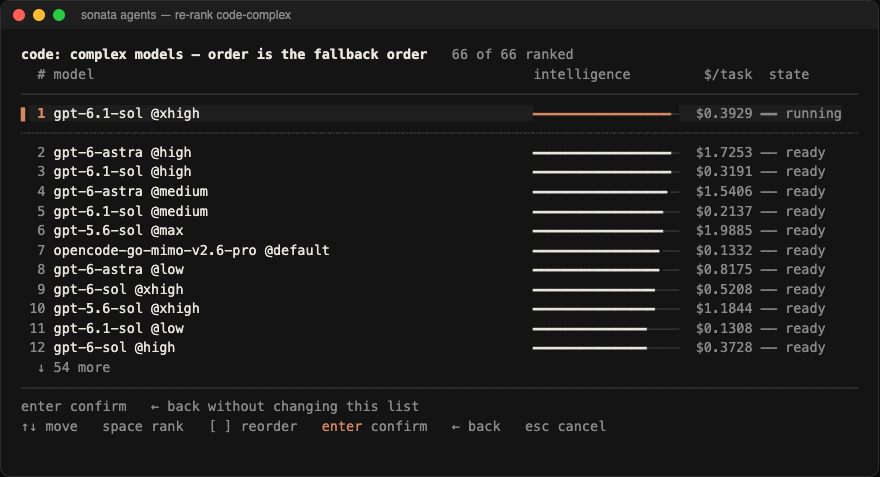
sonata init generates agents such as code-simple, code-complex and
review-complex, each backed by a ranked list of models. A local router
(sonata serve) runs them inside Claude Code's own loop and tries the next
model when one fails. If every model in the list fails, the agent falls back to
running the task in that model's own CLI (OpenCode, Codex, Pi or Reasonix).
Two reasons you might want that:
- Cost. Mechanical work — bulk refactors, test scaffolding, migrations — does not need a frontier model. A cheap high-cache model is an adequate substitute, and the difference over a working day is large.
- Diversity of judgement. Asking Claude to review Claude's work surfaces fewer problems than asking a different model family. Review is where a second opinion actually pays.
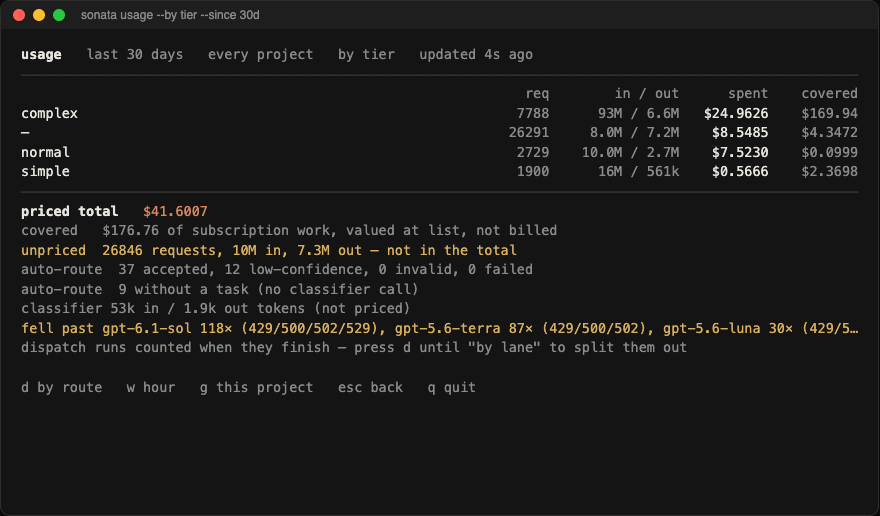
Sonata itself is free and MIT-licensed; you pay your providers as usual, and
sonata usage shows what each model, tier and role cost you — including work
a subscription already covers, valued at list price:
Status
Public beta. Sonata is pre-1.0 and changing quickly. The native path and the OpenCode, Codex, Pi and Reasonix adapters are complete, tested, and verified end to end against real models. Expect rough edges in setups nobody has tried yet, and please report them.
Read Limitations and Security before depending on it. The models sonata launches run on your machine, as you, and your code is sent to whichever providers you configure.
Quickstart
Requires Claude Code, Node 22+, tmux, and macOS or Linux, plus a provider: an API key for one of ~30 well-known providers, your Claude Code account, or an authenticated harness (OpenCode, Codex CLI, Pi or Reasonix). Full requirements are in Getting started.
npm install -g @zhihaohong52/sonata
cd your-project
sonata init
sonata init checks your environment, reports anything broken with the
command that fixes it, then walks you through providers, models, roles and a
ranking of models into tiers. It writes sonata.toml and generates the tier
agents. Every prompt has a flag, so it also runs unattended.
Accept its offer to route your sessions (sonata route auto), then start a
new Claude Code session: routing is set up when a session starts. Without it,
tier agents fail with model_not_found; sonata doctor says what is missing.
Then ask Claude Code for one by name, or describe work that suits it:
"Use code-simple to convert these callbacks to async/await."
"Get review-complex to look at the auth refactor."
Choose a tier by the task, not its size: simple is specified closely enough
that the diff could be written without asking a question; normal is the
default when you know what to change but need to fit it into the surrounding
code; complex needs a design decision, or "done" is still ambiguous. The
sonata-loop skill that sonata init installs drives this across a whole
feature — plan, route each task to a tier, gate behind review, escalate on
repeated failure.
The Getting started guide walks through the wizard screen by screen, including BYOK keys and hand-added models.
How it works
sonata init generates one agent per role (code, review, explore,
plan) and tier (simple, normal, complex) — up to 12 — plus, with
[auto_route] configured, a <role>-auto agent per role that picks the tier
itself. Tier agents are named code-simple, code-normal,
code-complex, review-simple, and so on. Each agent's frontmatter names a
router alias (model: sonata-code-simple), not a specific model:
Claude Code
    │  Agent(subagent_type: "code-simple")
    ▼
sonata-code-simple  (native — runs in Claude Code's own loop)
    │  model: sonata-code-simple
    ▼
router  (sonata serve)
    │  resolves the alias against [tiers.code].simple, tries each
    │  candidate in rank order, skips one in cooldown after a failure
    ▼
litellm → flash-1   (or the next-ranked model, on failure)
The router is the only place ranking lives — the agent just sends its alias
and gets an answer from whichever model actually worked. If every native
candidate for a tier fails, the router returns 529 naming the fallback:
sonata dispatch --tier code-simple, which the agent runs itself to reach a
model through its own harness (OpenCode, Codex, Pi, or Reasonix) instead:
sonata dispatch --tier code-simple "<task>"
    │  resolves the tier's harness-routed candidates, in rank order
    ▼
sonata CLI
    │  composes role prompt + CLAUDE.md + task
    │  launches harness in a detached tmux session, waits for it
    ▼
opencode → deepseek-v4-flash   (next candidate on a degraded/empty finish)
sonata dispatch blocks until the run finishes, needs approval, or stalls,
trying the next ranked candidate on a thrown launch, a degraded finish, or an
empty report; sonata wait/sonata approve resume or unblock a specific run
by id. sonata tail remains available as a human/debugging view of any run.
Completion is read from an exit sentinel and a report file, never scraped from
the terminal. If a harness dies without writing a report, sonata returns the
captured pane and marks the result degraded — so you always know when a
result is untrustworthy.
Progress comes from diffing the tmux pane. You can attach to any live run:
tmux attach -t sonata-<id> # -r for read-only
Attaching means you can correct a cheap model that is going off the rails instead of paying for the rest of a wasted run.
run_timeout_seconds is a hard cap, enforced by a watchdog inside the launched
shell rather than by sonata tail — a runaway run with nobody watching is
exactly the case that needs bounding. On expiry the whole process group is
killed and the run is reported DONE, degraded, with a report beginning
[timed out: …].
Commands
The ones you will use most:
| Command | Purpose |
|---|---|
sonata init |
Set up sonata in this project |
sonata doctor |
Check everything sonata depends on, and say how to fix what's broken |
sonata agents |
See and re-rank the tier agents' models |
sonata route auto |
Route every plain claude session in this project through the router, keeping Remote Control — set once, then launch claude as usual |
sonata code |
Launch one routed session without changing any settings |
sonata usage / sonata status |
Tokens and cost, and what the router served |
sonata dispatch |
Run a task through a model's own harness — the fallback lane |
sonata upgrade |
Install the latest release |
Every command and flag: Commands.
Documentation
zhihaohong52.github.io/sonata — the user guide, also
readable here in docs/guide/:
| Guide | Covers |
|---|---|
| Getting started | Install, sonata init screen by screen, BYOK, first dispatch |
| Commands | Every command and flag |
| Configuration | The sonata.toml schema, resolution order, roles and tiers |
| Native path | Running foreign models inside Claude Code's own loop through the local router |
| Codex subscription auth | Authenticating against a ChatGPT subscription instead of a metered key |
| Permission modes | How each harness honours Claude Code's permission modes |
| Troubleshooting | Symptom → cause table |
| Security | What sonata does and doesn't protect against |
| Limitations | Known gaps worth knowing before depending on this |
| Adding a harness | The adapter extension point |
Where this is headed: Roadmap to 1.0.
For maintainers and the curious: the design record behind the code is in
docs/internals/, every feature's spec and plan in
docs/superpowers/, and point-in-time audits in
docs/reviews/. DESIGN.md and PRODUCT.md at the root are
the design brief for the terminal UI.
Contributing
Issues and pull requests are welcome — see CONTRIBUTING.md for the development setup and what a good PR looks like. Report security issues privately, as described in SECURITY.md.
Changelog
See CHANGELOG.md for release notes.
License
MIT — see LICENSE.