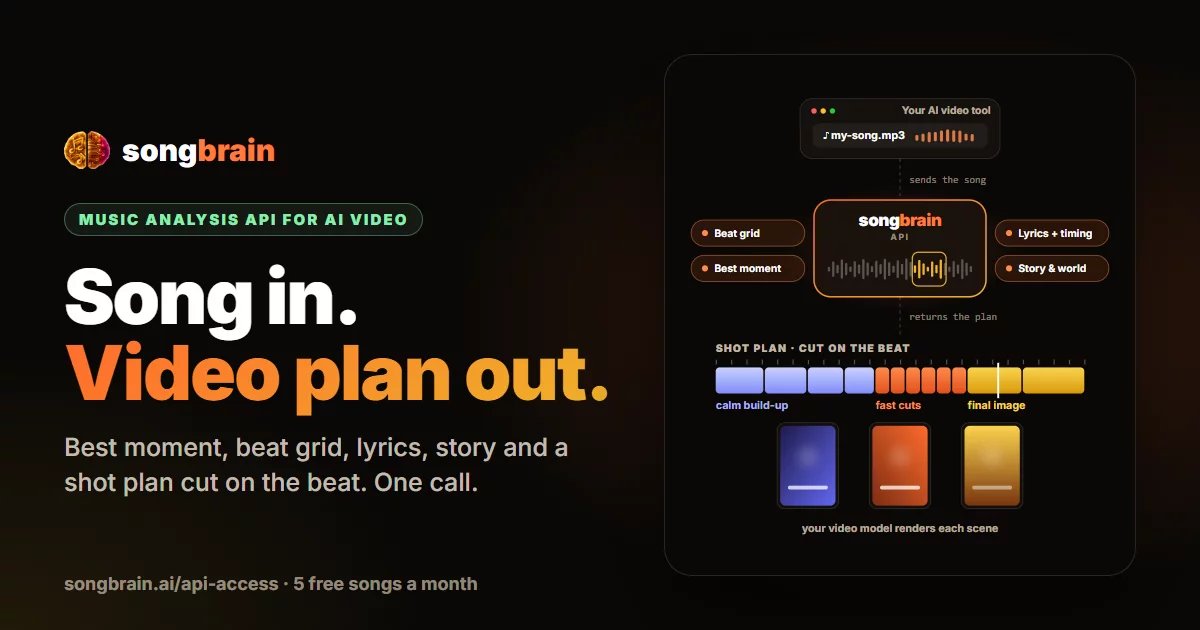
Song in, video plan out — the music analysis API for AI video.
Send a song. Get back JSON that a video model can use directly: what the song is, where the beats and sections are, which part to use, what the words are and when they are sung, what the video should show, and a shot list with a prompt for every scene that cuts on the beat.
Under the hood that is beat detection with downbeats, song structure analysis (sections with repeat letters), best-moment detection and word-timed lyrics in one hosted API, plus an MCP server at https://api.songbrain.ai/v1/mcp so Claude, Cursor or ChatGPT can read a song directly (setup guide).
This repository holds the official SDKs for Python and JavaScript/TypeScript, examples, and the MCP server entry.
- API docs: https://www.songbrain.ai/docs/api
- OpenAPI: https://api.songbrain.ai/v1/openapi.json
- Get a key (5 free songs a month): https://app.songbrain.ai/developers
- Changelog: SDKs · API
Try it now, no key
curl https://api.songbrain.ai/v1/examples/old-truck-home/shot-plan
This returns the story and shot plan of a real song in exactly the format your songs get. GET /v1/examples lists all examples.
What one call returns
One document per song (schema songbrain.song/1). Times are seconds from the start of the song.
| Section | What is in it |
|---|---|
song_dna |
Genre and subgenre (37 subgenres), tempo, key and key changes, mood, vocal style, instruments, energy, loudness (LUFS, true peak, per-platform check), a tagline and similar tracks |
timeline |
Every beat, every downbeat, time signature, sections with repeat letters (A, B, A) and energy, vocal changes, lyric hooks |
best_moments |
Ranked windows with start, peak and end, a score, the reason they work and the measured signals behind it, the beats inside, the words sung |
lyrics |
Lines with start and end, and every word with its own start and end |
scores |
Virality, quality and lyrics scores with breakdowns, what works, what to fix, audience |
story |
What the song means, one world, a three-colour palette, the one element the video is about (before, event, after), setup / turn / payoff |
shot_plan |
A beat-synced edit of the best moment (about 15 s, 9:16): every scene with absolute start and end seconds, act, kind, camera motion, transition, framing and a ready image/video prompt. Plus a section-level plan for the full song with cut points on the beat |
One scene from the shot plan:
{
  "index": 1,
  "kind": "tease",
  "act": "setup",
  "start_sec": 94.83,
  "end_sec": 96.246,
  "duration_sec": 1.416,
  "beats_in_scene": 4,
  "transition_in": "cold open, hold",
  "motion": "slow push-in on a still world",
  "prompt": "wide establishing shot of the empty space: A distant, warm yellow light source pulses faintly in the deep blue night ...",
  "sung": null
}
A song takes 60–90 seconds to analyse (up to about 2 minutes when busy).
Prompts for video models, starting from the best moment
Most of a song is not worth animating. Songbrain ranks the strongest windows first (best_moments, each with the reason it works and the audio signals behind it) and builds the shot_plan on the top one: about 15 seconds, cut on the beat, one scene per cut. Every scene carries a ready prompt for an image or video model, written from the song's story, world and three-colour palette, so the scenes look like one film instead of unrelated clips.
{"index": 8, "act": "turn", "start_sec": 102.965, "end_sec": 103.282, "motion": "impact: frame lands displaced and settles, fast energy",
 "prompt": "tight detail shot: The truck's grille, showing rust, illuminated by the faint glow of the low headlight. Faded brown and warm yellow, in ..."}
Pass the prompts to Kling, Runway, Luma, Veo or a hosted model on fal or Replicate, and cut the clips at the given seconds. Recipes: render-with-your-model.md, song_to_clips_fal.py, song_to_clips_replicate.py. The full-song plan (shot_plan.full_song) gives the cut points for a complete video.
Coming from Spotify Audio Features or Audio Analysis?
Since November 27, 2024, new Spotify apps get a 403 on /audio-features and /audio-analysis. Songbrain returns the same kind of data from any audio file, released or not, and more:
| Spotify | Songbrain | Note |
|---|---|---|
tempo |
song_dna.tempo_bpm |
plus tempo_confidence |
key + mode |
song_dna.key |
"C minor"; key_changes[] with the second each one happens |
energy |
song_dna.energy |
0–1, plus energy per section |
loudness |
song_dna.loudness_lufs |
EBU R128 integrated loudness and true peak |
valence, danceability |
song_dna.mood[] |
mood words rather than a number |
instrumentalness, speechiness |
has_vocals, song_dna.vocals |
vocal style or "instrumental" |
audio-analysis beats |
timeline.beats |
every beat in seconds |
audio-analysis bars |
timeline.downbeats |
first beat of each bar |
audio-analysis sections |
timeline.sections |
with repeat letters (A, B, A …) and relative energy |
| — | best_moments, lyrics, story, shot_plan |
not in Spotify: the strongest windows and why, word timings, a shot list |
Migration guide with a ten-line example: https://www.songbrain.ai/guides/spotify-audio-features-alternative
Install
pip install songbrain     # Python 3.9+, one dependency (requests)
npm install songbrain     # Node 18+, no runtime dependencies, ESM + CJS + types
Quickstart: Python
from songbrain import Songbrain

sb = Songbrain()                                   # reads SONGBRAIN_API_KEY
song = sb.analyze("song.mp3")                      # or analyze(audio_url="https://…")

dna = song["song_dna"]
print(dna["genre"], dna["tempo_bpm"], dna["key"])
for s in song["shot_plan"]["clip"]["scenes"]:
    print(f'{s["start_sec"]:.2f}-{s["end_sec"]:.2f} [{s["act"]}] {s["prompt"]}')
Quickstart: TypeScript / JavaScript
import { Songbrain } from "songbrain";

const sb = new Songbrain();                        // reads SONGBRAIN_API_KEY
const song = await sb.analyze({ file: "song.mp3" }); // or { audioUrl: "https://…" }

const dna = song.song_dna!;
console.log(dna.genre, dna.tempo_bpm, dna.key);
for (const s of song.shot_plan?.clip?.scenes ?? []) {
  console.log(`${s.start_sec.toFixed(2)}-${s.end_sec.toFixed(2)} [${s.act}] ${s.prompt}`);
}
analyze() uploads, waits until the song is done and returns the full document. Pass wait=False (Python) or wait: false (JS) to get the id right away, then use a webhook or get_song / getSong later.
Two modes
Every song is analysed in one of two modes. Use dna when you only need the data, or to sort many songs first. Then add the video direction to the ones you pick. dna plus the direction costs the same as full.
| Mode | What you get | Price |
|---|---|---|
dna |
Song DNA: song_dna, timeline, best_moments, lyrics, scores. No story, no shot plan |
10 credits, about $0.20 |
full (default) |
Song DNA + video direction: story and a beat-synced shot_plan with a prompt per scene |
25 credits, about $0.50 |
| Add direction later | story + shot_plan for a finished dna song. No new upload |
15 credits, about $0.30 |
song = sb.analyze("song.mp3", mode="dna")       # 10 credits: no story, no shot plan
if song["scores"]["virality"]["score"] >= 80:
    song = sb.add_direction(song["id"])         # +15 credits, waits about 30-40 s
    print(song["shot_plan"]["clip"]["scenes"][0]["prompt"])
let song = await sb.analyze({ file: "song.mp3", mode: "dna" }); // 10 credits: no story, no shot plan
if ((song.scores?.virality.score ?? 0) >= 80) {
  song = await sb.addDirection(song.id);                        // +15 credits, waits about 30-40 s
  console.log(song.shot_plan?.clip?.scenes[0]?.prompt);
}
The 5 free songs a month cover either mode. Adding the direction never uses a free song. If it fails, the 15 credits are refunded and the song stays dna. GET /v1/songs/{id}/shot-plan on a dna song answers 409 no_direction.
Without an SDK: send "mode": "dna" in the JSON body (or -F "mode=dna" with an upload), then POST /v1/songs/{id}/direction. Try the dna view without a key: GET https://api.songbrain.ai/v1/examples/sugar-rush?mode=dna.
SDK methods
Python uses snake_case and JS uses camelCase method names. Response fields are the API's own names in both.
| Python | JavaScript | API | Key |
|---|---|---|---|
analyze(file | audio_url=…, mode=None, test=False, idempotency_key=None, wait=True) |
analyze({ file | audioUrl, mode, test, idempotencyKey, wait }) |
POST /v1/songs + polling |
yes |
add_direction(id, wait=True) |
addDirection(id, { wait }) |
POST /v1/songs/{id}/direction + polling |
yes |
get_song(id, view, include) |
getSong(id, { view, include }) |
GET /v1/songs/{id} |
yes |
shot_plan(id) |
shotPlan(id) |
GET /v1/songs/{id}/shot-plan |
yes |
list_songs(limit, starting_after) |
listSongs({ limit, startingAfter }) |
GET /v1/songs |
yes |
iter_songs(page_size) |
iterSongs({ pageSize }) |
GET /v1/songs, every page |
yes |
delete_song(id) |
deleteSong(id) |
DELETE /v1/songs/{id} |
yes |
account() |
account() |
GET /v1/account |
yes |
test_webhook(url) |
testWebhook(url) |
POST /v1/webhooks/test |
yes |
webhook_deliveries(limit) |
webhookDeliveries({ limit }) |
GET /v1/webhooks/deliveries |
yes |
pricing() |
pricing() |
GET /v1/pricing |
no |
examples() |
examples() |
GET /v1/examples |
no |
example(id, view, include, mode) |
example(id, { view, include, mode }) |
GET /v1/examples/{id} |
no |
example_shot_plan(id) |
exampleShotPlan(id) |
GET /v1/examples/{id}/shot-plan |
no |
webhooks.verify(body, header, secret) |
verifyWebhook(body, header, secret) |
Songbrain-Signature header |
– |
Both SDKs:
- send the key as
Authorization: Bearer sb_live_…, - raise
SongbrainError(status,code,message,request_id/requestId) and the subclassesAuthenticationError,InsufficientCredits,NotFound,RateLimited(withretry_after/retryAfter),AnalysisFailedandWaitTimeout, - send an
Idempotency-Keywith every new song and retry network errors, 429 and 5xx up to 3 times with backoff, honouringRetry-After, - keep the last rate-limit headers in
last_rate_limit/lastRateLimit.
Package docs: python/README.md · js/README.md
Without an SDK
# 1. send a file (or JSON {"audio_url": "https://…"})
curl -X POST https://api.songbrain.ai/v1/songs \
  -H "Authorization: Bearer $SONGBRAIN_API_KEY" \
  -F "file=@song.mp3" -F "title=My Song"
# → 202 {"id": "…", "status": "processing", "eta_sec": 75, "billing": {…}}

# 2. poll until status is "done"
curl https://api.songbrain.ai/v1/songs/$ID -H "Authorization: Bearer $SONGBRAIN_API_KEY"
Options on document endpoints: ?view=summary drops word timings and beat arrays (about 3x smaller). ?include=song_dna,shot_plan returns only the named sections.
Errors always look like {"error": {"code": "…", "message": "…", "request_id": "req_…"}} with HTTP 400, 401, 402, 404, 409, 413, 415 or 429. A 429 carries a Retry-After header.
Test mode
Send "test": true (or test=True / test: true in the SDKs) and the song is free, needs no audio and is done right away. You get the Sugar Rush example analysis with your title and external_ref, "livemode": false and billing.type = "test". A webhook_url still gets a signed song.done within seconds. It is made for CI and for building your integration before you spend a song.
song = sb.analyze(test=True, external_ref="ci-123")   # done right away, costs nothing
assert song["livemode"] is False
Test songs never use your free songs, but they are rate-limited and count toward the daily cap. A pytest example: cookbook/ci_test_mode.py.
Your own lyrics
Lyrics are transcribed from the vocals, and sung words can be misheard. If you have the lyrics (Suno gives them to you), send them along: the analysis uses your exact words on the transcription's timing. Words the singer can't be heard on are left out, never guessed.
song = sb.analyze("song.mp3", lyrics=open("lyrics.txt").read())
song["lyrics"]["source"]   # "provided_lyrics"
const song = await sb.analyze({ file: "song.mp3", lyrics });
Measured or estimated?
Every song carries provenance: which fields are measured from the audio (tempo, key, beats, sections, loudness, moment windows), which are transcribed (lyrics), which are an AI model's judgement (genre, mood, scores) and which are generated (story, prompts, tagline). Scores also say "basis": "model_estimate". Details: docs.
Idempotency
POST /v1/songs accepts an Idempotency-Key header (1–255 printable characters). The same key on the same account within 24 hours returns the first answer again (same song id, no second charge) with Idempotent-Replayed: true. The same key with a different request is a 409 idempotency_key_reused; a key whose first request is still running is a 409 idempotency_in_progress (retry after a second). Failed first requests are not stored, so the key can be retried.
Both SDKs send a random key with every analyze() and reuse it across their own retries, so a timeout during an upload never creates two songs. Pass your own key (idempotency_key= / idempotencyKey), e.g. your job id, to make retries across processes safe too.
Pagination
GET /v1/songs?limit=20&starting_after=<song id> returns the newest songs first with has_more and next_cursor. Pass next_cursor as starting_after for the next page, or let the SDK do it:
for item in sb.iter_songs():           # Python
    print(item["id"], item["status"], item["livemode"])
for await (const item of sb.iterSongs()) console.log(item.id, item.status); // JS
Request ids and rate limits
Every response has a Songbrain-Request-Id: req_… header, and every error body repeats it as error.request_id. The SDKs put it on the error (request_id / requestId) and in its message. Quote it when you contact support.
Requests with a key return X-RateLimit-Limit (requests per minute, currently 120), X-RateLimit-Remaining and X-RateLimit-Reset (seconds until the window has room again). The SDKs keep the last values in sb.last_rate_limit / sb.lastRateLimit.
User-Agent and coding agents
The SDKs send songbrain-python/<version> or songbrain-js/<version> as User-Agent. Since 0.3.3, inside a coding agent's shell (Claude Code, Cursor, Gemini CLI, Codex, opencode, Augment) they append the agent's name, for example songbrain-js/0.4.0 (agent: claude-code). The name comes from environment variables those tools set themselves (AI_AGENT, CLAUDECODE, CURSOR_AGENT …); nothing else from your environment is sent. Browsers never send it. Set SONGBRAIN_NO_AGENT_HINT=1 to turn it off.
Webhooks
Pass webhook_url when you create a song. Songbrain POSTs song.done or song.failed, and account.low_balance when you run low:
{"id": "evt_…", "type": "song.done", "created": 1791200000, "livemode": true, "data": {"id": "…", "status": "done", "mode": "full", "external_ref": "…"}}
Every song.* event has data.mode. data.shot_plan_url is only there for full songs. When you add the direction to a dna song, a second song.done arrives with its own event id and data.direction_added: true.
- Signature. Every webhook has the header
Songbrain-Signature: t=<unix>,v1=<hex>.v1is the HMAC-SHA256 of"<t>.<raw body>"with your key's webhook secret. Both SDKs verify it for you (webhooks.verify/verifyWebhook). - Dedupe on the event id.
id(also in theSongbrain-Event-Idheader) stays the same when an event is retried. Store the ids you have handled and answer 2xx to repeats. - Retries. Anything but a 2xx is retried, up to 10 attempts over about 3 days: right away, then 1 min, 5 min, 30 min, 2 h, 6 h, 12 h, 24 h, 48 h and 72 h after the first attempt. Redirects are not followed.
- Test ping.
POST /v1/webhooks/test {"url": "…"}(test_webhook/testWebhook) sends a signedpingright now and tells you whether it was delivered.GET /v1/webhooks/deliveries(webhook_deliveries/webhookDeliveries) lists the last attempts with status codes.
Receivers: cookbook/webhook_receiver_fastapi.py (FastAPI, with dedupe) and examples/python/webhook_server.py (Flask).
MCP
Songbrain runs a remote MCP server at https://api.songbrain.ai/v1/mcp (streamable HTTP). It works in Claude Code, Claude Desktop, Cursor and other MCP clients. Without a key you get the example tools. With a key you can analyse songs from a URL (analyze_song, with an optional mode) and add the video direction to a dna song (add_video_direction).
claude mcp add --transport http songbrain https://api.songbrain.ai/v1/mcp \
  --header "Authorization: Bearer sb_live_…"
Setup for each client: examples/mcp.md. Registry name: io.github.songbrain-ai/songbrain (server.json).
Examples
| File | What it does |
|---|---|
| examples/python/shot_plan_to_prompts.py | Analyse a file or URL and print each scene as 01:34.8–01:36.2 [setup] prompt… |
| examples/node/shot-plan-to-prompts.mjs | The same in Node |
| examples/python/webhook_server.py | A Flask receiver that verifies the signature |
| examples/render-with-your-model.md | Feed the scene prompts to Kling, Runway, Luma, Veo or fal and cut on the given seconds |
| examples/mcp.md | MCP setup for Claude Code, Claude Desktop and Cursor |
Run either script with --example old-truck-home to try it without a key.
Cookbook
Runnable recipes in cookbook/. All work with --example sugar-rush (no key), and the video ones have a --dry-run that prints every call and the ffmpeg command.
| Recipe | What it does |
|---|---|
| song_to_clips_fal.py | One fal.ai video clip per shot-plan scene, stitched on the beat with the song underneath |
| song_to_clips_replicate.py | The same on Replicate |
| [beat_synced_slideshow.py](https://github.com |