
🌴 Troplist.com
A calm, local-first to-do list with a cinematic beach backdrop and gentle ocean waves.
▶ Live app: troplist.com
Private by design · offline-first · zero network · installable PWA
What it is
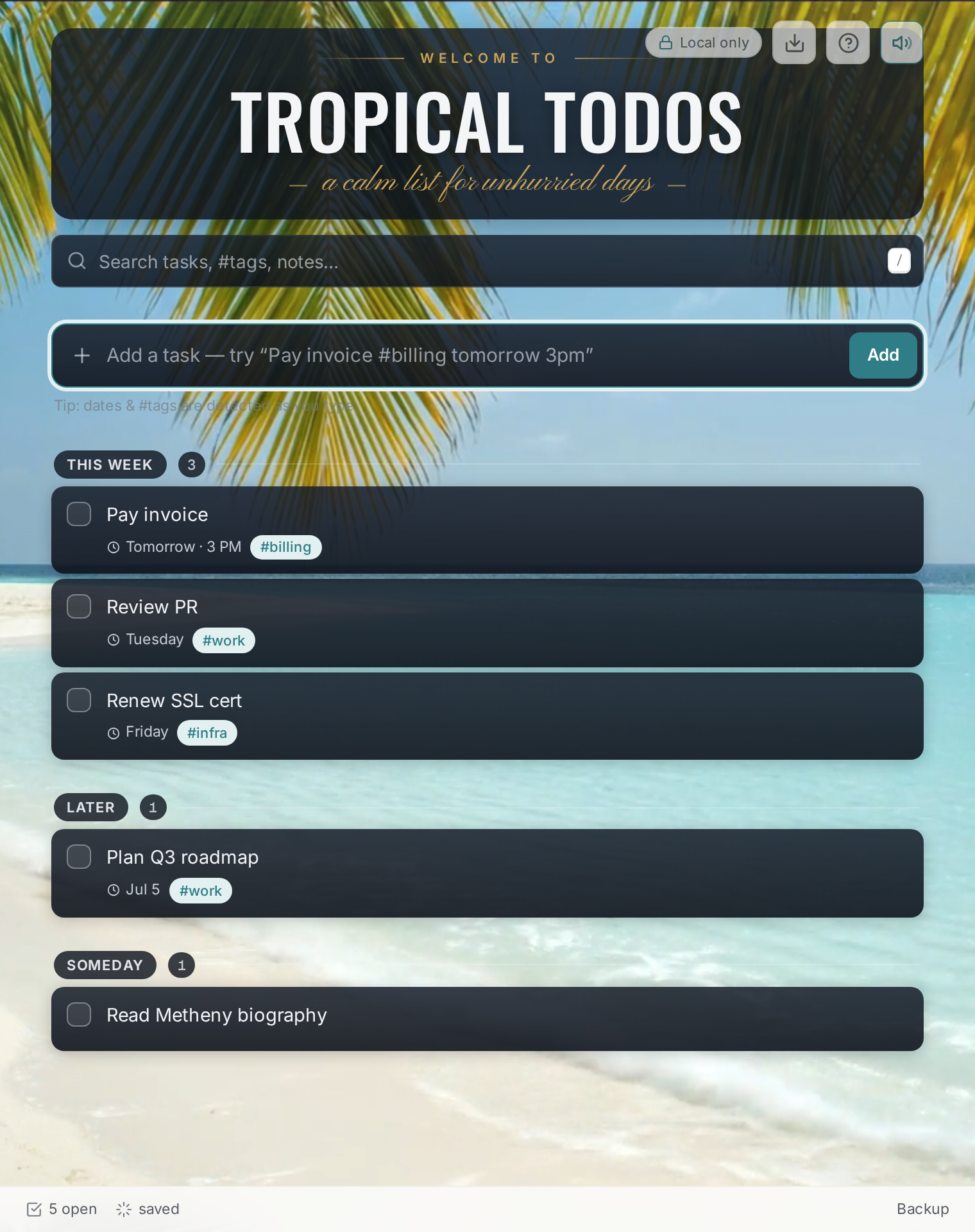
A single-page to-do list that runs entirely in your browser. No account, no server, no network calls after the page loads — your tasks live only on your device. Behind the list plays a real, looping beach video with optional gentle wave sound and occasional real bird calls, framed by a vintage poster masthead.
Features
- Rename folders — open Help (?), select Rename folders, choose a folder, and Save or Cancel; no touch-and-hold gesture is needed.
- One search-and-add bar — typing filters existing tasks; Add or Enter creates a task. Clear with × or Escape. Both
/andnfocus the top field. - Natural-language quick-add — type
Pay invoice #billing tomorrow 3pmand it parses the title, the#billingtag, and the due date/time automatically. - Work · Home · Misc — wording and times suggest a box; a referenced time files it (e.g.
Pay invoice tomorrow 3pm→ Work). Drag any task onto a bucket, or click an icon under search to open it. - Calm date buckets — Overdue · Today · This Week · Later · Someday.
- Thesaurus + fuzzy search over titles,
#tags, and notes (invcefinds "invoice";laundryfinds "wash the clothes"). - Keyboard-first —
/search ·nnew ·j/kmove ·xcomplete ·eedit ·⌫delete ·?help. - Cinematic beach background — an AI-rendered, seamlessly looping video (with a graceful still-image fallback). Tasks sit on dark "lava-rock" pills so text always reads.
- Continuous ocean waves + birds — a seamless 60-second PCM soundscape, on after the first interaction, with a one-tap mute toggle. The app keeps it playing when hidden; mobile operating systems may still suspend audio.
- Backup, your way — one-click JSON export, restore (merge or replace), and optional auto-backup to a folder you grant.
- Offline-first PWA — installable to your home screen with a tropical palm-and-check icon; works with no connection.
- Light & dusk themes follow your system preference.
Privacy
This is private-by-no-network. Data is stored in your browser's IndexedDB and never transmitted anywhere. The persistence layer is a single swappable module, so encrypted-at-rest storage can be added later without a rewrite.
Install
Open troplist.com and use your browser's Install / Add to Home Screen option. It launches full-screen as Troplist.
Run it yourself / deploy
Static files, zero build step. To host on GitHub Pages:
- Copy the repo contents into a repository.
- Settings → Pages → Deploy from branch →
main/(root). - Visit
https://<user>.github.io/<repo>/.
Project structure
| File | Purpose |
|---|---|
index.html |
App shell, styles, poster masthead |
app.js |
Store (IndexedDB), parser, bucketing, fuzzy search, keyboard, backup |
ambient.js |
Beach video (dual-crossfade loop) + wave audio + sound toggle |
sw.js |
Offline app-shell service worker |
manifest.webmanifest |
PWA install metadata |
assets/ |
Beach video (day/dusk, desktop/mobile), posters, waves loop, birds/ chirp clips |
icons/ |
App icons, maskable variants, Open Graph share card |
_build/ |
Asset generators (icon, caustics, waves) — not shipped to runtime |
Credits
- Beach video — AI-generated with Veo from the owner's own beach photograph; day/dusk grades via ffmpeg. Seamless loop via a dual-video crossfade (pattern adapted from rain-view).
- Wave audio — procedurally synthesized (CC0). Audio unlock pattern adapted from pocket-card.
- Bird calls — short clips from real recordings on Wikimedia Commons (Common Tailorbird, Indian White-eye & Song Wren, CC BY-SA 4.0; Indian Golden Oriole, public domain), mixed into the surf loop at build time, with their existing attribution retained.
- Built by StewAlexander.com.
Language and audio regression checks
Run node tests/regression.cjs, node tests/soundscape.cjs, and python3 tests/audio_asset.py. Rebuild the
combined audio using python3 _build/make_ambient.py (requires ffmpeg). The local
task thesaurus covers phrases and word forms for category suggestions and search;
it preserves original titles, explicit category choices, and learned vocabulary.
No remote model or thesaurus service receives task data.
The audio player decodes the soundscape once and loops on the Web Audio clock.
The mix uses a three-second equal-power crossfade with smooth easing, gentler
bird envelopes, and short gain ramps for mute/unmute. A media-element fallback
is retained for browsers without Web Audio (gapless playback is not guaranteed
in that fallback). tests/audio-browser.html renders two complete loops at
48 kHz using OfflineAudioContext and checks the actual rendered wrap.
iPhone/iPad playback (v1.2.2)
All browsers with Web Audio support, including iPhones and iPads, use the crossfaded buffer loop. This removes the native-media repeat pause introduced by the v1.2.1 compatibility change. The original silence report was subsequently identified by the user as a muted phone; it did not establish a Web Audio failure. Native media is now only a fallback when Web Audio is unavailable.
Folder buttons toggle open and closed with an inline chevron and active outline.
Open/closed wording remains in accessible labels and action tooltips.
The active button closes its folder and hides its rows. Up means closed; down
plus an outline means open. All tasks restores the full list. Drag-click
suppression expires after 350ms and never blocks keyboard activation.
Additional checks: node tests/folders.cjs and node tests/iphone-audio.cjs.
Physical iPhone listening remains a separate validation step.
App icon
The original palm-check mark combines a tropical palm and completion check in
one ivory silhouette with a gently swaying, tapered trunk flowing into a beach on ocean blue. Source: _build/icon.svg; raster exports:
_build/make_icons.cjs (requires Sharp at build time). All installation icons
are opaque and the mark fits within the maskable safe circle.
Flaticon palm-tree and to-do collections were reviewed for general visual research; no Flaticon artwork, paths, or downloadable assets are used. Reference collections: https://www.flaticon.com/free-icons/palm-tree and https://www.flaticon.com/free-icons/to-do-list.
Backup merge reliability (v1.4.4)
Folder moves advance the task edit timestamp. Version 4 snapshots include
per-folder name timestamps; merge preserves the newer edit and keeps the local
copy on ties. Legacy snapshots still load, but names without timestamps cannot
overwrite existing custom names. Replace intentionally restores snapshot names.
Conflicting duplicate folder names are ignored; valid simultaneous swaps work.
Tasks and names restore in one IndexedDB transaction, so a failed restore does
not leave a partially imported list. Run node tests/backup.cjs for merge,
legacy compatibility, timestamp, and rollback regression checks.