
Varlatch
Self-hosted secrets and environment configuration, built for AI coding agents.


Website · Documentation · Getting started · Changelog · Security
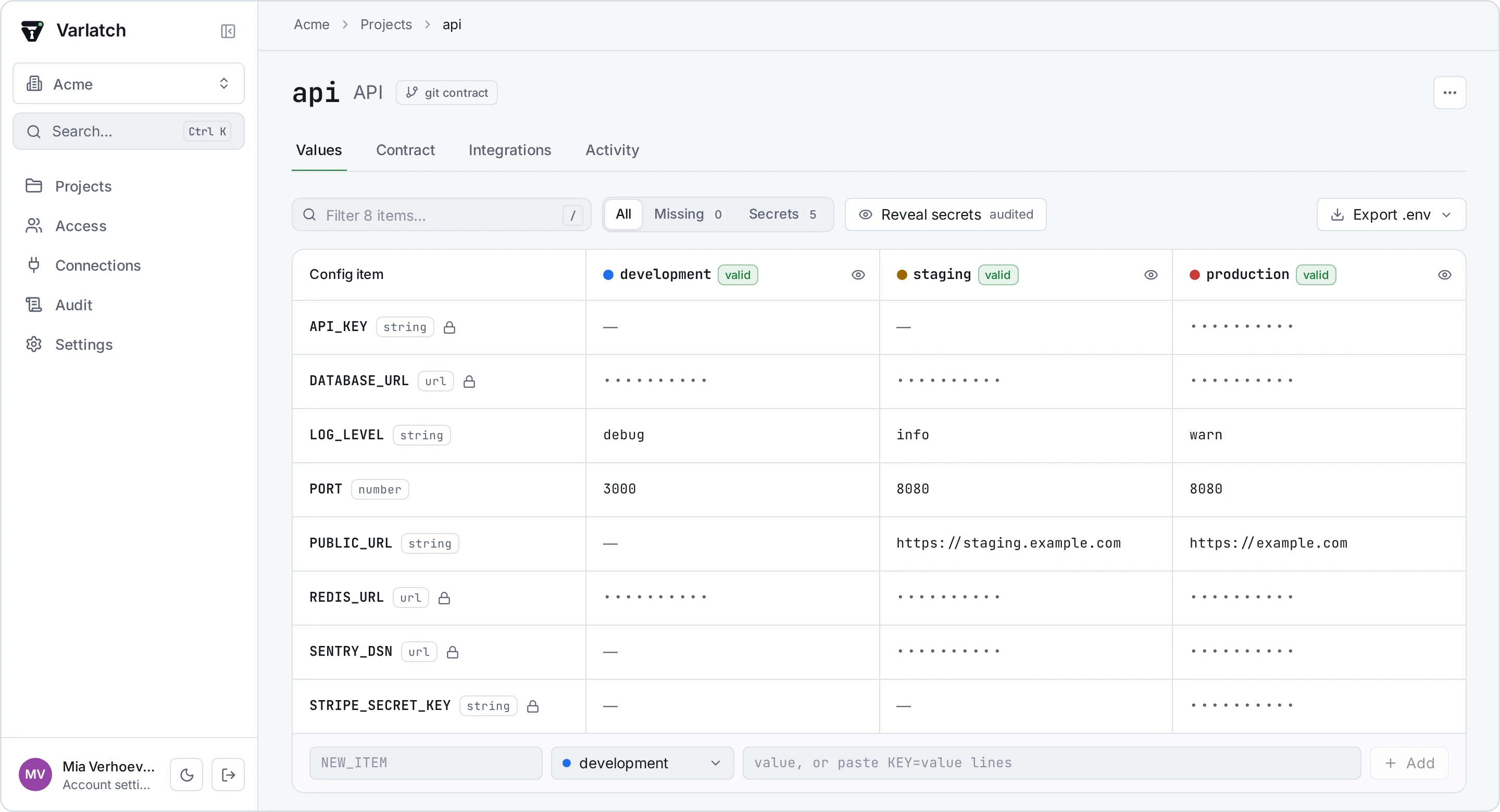
Varlatch is a self-hosted platform for secrets and environment configuration. It stores, authorizes, audits, and delivers the configuration your applications need, from a developer's laptop to CI and production. It is designed from the start for teams that work with AI coding agents: an agent can use a credential without ever being able to read it.
Varlatch is pre-1.0 and in daily use. The changelog lists what each release added.
Features
- Environments and values. Organizations, projects, and environments with
versioned values. An environment can derive from another, and values can
reference each other (
${DATABASE_HOST}), expanded on the server. - Configuration contracts. Declare which keys a project needs, which are sensitive, and what type each is, then validate every environment against that contract. Edit a contract in the dashboard or keep it as a schema file in your repository.
- Encryption with a real boundary. Secret values live in a dedicated
daemon,
varlatchd, with envelope encryption: an installation root key wraps a key per organization, which wraps a key per value version. Neither the database nor the dashboard backend alone yields plaintext. - Passkey sign-in. People sign in with passkeys, so there are no passwords to store or leak. Machines use scoped service credentials, or OIDC from CI such as GitHub Actions, with no stored secret at all.
- Access control. Default-deny grants, custom roles, groups, and teams, and restrictive requirements. A requirement can make an environment retrievable only from specific machines on your Tailscale network, checked by Tailscale identity rather than by IP address.
- Safe for AI agents. Using a secret and revealing it are separate
permissions.
varlatch run --agent-safegives an agent placeholders instead of secrets, and a local broker substitutes the real values only in requests to destinations you allow, at the headers or fields you name, and replaces a secret the destination echoes back in its response. Every use is authorized and audited. An MCP server,varlatch mcp, lets MCP hosts inspect configuration metadata; it never returns or writes a Secret's value. - A complete audit log. Every security-relevant action is recorded synchronously in an append-only log, exportable as NDJSON and deliverable to signed webhooks.
- Rotation without downtime. A rotated secret keeps its previous value available for a grace period, so running services move over before the old credential is revoked.
- Sync to other platforms. Push an environment's configuration to GitHub Actions, Coolify, or Convex. Every push is authorized and audited.
- Operations built in.
varlatch setupcreates an installation with public HTTPS or access over your tailnet only. Backups are encrypted and verified, never pause the service, and restore onto a fresh host.varlatch doctorchecks an installation's health, andvarlatch upgradetakes a verified backup before changing anything. - No artificial limits. Unlimited projects, environments, users, and machines.
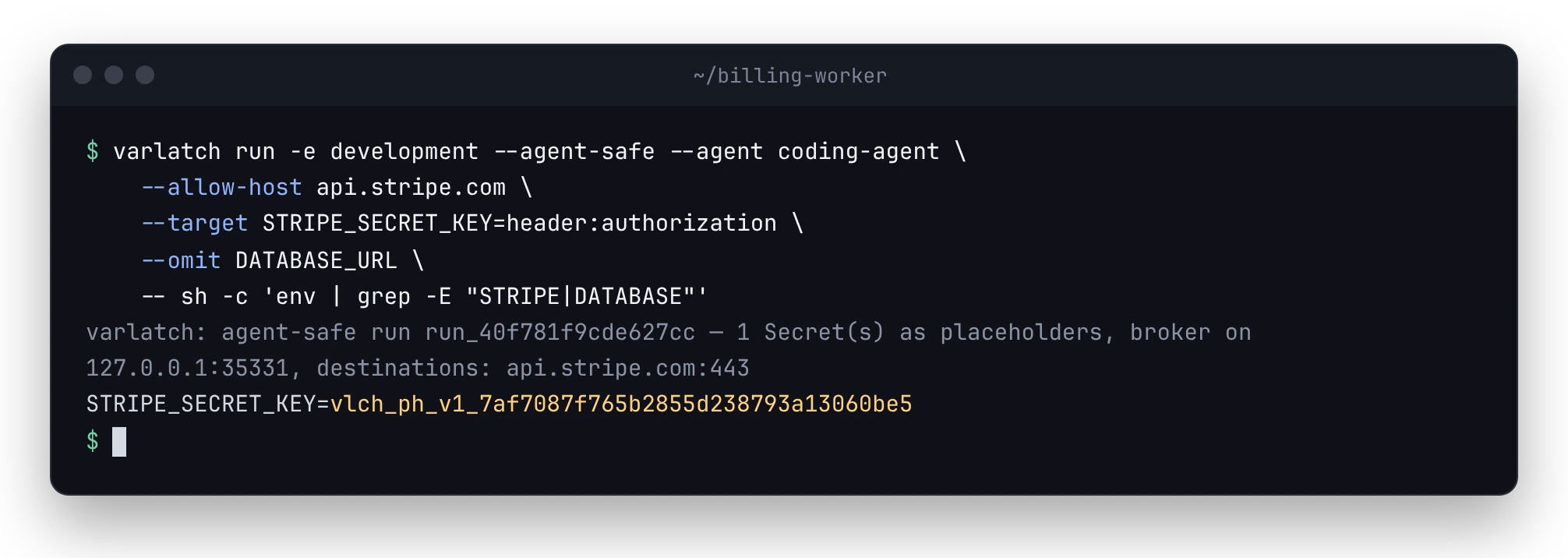
In an agent-safe run, the agent sees a placeholder instead of the Stripe key.
The local Broker puts the real key into the Authorization header of requests
to api.stripe.com only, and DATABASE_URL never reaches the agent at all.
Agent-safe runs explains the details.
A look around
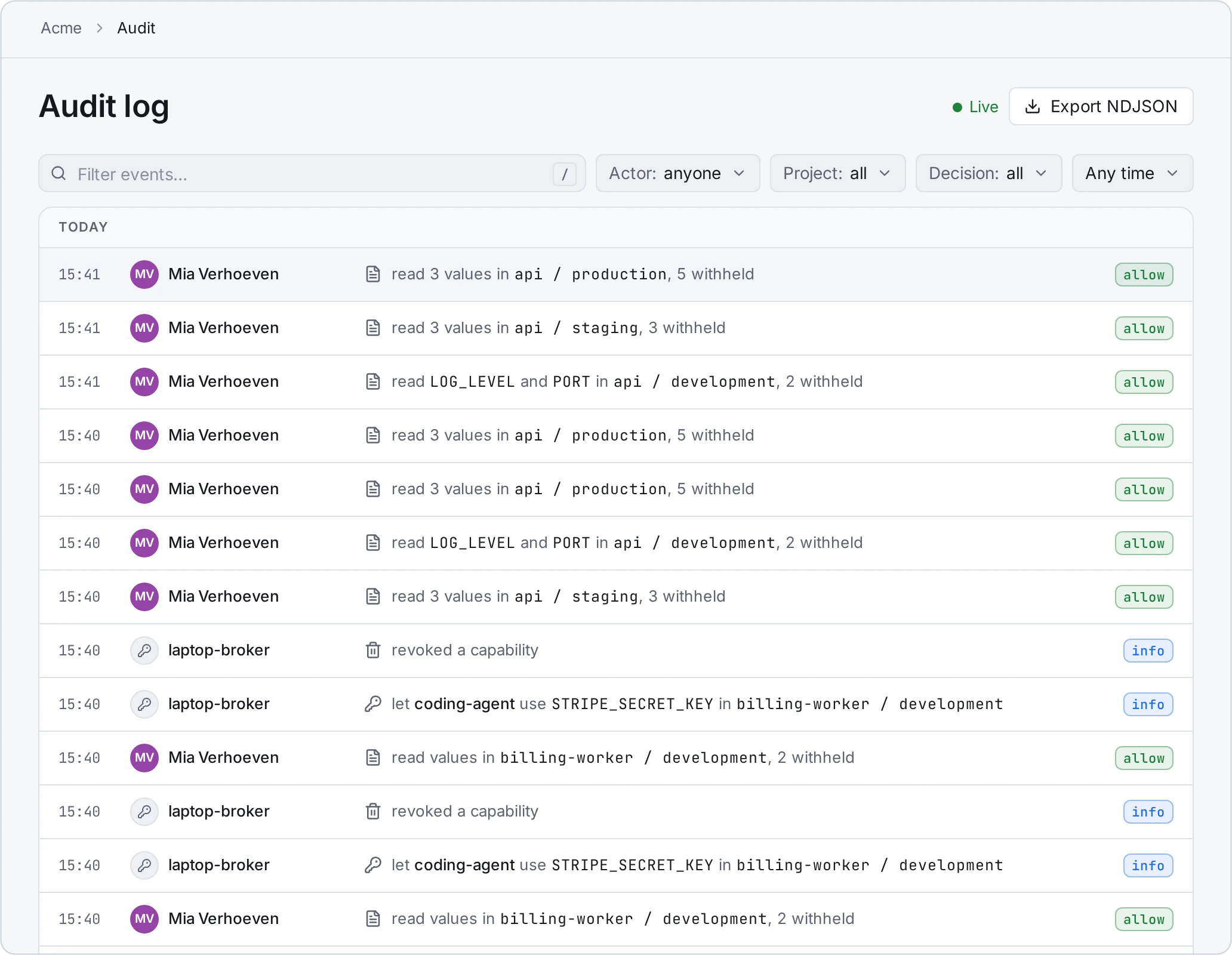 Audit log. Every security-relevant action, live, filterable, and exportable as NDJSON. |
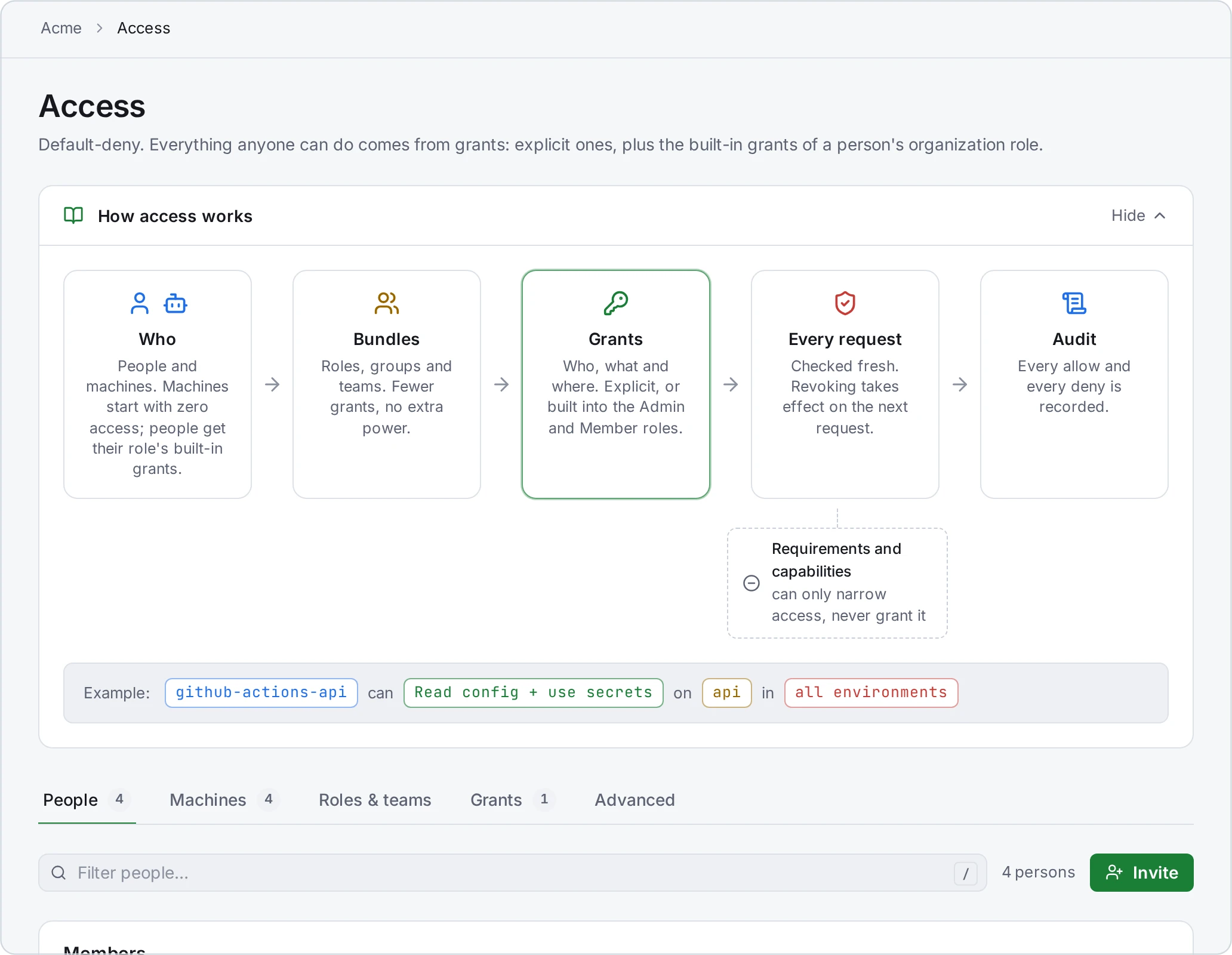 Access. Default-deny: people, machines, roles, teams, and grants. |
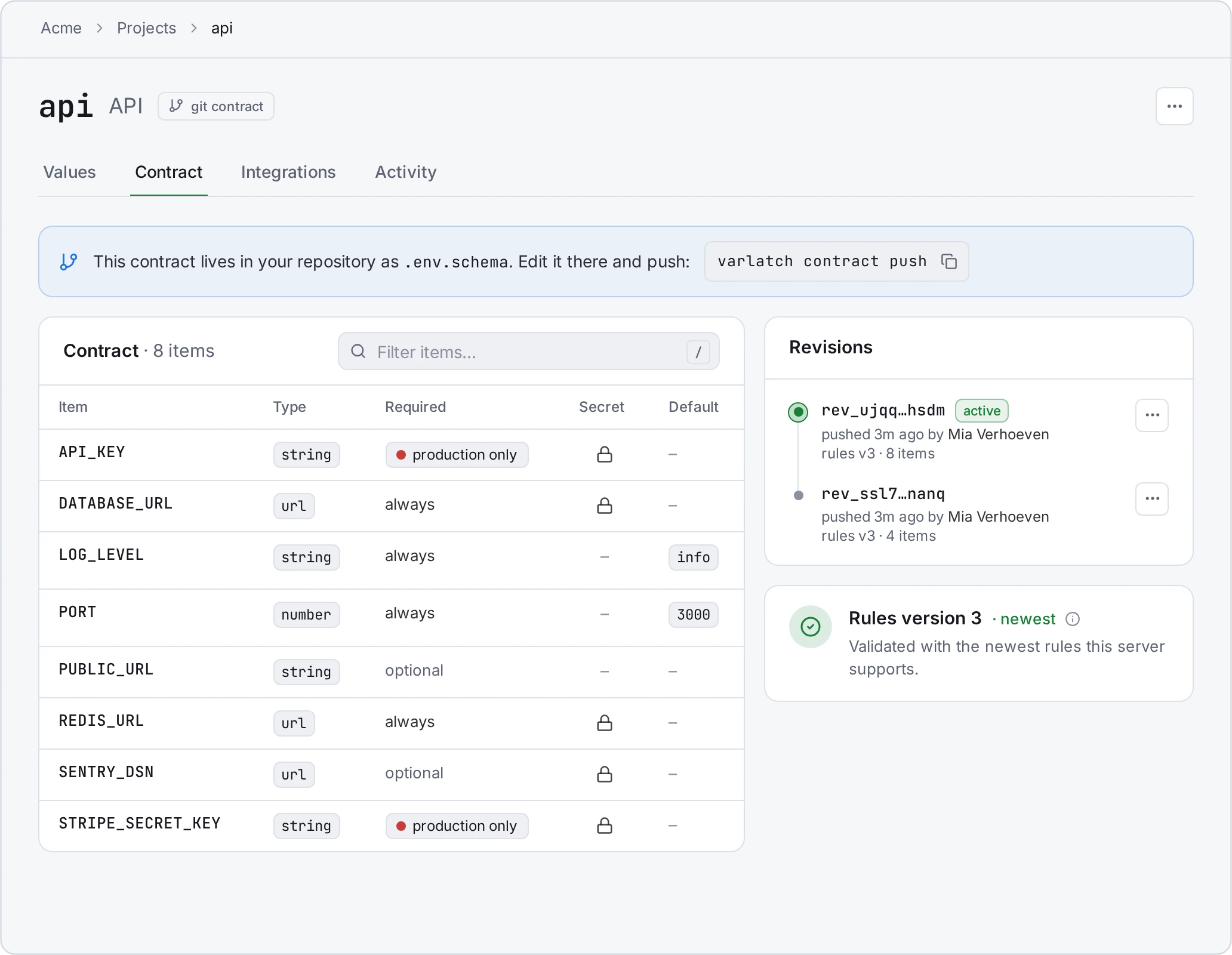 Contract. Which items a project needs, of what type, and which are secret. |
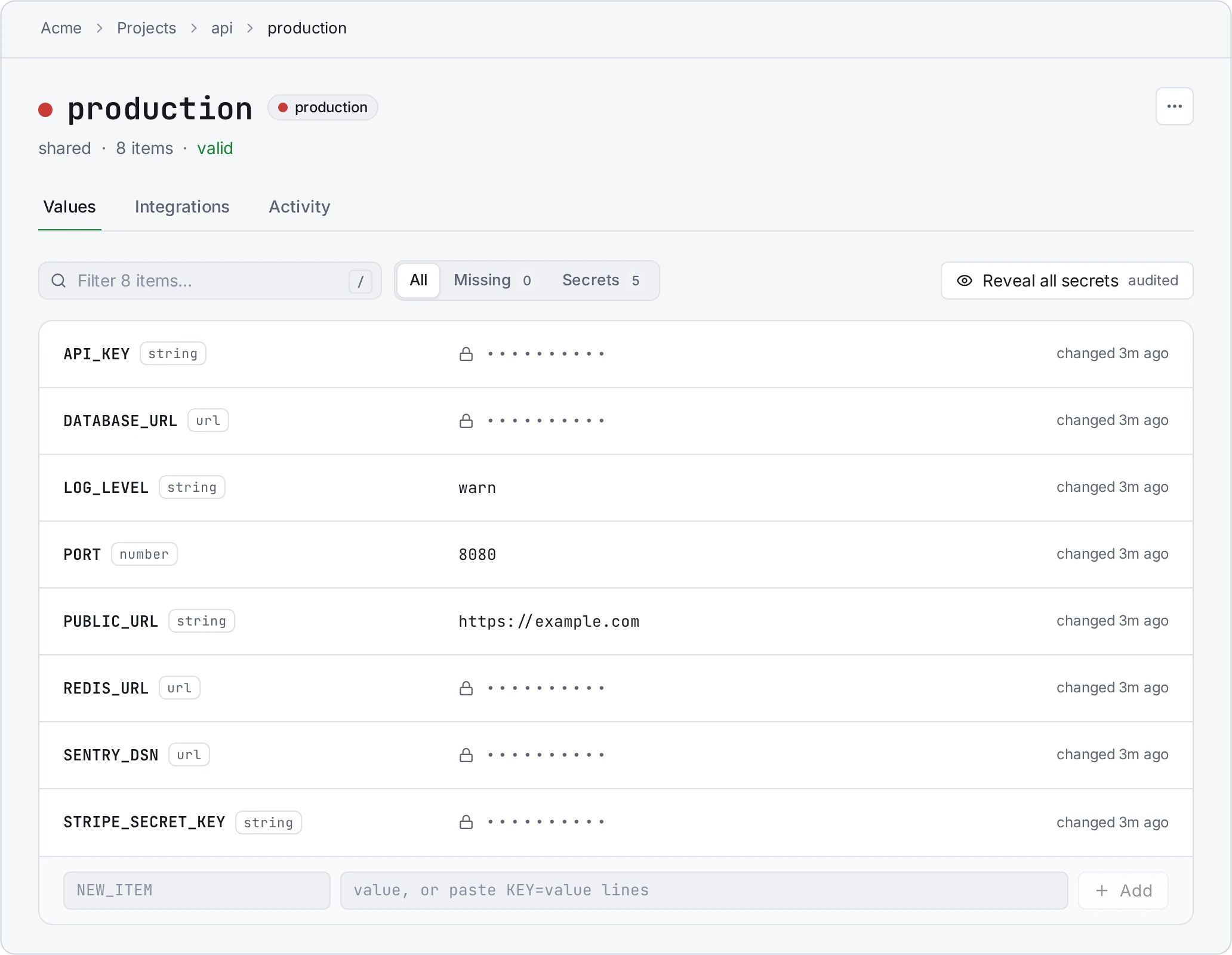 Environment. Secrets stay masked; revealing one is recorded in the audit log. |
How it works
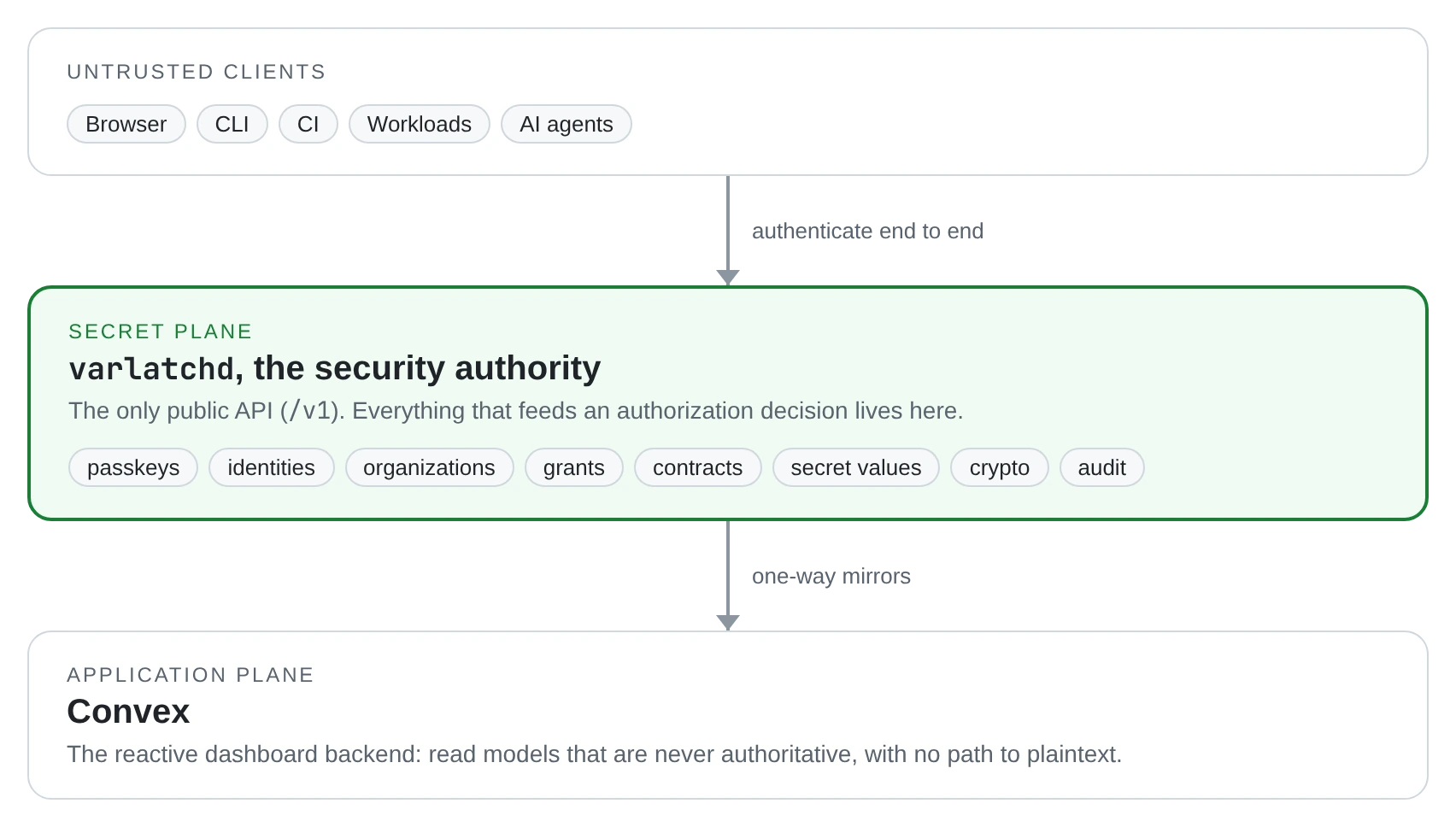
varlatchdis the security authority. It owns everything that feeds an authorization decision. A self-hosted Convex backend powers the live dashboard but cannot mint credentials, change security state, or reach plaintext, so compromising it gives no path into the secret store.- One public API.
varlatchdserves/v1: OpenAPI-first, bearer tokens only, with capability discovery so clients and servers of different versions work together. - Authorization is simple on purpose. Grants only ever add access, and requirements only restrict it. There are no deny rules and no policy language to get wrong.
- One PostgreSQL server, strictly separated. The secret store and the dashboard backend use separate databases and roles. The runtime role cannot rewrite audit history, and migration credentials exist only in a one-shot job.
Getting started
Getting started goes from nothing to
varlatch run: installing the CLI, running an installation, setting up a
project, and inviting your team.
Run your own installation
Varlatch runs with Docker Compose on any Linux host, amd64 or arm64, and on
Coolify. infra/compose/README.md walks through
setup, access, backups, and upgrades.
Use the CLI
The CLI is one file attached to every release, varlatch-cli-<version>.cjs,
and needs Node.js 22, 24 or 26 with its current security fixes:
Get the CLI.
varlatch login --server https://varlatch.example.com
varlatch init --org acme --project api
varlatch run -- npm run dev
varlatch run passes the environment's values to your command directly, so
no file of secrets lands on disk. varlatch types --out src/config.ts
generates typed access to them for a TypeScript application, and
varlatch types --out app/varlatch_config.py for a Python one.
varlatch run forwards SIGINT, SIGTERM, SIGHUP, SIGQUIT, SIGUSR1, and SIGUSR2
to your command (only the first two on Windows), so a service manager can stop
or reload a service through it, and it exits with your command's status: 128
plus the signal's number when a signal ended it, 130 for Ctrl-C. A signal sent
to the whole process group, such as Ctrl-C in a terminal, reaches your command
twice: from the terminal and forwarded.
Develop Varlatch
pnpm install
pnpm build
pnpm test
pnpm typecheck
To run the whole stack from a checkout, with synthetic data (Docker needed):
pnpm dev:up       # build, start, and seed once; prints a sign-in link
pnpm dev:link     # print a new one-time sign-in link
pnpm dev:down     # stop, keeping the data
pnpm dev:reset    # delete everything
It seeds the organization acme with the projects api and web, using
placeholder values only. State lives in .dev/.
Documentation
The same documentation, searchable, is at docs.varlatch.com.
docs/getting-started.md: from nothing tovarlatch run, for whoever runs the installation and for everyone who uses itCHANGELOG.md: what changed in each release, and how to upgradeCONTEXT.md: the vocabulary, from planes and identities to grants and contractsdocs/THREAT-MODEL.md: what Varlatch guarantees, each guarantee mapped to a test, and what it explicitly does notinfra/compose/README.md: self-hostingdocs/self-hosting/requirements.md: what a host needs, with measured memory, processor, and disk usedocs/self-hosting/configuration.md: every setting of an installationdocs/operations/backup.md: backups and recoverydocs/operations/verify-release.md: verifying a release's signatures and provenancedocs/reference/env-schema.md: the.env.schemacontract file formatdocs/reference/agent-safe-runs.md: running an agent with placeholders, and where the broker substitutesdocs/reference/assisted-mode.md: a coding agent driving the CLI with your credential, without reading Secretsdocs/reference/coding-agents.md: the Varlatch skill and agent files,varlatch agents installdocs/reference/import.md: moving a.envfile into Varlatch withvarlatch importdocs/reference/scripting.md: JSON output, exit statuses, and help for scripts, CI, and agentsdocs/reference/mcp.md: the MCP server,varlatch mcpdocs/reference/type-generation.md: typed configuration for TypeScript and Python withvarlatch types
Security, support, and contributing
Report vulnerabilities privately, as SECURITY.md describes,
never as a public issue. Varlatch comes without support commitments. Fixes,
security fixes included, go into the latest release only, so upgrade with
varlatch upgrade to get them. Before 1.0, a minor release may change the
/v1 API, the CLI, configuration, or the database schema; the changelog says
what to do.
Outside contributions are not accepted yet, but issues are welcome.
CONTRIBUTING.md explains.
No warranty
Varlatch is provided "as is", without warranty of any kind, and Robotsson is not liable for damage or loss from using it, to the extent the law allows. The warranty and liability sections of the licenses are the binding terms: sections 15 and 16 of the AGPL-3.0 and sections 7 and 8 of the Apache-2.0.
You run your installation and are responsible for it. Keep your Root KEK safe and your backups tested: without them, encrypted values cannot be recovered.
License
Copyright © 2026 Robotsson. Varlatch is open source, licensed by directory
(see LICENSE):
- AGPL-3.0-or-later: the secret store daemon (
services/varlatchd), the dashboard (apps/web), and the dashboard backend functions (convex/). - Apache-2.0: everything else, including the CLI, the SDK and other packages, and the deployment files.
The Convex backend that Varlatch runs by default is source-available, not open
source. Its license, FSL-1.1-Apache-2.0, permits internal use but not offering
it to others as a competing commercial service, and each version becomes
Apache-2.0 two years after its release. Running Varlatch for your own
organization is internal use. THIRD-PARTY-NOTICES.md
lists every third-party component of a release with its license.