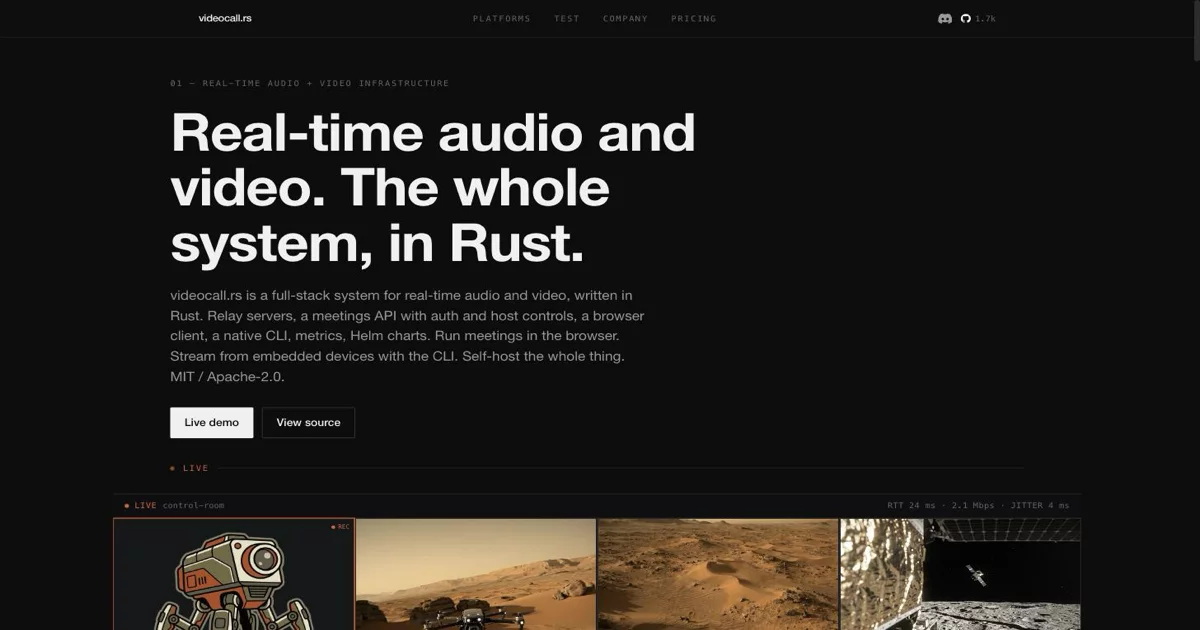

videocall.rs is an open-source, low-latency video conferencing platform and streaming API written entirely in Rust. It is a WebRTC alternative built on WebTransport (HTTP/3 and QUIC) with an automatic WebSocket fallback, and it runs in the browser, on native devices through a command-line client, and on mobile through iOS and Android SDKs. It is self-hostable, dual-licensed under MIT and Apache-2.0, and built for real-time video streaming from robots, drones, and embedded Linux boards (Raspberry Pi, Jetson) as well as conventional browser-to-browser calls.
Website | Documentation | Discord | Crates.io
Project status: Beta. Actively developed and used in production for non-critical workloads.
Table of Contents
- What videocall.rs is for
- Features
- FAQ
- Why WebTransport instead of WebRTC?
- How it compares
- Browser compatibility
- Architecture
- Getting Started
- Runtime configuration (config.js)
- Usage
- Meeting management
- Performance
- Security
- Feature flags
- Testing
- Release history
- Contributing
- Demos and media
- Contributors
- Sponsors
- License
What videocall.rs is for
videocall.rs gives you the building blocks for real-time video communication without the WebRTC stack. It is aimed at three audiences:
- Software professionals building custom video applications on a type-safe Rust API, from web apps to autonomous-vehicle feeds.
- Robotics and IoT engineers streaming low-latency video from drones, robots, and embedded devices using the lightweight
videocall-cliand the mobile SDKs. - Teams that want to self-host their own conferencing infrastructure with JWT authentication, SSO/OAuth, and transport encryption (TLS 1.3 / QUIC), deployed with the provided Helm charts.
The same core powers browser calls at videocall.rs.
Features
- Low latency by design. Media travels over WebTransport (QUIC/HTTP3), which avoids head-of-line blocking and recovers from packet loss faster than TCP-based transports.
- WebTransport with WebSocket fallback. Clients negotiate WebTransport where available and fall back to WebSockets automatically for compatibility.
- Encrypted in transit. WebSocket connections use TLS 1.3 and WebTransport uses QUIC's built-in TLS 1.3, so media is encrypted between each client and the relay. See Security.
- Browser, native, and mobile clients. A Dioxus/WebAssembly web UI, a native
videocall-clifor headless streaming, andvideocall-sdkbindings for iOS and Android. - Horizontally scalable. A NATS pub/sub backbone lets WebSocket and WebTransport servers scale independently behind a load balancer.
- Self-hostable. Kubernetes Helm charts, a fully native dev stack, and reproducible container images built with Nix.
- Pure-Rust media pipeline. VP9 encode/decode and Opus audio are pure Rust with no C libvpx or libopus dependency.
- Open source. Dual-licensed under MIT and Apache-2.0.
FAQ
Is videocall.rs a WebRTC replacement?
For most server-mediated video use cases, yes. videocall.rs does not use WebRTC's peer-connection stack. Media flows over WebTransport (QUIC/HTTP3), or a WebSocket fallback, to a Rust server that forwards packets to other participants through NATS. You give up WebRTC's mature browser SFU ecosystem, but you also drop ICE, STUN/TURN, and SDP negotiation entirely.
Can I self-host it?
Yes. The repository ships Helm charts for Kubernetes and a fully native local dev stack. Production container images are built reproducibly with Nix. See Getting Started and the architecture document.
Does it work in the browser?
Yes, on Chromium-based browsers (Chrome, Edge, Brave) and Safari (macOS and iOS). Firefox is not currently supported. See Browser compatibility.
How is it different from LiveKit, Jitsi, or mediasoup?
Those stacks are WebRTC selective-forwarding units. videocall.rs forwards media over WebTransport/QUIC instead of WebRTC, is written entirely in Rust (server, browser client, and native client), and requires no STUN/TURN/ICE infrastructure. See How it compares.
Can I stream from a Raspberry Pi?
Yes. videocall-cli is a headless native client that streams from a camera on Raspberry Pi, Jetson Nano, and other embedded Linux devices. See CLI-based streaming.
Is the media encrypted?
Media is encrypted in transit. WebSocket connections use TLS 1.3, and WebTransport uses QUIC's built-in TLS 1.3 encryption, so media is protected between each client and the relay. The relay server forwards media between participants; it is not end-to-end encrypted.
Why WebTransport instead of WebRTC?
WebTransport is the core technology that sets videocall.rs apart. Built on HTTP/3 and QUIC, it provides multiplexed, bidirectional streams and datagrams with modern congestion control. Choosing it over WebRTC has concrete consequences:
- No ICE, STUN, or TURN. Clients connect to a server over QUIC. There is no NAT-traversal negotiation, no candidate gathering, and no relay-server fleet to operate for connectivity.
- No SDP signaling dance. Session setup is a single QUIC handshake rather than an offer/answer exchange over a separate signaling channel.
- Better loss recovery. QUIC's per-stream flow control avoids the head-of-line blocking that degrades TCP-based transports on lossy links, which matters on mobile and long-haul networks.
- Faster connection establishment. QUIC's 0-RTT and 1-RTT handshakes reduce setup round-trips compared with WebRTC's multi-step negotiation.
- A standards-track platform. WebTransport is developed at the IETF and W3C with active browser-vendor support.
videocall.rs still runs a forwarding server, so it is architecturally closer to an SFU than to peer-to-peer WebRTC. The difference is that the transport and signaling are radically simpler: no ICE, no TURN, no SDP. For a deep dive, see the architecture document.
How it compares
An honest, verifiable comparison with widely used WebRTC-based stacks. All four are open source and server-mediated (SFU-style); the differences are in transport and implementation language.
| Project | Media transport | Signaling / NAT traversal | Core language | License |
|---|---|---|---|---|
| videocall.rs | WebTransport (QUIC/HTTP3), WebSocket fallback | QUIC handshake, no ICE/STUN/TURN | Rust (server, browser, native) | MIT / Apache-2.0 |
| LiveKit | WebRTC | ICE / STUN / TURN | Go | Apache-2.0 |
| Jitsi Videobridge | WebRTC | ICE / STUN / TURN | Java | Apache-2.0 |
| mediasoup | WebRTC | ICE / STUN / TURN | C++ core, Node.js / Rust API | ISC |
videocall.rs is the youngest of these and does not yet match their breadth of client SDKs, recording, and ecosystem integrations. Its advantage is a simpler transport and a single-language (Rust) codebase from server to browser.
Browser compatibility
| Browser | Support |
|---|---|
| Chrome | Yes |
| Brave | Yes |
| Edge | Yes |
| Safari (macOS, iOS) | Yes |
| Firefox | No |
Architecture
videocall.rs follows a microservices architecture in which clients connect over WebSocket or WebTransport and servers exchange media through a NATS pub/sub backbone.
graph TD
    Clients[Clients<br>Browsers, Mobile, CLI] -->|WebSocket| ActixAPI[Actix API<br>WebSocket]
    Clients -->|WebTransport| WebTransportServer[WebTransport<br>Server]
    ActixAPI --> NATS[NATS<br>Messaging]
    WebTransportServer --> NATS
Primary components:
- actix-api streaming servers (
websocket_server,webtransport_server,metrics) built on Actix Web. - meeting-api REST/auth API (login, meetings, host controls) on Axum with dbmate migrations.
- dioxus-ui web frontend built with Dioxus and compiled to WebAssembly.
- videocall-types shared protobuf data types and protocol definitions.
- videocall-client client library for native and WebAssembly integration.
- videocall-cli command-line client for headless streaming.
- videocall-sdk iOS and Android bindings (UniFFI).
- videocall-codecs / neteq pure-Rust codec wrappers and adaptive audio jitter buffer.
For details, including connection flows, message routing, and the encryption model, see the architecture document.
Getting Started
Development is fully native: the entire dev stack (postgres, NATS, prometheus, grafana, and the Rust services) runs as host processes supervised by process-compose, with hot reload everywhere. Docker only appears when you want to run the images, which are built by Nix. There are no Dockerfiles in the dev workflow. See docs/nix-architecture.md.
Prerequisites
- Modern Linux distribution, macOS, or Windows 10/11 (WSL2).
- Nix, which provides the dev stack, toolchains, and image builds.
- One-time on multi-user installs: add yourself to
trusted-usersso builds can pull the project's public binary cache instead of compiling everything locally. Until then Nix printsignoring untrusted substituter 'https://videocall-rs.cachix.org'(harmless, but slow):echo "trusted-users = root $USER" | sudo tee -a /etc/nix/nix.conf sudo pkill nix-daemon
- One-time on multi-user installs: add yourself to
- Docker is not needed. It is optional, only if you want to
docker runa published image locally. - A Chromium-based browser (Chrome, Edge, Brave) or Safari (macOS, iOS). Firefox is not supported.
Dev loop (everything native, hot reload, zero Docker)
git clone https://github.com/security-union/videocall-rs.git
cd videocall-rs
make dev
That's it. make dev opens the process-compose TUI running the whole stack as native processes:
| Process | What | Port |
|---|---|---|
postgres |
postgresql from nixpkgs, state in .data/postgres |
5432 |
nats |
nats-server with JetStream, state in .data/nats |
4222 / 8222 |
meeting-api |
dbmate migrations, then cargo watch |
8081 |
websocket / webtransport |
cargo watch |
8080 / 4433 udp |
metrics / server-stats |
cargo watch |
9091 / 9092 |
dioxus-ui |
tailwind watch + trunk serve |
3001 |
prometheus / grafana |
native, same dashboards/config as the container stack | 9090 / 3000 |
Services wait for middleware health (compose-style depends_on), recompile and restart instantly on save, and the TUI can restart individual processes on demand. Open http://localhost:3001 and navigate to a meeting at http://localhost:3001/meeting/<username>/<meeting-id>.
To stop: quit the TUI (F10 / Ctrl-C), or run make dev-down from another terminal. The TUI needs an interactive terminal; for scripted or headless use run nix-shell default.nix -A shells.dev --run "dev-stack -t=false".
Prefer one service per terminal? make dev-middleware starts just postgres/nats/prometheus/grafana; then make dev-websocket, make dev-meeting-api, make dev-ui, and so on run a single watcher each (these also work with plain rustup plus cargo-watch).
Overriding environment variables: every process in make dev sees env layered as built-in defaults < .env < .env.local, both untracked. Copy .env-sample to .env for documented knobs (OAuth, service URLs, JWT secret); put personal or secret overrides in .env.local, which is gitignored and never checked in.
Container images (the k8s deliverable)
Nothing local needs Docker: development, tests, and e2e all run native. The container images exist for Kubernetes. CI builds and publishes them from release.nix on every merge. To build one locally (for example, to debug an image's entrypoint with docker run):
make image-websocket-server   # nix-build one image and docker-load it
make images                   # all of them
On Linux the images build natively; on macOS the service binaries are cross-compiled to aarch64-unknown-linux-musl with no VM and no remote builder. The first macOS build compiles a musl cross-toolchain (one-time, tens of minutes); after that it is cached in the Nix store.
OAuth (optional)
Both stacks read the same files: make dev layers .env then .env.local into every process. To enable Google login, create a .env from the sample and fill in credentials (or keep secrets in .env.local):
cp .env-sample .env
- Go to Google Cloud Console → APIs & Credentials.
- Create an OAuth 2.0 Client ID (Web application type).
- Add
http://localhost:8081/login/callbackas an authorized redirect URI. - Copy the Client ID and Secret into your
.env.
Without OAuth credentials the app runs with auth bypassed for local development.
Platform notes:
- Rancher Desktop (Windows/WSL2) with Traefik Ingress on port 3001: Rancher Desktop runs Traefik, which may conflict with the dioxus-ui frontend. Override the port in your local
.env(not.env-sample):
Then access the app atDIOXUS_SERVE_PORT=8088 AFTER_LOGIN_URL=http://localhost:8088 ALLOWED_REDIRECT_URLS=http://localhost:8088http://localhost:8088. - Shell environment variables: if you have
API_BASE_URL,OAUTH_REDIRECT_URL, or similar variables exported in your shell profile (~/.bashrc,~/.zshrc), they override.envvalues. Remove them from your profile before runningmake dev.
Nix build system
The build system is native Nix, no flakes: default.nix (entry point), shell.nix (dev shells), release.nix (CI artifacts: packages and Docker images). Dependency pins live in nix/tamal/ and are managed by nixtamal; evaluating them needs plain Nix only. Full design: docs/nix-architecture.md. Coming from the old Docker dev environment? See docs/migrating-from-docker.md.
nix-shell                                              # default dev shell (frontend toolchain)
nix-shell default.nix -A shells.backend-dev           # backend toolchain + cargo-watch + dbmate
nix-build release.nix -A packages.websocket-server    # a single service binary (static musl)
make image-websocket-server                           # its Docker image, loaded into the daemon
make pins-update                                       # refresh nixtamal pins (nix/tamal/)
Runtime configuration (config.js)
The frontend is configured at runtime via a window.__APP_CONFIG object provided by a config.js file. The file is copied by Trunk and loaded at /config.js by dioxus-ui/index.html.
- Local:
make devandmake dev-uirunscripts/start-dioxus.sh, which writesdioxus-ui/scripts/config.jsfrom the environment before Trunk starts. To point the UI somewhere custom, override the relevant env vars in.env.local(seescripts/start-dioxus.shfor the keys) rather than editing the generated file. The Nix-builtvideocall/dioxus-uiimage does the same at container startup via its entrypoint. - Kubernetes / Helm:
helm/videocall-ui/templates/configmap-configjs.yamlrendersconfig.jsfrom.Values.runtimeConfig. DefineruntimeConfigin your values file and deploy or upgrade.
Voice Activity Detection (VAD) threshold
The vadThreshold config parameter controls how sensitive speaking detection is. It sets the minimum RMS audio level that counts as "speaking," used for tile border glow, peer-list mic glow, and self-video glow indicators.
window.__APP_CONFIG = Object.freeze({
    // ... other config ...
    vadThreshold: 0.02   // default
});
| Value | Sensitivity | Use case |
|---|---|---|
0.01 |
High: picks up quiet speech and background noise | Quiet environments, soft speakers |
0.02 |
Medium (default): good balance for most setups | General use |
0.05 |
Low: only triggers on louder speech | Noisy environments, reduces false positives |
0.10 |
Very low: requires loud or close speech | Very noisy environments |
The threshold can also be set via the VAD_THRESHOLD environment variable (see scripts/start-dioxus.sh) or via runtimeConfig.vadThreshold in Helm values.
Usage
Browser-based clients
- Navigate to your deployed instance or local setup:
http://<server-address>/meeting/<username>/<meeting-id> - Grant camera and microphone permissions when prompted.
- Click "Connect" to join the meeting.
CLI-based streaming
For headless devices like a Raspberry Pi:
# Install the CLI tool
cargo install videocall-cli

# Stream from a camera
videocall-cli stream \
  --user-id <your-user-id> \
  --video-device-index 0 \
  --meeting-id <meeting-id> \
  --resolution 1280x720 \
  --fps 30 \
  --frame-format NV12 \
  --bitrate-kbps 500
The CLI joins an existing meeting; create the call from a browser first. For all options, see the videocall-cli README.
Meeting management
videocall.rs includes a meeting management system with ownership, waiting rooms, and host controls.
- Meeting ownership: each meeting has an owner (the creator) identified by their email.
- My Meetings: users can view and manage all meetings they own from the home page.
- Waiting room: non-owners enter a waiting room and must be admitted by an existing participant.
- Host identification: the meeting owner is marked with "(Host)" in the UI.
- Soft delete: owners can delete their meetings; deleted meeting IDs can be reused.
Workflow: navigating to /meeting/{meeting-id} creates the meeting and makes you the owner if it does not exist. Owners see "Start Meeting," others see "Join Meeting." Non-owners wait for admission; admitted participants are auto-joined and can then manage the waiting room.
Meeting management requires the FEATURE_MEETING_MANAGEMENT flag (see Feature flags):
export FEATURE_MEETING_MANAGEMENT=true
Details: Meeting Ownership & Workflow and Meeting API Reference.
Performance
videocall.rs is engineered for real-time streaming across a range of hardware and networks:
- One-on-one and small groups: a mesh-style topology with adaptive quality driven by per-receiver diagnostics (packet loss, latency, jitter, estimated bandwidth).
- Large conferences: the NATS-backed forwarding architecture scales out horizontally — add relay servers for capacity, with WebSocket and WebTransport rela