
Vitrine
Kept under glass.
A curated collection of React components with memorable interactions. Read the source, read the prompt behind it, and copy what you need.
Browse the collection · How to use it · How it's made · Workshop · Contributing
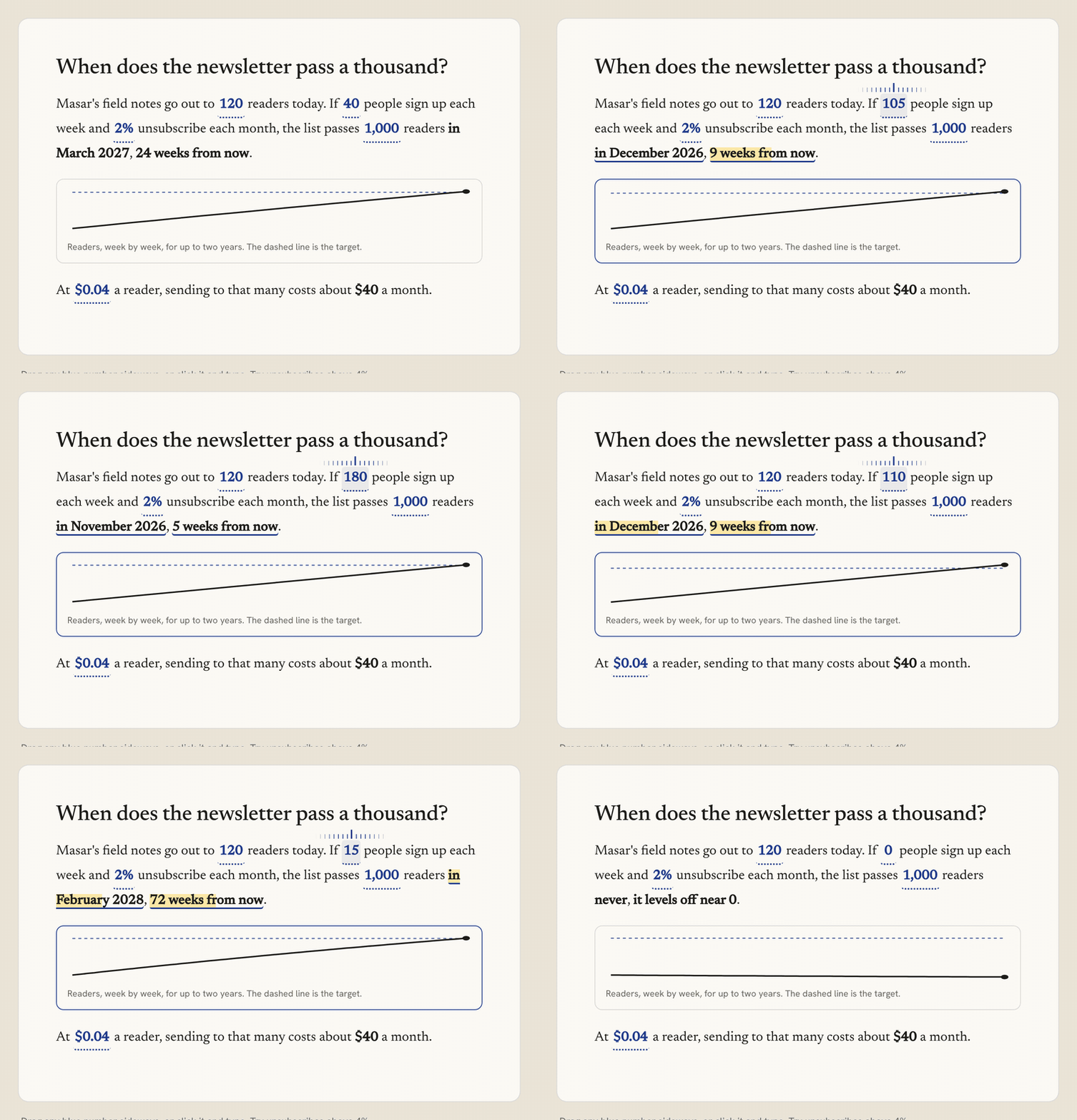
Reactive Prose, recorded from the live component: drag a number in the sentence and everything that depends on it recalculates.
What is Vitrine?
A vitrine is a glass display case: you look, you don't touch. Vitrine is the one display where you're allowed to take the object.
Each component is built around one clear idea, often borrowed from a physical object (letterpress, split-flap boards, wet ink, a transit map, a patch bay) and kept useful. Every component comes with:
- a live preview with its variants,
- the real source, exactly what runs in the preview,
- the design prompt it was built from, detailed enough to rebuild or adapt it with an AI assistant,
- notes on interaction, animation, accessibility, responsiveness and touch.
There is no package, no CLI and no registry install. You copy the files into your project and they're yours.
A closer look
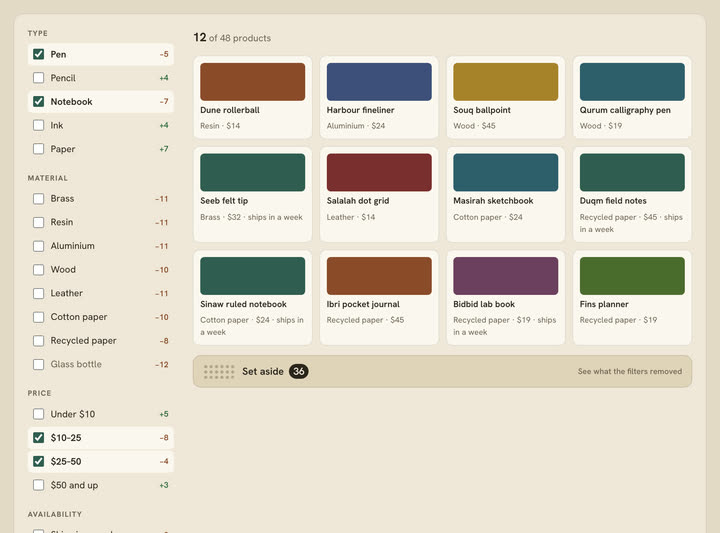
Sieve — filters that show their work. Every option previews how many items it would add or remove, and what you filtered out waits in a tray instead of vanishing. |
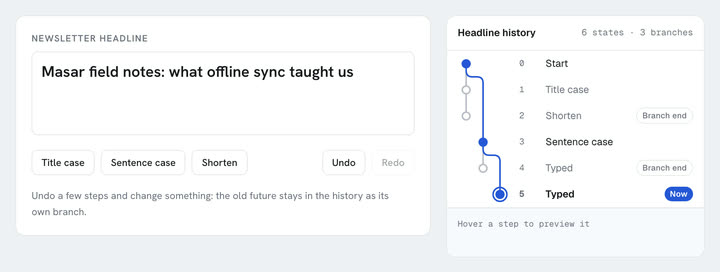
Undo Tree — history that branches instead of forgetting. Undo, change something, and the old future stays in the tree as its own branch. |
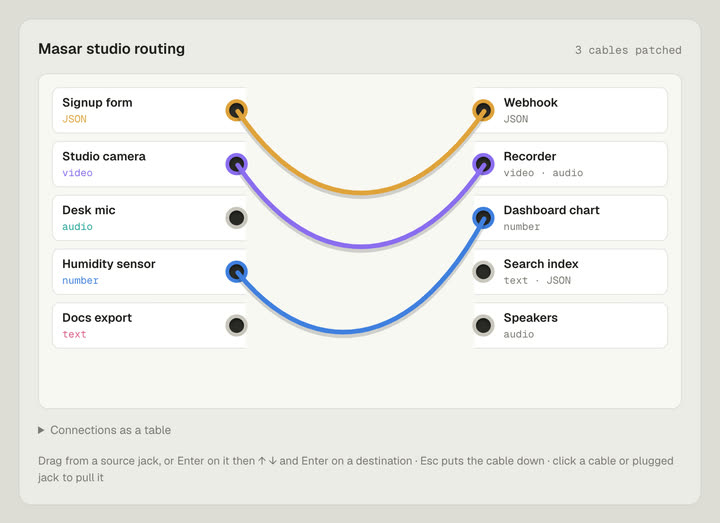
Patch Bay — routing as cables. Plugs refuse incompatible jacks and say why, and every connection is also available as a table. |
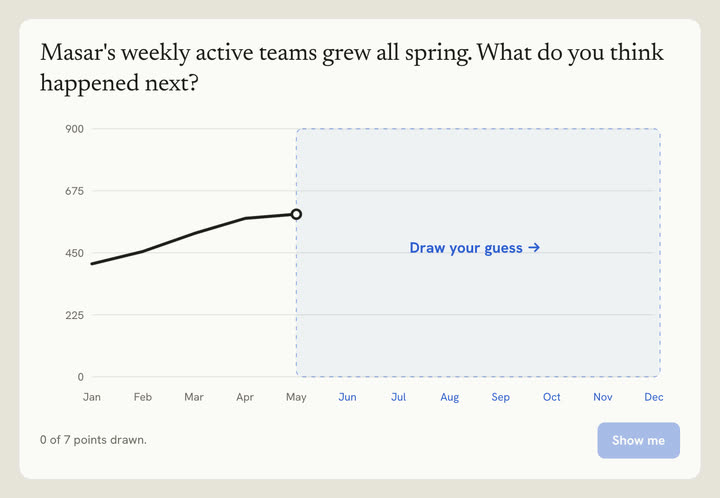
You Draw It — a chart that asks for your guess before it shows the answer, then compares the two. |
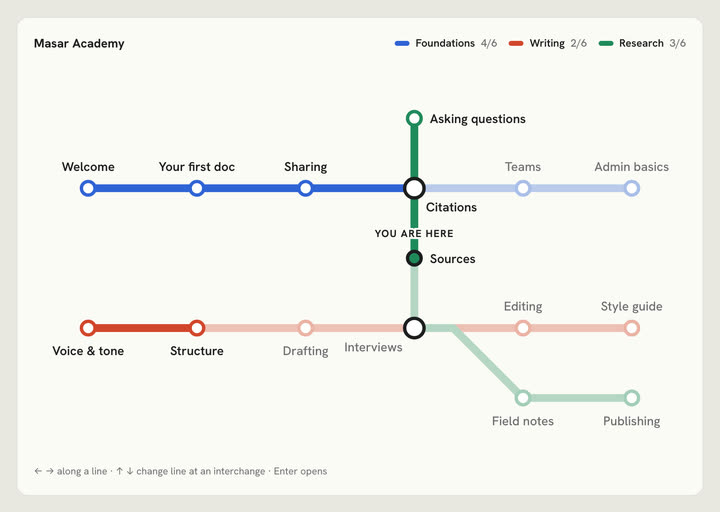
Line Map — structure drawn as a transit map. Arrow keys travel along a line; at interchanges you change lines. |
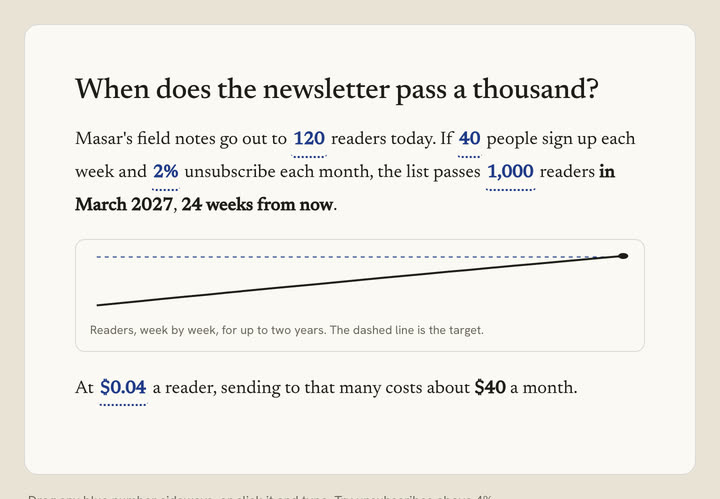
Reactive Prose — text you can operate. Numbers in the sentence are controls, and the conclusion and chart follow them. |
What's inside
555 components in 33 categories. Recently added components carry a New label; the registry check keeps it to at most 100.
| Category | Category | Category | |||
|---|---|---|---|---|---|
| Buttons | 81 | Backgrounds | 60 | Cards | 51 |
| AI & Chat | 39 | Controls | 22 | Authentication | 22 |
| Feedback | 22 | Stats | 20 | Analytics | 20 |
| Sections | 19 | Highlights | 17 | Cursors | 16 |
| Forms | 16 | Data | 15 | Text Animations | 14 |
| Micro-animations | 13 | CTAs | 12 | Navigation | 11 |
| FAQ | 10 | Type & Names | 10 | Pricing | 9 |
| Heroes | 8 | Media | 8 | Time | 7 |
| Overlays | 6 | Navbars | 4 | Developer | 4 |
| Footers | 4 | Maps & Globes | 4 | Sidebars | 3 |
| Decisions | 3 | Commerce | 3 | Reading | 2 |
A longer tour
- Glassbreak Button: a plate of dark glass that fractures from a single impact point, pure CSS and fully choreographed.
- Silk Field: a shader background you can set type on.
- Specimen Card: a card treated as a catalogued object.
- Iris Shutter Button: an action that opens and closes like a lens.
- Prompt Composer, Thinking Trace, Cited Answer, Inline Diff: the building blocks of a polished AI interface.
- Split-Flap Text, Extrude Text: type that moves with intent.
- Route Globe, Sankey Flow, Sunburst Drill, Cohort Retention: data that rewards a closer look.
- Trace 404, Forwarding 404, Underside 404: missing pages that explain where the request stopped, where the page moved, or turn over to an index.
- Insert Menu, Board View, Page Header: a calm document editor's pieces, from the / menu to drag-and-drop status boards.
- Lesson Path, Word Bank, League Table: chunky, pressable learning UI where progress always says what it means.
- Query Cell, Schema Drop, Column Profile: a hard-edged data toolkit that parses CSV and profiles columns in the browser.
- Card Wallet, Transfer Composer, Approval Inbox: precise banking flows that await real callbacks and never fake success.
- Reactive Prose, Stretchtext: text you can operate. Drag a number in a sentence and the figures that depend on it recalculate; choose how deep an article goes and the detail grows inside its sentences.
- Pairwise Ranker, Magnet Board, Allocation Faders: decisions made visible. Rank by answering "this or that?", sort by dropping quality magnets on a board, split a budget on faders that always add up.
- Sieve, Build Sheet, Gate Selector: rules you can see. Filters that show what they removed, a configurator that explains its conflicts and offers the fix, a status control shaped like the workflow it allows.
- Undo Tree, Shadow Board: history that branches instead of forgetting, and toolbar customisation where every tool keeps its painted outline.
- Line Map, Notification Dial, You Draw It: structure drawn as a transit map, a setting that shows its consequence before you commit, and a chart that asks for your guess before it shows the answer.
- Splice: choosing as the main act. Assemble one text from the best sentences of several drafts.
- Query Tokens, Keymap, Cron Builder, Scrub Number, Conflict Resolver: tools for people who build. Filter syntax that stays editable, shortcuts on a drawn keyboard, schedules in three linked forms, design-tool number fields, and a three-way merge that only asks about real conflicts.
- Transcript Player, Log Tail, Span Waterfall: media and tooling you read as much as operate. A transcript that is the player, a live log that holds still when you scroll up, a trace drawn as bars with its critical path.
- Segment Counter, Timezone Overlap, Patina: the honest details. The one character that doubled your SMS bill, everyone's working hours on one axis, cards that visibly age until someone checks them.
- Confidence Ink, Patch Bay, Fit Compare, Exploded View: model uncertainty printed as lighter ink, routing as cables that sag, products shown at true size, and drawings that come apart.
- Helix Showcase, Signal Tiles, Platform Downloads: a portfolio wound into a spiral of curved cards that turns as you scroll, black service tiles that switch on with a dot field and a travelling border light, and download buttons that put the visitor's own system first.
- Column Bloom, Satin Hero: two heroes: a stepped orange glow ringed by keywords, and a headline pressed into drifting satin.
- Obsidian Flow: a background of slowly folding black liquid under a faint grid (it began as a hero; the old link redirects).
- Refraction Blob, Ask Bar, Sweep Cards, Infinite Highlight Sweep: a lumpy glass drop that reads a name through itself and turns with the scroll, an assistant's opening screen with one bar that grows, attaches and dictates, and pastel cards whose key phrases a demo cursor sweeps once. Highlight Sweep now plays once and rests; Infinite Highlight Sweep is the looping version.
- Docket Nav, Running Head, Typeset Hero, Colophon Footer: the structural pieces a real page needs, with the same care as the showpieces.
- Phrase Date, Shortcut Palette, Nearest Page, Plain Consent: the small, honest utilities: a date you can write in words, a palette that teaches its shortcuts, a 404 that finds the page you meant, cookie consent without the tricks.
- Button Set, Danger, Hold to Delete, Type to Delete, Upload, Drop Zone, Avatar Upload, Live, Ping, Corner Cut, Corner Brackets: the everyday set in eight styles, three kinds of delete (ask in place, hold, or type the name) that all end in an undo, three kinds of upload that become their own progress, three kinds of live and attention button, and two kinds of chamfered panel button.
- Status Badge, Alert Callout: twelve statuses with their own marks in four looks, and alerts in four tones and four looks that fold away.
- Linear, Segmented, Indeterminate and Ring Progress: four kinds of progress, each its own component.
- Activity, Changelog and Milestone Timelines: a live feed grouped by day, release notes with tagged changes, and a roadmap with its line filled up to today.
- Halftone Rise, Orbit Dawn, Light Pour, Haze Tier Card: a dome of light printed as a pixel-scale copper dither, a ringed dawn rising under a faint star chart, a shaft of light that pours down and flares across the floor, and a pricing tier whose edges glow with drifting haze. Each comes in four colours.
- Frost Bloom, Prism Rim, Nebula Pill, Call Pill, Bell Subscribe, Glyph Halo Composer, Afterglow Prompt: glass pills tinted from inside, a dark pill in a hairline spectrum, clouds of colour under grain, a booking button with a breathing dot, a neo-brutalist subscribe toggle that rings, and two AI prompt boxes, one glowing from both ends over drifting characters and one with a rim lit like a low sun.
- Conduit, Light Leak, Aurora Foot and Rim Glow Cards, Credit Tier Pricing: light as the material. A card a beam pours through, a card lit through its top edge, cards whose feet catch fire in four colours, tiles rim-lit from below, and a three-plan pricing section over a glowing dome of dots.
- Filter Step Card, Ember Globe, Point Bloom, Glow Base Pricing: a step card whose filter panel really filters, a turning sphere of ember and white points, nested shells of points folding like membranes, plans glowing from their base.
- Aurora, Shine and Spotlight Text; Hover, Scroll, Echo and Marquee Outline Text: gradient fills that drift, glint or follow the pointer, and hairline lettering that fills on hover, on scroll, as echoes or in a marquee.
- Pill Swap, Brush Swatch, Highlighter Pen, Pen Loop, Margin Note, Search Hits and eleven more Highlights: seventeen ways to point at the words that matter. A word in a pill that changes colour with it, a stroke of paint, design-tool handles, an imperfect highlighter, a pen loop with a note, hand-drawn underlines, an inverting sweep, a demo cursor that sweeps a highlight across a phrase (once, or looping), focus brackets, washi tape, press-to-peek redactions, a dithered fill, find-in-page hits that glide, comments in the margin, a misregistered risograph print and a watercolour wash.
- Line Chart, Bar Chart, Donut Chart: dashboard charts with morphing ranges, grouped and stacked bars that slide between layouts, a ring that steps out a part, keyboard reading and data tables.
- Smart Download and Platform Badges are now two components (the badges come in solid, outline or light), and Refraction Blob, Helix Showcase and Satin Hero have new navigation.
How to use a component
- Find it: browse by category or search (press ⌘K / Ctrl K in the gallery and try "glass", "hover" or "authentication").
- Inspect it: open the component to see it full size, switch variants, and read the source and the prompt.
- Copy it: copy every listed file into one folder in your project, including
usage.tsx. Keep any.cssnext to the component. - Make it yours: colours, sizes and timings live in props and CSS variables at the top of each file. You own and maintain the copied code.
The code tab shows the real files, follows local imports and rewrites them into one portable folder. The folder is highlighted at build time (npm run build:source, run before every build and by npm run dev on each registry change) and written to public/source as content-hashed JSON. A component page carries only the file names; the Code tab fetches its source the first time it opens, so pages stay small. The exported usage.tsx keeps demonstration links inside the example; the reusable components still accept real URLs. The release check compiles all 545 exported examples in isolation.
Fonts. Components name their fonts in CSS (Geist, Instrument Serif, Anton, Archivo, IBM Plex…). Each component page lists the fonts found in its source; add those families to your project. In the gallery, demo fonts load through
src/site/ComponentFonts.tsxand the site's own fonts are self-hosted through Fontsource packages.
How Vitrine is made
- An idea and a brief first. Each component starts from one specific interaction idea and a written brief: geometry, states, timing, accessibility and fallbacks. That brief ships with the component as its prompt.
- AI-assisted implementation. AI coding tools help write the code. The direction, the choice of what goes into the collection and the review of each piece are done by the maintainer, Hamza Al-Bulushi.
- Automated checks.
npm run release:check(also run in CI) checks prompts and variants against the code, registry consistency and CSS isolation, compiles every exported example in an isolated project, runs scripted interaction tests for a subset of components, and builds the site. The production route and browser checks load every component page and preview state. - Manual review. Components are reviewed in the browser, including at narrow widths, with the keyboard and with reduced motion, but the depth of manual testing varies from piece to piece.
- What the checks don't prove. Keyboard access, focus, reduced motion and touch fallbacks are requirements for every component, but automated checks can't establish full accessibility. Test with your own content and assistive technology before you ship. If something falls short, please open an issue.
Run the gallery locally
Requirements: Node 22.6+ (24 recommended) and Python 3 (used by the registry generator).
git clone https://github.com/ham7a311/vitrine.git
cd vitrine
npm install
npm run dev          # http://localhost:3000, and keeps each Code tab in step with your edits
Other scripts:
npm run build        # production build of every page
npm run build:source # write each component's highlighted source to public/source (runs before every build)
npm run typecheck    # tsc --noEmit
npm run registry     # regenerate the registry index + run the prompt guard
The Workshop
Vitrine also shows how to build with the collection.
Recipes are complete pages made only from Vitrine components, each with creative direction, a section-by-section component plan, and a copyable build brief:
The Portfolio · The Showcase · The Brutalist Studio · The Launch · The Console · The Docs · The Auth Flow · The AI Workspace · The AI Company
Skills are 24 reusable AI workflows written as SKILL.md files that work in Claude Code, Claude.ai projects, Cursor rules and ChatGPT projects:
| Stage | Skills |
|---|---|
| Design | Art Director · Design Critic · Refinement Pass · Template Tells · Responsive Art Direction · Interface Copy · Motion Critic · Theme System · Copy Quality · Landing Page Art Director · Portfolio Art Director · Content Structure Auditor |
| Build | Component Author · Component Adaptation · Design System Consistency · Component Architect |
| Check | Responsive Auditor · Screenshot Iteration · Accessibility Auditor · Performance Auditor |
| Grow | SEO Auditor · Technical SEO Audit · Search Optimization · Conversion UX Review |
The skill files live in src/workshop/skills/<name>/SKILL.md.
Component rules
Every component in the collection follows the same contract:
- React + TypeScript. Tailwind only where it helps. Plain CSS for real keyframes. No animation libraries.
- Colours are defined by the component itself (CSS variables or props). Nothing reads the gallery's tokens.
- Keyboard access, visible focus,
prefers-reduced-motion, and a touch fallback for hover-dependent behaviour. - WebGL/canvas components pause offscreen and in hidden tabs, cap DPR and degrade gracefully.
- Demo content is fictional.
A prompt guard (scripts/check-prompts.mts) enforces that variant prompts describe only the selected option, so a component's brief never drifts from what it shows.
Project structure
src/
  app/            Next.js App Router: home, /components, /components/[slug], /categories, /about, /workshop
  site/           the gallery shell (navbar, search palette, preview stage, code viewer), not meant to be copied
  lib/            search scorer, portable source bundler, build-time highlighting (shiki)
  workshop/       recipes, skills (SKILL.md) and live recipe previews
  registry/
    <category>/<slug>/
      <Name>.tsx  the component
      <name>.css  keyframes / complex selectors, when needed
      demo.tsx    what the gallery renders (also shown as usage.tsx)
      meta.ts     name, category, tags, prompt, interaction, a11y, variants…
    order.txt     curated gallery order
    gen.py        `npm run registry` regenerates index.ts + demos.tsx from order.txt
scripts/          prompt guard
Adding a component
- Create
src/registry/<category>/<slug>/with the component, an optional.css, ademo.tsx(default export, receives{ variant }) and ameta.ts. - Add
<category>/<slug>tosrc/registry/order.txt. - Run
npm run registry.
Read CONTRIBUTING.md for the full checklist.
Tech
Nex